音视频编解码学习(一):ffmpeg rockchip之利用rkmpp进行硬解码——rkmppdec.c中重要函数分析
·
1、ffmpeg rockchip处理帧并调用rkmpp进行硬解码流程
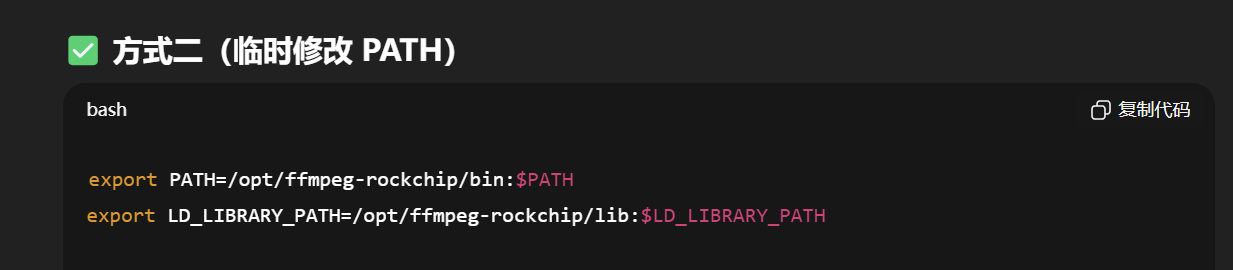
配置ffmpeg时添加符号:-g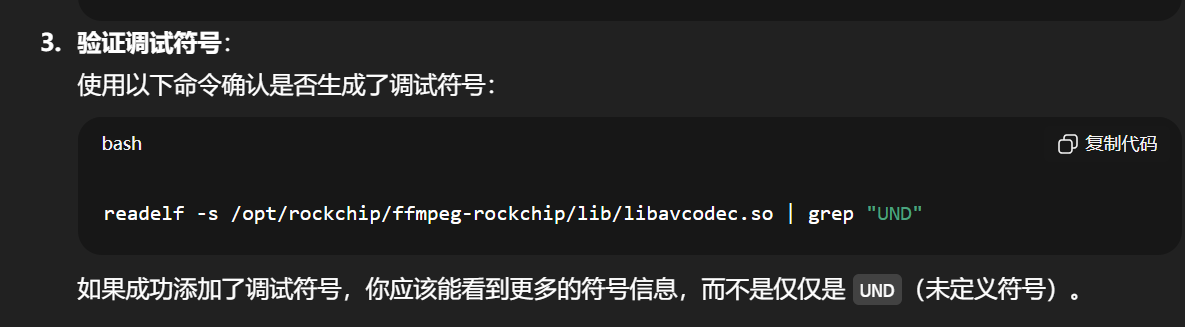
烧到开发板上
整体大致流程如下:
avcodec_open2()
   ↓
rkmpp_init_decoder()
   ↓
avcodec_send_packet()
   ↓
rkmpp_decode()
   ↓
  ├── decode_put_packet()
  ├── decode_get_frame()
   ↓
avcodec_receive_frame()
   ↓
rkmpp_close_decoder()
2、源代码分析:libavcodec/rkmppdec.c
重要的函数: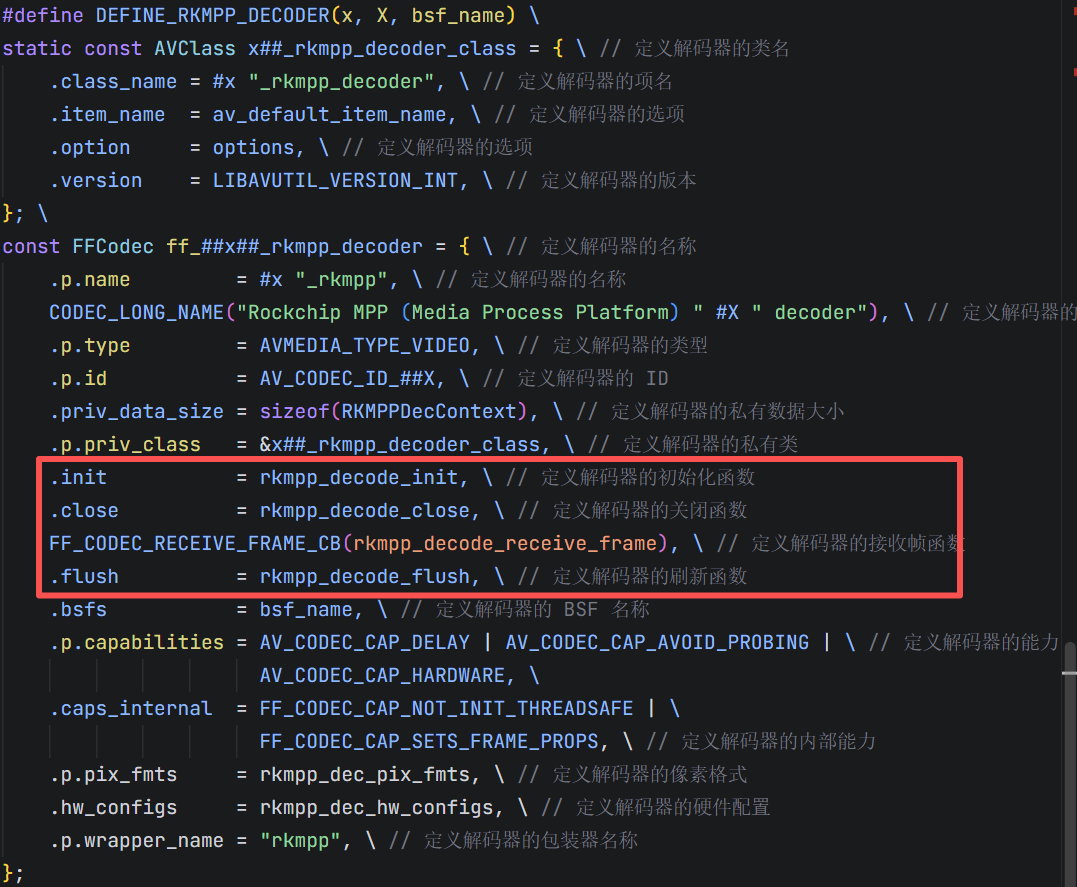
2.1、rkmpp_decode_init
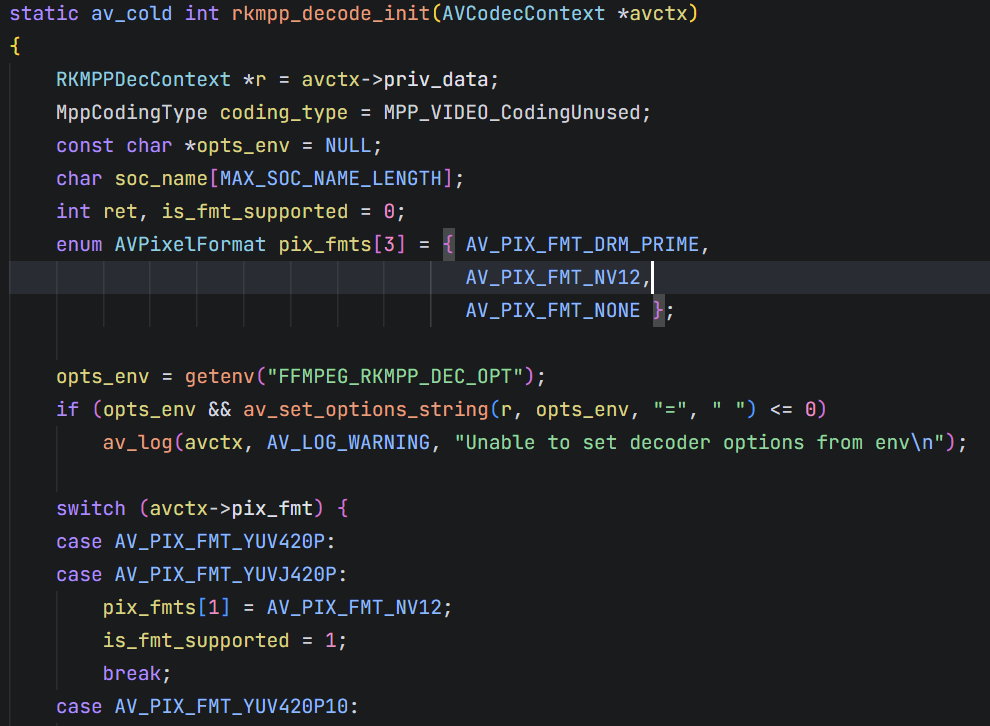
# 1、先根据根据上层想要的输出像素格式去匹配rkmpp硬件解码像素格式(switch case这里)

# 2、建立MPP解码器对象
    if ((ret = mpp_create(&r->mctx, &r->mapi)) != MPP_OK) {
        av_log(avctx, AV_LOG_ERROR, "Failed to create MPP context and api: %d\n", ret);
        ret = AVERROR_EXTERNAL;
        goto fail;
    }

    if ((ret = mpp_init(r->mctx, MPP_CTX_DEC, coding_type)) != MPP_OK) { // 初始化MPP上下文
        av_log(avctx, AV_LOG_ERROR, "Failed to init MPP context: %d\n", ret);
        ret = AVERROR_EXTERNAL;
        goto fail;
    }
# 3、这里有个特殊的处理MJPEG
if (avctx->codec_id == AV_CODEC_ID_MJPEG) {
    r->buf_mode = RKMPP_DEC_HALF_INTERNAL;
    /* Misc buffer group: for info change frame and bitstream only */
    ret = mpp_buffer_group_get_internal(&r->buf_group_misc, MPP_BUFFER_TYPE_DRM |
                                                            MPP_BUFFER_FLAGS_DMA32 |
                                                            MPP_BUFFER_FLAGS_CACHABLE);
    if (ret != MPP_OK) {
        av_log(avctx, AV_LOG_ERROR, "Failed to get MPP internal buffer group for Misc: %d\n", ret);
        ret = AVERROR_EXTERNAL;
        goto fail;
    }
}
/*
由于MJPEG的格式问题,与H264等不同,H264是帧间压缩的视频编码,分为IBP帧,帧间有强依赖性。
MJPEG本质上是由一连串的单独的JPEG压缩图片按照帧率压缩而成,每一帧都是单独无依赖的,单帧入,单帧出。

H264的码流本质上是按照NALU组成的大块连续数据,但是MJPEG是大量碎片化的小数据包,所以针对MJPEG
需要单独申请内存(会进行频繁的申请释放操作)

mpp_buffer_group_get_internal申请的是硬件显存,不是malloc申请的内存。cpu可以间接访问。
*/

# 4、创建/复用MPP的硬件设备
if (avctx->hw_device_ctx) { // 如果ffmpeg上下文有硬件设备上下文, 则尝试复用之, 否则创建新的
        AVBufferRef *device_ref = avctx->hw_device_ctx;
        AVHWDeviceContext *device_ctx = (AVHWDeviceContext *)device_ref->data;

        if (device_ctx && device_ctx->type == AV_HWDEVICE_TYPE_RKMPP) {
            r->hwdevice = av_buffer_ref(avctx->hw_device_ctx);
            if (r->hwdevice)
                av_log(avctx, AV_LOG_VERBOSE, "Picked up an existing RKMPP hardware device\n");
        }
    }
if (!r->hwdevice) {
	if ((ret = av_hwdevice_ctx_create(&r->hwdevice, AV_HWDEVICE_TYPE_RKMPP, NULL, NULL, 0)) < 0) 		{
		av_log(avctx, AV_LOG_ERROR, "Failed to create a RKMPP hardware device: %d\n", ret);
		goto fail;
	}
        av_log(avctx, AV_LOG_VERBOSE, "Created a RKMPP hardware device\n");
}
return 0;
2.2、rkmpp_decode_receive_frame
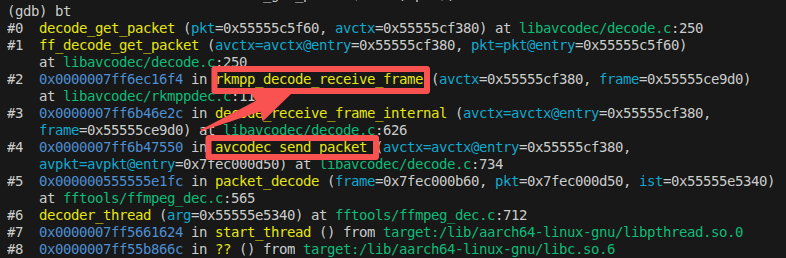
这是最关键的一个函数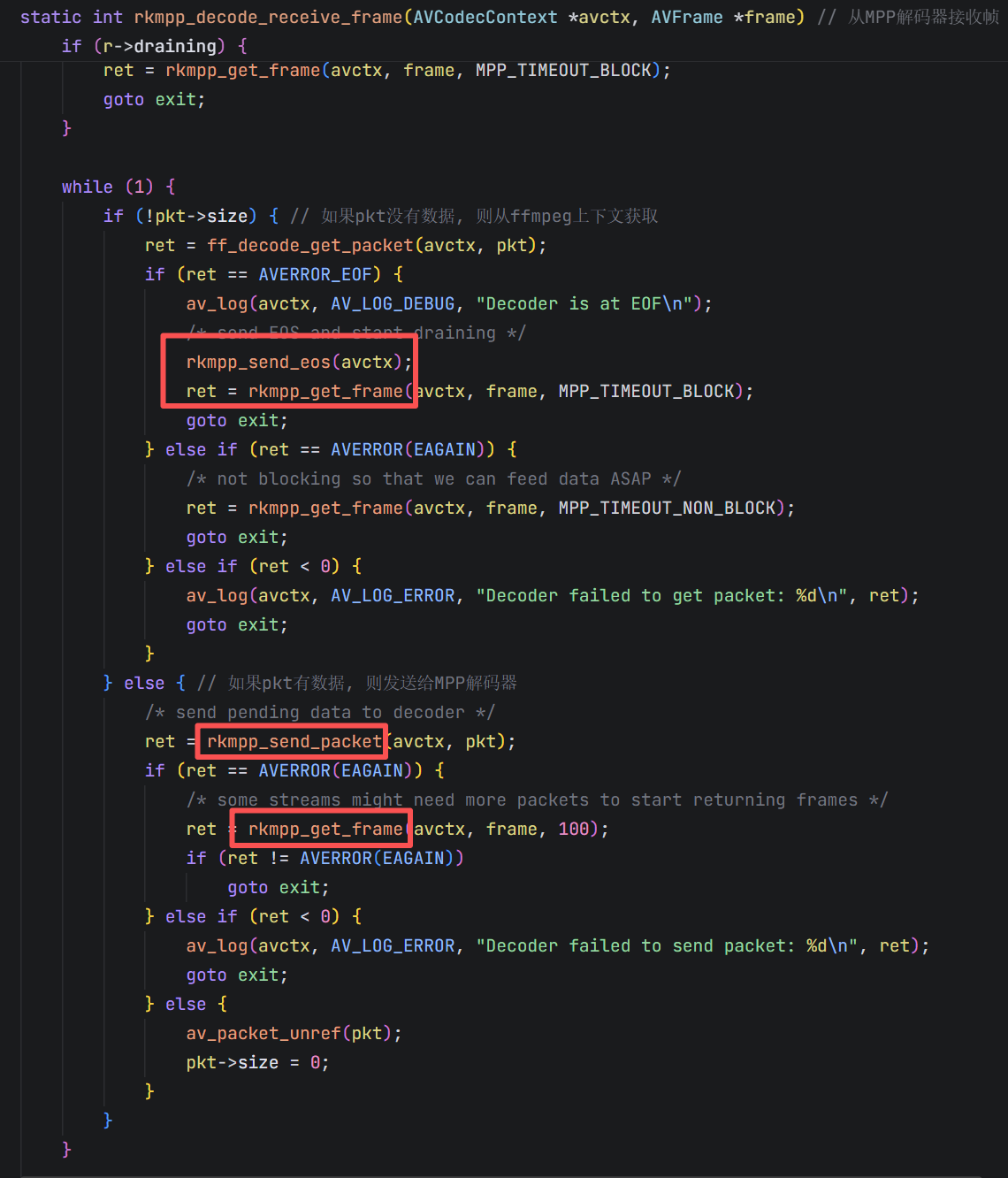
本质来说就是一个死循环,不断地拿packet丢给MPP,rkmpp的其他API后面再深入分析。
2.3、rkmpp_send_packet
这个函数会将packet塞进MPP。注意,packet是压缩的数据,还没解码。
调用关系如图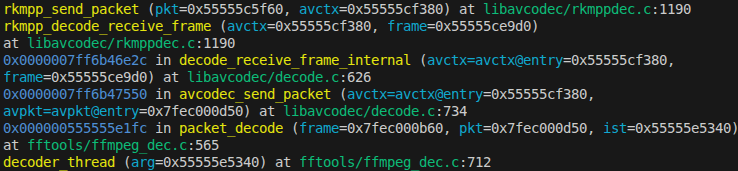
跳帧处理策略: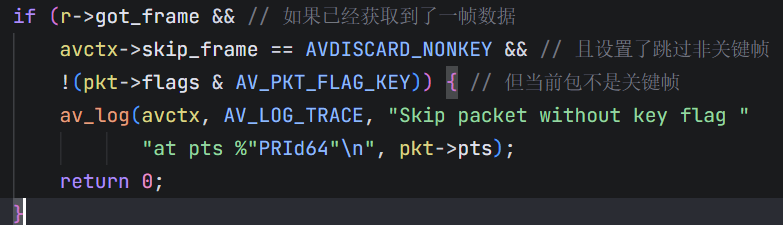
很多码流(直播、切入)再开始阶段可能需要先喂一段数据才能“起解”,如果一上来就把非关键帧丢了,可能下一个关键帧还有很远,就会导致硬解一直不出画面,所以在跳帧的时候先确保已经稳定硬解出过帧再跳。
核心点:
对于MPP来说,MJPEG都是单独拿出来作为一种情况进行考虑的,上文提到过。
if (avctx->codec_id == AV_CODEC_ID_MJPEG) {
        MppBuffer mpp_buf = NULL;

        av_assert0(r->buf_group_misc);

        /* the input slot of the MJPEG decoder must be a DRM/DMA buffer,
         * so borrow some from the frame buffer to write the pkt data */
        if ((ret = mpp_buffer_get(r->buf_group_misc, &mpp_buf, pkt->size)) != MPP_OK) {
            av_log(avctx, AV_LOG_ERROR, "Failed to get buffer for packet: %d\n", ret);
            return AVERROR_EXTERNAL;
        }
        if (!mpp_buf)
            return AVERROR(ENOMEM);

        if ((ret = mpp_buffer_write(mpp_buf, 0, pkt->data, pkt->size)) != MPP_OK) {
            av_log(avctx, AV_LOG_ERROR, "Failed to write buffer: %d\n", ret);
            mpp_buffer_put(mpp_buf);
            return AVERROR_EXTERNAL;
        }
        if ((ret = mpp_buffer_sync_partial_end(mpp_buf, 0, pkt->size)) != MPP_OK)
            av_log(avctx, AV_LOG_DEBUG, "Failed to sync buffer write: %d\n", ret);

        if ((ret = mpp_packet_init_with_buffer(&mpp_pkt, mpp_buf)) != MPP_OK) {
            av_log(avctx, AV_LOG_ERROR, "Failed to init packet with buffer: %d\n", ret);
            mpp_buffer_put(mpp_buf);
            return AVERROR_EXTERNAL;
        }
        mpp_buffer_put(mpp_buf);
        mpp_packet_set_pts(mpp_pkt, mpp_pkt_pts);

        ret = rkmpp_mjpeg_put_packet(avctx, mpp_pkt);
        if (ret == MPP_ERR_UNKNOW) {
            if (mpp_pkt)
                mpp_packet_deinit(&mpp_pkt);
            return AVERROR_EXTERNAL;
        }
    } else {
        if ((ret = mpp_packet_init(&mpp_pkt, pkt->data, pkt->size)) != MPP_OK) {
            av_log(avctx, AV_LOG_ERROR, "Failed to init packet: %d\n", ret);
            return AVERROR_EXTERNAL;
        }
        mpp_packet_set_pts(mpp_pkt, mpp_pkt_pts);

        ret = r->mapi->decode_put_packet(r->mctx, mpp_pkt);
    }
可以看到AVPacket转换成MppPacket就是在函数mpp_packet_init()/mpp_packet_iniy_with_buffer()这里进行转换的。同样,后者是MJPEG使用的。
2.4、rkmpp_get_frame
函数内部获取frame其实也是分为MJPEG和非MJPEG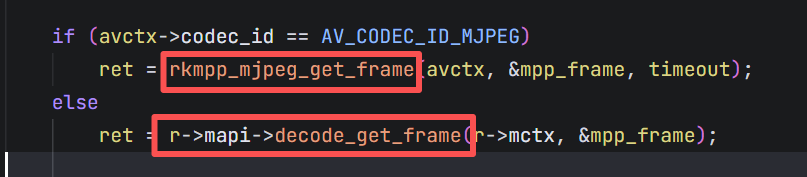
后面包括一些取帧超时、失败,没有拿到帧、处理EOS等杂项。
!!! 最核心的部分是info_change的处理(分辨率、格式的变化)
if (r->info_change = mpp_frame_get_info_change(mpp_frame) ||
        (avctx->codec_id == AV_CODEC_ID_MJPEG && !r->buf_group)) {
        char *opts = NULL;
        int fast_parse = r->fast_parse;
        int mpp_frame_mode = mpp_frame_get_mode(mpp_frame);
        const MppFrameFormat mpp_fmt = mpp_frame_get_fmt(mpp_frame);
        enum AVPixelFormat pix_fmts[3] = { AV_PIX_FMT_DRM_PRIME,
                                           AV_PIX_FMT_NONE,
                                           AV_PIX_FMT_NONE };

        av_log(avctx, AV_LOG_VERBOSE, "Noticed an info change\n");

        if (r->afbc && !(mpp_fmt & MPP_FRAME_FBC_MASK)) {
            av_log(avctx, AV_LOG_VERBOSE, "AFBC is requested but not supported\n");
            r->afbc = 0;
        }

        pix_fmts[1] = rkmpp_get_av_format(mpp_fmt & MPP_FRAME_FMT_MASK);

        if (avctx->pix_fmt == AV_PIX_FMT_DRM_PRIME)
            avctx->sw_pix_fmt = pix_fmts[1];
        else {
            if ((ret = ff_get_format(avctx, pix_fmts)) < 0)
                goto exit;
            avctx->pix_fmt = ret;
        }

        avctx->width        = mpp_frame_get_width(mpp_frame);
        avctx->height       = mpp_frame_get_height(mpp_frame);
        avctx->coded_width  = FFALIGN(avctx->width,  64);
        avctx->coded_height = FFALIGN(avctx->height, 64);
        rkmpp_export_avctx_color_props(avctx, mpp_frame);

        if (av_opt_serialize(r, 0, 0, &opts, '=', ' ') >= 0)
            av_log(avctx, AV_LOG_VERBOSE, "Decoder options: %s\n", opts);
        if (opts)
            av_freep(&opts);

        av_log(avctx, AV_LOG_VERBOSE, "Configured with size: %dx%d | pix_fmt: %s | sw_pix_fmt: %s\n",
               avctx->width, avctx->height,
               av_get_pix_fmt_name(avctx->pix_fmt),
               av_get_pix_fmt_name(avctx->sw_pix_fmt));

        if ((ret = rkmpp_set_buffer_group(avctx, pix_fmts[1], avctx->width, avctx->height)) < 0)
            goto exit;

        /* Disable fast parsing for the interlaced video */
        if (((mpp_frame_mode & MPP_FRAME_FLAG_FIELD_ORDER_MASK) == MPP_FRAME_FLAG_DEINTERLACED ||
             (mpp_frame_mode & MPP_FRAME_FLAG_FIELD_ORDER_MASK) == MPP_FRAME_FLAG_TOP_FIRST) && fast_parse) {
            av_log(avctx, AV_LOG_VERBOSE, "Fast parsing is disabled for the interlaced video\n");
            fast_parse = 0;
        }
        if ((ret = r->mapi->control(r->mctx, MPP_DEC_SET_PARSER_FAST_MODE, &fast_parse)) != MPP_OK) {
            av_log(avctx, AV_LOG_ERROR, "Failed to set parser fast mode: %d\n", ret);
            ret = AVERROR_EXTERNAL;
            goto exit;
        }

        if ((ret = r->mapi->control(r->mctx, MPP_DEC_SET_INFO_CHANGE_READY, NULL)) != MPP_OK) {
            av_log(avctx, AV_LOG_ERROR, "Failed to set info change ready: %d\n", ret);
            ret = AVERROR_EXTERNAL;
            goto exit;
        }

        /* there's no real info change, export the frame directly */
        if (avctx->codec_id == AV_CODEC_ID_MJPEG)
            goto export;

        /* no more new pkts after EOS, retry to get frame */
        if (r->draining) {
            mpp_frame_deinit(&mpp_frame);
            return rkmpp_get_frame(avctx, frame, MPP_TIMEOUT_MAX);
        }
        ret = AVERROR(EAGAIN);
        goto exit;
    } else {
export:
        av_log(avctx, AV_LOG_DEBUG, "Received a frame\n");
        r->got_frame = 1;

        switch (avctx->pix_fmt) {
        case AV_PIX_FMT_DRM_PRIME:
            {
                if ((ret = rkmpp_export_frame(avctx, frame, mpp_frame)) < 0)
                    goto exit;
                return 0;
            }
            break;
        case AV_PIX_FMT_NV12:
        case AV_PIX_FMT_NV16:
        case AV_PIX_FMT_NV24:
        case AV_PIX_FMT_NV15:
        case AV_PIX_FMT_NV20:
            {
                AVFrame *tmp_frame = av_frame_alloc();
                if (!tmp_frame) {
                    ret = AVERROR(ENOMEM);
                    goto exit;
                }
                if ((ret = rkmpp_export_frame(avctx, tmp_frame, mpp_frame)) < 0)
                    goto exit;

                if ((ret = ff_get_buffer(avctx, frame, 0)) < 0) {
                    av_log(avctx, AV_LOG_ERROR, "ff_get_buffer failed: %d\n", ret);
                    av_frame_free(&tmp_frame);
                    goto exit;
                }
                if ((ret = av_hwframe_transfer_data(frame, tmp_frame, 0)) < 0) {
                    av_log(avctx, AV_LOG_ERROR, "av_hwframe_transfer_data failed: %d\n", ret);
                    av_frame_free(&tmp_frame);
                    goto exit;
                }
                if ((ret = av_frame_copy_props(frame, tmp_frame)) < 0) {
                    av_log(avctx, AV_LOG_ERROR, "av_frame_copy_props failed: %d\n", ret);
                    av_frame_free(&tmp_frame);
                    goto exit;
                }
                av_frame_free(&tmp_frame);
                return 0;
            }
            break;
        default:
            {
                ret = AVERROR_BUG;
                goto exit;
            }
            break;
        }
    }
- 检查AFBC是否实际可用,不可用就关掉
- 根据MPP的输出格式选择像素格式
- 更新尺寸和颜色属性
- 打印配置日志
- 重新配置buffer group,也就是
rkmpp_set_buffer_group(),这是这个分支最重要的部分 - 如果正在draining,那就递归继续取帧
重点分析**export:**这个分支
分为三种情况:
AV_PIX_FMT_DRM_PRIME
这里直接调用rkmpp_export_frame()把MppFrame的dma buffer的fd + DRM描述符打包进AVFrame。- 软件格式
NV12 / NV16 / NV24 / NV15 / NV20
先导出一个临时硬件帧tmp_frame,再通过av_hwframe_transfer_data把硬件帧下载成普通内存 - 其他格式认为是出错

DAMO开发者矩阵,由阿里巴巴达摩院和中国互联网协会联合发起,致力于探讨最前沿的技术趋势与应用成果,搭建高质量的交流与分享平台,推动技术创新与产业应用链接,围绕“人工智能与新型计算”构建开放共享的开发者生态。
更多推荐

 8
8 0
0- 0


 已为社区贡献2条内容

所有评论(0)