SQLite数据库
·
1、SQLite的定义与特点
SQLite是一种轻量级的嵌入式关系型数据库管理系统,无需独立的服务器进程或配置。其数据存储在单个磁盘文件中,支持跨平台操作。
1.1 核心特点:
- 嵌入式设计:直接集成到应用程序中,无需额外服务进程。
- 零配置:无需安装或管理,文件即数据库。
- 无数据类型限制:采用动态类型系统,字段可存储任意类型数据。
- 事务支持:完全兼容ACID(原子性、一致性、隔离性、持久性)。
- 跨平台:支持Windows、Linux、macOS等系统,文件可跨平台迁移。
1.2 与其他数据库的对比
SQLite vs MySQL/PostgreSQL:
| 特性 | SQLite | MySQL/PostgreSQL |
|---|---|---|
| 架构 | 嵌入式,单文件 | 客户端-服务器模式 |
| 并发 | 仅支持单写多读 | 支持高并发读写 |
| 扩展性 | 适合小型应用 | 支持分布式与集群 |
| 配置复杂度 | 无需配置 | 需安装、配置用户权限等 |
| 适用规模 | 低流量、本地存储 | 高流量、企业级应用 |
1.3 适用场景与局限性
1.3.1 适用场景:
- 移动应用(如Android/iOS本地存储)。
- 嵌入式设备(IoT、桌面软件配置存储)。
- 快速原型开发或小型单机应用。
1.3.2 局限性:
- 并发写入性能差:锁机制限制多线程同时写入。
- 无用户管理:缺乏网络访问权限控制。
- 存储容量限制:单文件设计可能受文件系统约束。
1.3.3 典型用例:
- 浏览器(Chrome/Firefox)存储历史记录。
- 手机App的离线缓存。
- 开发环境中的临时数据分析。
2、python操作与SQLite数据
2.1 准备工作
2.1.1 安装 Python
-
如果还没有安装 Python,需要前往 Python 官方网站下载并安装。
2.1.2 安装 SQLite 库
-
SQLite 在 Python 中通过
sqlite3模块提供支持。 -
sqlite3是 Python 标准库的一部分,因此无需额外安装,可以直接导入使用。
2.1.3 示例代码
-
最后一行是 Python 导入
sqlite3模块的语句:
import sqlite3 # 导入 sqlite3 模块2.2 python操作与sqlite数据库
2.2.1 创建数据库和表
import sqlite3

# 创建数据库并且链接数据库
connection = sqlite3.connect("my_school.db")
# 创建游标
crs = connection.cursor()
# 执行sql
crs.execute('''
    create table if not exists student(
        id integer primary key autoincrement,
        name text not null,
        age integer not null,
        address text not null,
        grade text not null
    )
''')
# 事务(统一提交和统一回滚)
connection.commit()
connection.close()数据类型参考文档:SQLite 数据类型 | 菜鸟教程
2.2.2 插件安装
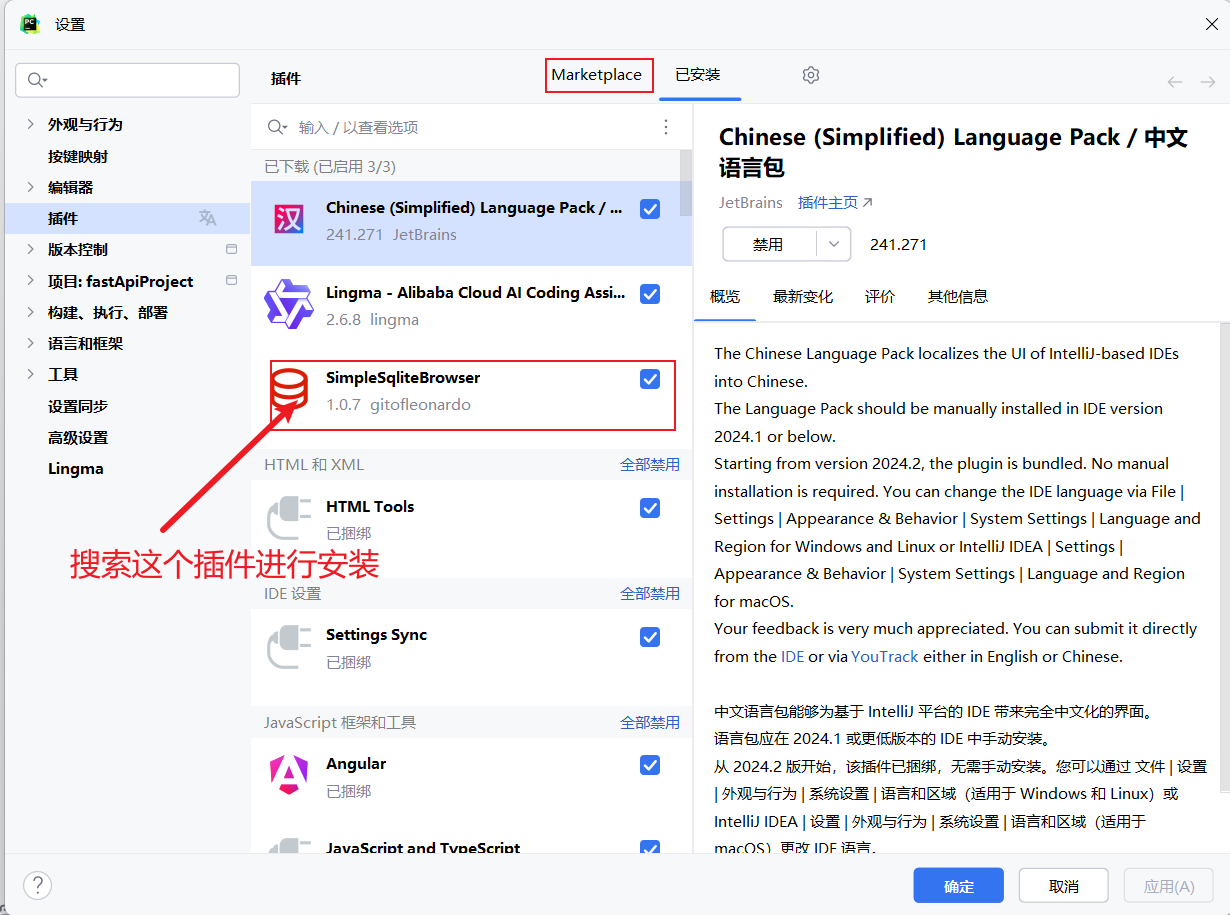
数据库呈现如下: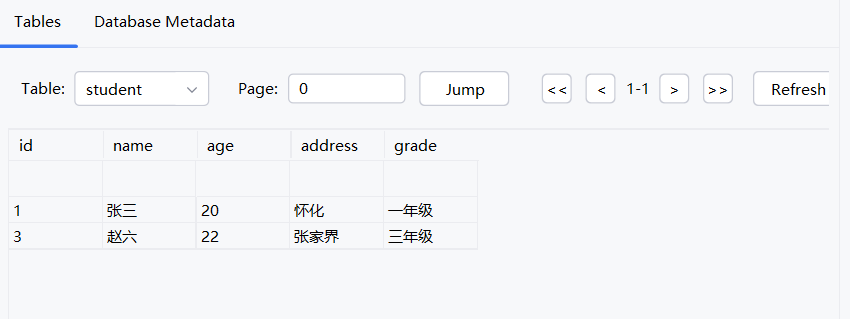
2.2.3 插入数据
import sqlite3

connection = sqlite3.connect("my_school.db")
crs = connection.cursor()
# 新增数据
crs.execute("insert into student(name,age,address,grade)values('张三','20','怀化','一年级')")
crs.execute("insert into student(name,age,address,grade)values('李四','21','长沙','二年级')")
crs.execute("insert into student(name,age,address,grade)values('王五','22','张家界','三年级')")
# 事务提交
connection.commit()
# 关闭数据库连接
connection.close()
2.2.4 查找数据
import sqlite3

connection = sqlite3.connect("my_school.db")
crs = connection.cursor()

# 查询数据
crs.execute("select * from student")
rows = crs.fetchall() # 拿到数据
for i in rows:
    print(i[1])
# 事务提交
connection.commit()
# 关闭数据库连接
connection.close()
2.2.5 修改数据
import sqlite3

connection = sqlite3.connect("my_school.db")
crs = connection.cursor()

# 修改数据
crs.execute("update student set name = '赵六' where id = 3")

# 事务提交
connection.commit()
# 关闭数据库连接
connection.close()
2.2.6 删除数据
import sqlite3

connection = sqlite3.connect("my_school.db")
crs = connection.cursor()

# 删除 数据
crs.execute("delete from student where name = '李四'")

# 事务提交
connection.commit()
# 关闭数据库连接
connection.close()
2.2.7 面向对象版
import sqlite3

class DBHelper:
    # 初始化
    def __init__(self, dbname):
        """
        :param dbname:数据库名称
        :self.connection:与数据库链接的对象
        """
        self.dbname = dbname
        self.connection = None
    # 连接数据库
    def connet_database(self):
        try:
            self.connection = sqlite3.connect(self.dbname)
            return  self.connection
        except sqlite3.Error as e:
            print(f"链接失败:{e}")

    # 创建表
    def create_table(self):
        try:
            # 创建游标
            cursor = self.connection.cursor()
            cursor.execute("""
                CREATE TABLE IF NOT EXISTS user(
                    id INTEGER PRIMARY KEY AUTOINCREMENT,
                    name VARCHAR(20) NOT NULL,
                    age integer NOT NULL
                )
            """)
        except sqlite3.Error as e:
            print(f"创建表失败:{e}")

    # 插入数据
    def insert_data(self, name, age):
        try:
            cursor = self.connection.cursor()
            cursor.execute("select id from user where name=?",(name,))
            user_id = cursor.fetchone()
            if user_id:
                print("用户已存在")
            else:
                cursor.execute("insert into user(name,age) values(?,?)",(name,age))
                self.connection.commit()
        except sqlite3.Error as e:
            print(f"插入数据失败:{e}")

    # 更新数据
    def update_data(self, name, age):
        try:
            cursor = self.connection.cursor()
            cursor.execute("update user set age=? where name=?",(age,name))
            self.connection.commit()
        except sqlite3.Error as e:
            print(f"更新数据失败:{e}")

    # 删除数据
    def delete_data(self, name):
        try:
            cursor = self.connection.cursor()
            cursor.execute("delete from user where name=?",(name,))
            self.connection.commit()
        except sqlite3.Error as e:
            print(f"删除数据失败:{e}")

    # 查询数据
    def select_data(self, name):
        try:
            cursor = self.connection.cursor()
            cursor.execute("select * from user where name=?",(name,))
            data = cursor.fetchone() # 拿到数据
            print(data)
        except sqlite3.Error as e:
            print(f"查询数据失败:{e}")

    # 关闭数据库
    def close_database(self):
        self.connection.close()
        print("数据库已关闭")

    # 查询所有的 数据
    def select_all(self):
        try:
            cursor = self.connection.cursor()
            cursor.execute("select * from user")
            for i in cursor.fetchall():
                print(f'序号:{i[0]},姓名:{i[1]},年龄:{i[2]}')
        except sqlite3.Error as e:
            print(f"查询数据失败:{e}")


if __name__ == '__main__':
    db = DBHelper("user.db")
    db.connet_database()
    db.create_table()
    try:
        # 主界面
        while True:
            print("=====================")
            print("欢迎来到数据库管理系统")
            print("1.查询所有数据")
            print("2.插入数据")
            print("3.更新数据")
            print("4.删除数据")
            print("5.查询某人数据")
            print("6.退出")
            choice = int(input("请输入你的选择:"))
            if choice == 1:
                db.select_all()
            elif choice == 2:
                name = input("请输入用户名:")
                age = int(input("请输入年龄:"))
                db.insert_data(name,age)
            elif choice == 3:
                try:
                    name = input("请输入用户名:")
                    age = int(input("请输入年龄:"))
                    db.update_data(name,age)
                except Exception as e:
                    print(f"更新数据失败:{e}")
            elif choice == 4:
                name = input("请输入用户名:")
                db.delete_data(name)
            elif choice == 5:
                name = input("请输入用户名:")
                db.select_data(name)
            elif choice == 6:
                print("退出")
                db.close_database()
                break
            else:
                print("输入错误")
    except sqlite3.Error as e:
        print(f"操作数据库失败:{e}")
    # db.select_data("李四")
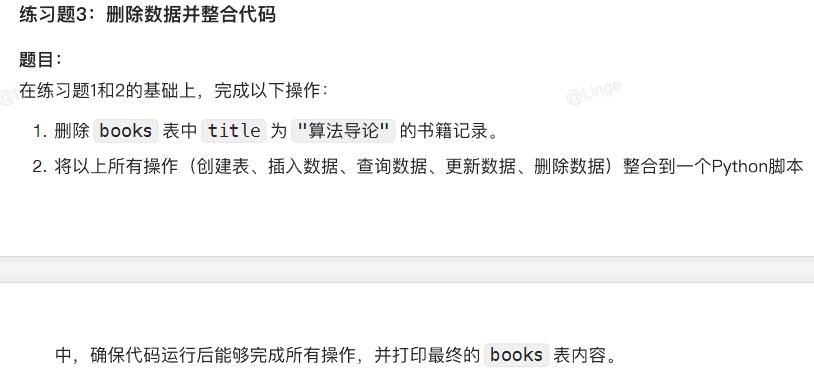
2.3 练习题
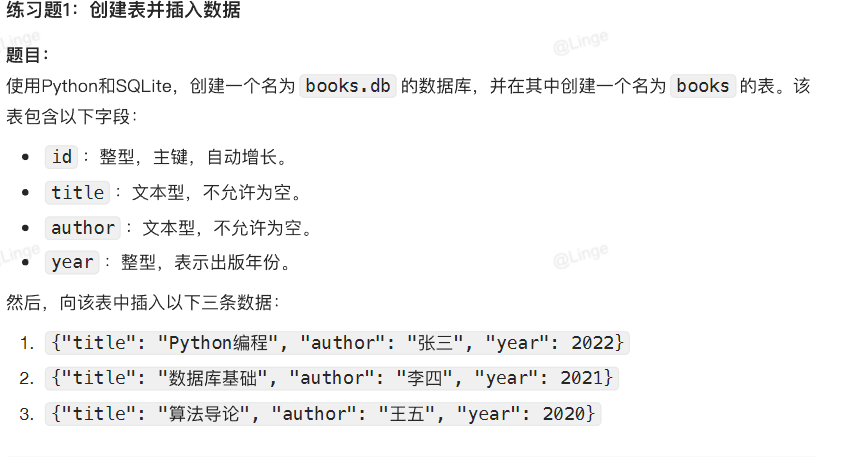
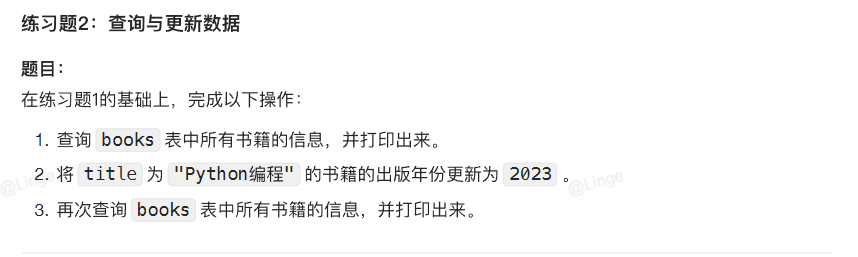
注意:
后续更新综合案例:基于FastAPI和SQLAIchemy实现CRUD接口

DAMO开发者矩阵,由阿里巴巴达摩院和中国互联网协会联合发起,致力于探讨最前沿的技术趋势与应用成果,搭建高质量的交流与分享平台,推动技术创新与产业应用链接,围绕“人工智能与新型计算”构建开放共享的开发者生态。
更多推荐

 22
22 0
0- 0


 已为社区贡献1条内容

所有评论(0)