腾讯人脸识别
·
本地,腾讯云端,数据库三者都上传
工具包以及配置
package com.qcby.aiCommunity.config;

import io.swagger.annotations.ApiModel;
import io.swagger.annotations.ApiModelProperty;
import lombok.Data;
import org.springframework.boot.context.properties.ConfigurationProperties;
import org.springframework.stereotype.Component;

@ConfigurationProperties(value="plateocr")
@Component
@Data
@ApiModel(value = "ApiConfiguration",description = "人脸识别参数描述")
public class ApiConfiguration {

    @ApiModelProperty("人脸识别secretId")
    private String secretId;
    @ApiModelProperty("人脸识别secretKey")
    private String secretKey;
    //  服务器ip
    @ApiModelProperty("人脸识别服务器ip")
    private String serverIp;
    //  服务器区域
    @ApiModelProperty("人脸识别服务器区域")
    private String area;
    //  默认分组
    @ApiModelProperty("人脸识别默认分组")
    private String groupId;
    //  用户id前缀
    @ApiModelProperty("人脸识别用户id前缀")
    private String personIdPre;
    //  随机数
    @ApiModelProperty("人脸识别随机数")
    private String nonceStr;
    //  是否使用
    @ApiModelProperty("人脸识别,是否启用人脸识别功能")
    private boolean used = false;
    //  识别准确率
    @ApiModelProperty("人脸识别比对准确度,如符合80%就识别通过")
    private float passPercent;
}
手写配置类实现WebMvcConfigurer
package com.qcby.aiCommunity.config;

import org.springframework.beans.factory.annotation.Autowired;
import org.springframework.beans.factory.annotation.Value;
import org.springframework.context.annotation.Configuration;
import org.springframework.web.servlet.config.annotation.ResourceHandlerRegistry;
import org.springframework.web.servlet.config.annotation.WebMvcConfigurer;

@Configuration
public class FaceMVCConfigutration implements WebMvcConfigurer {
    @Value("${upload-path.face}")
    private String face;
    @Override
    public void addResourceHandlers(ResourceHandlerRegistry registry) {
        registry.addResourceHandler("/community/upload/face/**")
                .addResourceLocations("file:" + face);
    }
}
package com.qcby.aiCommunity.utils;

import org.apache.commons.codec.binary.Base64;

import java.io.*;
import java.net.HttpURLConnection;
import java.net.URL;

public class Base64Util {
    /**
     * 将二进制数据编码为BASE64字符串
     *
     * @param binaryData
     * @return
     */
    public static String encode(byte[] binaryData) {
        try {
            return new String(Base64.encodeBase64(binaryData), "UTF-8");
        } catch (UnsupportedEncodingException e) {
            return null;
        }
    }

    /**
     * 将BASE64字符串恢复为二进制数据
     *
     * @param base64String
     * @return
     */
    public static byte[] decode(String base64String) {
        try {
            return Base64.decodeBase64(base64String.getBytes("UTF-8"));
        } catch (UnsupportedEncodingException e) {
            return null;
        }
    }

    /**
     * 将文件转成base64 字符串
     *
     *  path文件路径
     * @return *
     * @throws Exception
     */

    public static String encodeBase64File(String path) throws Exception {
        File file = new File(path);
        FileInputStream inputFile = new FileInputStream(file);
        byte[] buffer = new byte[(int) file.length()];
        inputFile.read(buffer);
        inputFile.close();
        return encode(buffer);
    }
    //读取网络图片
    public static String encodeBase64URLFile(String path) throws Exception {
        URL url = new URL(path);
        HttpURLConnection conn = (HttpURLConnection)url.openConnection();
        conn.setRequestMethod("GET");
        conn.setConnectTimeout(5*1000);
        InputStream is = conn.getInputStream();
        byte[] data = readInputStream(is);
        is.close();
        conn.disconnect();
        return encode(data);
    }
    public static byte[] readInputStream(InputStream inStream) throws Exception{
        ByteArrayOutputStream outStream = new ByteArrayOutputStream();
        //创建一个Buffer字符串
        byte[] buffer = new byte[1024];
        //每次读取的字符串长度,如果为-1,代表全部读取完毕
        int len = 0;
        //使用一个输入流从buffer里把数据读取出来
        while( (len=inStream.read(buffer)) != -1 ){
            //用输出流往buffer里写入数据,中间参数代表从哪个位置开始读,len代表读取的长度
            outStream.write(buffer, 0, len);
        }
        //关闭输入流
        inStream.close();
        //把outStream里的数据写入内存
        return outStream.toByteArray();
    }
    /**
     * 将base64字符解码保存文件
     *
     * @param base64Code
     * @param targetPath
     * @throws Exception
     */

    public static void decoderBase64File(String base64Code, String targetPath) throws Exception {
        byte[] buffer = decode(base64Code);
        FileOutputStream out = new FileOutputStream(targetPath);
        out.write(buffer);
        out.close();
    }

    /**
     * 将base64字符保存文本文件
     *
     * @param base64Code
     * @param targetPath
     * @throws Exception
     */

    public static void toFile(String base64Code, String targetPath) throws Exception {

        byte[] buffer = base64Code.getBytes();
        FileOutputStream out = new FileOutputStream(targetPath);
        out.write(buffer);
        out.close();
    }
}
package com.qcby.aiCommunity.utils;
import com.alibaba.fastjson.JSONArray;
import com.alibaba.fastjson.JSONObject;
import com.qcby.aiCommunity.config.ApiConfiguration;
import com.tencentcloudapi.common.Credential;
import com.tencentcloudapi.common.exception.TencentCloudSDKException;
import com.tencentcloudapi.common.profile.ClientProfile;
import com.tencentcloudapi.common.profile.HttpProfile;
import com.tencentcloudapi.iai.v20180301.IaiClient;
import com.tencentcloudapi.iai.v20180301.models.*;
import org.slf4j.Logger;
import org.slf4j.LoggerFactory;
import org.springframework.stereotype.Component;

@Component
public class FaceApi {

    private Logger logger = LoggerFactory.getLogger(FaceApi.class);

    //人脸分析
    public RootResp detectFace(ApiConfiguration config, String url) {
        RootResp result = new RootResp();
        try{
            Credential cred = new Credential(config.getSecretId(), config.getSecretKey());
            HttpProfile httpProfile = new HttpProfile();
            httpProfile.setEndpoint(config.getServerIp());
            ClientProfile clientProfile = new ClientProfile();
            clientProfile.setHttpProfile(httpProfile);
            IaiClient client = new IaiClient(cred, config.getArea(), clientProfile);
            JSONObject paramObj = new JSONObject();
            paramObj.put("Url", url);
            paramObj.put("MaxFaceNum",1);
            paramObj.put("MinFaceSize",34);
            paramObj.put("NeedFaceAttributes",0);
            paramObj.put("NeedQualityDetection",1);
            DetectFaceRequest req = DetectFaceRequest.fromJsonString(paramObj.toJSONString(),DetectFaceRequest.class);
            DetectFaceResponse resp = client.DetectFace(req);
            result.setData(DetectFaceResponse.toJsonString(resp));
        } catch (TencentCloudSDKException e) {
            result.setRet(-1);
            result.setMsg(e.toString());
            logger.error(e.toString());
        }
        logger.info(String.valueOf(result));
        return result;
    }

    //添加个体
    public RootResp newperson(ApiConfiguration config, String personId, String personName, String image) {
        RootResp result = new RootResp();
        try{
            Credential cred = new Credential(config.getSecretId(), config.getSecretKey());
            HttpProfile httpProfile = new HttpProfile();
            httpProfile.setEndpoint(config.getServerIp());
            ClientProfile clientProfile = new ClientProfile();
            clientProfile.setHttpProfile(httpProfile);
            IaiClient client = new IaiClient(cred, config.getArea(), clientProfile);
            JSONObject paramObj = new JSONObject();
            paramObj.put("GroupId", config.getGroupId());
            paramObj.put("PersonId", config.getPersonIdPre() + personId);
            paramObj.put("PersonName", personName);
            paramObj.put("Image", image);
            CreatePersonRequest req = CreatePersonRequest.fromJsonString(paramObj.toJSONString(), CreatePersonRequest.class);
            CreatePersonResponse resp = client.CreatePerson(req);
            result.setData(CreatePersonResponse.toJsonString(resp));
        } catch (TencentCloudSDKException e) {
            result.setRet(-1);
            result.setMsg(e.toString());
            logger.error(e.toString());
        }
        logger.info(String.valueOf(result));
        return result;
    }

    //删除个体
    public RootResp delperson(ApiConfiguration config, String personId) {
        RootResp result = new RootResp();
        try{
            Credential cred = new Credential(config.getSecretId(), config.getSecretKey());
            HttpProfile httpProfile = new HttpProfile();
            httpProfile.setEndpoint(config.getServerIp());
            ClientProfile clientProfile = new ClientProfile();
            clientProfile.setHttpProfile(httpProfile);
            IaiClient client = new IaiClient(cred, config.getArea(), clientProfile);
            JSONObject paramObj = new JSONObject();
            paramObj.put("PersonId", config.getPersonIdPre() + personId);
            DeletePersonRequest req = DeletePersonRequest.fromJsonString(paramObj.toJSONString(), DeletePersonRequest.class);
            DeletePersonResponse resp = client.DeletePerson(req);
            result.setData(DeletePersonResponse.toJsonString(resp));
        } catch (TencentCloudSDKException e) {
            result.setRet(-1);
            result.setMsg(e.toString());
            logger.error(e.toString());
        }
        logger.info(String.valueOf(result));
        return result;
    }

    //增加人脸
    public RootResp addface(ApiConfiguration config, String personId, String image) {
        RootResp result = new RootResp();
        try{
            Credential cred = new Credential(config.getSecretId(), config.getSecretKey());
            HttpProfile httpProfile = new HttpProfile();
            httpProfile.setEndpoint(config.getServerIp());
            ClientProfile clientProfile = new ClientProfile();
            clientProfile.setHttpProfile(httpProfile);
            IaiClient client = new IaiClient(cred, config.getArea(), clientProfile);
            JSONObject paramObj = new JSONObject();
            JSONArray images = new JSONArray();
            images.add(image);
            paramObj.put("PersonId", config.getPersonIdPre() + personId);
            paramObj.put("Images", images);
            CreateFaceRequest req = CreateFaceRequest.fromJsonString(paramObj.toJSONString(), CreateFaceRequest.class);
            CreateFaceResponse resp = client.CreateFace(req);
            result.setData(CreateFaceResponse.toJsonString(resp));
        } catch (TencentCloudSDKException e) {
            result.setRet(-1);
            result.setMsg(e.toString());
            logger.error(e.toString());
        }
        logger.info(String.valueOf(result));
        return result;
    }

    //删除人脸
    public RootResp delface(ApiConfiguration config, String personId, String faceId) {
        RootResp result = new RootResp();
        try{
            Credential cred = new Credential(config.getSecretId(), config.getSecretKey());
            HttpProfile httpProfile = new HttpProfile();
            httpProfile.setEndpoint(config.getServerIp());
            ClientProfile clientProfile = new ClientProfile();
            clientProfile.setHttpProfile(httpProfile);
            IaiClient client = new IaiClient(cred, config.getArea(), clientProfile);
            JSONObject paramObj = new JSONObject();
            JSONArray faces = new JSONArray();
            faces.add(faceId);
            paramObj.put("PersonId", config.getPersonIdPre() + personId);
            paramObj.put("FaceIds", faces);
            DeleteFaceRequest req = DeleteFaceRequest.fromJsonString(paramObj.toJSONString(), DeleteFaceRequest.class);
            DeleteFaceResponse resp = client.DeleteFace(req);
            result.setData(DeleteFaceResponse.toJsonString(resp));
        } catch (TencentCloudSDKException e) {
            result.setRet(-1);
            result.setMsg(e.toString());
            logger.error(e.toString());
        }
        logger.info(String.valueOf(result));
        return result;
    }

    //人脸验证
    public RootResp faceVerify(ApiConfiguration config, String personId, String image) {
        RootResp result = new RootResp();
        try{
            Credential cred = new Credential(config.getSecretId(), config.getSecretKey());
            HttpProfile httpProfile = new HttpProfile();
            httpProfile.setEndpoint(config.getServerIp());
            ClientProfile clientProfile = new ClientProfile();
            clientProfile.setHttpProfile(httpProfile);
            IaiClient client = new IaiClient(cred, config.getArea(), clientProfile);
            JSONObject paramObj = new JSONObject();
            paramObj.put("PersonId", config.getPersonIdPre() + personId);
            paramObj.put("Image", image);
            VerifyFaceRequest req = VerifyFaceRequest.fromJsonString(paramObj.toJSONString(), VerifyFaceRequest.class);
            VerifyFaceResponse resp = client.VerifyFace(req);
            result.setData(VerifyFaceResponse.toJsonString(resp));
        } catch (TencentCloudSDKException e) {
            result.setRet(-1);
            result.setMsg(e.toString());
            logger.error(e.toString());
        }
        logger.info(String.valueOf(result));
        return result;
    }

    //人员搜索按库返回
    public RootResp searchPersonsReturnsByGroup(ApiConfiguration config, String image) {
        RootResp result = new RootResp();
        try{
            Credential cred = new Credential(config.getSecretId(), config.getSecretKey());
            HttpProfile httpProfile = new HttpProfile();
            httpProfile.setEndpoint(config.getServerIp());
            ClientProfile clientProfile = new ClientProfile();
            clientProfile.setHttpProfile(httpProfile);
            IaiClient client = new IaiClient(cred, config.getArea(), clientProfile);
            JSONObject paramObj = new JSONObject();
            paramObj.put("GroupIds", new String[] {config.getGroupId()});
            paramObj.put("Image", image);
            //最多返回的最相似人员数目
            paramObj.put("MaxPersonNumPerGroup", 5);
            //返回人员具体信息
            paramObj.put("NeedPersonInfo", 1);
            //最多识别的人脸数目
            paramObj.put("MaxFaceNum", 1);
            SearchFacesReturnsByGroupRequest req = SearchFacesReturnsByGroupRequest.fromJsonString(paramObj.toJSONString(), SearchFacesReturnsByGroupRequest.class);
            SearchFacesReturnsByGroupResponse resp = client.SearchFacesReturnsByGroup(req);
            result.setData(VerifyFaceResponse.toJsonString(resp));
        } catch (TencentCloudSDKException e) {
            result.setRet(-1);
            result.setMsg(e.toString());
            logger.error(e.toString());
        }
        logger.info(String.valueOf(result));
        return result;
    }
}
package com.qcby.aiCommunity.utils;

import com.alibaba.fastjson.JSON;

public class RootResp {
    private int ret = 0;

    public int getRet() {
        return this.ret;
    }

    public void setRet(int ret) {
        this.ret = ret;
    }

    private String msg;

    public String getMsg() {
        return this.msg;
    }

    public void setMsg(String msg) {
        this.msg = msg;
    }

    private Object data;

    public Object getData() {
        return this.data;
    }

    public void setData(Object data) {
        this.data = data;
    }

    @Override
    public String toString() {
        return JSON.toJSONString(this);
    }
}
yml配置
upload-path:
  url: http://localhost:8282/
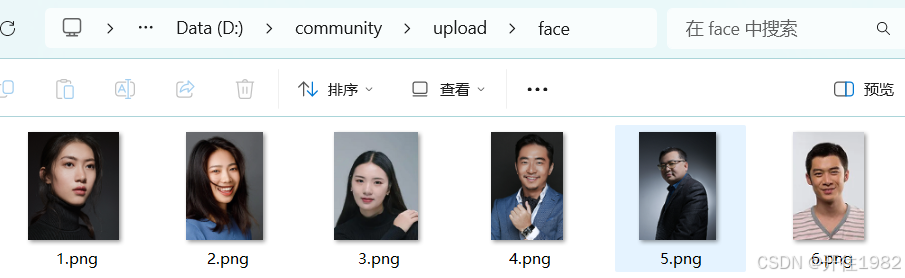
  face: D:/community/upload/face/

plateocr:
  secret-id: 写自己的
  secret-key: 写自己的
  server: iai.tencentcloudapi.com
  area: ap-beijing
  group-id: AIcommunity
  used: true
  pass-percent: 80
controller
/**
 * 录入人脸
 * URL: POST /sys/person/addPerson
 */
@PostMapping("/addPerson")
public Result addPersonImg(@RequestBody FaceForm faceForm) {
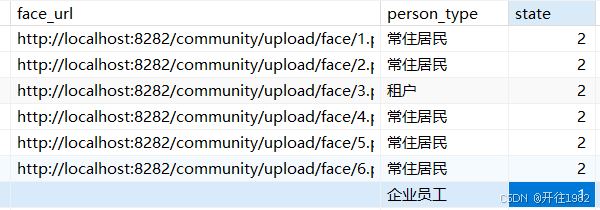
    // 步骤1:根据前端传入的personId查询对应的用户信息(关联人脸与用户)
    Person person = personService.getById(faceForm.getPersonId());

    // 步骤2:输入合法性校验(避免无效请求,保障流程严谨性)
    if (faceForm == null || faceForm.getPersonId() == null || faceForm.getPersonId().isEmpty()) {
        return Result.error("请上传人脸"); // 若参数无效,返回错误提示
    }

    // 步骤3:判断系统是否启用人脸识别功能(通过配置开关控制)
    if(apiConfiguration.isUsed()){
        // 步骤4:调用newPerson方法,执行人脸录入核心逻辑,返回人脸唯一标识faceId
        String faceId = newPerson(faceForm,person.getUserName());

        // 步骤5:根据人脸录入结果处理后续逻辑
        if(faceId == null){
            return Result.error("人脸识别失败"); // 录入失败,返回错误
        }else{
            // 步骤6:生成人脸图像本地存储路径(faceId作为唯一文件名,避免重复)
            String fileName = faceId + "."+faceForm.getExtName();
            String faceUrl = uploadUrlpath + faceLocalPath.substring(3) + fileName;

            // 步骤7:更新用户信息(存储人脸图像URL,标记用户状态为“已录入人脸”)
            person.setFaceUrl(faceUrl);
            person.setState(2); // 假设state=2表示“已完成人脸录入”
            personService.updateById(person);

            return Result.ok(); // 全部流程成功,返回成功提示
        }
    }else {
        return Result.error("人脸识别开启失败"); // 未启用人脸识别功能,返回错误
    }
private String newPerson(FaceForm faceForm, String userName) {
    String faceId = null; // 用于存储第三方API返回的人脸唯一标识(后续用于关联用户与人脸)

    // 步骤1:从请求参数中提取关键信息
    String fileBase64 = faceForm.getFileBase64(); // 人脸图像的Base64编码(便于网络传输)
    String extName = faceForm.getExtName(); // 图像文件扩展名(如jpg、png,用于本地存储)
    String personId = faceForm.getPersonId()+ ""; // 用户唯一标识(关联人脸与系统用户)
    String savePath = faceLocalPath; // 人脸图像本地存储根路径

    // 步骤2:校验人脸图像数据是否存在(避免空数据请求)
    if (fileBase64 != null && !fileBase64.equals("")){
        // 步骤3:创建人脸识别工具类实例(封装第三方API调用逻辑)
        FaceApi faceApi = new FaceApi();

        // 步骤4:调用第三方人脸库API,将人脸录入到库中
        // 传入参数:配置(密钥、服务器地址等)、用户ID、用户名、Base64编码的人脸图像
        // 内部逻辑:第三方API会自动完成人脸检测、特征提取、特征存储,并返回结果
        RootResp rootResp = faceApi.newperson(apiConfiguration, personId, userName, fileBase64);

        // 步骤5:解析API返回结果(判断录入是否成功)
        if (rootResp.getRet() == 0){ // ret=0表示API调用成功
            // 将返回的JSON字符串转换为对象,提取人脸唯一标识FaceId
            JSONObject jsonObject = JSON.parseObject(rootResp.getData().toString());
            faceId = jsonObject.getString("FaceId"); // FaceId是第三方库中人脸的唯一标识

            // 步骤6:若人脸录入成功,将Base64编码的图像解码并保存到本地(用于后续查看/备份)
            if (faceId != null){
                savePath = savePath + faceId + "."+extName; // 拼接完整存储路径(用FaceId命名,确保唯一)
                try {
                    // 调用Base64工具类,将Base64字符串解码为图像文件并保存
                    Base64Util.decoderBase64File(fileBase64, savePath);
                } catch (Exception e) {
                    throw new RuntimeException(e); // 保存失败时抛出异常
                }
            }
        }else {
            return faceId; // API调用失败(ret≠0),返回null(表示录入失败)
        }
    }
    return faceId; // 返回人脸唯一标识(成功则为有效ID,失败则为null)
}

}


DAMO开发者矩阵,由阿里巴巴达摩院和中国互联网协会联合发起,致力于探讨最前沿的技术趋势与应用成果,搭建高质量的交流与分享平台,推动技术创新与产业应用链接,围绕“人工智能与新型计算”构建开放共享的开发者生态。
更多推荐



 16
16 0
0- 0


 已为社区贡献2条内容

所有评论(0)