MWORKS-Julia语言(十)——人脸识别
·
题目:在MWORKS中实现基于PCA的人脸识别,要求选用FERET-80-80中20人的图像信息训练,并随机选取一张图片进行识别。
期末考结束后我会把帖子权限放开。问过老师了不需要摄像头什么的,很简单。
这里也补充说一下,开vip是因为想让你们自己去做,这个东西真的很简单,直接问ai就可以了,一小时就能做出来。 还有就是不要问我怎么问ai,这种问题我真的不知道该怎么回答。我就用的腾讯元宝,实在做不出来再找我要好吧,这东西很简单的不要什么都等别人做完再抄,有几个作业是真的很难搞所以我直接发了因为我知道大家也搞得焦头烂额,也是互相体谅。但是如果真的连问ai都懒得问那我也确实不好说什么。
已开放。
一、题目中功能要求
1.PCA人脸识别
2.FERET-80-80文件中的内容
3.图片格式
4.随机选取
5.正确率
二、代码实现
using Images, FileIO, LinearAlgebra, Statistics, Random, ImageTransformations

# ========== 参数配置 ==========
const NUM_PERSONS = 20        # 识别20人
const TRAIN_PER_PERSON = 5    # 每人训练图像数
const TEST_PER_PERSON = 1     # 每人测试图像数
const IMG_SIZE = (80, 80)     # FERET-80-80尺寸
const ENERGY_THRESHOLD = 0.95 # PCA能量保留阈值
const DATA_PATH = raw"H:\MWORKS.Syslab\FERET_80_80"  # 数据集路径

# ========== 数据加载与预处理 ==========
function load_feret_dataset()
    # 验证目录存在性
    if !isdir(DATA_PATH)
        @error "数据集目录不存在: $DATA_PATH"
        return
    end

    # 获取所有目录并过滤FERET-XXX格式
    all_dirs = readdir(DATA_PATH; sort=true)
    person_dirs = filter(x -> occursin(r"^FERET-\d{3}$"i, x), all_dirs)

    # 目录验证
    if isempty(person_dirs)
        @error "未找到符合 FERET-XXX 格式的目录,请检查路径: $DATA_PATH"
        @info "目录列表: $all_dirs"
        return
    end

    # 初始化数据矩阵
    valid_count = min(NUM_PERSONS, length(person_dirs))
    train_data = Matrix{Float64}(undef, prod(IMG_SIZE), valid_count * TRAIN_PER_PERSON)
    train_labels = Vector{Int}(undef, valid_count * TRAIN_PER_PERSON)
    test_data = Matrix{Float64}(undef, prod(IMG_SIZE), valid_count)
    test_labels = Vector{Int}(undef, valid_count)

    img_count = 1
    valid_persons = 0

    for (idx, person) in enumerate(person_dirs[1:valid_count])
        # 路径兼容性处理(Windows反斜杠转正斜杠)
        img_dir = replace(joinpath(DATA_PATH, person), "\\" => "/")

        # 目录存在性检查
        if !isdir(img_dir)
            @error "目录不存在: $img_dir"
            continue
        end

        # 读取TIF文件(不区分大小写)
        img_files = filter(f -> occursin(r"\.tif$"i, f), readdir(img_dir))

        # 文件数量验证
        if length(img_files) < TRAIN_PER_PERSON + TEST_PER_PERSON
            @error "目录 $person 中图像不足 $(TRAIN_PER_PERSON + TEST_PER_PERSON) 张: 实际 $(length(img_files))"
            continue
        end

        rand_files = shuffle(img_files)
        valid_persons += 1

        # 加载训练图像
        for j in 1:TRAIN_PER_PERSON
            img_path = joinpath(img_dir, rand_files[j])
            try
                img = Images.load(img_path)

                # 确保转换为灰度图并调整尺寸
                if ndims(img) == 3
                    img = Gray.(img)
                end
                # 使用ImageTransformations的imresize[6,9](@ref)
                img_arr = Float64.(Gray.(img))  # 确保转为数值矩阵
                img_resized = ImageTransformations.imresize(img_arr, IMG_SIZE)

                train_data[:, img_count] = vec(img_resized)
                train_labels[img_count] = valid_persons
                img_count += 1
            catch e
                @error "图像加载失败: $img_path" exception=(e, catch_backtrace())
            end
        end

        # 随机选择测试图像
        test_idx = rand(TRAIN_PER_PERSON+1:length(img_files))
        test_path = joinpath(img_dir, rand_files[test_idx])
        try
            test_img = Images.load(test_path)
            if ndims(test_img) == 3
                test_img = Gray.(test_img)
            end
            # 使用ImageTransformations的imresize[6,9](@ref)
            test_arr = Float64.(Gray.(test_img))
            test_resized = ImageTransformations.imresize(test_arr, IMG_SIZE)

            test_data[:, valid_persons] = vec(test_resized)
            test_labels[valid_persons] = valid_persons
        catch e
            @error "测试图像加载失败: $test_path" exception=(e, catch_backtrace())
        end
    end

    # 裁剪有效数据部分
    train_data = train_data[:, 1:img_count-1]
    train_labels = train_labels[1:img_count-1]
    test_data = test_data[:, 1:valid_persons]
    test_labels = test_labels[1:valid_persons]

    @info "成功加载 $valid_persons 个人的数据 (训练图: $(size(train_data,2)), 测试图: $valid_persons)"
    return train_data, train_labels, test_data, test_labels
end

# ========== PCA训练核心 ==========
function pca_train(train_data::Matrix{Float64})
    # 检查数据有效性
    if size(train_data, 2) == 0
        @error "训练数据为空,无法执行PCA"
        return nothing, nothing, nothing, nothing, nothing
    end

    # 计算平均脸
    mean_face = mean(train_data; dims=2)
    centered_data = train_data .- mean_face

    # SVD加速计算
    F = centered_data' / sqrt(size(train_data, 2) - 1)
    U, S, _ = svd(F)
    eigenvalues = S.^2

    # 确定主成分数量
    cumulative_energy = cumsum(eigenvalues) / sum(eigenvalues)
    k = findfirst(x -> x >= ENERGY_THRESHOLD, cumulative_energy)

    # 检查是否找到有效k值
    if isnothing(k)
        @warn "未能找到满足能量阈值的主成分,使用所有主成分"
        k = length(eigenvalues)
    end

    @info "保留 $k 个主成分 (能量保留: $(round(cumulative_energy[k]*100, digits=2))%)"

    # 特征脸计算
    eigenfaces = centered_data * U[:, 1:k] ./ S[1:k]'
    train_proj = eigenfaces' * centered_data

    return eigenfaces, mean_face, train_proj, k, cumulative_energy
end

# ========== 人脸识别 ==========
function recognize_face(test_img::Vector{Float64}, eigenfaces, mean_face, train_proj, train_labels)
    centered_test = test_img - mean_face
    test_proj = eigenfaces' * centered_test

    # 最近邻分类
    distances = [norm(test_proj - train_proj[:, i]) for i in 1:size(train_proj, 2)]
    min_dist, min_idx = findmin(distances)
    predicted_label = train_labels[min_idx]

    return predicted_label, min_dist, min_idx
end

# ========== 主流程 ==========
function main()
    try
        # 1. 加载数据
        @info "加载FERET数据集..."
        train_data, train_labels, test_data, test_labels = load_feret_dataset()

        # 检查数据是否有效
        if isempty(train_labels) || isempty(test_labels)
            @error "没有有效数据可供训练和测试"
            return
        end

        # 2. PCA训练
        @info "执行PCA训练..."
        eigenfaces, mean_face, train_proj, k, cumulative_energy = pca_train(train_data)

        # 检查PCA结果有效性
        if isnothing(eigenfaces)
            @error "PCA训练失败"
            return
        end

        # 3. 随机测试
        test_idx = rand(1:size(test_data, 2))
        test_img = test_data[:, test_idx]
        predicted_label, min_dist, min_idx = recognize_face(
            test_img, eigenfaces, mean_face, train_proj, train_labels
        )

        # 4. 结果输出
        println("\n===== 识别结果 =====")
        println("实际身份: Person $(test_labels[test_idx])")
        println("预测身份: Person $predicted_label")
        println("欧氏距离: $min_dist")
        println("匹配状态: ", test_labels[test_idx] == predicted_label ? "成功 ✅" : "失败 ❌")

    catch e
        @error "程序执行失败" exception=(e, catch_backtrace())
    end
end

# 执行程序
main()
三、结果展示
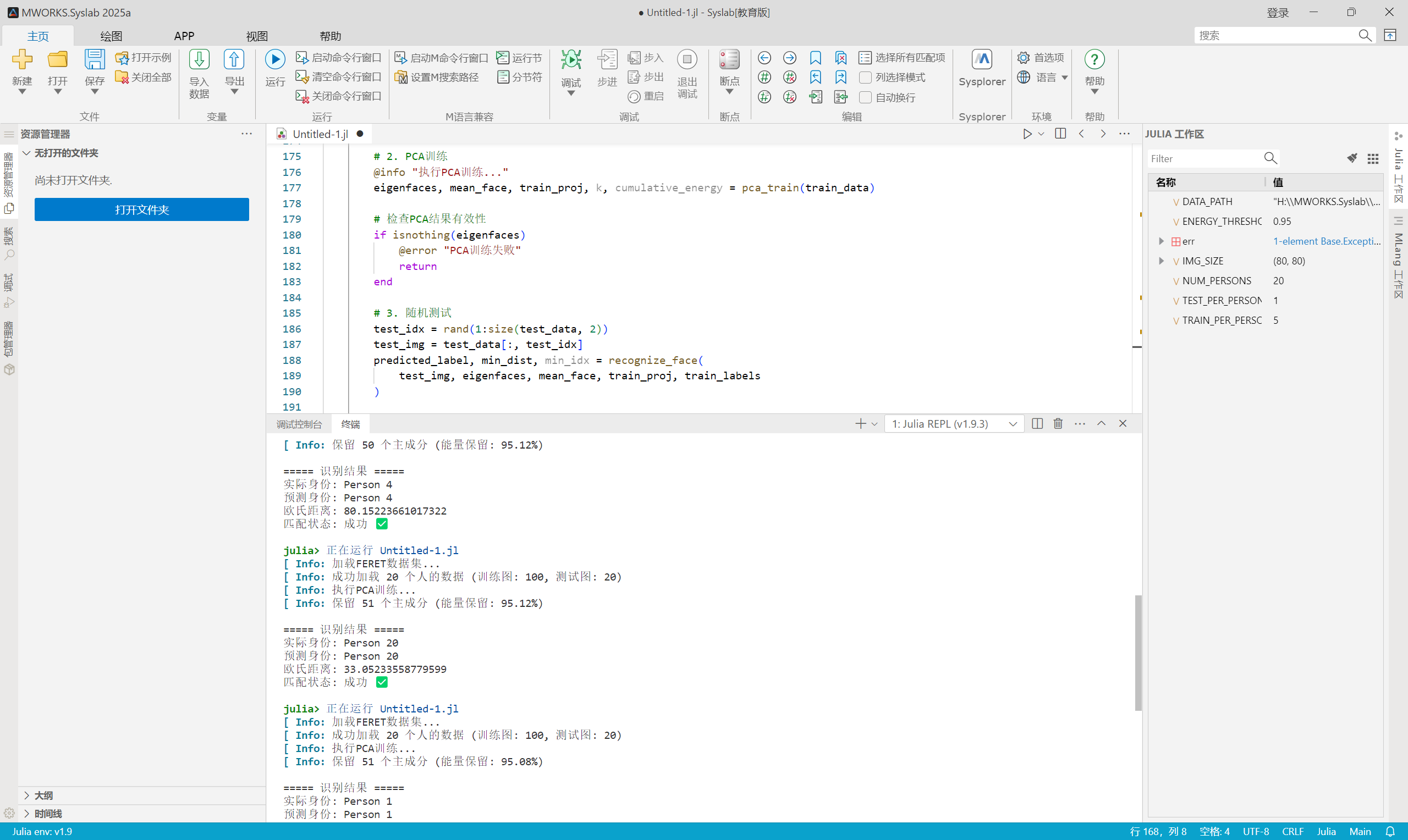
四、疑问
1.我问过老师了,结果达到这个程度就可以了,不需要更加复杂的功能比如摄像头什么的;
2.若本代码报错,有以下几种可能:
(1)未安装包/包没更新;
(2)图片为.tif格式,要注意;
(3)其实有几个人脸识别总是错误的,我看课上有另一个同学好像也是这个问题,但是期末了就这样就可以了交上去没问题的;
(4)查看具体报错信息,咨询AI辅助修改。

DAMO开发者矩阵,由阿里巴巴达摩院和中国互联网协会联合发起,致力于探讨最前沿的技术趋势与应用成果,搭建高质量的交流与分享平台,推动技术创新与产业应用链接,围绕“人工智能与新型计算”构建开放共享的开发者生态。
更多推荐
 8
8 0
0- 0


 已为社区贡献1条内容

所有评论(0)