easyExcel百万级别数据量导出3min左右(亲测可用)
·
工作多年没遇到大数据量导出的需求,前两天同事问我这个问题,于是看了几个帖子,调试了easyExcel大数据量导出,有的帖子说100万级别80多秒,试了各种情况都达不到,最后从10多分钟优化到现在3分钟左右,也算满足需要了,随记录下。
目录
easyexcel依赖
<dependency>
    <groupId>com.alibaba</groupId>
    <artifactId>easyexcel</artifactId>
    <version>3.0.5</version>
</dependency>
1、Controller层主要
rmContractService.exportExcel2(response);2、service层、serviceImpl层
void exportExcel2(HttpServletResponse response) throws IOException;private static final int BATCH_SIZE = 200000; // 每次查询20万条数据
private static final int MAX_SHEET_ROWS = 1000000; // 每个sheet最多100万条数据
@Override
public void exportExcel2(HttpServletResponse response) {
long startTime = System.currentTimeMillis();
System.out.println("导出开始时间:" + startTime);
// 查询总记录数
long totalRecords = rmContractMapper.selectCount2();
int totalSheets = (int) Math.ceil((double) totalRecords / MAX_SHEET_ROWS);
List<List<StatisticsRequestVo>> allData = new ArrayList<>();
ExecutorService executor = Executors.newFixedThreadPool(6); // 创建线程池
// 计算每个sheet需要执行的查询次数
List<Future<List<StatisticsRequestVo>>> futures = new ArrayList<>();
for (int sheetNo = 0; sheetNo < totalSheets; sheetNo++) {
int recordsInSheet = (int) Math.min(MAX_SHEET_ROWS, totalRecords - sheetNo * MAX_SHEET_ROWS);
int queryTimes = (int) Math.ceil((double) recordsInSheet / BATCH_SIZE);
for (int queryNo = 0; queryNo < queryTimes; queryNo++) {
int offset = sheetNo * MAX_SHEET_ROWS + queryNo * BATCH_SIZE;
Callable<List<StatisticsRequestVo>> task = () -> rmContractMapper.selectList(offset, BATCH_SIZE);
Future<List<StatisticsRequestVo>> future = executor.submit(task);
futures.add(future);
}
}
// 收集所有数据
for (Future<List<StatisticsRequestVo>> future : futures) {
List<StatisticsRequestVo> data = null;
try {
data = future.get();
} catch (InterruptedException e) {
e.printStackTrace();
} catch (ExecutionException e) {
e.printStackTrace();
}
allData.add(data);
}
// 关闭线程池
executor.shutdown();
try {
executor.awaitTermination(Long.MAX_VALUE, TimeUnit.NANOSECONDS);
} catch (InterruptedException e) {
e.printStackTrace();
}
OutputStream outputStream = null;
try {
outputStream = response.getOutputStream();
} catch (IOException e) {
e.printStackTrace();
}
ExcelWriter excelWriter = EasyExcel.write(outputStream).build();
int sheetNo = 0;
List<StatisticsRequestVo> sheetData = new ArrayList<>();
for (List<StatisticsRequestVo> dataBatch : allData) {
sheetData.addAll(dataBatch);
if (sheetData.size() >= MAX_SHEET_ROWS || dataBatch == allData.get(allData.size() - 1)) {
WriteSheet writeSheet = EasyExcel.writerSheet(sheetNo++, "Sheet" + sheetNo).head(StatisticsRequestVo.class).build();
excelWriter.write(sheetData, writeSheet);
sheetData = new ArrayList<>();
}
}
excelWriter.finish();
try {
outputStream.close();
log.info("*********统计查询列表导出结束!**************");
long endTime = System.currentTimeMillis();
System.out.println("导出所用时间:" + (endTime - startTime) / 1000 + "秒");
} catch (IOException e) {
e.printStackTrace();
}
}思路:1、默认每个sheet最大存100万条数据,每次查20万条数据
2、根据查询总条数计算有多少个sheet页,计算每个sheet需要执行的查询次数
3、多线程执行查询任务、收集所有查询数据、 关闭线程池
4、easyExcel写入报表数据
selectCount2 、selectList替换成自己的接口及sql。由于大数据量导出使用场景不多,所以对核心代码异常处理、变量处理,多线程等没有做太多细节优化,大神们,可以自己优化下(^_^)。
3、mapper 及 sql
 int selectCount2();

List<StatisticsRequestVo> selectList(@Param("pageNum")int pageNum, @Param("pageSize")int pageSize);
<select id="selectCount2" resultType="java.lang.Integer">
select COUNT(1) from px_sys_user
</select>
<select id="selectList" resultType="com.sgcc.dlsc.sbs.retailmall.controller.vo.StatisticsRequestVo">
select p.id,p.name,p.age,p.address,p.sex,p.idCard,p.remark from px_sys_user p,
(select a.id from px_sys_user a order by a.id+0 limit #{pageNum}, #{pageSize} ) as d
where p.id = d.id
</select>4、StatisticsRequestVo
字段映射 、列名
@Data
@NoArgsConstructor
@AllArgsConstructor
public class StatisticsRequestVo  implements Serializable {
    @ExcelProperty(value = "ID")
    private String id;

    @ExcelProperty(value = "证件号")
    private String idCard;

    @ExcelProperty(value = "姓名")
    private String name;

    @ExcelProperty(value = "年龄")
    private Integer age;

    @ExcelProperty(value = "性别")
    private String sex;

    @ExcelProperty(value = "地址")
    private String address;

    @ExcelProperty(value = "备注")
    private String remark;

}
5、前端调用按钮 及 接口
避免后端抛出 Can not close IO异常,设置响应时间 orgRequest.defaults.timeout = 900000,每个公司设置方式可能不一样,视情况而定。
export default class RmContractApi {

  static exportExcel(data) {
    orgRequest.defaults.timeout = 900000
    return request({
      url: '/px-retailmall-extnet/RmContract/exportExcel',
      responseType: 'blob',
      method: 'post',
      data: data
    })
  }

}前端导出按钮,请求后端接口,传参请求方式,每个公司设置方式可能不一样,视情况而定。
 <el-button type="primary" @click="exportExcel()">导 出</el-button>


    exportExcel() {

      let data = {
        packageMonth: moment(this.searchForm.packageMonth).format('YYYY'),
        orderNumber: this.searchForm.orderNumber,
        startDate: this.searchForm.createTime === null ? "" : this.searchForm.createTime,
        originList: []
      }

      RmContractApi.exportExcel(data).then((res) => {
        const url = window.URL.createObjectURL(new Blob([res.data]))
        const link = document.createElement('a')
        link.href = url
        const ExcelName = '导出信息' + '.xlsx'
        link.setAttribute('download', ExcelName)
        document.body.appendChild(link)
        link.click()
        this.$vMessage({message: '导出信息成功', type: 'success'})
        this.loading = false
      }).catch(() => {
        this.$vMessage({message: '导出信息失败', type: 'error'})
        this.loading = false
      })
6、数据库模拟数据
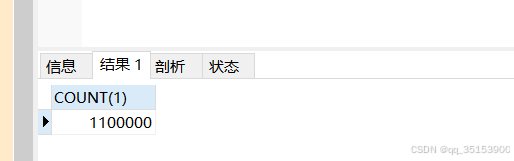
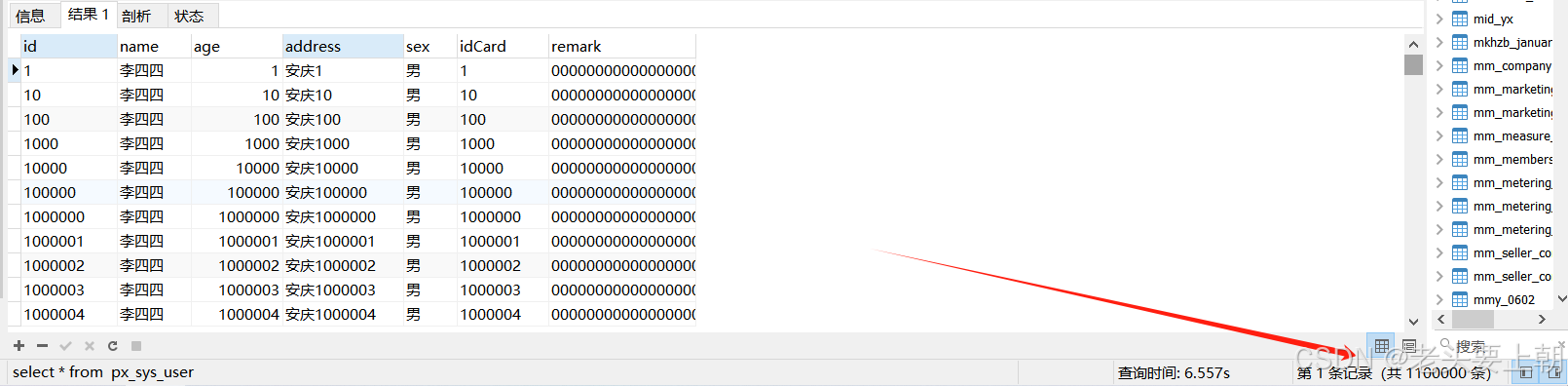
7、导出结果及响应时间
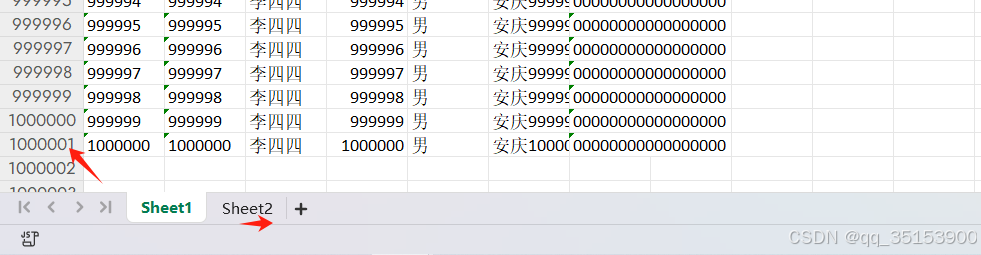

DAMO开发者矩阵,由阿里巴巴达摩院和中国互联网协会联合发起,致力于探讨最前沿的技术趋势与应用成果,搭建高质量的交流与分享平台,推动技术创新与产业应用链接,围绕“人工智能与新型计算”构建开放共享的开发者生态。
更多推荐

 10
10 0
0- 0


 已为社区贡献1条内容

所有评论(0)