企业微信机器人开发文档
摘要
如果想让机器人的回复更加灵活可控,使用个人或企业内部的数据资料等,那么就需要构建自己的企业微信机器人。文章列举了构建机器人的过程,如果只是想直接使用,可以直接下载代码构建即可。
前置准备
环境要求
- 企业微信管理员权限(用于创建API模式的智能机器人)
- 具备域名的可公开访问项目
- Java 9以下版本需要下载JCE无限制权限策略文件(我直接java17)
技术准备
引入官方代码
- 从企业微信开发者中心下载官方提供的加解密代码
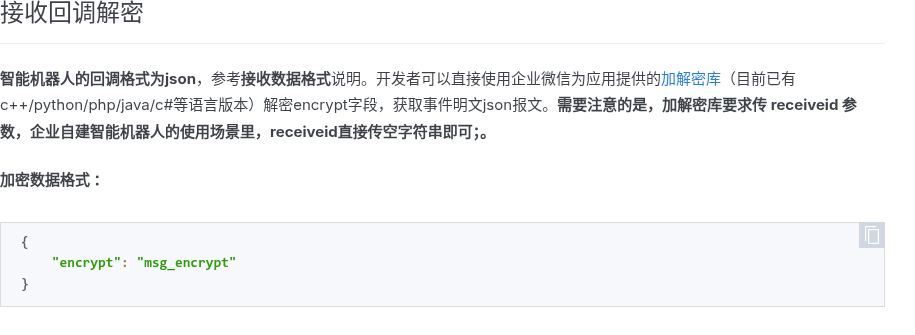
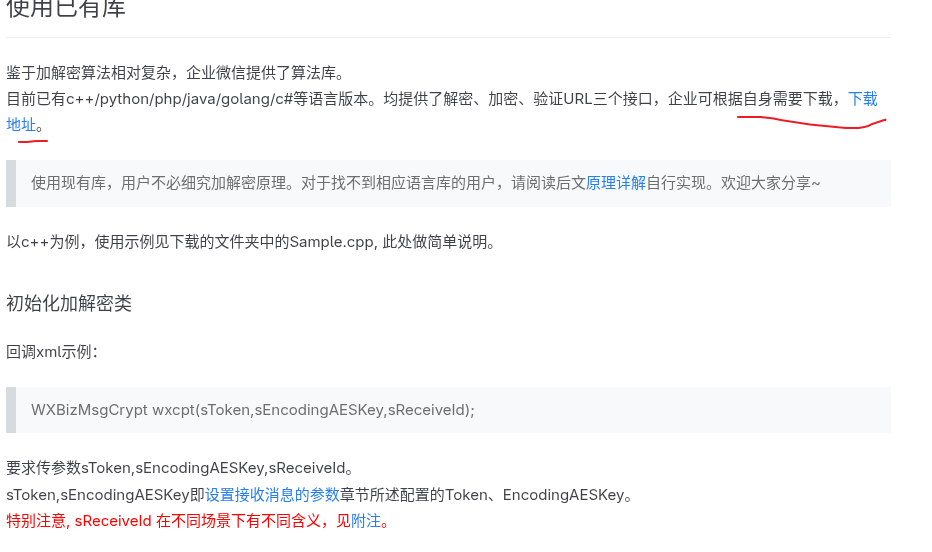
- 将 com/qq/weixin/mp/aes 目录下的所有Java文件复制到您的项目中
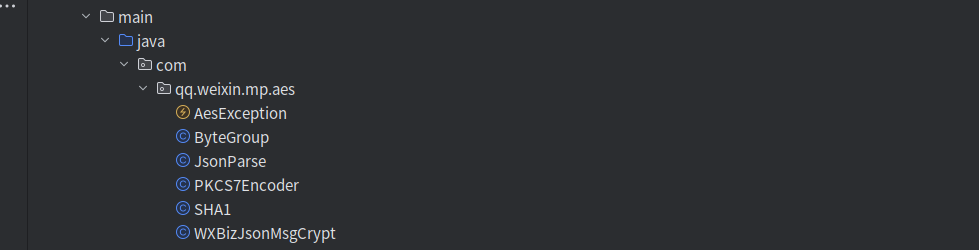
- 确保相关导入没有问题,无编译错误
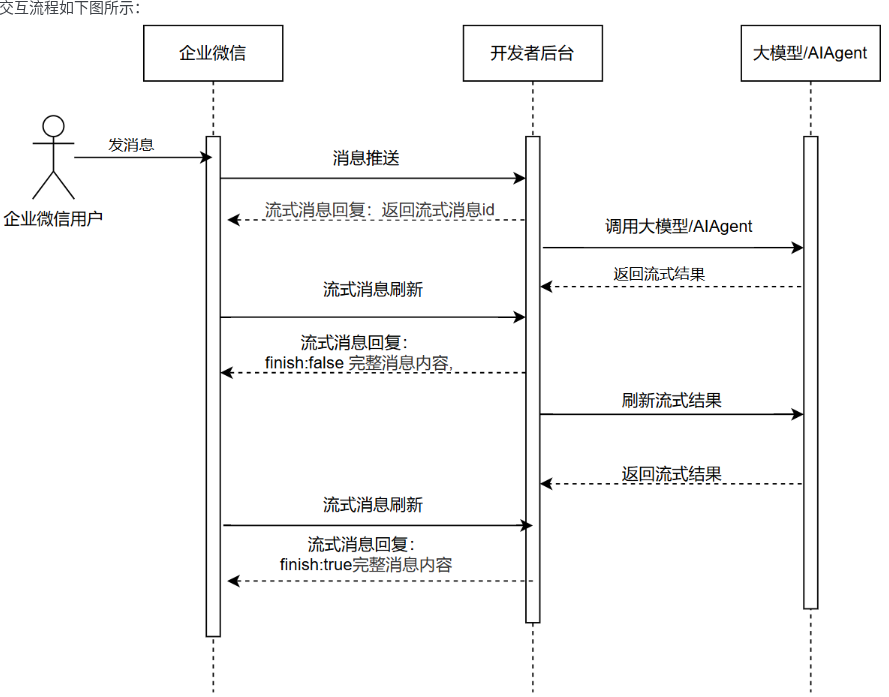
交互流程
URL验证接口实现
    /**
     * URL验证接口 (GET请求)
     * 企业微信会调用此接口验证URL有效性
     */
    @GetMapping("/push/wechat")
    public String wechatGet(
            @RequestParam("msg_signature") String msgSignature,
            @RequestParam("timestamp") String timestamp,
            @RequestParam("corpid") String corpid, // 企业id
            @RequestParam("nonce") String nonce,
            @RequestParam("echostr") String echostr) {
        log.info("验证URL请求的corpid:{}, 签名: {}, 时间戳: {}, 随机数: {}",
                corpid, msgSignature, timestamp, nonce);
        try {
            // 使用URL中的corpid初始化加解密工具
            WXBizJsonMsgCrypt wxcpt = new WXBizJsonMsgCrypt(sToken, sEncodingAESKey, "");
            // 验证URL并获取明文echostr
            String sEchoStr = wxcpt.VerifyURL(msgSignature, timestamp, nonce, echostr);
            log.info("验证URL成功, 返回明文: {}", sEchoStr);
            return sEchoStr;
        } catch (Exception e) {
            log.error("验证URL失败", e);
            return "error";
        }
    }

关键点说明
corpid参数:必须从URL参数中获取,不能使用固定值
返回值:必须返回解密后的明文echostr,不能包含其他内容
异常处理:必须捕获所有异常并记录日志,但对外返回简洁信息
接收消息接口实现
数据结构定义
@Data
public static class RobotData {
    private String tousername; // 接收方企业微信ID
    private String encrypt;    // 加密的消息内容
    private String agentid;    // 应用ID
}
接口代码
这里代码如果看着比较复杂,可以直接下载tag:
v0.1版本,只是做了简单的文本回复测试。这里代码是已经打通百炼。
/**
* 接收消息接口 (POST请求)
* 企业微信会将用户发送给机器人的消息推送到此接口
* {
* "msgid": "CAIQ16HMjQYY/NGagIOAgAMgq4KM0AI=",
* "aibotid": "AIBOTID",
* "chatid": "CHATID",
* "chattype": "group",
* "from": {
* "userid": "USERID"
* },
* "msgtype": "text",
* "text": {
* "content": "@RobotA hello robot"
* }
* }
*
curl -X POST http://127.0.0.1:8080/wx/work/robot/push/wechat?msg_signature=65173e4c8284b36c27ea1565a12fe9b98da7b760×tamp=1698044465&nonce=1698044465 -H "Content-Type: application/json" -d '{"encrypt":"1/eL5o4f0xYunv/GG/9AVW+UXnj3ZCntsFmkLcTW8Ekm8nenhQ2IcTzeZNQujFiXgjrEMAnxFX55pHnYZHxmlEl6K9k+gjLiS8k2gKn4hqmATH8WcQgJW+pahiqg3jH4WMuk6RSgZ6QpL4x21LgUB3SimB5DM4SkkrIDt+sWgM2L0JjJqK9vFio0txS12CW5GBjlpVhg1kcvJP9JZ9c/VYU0eJ9R8I3GfI377UlINYHgwwfFTyRIpeWz8gS9lybijk7vFcNrW+qyvRKOKZeT3Mi7OXuLu4MKuVLL8fDy45E="}'
*/
@PostMapping("/push/wechat")
public String wechatPost(
@RequestParam("msg_signature") String msgSignature,
@RequestParam("timestamp") String timestamp,
@RequestParam("nonce") String nonce,
@RequestBody RobotData postData) {
log.info("接收消息请求的签名: {}, 时间戳: {}, 随机数: {}", msgSignature, timestamp, nonce);
log.info("接收到的加密消息: {}", JSON.toJSONString(postData));
try {
// 加解密库要求传 receiveid 参数,企业自建智能机器人的使用场景里,receiveid直接传空字符串即可;。
WXBizJsonMsgCrypt wxcpt = new WXBizJsonMsgCrypt(sToken, sEncodingAESKey, "");
// 解密消息
String sMsg = wxcpt.DecryptMsg(msgSignature, timestamp, nonce, JSON.toJSONString(postData));
log.info("消息解密后内容: {}", sMsg);
// 解析消息内容
JSONObject json = new JSONObject(sMsg);
String msgType = json.getString("msgtype");
String chatType = json.getString("chattype"); // 聊天类型: single/group
log.info("消息类型: {}, 聊天类型: {}", msgType, chatType);
// 处理文本消息
if ("text".equals(msgType)) {
JSONObject textObj = json.getJSONObject("text");
String content = textObj.getString("content");
String userId = json.getJSONObject("from").getString("userid");
log.info("用户[{}]在[{}]聊天中发送消息: {}", userId, chatType, content);
// 构建回复消息
String replyMsg = replyMessageStream.reply(json);
log.info("加密前的回复消息: {}", replyMsg);
// 加密回复消息
String encryptMsg = wxcpt.EncryptMsg(replyMsg, timestamp, nonce);
log.info("加密后的回复消息: {}", encryptMsg);
return encryptMsg;
}else if("stream".equals(msgType)){
// 企业微信官方文档显示如果首次返回stream,则后续的stream消息会返回stream_id,且stream_id不变
JSONObject streamObj = json.getJSONObject("stream");
String streamId= streamObj.getString("id");
// 通过streamId获取数据栈,返回结果
String poll = streamMapRepository.poll(streamId);
String streamText = streamMapRepository.getStreamText(streamId);
log.info("streamId: {}, pull: {}, streamText: {}", streamId, poll, streamText);
String replyMsg;
if(!StringUtils.hasText(streamText)){
replyMsg = replyMessageStream.buildStreamMessage("你好呀!我是智能机器人,有什么可以帮您的吗? 当前时间是" + new Date(), streamId, true, null);
}else if("messageend".equals(poll)){
replyMsg = replyMessageStream.buildStreamMessage(streamText, streamId, true, null);
// 结束后清理数据
streamMapRepository.delete(streamId);
}else{
replyMsg = replyMessageStream.buildStreamMessage(streamText, streamId, false, null);
}
log.info("streamId: {}, 加密前的回复消息: {}", streamId, replyMsg);
// 加密回复消息
String encryptMsg = wxcpt.EncryptMsg(replyMsg, timestamp, nonce);
log.info("streamId: {}, 加密后的回复消息: {}", streamId, encryptMsg);
return encryptMsg;
}
} catch (Exception e) {
log.error("处理消息失败", e);
}
return "success";
}消息格式说明
企业微信推送的消息格式示例:实际以官方最新内容为准。
{
    "msgid": "CAIQ16HMjQYY/NGagIOAgAMgq4KM0AI=",
    "aibotid": "AIBOTID",
    "chatid": "CHATID",
    "chattype": "group",
    "from": {
        "userid": "USERID"
    },
    "msgtype": "text",
    "text": {
        "content": "@RobotA hello robot"
    }
}

参数  说明
msgid   本次回调的唯一性标志,开发者需据此进行事件排重(可能因为网络等原因重复回调)
aibotid 智能机器人id
chatid  会话id,仅群聊类型时候返回
chattype    会话类型,single\group,分别表示:单聊\群聊
from    该事件触发者的信息
from.userid 操作者的userid
msgtype 消息类型,此时固定是text
text.content    消息内容
修改加解密工具类
修改 JsonParse 类的 extract 方法:
/**
 * 提取出 JSON 包中的加密消息
 * @param jsontext 待提取的json字符串
 * @return 提取出的加密消息字符串
 * @throws AesException
 */
public static Object[] extract(String jsontext) throws AesException {
    Object[] result = new Object[3];
    try {
        JSONObject json = new JSONObject(jsontext);
        String encrypt_msg = json.getString("encrypt");
        // 企业微信机器人消息格式中不包含tousername和agentid
        result[0] = ""; // tousername
        result[1] = encrypt_msg;
        result[2] = ""; // agentid
        return result;
    } catch (Exception e) {
        log.error("json解析出错!", e);
        throw new AesException(AesException.ParseJsonError);
    }
}
代码路径
如果有帮助,点点star https://github.com/zhaozhiwei1992/weixin-work-bot
配置与测试
应用部署
将应用部署到具备域名的服务器上并确保应用可通过HTTPS访问(企业微信要求回调URL必须是HTTPS)
机器人配置
- 在企业微信管理后台创建API模式的智能机器人
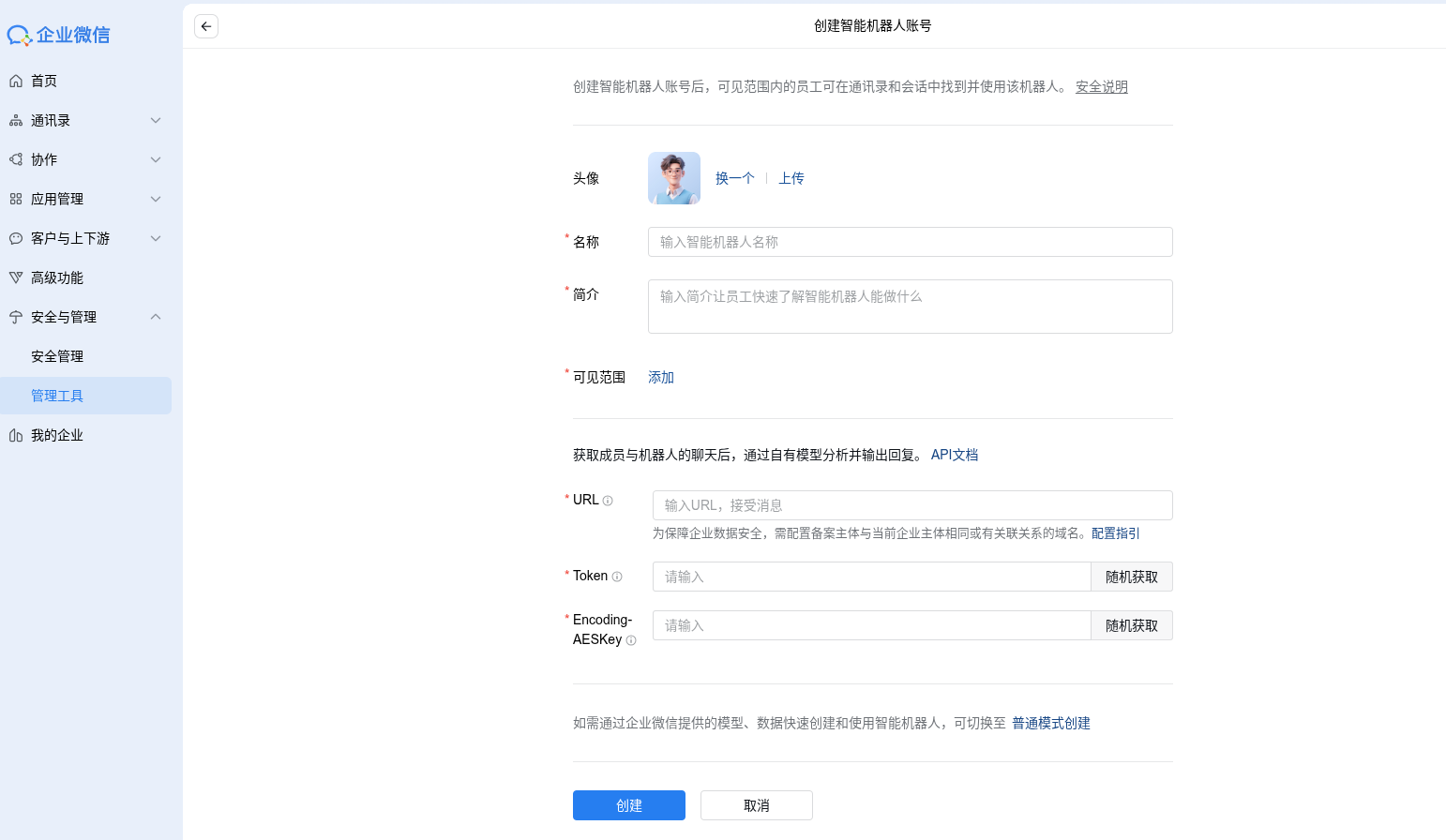
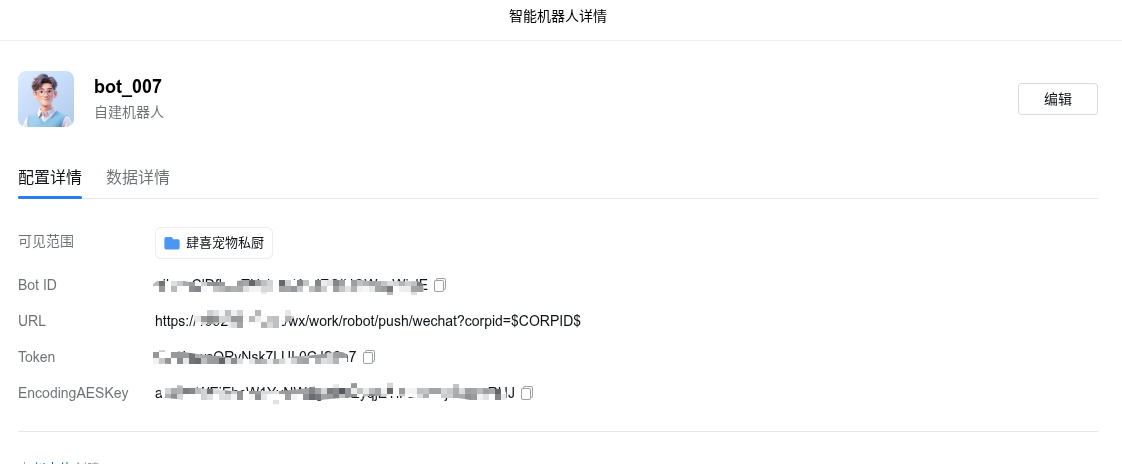
- 随机生成Token和EncodingAESKey,在application.yml中填入生成的Token和EncodingAESKey
- 设置回调URL为:https://您的域名/robot/push/wechat?corpid=
测试验证
URL验证测试:保存机器人配置时,企业微信会自动调用验证接口
消息接收测试:
在企业微信中单聊或群聊中@机器人发送消息,查看后台日志确认收到并正确处理消息,验证机器人是否能正确回复。


常见问题排查
- URL验证失败:检查Token、EncodingAESKey和corpid是否正确
- 解密失败:检查提取加密消息的方法是否正确修改
- 无法回复消息:检查回复消息的格式是否符合企业微信要求,回复msgtype一定要用stream,否则可能出现都访问通了,但是客户端收不到消息。
- HTTPS证书问题:确保证书有效且受信任
注意事项
性能考虑:消息处理应尽量高效,避免超时(企业微信默认超时时间为5秒)
安全考虑: 验证消息签名确保请求来自企业微信
对用户输入进行适当过滤和转义,防止注入攻击
错误处理:妥善处理所有异常,避免服务崩溃
日志记录:详细记录请求和响应信息,便于排查问题
通过以上步骤,您可以成功开发并部署一个企业微信智能机器人,实现接收消息和自动回复的功能。
参考
https://developer.work.weixin.qq.com/community/question/detail?content_id=16740110965903826290

DAMO开发者矩阵,由阿里巴巴达摩院和中国互联网协会联合发起,致力于探讨最前沿的技术趋势与应用成果,搭建高质量的交流与分享平台,推动技术创新与产业应用链接,围绕“人工智能与新型计算”构建开放共享的开发者生态。
更多推荐
 32
32 0
0- 0


 已为社区贡献1条内容

所有评论(0)