20251118给荣品RD-RK3588的开发板适配USB的HUB芯片FE2_QFP48
20251118给荣品RD-RK3588的开发板适配USB的HUB芯片FE2_QFP48
2025/11/17 20:58
缘起:经过反复测试,终于把全部的USB接口都点亮USB接口的鼠标了!
当你把荣品RD-RK3588开发板重新适配一把,就相当于从头做了一个项目:【荣品RD-RK3588开发板】。
当然,开发板的功能都是好的,你免除了调试的过程,也就没有解决相关硬件出错的经验/机会了!
结论:荣品的FAE工程师是真的很忙。
代码写的非常写意/潇洒!
【整个DTS,TAB和空格按键都是混用的!^_有些时候看着很难受的!^_】
DTS中的代码排版真的让人看得很难受!
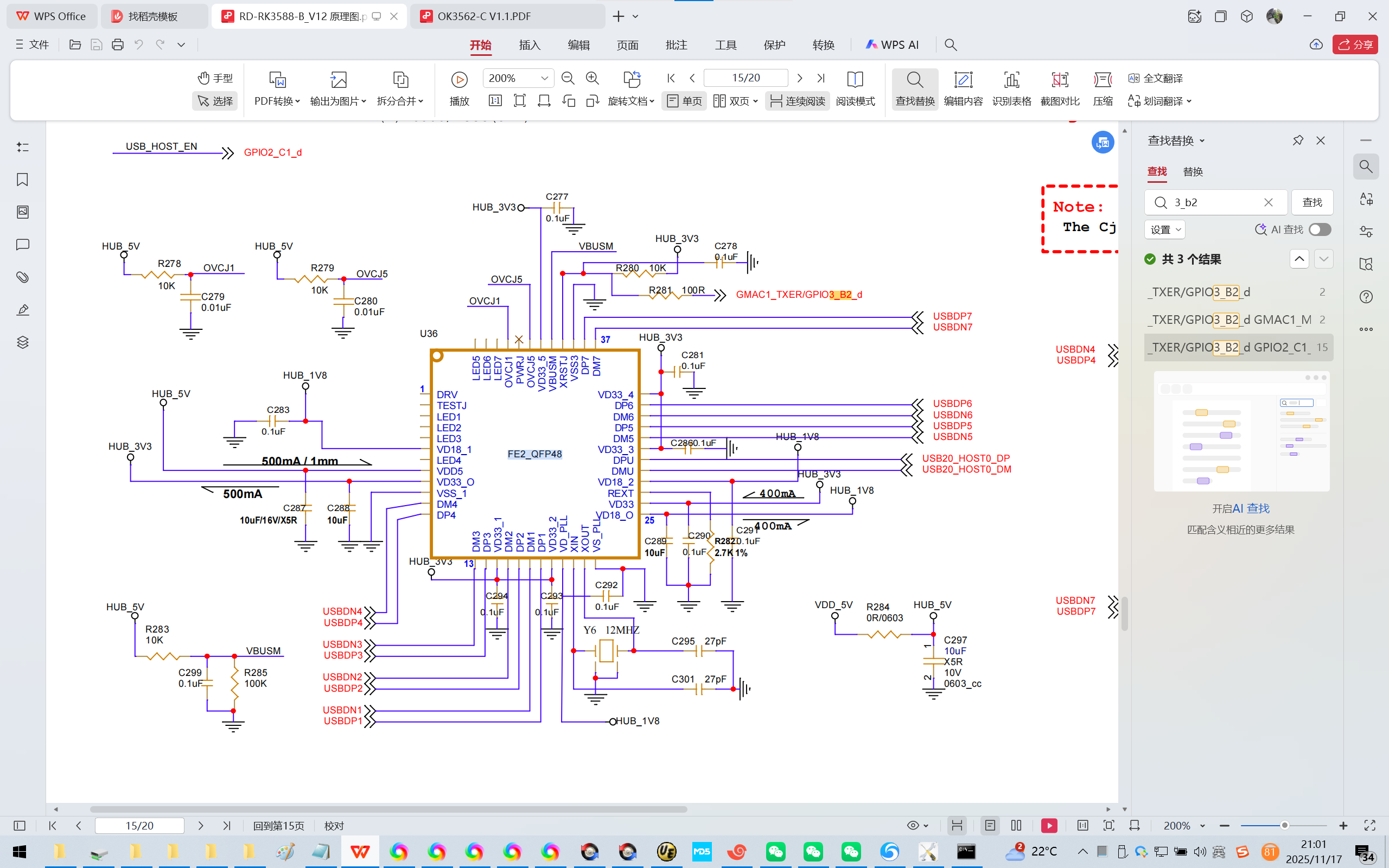
1、很容易/根据经验/看原理图即可知道:USB的HUB芯片FE2_QFP48 的 XRSTJ引脚由GMAC1_TXER/GPIO3_B2_d ,也就是GPIO106控制!
2、DTS
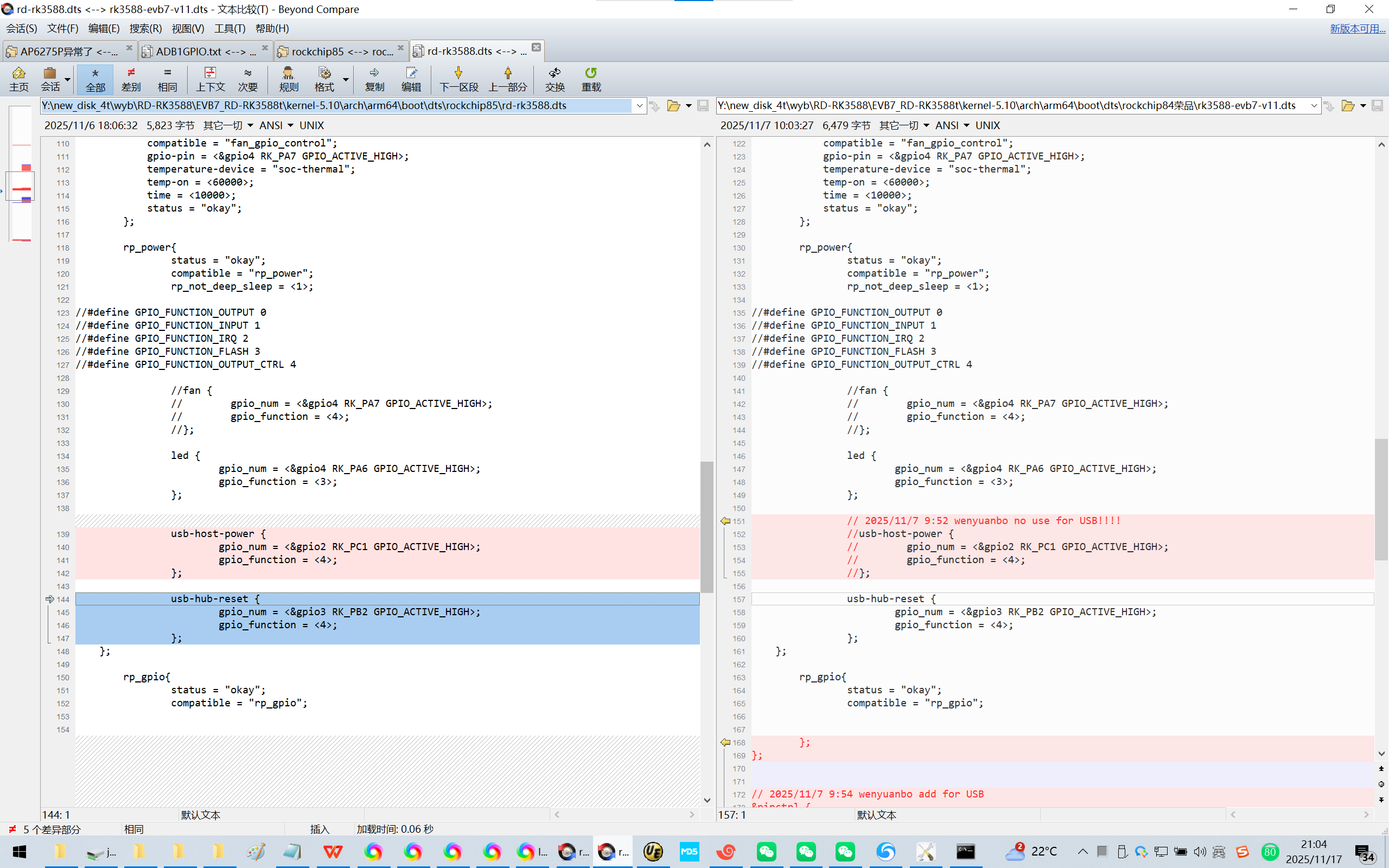
Y:\new_disk_4t\wyb\RD-RK3588\EVB7_RD-RK3588t\kernel-5.10\arch\arm64\boot\dts\rockchip85\rd-rk3588.dts
Y:\new_disk_4t\wyb\RD-RK3588\EVB7_RD-RK3588t\kernel-5.10\arch\arm64\boot\dts\rockchip84荣品\rk3588-evb7-v11.dts
/ {
model = "rd-rk3588";
reserved-memory {
#address-cells = <2>;
#size-cells = <2>;
ranges;
dma_trans: dma-trans@3c000000 {
reg = <0x0 0x3c000000 0x0 0x04000000>;
};
};
vcc_1v1_nldo_s3: vcc-1v1-nldo-s3 {
compatible = "regulator-fixed";
regulator-name = "vcc_1v1_nldo_s3";
regulator-always-on;
regulator-boot-on;
regulator-min-microvolt = <1100000>;
regulator-max-microvolt = <1100000>;
vin-supply = <&vcc5v0_sys>;
};
// 2025/11/7 9:54 wenyuanbo add for USB
gpiotest: gpiotest-regulator { //gpio power enable
compatible = "regulator-fixed";
gpios = <&gpio2 RK_PC1 GPIO_ACTIVE_HIGH>;
pinctrl-names = "default";
pinctrl-0 = <&gpiopower>;
regulator-name = "vcc_camear";
enable-active-high;
regulator-always-on;
regulator-boot-on;
};
fan_gpio_control {
compatible = "fan_gpio_control";
gpio-pin = <&gpio4 RK_PA7 GPIO_ACTIVE_HIGH>;
temperature-device = "soc-thermal";
temp-on = <60000>;
time = <10000>;
status = "okay";
};
rp_power{
status = "okay";
compatible = "rp_power";
rp_not_deep_sleep = <1>;
//#define GPIO_FUNCTION_OUTPUT 0
//#define GPIO_FUNCTION_INPUT 1
//#define GPIO_FUNCTION_IRQ 2
//#define GPIO_FUNCTION_FLASH 3
//#define GPIO_FUNCTION_OUTPUT_CTRL 4
//fan {
// gpio_num = <&gpio4 RK_PA7 GPIO_ACTIVE_HIGH>;
// gpio_function = <4>;
//};
led {
gpio_num = <&gpio4 RK_PA6 GPIO_ACTIVE_HIGH>;
gpio_function = <3>;
};
// 2025/11/7 9:52 wenyuanbo no use for USB!!!!
//usb-host-power {
// gpio_num = <&gpio2 RK_PC1 GPIO_ACTIVE_HIGH>;
// gpio_function = <4>;
//};
usb-hub-reset {
gpio_num = <&gpio3 RK_PB2 GPIO_ACTIVE_HIGH>;
gpio_function = <4>;
};
};
rp_gpio{
status = "okay";
compatible = "rp_gpio";
};
};
// 2025/11/7 9:54 wenyuanbo add for USB
&pinctrl {
gpiopower:gpiopower-pwr{
rockchip,pin =
//<4 RK_PC6 &pcfg_pull_down>;
<2 RK_PC1 &pcfg_pull_down>;
};
};
3、问DeepSeek:
https://chat.deepseek.com/a/chat/s/9ba7baf2-36e1-4708-ae4a-3a316c189fcf
RK3588开发板USB Hub适配DTS配置
给荣品RD-RK3588的开发板的USB hub适配,这个DTS改如何适配呢?
usb-hub-reset {
gpio_num = <&gpio3 RK_PB2 GPIO_ACTIVE_HIGH>;
gpio_function = <4>;
};
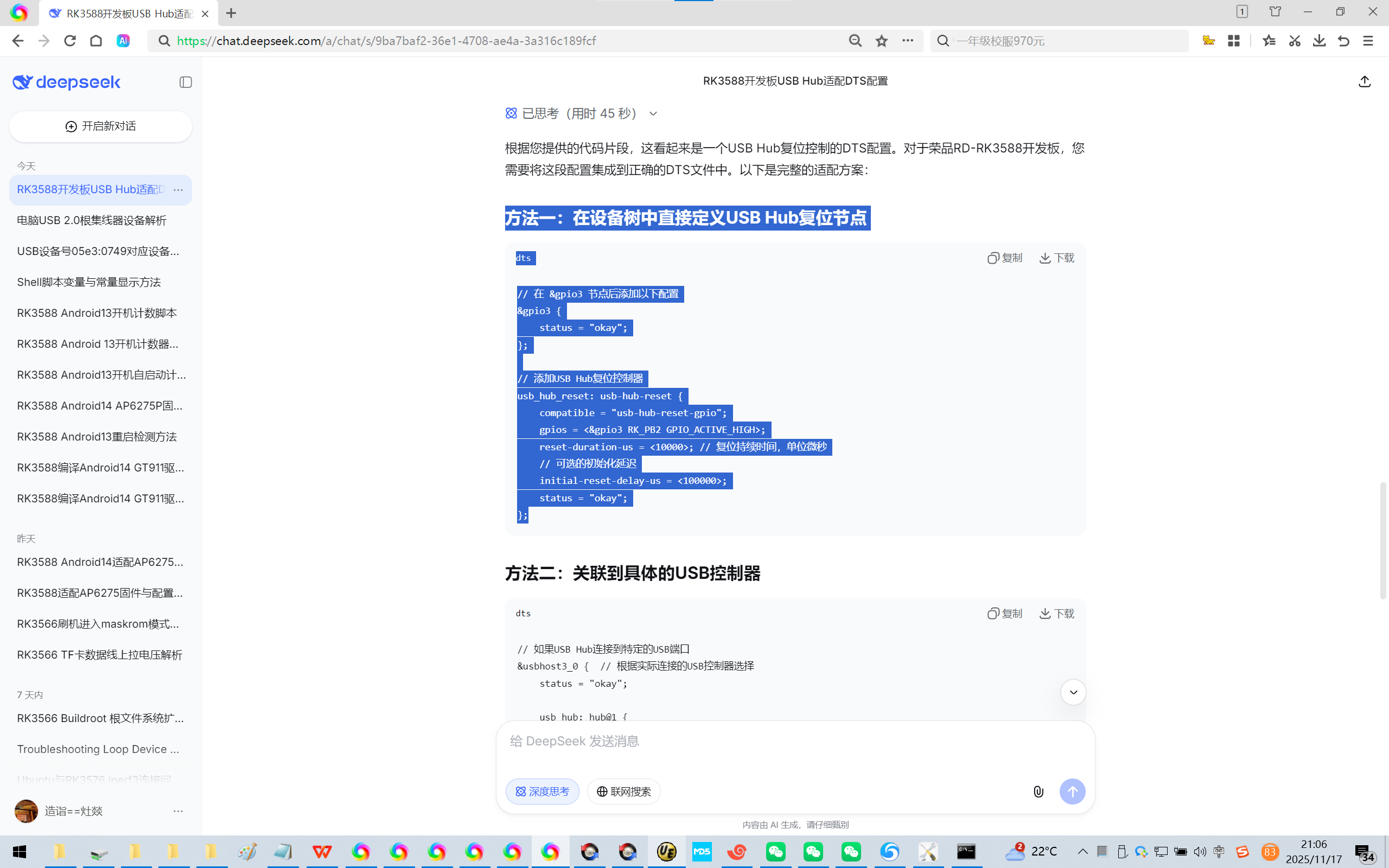
根据您提供的代码片段,这看起来是一个USB Hub复位控制的DTS配置。对于荣品RD-RK3588开发板,您需要将这段配置集成到正确的DTS文件中。以下是完整的适配方案:
方法一:在设备树中直接定义USB Hub复位节点
dts
// 在 &gpio3 节点后添加以下配置
&gpio3 {
status = "okay";
};
// 添加USB Hub复位控制器
usb_hub_reset: usb-hub-reset {
compatible = "usb-hub-reset-gpio";
gpios = <&gpio3 RK_PB2 GPIO_ACTIVE_HIGH>;
reset-duration-us = <10000>; // 复位持续时间,单位微秒
// 可选的初始化延迟
initial-reset-delay-us = <100000>;
status = "okay";
};
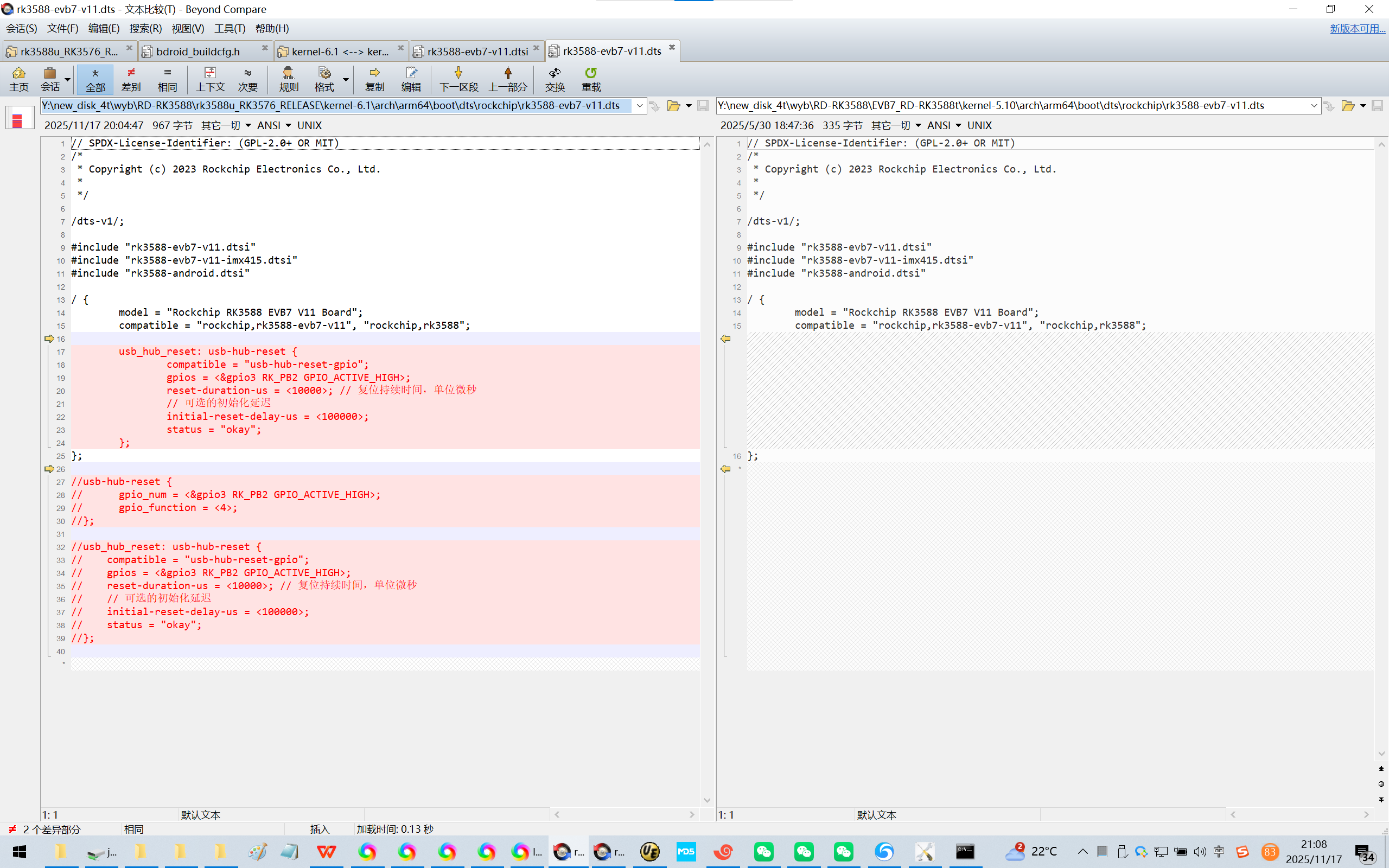
4、使用了DeepSeek推荐的写法,是否可以直接使用荣品的写法请自行验证了!^_
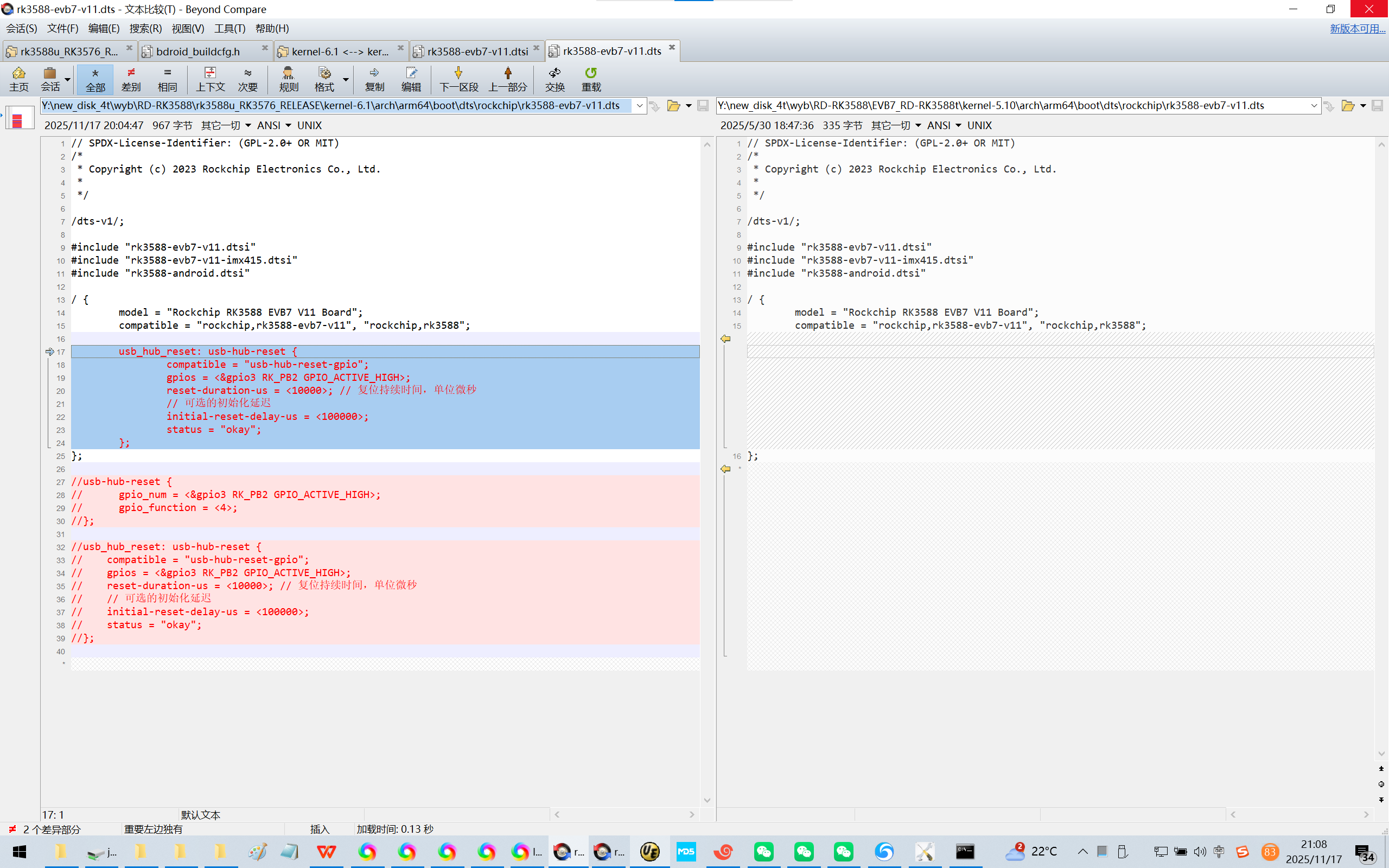
Y:\new_disk_4t\wyb\RD-RK3588\rk3588u_RK3576_RELEASE\kernel-6.1\arch\arm64\boot\dts\rockchip\rk3588-evb7-v11.dts
Y:\new_disk_4t\wyb\RD-RK3588\EVB7_RD-RK3588t\kernel-5.10\arch\arm64\boot\dts\rockchip\rk3588-evb7-v11.dts
// SPDX-License-Identifier: (GPL-2.0+ OR MIT)
/*
* Copyright (c) 2023 Rockchip Electronics Co., Ltd.
*
*/
/dts-v1/;
#include "rk3588-evb7-v11.dtsi"
#include "rk3588-evb7-v11-imx415.dtsi"
#include "rk3588-android.dtsi"
/ {
model = "Rockchip RK3588 EVB7 V11 Board";
compatible = "rockchip,rk3588-evb7-v11", "rockchip,rk3588";
usb_hub_reset: usb-hub-reset {
compatible = "usb-hub-reset-gpio";
gpios = <&gpio3 RK_PB2 GPIO_ACTIVE_HIGH>;
reset-duration-us = <10000>; // 复位持续时间,单位微秒
// 可选的初始化延迟
initial-reset-delay-us = <100000>;
status = "okay";
};
};
//usb-hub-reset {
// gpio_num = <&gpio3 RK_PB2 GPIO_ACTIVE_HIGH>;
// gpio_function = <4>;
//};
//usb_hub_reset: usb-hub-reset {
// compatible = "usb-hub-reset-gpio";
// gpios = <&gpio3 RK_PB2 GPIO_ACTIVE_HIGH>;
// reset-duration-us = <10000>; // 复位持续时间,单位微秒
// // 可选的初始化延迟
// initial-reset-delay-us = <100000>;
// status = "okay";
//};
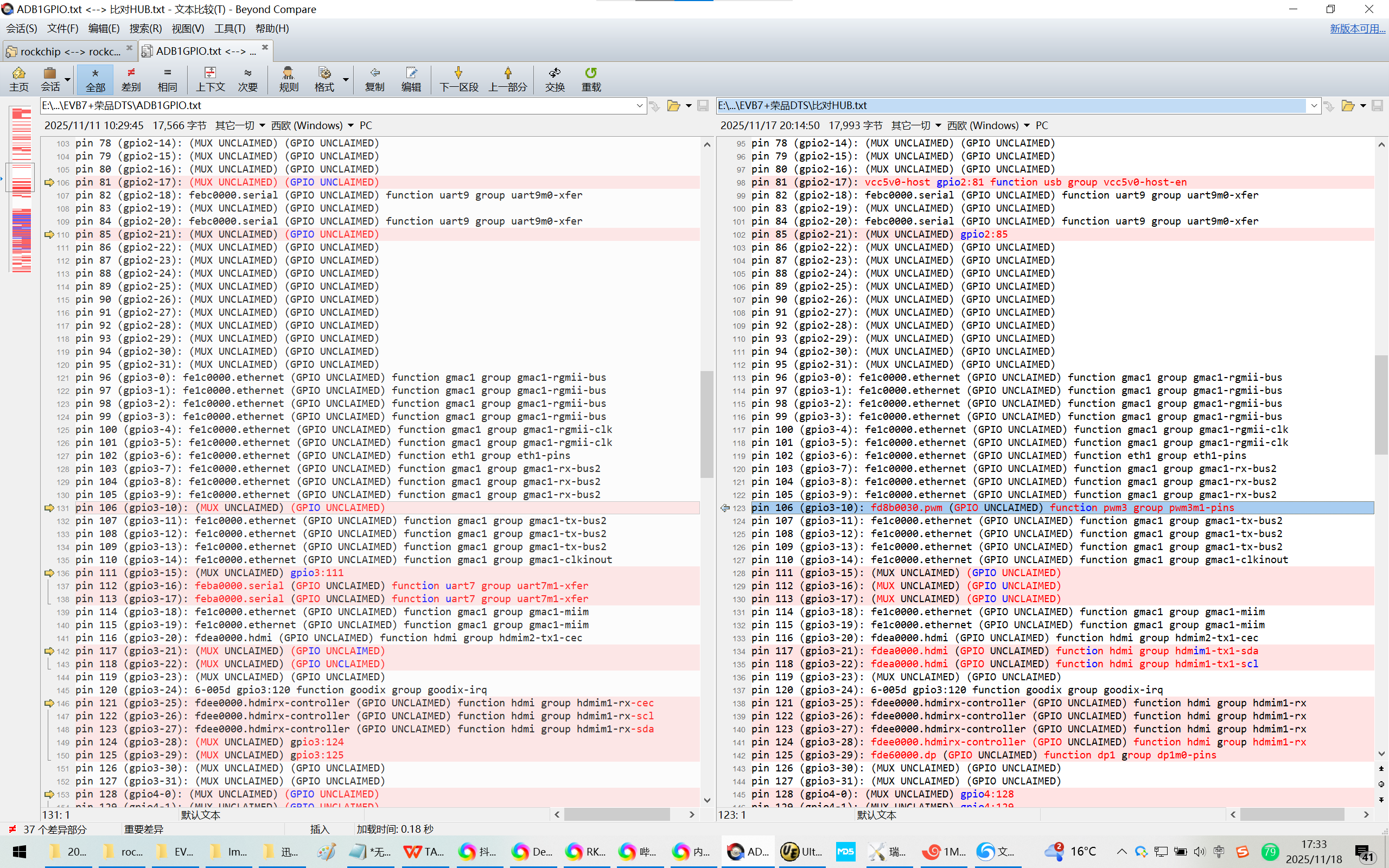
5、查看GPIO口复用可以很容易看见GPIO口冲突了!
rk3588_u:/ # cd /sys/kernel/debug/pinctrl/pinctrl-rockchip-pinctrl
rk3588_u:/sys/kernel/debug/pinctrl/pinctrl-rockchip-pinctrl #
rk3588_u:/sys/kernel/debug/pinctrl/pinctrl-rockchip-pinctrl # cat pin
pinconf-groups pinconf-pins pingroups pinmux-functions pinmux-pins pinmux-select pins
rk3588_u:/sys/kernel/debug/pinctrl/pinctrl-rockchip-pinctrl # cat pinm
pinmux-functions pinmux-pins pinmux-select
rk3588_u:/sys/kernel/debug/pinctrl/pinctrl-rockchip-pinctrl # cat pinmux-pins
pin 105 (gpio3-9): fe1c0000.ethernet (GPIO UNCLAIMED) function gmac1 group gmac1-rx-bus2
pin 106 (gpio3-10): fd8b0030.pwm (GPIO UNCLAIMED) function pwm3 group pwm3m1-pins
pin 107 (gpio3-11): fe1c0000.ethernet (GPIO UNCLAIMED) function gmac1 group gmac1-tx-bus2
pin 105 (gpio3-9): fe1c0000.ethernet (GPIO UNCLAIMED) function gmac1 group gmac1-rx-bus2
pin 106 (gpio3-10): (MUX UNCLAIMED) (GPIO UNCLAIMED)
pin 107 (gpio3-11): fe1c0000.ethernet (GPIO UNCLAIMED) function gmac1 group gmac1-tx-bus2
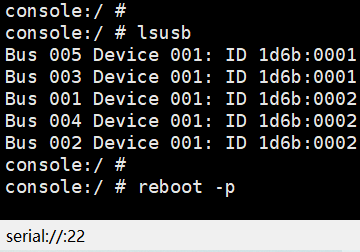
6、修改之后即可确认:
console:/ #
console:/ #
console:/ # lsusb
Bus 005 Device 001: ID 1d6b:0001
Bus 003 Device 001: ID 1d6b:0001
Bus 001 Device 001: ID 1d6b:0002
Bus 004 Device 001: ID 1d6b:0002
Bus 002 Device 001: ID 1d6b:0002
console:/ #
console:/ # reboot -p
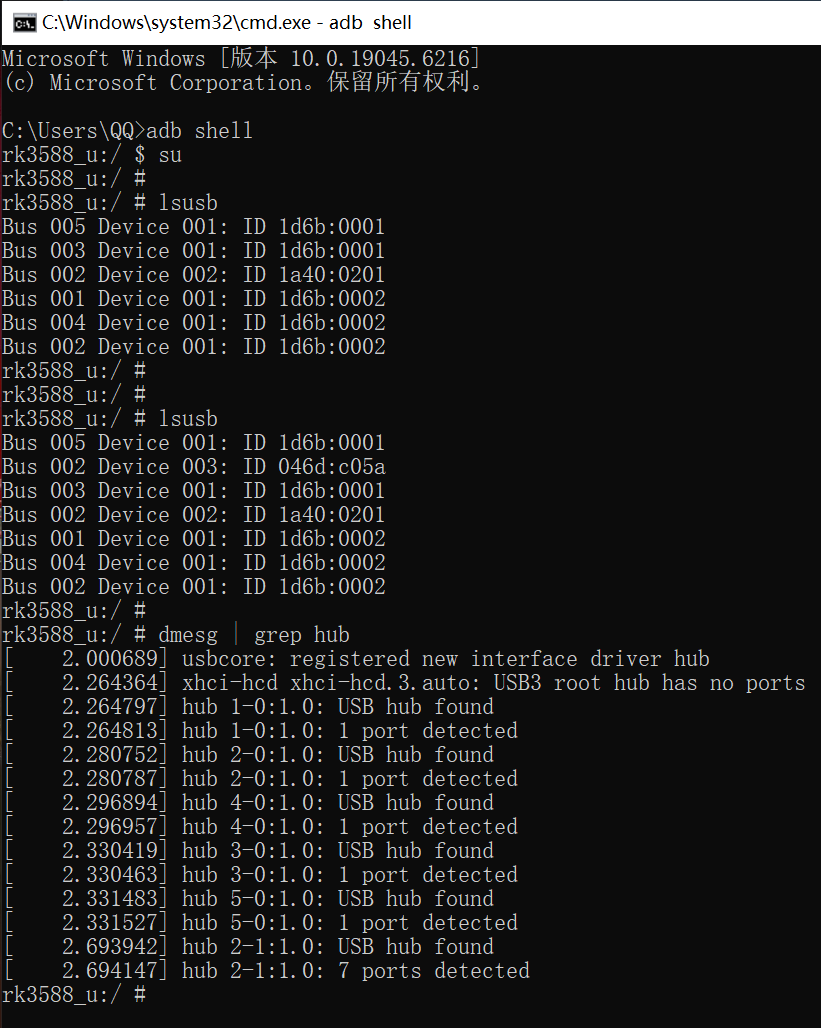
Microsoft Windows [版本 10.0.19045.6216]
(c) Microsoft Corporation。保留所有权利。
C:\Users\QQ>adb shell
rk3588_u:/ $ su
rk3588_u:/ #
rk3588_u:/ # lsusb
Bus 005 Device 001: ID 1d6b:0001
Bus 003 Device 001: ID 1d6b:0001
Bus 002 Device 002: ID 1a40:0201
Bus 001 Device 001: ID 1d6b:0002
Bus 004 Device 001: ID 1d6b:0002
Bus 002 Device 001: ID 1d6b:0002
rk3588_u:/ #
rk3588_u:/ #
rk3588_u:/ # lsusb
Bus 005 Device 001: ID 1d6b:0001
Bus 002 Device 003: ID 046d:c05a
Bus 003 Device 001: ID 1d6b:0001
Bus 002 Device 002: ID 1a40:0201
Bus 001 Device 001: ID 1d6b:0002
Bus 004 Device 001: ID 1d6b:0002
Bus 002 Device 001: ID 1d6b:0002
rk3588_u:/ #
rk3588_u:/ # dmesg | grep hub
[ 2.000689] usbcore: registered new interface driver hub
[ 2.264364] xhci-hcd xhci-hcd.3.auto: USB3 root hub has no ports
[ 2.264797] hub 1-0:1.0: USB hub found
[ 2.264813] hub 1-0:1.0: 1 port detected
[ 2.280752] hub 2-0:1.0: USB hub found
[ 2.280787] hub 2-0:1.0: 1 port detected
[ 2.296894] hub 4-0:1.0: USB hub found
[ 2.296957] hub 4-0:1.0: 1 port detected
[ 2.330419] hub 3-0:1.0: USB hub found
[ 2.330463] hub 3-0:1.0: 1 port detected
[ 2.331483] hub 5-0:1.0: USB hub found
[ 2.331527] hub 5-0:1.0: 1 port detected
[ 2.693942] hub 2-1:1.0: USB hub found
[ 2.694147] hub 2-1:1.0: 7 ports detected
rk3588_u:/ #
很容易知道:hub的USB设备号:
Bus 002 Device 002: ID 1a40:0201
罗技鼠标的USB设备号:
Bus 002 Device 003: ID 046d:c05a

DAMO开发者矩阵,由阿里巴巴达摩院和中国互联网协会联合发起,致力于探讨最前沿的技术趋势与应用成果,搭建高质量的交流与分享平台,推动技术创新与产业应用链接,围绕“人工智能与新型计算”构建开放共享的开发者生态。
更多推荐



 22
22 0
0- 0


 已为社区贡献16条内容

所有评论(0)