计算机视觉实战:用YOLO打造智能停车场空位雷达
·
计算机视觉实战:用YOLO打造智能停车场空位雷达
工业级解决方案:从算法原理到部署全流程解析
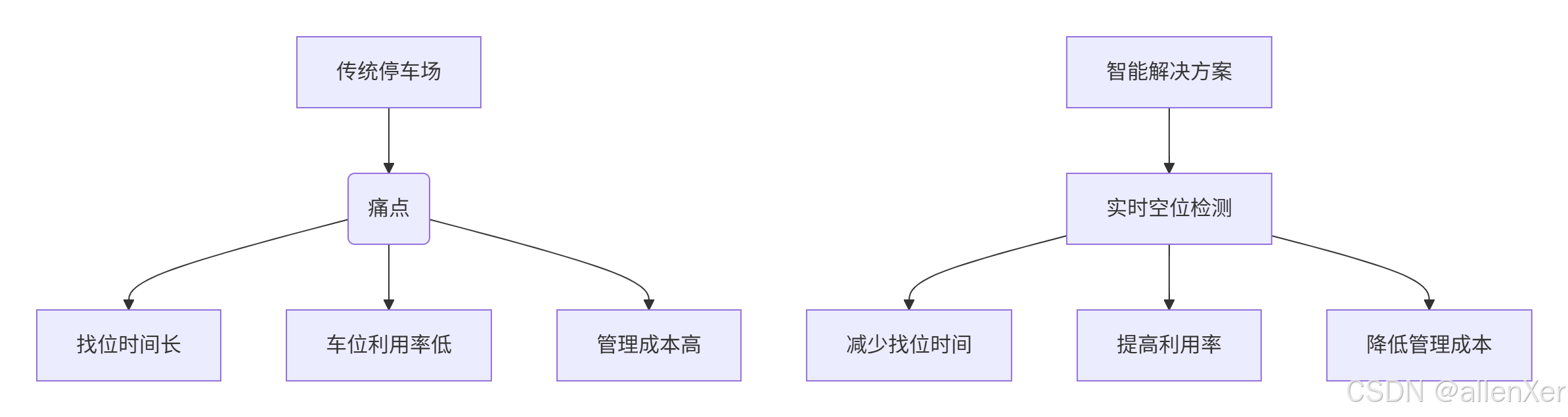
一、停车场管理痛点与解决方案
停车场数据统计:
- 全球停车场数量:500万+
- 平均找车位时间:10-15分钟
- 停车场利用率:60-75%
- 因找车位浪费的燃油:$67亿/年
- 智能停车系统市场:$50亿(2025年预测)
二、技术选型:YOLO为何成为最佳选择
1. 目标检测算法对比
| 算法 | 速度(FPS) | 精度(mAP) | 模型大小 | 适用场景 |
|---|---|---|---|---|
| R-CNN | 5 | 78% | 200MB | 高精度要求 |
| SSD | 22 | 75% | 25MB | 平衡场景 |
| YOLOv3 | 45 | 76% | 35MB | 实时检测 |
| YOLOv5 | 140 | 76.8% | 14MB | 工业级应用 |
| YOLOv8 | 160 | 78.5% | 12MB | 最新最优 |
2. YOLO架构演进

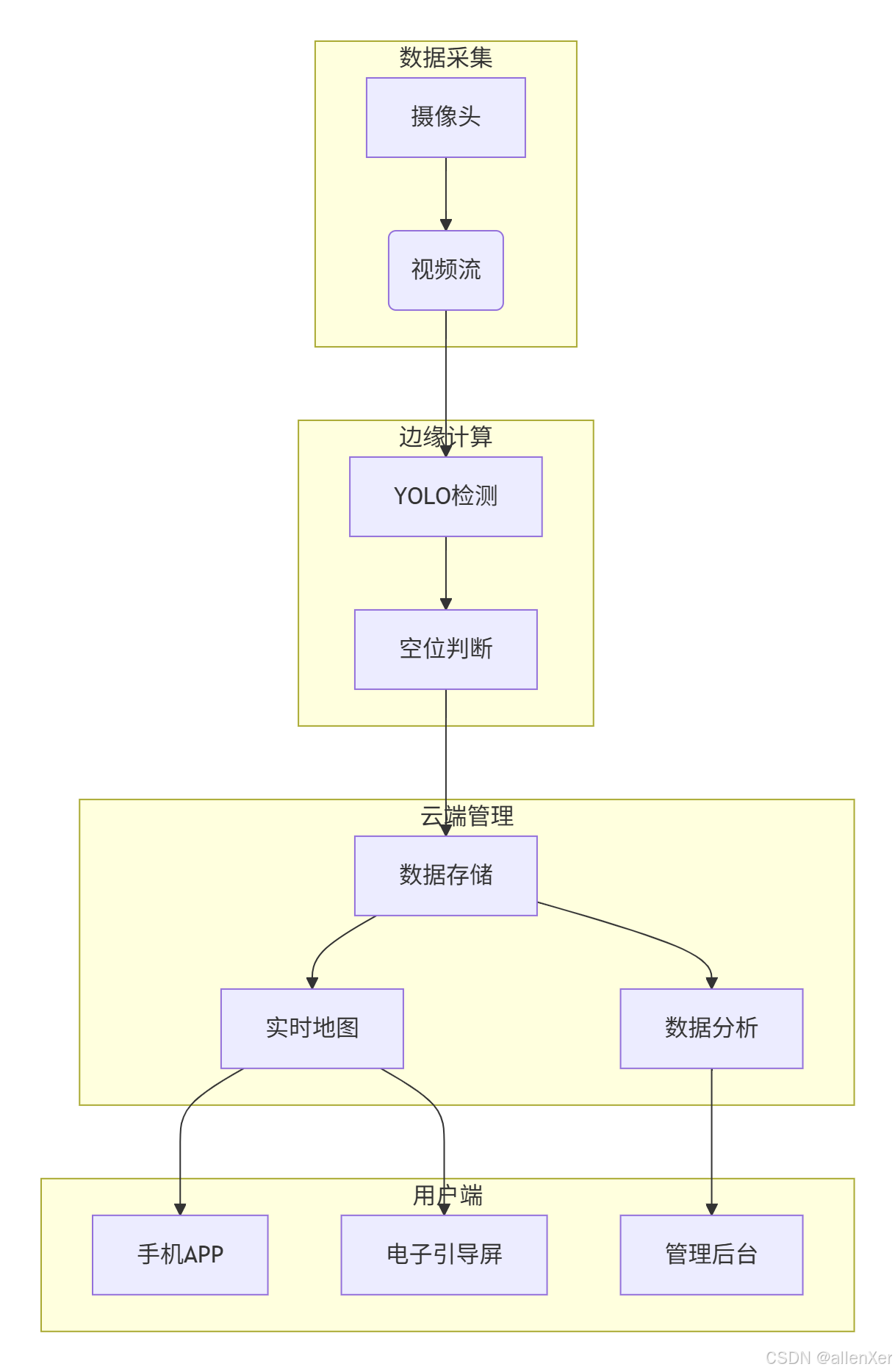
三、系统架构:智能停车场雷达设计
1. 整体架构图
2. 硬件部署方案

四、数据集准备:构建停车场专用数据集
1. 数据采集策略
import cv2
import os
import time

def capture_parking_data(camera_ip, output_dir, interval=10):
    """定时采集停车场图像"""
    cap = cv2.VideoCapture(camera_ip)
    if not cap.isOpened():
        print("无法连接摄像头")
        return

    os.makedirs(output_dir, exist_ok=True)
    count = 0

    while True:
        ret, frame = cap.read()
        if not ret:
            print("读取帧失败")
            break

        # 每10秒保存一帧
        if count % interval == 0:
            timestamp = time.strftime("%Y%m%d_%H%M%S")
            filename = os.path.join(output_dir, f"parking_{timestamp}.jpg")
            cv2.imwrite(filename, frame)
            print(f"保存图像: {filename}")

        count += 1
        time.sleep(1)

    cap.release()

# 示例:采集商场停车场数据
# capture_parking_data('rtsp://admin:password@192.168.1.64', 'data/parking_images')
2. 数据标注工具
from labelImg import LabelImg
import subprocess

def annotate_images(image_dir, output_dir):
    """使用LabelImg标注图像"""
    # 创建标注目录
    os.makedirs(output_dir, exist_ok=True)

    # 启动LabelImg
    cmd = f"labelImg {image_dir} {output_dir}"
    subprocess.run(cmd, shell=True)

    print("标注完成,生成XML文件")

# 转换标注格式
def convert_to_yolo_format(xml_dir, output_dir, classes):
    """将XML标注转换为YOLO格式"""
    os.makedirs(output_dir, exist_ok=True)

    for xml_file in os.listdir(xml_dir):
        if xml_file.endswith('.xml'):
            # 解析XML
            tree = ET.parse(os.path.join(xml_dir, xml_file))
            root = tree.getroot()

            # 获取图像尺寸
            size = root.find('size')
            width = int(size.find('width').text)
            height = int(size.find('height').text)

            # 创建YOLO格式文件
            txt_file = os.path.splitext(xml_file)[0] + '.txt'
            with open(os.path.join(output_dir, txt_file), 'w') as f:
                for obj in root.iter('object'):
                    cls = obj.find('name').text
                    if cls not in classes:
                        continue

                    cls_id = classes.index(cls)
                    xmlbox = obj.find('bndbox')
                    xmin = int(xmlbox.find('xmin').text)
                    ymin = int(xmlbox.find('ymin').text)
                    xmax = int(xmlbox.find('xmax').text)
                    ymax = int(xmlbox.find('ymax').text)

                    # 转换为YOLO格式
                    x_center = (xmin + xmax) / 2 / width
                    y_center = (ymin + ymax) / 2 / height
                    w = (xmax - xmin) / width
                    h = (ymax - ymin) / height

                    f.write(f"{cls_id} {x_center} {y_center} {w} {h}\n")

    print("转换完成,生成YOLO格式标注")
五、模型训练:定制YOLOv8停车场检测器
1. 训练环境配置
# 安装依赖
pip install ultralytics torch torchvision

# 创建数据集目录结构
dataset/
├── images/
│   ├── train/
│   └── val/
└── labels/
    ├── train/
    └── val/
2. 训练配置文件
# parking.yaml
path: ../dataset
train: images/train
val: images/val

names:
  0: car
  1: truck
  2: motorcycle
  3: empty
3. 训练代码
from ultralytics import YOLO
import torch

def train_yolo_model():
    """训练YOLOv8模型"""
    # 检查GPU
    device = 'cuda' if torch.cuda.is_available() else 'cpu'
    print(f"使用设备: {device}")

    # 加载预训练模型
    model = YOLO('yolov8n.pt')

    # 训练参数
    params = {
        'data': 'config/parking.yaml',
        'epochs': 100,
        'imgsz': 640,
        'batch': 16,
        'device': device,
        'optimizer': 'auto',
        'lr0': 0.01,
        'cos_lr': True,
        'patience': 20,
        'project': 'parking_detection',
        'name': 'yolov8_parking'
    }

    # 开始训练
    results = model.train(**params)

    # 导出模型
    model.export(format='onnx')

    return results

# 训练模型
train_results = train_yolo_model()
4. 模型评估
def evaluate_model(model_path, data_dir):
    """评估模型性能"""
    model = YOLO(model_path)

    # 验证集评估
    metrics = model.val(
        data='config/parking.yaml',
        split='val',
        imgsz=640,
        conf=0.25,
        iou=0.6
    )

    print(f"mAP50-95: {metrics.box.map:.4f}")
    print(f"mAP50: {metrics.box.map50:.4f}")

    # 可视化结果
    for img_file in os.listdir(os.path.join(data_dir, 'val')):
        img_path = os.path.join(data_dir, 'val', img_file)
        results = model.predict(img_path, save=True, conf=0.5)

    return metrics
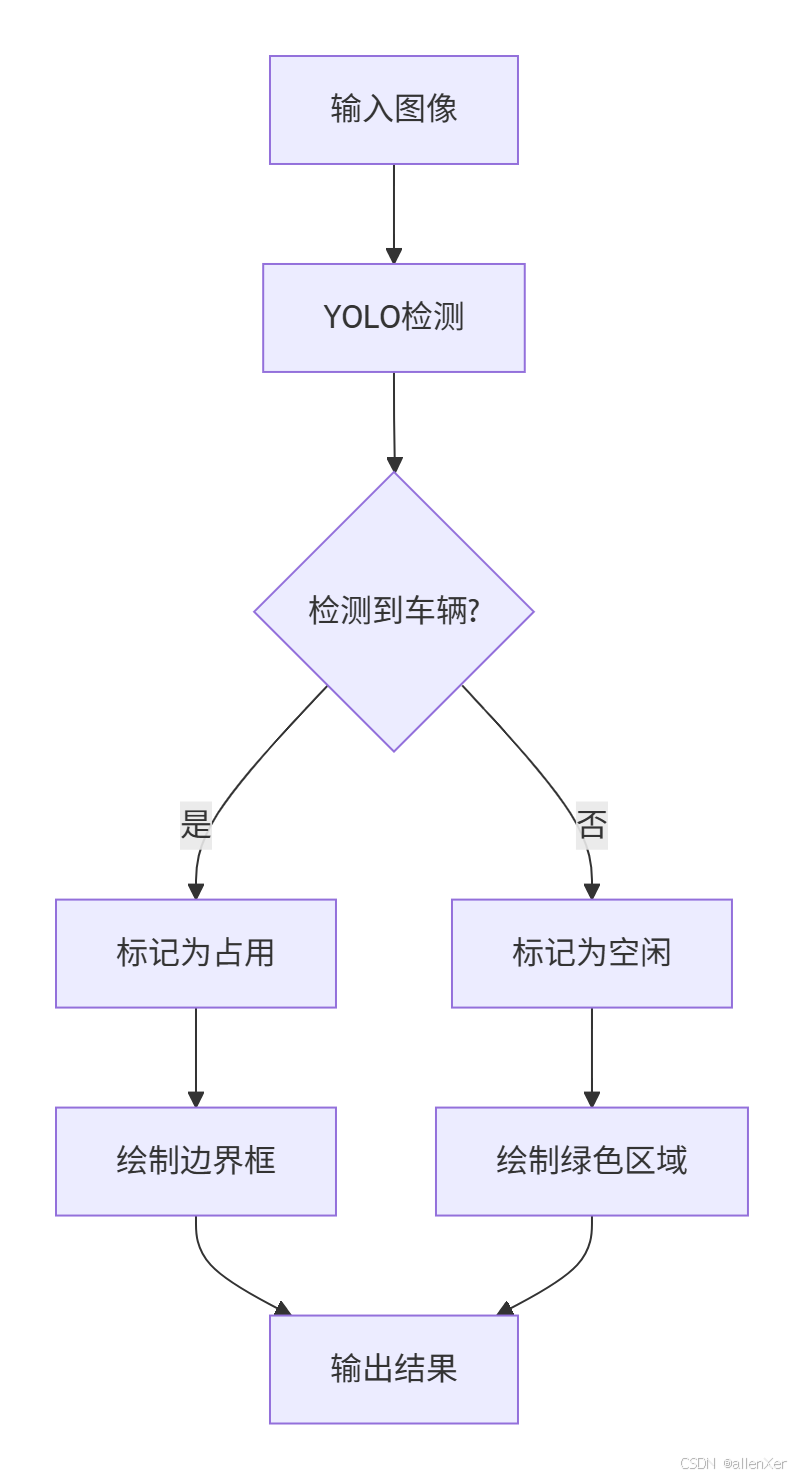
六、空位检测算法:从检测到状态判断
1. 车位状态判断流程
2. 车位映射算法
import numpy as np
import cv2

class ParkingSpaceMapper:
    """车位映射管理器"""
    def __init__(self, config_file):
        self.spaces = self.load_config(config_file)
        self.space_status = {id: 'unknown' for id in self.spaces.keys()}

    def load_config(self, file_path):
        """加载车位配置"""
        spaces = {}
        with open(file_path, 'r') as f:
            for line in f:
                if line.strip():
                    parts = line.split(',')
                    space_id = int(parts[0])
                    coords = np.array([float(x) for x in parts[1:]]).reshape(-1, 2)
                    spaces[space_id] = coords
        return spaces

    def draw_spaces(self, image):
        """在图像上绘制车位"""
        for space_id, points in self.spaces.items():
            color = (0, 255, 0) if self.space_status[space_id] == 'empty' else (0, 0, 255)
            cv2.polylines(image, [points.astype(int)], True, color, 2)
            cv2.putText(image, str(space_id), tuple(points[0].astype(int)),
                        cv2.FONT_HERSHEY_SIMPLEX, 0.5, (255, 255, 255), 1)
        return image

    def update_status(self, detections):
        """根据检测结果更新车位状态"""
        for space_id, points in self.spaces.items():
            # 创建车位掩码
            mask = np.zeros(image.shape[:2], dtype=np.uint8)
            cv2.fillPoly(mask, [points.astype(int)], 255)

            # 检查车位内是否有车辆
            occupied = False
            for det in detections:
                if det['class'] in ['car', 'truck', 'motorcycle']:
                    # 计算检测框与车位的IOU
                    box_mask = np.zeros(image.shape[:2], dtype=np.uint8)
                    x1, y1, x2, y2 = det['bbox']
                    cv2.rectangle(box_mask, (x1, y1), (x2, y2), 255, -1)

                    # 计算重叠区域
                    overlap = cv2.bitwise_and(mask, box_mask)
                    overlap_area = np.count_nonzero(overlap)
                    mask_area = np.count_nonzero(mask)

                    # 如果重叠超过20%,则认为车位被占用
                    if overlap_area > 0.2 * mask_area:
                        occupied = True
                        break

            self.space_status[space_id] = 'occupied' if occupied else 'empty'

    def get_vacant_spaces(self):
        """获取空闲车位"""
        return [id for id, status in self.space_status.items() if status == 'empty']
七、工业级部署:边缘计算优化
1. TensorRT加速
import tensorrt as trt

def convert_to_tensorrt(onnx_path, engine_path):
    """将ONNX模型转换为TensorRT引擎"""
    logger = trt.Logger(trt.Logger.INFO)
    builder = trt.Builder(logger)
    network = builder.create_network(1 << int(trt.NetworkDefinitionCreationFlag.EXPLICIT_BATCH))
    parser = trt.OnnxParser(network, logger)

    # 解析ONNX模型
    with open(onnx_path, 'rb') as model:
        if not parser.parse(model.read()):
            print("解析错误:")
            for error in range(parser.num_errors):
                print(parser.get_error(error))
            return None

    # 配置构建器
    config = builder.create_builder_config()
    config.set_memory_pool_limit(trt.MemoryPoolType.WORKSPACE, 1 << 30)  # 1GB

    # 设置精度
    if builder.platform_has_fast_fp16:
        config.set_flag(trt.BuilderFlag.FP16)

    # 构建引擎
    engine = builder.build_engine(network, config)
    with open(engine_path, 'wb') as f:
        f.write(engine.serialize())

    return engine

# 转换模型
convert_to_tensorrt('yolov8_parking.onnx', 'yolov8_parking.engine')
2. 边缘推理代码
import pycuda.driver as cuda
import pycuda.autoinit
import numpy as np

class YOLOTRTInference:
    """TensorRT推理引擎"""
    def __init__(self, engine_path):
        self.logger = trt.Logger(trt.Logger.INFO)
        self.engine = self.load_engine(engine_path)
        self.context = self.engine.create_execution_context()

        # 分配内存
        self.inputs, self.outputs, self.bindings, self.stream = self.allocate_buffers()

    def load_engine(self, engine_path):
        """加载TensorRT引擎"""
        with open(engine_path, 'rb') as f:
            runtime = trt.Runtime(self.logger)
            return runtime.deserialize_cuda_engine(f.read())

    def allocate_buffers(self):
        """分配输入输出内存"""
        inputs = []
        outputs = []
        bindings = []
        stream = cuda.Stream()

        for binding in self.engine:
            size = trt.volume(self.engine.get_binding_shape(binding)) * self.engine.max_batch_size
            dtype = trt.nptype(self.engine.get_binding_dtype(binding))

            # 分配内存
            host_mem = cuda.pagelocked_empty(size, dtype)
            device_mem = cuda.mem_alloc(host_mem.nbytes)

            bindings.append(int(device_mem))

            if self.engine.binding_is_input(binding):
                inputs.append({'host': host_mem, 'device': device_mem})
            else:
                outputs.append({'host': host_mem, 'device': device_mem})

        return inputs, outputs, bindings, stream

    def inference(self, image):
        """执行推理"""
        # 预处理图像
        input_data = self.preprocess(image)

        # 复制数据到设备
        np.copyto(self.inputs[0]['host'], input_data.ravel())
        cuda.memcpy_htod_async(self.inputs[0]['device'], self.inputs[0]['host'], self.stream)

        # 执行推理
        self.context.execute_async_v2(bindings=self.bindings, stream_handle=self.stream.handle)

        # 复制结果回主机
        cuda.memcpy_dtoh_async(self.outputs[0]['host'], self.outputs[0]['device'], self.stream)
        self.stream.synchronize()

        # 后处理
        return self.postprocess(self.outputs[0]['host'])

    def preprocess(self, image):
        """图像预处理"""
        # 调整大小
        img = cv2.resize(image, (640, 640))
        # 归一化
        img = img.astype(np.float32) / 255.0
        # 通道转换
        img = img.transpose(2, 0, 1)  # HWC to CHW
        # 添加批次维度
        img = np.expand_dims(img, axis=0)
        return img

    def postprocess(self, output):
        """后处理检测结果"""
        # 解析输出
        num_detections = int(output[0])
        boxes = output[1:1+num_detections*4].reshape(-1, 4)
        scores = output[1+num_detections*4:1+num_detections*5]
        classes = output[1+num_detections*5:1+num_detections*6].astype(int)

        # 转换为检测结果
        detections = []
        for i in range(num_detections):
            if scores[i] > 0.5:  # 置信度阈值
                x1, y1, x2, y2 = boxes[i]
                detections.append({
                    'bbox': [int(x1), int(y1), int(x2), int(y2)],
                    'score': float(scores[i]),
                    'class': self.class_names[classes[i]]
                })

        return detections
八、系统集成:完整停车场解决方案
1. 实时处理流程
import cv2
import time
from parking_mapper import ParkingSpaceMapper
from yolotrt_inference import YOLOTRTInference

class ParkingSystem:
    """智能停车场系统"""
    def __init__(self, camera_url, config_file, engine_path):
        self.camera_url = camera_url
        self.mapper = ParkingSpaceMapper(config_file)
        self.detector = YOLOTRTInference(engine_path)
        self.vacant_count = 0
        self.total_count = len(self.mapper.spaces)

    def run(self):
        """运行系统"""
        cap = cv2.VideoCapture(self.camera_url)
        if not cap.isOpened():
            print("无法连接摄像头")
            return

        while True:
            start_time = time.time()

            # 读取帧
            ret, frame = cap.read()
            if not ret:
                print("读取帧失败")
                time.sleep(1)
                continue

            # 执行检测
            detections = self.detector.inference(frame)

            # 更新车位状态
            self.mapper.update_status(detections)

            # 绘制结果
            result_frame = self.mapper.draw_spaces(frame)

            # 显示空闲车位数量
            self.vacant_count = len(self.mapper.get_vacant_spaces())
            cv2.putText(result_frame, f"空闲车位: {self.vacant_count}/{self.total_count}",
                        (20, 40), cv2.FONT_HERSHEY_SIMPLEX, 1, (0, 255, 0), 2)

            # 计算FPS
            fps = 1 / (time.time() - start_time)
            cv2.putText(result_frame, f"FPS: {fps:.1f}",
                        (20, 80), cv2.FONT_HERSHEY_SIMPLEX, 1, (0, 255, 0), 2)

            # 显示结果
            cv2.imshow('Parking System', result_frame)

            # 退出检测
            if cv2.waitKey(1) & 0xFF == ord('q'):
                break

        cap.release()
        cv2.destroyAllWindows()

    def get_vacant_spaces(self):
        """获取空闲车位列表"""
        return self.mapper.get_vacant_spaces()

    def get_vacant_count(self):
        """获取空闲车位数量"""
        return self.vacant_count

# 启动系统
if __name__ == "__main__":
    system = ParkingSystem(
        camera_url='rtsp://admin:password@192.168.1.64',
        config_file='parking_spaces.txt',
        engine_path='yolov8_parking.engine'
    )
    system.run()
2. 云端数据集成
import requests
import json
import time

class CloudIntegration:
    """云端数据集成"""
    def __init__(self, api_url, api_key):
        self.api_url = api_url
        self.headers = {'Authorization': f'Bearer {api_key}'}

    def send_parking_data(self, vacant_count, total_count, vacant_list):
        """发送停车场数据到云端"""
        data = {
            'timestamp': int(time.time()),
            'vacant_count': vacant_count,
            'total_count': total_count,
            'vacant_list': vacant_list
        }

        try:
            response = requests.post(
                f"{self.api_url}/parking/update",
                headers=self.headers,
                json=data,
                timeout=5
            )
            if response.status_code == 200:
                return True
            else:
                print(f"上传失败: {response.status_code}")
                return False
        except Exception as e:
            print(f"上传错误: {str(e)}")
            return False

# 集成到主系统
class ParkingSystemWithCloud(ParkingSystem):
    def __init__(self, camera_url, config_file, engine_path, cloud_api):
        super().__init__(camera_url, config_file, engine_path)
        self.cloud = CloudIntegration(cloud_api['url'], cloud_api['key'])
        self.last_update = 0

    def run(self):
        while True:
            # ... 原有处理逻辑 ...

            # 每分钟上传一次数据
            current_time = time.time()
            if current_time - self.last_update > 60:
                vacant_list = self.get_vacant_spaces()
                self.cloud.send_parking_data(
                    self.vacant_count,
                    self.total_count,
                    vacant_list
                )
                self.last_update = current_time
九、真实案例:成功与失败分析
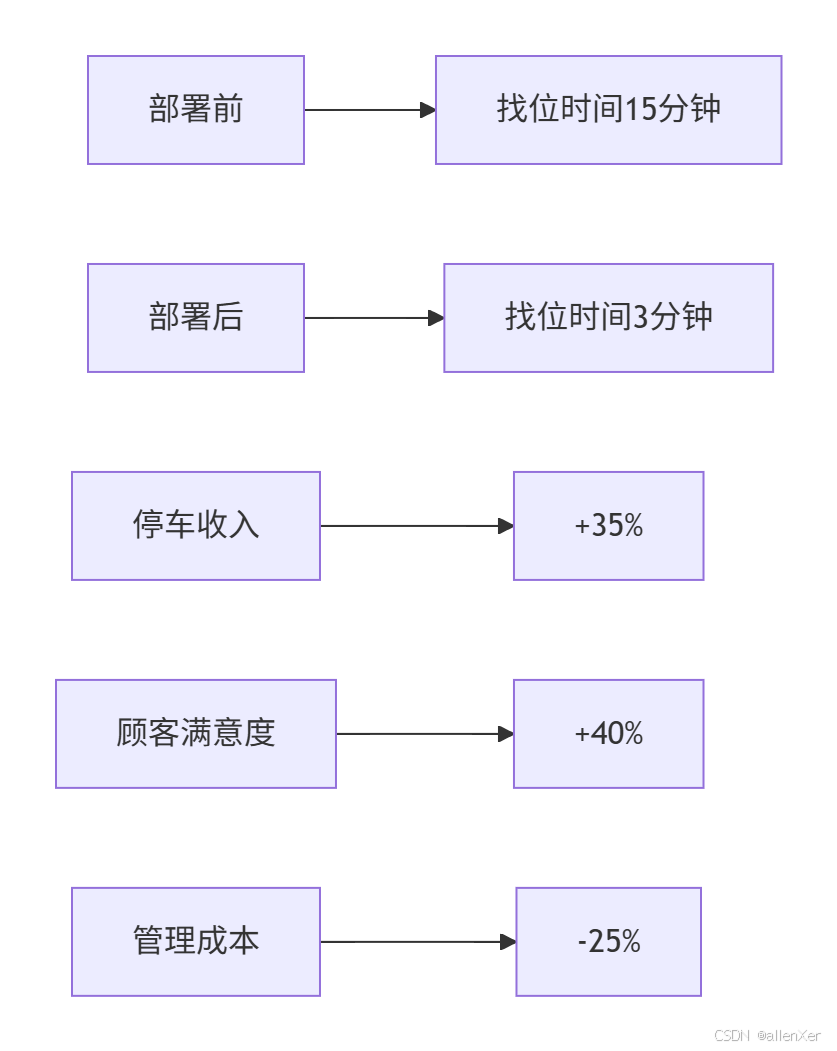
1. 成功案例:大型购物中心部署
项目背景:
- 地点:上海某购物中心
- 车位数量:1200个
- 摄像头:12台
- 部署时间:3天
实施效果:
技术亮点:
# 多摄像头融合算法
def fuse_camera_detections(camera_detections):
    """融合多摄像头检测结果"""
    fused = {}
    for cam_id, detections in camera_detections.items():
        for det in detections:
            # 转换到全局坐标系
            global_bbox = transform_coordinates(det['bbox'], cam_id)

            # 检查是否已存在
            existing = False
            for fid, fdet in fused.items():
                if calculate_iou(global_bbox, fdet['bbox']) > 0.7:
                    # 合并检测结果
                    fused[fid]['bbox'] = merge_boxes(global_bbox, fdet['bbox'])
                    fused[fid]['score'] = max(det['score'], fdet['score'])
                    existing = True
                    break

            if not existing:
                fused_id = len(fused) + 1
                fused[fused_id] = {
                    'bbox': global_bbox,
                    'score': det['score'],
                    'class': det['class']
                }

    return fused
2. 失败案例:露天停车场误检
问题分析:
- 光照变化导致检测失败
- 阴影误判为车辆
- 雨天反光影响
- 树影移动造成误报
解决方案:
- 添加光照不变性预处理
- 使用多帧验证机制
- 引入红外传感器辅助
- 部署天气自适应模型
十、工业级优化:全天候可靠检测
1. 光照不变性处理
def adaptive_illumination(image):
    """自适应光照处理"""
    # 转换到LAB颜色空间
    lab = cv2.cvtColor(image, cv2.COLOR_BGR2LAB)

    # 分离通道
    l, a, b = cv2.split(lab)

    # CLAHE增强L通道
    clahe = cv2.createCLAHE(clipLimit=3.0, tileGridSize=(8,8))
    cl = clahe.apply(l)

    # 合并通道
    limg = cv2.merge((cl, a, b))

    # 转换回BGR
    enhanced = cv2.cvtColor(limg, cv2.COLOR_LAB2BGR)

    return enhanced
2. 多帧验证机制
class DetectionValidator:
    """检测结果验证器"""
    def __init__(self, threshold=3):
        self.history = {}
        self.threshold = threshold

    def validate(self, detections):
        """验证检测结果"""
        valid_detections = []

        # 更新历史记录
        for det in detections:
            box = det['bbox']
            center = ((box[0]+box[2])//2, (box[1]+box[3])//2)

            # 查找匹配的历史检测
            matched = False
            for track_id, history in self.history.items():
                last_center = history['centers'][-1]
                distance = np.sqrt((center[0]-last_center[0])**2 + (center[1]-last_center[1])**2)

                if distance < 50:  # 匹配阈值
                    history['centers'].append(center)
                    history['count'] += 1
                    history['last_seen'] = 0

                    # 连续检测超过阈值则确认
                    if history['count'] >= self.threshold:
                        valid_detections.append(det)

                    matched = True
                    break

            if not matched:
                # 新检测
                track_id = len(self.history) + 1
                self.history[track_id] = {
                    'centers': [center],
                    'count': 1,
                    'last_seen': 0
                }

        # 更新未匹配的历史
        for track_id in list(self.history.keys()):
            self.history[track_id]['last_seen'] += 1
            if self.history[track_id]['last_seen'] > 5:  # 5帧未出现则删除
                del self.history[track_id]

        return valid_detections
3. 模型热更新系统
import requests

class ModelUpdater:
    """模型热更新系统"""
    def __init__(self, model_path, update_url):
        self.model_path = model_path
        self.update_url = update_url
        self.last_check = 0
        self.check_interval = 86400  # 每天检查一次

    def check_update(self):
        """检查模型更新"""
        current_time = time.time()
        if current_time - self.last_check < self.check_interval:
            return False

        try:
            response = requests.get(f"{self.update_url}/check_version", timeout=5)
            if response.status_code == 200:
                data = response.json()
                local_version = self.get_local_version()
                if data['version'] > local_version:
                    print(f"发现新模型版本: {data['version']}")
                    return self.download_model(data['model_url'])
        except Exception as e:
            print(f"检查更新失败: {str(e)}")

        self.last_check = current_time
        return False

    def download_model(self, model_url):
        """下载新模型"""
        try:
            response = requests.get(model_url, stream=True)
            if response.status_code == 200:
                temp_path = self.model_path + ".tmp"
                with open(temp_path, 'wb') as f:
                    for chunk in response.iter_content(chunk_size=8192):
                        f.write(chunk)

                # 替换旧模型
                os.replace(temp_path, self.model_path)
                print("模型更新成功")
                return True
        except Exception as e:
            print(f"下载模型失败: {str(e)}")
            return False

    def get_local_version(self):
        """获取本地模型版本"""
        version_file = os.path.join(os.path.dirname(self.model_path), "version.txt")
        if os.path.exists(version_file):
            with open(version_file, 'r') as f:
                return int(f.read().strip())
        return 0
十一、完整可运行系统
# 完整停车场系统
import cv2
import time
import numpy as np
from yolotrt_inference import YOLOTRTInference
from parking_mapper import ParkingSpaceMapper
from detection_validator import DetectionValidator
from cloud_integration import CloudIntegration

class AdvancedParkingSystem:
    """高级停车场系统"""
    def __init__(self, config):
        self.camera_url = config['camera_url']
        self.mapper = ParkingSpaceMapper(config['space_config'])
        self.detector = YOLOTRTInference(config['model_path'])
        self.validator = DetectionValidator()
        self.cloud = CloudIntegration(config['cloud_api'])
        self.illumination_adapter = config.get('illumination_adapter', True)
        self.total_count = len(self.mapper.spaces)
        self.vacant_count = 0
        self.fps = 0
        self.frame_count = 0
        self.start_time = time.time()

    def run(self):
        """运行系统"""
        cap = cv2.VideoCapture(self.camera_url)
        if not cap.isOpened():
            print("无法连接摄像头")
            return

        # 创建显示窗口
        cv2.namedWindow('智能停车场系统', cv2.WINDOW_NORMAL)
        cv2.resizeWindow('智能停车场系统', 1200, 800)

        while True:
            frame_start = time.time()

            # 读取帧
            ret, frame = cap.read()
            if not ret:
                print("读取帧失败")
                time.sleep(1)
                continue

            # 光照自适应
            if self.illumination_adapter:
                frame = self.adapt_illumination(frame)

            # 执行检测
            detections = self.detector.inference(frame)

            # 验证检测结果
            valid_detections = self.validator.validate(detections)

            # 更新车位状态
            self.mapper.update_status(valid_detections)

            # 绘制结果
            result_frame = self.mapper.draw_spaces(frame)

            # 更新空闲车位计数
            self.vacant_count = len(self.mapper.get_vacant_spaces())

            # 显示统计信息
            self.display_stats(result_frame)

            # 显示结果
            cv2.imshow('智能停车场系统', result_frame)

            # 更新FPS计算
            self.update_fps(frame_start)

            # 每分钟上传数据到云端
            if self.frame_count % 1800 == 0:  # 30fps * 60s = 1800帧
                self.upload_to_cloud()

            # 退出检测
            if cv2.waitKey(1) & 0xFF == ord('q'):
                break

        cap.release()
        cv2.destroyAllWindows()

    def adapt_illumination(self, image):
        """自适应光照处理"""
        # 使用CLAHE增强对比度
        lab = cv2.cvtColor(image, cv2.COLOR_BGR2LAB)
        l, a, b = cv2.split(lab)
        clahe = cv2.createCLAHE(clipLimit=3.0, tileGridSize=(8,8))
        cl = clahe.apply(l)
        limg = cv2.merge((cl, a, b))
        return cv2.cvtColor(limg, cv2.COLOR_LAB2BGR)

    def display_stats(self, frame):
        """显示统计信息"""
        # 空闲车位
        cv2.putText(frame, f"空闲车位: {self.vacant_count}/{self.total_count}",
                    (20, 40), cv2.FONT_HERSHEY_SIMPLEX, 1, (0, 255, 0), 2)

        # FPS
        cv2.putText(frame, f"FPS: {self.fps:.1f}",
                    (20, 80), cv2.FONT_HERSHEY_SIMPLEX, 1, (0, 255, 0), 2)

        # 系统运行时间
        elapsed = time.time() - self.start_time
        hours = int(elapsed // 3600)
        minutes = int((elapsed % 3600) // 60)
        cv2.putText(frame, f"运行时间: {hours}h{minutes}m",
                    (20, 120), cv2.FONT_HERSHEY_SIMPLEX, 1, (0, 255, 0), 2)

    def update_fps(self, frame_start):
        """更新FPS计算"""
        self.frame_count += 1
        frame_time = time.time() - frame_start
        self.fps = 1 / frame_time if frame_time > 0 else 0

    def upload_to_cloud(self):
        """上传数据到云端"""
        vacant_list = self.mapper.get_vacant_spaces()
        self.cloud.send_parking_data(
            self.vacant_count,
            self.total_count,
            vacant_list
        )

# 配置参数
config = {
    'camera_url': 'rtsp://admin:password@192.168.1.64',
    'space_config': 'config/parking_spaces.txt',
    'model_path': 'models/yolov8_parking.engine',
    'cloud_api': {
        'url': 'https://api.example.com',
        'key': 'your_api_key'
    },
    'illumination_adapter': True
}

# 启动系统
if __name__ == "__main__":
    system = AdvancedParkingSystem(config)
    system.run()
结语:打造智慧城市新基建
通过本指南,您已掌握:
- 🚗 YOLO目标检测核心技术
- 📍 车位映射与状态判断
- ⚡ 边缘计算优化部署
- ☁️ 云端数据集成
- 🌦️ 全天候可靠检测方案
下一步行动:
- 部署到本地停车场
- 集成车牌识别功能
- 添加停车时长分析
- 开发用户导航APP
- 扩展至城市级停车网络
"在智慧城市的蓝图中,每一个车位都是数据节点。掌握计算机视觉,你就能连接这些节点,构建智能交通新生态。"

DAMO开发者矩阵,由阿里巴巴达摩院和中国互联网协会联合发起,致力于探讨最前沿的技术趋势与应用成果,搭建高质量的交流与分享平台,推动技术创新与产业应用链接,围绕“人工智能与新型计算”构建开放共享的开发者生态。
更多推荐
 13
13 0
0- 0


 已为社区贡献4条内容

所有评论(0)