HPL-用于分布式内存计算机的高性能Linpack基准的便携式实现测试
软件准备:
[root@heavydb hpl]# cat /etc/redhat-release
CentOS Linux release 7.9.2009 (Core)
[root@heavydb hpl]# pwd
/hpl
[root@heavydb hpl]# ls -lt
total 39024
drwxr-xr-x 11 root games 4096 Jun 15 12:13 hpl-2.3
drwxr-xr-x 14 root root 4096 Jun 15 12:06 mpich-main
drwxr-xr-x 7 root root 75 Jun 15 12:05 mpich
drwxr-xr-x 7 502 games 276 Jun 15 12:01 CBLAS
drwxr-xr-x 4 1001 1001 8192 Jun 15 11:59 BLAS-3.10.0
drwxrwxr-x. 7 501 games 4096 Jun 14 16:45 libtool-2.4.6
drwxr-xr-x. 11 1000 1000 4096 Jun 14 16:42 automake-1.16.5
-rw-r--r-- 1 root root 9603054 Jun 15 09:54 mpich-main.zip
-rw-r--r--. 1 root root 1601740 Oct 4 2021 automake-1.16.5.tar.xz
-rw-r--r-- 1 root root 296610 Jun 30 2021 blas-3.10.0.tgz
-rw-r--r-- 1 root root 660871 Dec 3 2018 hpl-2.3.tar.gz
-rw-r--r--. 1 root root 1806697 Feb 16 2015 libtool-2.4.6.tar.gz
-rw-r--r-- 1 root root 197468 Jan 21 2011 cblas.tgz
-rw-r--r-- 1 root root 31332 Mar 25 1998 ssgemmbased.tgz
如下依赖包安装准备,可避免后续autogen.sh的各种报错。
yum install python3.*
wget https://ftp.gnu.org/gnu/automake/automake-1.16.5.tar.xz --no-check-certificate
tar -xf automake-1.16.5.tar.xz
cd automake-1.16.5
./configure
make && make install
which automake

wget http://mirrors.ustc.edu.cn/gnu/libtool/libtool-2.4.6.tar.gz
tar -zxvf libtool-2.4.6.tar.gz
cd libtool-2.4.6
./configure --prefix=/usr
make && make install
libtool --version
cp -rp /usr/share/aclocal/* /usr/local/share/aclocal/*
1.GCC/Fortran77 编译器
检查环境,会输出版本信息
gfortran -v
gcc -v
[root@heavydb hpl]# gfortran -v
Using built-in specs.
COLLECT_GCC=gfortran
COLLECT_LTO_WRAPPER=/usr/libexec/gcc/x86_64-redhat-linux/4.8.5/lto-wrapper
Target: x86_64-redhat-linux
Configured with: ../configure --prefix=/usr --mandir=/usr/share/man --infodir=/usr/share/info --with-bugurl=http://bugzilla.redhat.com/bugzilla --enable-bootstrap --enable-shared --enable-threads=posix --enable-checking=release --with-system-zlib --enable-__cxa_atexit --disable-libunwind-exceptions --enable-gnu-unique-object --enable-linker-build-id --with-linker-hash-style=gnu --enable-languages=c,c++,objc,obj-c++,java,fortran,ada,go,lto --enable-plugin --enable-initfini-array --disable-libgcj --with-isl=/builddir/build/BUILD/gcc-4.8.5-20150702/obj-x86_64-redhat-linux/isl-install --with-cloog=/builddir/build/BUILD/gcc-4.8.5-20150702/obj-x86_64-redhat-linux/cloog-install --enable-gnu-indirect-function --with-tune=generic --with-arch_32=x86-64 --build=x86_64-redhat-linux
Thread model: posix
gcc version 4.8.5 20150623 (Red Hat 4.8.5-44) (GCC)
[root@heavydb hpl]# gcc -v
Using built-in specs.
COLLECT_GCC=gcc
COLLECT_LTO_WRAPPER=/usr/libexec/gcc/x86_64-redhat-linux/4.8.5/lto-wrapper
Target: x86_64-redhat-linux
Configured with: ../configure --prefix=/usr --mandir=/usr/share/man --infodir=/usr/share/info --with-bugurl=http://bugzilla.redhat.com/bugzilla --enable-bootstrap --enable-shared --enable-threads=posix --enable-checking=release --with-system-zlib --enable-__cxa_atexit --disable-libunwind-exceptions --enable-gnu-unique-object --enable-linker-build-id --with-linker-hash-style=gnu --enable-languages=c,c++,objc,obj-c++,java,fortran,ada,go,lto --enable-plugin --enable-initfini-array --disable-libgcj --with-isl=/builddir/build/BUILD/gcc-4.8.5-20150702/obj-x86_64-redhat-linux/isl-install --with-cloog=/builddir/build/BUILD/gcc-4.8.5-20150702/obj-x86_64-redhat-linux/cloog-install --enable-gnu-indirect-function --with-tune=generic --with-arch_32=x86-64 --build=x86_64-redhat-linux
Thread model: posix
gcc version 4.8.5 20150623 (Red Hat 4.8.5-44) (GCC)
[root@heavydb hpl]#
如果没有,则安装
sudo yum install gcc
sudo yum install gcc-gfortran
2.安装向量和矩阵运算库函数
BLAS/CBLAS/ATLAS 库
安装步骤
下载 blas-3.10.0.tgz:
wget http://www.netlib.org/blas/blas-3.10.0.tgz
解压包:
tar -xzf blas-3.10.0.tgz
切换目录:
cd BLAS-3.10.0
编译生成blas_LINUX.a:
make
链接.o文件生成libblas.a文件:
ar rv libblas.a *.o
切换目录:对于我,回到HPL目录下
cd ..
下载 cblas.tgz:
wget http://www.netlib.org/blas/blast-forum/cblas.tgz
解压包:
tar -xzf cblas.tgz
切换目录:
cd CBLAS
将第4步产生的.a文件拷贝到当前目录:
cp ../BLAS-3.10.0/blas_LINUX.a ./
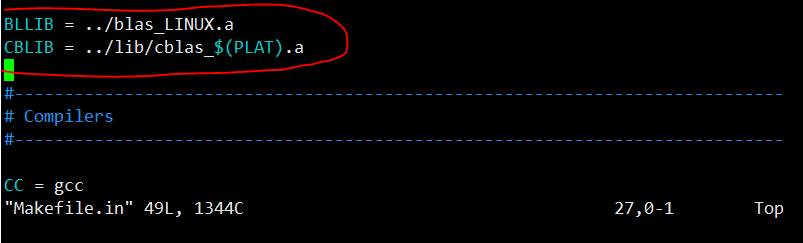
修改Makefile.in文件中的BLLIB:
vim Makefile.in
在Makefile.in里修改这两个
BLLIB = ../blas_LINUX.a
CBLIB = ../lib/cblas_$(PLAT).a
编译:
make
测试运行:
./testing/xzcblat1
3.MPICH 并行环境
下载 mpich最新版:(如果选择4.0.2版本,编译失败。注意moudel需要单独下载拷贝,否则./autogen.sh失败)
git clone https://github.com/pmodels/mpich.git
切换到主目录:
cd mpich-main
设置安装路径:/hpl/mpich
./configure --disable-cxx --prefix=/hpl/mpich 2>&1 | tee c.txt
编译:
make 2>&1 | tee m.txt
安装:
make install 2>&1 | tee mi.txt
临时配置环境变量:/etc/profile
export PATH=/hpl/mpich/bin:$PATH
export LD_LIBRARY_PATH=/hpl/mpich/lib:$LD_LIBRARY_PATH
查看前面工作是否成功:
which mpicc && which mpiexec

创建目录(在源代码目录中):
cd /hpl/mpich-main
mkdir machinefile
测试运行:
mpiexec -f machinefile -n 3 hostname && mpiexec -n 5 -f machinefile ./examples/cpi

4.Linpack之HPL测试 (HPL Benchmark)
到达压缩包要下载的目录
cd /hpl
cp CBLAS/lib/* /usr/local/lib/
cp BLAS-3.8.0/blas_LINUX.a /usr/local/lib/
下载 hpl-2.3.tar.gz:
wget http://www.netlib.org/benchmark/hpl/hpl-2.3.tar.gz
解压包:
tar -xzf hpl-2.3.tar.gz
切换目录:
cd hpl-2.3
cp setup/Make.Linux_PII_CBLAS ./
打开Make.top文件:
vim Make.top
修改变量值:
arch = Linux_PII_CBLAS
关闭Make.top文件:
:wq
打开Makefile文件:
vim Makefile
修改变量值:
arch = Linux_PII_CBLAS
关闭Makefile文件:
:wq
打开Make.Linux_PII_CBLAS:
vim Make.Linux_PII_CBLAS
修改Make.Linux_PII_CBLAS文件中的变量:
ARCH = Linux_PII_CBLAS
TOPdir = /hpl/hpl-2.3
MPdir = /hpl/mpich
MPlib = $(MPdir)/lib/libmpi.so /usr/lib64/libpthread.so /usr/lib64/libc.so
LAdir = /usr/local/lib
LAinc =
LAlib = $(LAdir)/cblas_LINUX.a $(LAdir)/blas_LINUX.a
CC = /hpl/mpich/bin/mpicc
LINKER = /hpl/mpich/bin/mpif77
关闭Make.Linux_PII_CBLAS文件,只读文件,加上!强制保存写并退出。
:wq!
编译:
make arch=Linux_PII_CBLAS
如果报错,可能原因有,Make.Linux_PII_CBLAS中的路径没有改对,路径要与自己实际的安装路径相符,可以一一对照,看看路径下对应的文件是否存在。也可能原因,Makefile文件格式严苛,不要随意用空格,路径前后有空格虽然看不出来,但是Makefile文件能认出来。路径特别是mpich-install的路径不要弄错,环境变量再检查检查。若还不行,按照步骤删掉,都重来一遍。
若无报错,运行测试:
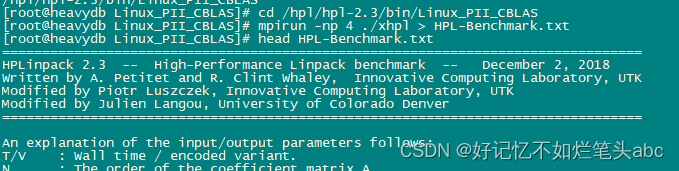
cd /hpl/hpl-2.3/bin/Linux_PII_CBLAS
mpirun -np 4 ./xhpl > HPL-Benchmark.txt

相关参考:
HPL-用于分布式内存计算机的高性能Linpack基准的便携式实现
https://blog.51cto.com/u_15346769/3689788
GPU的HPL基准测试 - liu_shaobo - 博客园
CPU的HPL基准测试 - liu_shaobo - 博客园
编译libtool遇到的问题处理:
Libtool library used but ‘LIBTOOL‘ is undefined_好记忆不如烂笔头abc的博客-CSDN博客

DAMO开发者矩阵,由阿里巴巴达摩院和中国互联网协会联合发起,致力于探讨最前沿的技术趋势与应用成果,搭建高质量的交流与分享平台,推动技术创新与产业应用链接,围绕“人工智能与新型计算”构建开放共享的开发者生态。
更多推荐


 0
0 0
0- 0


 已为社区贡献15条内容

所有评论(0)