图形学 实验四 梁barsky算法
核心思想:
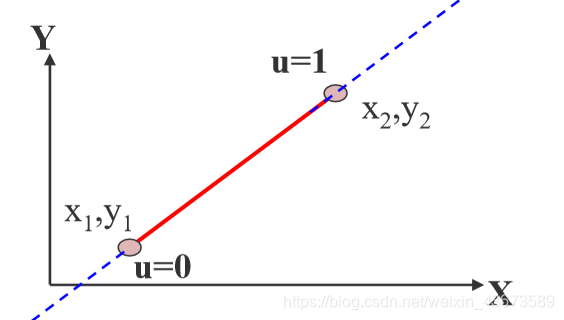
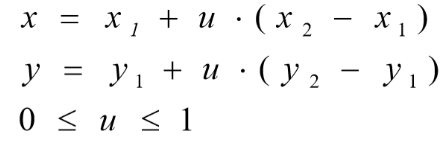
用参数方程表示一条直线
已知一条线段的起点(x1,y1)、终点(x2,y2),就可以通过一个参数u,表示这条线段所在直线上的任意一个点(x,y)
x=x1+u(x2-x1)
y=y1+u(y2-y1)
其中:
(x,y)是直线上任意一点
(x1,y1)是线段的起点
(x2,y2)是线段的终点
Δx是x2-x1
Δy是y2-y1
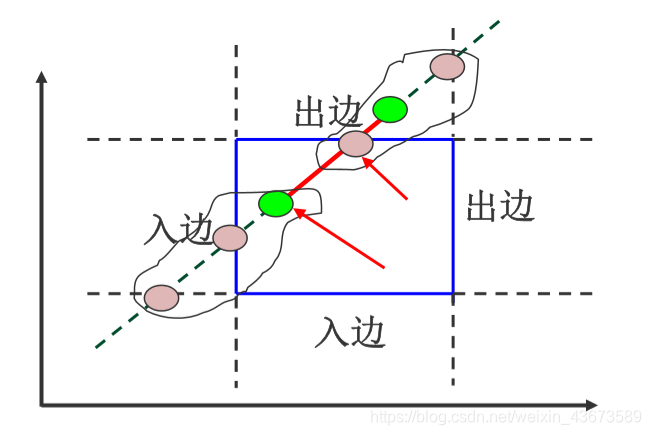
辅助概念
左下:入边
右上:出边
现在,
用u1表示可见部分的起点的参数u
用u2表示可见部分的终点的参数u
那么,
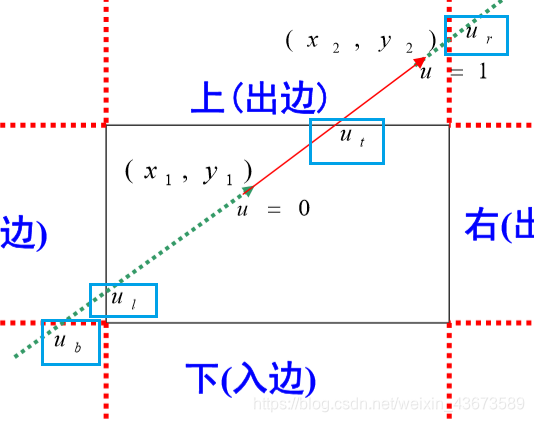
u1=max(0,ul,ub)
u2=min(1,ut,ur)
其中,
ul ub 分别是直线与窗口左边、下边交点的参数u
ut ur 分别是直线与窗口上边、右边交点的参数u
u=0表示起点
u=1表示终点
直线段的参数方程(一个参数u对应一个点)
u=0是起点,u=1是终点
x1,y1是起点
x2,y2是终点
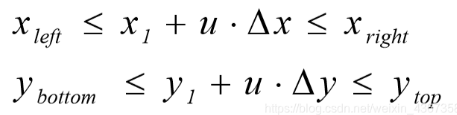
现在我们要的是在窗口内的点,那么这些点的参数方程就要满足下面的不等式关系
我们关注的是参数u的值,要获取这些窗口内的点(x,y),就要知道它们的多个u值
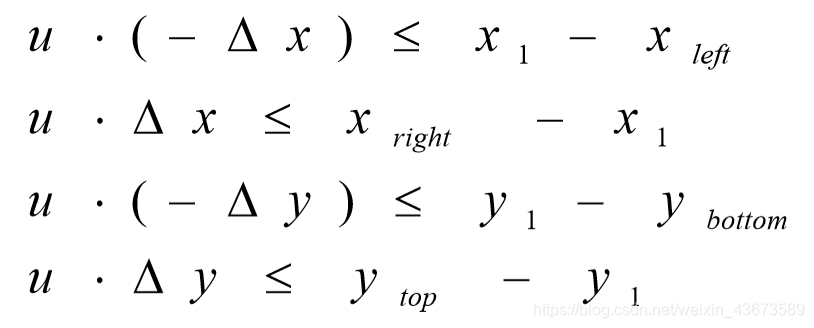
为了方便,我们把不等式拆分成下面这个形式,均为小于号
每一行的u分别是ul、ur、ub、ut
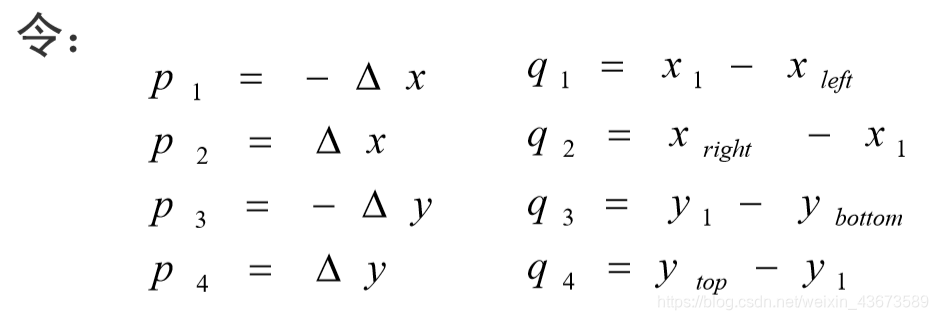
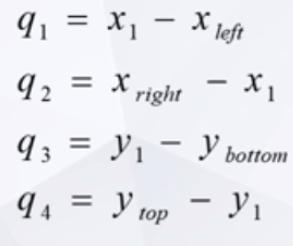
再为了方便,用两个字母及其对应下标(8个变量)对不等式左右两边除了u的部分分别进行表记
数字与边的对应关系:
1l、2r、3b、4t
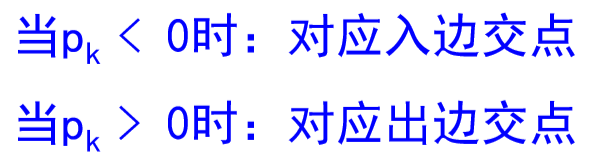
lb为入边,rt为出边
这就有了
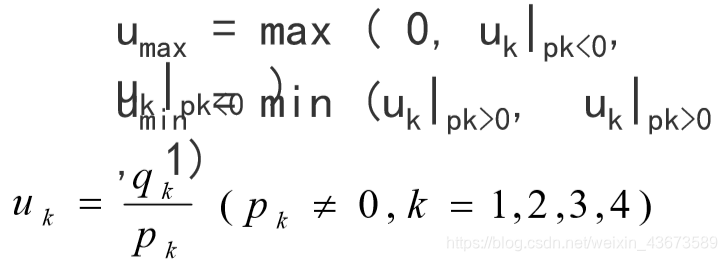
现在我们就得到了u的表达式
uk是窗口边界及其延长线的交点的对应参数值,将这个参数值代入方程就可以获取该点的位置


算法举例:
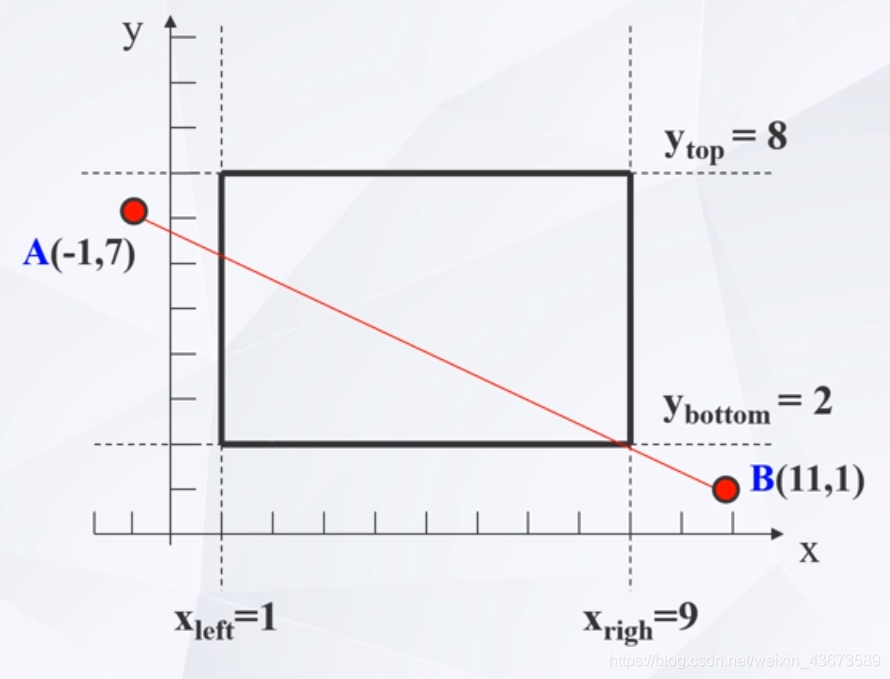
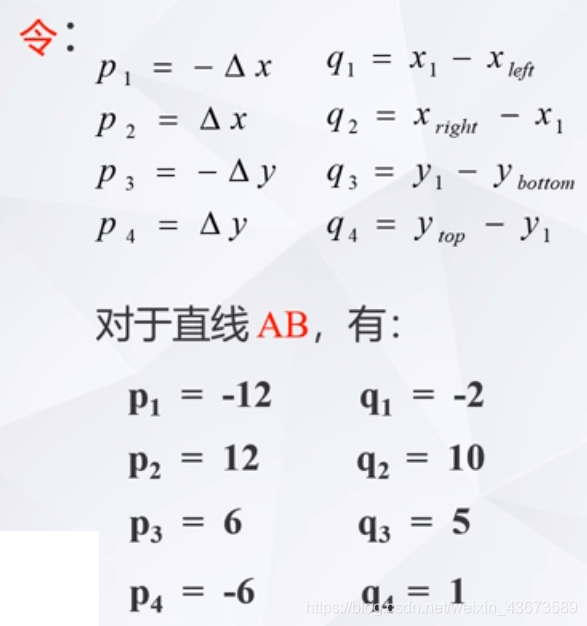
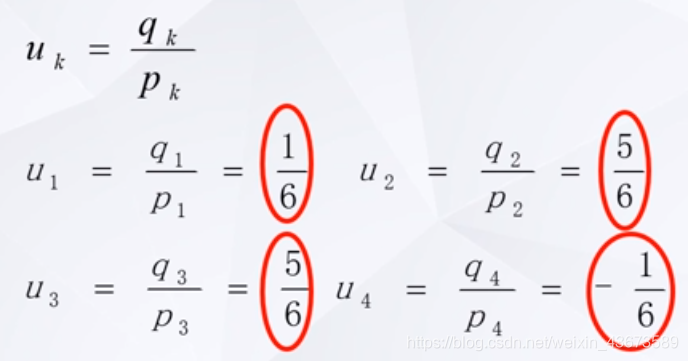
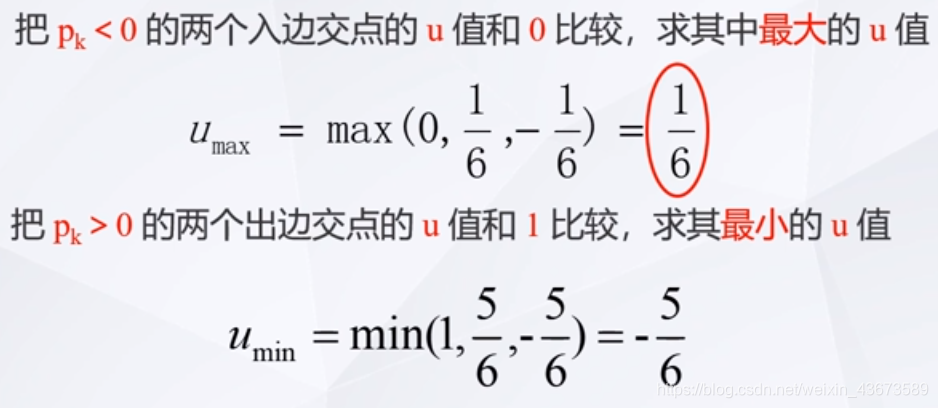
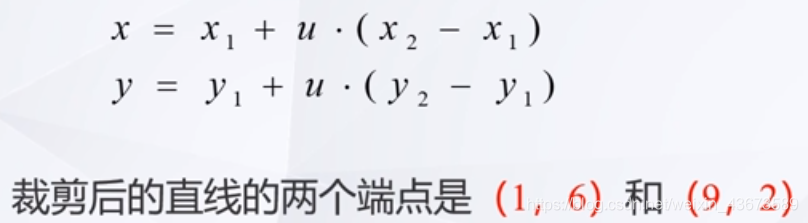
算法的具体步骤:
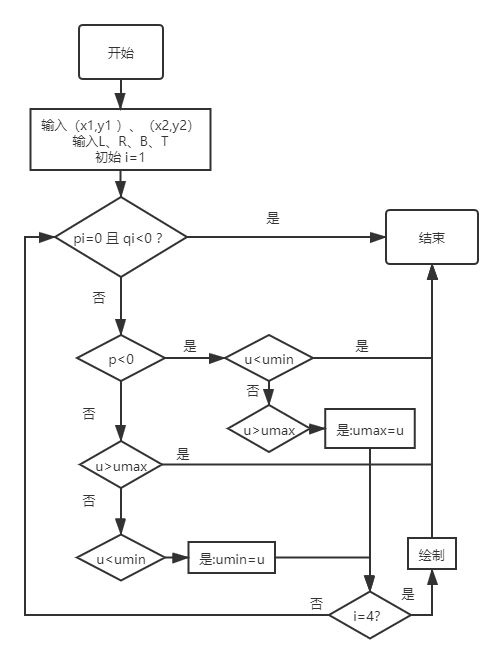
(1)输入线段的起点、终点(x1,y1 )、(x2,y2)以及窗口边界的横纵坐标:wxl、wxr、wyb和wyt。w代表窗口,windows。l、r、b、t分别代表left、right、bottom、top。
(2)直线垂直的情况:
若△X=0,则p1=p2=0,此时进一步判断是否满足q1<0或q2<0 ,若满足,则该直线段不在窗口内,算法转(7)-结束。否则 ,满足q1≥0且q2≥0,则进一步计算umax和umin :
算法转(5)
(3)直线水平的情况;
若△y=0,则p3=p4=0,此时进一步判断是否满足q3<0或q4<0 ,若满足,则该直线段不在窗口内,算法转(7)。否则,满 足q3 ≥0且q4 ≥0,则进一步计算umax和umin :
注:p的绝对值是横纵坐标的△x或△y,若p=0,就是平行于边界
如果p已经=0了,又同时有q<0,就是线段的起点在边界外,则线段在边界外
(4)一般情况:
若上述两条均不满足,则有pk≠0(k=1,2,3,4), 此时计算umax和umin:
(5)求得umax和umin后,进行判断:若umax>umin ,则直线段在窗口外,算法转(7)。若umax ≤umin,利用直线的参数方程
(6)利用直线的扫描转换算法绘制在窗口内的直线段
(7)算法结束
流程图:
附:作图地址
代码:
/*
 *  clip.cpp
 *  This program clips the line with the given window.
 */
#include <windows.h>
#include <glut.h>
#include <math.h>
#include <stdio.h>
#include <iostream>

using namespace std;

//矩形的四边界,使用函数表示法,比如x=L,表示矩形左边界所在直线
float L, R, B, T;

void myinit(void)
{
	glShadeModel(GL_FLAT);
	glClearColor(0.0, 0.0, 0.0, 0.0);
}

void myReshape(int w, int h)
{
	glViewport(0, 0, w, h);
	glMatrixMode(GL_PROJECTION);
	glLoadIdentity();
	if (w <= h)
		gluOrtho2D(0.0, 1.0, 0.0, 1.0*(GLfloat)h / (GLfloat)w);
	else
		gluOrtho2D(0.0, 1.0*(GLfloat)w / (GLfloat)h, 0.0, 1.0);
	glMatrixMode(GL_MODELVIEW);
}

//求裁剪后所得端点的u值,即在2组*3个u中,求出u的极大值、极小值
int getu(float p, float q, float* umax, float* umin)
{
	//假定当前点u的状态为可见
	int flag = 1;                           //flag为标志变量,0表示舍弃,1表示可见
	//参数u
	float u;
	//当前处理入边不等式,入边求大,小的点将直接被舍弃
	if (p < 0.0)
	{
		//求参数u
		u = q / p;
		if (u < *umin)//这个点比最小的点还要小,舍弃
			flag = 0;
		else if (u > *umax)
			*umax = u;                        //求 入边umax
	}
	//当前处理出边不等式,出边求小,大的点将直接被舍弃
	else if (p > 0.0) {
		u = q / p;
		if (u > *umax)//这个点比最大的点还要小,舍弃
			flag = 0;
		else if (u < *umin)
			*umin = u;                        //求 出边umin
	}
	else if (q < 0 && p == 0)               //p=0,就是deltax或deltay=0,平行于边界。p<0并且q<0,平行或垂直线的点在边界外。
		flag = 0;
	return flag;
}

void myclip()
// line clipping algorithm 直线裁剪算法
{
	float dx, dy;
	float x1, x2, y1, y2;
	float umin, umax;
	umin = 0, umax = 1.0;

	cout << "输入线段的起点、终点(x1,y1)、(x2,y2):" << endl;
	cin >> x1 >> y1 >> x2 >> y2;
	//求出不等式中需要的dx、dy
	dx = x2 - x1; dy = y2 - y1;

	//画一条线段
	glBegin(GL_LINES);
	glColor4f(0.0, 0.0, 0.0, 0.0);
	//设定线的端点
	glVertex2f(x1, y1);                     // 起点
	glVertex2f(x2, y2);                     // 终点
	//结束绘制
	glEnd();
	//分别求出不等式的四组u值,但凡有一组不等式判断直线不在边界内,返回子为0,直接结束
	if (getu(-dx, x1 - L, &umin, &umax))//求第一个不等式的u值,入边求大
		if (getu(dx, R - x1, &umin, &umax)) //求第二个不等式的u值,出边求小
			if (getu(-dy, y1 - B, &umin, &umax))//求第三个不等式的u值,入边求大
				if (getu(dy, T - y1, &umin, &umax))//求第四个不等式的u值,出边求小
				{
					if (umax < 1.0)
					{
						x2 = x1 + umax * dx;  //求得裁剪后的终点
						y2 = y1 + umax * dy;
					}
					if (umin > 0.0)
					{
						x1 = x1 + umin * dx;  //求得裁剪后的起点
						y1 = y1 + umin * dy;
					}
					glBegin(GL_LINES);
					glColor4f(1.0, 0.0, 0.0, 1.0);
					glVertex2f(x1, y1);     // clipped line startpoint
					glVertex2f(x2, y2);     // clipped line endpoint
					glEnd();
				}
}

void display(void)
{
	glClear(GL_COLOR_BUFFER_BIT);
	// ------------------------------------
	//  please define your own line segment and draw
	//  it here with different color and line width
	// ------------------------------------
	cout<<"请输入矩形的左、右、下、上边界:"<<endl;
	cin >> L>>R>>B>>T;
	glColor4f(0.7, 0.0, 0.7, 0.55);
	glBegin(GL_POLYGON);
	glVertex2f(L, B); // Bottom Left
	glVertex2f(R, B); // Bottom Left
	glVertex2f(R, T); // Bottom Right
	glVertex2f(L, T); // Bottom Right
	glEnd();
	//-------------------------------
	//do the clipping in myclip() funtion
	//-------------------------------
	myclip();
	// ------------------------------------
	//  please draw clipped line here with another
	//  color and line width
	// ------------------------------------
	glFlush();
}

/*  Main Loop
 *  Open window with initial window size, title bar,
 *  RGBA display mode, and handle input events.
 */
int main(int argc, char** argv)
{
	glutInit(&argc, argv);
	glutInitDisplayMode(GLUT_SINGLE | GLUT_RGBA);
	//define size and the relative positon of the applicaiton window on the display
	glutInitWindowSize(500, 500);
	glutInitWindowPosition(100, 100);
	//init the defined window with "argv[1]" as topic showed on the top the window
	glutCreateWindow(argv[0]);
	// opengl setup
	myinit();
	//define callbacks
	glutDisplayFunc(display);
	glutReshapeFunc(myReshape);
	//enter the loop for display
	glutMainLoop();
	return 1;
}

DAMO开发者矩阵,由阿里巴巴达摩院和中国互联网协会联合发起,致力于探讨最前沿的技术趋势与应用成果,搭建高质量的交流与分享平台,推动技术创新与产业应用链接,围绕“人工智能与新型计算”构建开放共享的开发者生态。
更多推荐

 2
2 0
0- 0


 已为社区贡献4条内容

所有评论(0)