HCIA 综合实验配置
2.交换机配置VLAN需要遵循最小VLAN透传原则3.利用OSPF协议使内外用户互相访问-全网可达(设备Router-ID需要手工配置,和设备编号一致,例如R1-RID:1.1.1.1),并采用精准宣告的方式进行宣告(例如:172.16.64.1/24接口,宣告:172.16.64.1 0.0.0.0)4.内网全网可达,并且需要尽可能减小路由表条目数量(汇总采用精确汇总方式),能够利用缺省省去的配
- 实验拓扑
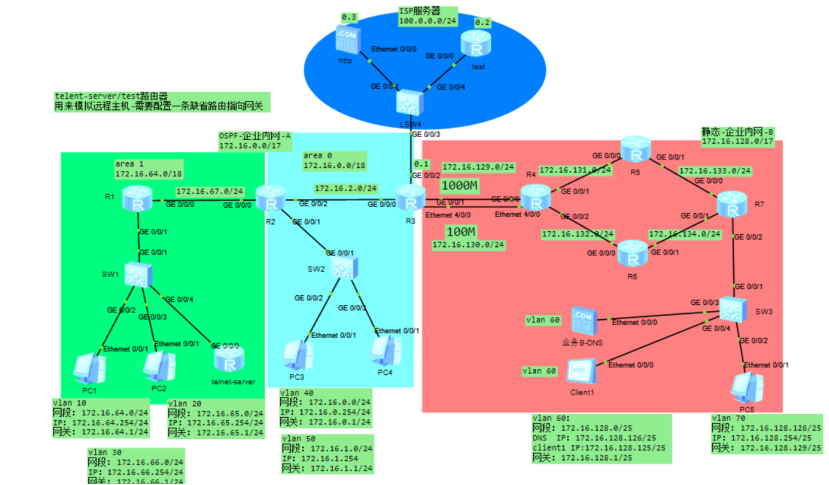
- 实验需求
- 1.所有PC均需要通过DHCP获取IP地址-地址池名称和设备VLAN一致,例如PC1-ip pool vlan10,其中只有业务B网络用户需要访问互联网web服务-需要DNS信息。
-
2.交换机配置VLAN需要遵循最小VLAN透传原则
3.利用OSPF协议使内外用户互相访问-全网可达(设备Router-ID需要手工配置,和设备编号一致,例如R1-RID:1.1.1.1),
并采用精准宣告的方式进行宣告(例如:172.16.64.1/24接口,宣告:172.16.64.1 0.0.0.0)
4.内网全网可达,并且需要尽可能减小路由表条目数量(汇总采用精确汇总方式),能够利用缺省省去的配置可省略,防止环路,
并且保障安全(在OSPF区域0需要配置认证-采用MD5认证,密码为123456)
5.内网所有用户均可访问互联网(边界路由器配置NAT),ACL采用基础ACL,编号为2000,R3-0/0/2接口不允许宣告在内网中(包含静态)。
6.test设备需要远程登陆到内网telnet-server设备,登录账号为 huawei 密码 123456,登录权限为最高。
7.不允许VLAN 40和VLAN 50 用户访问内网B业务,acl编号为2001,不允许PC1访问PC5,ACL编号为3000。
8.R3-R4中间百兆链路作为备份链路,不允许正常情况下数据通过,需要降低优先级数值配置为100。
9.所有设备严格按照拓扑图标识进行配置,注意大小写。
10.图示中所有服务器和client设备均为体现需求,地址固定,不做更改,在配置时需求注意。clinet1用来模拟内网用户访问互联网(ISP-服务器),
test设备用来测试互联网用户远程登陆内网telent-server主机。
- 配置思路
本次配置的核心逻辑:
二层架构:严格遵循最小VLAN透传原则,只在Trunk链路上允许必要的VLAN。
三层路由:
R1,R2,R3:
Area 0配置MD5认证(密码为123456)
OSPF使用精确宣告(0.0.0.0反掩码),R3-0/0/2接口不允许宣告在内网中(包含静态)
在R2和R3上做路由汇总以减少条目
设备手工配置DHCP(和设备编号一致)
NAT:
仅在R3上针对业务B网段做NAT。
策略路由:R3-R4百兆链路通过调整开销值(Cost降低优先级数值配置为100)作为备份,平时不走流量。
ACL:
R3上配置ACL 2001拦截特定VLAN 40,50访问内网B;
R1上配置ACL 3000拦截PC1访问PC5。
R3上配置ACL 2000允许所有内网用户访问互联网
服务:DHCP全局地址池配置,
ISP侧的Telnet服务,(内网telnet-server设备,登录账号为 huawei 密码 123456,登录权限为最高)
B网配置DNS信息。
四,配置步骤:
二层配置:
SW1
<Huawei>system-view
[Huawei]sysname SW1
[SW1]vlan batch 10 20 30
Info: This operation may take a few seconds. Please wait for a moment...done
[SW1]interface GigabitEthernet 0/0/1
[SW1-GigabitEthernet0/0/1]port link-type trunk
[SW1-GigabitEthernet0/0/1]port trunk allow-pass vlan 10 20 30
[SW1-GigabitEthernet0/0/1]q
[SW1]interface GigabitEthernet 0/0/2
[SW1-GigabitEthernet0/0/2]port link-type access
[SW1-GigabitEthernet0/0/2]port default vlan 10
[SW1-GigabitEthernet0/0/2]q
[SW1]interface GigabitEthernet 0/0/3
[SW1-GigabitEthernet0/0/3]port link-type access
[SW1-GigabitEthernet0/0/3]port default vlan 20
[SW1-GigabitEthernet0/0/3]q
[SW1]interface GigabitEthernet 0/0/4
[SW1-GigabitEthernet0/0/4]port link-type access
[SW1-GigabitEthernet0/0/4]port default vlan 30
[SW1-GigabitEthernet0/0/4]q
[SW1]q
<SW1>save
SW2
<Huawei>system-view
Enter system view, return user view with Ctrl+Z.
[Huawei]sysname SW2
[SW2]vlan batch 40 50
Info: This operation may take a few seconds. Please wait for a moment...done.
[SW2]interface GigabitEthernet 0/0/1
[SW2-GigabitEthernet0/0/1]port link-type trunk
[SW2-GigabitEthernet0/0/1]port trunk allow-pass vlan 40 50
[SW2-GigabitEthernet0/0/1]q
[SW2]interface GigabitEthernet 0/0/2
[SW2-GigabitEthernet0/0/2]port link-type access
[SW2-GigabitEthernet0/0/2]port default vlan 40
[SW2-GigabitEthernet0/0/2]q
[SW2]interface GigabitEthernet 0/0/3
[SW2-GigabitEthernet0/0/3]port link-type access
[SW2-GigabitEthernet0/0/3]port default vlan 50
[SW2-GigabitEthernet0/0/3]q
[SW2]q
<SW2>save
SW3
<Huawei>system-view
Enter system view, return user view with Ctrl+Z.
[Huawei]sysname SW3
[SW3]vlan batch 60 70
Info: This operation may take a few seconds. Please wait for a moment...done.
[SW3]interface GigabitEthernet 0/0/1
[SW3-GigabitEthernet0/0/1]port link-type trunk
[SW3-GigabitEthernet0/0/1]port trunk allow-pass vlan 60 70
[SW3-GigabitEthernet0/0/1]q
[SW3]interface GigabitEthernet 0/0/3
[SW3-GigabitEthernet0/0/3]port link-type access
[SW3-GigabitEthernet0/0/3]port default vlan 60
[SW3-GigabitEthernet0/0/3]q
[SW3]interface GigabitEthernet 0/0/4
[SW3-GigabitEthernet0/0/4]port link-type access
[SW3-GigabitEthernet0/0/4]port default vlan 60
[SW3-GigabitEthernet0/0/4]q
[SW3]interface GigabitEthernet 0/0/2
[SW3-GigabitEthernet0/0/2]port link-type access
[SW3-GigabitEthernet0/0/2]port default vlan 70
[SW3-GigabitEthernet0/0/2]q
[SW3]q
<SW3>save
sw4
<Huawei>system-view
[Huawei]sysname SW4
[SW4]vlan 100
[SW4-vlan100]q
[SW4]interface GigabitEthernet 0/0/3
[SW4-GigabitEthernet0/0/3]port link-type trunk
[SW4-GigabitEthernet0/0/3]port trunk allow-pass vlan 100
[SW4-GigabitEthernet0/0/3]q
[SW4]interface Vlanif 100
[SW4-Vlanif100]ip address 100.0.0.4 24
[SW4-Vlanif100]q
[SW4]interface GigabitEthernet 0/0/4
[SW4-GigabitEthernet0/0/4]port link-type access
[SW4-GigabitEthernet0/0/4]port default vlan 100
[SW4-GigabitEthernet0/0/4]q
[SW4]interface GigabitEthernet 0/0/1
[SW4-GigabitEthernet0/0/1]port link-type access
[SW4-GigabitEthernet0/0/1]port default vlan 100
[SW4-GigabitEthernet0/0/1]q
[SW4]q
<SW4>save
三层配置:
R1:
DHCP全局地址池配置,单臂路由,ospf,ACL3000,router-id 1.1.1.1
<Huawei>system-view
Enter system view, return user view with Ctrl+Z.
[Huawei]sysname R1
[R1]router id 1.1.1.1
Info: Router ID has been modified, please reset the relative protocols manually
to update the Router ID.
[R1]dhcp enable
[R1]ip route-static 0.0.0.0 0 172.16.67.2
[R1]ip pool vlan10
Info: It's successful to create an IP address pool.
[R1-ip-pool-vlan10]gateway-list 172.16.64.1
[R1-ip-pool-vlan10]network 172.16.64.0 mask 24
[R1-ip-pool-vlan10]q
[R1]ip pool vlan20
Info: It's successful to create an IP address pool.
[R1-ip-pool-vlan20]gateway-list 172.16.65.1
[R1-ip-pool-vlan20]network 172.16.65.0 mask 24
[R1-ip-pool-vlan20]q
[R1]ip pool vlan30
Info: It's successful to create an IP address pool.
[R1-ip-pool-vlan30]gateway-list 172.16.66.1
[R1-ip-pool-vlan30]network 172.16.66.0 mask 24
[R1-ip-pool-vlan30]q
[R1]interface GigabitEthernet 0/0/1.10
[R1-GigabitEthernet0/0/1.10]ip address 172.16.64.1 24
[R1-GigabitEthernet0/0/1.10]dot1q termination vid 10
Apr 9 2026 16:16:50-08:00 R1 %%01IFNET/4/LINK_STATE(l)[0]:The line protocol IP
on the interface GigabitEthernet0/0/1.10 has entered the UP state.
[R1-GigabitEthernet0/0/1.10]arp broadcast enable
[R1-GigabitEthernet0/0/1.10]dhcp select global
[R1-GigabitEthernet0/0/1.10]q
[R1]interface GigabitEthernet 0/0/1.20
[R1-GigabitEthernet0/0/1.20]ip address 172.16.65.1 24
[R1-GigabitEthernet0/0/1.20]dot1q termination vid 20
Apr 9 2026 16:18:29-08:00 R1 %%01IFNET/4/LINK_STATE(l)[1]:The line protocol IP
on the interface GigabitEthernet0/0/1.20 has entered the UP state.
[R1-GigabitEthernet0/0/1.20]arp broadcast enable
[R1-GigabitEthernet0/0/1.20]dhcp select global
[R1-GigabitEthernet0/0/1.20]q
[R1]interface GigabitEthernet 0/0/1.30
[R1-GigabitEthernet0/0/1.30]ip address 172.168.66.1 24
[R1-GigabitEthernet0/0/1.30]dot1q termination vid 30
Apr 9 2026 16:19:31-08:00 R1 %%01IFNET/4/LINK_STATE(l)[2]:The line protocol IP
on the interface GigabitEthernet0/0/1.30 has entered the UP state.
[R1-GigabitEthernet0/0/1.30]arp broadcast enable
[R1-GigabitEthernet0/0/1.30]dhcp select global
[R1-GigabitEthernet0/0/1.30]q
[R1]interface GigabitEthernet 0/0/0
[R1-GigabitEthernet0/0/0]ip address 172.16.67.1 24
[R1-GigabitEthernet0/0/0]q
[R1]ospf 1 router-id 1.1.1.1
[R1-ospf-1]area 1
[R1-ospf-1-area-0.0.0.1]network 172.16.64.1 0.0.0.0
[R1-ospf-1-area-0.0.0.1]network 172.16.65.1 0.0.0.0
[R1-ospf-1-area-0.0.0.1]network 172.16.66.1 0.0.0.0
[R1-ospf-1-area-0.0.0.1]network 172.16.67.1 0.0.0.0
[R1-ospf-1-area-0.0.0.1]q
[R1-ospf-1]q
[R1]acl number 3000
[R1-acl-adv-3000]rule 5 deny ip source 172.16.64.254 0.0.0.0 destination 172.16.
66.254 0
[R1-acl-adv-3000]rule 10 permit ip
[R1-acl-adv-3000]q
[R1]interface GigabitEthernet 0/0/1.10
[R1-GigabitEthernet0/0/1.10]traffic-filter inbound acl 3000
[R1-GigabitEthernet0/0/1.10]q
[R1]ip route-static 0.0.0.0 0 172.16.67.2
[R1]q
<R1>save
R2
DHCP全局地址池配置,单臂路由,ospf 1 Area 0配置MD5认证(密码为123456)
,ACL3000,router-id 2.2.2.2,做路由汇总以减少条目
<Huawei>system-view
Enter system view, return user view with Ctrl+Z.
[Huawei]sysname R2
[R2]router id 2.2.2.2
Info: Router ID has been modified, please reset the relative protocols manually
to update the Router ID.
[R2]dhcp enable
Info: The operation may take a few seconds. Please wait for a moment.done.
[R2]ip route-static 0.0.0.0 0 172.16.2.2
[R2]ip pool vlan40
Info: It's successful to create an IP address pool.
[R2-ip-pool-vlan40]gateway-list 172.16.0.1
[R2-ip-pool-vlan40]network 172.16.0.0 mask 24
[R2-ip-pool-vlan40]q
[R2]ip pool vlan50
Info: It's successful to create an IP address pool.
[R2-ip-pool-vlan50]gateway-list 172.16.1.1
[R2-ip-pool-vlan50]network 172.16.1.0 mask 24
[R2-ip-pool-vlan50]q
[R2]interface GigabitEthernet 0/0/1.40
[R2-GigabitEthernet0/0/1.40]ip address 172.16.0.1 24
[R2-GigabitEthernet0/0/1.40]dot1q termination vid 40
Apr 9 2026 16:37:16-08:00 R2 %%01IFNET/4/LINK_STATE(l)[0]:The line protocol IP
on the interface GigabitEthernet0/0/1.40 has entered the UP state.
[R2-GigabitEthernet0/0/1.40]arp broadcast enable
[R2-GigabitEthernet0/0/1.40]dhcp select global
[R2-GigabitEthernet0/0/1.40]q
[R2]interface GigabitEthernet 0/0/1.50
[R2-GigabitEthernet0/0/1.50]ip address 172.16.1.1 24
[R2-GigabitEthernet0/0/1.50]dot1q termination vid 50
Apr 9 2026 16:38:18-08:00 R2 %%01IFNET/4/LINK_STATE(l)[1]:The line protocol IP
on the interface GigabitEthernet0/0/1.50 has entered the UP state.
[R2-GigabitEthernet0/0/1.50]arp broadcast enable
[R2-GigabitEthernet0/0/1.50]dhcp select global
[R2-GigabitEthernet0/0/1.50]q
[R2]interface GigabitEthernet 0/0/0
[R2-GigabitEthernet0/0/0]ip address 172.16.67.2 24
[R2-GigabitEthernet0/0/0]q
[R2]interface GigabitEthernet 0/0/2
[R2-GigabitEthernet0/0/2]ip address 172.16.2.1 24
[R2-GigabitEthernet0/0/2]q
[R2]ospf 1 router-id 2.2.2.2
[R2-ospf-1]area 0
[R2-ospf-1-area-0.0.0.0]authentication-mode MD5 1 cipher 123456
[R2-ospf-1-area-0.0.0.0]network 172.16.2.1 0.0.0.0
[R2-ospf-1-area-0.0.0.0]network 172.16.0.1 0.0.0.0
[R2-ospf-1-area-0.0.0.0]network 172.16.1.1 0.0.0.0
[R2-ospf-1-area-0.0.0.0]q
[R2-ospf-1]area 1
[R2-ospf-1-area-0.0.0.1]network 172.16.67.2 0.0.0.0
[R2-ospf-1-area-0.0.0.1]abr-summary 172.16.64.0 255.255.252.0
[R2-ospf-1-area-0.0.0.1]q
[R2-ospf-1]q
[R2]q
<R2>save
R3
ospf 1 area 0 1,Area 0配置MD5认证(密码为123456),R3-0/0/2接口不允许宣告在内网中(包含静态),做路由汇总以减少条目,针对业务B网段做NAT,R3-R4百兆链路通过调整开销值(Cost降低优先级数值配置为100)作为备份,配置ACL 2001拦截VLAN 40,50访问内网B;配置ACL 2000允许所有内网用户访问互联网
<Huawei>system-view
Enter system view, return user view with Ctrl+Z.
[Huawei]sysname R3
[R3]router id 3.3.3.3
Info: Router ID has been modified, please reset the relative protocols manually
to update the Router ID.
[R3]acl number 2000
[R3-acl-basic-2000]rule 5 permit source 172.16.0.0 0.0.255.255
[R3-acl-basic-2000]q
[R3]acl number 2001
[R3-acl-basic-2001]rule 5 deny source 172.16.0.0 0.0.0.255
[R3-acl-basic-2001]rule 10 deny source 172.16.1.0 0.0.0.255
[R3-acl-basic-2001]rule 15 permit
[R3-acl-basic-2001]q
[R3]interface GigabitEthernet 0/0/0
[R3-GigabitEthernet0/0/0]ip address 172.16.2.2 24
Apr 9 2026 17:19:11-08:00 R3 %%01IFNET/4/LINK_STATE(l)[0]:The line protocol IP
on the interface GigabitEthernet0/0/0 has entered the UP state.
[R3-GigabitEthernet0/0/0]traffic-filter inbound acl 2001
[R3-GigabitEthernet0/0/0]q
[R3]interface GigabitEthernet 0/0/1
[R3-GigabitEthernet0/0/1]ip address 172.16.129.1 24
Apr 9 2026 17:20:20-08:00 R3 %%01IFNET/4/LINK_STATE(l)[1]:The line protocol IP
on the interface GigabitEthernet0/0/1 has entered the UP state.
[R3-GigabitEthernet0/0/1]q
[R3]interface Ethernet 4/0/0
[R3-Ethernet4/0/0]ip address 172.16.130.1 24
[R3-Ethernet4/0/0]ospf cost 100
[R3-Ethernet4/0/0]q
[R3]interface GigabitEthernet 0/0/2
[R3-GigabitEthernet0/0/2]ip address 100.0.0.1 24
[R3-GigabitEthernet0/0/2]nat outbound 2000
[R3-GigabitEthernet0/0/2]q
[R3]ospf 1 router-id 3.3.3.3
[R3-ospf-1]default-route-advertise always
[R3-ospf-1]area 0
[R3-ospf-1-area-0.0.0.0]authentication-mode MD5 1 cipher 123456
[R3-ospf-1-area-0.0.0.0]network 172.16.2.2 0.0.0.0
[R3-ospf-1-area-0.0.0.0]q
[R3-ospf-1]area 2
[R3-ospf-1-area-0.0.0.2]network 172.16.129.1 0.0.0.0
[R3-ospf-1-area-0.0.0.2]network 172.16.130.1 0.0.0.0
[R3-ospf-1-area-0.0.0.2]q
[R3]ip route-static 0.0.0.0 0.0.0.0 100.0.0.4
[R3]q
<R3>save
R4
R3-R4百兆链路通过调整开销值(Cost降低优先级数值配置为100)作为备份,OSPF 1 area 2
<Huawei>system-view
Enter system view, return user view with Ctrl+Z.
[Huawei]sysname R4
[R4]interface GigabitEthernet 0/0/0
[R4-GigabitEthernet0/0/0]ip address 172.16.129.2 24
Apr 9 2026 19:20:58-08:00 R4 %%01IFNET/4/LINK_STATE(l)[0]:The line protocol IP
on the interface GigabitEthernet0/0/0 has entered the UP state.
[R4-GigabitEthernet0/0/0]q
[R4]interface Ethernet 4/0/0
[R4-Ethernet4/0/0]ip address 172.16.130.2 24
Apr 9 2026 19:22:01-08:00 R4 %%01IFNET/4/LINK_STATE(l)[1]:The line protocol IP
on the interface Ethernet4/0/0 has entered the UP state.
[R4-Ethernet4/0/0]ospf cost 100
[R4-Ethernet4/0/0]q
[R4]interface GigabitEthernet 0/0/1
[R4-GigabitEthernet0/0/1]ip address 172.16.131.1 24
[R4-GigabitEthernet0/0/1]q
[R4]interface GigabitEthernet 0/0/2
[R4-GigabitEthernet0/0/2]ip address 172.16.132.1 24
Error: The address already exists.
[R4-GigabitEthernet0/0/2]q
[R4]ip route-static 172.16.134.0 24 172.16.132.2
[R4]ip route-static 172.16.133.0 24 172.16.131.2
[R4]ip route-static 172.16.128.0 24 172.16.131.2
[R4]router id 4.4.4.4
Info: Router ID has been modified, please reset the relative protocols manually
to update the Router ID.
[R4]ospf 1 router-id 4.4.4.4
[R4-ospf-1]area 2
[R4-ospf-1-area-0.0.0.2]network 172.16.129.2 0.0.0.0
[R4-ospf-1-area-0.0.0.2]network 172.16.130.2 0.0.0.0
[R4-ospf-1-area-0.0.0.2]network 172.16.131.1 0.0.0.0
[R4-ospf-1-area-0.0.0.2]network 172.16.132.1 0.0.0.0
[R4-ospf-1-area-0.0.0.2]q
[R4-ospf-1]q
[R4]q
<R4>save
R5
<Huawei>system-view
Enter system view, return user view with Ctrl+Z.
[Huawei]sysname R5
[R5]interface GigabitEthernet 0/0/0
[R5-GigabitEthernet0/0/0]ip address 172.16.131.2 24
[R5-GigabitEthernet0/0/0]q
[R5]interface GigabitEthernet 0/0/1
[R5-GigabitEthernet0/0/1]ip address 172.16.133.1 24
[R5-GigabitEthernet0/0/1]q
[R5]ip route-static 172.16.134.0 24 172.16.133.2
[R5]ip route-static 172.16.128.0 24 172.16.133.2
[R5]ip route-static 0.0.0.0 0 172.16.131.1
[R5]q
<R5>save
R6
<Huawei>system-view
Enter system view, return user view with Ctrl+Z.
[Huawei]sysname R6
[R6]interface GigabitEthernet 0/0/0
[R6-GigabitEthernet0/0/0]ip address 172.16.132.2 24
[R6-GigabitEthernet0/0/0]q
[R6]interface GigabitEthernet 0/0/1
[R6-GigabitEthernet0/0/1]ip address 172.16.134.1 24
[R6-GigabitEthernet0/0/1]q
[R6]ip route-static 0.0.0.0 0 172.16.132.1
[R6]ip route-static 172.16.128.0 24 172.16.134.2
[R6]ip route-static 172.16.133.0 24 172.16.134.2
[R6]q
<R6>save
R7
DHCP全局地址池,单臂路由,
<Huawei>system-view
Enter system view, return user view with Ctrl+Z.
[Huawei]sysname R7
[R7]dhcp enable
[R7]ip route-static 0.0.0.0 0 172.16.133.1
[R7]ip route-static 0.0.0.0 0 172.16.134.1
[R7]interface GigabitEthernet 0/0/0
[R7-GigabitEthernet0/0/0]ip address 172.16.133.2 24
Error: The address already exists.
[R7-GigabitEthernet0/0/0]q
[R7]interface GigabitEthernet 0/0/1
[R7-GigabitEthernet0/0/1]ip address 172.16.134.2 24
Error: The address already exists.
[R7-GigabitEthernet0/0/1]q
[R7]ip pool vlan60
Info: It's successful to create an IP address pool.
[R7-ip-pool-vlan60]gateway-list 172.16.128.1
[R7-ip-pool-vlan60]network 172.16.128.0 mask 25
[R7-ip-pool-vlan60]dns-list 172.16.128.126
[R7-ip-pool-vlan60]q
[R7]ip pool vlan70
Info: It's successful to create an IP address pool.
[R7-ip-pool-vlan70]gateway-list 172.16.128.129
[R7-ip-pool-vlan70]network 172.16.128.128 mask 25
[R7-ip-pool-vlan70]dns-list 172.16.128.126
[R7-ip-pool-vlan70]q
[R7]interface GigabitEthernet 0/0/2.60
[R7-GigabitEthernet0/0/2.60]ip address 172.16.128.1 25
[R7-GigabitEthernet0/0/2.60]dot1q termination vid 60
[R7-GigabitEthernet0/0/2.60]arp broadcast enable
[R7-GigabitEthernet0/0/2.60]dhcp select global
[R7-GigabitEthernet0/0/2.60]q
[R7]interface GigabitEthernet 0/0/2.70
[R7-GigabitEthernet0/0/2.70]ip address 172.16.128.129 25
[R7-GigabitEthernet0/0/2.70]dot1q termination vid 70
[R7-GigabitEthernet0/0/2.70]arp broadcast enable
[R7-GigabitEthernet0/0/2.70]dhcp select global
[R7-GigabitEthernet0/0/2.70]q
[R7]ip route-static 172.16.132.0 24 172.16.134.1
[R7]ip route-static 172.16.131.0 24 172.16.133.1
[R7]q
<R7>save
Telent-server 配置
<Huawei>system-view
Enter system view, return user view with Ctrl+Z.
[Huawei]sysname telnet-server
[telnet-server]interface GigabitEthernet 0/0/0
[telnet-server-GigabitEthernet0/0/0]ip address 172.16.66.254 24
[telnet-server]telnet server enable
Error: TELNET server has been enabled
[telnet-server]aaa
[telnet-server-aaa]local-user huawei password cipher 123456
Info: Add a new user.
[telnet-server-aaa]local-user huawei service-type telnet
[telnet-server-aaa]local-user huawei level 15
[telnet-server-aaa]q
[telnet-server]user-interface vty 0 4
[telnet-server-ui-vty0-4]authentication-mode aaa
[telnet-server-ui-vty0-4]protocol inbound telnet
[telnet-server-ui-vty0-4]q
[telnet-server]q
<telnet-server>save
Test 配置
<Huawei>system-view
[Huawei]sysname test
[test]interface GigabitEthernet 0/0/0
[test-GigabitEthernet0/0/0]ip address 100.0.0.2 24
[test-GigabitEthernet0/0/0]q
[test]telnet client enable
^
Error: Unrecognized command found at '^' position.
[test]q
<test>save
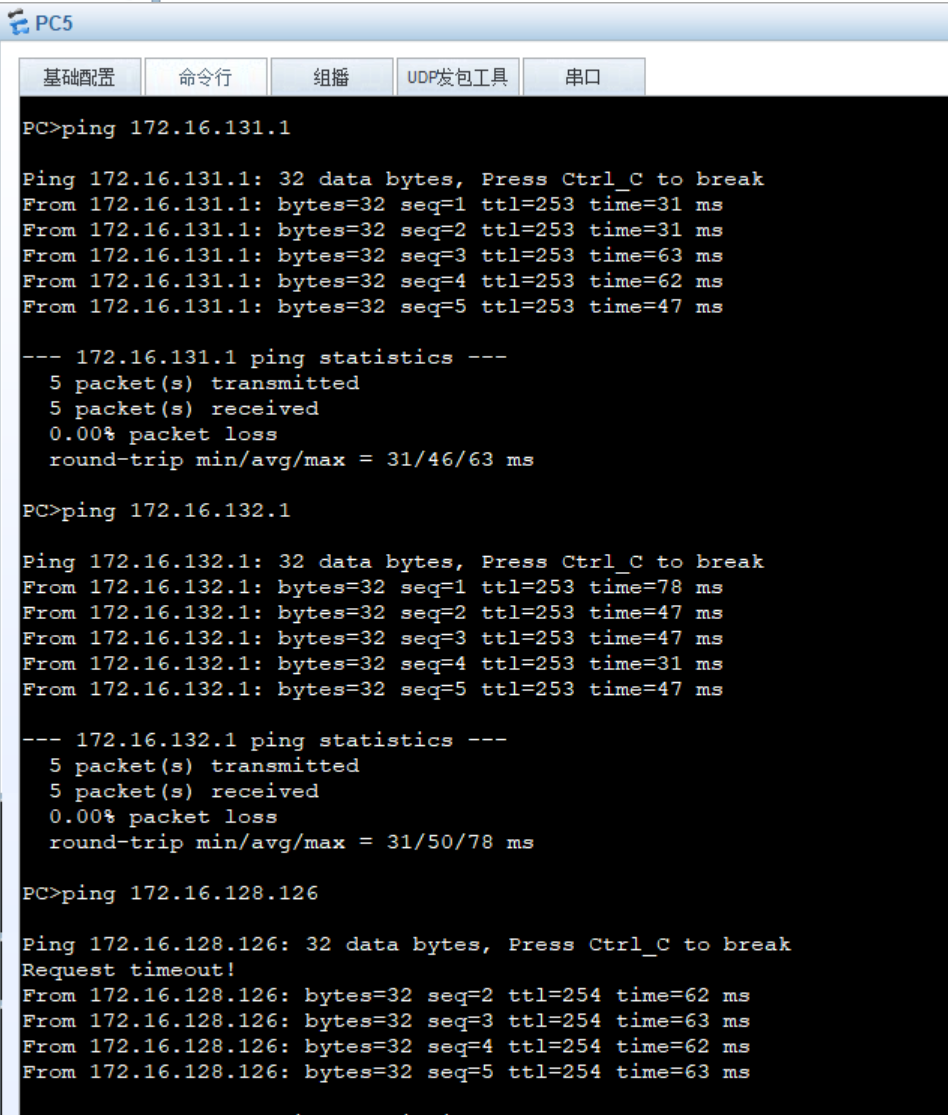
实验验证
DHCP地址获取
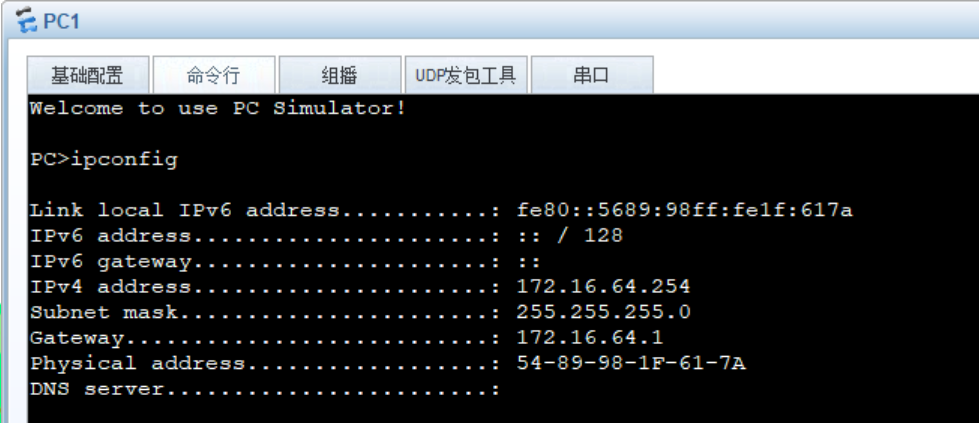
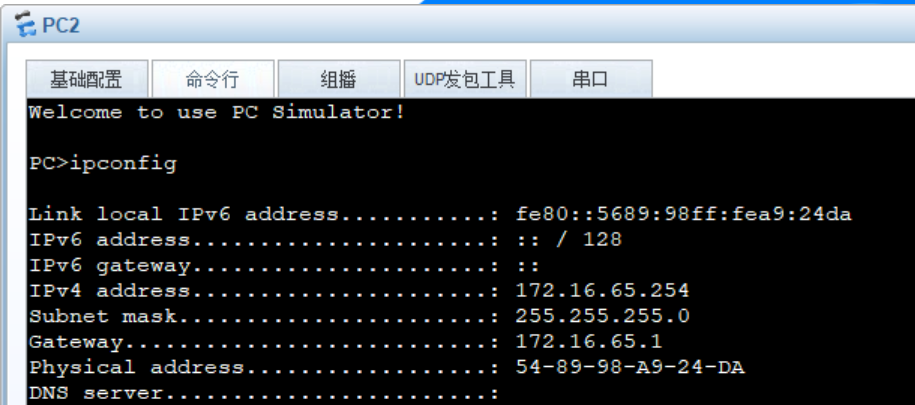
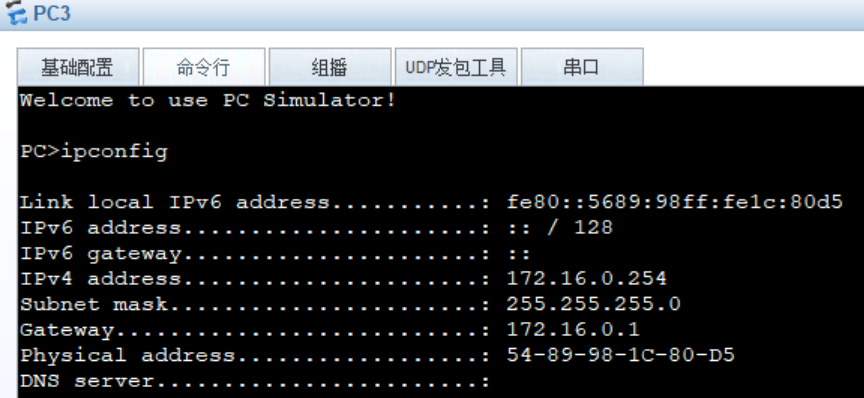
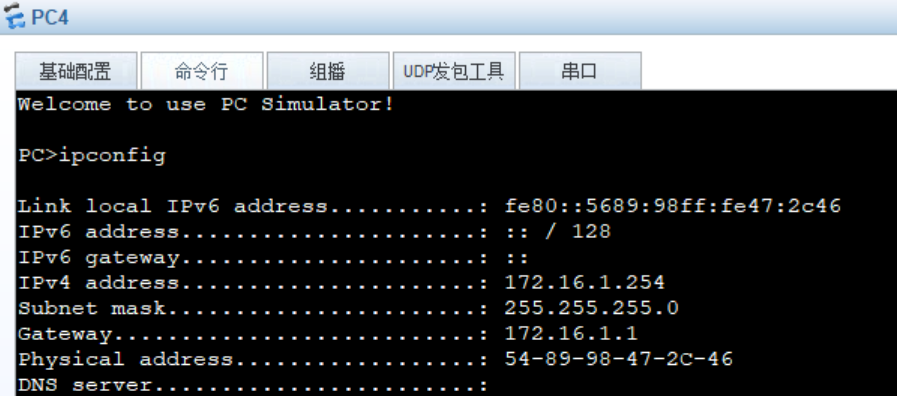
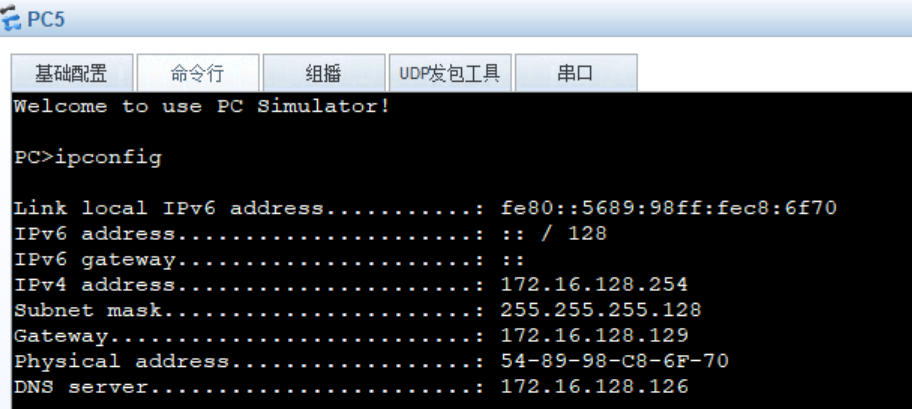
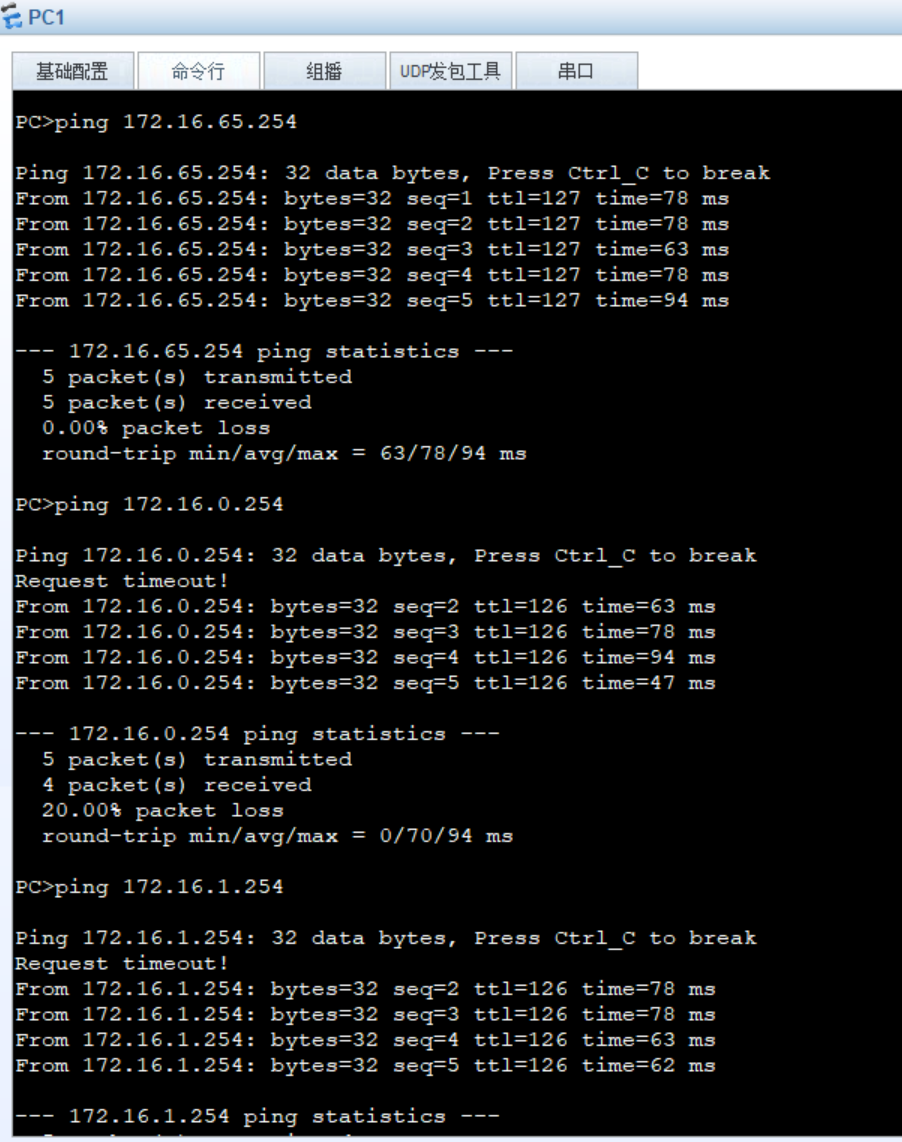
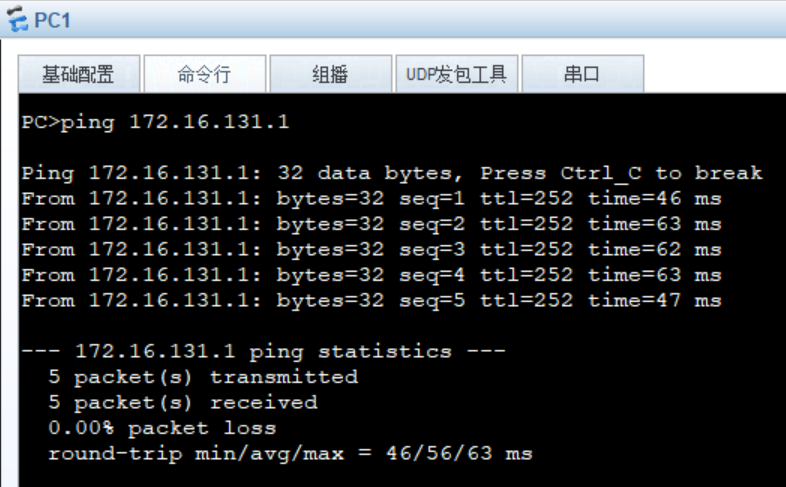
全网通测试

DAMO开发者矩阵,由阿里巴巴达摩院和中国互联网协会联合发起,致力于探讨最前沿的技术趋势与应用成果,搭建高质量的交流与分享平台,推动技术创新与产业应用链接,围绕“人工智能与新型计算”构建开放共享的开发者生态。
更多推荐

 1
1 0
0- 0


 已为社区贡献1条内容

所有评论(0)