图漾GM461-E1/U2相机专栏
文章目录
- 前言
- 1.GM461-E1相机
- 2.GM461-E1相机调参技巧
- 3.GM461-E1相机SDK相关
- 4.GM461-E1相机常见FAQ
- 5.GM461-E1相机测试结果
- 6.成像问题FAQ
- 7.其他问题FAQ
- 8.GM461相机属性表
- 9.相机深度图后处理
- 10.固件和驱动更新记录
- 11.其他学习资料
前言
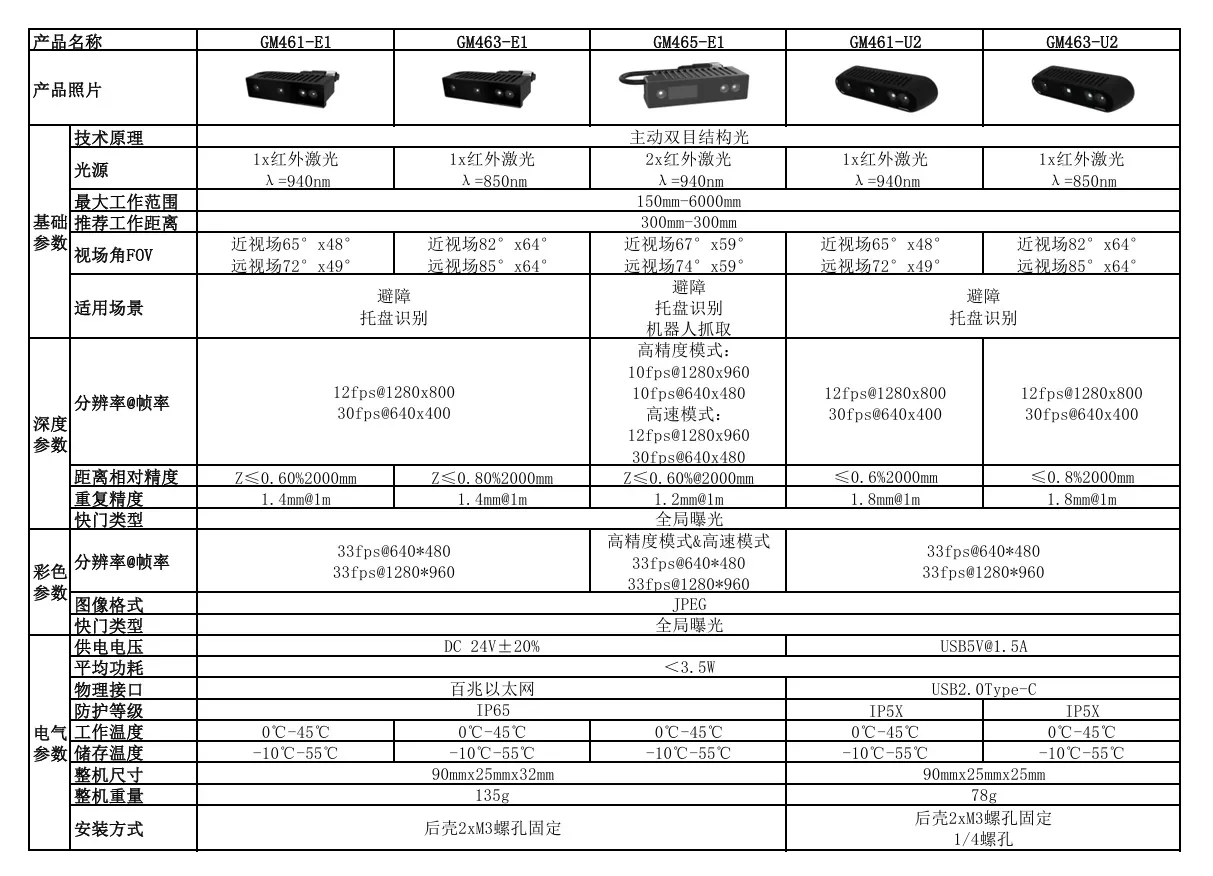
1.GM461-E1相机
1.1 GM461-E1工作场景
GM461是一款高性价比的3D工业相机新品,兼具工业级的稳定性和消费级的价格优势,产品通用性强,可广泛使用于如工业、物流、移动机器人、商业、安全、教育等多种应用场景。
1.2 GM461-E1 IO线和数据线定义
1.2.1 IO接口定义
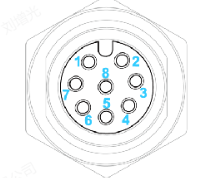
相机的电源&数据接口线定义如下:
| A-Code引脚编号 | 网口线序号 | 名称 | 网口端线标颜色 | 描述 |
|---|---|---|---|---|
| 1 | 5 | P_24V | 白色蓝色 | DC电源正 |
| 3 | 8 | P_GND | 棕色 | 电源地 |
| 2 | 7 | NC | 白色棕色 | - |
| 7 | 4 | NC | 蓝色 | - |
| 6 | 1 | MD1+ | 白色橙色 | TX_D1+/发信号+ |
| 4 | 2 | MD1- | 橙色 | TX_D1-/发信号- |
| 5 | 3 | MD2+ | 白色绿色 | RX_D2+/收信号+ |
| 8 | 6 | MD2- | 绿色 | RX_D2-/收信号- |
注: TX 和 RX 支持自适应翻转
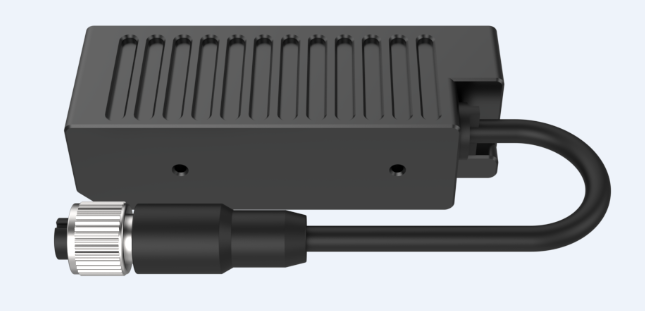
1.2.2 数据接口线
GM461-E1相机数据线如下图: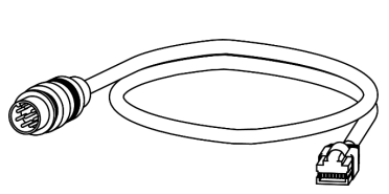
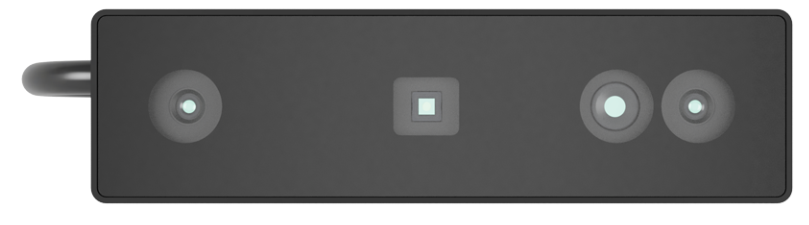
1.2.3 GM461-E1相机正面安装方向
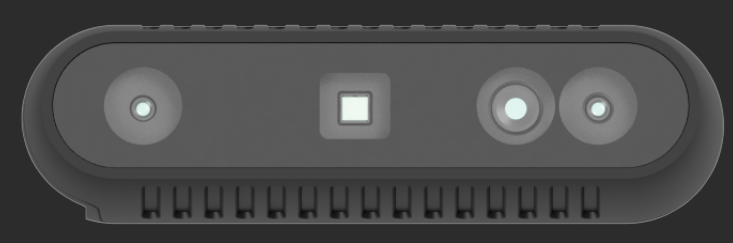
GM461-E1相机正面安装方向如下: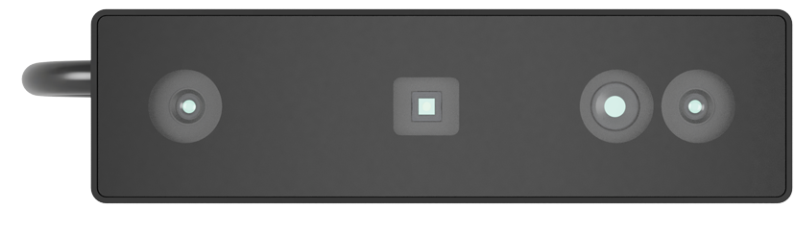
从左到右依次是右IR镜头,散斑投射器,RGB相机,左IR镜头。
1.2.4 GM461相机连接拓扑网络
GM461相机拓扑网络如下图: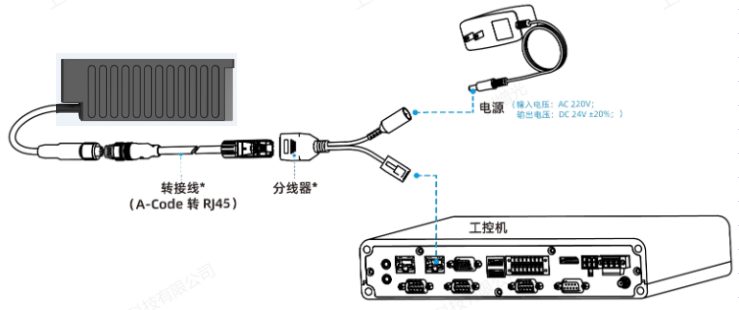
1.2.5 上下面螺纹孔安装
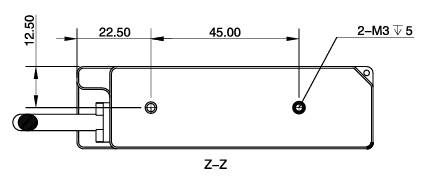
GM461-E1相机上下面有一组M3螺纹孔(螺纹深度5mm)
1.3 GM461-E1相机性能指标
GM461-E1相机的性能指标如下图: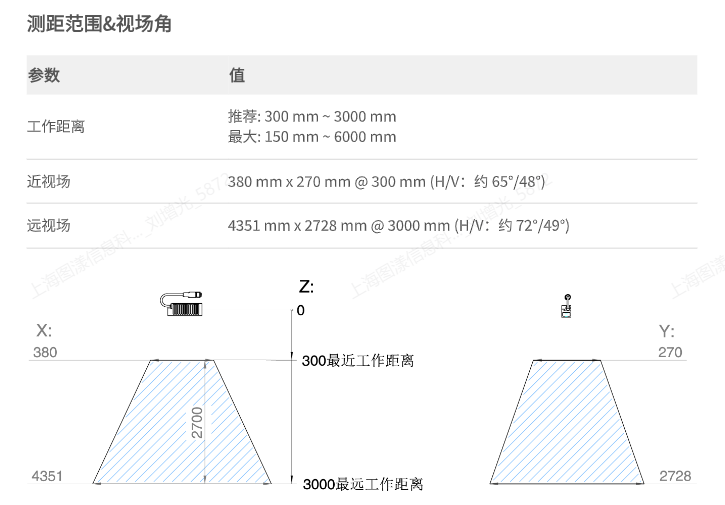
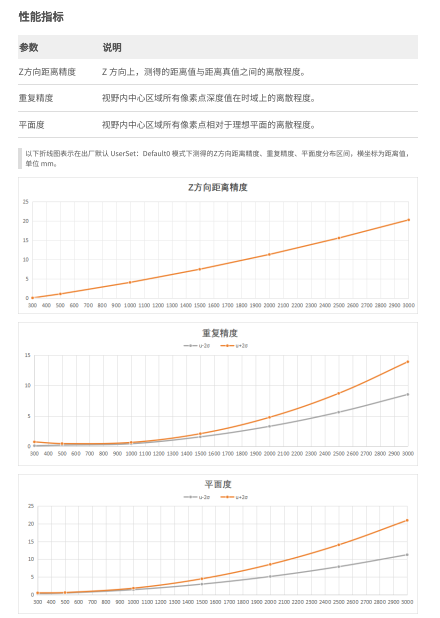
1.3.1 Z轴方向精度说明
待补充
1.3.2 XY轴精度说明
待补充
1.4 GM461-U2驱动安装
1.4.1 Windows环境安装驱动
GM461-E1和GM461-U2的硬件基本是一致的,只是连接接口不一致,在Windows平台使用GM46X-U2相机时,需要安装驱动,具体下载地址如下:
1.Windows平台下载Camport4压缩包
2.至于Windows平台安装USB驱动,具体操作步骤可参考此连接:USB驱动安装流程
1.4.2 Linux环境配置规则文件
如使用USB相机,需先安装USB驱动。
sudo apt-get install libusb-1.0-0-dev
Linux 系统默认需要root权限才能直接访问USB设备。因此,访问Percipio USB相机前,非root 用户需要创建udev rule并修改USB备的访问权限。
具体操作可打开如下链接:
1.Linux环境下配置usb相机访问权限
1.4.2.1 设置步骤
在 /etc/udev/rules.d 目录下新建一个扩展名为 .rules 的规则文件(如 88-tyusb.rules)
备注:规则文件名的开头须为数字 (0 ~ 99),数字越大,优先级越高。
sudo nano /etc/udev/rules.d/88-tyusb.rules
在文件内添加以下规则,下方规则是将USB设备加到 tofu用户组:
SUBSYSTEM=="usb", ATTRS{idProduct}=="1003", ATTRS{idVendor}=="04b4", GROUP="tofu", MODE="0666"
SUBSYSTEM=="usb", ATTRS{idProduct}=="1004", ATTRS{idVendor}=="04b4", GROUP="tofu", MODE="0667"
重启PC后获得USB相机的访问权限。
2.GM461-E1相机调参技巧
1.GM461-E1相机,需要搭配图漾新版本的看图软件使用,可点击官网下载:Viewer软件下载链接
2.新的看图软件详细操作,可查看此链接:新版看图软件操作手册
2.1 深度图滤波设置
建议在开启相机取流前,打开散斑滤波设置开关。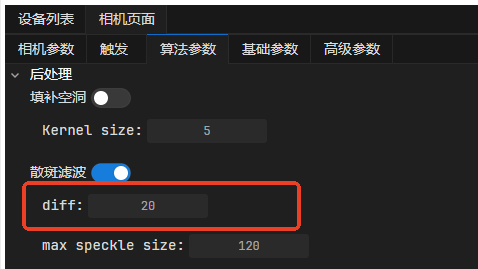
0.5.11及其以后的版本,增加了自动开启散斑滤波的设置,具体如下图:
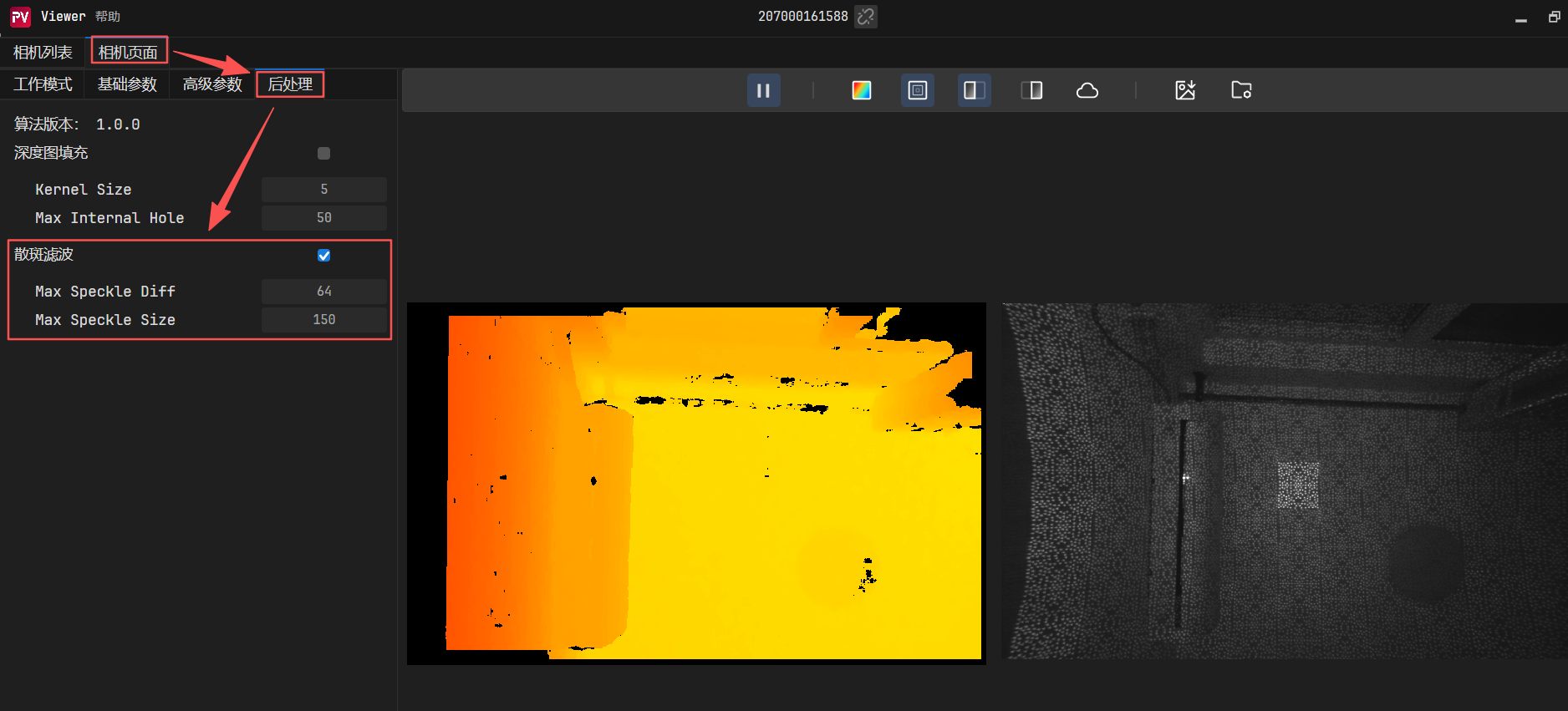
新的看图软件详细操作,可查看此链接:新版看图软件操作手册
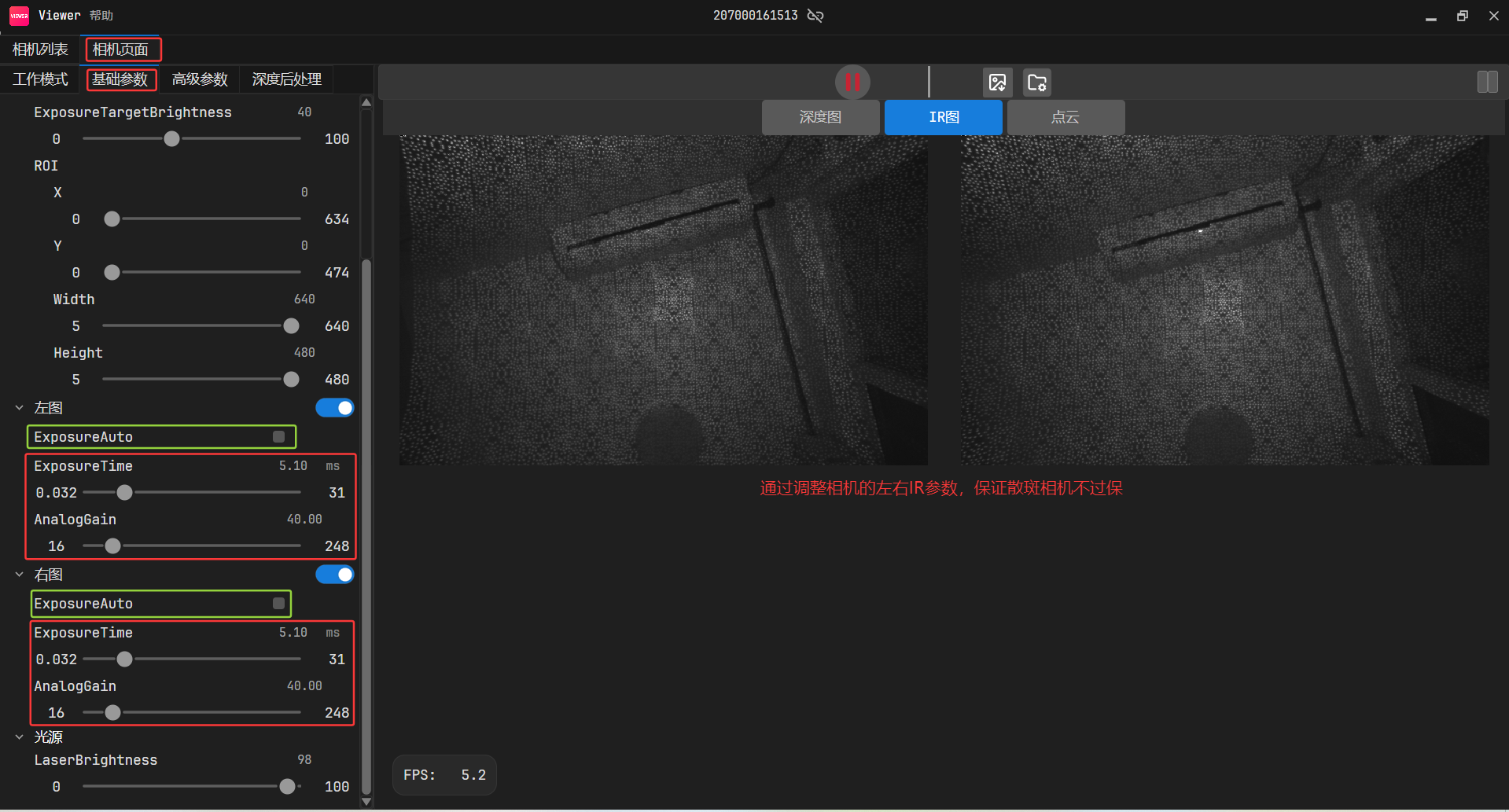
2.2 如何调整相机左右IR的参数?
首先需要开启左右取流: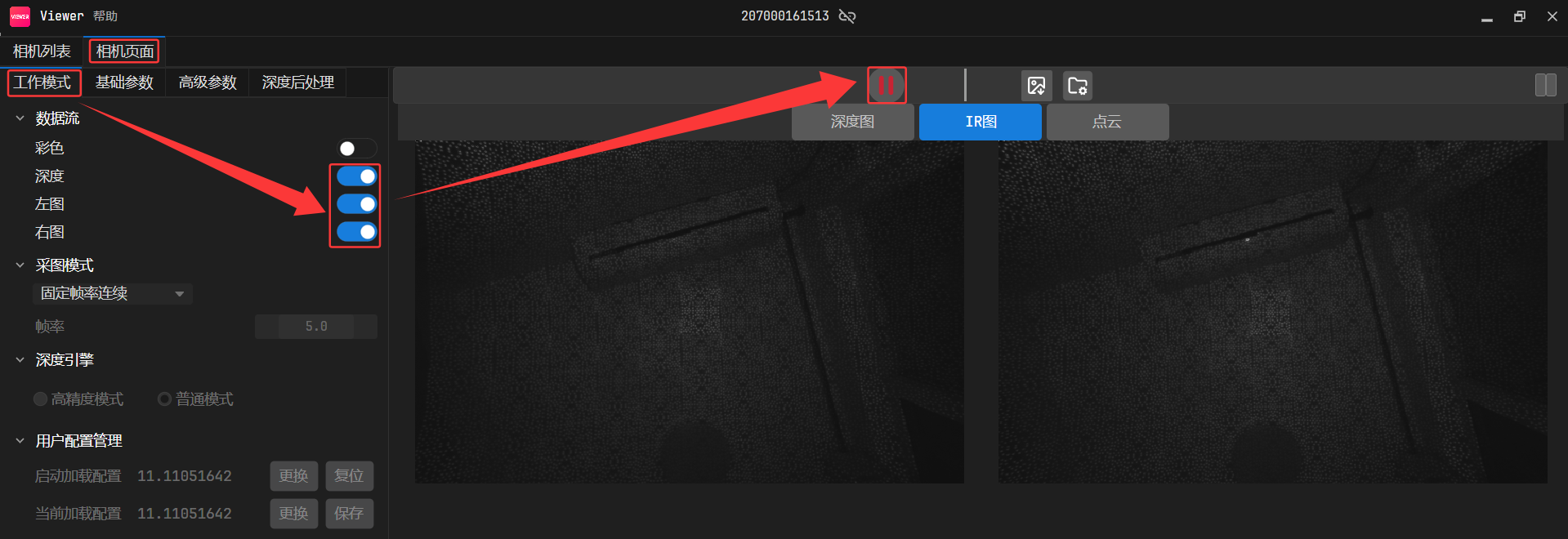
2.2.1 手动调整左右IR曝光
2.2.2 调整相机左右IR自动曝光
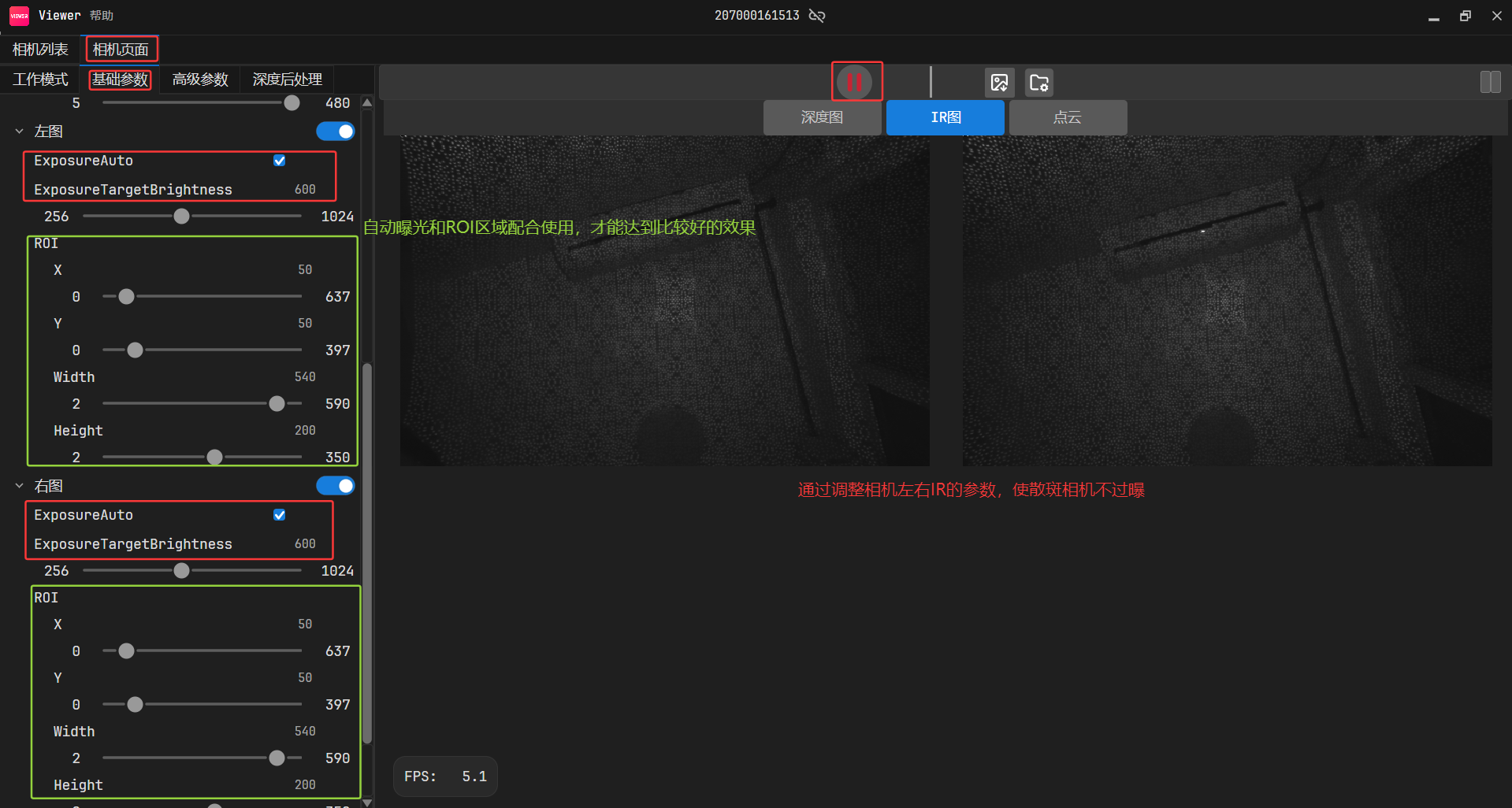
0.5.11及其以后的版本,增加了自动设置左右IR的ROI设置。
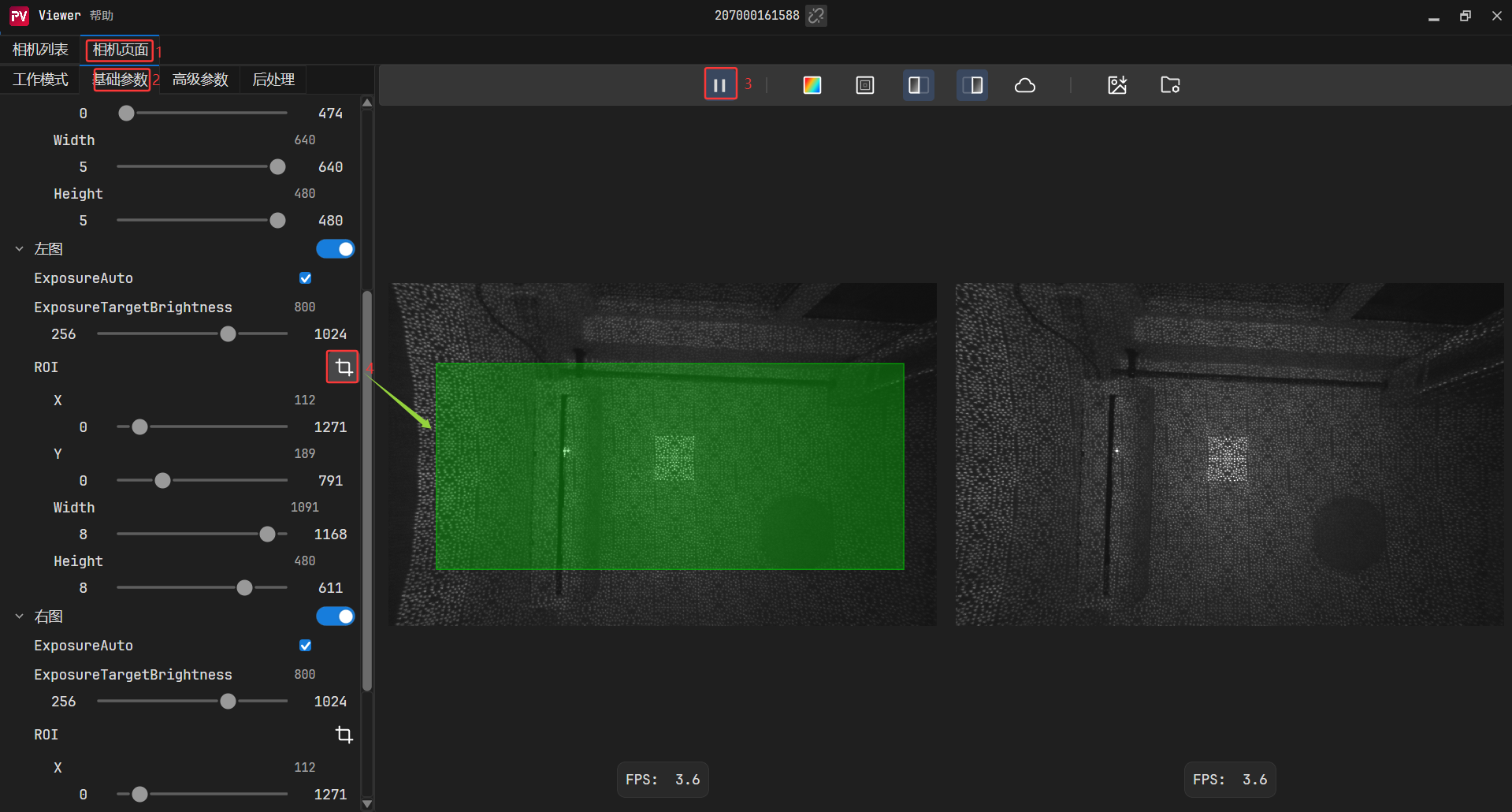
根据设置的ROI 区域的图像信息,来调整整个画面的亮度。
1. 如果检测到划定区域的亮度较低,算法“觉得”应该增强亮度,于是会调亮图像画面。
2. 如果检测到划定区域的亮度较亮,算法“觉得”应该减弱亮度,于是会调暗图像画面。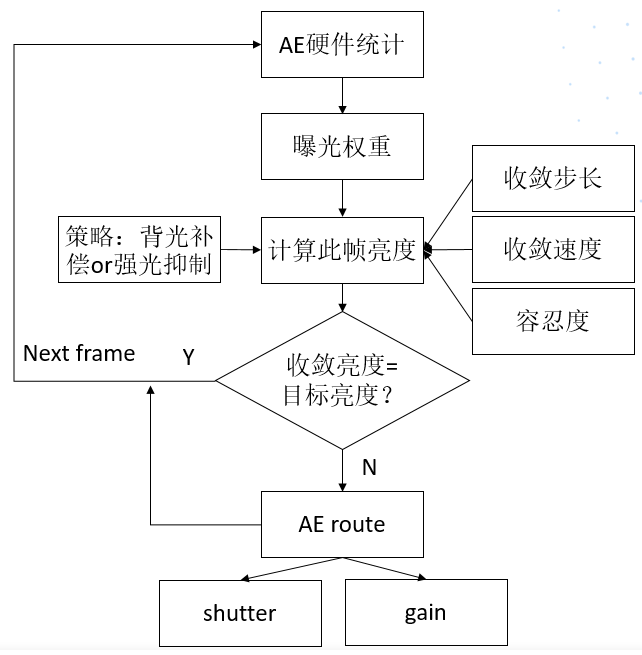
2.3 调试深度图
2.3.1 查看深度值
打开深度取图开关,点击 按钮开始采图
2.将鼠标放置于深度图上,即可查看当前像素点对应的像素坐标与实际深度值(单位:mm)。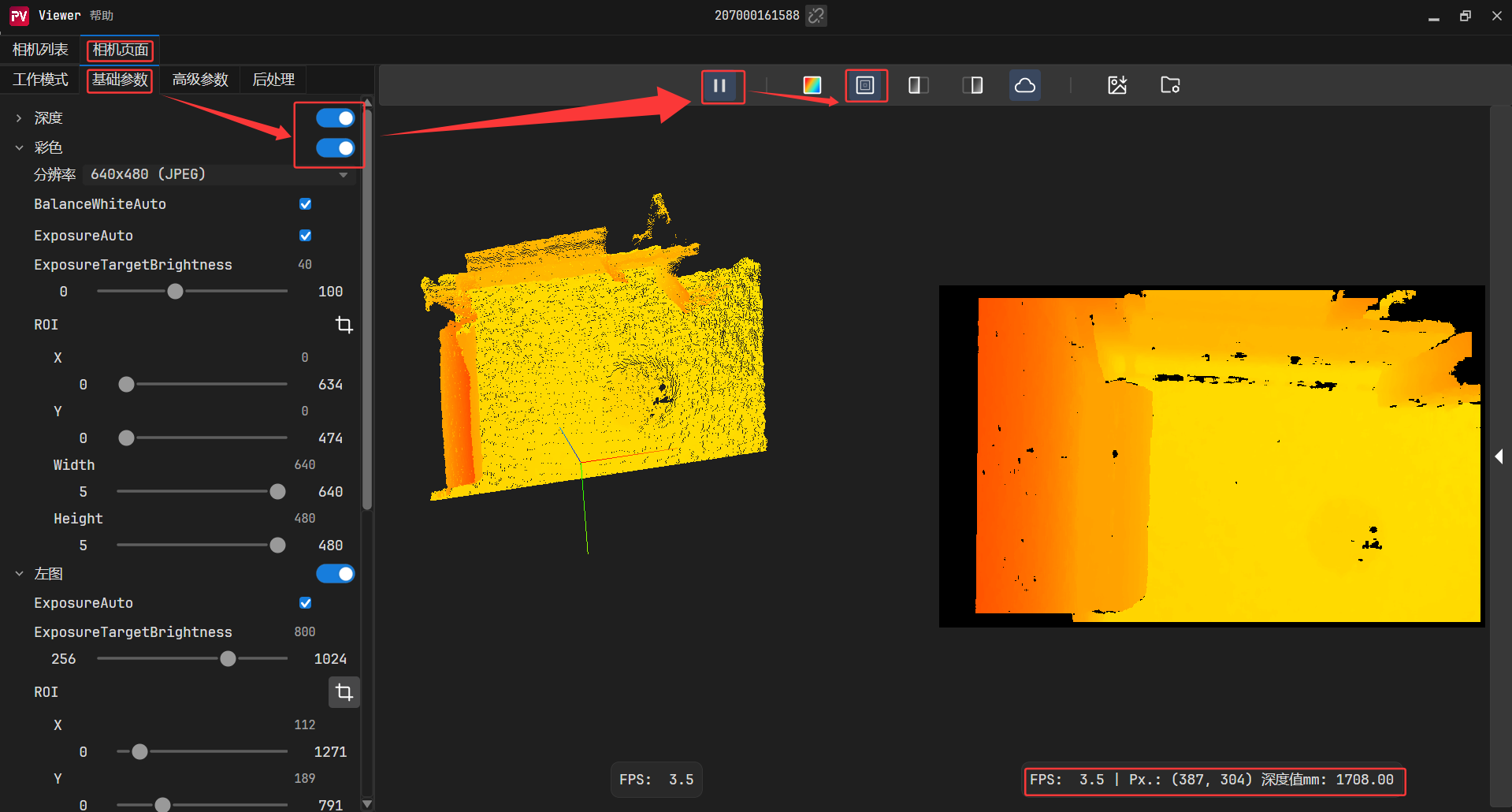
2.3.2 渲染范围调节方法
深度图支持动态渲染范围调整。通过优化目标深度区间的色彩映射,显著增强深度细节的可辨识度。
1.通过上滑块调节渲染深度上限,通过下滑块调节渲染深度下限。
2.直接在输入框键入目标值,或通过箭头微调。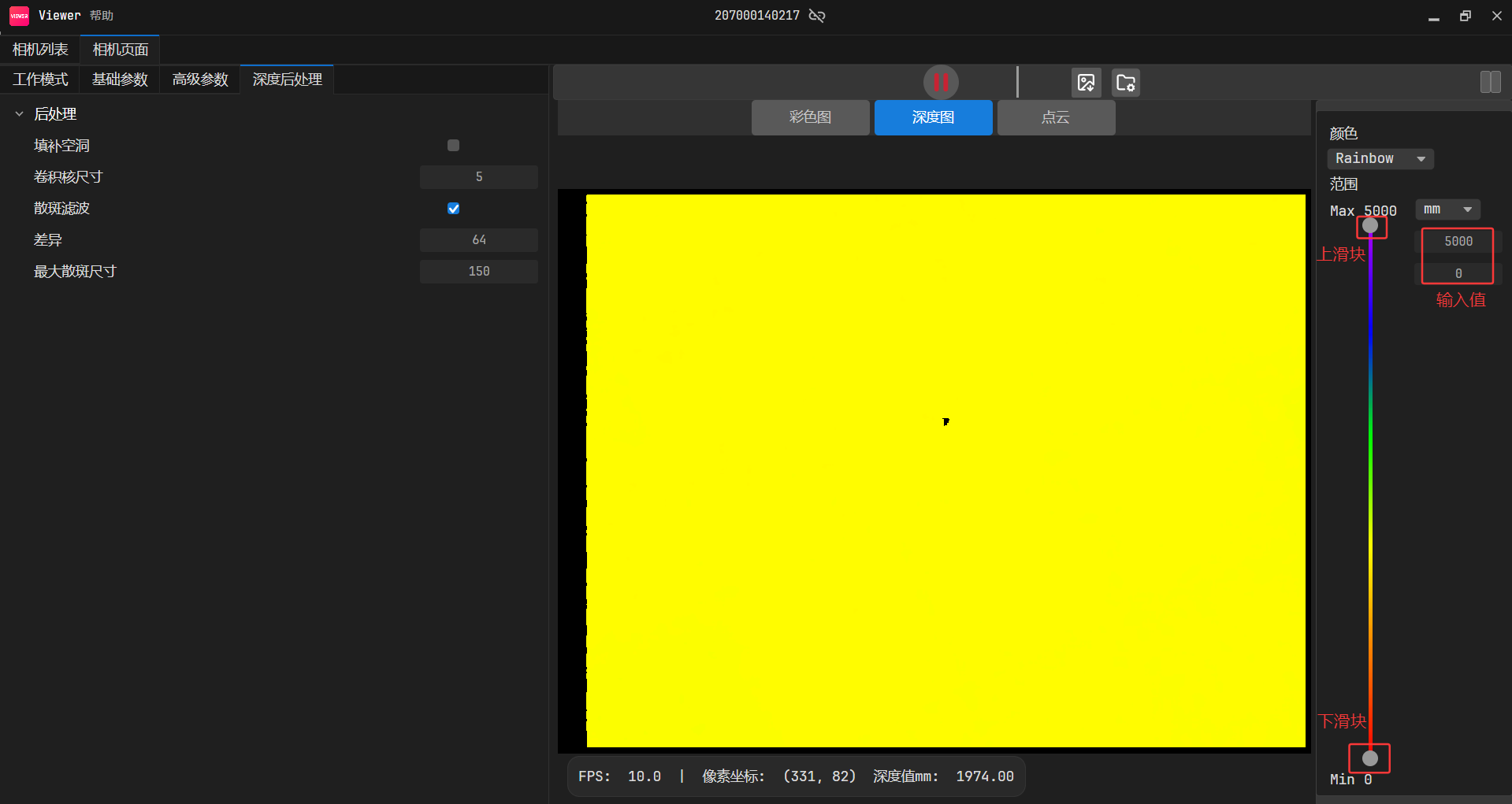
2.3.3 调节深度图渲染效果
1.深度值位于下滑块值和上滑块值之间时,色彩梯度均匀分布;
2.深度值小于下滑块值显示为红色,深度值大于上滑块值显示为紫色。
当场景深度集中分布在 400-800 mm 区间时:
使用默认渲染范围(0-5000 mm):如下方左图所示,色彩梯度平缓,细节难以区分**。
缩小范围至400–800mm:如下方右图所示,色彩对比鲜明,可清晰辨识三个物体的深度差异。
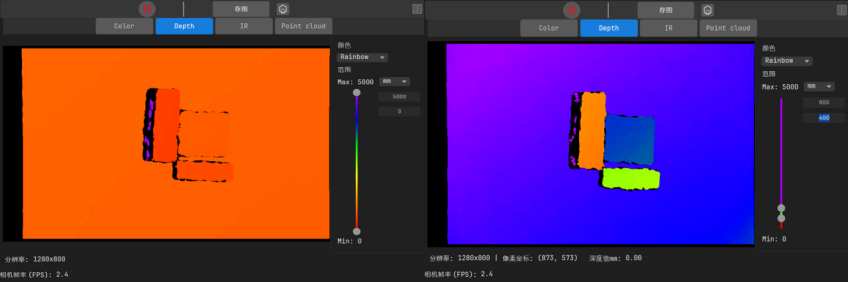
2.4 保存图像
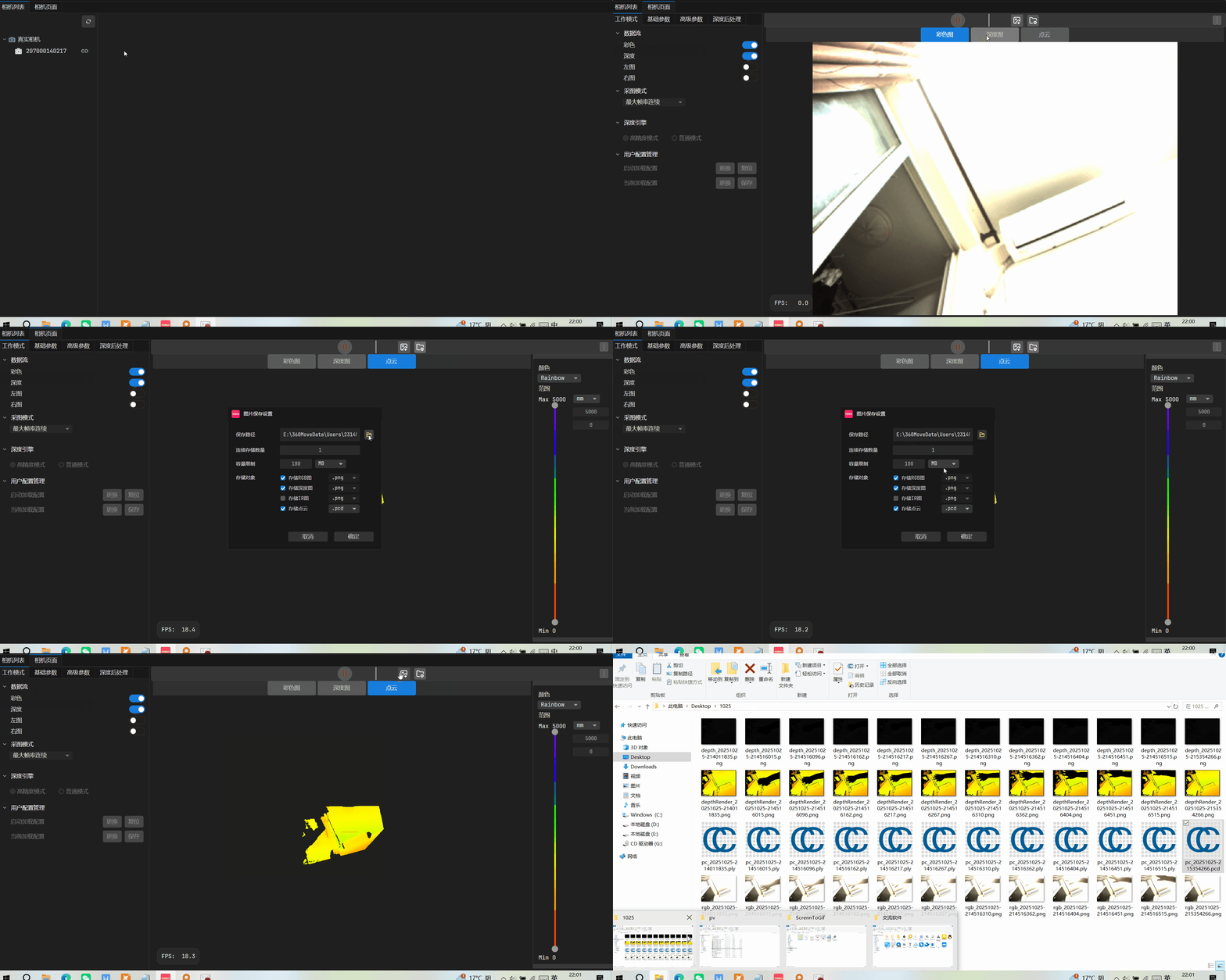
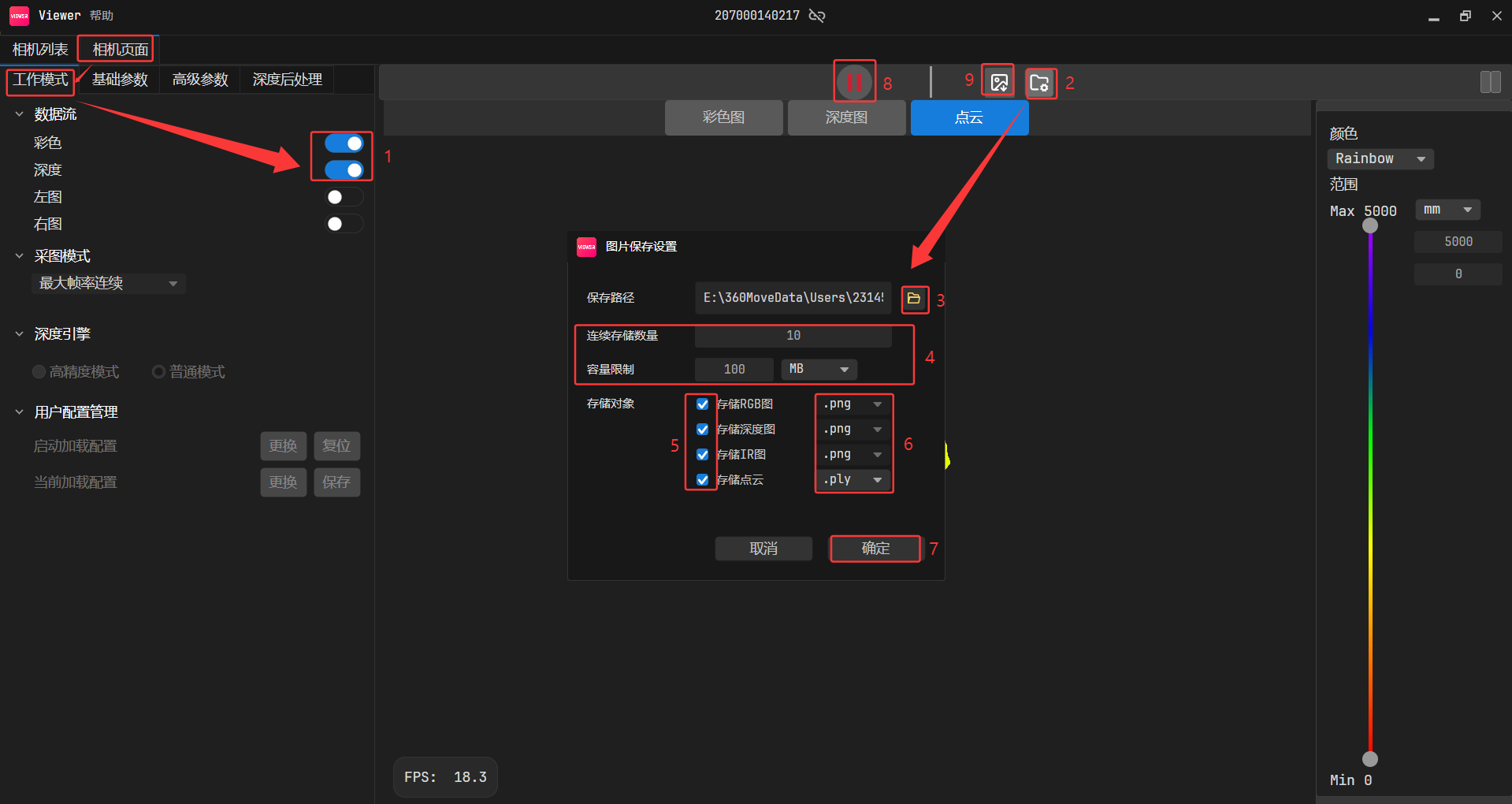
2.4.1 存图设置
新的Percipio Viewer支持保存当前帧图像,可同时保存彩色图、深度图、渲染后的深度图、左/右IR图、点云数据
(.ply/.pcd格式)。
操作步骤:
1.点击 ,弹出保存图片设置对话框。
2.点击 ,选择存图文件夹,并点击 “确定"。
详细操作可打开如下链接:
保存图像设置
2.4.2 单张存图
2.4.3 连续存图
2.5 GM461-E1相机保存参数配置
保存相机参数配置,上电加载参数,具体操作流程如下图: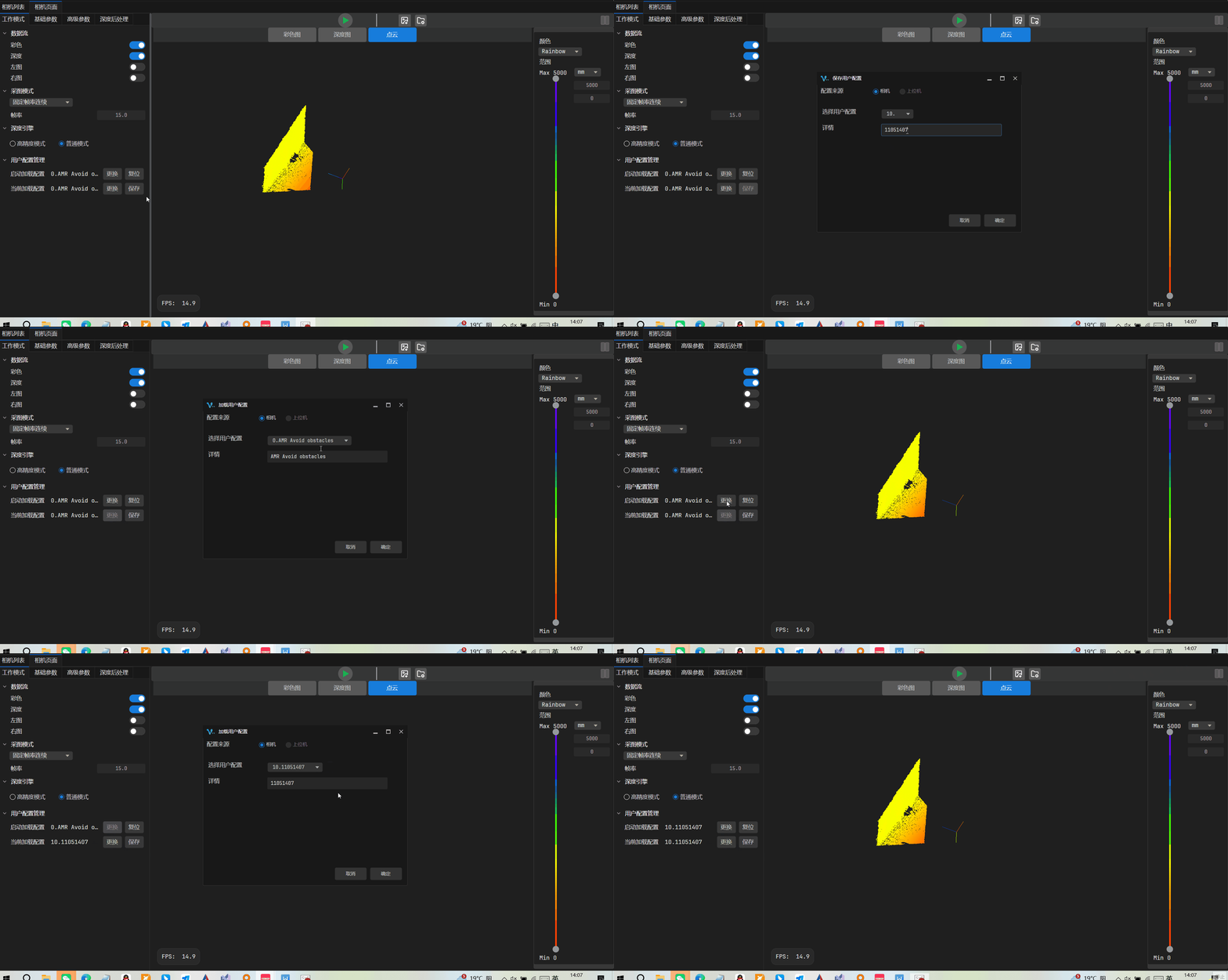
2.6 GM461-E1相机参数补充说明
- 1.开启
DepthSgbmSaturateFilterEnable、DepthSgbmTextureFilterEnable这两个后处理后,深度图像帧率会减半。 - 2.Userset默认配置是输出固定帧率,可设置帧率范围:[4,15] 或 [8,30]。
- 3.在相同场景和参数配置下,切换分辨率会导致深度图像处理效果出现差异。
这是由于深度后处理算法(如饱和度滤波、纹理滤波)的内部计算是基于像素的。如需不同分辨率呈现近似深度效果,可采用以下方案:
1).关闭深度后处理:直接禁用相关滤波功能。
2).手动参数适配:开启后处理时,需按分辨率比例手动调整参数值。例如:640×400 分辨率下,参数设置为7。切换至1280×800分辨率时,应将参数调整为28。
3.GM461-E1相机SDK相关
GM461-E1相机,推荐使用的编程语言和SDK版本如下:
3.1 TYCamera之C++语言SDK(推荐)
GM461-E1相机,只能搭配4.X.X版本的SDK使用,如果相机固件是106版本之后的,需要配合使用最新版本的SDK(4.1.14版本及以上)、最新版本的Viewer。
具体操作和Sample和案例,可打开如下链接:
1.图漾相机4.X.X版本C++语言SDK
2.图漾官网C++语言教程
官网修改后的C++语言SDK,可参考链接:官网修改后的C++语言的SDK
3.1.1 完整参考例子
#include <limits>
#include <cassert>
#include <cmath>
#include "../common/common.hpp"
#include <TYImageProc.h>
#include <chrono>
//深度图对齐到彩色图开关,置1则将深度图对齐到彩色图坐标系,置0则不对齐
//因彩色图对齐到深度图时会有部分深度缺失的区域丢失彩色信息,因此默认使用深度图对齐到彩色图方式
#define MAP_DEPTH_TO_COLOR 1
//开启以下深度图渲染显示将会降低帧率
DepthViewer depthViewer0("OrgDepth");//用于显示渲染后的原深度图
DepthViewer depthViewer1("FillHoleDepth");//用于显示渲染后的填洞处理之后的深度图
DepthViewer depthViewer2("SpeckleFilterDepth"); //用于显示渲染后的经星噪滤波过的深度图
DepthViewer depthViewer3("EnhenceFilterDepth"); //用于显示渲染后的经时域滤波过的深度图
DepthViewer depthViewer4("MappedDepth"); //用于显示渲染后的对齐到彩色图坐标系的深度图
//设置相机参数开关,默认使用相机内保存的参数。(使用保存的参数,也可以修改参数)
//不同型号相机具备不同的参数属性,可以使用PercipioViewer看图软件确认相机支持的参数属性和参数取值范围
bool setParameters = false;
static void use_new_apis()
{
LOGD("This is a new device. We have provided GenICam style API in TYParameter.h to get/set parameters.");
}
static void use_old_apis()
{
LOGD("This is a old device. Please use the API in TYApi.h to get/set parameters");
}
//事件回调
void eventCallback(TY_EVENT_INFO *event_info, void *userdata)
{
if (event_info->eventId == TY_EVENT_DEVICE_OFFLINE)
{
LOGD("=== Event Callback: Device Offline!");
// Note:
// Please set TY_BOOL_KEEP_ALIVE_ON OFF feature to false if you need to debug with breakpoint!
}
else if (event_info->eventId == TY_EVENT_LICENSE_ERROR)
{
LOGD("=== Event Callback: License Error!");
}
}
//数据格式转换
//cv pixel format to TY_PIXEL_FORMAT
static int cvpf2typf(int cvpf)
{
switch(cvpf)
{
case CV_8U: return TY_PIXEL_FORMAT_MONO;
case CV_8UC3: return TY_PIXEL_FORMAT_RGB;
case CV_16UC1: return TY_PIXEL_FORMAT_DEPTH16;
default: return TY_PIXEL_FORMAT_UNDEFINED;
}
}
//数据格式转换
//mat to TY_IMAGE_DATA
static void mat2TY_IMAGE_DATA(int comp, const cv::Mat& mat, TY_IMAGE_DATA& data)
{
data.status = 0;
data.componentID = comp;
data.size = mat.total() * mat.elemSize();
data.buffer = mat.data;
data.width = mat.cols;
data.height = mat.rows;
data.pixelFormat = cvpf2typf(mat.type());
}
struct CallbackData
{
int index;
TY_DEV_HANDLE hDevice;
TY_CAMERA_CALIB_INFO depth_calib;
TY_CAMERA_CALIB_INFO color_calib;
float f_depth_scale;
bool isTof;
bool saveOneFramePoint3d;
bool exit_main;
int fileIndex;
bool map_depth_to_color;
};
static CallbackData cb_data;
//通过内参实训深度图转点云,方式供参考
//depth to pointcloud
cv::Mat depthToWorld(float* intr, const cv::Mat &depth,float scale_unit)
{
cv::Mat world(depth.rows, depth.cols, CV_32FC3);
float cx = intr[2];
float cy = intr[5];
float inv_fx = 1.0f / intr[0];
float inv_fy = 1.0f / intr[4];
for (int r = 0; r < depth.rows; r++)
{
uint16_t* pSrc = (uint16_t*)depth.data + r * depth.cols;
cv::Vec3f* pDst = (cv::Vec3f*)world.data + r * depth.cols;
for (int c = 0; c < depth.cols; c++)
{
uint16_t z = pSrc[c] * scale_unit;
if(z == 0){
pDst[c][0] = NAN;
pDst[c][1] = NAN;
pDst[c][2] = NAN;
} else {
pDst[c][0] = (c - cx) * z * inv_fx;
pDst[c][1] = (r - cy) * z * inv_fy;
pDst[c][2] = z;
}
}
}
return world;
}
//输出畸变校正的彩色图,并实现深度图对齐到彩色图
static void doRegister(const TY_CAMERA_CALIB_INFO& depth_calib
, const TY_CAMERA_CALIB_INFO& color_calib
, const cv::Mat& depth
, const float f_scale_unit
, const cv::Mat& color
, cv::Mat& undistort_color
, cv::Mat& out
, bool map_depth_to_color
)
{
// do undistortion RGB校正畸变
TY_IMAGE_DATA src;
src.width = color.cols;
src.height = color.rows;
src.size = color.size().area() * 3;
src.pixelFormat = TYPixelFormatRGB8;
src.buffer = color.data;
undistort_color = cv::Mat(color.size(), CV_8UC3);
TY_IMAGE_DATA dst;
dst.width = color.cols;
dst.height = color.rows;
dst.size = undistort_color.size().area() * 3;
dst.buffer = undistort_color.data;
dst.pixelFormat = TYPixelFormatRGB8;
ASSERT_OK(TYUndistortImage(&color_calib, &src, NULL, &dst));
//TM265相机这里,新相机的RGB加入了鱼眼标定,如果使用TM265相机,则用TYGetEnum(hDevice, comp_id, TY_ENUM_LENS_OPTICAL_TYPE, &lens_tpye);
// TY_LENS_PINHOLE是老的小孔成像,TY_LENS_FISHEYE是新的鱼眼
// ASSERT_OK(TYUndistortImage(&color_calib, &src, NULL, &dst , TY_LENS_FISHEYE));
// 新的do register,用了最邻近插值
if (map_depth_to_color)
{
int outW = depth.cols;
int outH = depth.cols * undistort_color.rows / undistort_color.cols;
out = cv::Mat::zeros(cv::Size(outW, outH), CV_16U);
ASSERT_OK(
TYMapDepthImageToColorCoordinate(
&depth_calib,
depth.cols, depth.rows, depth.ptr<uint16_t>(),
&color_calib,
out.cols, out.rows, out.ptr<uint16_t>(), f_scale_unit
)
);
cv::Mat temp;
cv::resize(out, temp, undistort_color.size(), 0, 0, cv::INTER_NEAREST);
out = temp;
}
}
//图像帧处理
void frameHandler(TY_FRAME_DATA* frame, void* userdata)
{
CallbackData* pData = (CallbackData*) userdata;
LOGD("=== Get frame %d", ++pData->index);
std::vector<TY_VECT_3F> P3dtoColor,P3d;//点云
std::vector<cv::Mat> depths;
cv::Mat depth, color;
auto StartParseFrame = std::chrono::steady_clock::now();
//解析图像帧
parseFrame(*frame, &depth, 0, 0, &color);//拿深度图和color图
auto ParseFrameFinished = std::chrono::steady_clock::now();
auto duration2 = std::chrono::duration_cast<std::chrono::microseconds>(ParseFrameFinished - StartParseFrame);
LOGI("*******ParseFrame spend Time : %lld", duration2);
//填洞开关,开启后会降低帧率
bool FillHole = 1;
//星噪滤波开关,深度图中离散点降噪处理
bool SpeckleFilter = 0;
//时域滤波,可降低单点抖动,提升点云平面度
bool EnhenceFilter = 0;
//如果需要使用时域滤波功能,可设置该值范围
int depthnum = 1;
//深度图处理
if (!depth.empty())
{
if (pData->isTof)
{
//TOF相机深度图校正畸变
TY_IMAGE_DATA src;
src.width = depth.cols;
src.height = depth.rows;
src.size = depth.size().area() * 2;
src.pixelFormat = TYPixelFormatCoord3D_C16;
src.buffer = depth.data;
cv::Mat undistort_depth = cv::Mat(depth.size(), CV_16U);
TY_IMAGE_DATA dst;
dst.width = depth.cols;
dst.height = depth.rows;
dst.size = undistort_depth.size().area() * 2;
dst.buffer = undistort_depth.data;
dst.pixelFormat = TYPixelFormatCoord3D_C16;
ASSERT_OK(TYUndistortImage(&cb_data.depth_calib, &src, NULL, &dst));
depth = undistort_depth.clone();
}
if (FillHole)
{
TY_IMAGE_DATA sfFilledDepth;
cv::Mat fillDepth(depth.size(), depth.type());
fillDepth = depth.clone();
mat2TY_IMAGE_DATA(TY_COMPONENT_DEPTH_CAM, fillDepth, sfFilledDepth);
//深度图填洞处理
struct DepthInpainterParameters inpainter = DepthInpainterParameters_Initializer;
inpainter.kernel_size = 10;
inpainter.max_internal_hole = 1800;
TYDepthImageInpainter(&sfFilledDepth, &inpainter);
//空洞填充后度图渲染
depthViewer1.show(fillDepth);
depth = fillDepth.clone();
}
if (SpeckleFilter)
{
//使用星噪滤波
TY_IMAGE_DATA sfFilteredDepth;
cv::Mat filteredDepth(depth.size(), depth.type());
filteredDepth = depth.clone();
mat2TY_IMAGE_DATA(TY_COMPONENT_DEPTH_CAM, filteredDepth, sfFilteredDepth);
struct DepthSpeckleFilterParameters sfparam = DepthSpeckleFilterParameters_Initializer;
sfparam.max_speckle_size = 300;//噪点面积小于该值将被过滤
sfparam.max_speckle_diff = 64;//相邻像素视差大于该值将被视为噪点
TYDepthSpeckleFilter(&sfFilteredDepth, &sfparam);
//显示星噪滤波后深度图渲染
depthViewer2.show(filteredDepth);
depth = filteredDepth.clone();
}
//深度图时域滤波设置
if (EnhenceFilter)
{
depths.push_back(depth.clone());
LOGD("depths_size %d", depths.size());
if (depths.size() >= depthnum)
{
// filter
//LOGD("count %d ", ++cnt);
LOGD("depthnum count %d ", depthnum);
std::vector<TY_IMAGE_DATA> tyDepth(depthnum);
for (size_t i = 0; i < depthnum; i++)
{
mat2TY_IMAGE_DATA(TY_COMPONENT_DEPTH_CAM, depths[i], tyDepth[i]);
}
//使用时域滤波
TY_IMAGE_DATA tyFilteredDepth;
cv::Mat filteredDepth2(depth.size(), depth.type());
mat2TY_IMAGE_DATA(TY_COMPONENT_DEPTH_CAM, filteredDepth2, tyFilteredDepth);
struct DepthEnhenceParameters param = DepthEnhenceParameters_Initializer;
param.sigma_s = 0; //空间滤波系数
param.sigma_r = 0; //深度滤波系数
param.outlier_rate = 0; //以像素为单位的滤波窗口
param.outlier_win_sz = 0.f;//噪音过滤系数
TYDepthEnhenceFilter(&tyDepth[0], depthnum, NULL, &tyFilteredDepth, ¶m);
depths.clear();
//显示时域滤波后深度图渲染
depthViewer3.show(filteredDepth2);
}
}
else if (!FillHole && !SpeckleFilter&& !EnhenceFilter)
{
//显示原深度图渲染
depthViewer0.show(depth);
}
}
//彩色图处理
cv::Mat color_data_mat,p3dtocolorMat, undistort_color;
uint8_t* color_data = NULL;
if (!color.empty())
{
cv::Mat undistort_color, MappedDepth;
bool hasColorCalib = false;
ASSERT_OK(TYHasFeature(pData->hDevice, TY_COMPONENT_RGB_CAM, TY_STRUCT_CAM_CALIB_DATA, &hasColorCalib));
if (hasColorCalib)
{
cv::Mat tmp;
//cv::resize(out, tmp, undistort_color.size(), 0, 0, cv::INTER_NEAREST);
switch (color.type())
{
case CV_16U:
color.convertTo(tmp, CV_8U, 1.f / 256);
cv::cvtColor(tmp, color, cv::COLOR_GRAY2BGR);
break;
case CV_16UC3:
tmp = color;
tmp.convertTo(color, CV_8UC3, 1.f / 256);
break;
default:
break;
}
if (MAP_DEPTH_TO_COLOR)
{
doRegister(pData->depth_calib, pData->color_calib, depth, pData->f_depth_scale, color, color_data_mat, MappedDepth, MAP_DEPTH_TO_COLOR);
//生成对齐到彩色图坐标系的点云,两种方法
//方法一:生成点云放在TY_VECT_3F---P3dtoColor
P3dtoColor.resize(MappedDepth.size().area());
ASSERT_OK(TYMapDepthImageToPoint3d(&pData->color_calib, MappedDepth.cols, MappedDepth.rows, (uint16_t*)MappedDepth.data, &P3dtoColor[0], pData->f_depth_scale));
//方法二:生成点云放在32FC3 Mat---p3dtocolorMat
//p3dtocolorMat = depthToWorld(pData->intri_color->data, MappedDepth, pData->scale_unit);
//显示畸变校正后的彩色图
imshow("undistort_color", color_data_mat);
//显示对齐到彩色图坐标系的深度图
depthViewer4.show(MappedDepth);
}
else
{
//彩色图去畸变,不对齐的深度图
doRegister(pData->depth_calib, pData->color_calib, depth, pData->f_depth_scale, color, color_data_mat, MappedDepth, MAP_DEPTH_TO_COLOR);
//显示畸变校正后的彩色图
imshow("undistort_color", color_data_mat);
//方法一:生成点云放在TY_VECT_3F---P3dtoColor
P3d.resize(MappedDepth.size().area());
ASSERT_OK(TYMapDepthImageToPoint3d(&pData->depth_calib, MappedDepth.cols, MappedDepth.rows
, (uint16_t*)MappedDepth.data, &P3d[0], pData->f_depth_scale));
//方法二 pointcloud in CV_32FC3 format
//newP3d = depthToWorld(pData->intri_depth->data, depth, pData->scale_unit);
}
}
}
//保存点云
//save pointcloud
if (pData->saveOneFramePoint3d)
{
char file[32];
if (MAP_DEPTH_TO_COLOR)
{
LOGD("Save p3dtocolor now!!!");
//保存对齐到color坐标系XYZRGB格式彩色点云
sprintf(file, "pointsToColor-%d.xyz", pData->fileIndex++);
//方式一点云保存
writePointCloud((cv::Point3f*)&P3dtoColor[0], (const cv::Vec3b*)color_data_mat.data, P3dtoColor.size(), file, PC_FILE_FORMAT_XYZ);
//方式二点云保存
//writePointCloud((cv::Point3f*)p3dtocolorMat.data, (const cv::Vec3b*)color_data_mat.data, p3dtocolorMat.total(), file, PC_FILE_FORMAT_XYZ);
}
else
{
LOGD("Save point3d now!!!");
//保存XYZ格式点云
sprintf(file, "points-%d.xyz", pData->fileIndex++);
//方式一点云保存
writePointCloud((cv::Point3f*)&P3d[0], 0, P3d.size(), file, PC_FILE_FORMAT_XYZ);
//方式二点云保存
//writePointCloud((cv::Point3f*)newP3d.data, 0, newP3d.total(), file, PC_FILE_FORMAT_XYZ);
}
pData->saveOneFramePoint3d = false;
}
//归还Buffer队列
LOGD("=== Re-enqueue buffer(%p, %d)", frame->userBuffer, frame->bufferSize);
ASSERT_OK( TYEnqueueBuffer(pData->hDevice, frame->userBuffer, frame->bufferSize) );
}
int main(int argc, char* argv[])
{
std::string ID, IP;
TY_INTERFACE_HANDLE hIface = NULL;
TY_DEV_HANDLE hDevice = NULL;
TY_CAMERA_INTRINSIC intri_depth;
TY_CAMERA_INTRINSIC intri_color;
TY_CAMERA_DISTORTION dist;
TY_CAMERA_EXTRINSIC extri;
int32_t resend = 1;
bool isTof = 1;
for(int i = 1; i < argc; i++)
{
if(strcmp(argv[i], "-id") == 0)
{
ID = argv[++i];
} else if(strcmp(argv[i], "-ip") == 0)
{
IP = argv[++i];
} else if(strcmp(argv[i], "-h") == 0)
{
LOGI("Usage: SimpleView_Callback [-h] [-id <ID>]");
return 0;
}
}
LOGD("=== Init lib");
ASSERT_OK( TYInitLib() );
TY_VERSION_INFO ver;
ASSERT_OK( TYLibVersion(&ver) );
LOGD("- lib version: %d.%d.%d", ver.major, ver.minor, ver.patch);
std::vector<TY_DEVICE_BASE_INFO> selected;
//选择相机
ASSERT_OK( selectDevice(TY_INTERFACE_ALL, ID, IP, 10, selected) );
ASSERT(selected.size() > 0);
//默认加载第一个相机
TY_DEVICE_BASE_INFO& selectedDev = selected[0];
if (TYIsNetworkInterface(selectedDev.iface.type))
{
LOGD(" - device %s:", selectedDev.id);
if (strlen(selectedDev.userDefinedName) != 0)
{
LOGD(" vendor : %s", selectedDev.userDefinedName);
}
else {
LOGD(" vendor : %s", selectedDev.vendorName);
}
LOGD(" model : %s", selectedDev.modelName);
LOGD(" device MAC : %s", selectedDev.netInfo.mac);
LOGD(" device IP : %s", selectedDev.netInfo.ip);
LOGD(" TL version : %s", selectedDev.netInfo.tlversion);
if (strcmp(selectedDev.netInfo.tlversion, "Gige_2_1") == 0)
{
use_new_apis();
}
else
{
use_old_apis();
}
}
else
{
TY_DEV_HANDLE handle;
int32_t ret = TYOpenDevice(hIface, selectedDev.id, &handle);
if (ret == 0)
{
TYGetDeviceInfo(handle, &selectedDev);
TYCloseDevice(handle);
LOGD(" - device %s:", selectedDev.id);
}
else
{
LOGD(" - device %s(open failed, error: %d)", selectedDev.id, ret);
}
if (strlen(selectedDev.userDefinedName) != 0)
{
LOGD(" vendor : %s", selectedDev.userDefinedName);
}
else {
LOGD(" vendor : %s", selectedDev.vendorName);
}
LOGD(" model : %s", selectedDev.modelName);
use_old_apis();
if (!setParameters)
{
std::string js_data;
int ret;
ret = load_parameters_from_storage(hDevice, js_data);//使用相机内保存参数
if (ret == TY_STATUS_ERROR)
{
LOGD("no save parameters in the camera");
setParameters = true;
}
else if (ret != TY_STATUS_OK)
{
LOGD("Failed: error %d(%s)", ret, TYErrorString(ret));
setParameters = true;
}
}
}
//打开接口和设备
ASSERT_OK( TYOpenInterface(selectedDev.iface.id, &hIface) );
ASSERT_OK( TYOpenDevice(hIface, selectedDev.id, &hDevice) );
//使能相机组件
TY_COMPONENT_ID allComps;
ASSERT_OK(TYGetComponentIDs(hDevice, &allComps));
ASSERT_OK(TYDisableComponents(hDevice, allComps));
//使能彩色相机
//try to enable color camera
if (allComps & TY_COMPONENT_RGB_CAM )
{
LOGD("Has RGB camera, open RGB cam");
ASSERT_OK(TYEnableComponents(hDevice, TY_COMPONENT_RGB_CAM));
}
//使能Depth相机
//try to enable color camera
if (allComps & TY_COMPONENT_DEPTH_CAM)
{
LOGD("Has Depth camera, open Depth cam");
ASSERT_OK(TYEnableComponents(hDevice, TY_COMPONENT_DEPTH_CAM));
}
//使能IR相机
//try to enable ir cam
if (allComps & TY_COMPONENT_IR_CAM_LEFT)
{
LOGD("=== Configure components, open ir cam");
ASSERT_OK(TYEnableComponents(hDevice, TY_COMPONENT_IR_CAM_LEFT));
}
//读取彩色相机标定数据
//TY_STRUCT_CAM_CALIB_DATA内参是相机出厂标定分辨率的内参
//TY_STRUCT_CAM_INTRINSIC内参是相机当前分辨率的内参
LOGD("=== Get color intrinsic");
ASSERT_OK(TYGetStruct(hDevice, TY_COMPONENT_RGB_CAM, TY_STRUCT_CAM_INTRINSIC, &intri_color, sizeof(intri_color)));
////打印当前彩色相机分辨率内参,分辨率不同,fx,fy,cx,cy不一样。
//打印这里也可引入C++标准库iomanip,之后调用setw()函数打印
LOGD("===%23s%f %f %f", "", intri_color.data[0], intri_color.data[1], intri_color.data[2]);
LOGD("===%23s%f %f %f", "", intri_color.data[3], intri_color.data[4], intri_color.data[5]);
LOGD("===%23s%f %f %f", "", intri_color.data[6], intri_color.data[7], intri_color.data[8]);
LOGD("=== Read color calib data");
ASSERT_OK(TYGetStruct(hDevice, TY_COMPONENT_RGB_CAM, TY_STRUCT_CAM_CALIB_DATA
, &cb_data.color_calib, sizeof(cb_data.color_calib)));
//读取深度相机内参和深度相机标定数据
//TY_STRUCT_CAM_CALIB_DATA内参是相机出厂标定分辨率的内参
//TY_STRUCT_CAM_INTRINSIC内参是相机当前分辨率的内参
LOGD("=== Get depth intrinsic");
ASSERT_OK(TYGetStruct(hDevice, TY_COMPONENT_DEPTH_CAM, TY_STRUCT_CAM_INTRINSIC, &intri_depth, sizeof(intri_depth)));
////打印当前深度图相机分辨率内参,分辨率不同,fx,fy,cx,cy不一样。
LOGD("===%23s%f %f %f", "", intri_depth.data[0], intri_depth.data[1], intri_depth.data[2]);
LOGD("===%23s%f %f %f", "", intri_depth.data[3], intri_depth.data[4], intri_depth.data[5]);
LOGD("===%23s%f %f %f", "", intri_depth.data[6], intri_depth.data[7], intri_depth.data[8]);
LOGD("=== Read depth calib data");
ASSERT_OK(TYGetStruct(hDevice, TY_COMPONENT_DEPTH_CAM, TY_STRUCT_CAM_CALIB_DATA
, &cb_data.depth_calib, sizeof(cb_data.depth_calib)));
//////获取彩色图畸变系数;
//////跑GM46X最新固件有问题,先屏蔽
//LOGD("=== Get color distortion");
//ASSERT_OK(TYGetStruct(hDevice, TY_COMPONENT_RGB_CAM, TY_STRUCT_CAM_DISTORTION, &dist, sizeof(dist)));
//LOGD("===%23s%f %f %f %f", "", dist.data[0], dist.data[1], dist.data[2], dist.data[3]);
//LOGD("===%23s%f %f %f %f", "", dist.data[4], dist.data[5], dist.data[6], dist.data[7]);
//LOGD("===%23s%f %f %f %f", "", dist.data[8], dist.data[9], dist.data[10], dist.data[11]);
////获取RGB至相机左IR的外参
// //TY_STRUCT_EXTRINSIC_TO_IR_LEFT
//////跑GM46X最新固件有问题,先屏蔽
//
//ASSERT_OK(TYGetStruct(hDevice, TY_COMPONENT_RGB_CAM_LEFT, TY_STRUCT_EXTRINSIC_TO_DEPTH, &extri, sizeof(extri)));
//LOGD("===%23s%f %f %f %f", "", extri.data[0], extri.data[1], extri.data[2], extri.data[3]);
//LOGD("===%23s%f %f %f %f", "", extri.data[4], extri.data[5], extri.data[6], extri.data[7]);
//LOGD("===%23s%f %f %f %f", "", extri.data[8], extri.data[9], extri.data[10], extri.data[11]);
//LOGD("===%23s%f %f %f %f", "", extri.data[12], extri.data[13], extri.data[14], extri.data[15]);
//获取所需Buffer大小
LOGD("=== Prepare image buffer");
uint32_t frameSize;
ASSERT_OK( TYGetFrameBufferSize(hDevice, &frameSize) );
LOGD(" - Get size of framebuffer, %d", frameSize);
//分配两个Buffer,并压入队列
LOGD(" - Allocate & enqueue buffers");
char* frameBuffer[2];
frameBuffer[0] = new char[frameSize];
frameBuffer[1] = new char[frameSize];
LOGD(" - Enqueue buffer (%p, %d)", frameBuffer[0], frameSize);
ASSERT_OK( TYEnqueueBuffer(hDevice, frameBuffer[0], frameSize) );
LOGD(" - Enqueue buffer (%p, %d)", frameBuffer[1], frameSize);
ASSERT_OK( TYEnqueueBuffer(hDevice, frameBuffer[1], frameSize) );
//注册事件回调
bool device_offline = false;;
LOGD("=== Register event callback");
ASSERT_OK(TYRegisterEventCallback(hDevice, eventCallback, &device_offline));
////触发模式设置
//bool hasTrigger;
//ASSERT_OK(TYHasFeature(hDevice, TY_COMPONENT_DEVICE, TY_STRUCT_TRIGGER_PARAM, &hasTrigger));
//if (hasTrigger)
//{
// TY_TRIGGER_PARAM trigger;
// LOGD("=== enable trigger mode");
// //trigger.mode = TY_TRIGGER_MODE_OFF;
// trigger.mode = TY_TRIGGER_MODE_SLAVE;//软触发和硬触发模式
// ASSERT_OK(TYSetStruct(hDevice, TY_COMPONENT_DEVICE, TY_STRUCT_TRIGGER_PARAM, &trigger, sizeof(trigger)));
//
//
//}
ASSERT_OK(TYEnumSetString(hDevice, "AcquisitionMode", "SingleFrame"));
ASSERT_OK(TYEnumSetString(hDevice, "TriggerSource", "Software"));//触发源是软触发
//4.0.7之后版本的SDK,删除Resned开关,逻辑修改为相机支持则默认打开。
////for network only
//LOGD("=== resend: %d", resend);
//if (resend)
//{
// bool hasResend;
// ASSERT_OK(TYHasFeature(hDevice, TY_COMPONENT_DEVICE, TY_BOOL_GVSP_RESEND, &hasResend));
// if (hasResend)
// {
// LOGD("=== Open resend");
// ASSERT_OK(TYSetBool(hDevice, TY_COMPONENT_DEVICE, TY_BOOL_GVSP_RESEND, true));
// }
// else
// {
// LOGD("=== Not support feature TY_BOOL_GVSP_RESEND");
// }
//}
//开始采集
LOGD("=== Start capture");
ASSERT_OK( TYStartCapture(hDevice) );
//回调数据初始化
cb_data.index = 0;
cb_data.hDevice = hDevice;
cb_data.saveOneFramePoint3d = false;
cb_data.fileIndex = 0;
// cb_data.intri_depth = &intri_depth;
// cb_data.intri_color = &intri_color;
//float scale_unit = 1.;
float scale_unit =1.;
TYGetFloat(hDevice, TY_COMPONENT_DEPTH_CAM, TY_FLOAT_SCALE_UNIT, &scale_unit);
std::cout << "scale_uint:" << scale_unit << std::endl;
cb_data.f_depth_scale = scale_unit;
cb_data.isTof = isTof;
depthViewer0.depth_scale_unit = scale_unit;
depthViewer1.depth_scale_unit = scale_unit;
depthViewer2.depth_scale_unit = scale_unit;
depthViewer3.depth_scale_unit = scale_unit;
depthViewer4.depth_scale_unit = scale_unit;
//循环取图
LOGD("=== While loop to fetch frame");
TY_FRAME_DATA frame;
bool exit_main = false;
int index = 0;
uint32_t source = 8;
while(!exit_main)
{
int key = cv::waitKey(1);
switch(key & 0xff)
{
case 0xff:
break;
case 'q':
exit_main = true;
break;
case 's':
cb_data.saveOneFramePoint3d = true;//图片显示窗口上按s键则存一张点云图
break;
default:
LOGD("Pressed key %d", key);
}
auto timeTrigger = std::chrono::steady_clock::now();
//GM461相机发送一次软触发
if (source == 8)
{
ASSERT_OK(TYCommandExec(hDevice, "TriggerSoftware"));
std::cout << "triggermode:" << source << std::endl;
}
//旧相机的发送软触发指令
//while (TY_STATUS_BUSY == TYSendSoftTrigger(hDevice));
//获取帧,默认超时设置为8s
int err = TYFetchFrame(hDevice, &frame, 8000);
//获取图像时间戳代码
LOGD("=== Time Stamp (%" PRIu64 ")", frame.image[0].timestamp);
time_t tick = (time_t)(frame.image[0].timestamp / 1000000);
struct tm tm;
char s[100];
tm = *localtime(&tick);
strftime(s, sizeof(s), "%Y-%m-%d %H:%M:%S", &tm);
int milliseconds = (int)((frame.image[0].timestamp % 1000000) / 1000);
char ms_str[5];
sprintf(ms_str, ".%d", milliseconds);
strcat(s, ms_str);
LOGD("===Time Stamp %d:%s\n", (int)tick, s);
auto timeGetFrame = std::chrono::steady_clock::now();
auto duration = std::chrono::duration_cast<std::chrono::microseconds>(timeGetFrame - timeTrigger);
LOGI("*******FetchFrame spend Time : %lld", duration);
if( err != TY_STATUS_OK )
{
LOGD("... Drop one frame");
continue;
}
if (err == TY_STATUS_OK)
{
LOGD("Get frame %d", ++index);
int fps = get_fps();
if (fps > 0)
{
LOGI("***************************fps: %d", fps);
}
}
frameHandler(&frame, &cb_data);
}
ASSERT_OK( TYStopCapture(hDevice) );
ASSERT_OK( TYCloseDevice(hDevice) );
ASSERT_OK( TYCloseInterface(hIface) );
ASSERT_OK( TYDeinitLib() );
delete frameBuffer[0];
delete frameBuffer[1];
LOGD("=== Main done!");
return 0;
}
3.1.2 GM461-E1相机软触发注意事项
建议选择下面软触发指令,依次时选择触发模式—>选择触发源—>发送软触发指令
ASSERT_OK(TYEnumSetString(hDevice, "AcquisitionMode", "SingleFrame"));
ASSERT_OK(TYEnumSetString(hDevice, "TriggerSource", "Software"));//触发源是软触发
ASSERT_OK(TYCommandExec(hDevice, "TriggerSoftware"));//通过此命令控制相机采图
3.1.3 TYSendSoftTrigger软触发指令不生效
而之前的Sample_V1里面提供的,对GM461-E1/相机是不生效的。
//触发模式设置
	bool hasTrigger;
	ASSERT_OK(TYHasFeature(hDevice, TY_COMPONENT_DEVICE, TY_STRUCT_TRIGGER_PARAM, &hasTrigger));
	if (hasTrigger)
	{
		TY_TRIGGER_PARAM trigger;
		//trigger.mode = TY_TRIGGER_MODE_OFF;//连续采集模式
		LOGD("=== enable trigger mode");
		trigger.mode = TY_TRIGGER_MODE_SLAVE;//软触发和硬触发模式
		ASSERT_OK(TYSetStruct(hDevice, TY_COMPONENT_DEVICE, TY_STRUCT_TRIGGER_PARAM, &trigger, sizeof(trigger)));

		//bool hasDI0_WORKMODE;
		//ASSERT_OK(TYHasFeature(hDevice, TY_COMPONENT_DEVICE, TY_STRUCT_DI0_WORKMODE, &hasDI0_WORKMODE));
		//if (hasDI0_WORKMODE)
		//{
		//	//硬触发模式防抖
		//	TY_DI_WORKMODE di_wm;
		//	di_wm.mode = TY_DI_PE_INT;
		//	di_wm.int_act = TY_DI_INT_TRIG_CAP;
		//	uint32_t time_hw = 10;//单位ms,硬件滤波,小于设定时间的电平信号会被过滤
		//	uint32_t time_sw = 200;//单位ms,软件滤波,连续高频触发情形,小于设置周期的后一个触发信号将被过滤
		//	di_wm.reserved[0] = time_hw | (time_sw << 16);
		//	ASSERT_OK(TYSetStruct(hDevice, TY_COMPONENT_DEVICE, TY_STRUCT_DI0_WORKMODE, &di_wm, sizeof(di_wm)));
		//}

	}
旧相机(GM46X和PMD系列相机除外)支持的软触发指令
auto timeTrigger = std::chrono::steady_clock::now();
		//发送一次软触发
		while (TY_STATUS_BUSY == TYSendSoftTrigger(hDevice));
		//获取帧,默认超时设置为10s
        int err = TYFetchFrame(hDevice, &frame, 3000);
		auto timeGetFrame = std::chrono::steady_clock::now();
		auto duration = std::chrono::duration_cast<std::chrono::microseconds>(timeGetFrame - timeTrigger);
		LOGI("*******FetchFrame spend Time : %lld", duration);
3.1.4 GM461-E1相机推荐SDK版本
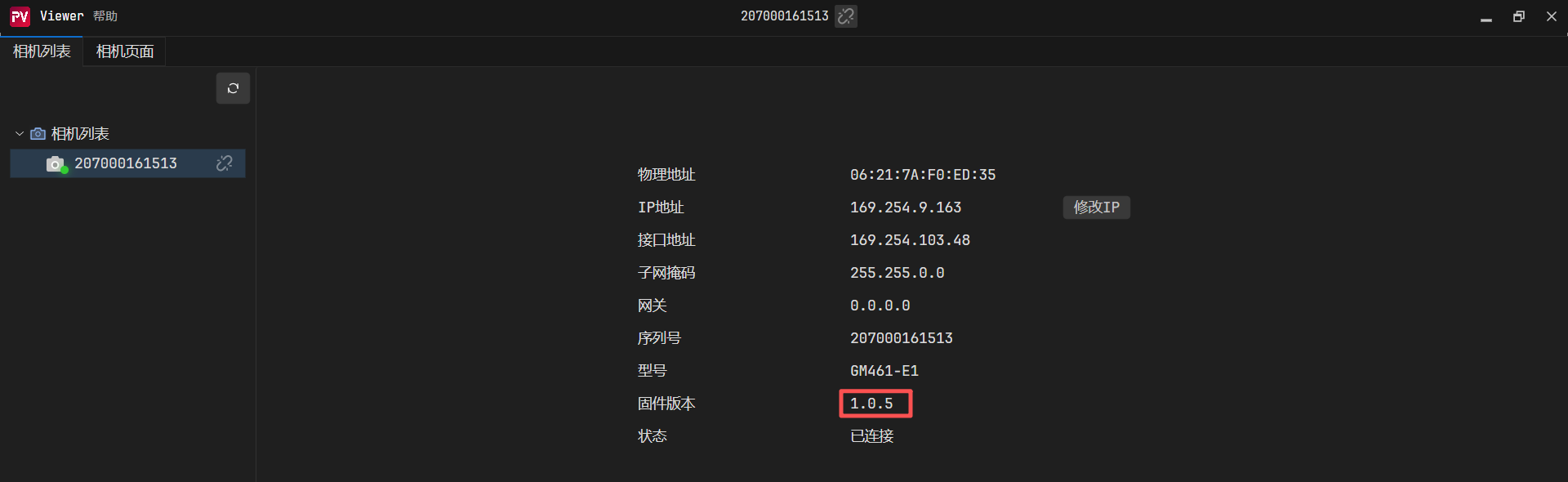
1.如果固件是0.0.106版本及其以前版本,推荐使用4.1.1版本(无痛切换)
2.如果固件是1.0.X版本以上,推荐使用4.1.14及其以上版本(引入了tyimgproc.dll)
3.1.5 C++语言SDK升级注意事项
待补充
3.2 TYCamera之ROS1版本(推荐)
GM461-E1相机,只能搭配4.X.X版本的SDK使用,如果相机固件是106版本之后的,需要配合使用最新版本的SDK(4.1.14版本以上版本)、以及最新版本的Viewer软件。
1.具体操作和Sample和案例,可打开如下链接:
图漾相机-ROS1_SDK_ubuntu 4.X.X版本编译
图漾官网ROS1教程
3.3 TYCamera之ROS2版本(推荐)
GM461-E1相机,只能搭配4.X.X版本的SDK使用,如果相机固件是106版本之后的,需要配合使用最新版本的SDK(4.1.14版本及以上)、最新版本的Viewer软件。
具体操作和Sample和案例,可打开如下链接:
图漾相机-ROS2-SDK-Ubuntu 4.X.X版本编译
图漾官网ROS2教程
1.GM461-E1相机,推荐使用4.1.14及其以上SDK版本(引入了tyimgproc.dll)
3.4 VCamera之C#语言SDK
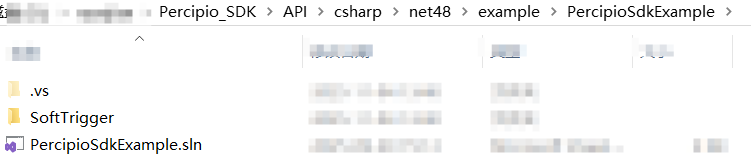
新的看图软件,自带的C#例程比较简陋。详细的编译流程可参看链接:
VCamera之C#语言SDK
详细的编译流程可参看链接:VCamera之C#语言SDK编译流程
至于VCamera详细的Api链接,可查看链接:VCamera之C#语言Api接口
3.5 VCamera之Python语言SDK
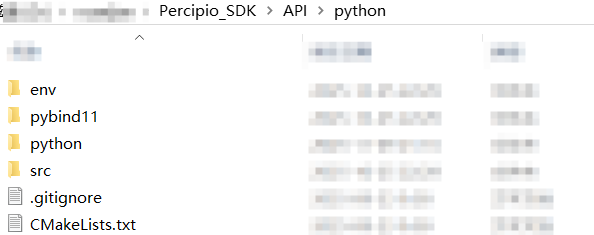
新的看图软件,自带的Python例程比较简陋。
VCamera之Python语言SDK
详细的编译流程可参看链接:VCamera之Python语言SDK编译流程
至于VCamera详细的Api链接,可查看链接:VCamera之Python语言Api接口
3.6 Halcon语言SDK
建议参考以下链接:
1.图漾Halcon版本SDK使用教程【V1.1.X新版本】
2.图漾官网Halcon版本SDK操作流程
3.7 VisionPro语言SDK
建议参考以下链接:
1.图漾相机搭配VisionPro使用简易教程
如果出现链接不上相机的情况,请更新官网最新版本的驱动。
3.8 TyCamera之C++封装简化版SDK(新客户推荐)
待补充
4.GM461-E1相机常见FAQ
4.1 如何获取GM461-E1相机内参?
4.1.1 方法一 运行sample_read_calibration_data
编译C++语言中的sample_read_calibration_data例子,之后运行,会打印GM461-E1相机的内参。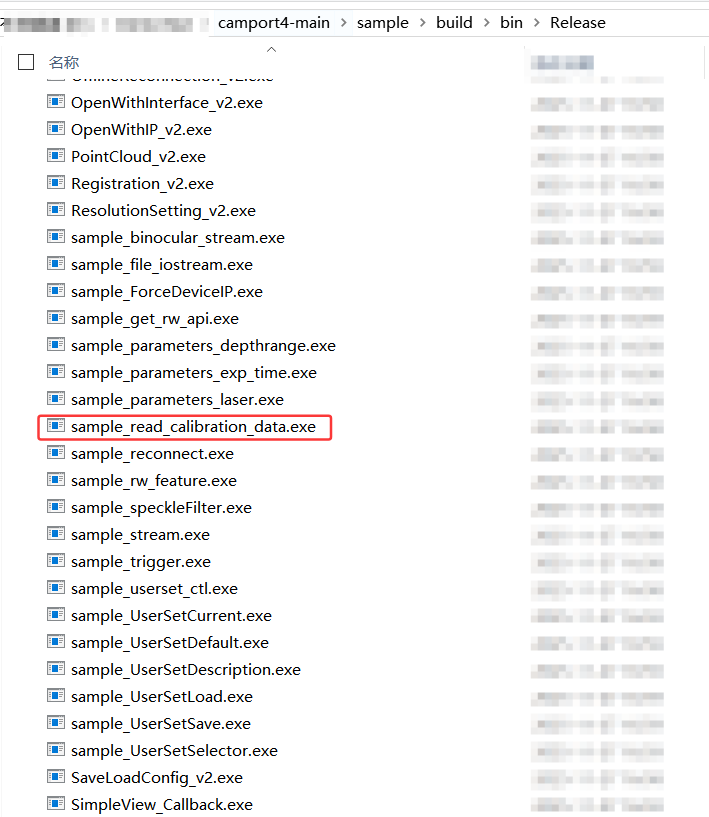
4.1.2 方法二 运行x64中的例子
使用本贴子中的x64压缩包,通过鼠标右键+shift键,进入到PowerShell界面,运行sample_read_calibration_data例子,详细步骤如下: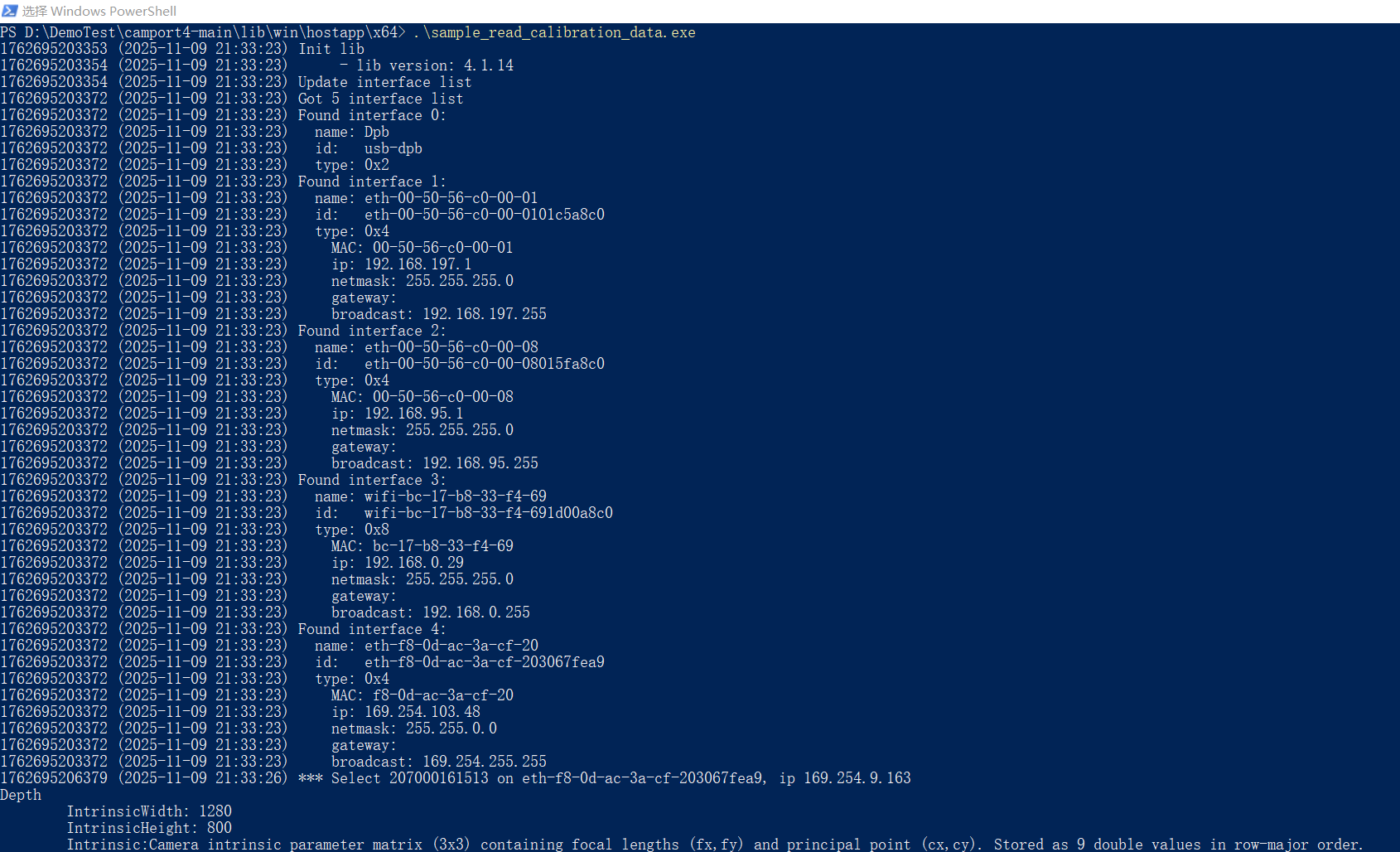
4.1.3 方法三 运行DumpCalibInfo
编译C++语言中的例子,之后运行Sample_V1文件夹中的DumpCalibInfo例子,会生成一个json文件,里面记录GM461–E1相机的内外参信息。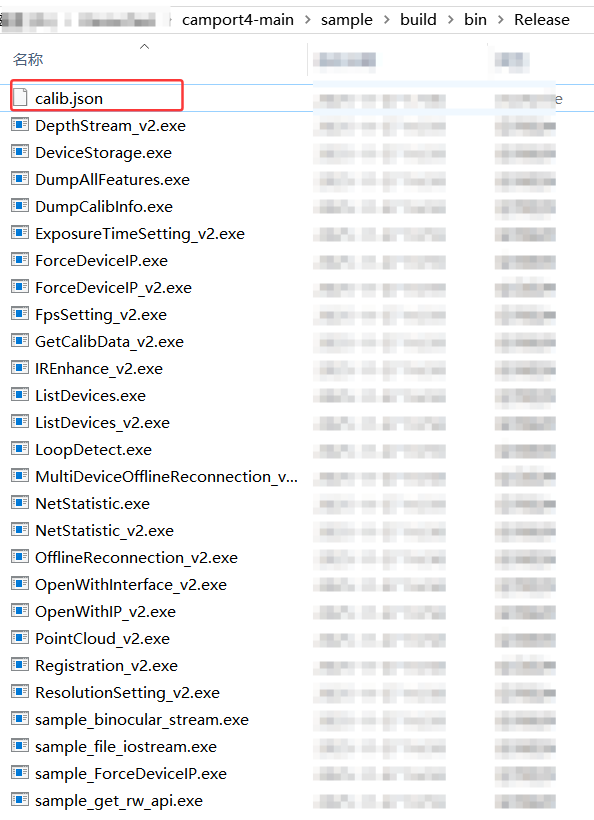
生成的json文件如下图:
{
	"sn": "207000161588",
	"timestamp": "2025-12-06 17:39:11",
	"depth_calib_info" : {
		"intri": [
		844.391357,
		0.000000,
		629.569580,
		0.000000,
		844.391357,
		387.850281,
		0.000000,
		0.000000,
		1.000000
		],
		"image_width": 1280,
		"image_height": 800,
		"scale_unit": 1.000000
	},
	"color_calib_info" : {
		"intri": [
		805.732117,
		0.000000,
		625.247437,
		0.000000,
		805.713318,
		525.051575,
		0.000000,
		0.000000,
		1.000000
		],
		"extri": [
		0.999887,
		-0.012590,
		0.008164,
		10.426156,
		0.012527,
		0.999892,
		0.007633,
		0.107329,
		-0.008259,
		-0.007530,
		0.999938,
		-0.280716,
		0.000000,
		0.000000,
		0.000000,
		1.000000,
		0.261180
		],
		"distortion": [
		0.261180,
		0.731387,
		-0.000107,
		0.003116,
		0.911238,
		0.280016,
		0.661509,
		0.999843,
		-0.002933,
		-0.000390,
		0.000311,
		0.000250
		],
		"image_width": 1280,
		"image_height": 960
	}
}
4.1.4 方法四 通过Viewer工具保存图像
在连上相机后,打开相机取流,之后保存图像,具体操作可参考5.3章节保存图像,之后打开保存图像的文件夹路径,打开txt文件,如下图: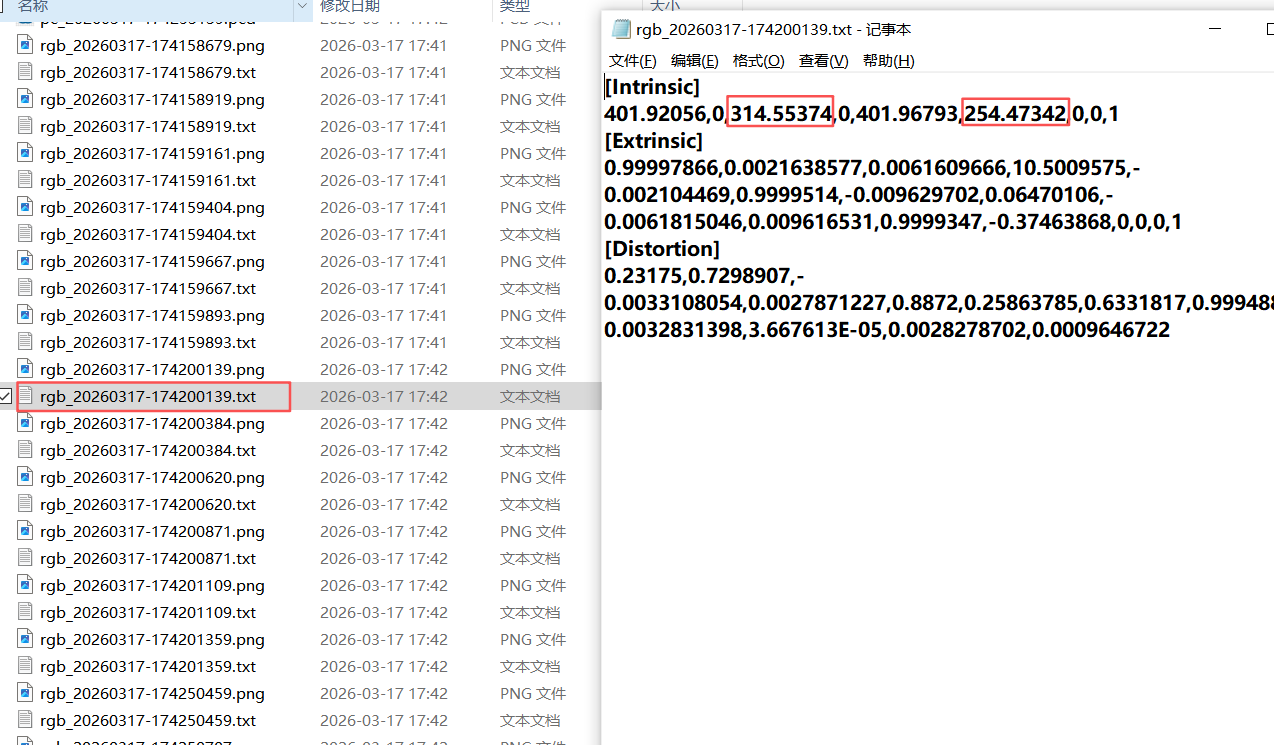
此处保存的内参,会随着分辨率的变化而变化。
4.2 GM461-E1相机内参说明
运行sample_read_calibration_data例子,打印出来的内参如下:
Depth
        IntrinsicWidth: 1280
        IntrinsicHeight: 800
        Intrinsic:Camera intrinsic parameter matrix (3x3) containing focal lengths (fx,fy) and principal point (cx,cy). Stored as 9 double values in row-major order.
                  849.295362    0.000000  631.821602
                    0.000000  849.295362  395.606600
                    0.000000    0.000000    1.000000
        No rectifyed intrinsic data.
        No rotation data.
        No distortion data.
        No extrinsic data.
Texture
        IntrinsicWidth: 1280
        IntrinsicHeight: 960
        Intrinsic:Camera intrinsic parameter matrix (3x3) containing focal lengths (fx,fy) and principal point (cx,cy). Stored as 9 double values in row-major order.
                  803.841137    0.000000  629.107503
                    0.000000  803.935828  508.946834
                    0.000000    0.000000    1.000000
        No rectifyed intrinsic data.
        No rotation data.
        Distortion:Camera distortion coefficients (12x1 vector) including radial (k1-k6), tangential (p1-p2), and prism (s1-s4) distortions. Stored as 12 double values.
                    0.231750    0.729891   -0.003311    0.002787    0.887200    0.258638    0.633182    0.999489   -0.003283    0.000037    0.002828    0.000965
        Extrinsic:Camera extrinsic matrix (4x4) containing rotation and translation relative to world coordinate system. Stored as 16 double values in row-major order.
                    0.999979    0.002164    0.006161   10.500958
                   -0.002104    0.999951   -0.009630    0.064701
                   -0.006182    0.009617    0.999935   -0.374639
                    0.000000    0.000000    0.000000    1.000000
Left
        IntrinsicWidth: 1280
        IntrinsicHeight: 800
        Intrinsic:Camera intrinsic parameter matrix (3x3) containing focal lengths (fx,fy) and principal point (cx,cy). Stored as 9 double values in row-major order.
                  846.596971    0.000000  630.892295
                    0.000000  846.503802  397.161103
                    0.000000    0.000000    1.000000
        Rectifyed intrinsic:Rectified camera intrinsic parameter matrix (3x3) after distortion correction. Contains modified focal lengths and principal point. Stored as 9 double values.
                  849.295362    0.000000  631.821602
                    0.000000  849.295362  395.606600
                    0.000000    0.000000    1.000000
        Rotation:Camera rotation matrix (3x3) representing orientation in 3D space. Orthonormal matrix with determinant +1. Stored as 9 double values in row-major order.
                    0.999997   -0.002445   -0.000869
                    0.002448    0.999990    0.003720
                    0.000860   -0.003722    0.999993
        Distortion:Camera distortion coefficients (12x1 vector) including radial (k1-k6), tangential (p1-p2), and prism (s1-s4) distortions. Stored as 12 double values.
                   -0.065113    0.009064   -0.000904   -0.000084    0.598195   -0.126516    0.127444    0.540535   -0.000395    0.000427   -0.000143    0.000617
        Extrinsic:Camera extrinsic matrix (4x4) containing rotation and translation relative to world coordinate system. Stored as 16 double values in row-major order.
                    1.000000    0.000000    0.000000    0.000000
                    0.000000    1.000000    0.000000    0.000000
                    0.000000    0.000000    1.000000    0.000000
                    0.000000    0.000000    0.000000    1.000000
Right
        IntrinsicWidth: 1280
        IntrinsicHeight: 800
        Intrinsic:Camera intrinsic parameter matrix (3x3) containing focal lengths (fx,fy) and principal point (cx,cy). Stored as 9 double values in row-major order.
                  845.633045    0.000000  631.451000
                    0.000000  845.635807  395.112098
                    0.000000    0.000000    1.000000
        Rectifyed intrinsic:Rectified camera intrinsic parameter matrix (3x3) after distortion correction. Contains modified focal lengths and principal point. Stored as 9 double values.
                  849.295362    0.000000  631.821602
                    0.000000  849.295362  395.606600
                    0.000000    0.000000    1.000000
        Rotation:Camera rotation matrix (3x3) representing orientation in 3D space. Orthonormal matrix with determinant +1. Stored as 9 double values in row-major order.
                    0.999985   -0.005487   -0.000876
                    0.005484    0.999978   -0.003723
                    0.000896    0.003718    0.999993
        Distortion:Camera distortion coefficients (12x1 vector) including radial (k1-k6), tangential (p1-p2), and prism (s1-s4) distortions. Stored as 12 double values.
                   -0.060512    0.028435   -0.001911   -0.000879    0.599802   -0.119581    0.137869    0.548687    0.000119    0.000392    0.002222    0.000146
        Extrinsic:Camera extrinsic matrix (4x4) containing rotation and translation relative to world coordinate system. Stored as 16 double values in row-major order.
                    0.999995    0.003036    0.000048  -65.960244
                   -0.003036    0.999968    0.007443    0.361959
                   -0.000025   -0.007443    0.999972    0.057769
                    0.000000    0.000000    0.000000    1.000000
4.2.1 深度图内参
Depth
        IntrinsicWidth: 1280
        IntrinsicHeight: 800
        Intrinsic:Camera intrinsic parameter matrix (3x3) containing focal lengths (fx,fy) and principal point (cx,cy). Stored as 9 double values in row-major order.
                  849.295362    0.000000  631.821602
                    0.000000  849.295362  395.606600
                    0.000000    0.000000    1.000000
        No rectifyed intrinsic data.
        No rotation data.
        No distortion data.
        No extrinsic data.
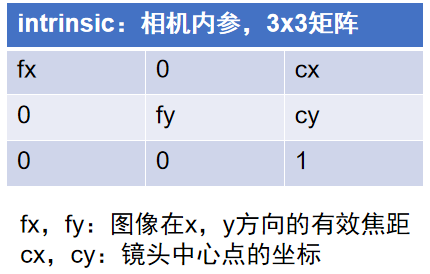
1.cx和cy通常大约是图像分辨率W和H的一半,得出GM461相机深度图出厂标定分辨率为1280x800。
2.由于深度相机是虚拟相机,所以其畸变参数以及外参都是零矩阵。
4.2.2 彩色图内参/畸变系数/外参
Texture
        IntrinsicWidth: 1280
        IntrinsicHeight: 960
        Intrinsic:Camera intrinsic parameter matrix (3x3) containing focal lengths (fx,fy) and principal point (cx,cy). Stored as 9 double values in row-major order.
                  803.841137    0.000000  629.107503
                    0.000000  803.935828  508.946834
                    0.000000    0.000000    1.000000
        No rectifyed intrinsic data.
        No rotation data.
        Distortion:Camera distortion coefficients (12x1 vector) including radial (k1-k6), tangential (p1-p2), and prism (s1-s4) distortions. Stored as 12 double values.
                    0.231750    0.729891   -0.003311    0.002787    0.887200    0.258638    0.633182    0.999489   -0.003283    0.000037    0.002828    0.000965
        Extrinsic:Camera extrinsic matrix (4x4) containing rotation and translation relative to world coordinate system. Stored as 16 double values in row-major order.
                    0.999979    0.002164    0.006161   10.500958
                   -0.002104    0.999951   -0.009630    0.064701
                   -0.006182    0.009617    0.999935   -0.374639
                    0.000000    0.000000    0.000000    1.000000
1.cx和cy通常大约是图像分辨率W和H的一半,得出GM461相机彩色图出厂标定分辨率为1280x960
2.彩色图相机的畸变系数如下:
3.彩色图相机的外参如下: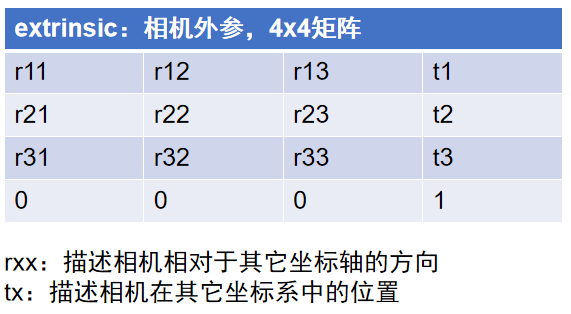
t = [ t 1 , t 2 , t 3 ] \mathbf{t} = [t_1, t_2, t_3] t=[t1,t2,t3]:RGB相对于左IR坐标系下的三维平移偏移。
4.2.3 左右IR极限约束前内参/极限校正后内参
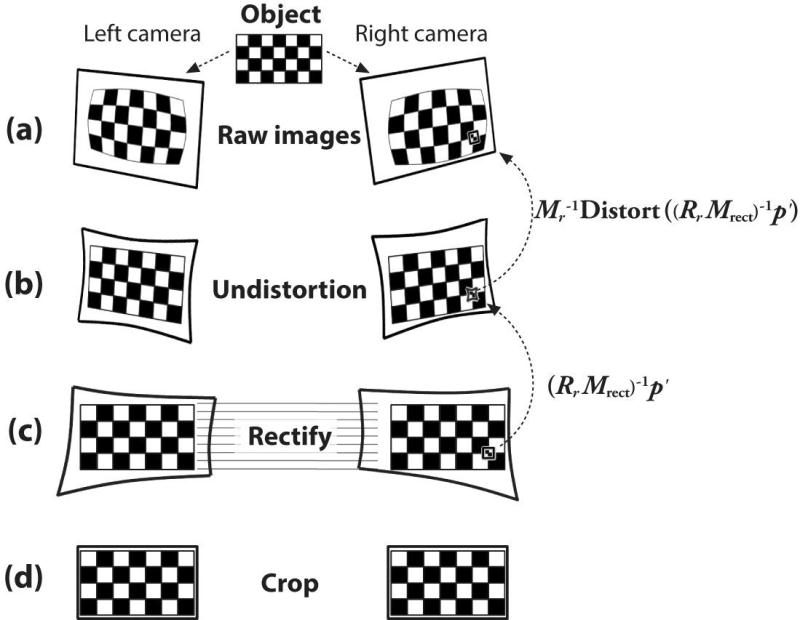
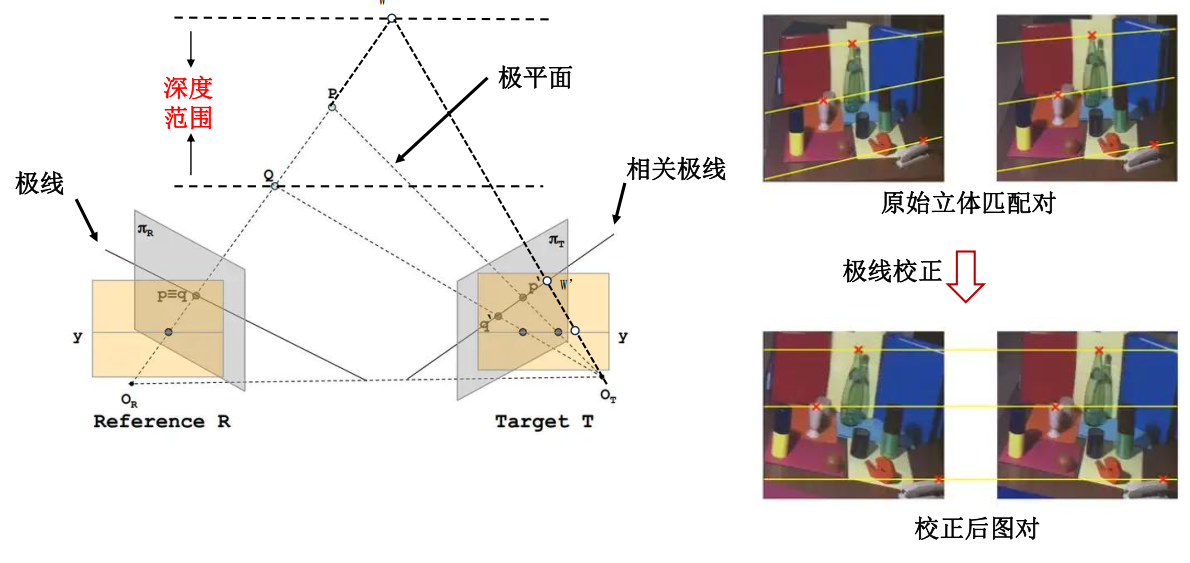
Left
        IntrinsicWidth: 1280
        IntrinsicHeight: 800
        Intrinsic:Camera intrinsic parameter matrix (3x3) containing focal lengths (fx,fy) and principal point (cx,cy). Stored as 9 double values in row-major order.
                  846.596971    0.000000  630.892295
                    0.000000  846.503802  397.161103
                    0.000000    0.000000    1.000000
        Rectifyed intrinsic:Rectified camera intrinsic parameter matrix (3x3) after distortion correction. Contains modified focal lengths and principal point. Stored as 9 double values.
                  849.295362    0.000000  631.821602
                    0.000000  849.295362  395.606600
                    0.000000    0.000000    1.000000
        Rotation:Camera rotation matrix (3x3) representing orientation in 3D space. Orthonormal matrix with determinant +1. Stored as 9 double values in row-major order.
                    0.999997   -0.002445   -0.000869
                    0.002448    0.999990    0.003720
                    0.000860   -0.003722    0.999993
        Distortion:Camera distortion coefficients (12x1 vector) including radial (k1-k6), tangential (p1-p2), and prism (s1-s4) distortions. Stored as 12 double values.
                   -0.065113    0.009064   -0.000904   -0.000084    0.598195   -0.126516    0.127444    0.540535   -0.000395    0.000427   -0.000143    0.000617
        Extrinsic:Camera extrinsic matrix (4x4) containing rotation and translation relative to world coordinate system. Stored as 16 double values in row-major order.
                    1.000000    0.000000    0.000000    0.000000
                    0.000000    1.000000    0.000000    0.000000
                    0.000000    0.000000    1.000000    0.000000
                    0.000000    0.000000    0.000000    1.000000
Right
        IntrinsicWidth: 1280
        IntrinsicHeight: 800
        Intrinsic:Camera intrinsic parameter matrix (3x3) containing focal lengths (fx,fy) and principal point (cx,cy). Stored as 9 double values in row-major order.
                  845.633045    0.000000  631.451000
                    0.000000  845.635807  395.112098
                    0.000000    0.000000    1.000000
        Rectifyed intrinsic:Rectified camera intrinsic parameter matrix (3x3) after distortion correction. Contains modified focal lengths and principal point. Stored as 9 double values.
                  849.295362    0.000000  631.821602
                    0.000000  849.295362  395.606600
                    0.000000    0.000000    1.000000
        Rotation:Camera rotation matrix (3x3) representing orientation in 3D space. Orthonormal matrix with determinant +1. Stored as 9 double values in row-major order.
                    0.999985   -0.005487   -0.000876
                    0.005484    0.999978   -0.003723
                    0.000896    0.003718    0.999993
        Distortion:Camera distortion coefficients (12x1 vector) including radial (k1-k6), tangential (p1-p2), and prism (s1-s4) distortions. Stored as 12 double values.
                   -0.060512    0.028435   -0.001911   -0.000879    0.599802   -0.119581    0.137869    0.548687    0.000119    0.000392    0.002222    0.000146
        Extrinsic:Camera extrinsic matrix (4x4) containing rotation and translation relative to world coordinate system. Stored as 16 double values in row-major order.
                    0.999995    0.003036    0.000048  -65.960244
                   -0.003036    0.999968    0.007443    0.361959
                   -0.000025   -0.007443    0.999972    0.057769
                    0.000000    0.000000    0.000000    1.000000
4.3 GM461-E1相机光心位置
散斑相机以左IR为光心。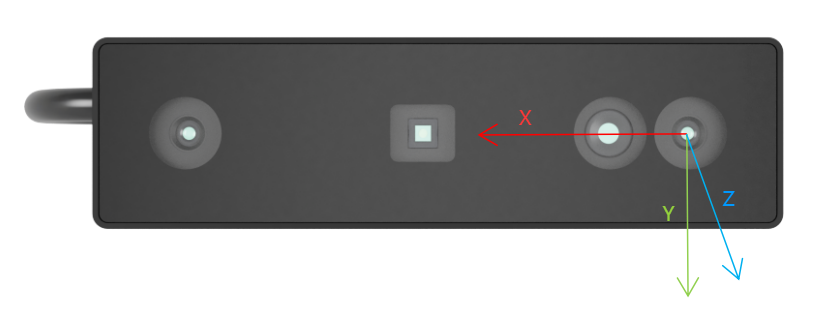
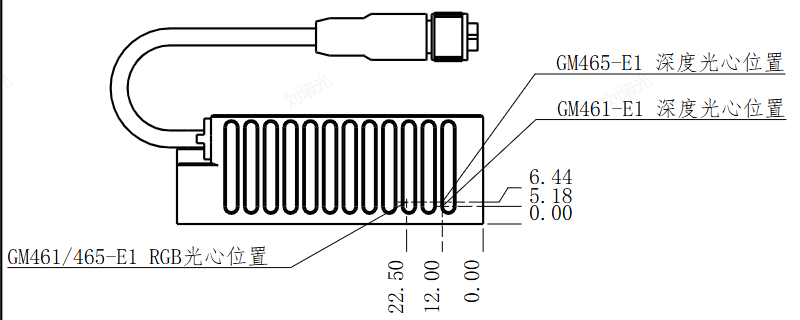
同时通过Texture(彩色)外参,可得知Texture至左IR应该在10mm左右。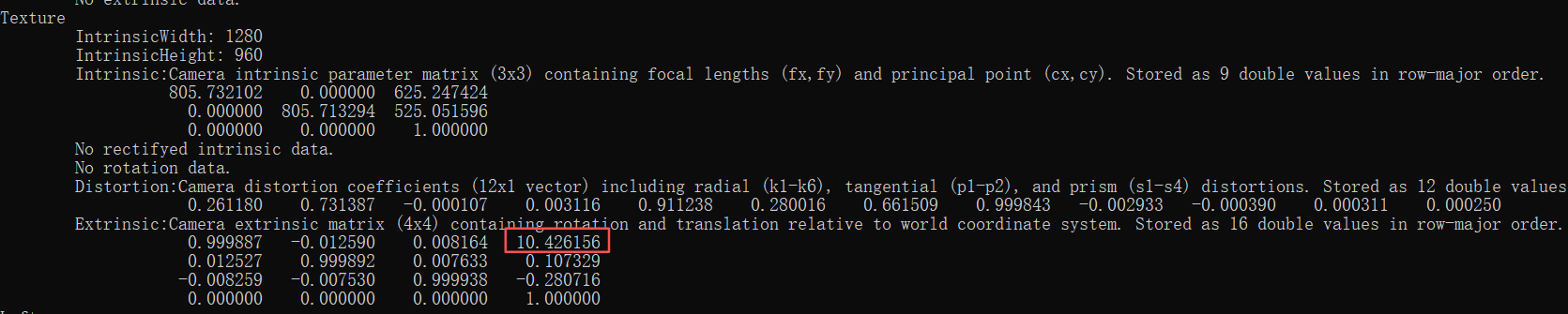
5.GM461-E1相机测试结果
5.1 GM461-E1 帧率测试
5.1.1 GM461-E1 出图延迟时间
出图延迟时间:相机使用默认UserSet,在连续采集模式下统计从开始曝光到系统完全处理完图像的总之时间,单位微秒。
说明:
Depth: Bin1- 1280x800,Bin2- 640x400,Bin4-320x200。
Texture: Bin1- 1280x960,Bin2- 640x480,Bin4-320x240。
IR: Bin1- 1280x800,Bin2- 640x400。
GM461相机出图延时时间测试结果如下所示:
| 测试项 | Default | AMR Obstacle Avoidance | Recognition and Localization |
|---|---|---|---|
| Depth_C16_Bin1 | 172.58 | 234.38 | 241.83 |
| Depth_C16_Bin2 | 69.79 | 111.60 | 128.27 |
| Depth_C16_Bin4 | 82.75 | 66.80 | 85.04 |
| Texture_JPEG_Bin1 | 77.20 | 80.11 | 78.71 |
| Texture_JPEG_Bin2 | 73.31 | 75.75 | 75.01 |
| Texture_JPEG_Bin4 | 76.78 | 77.46 | 77.81 |
| Left_Mono_Bin2 | 54.80 | 54.66 | 86.36 |
| Right_Mono_Bin2 | 54.22 | 53.72 | 86.31 |
| Left_Mono_Bin1 | 197.79 | 156.38 | 191.05 |
| Right_Mono_Bin1 | 194.32 | 169.78 | 190.26 |
| Left_Bin2+Right_Bin2 | 120.82 | 119.18 | 138.31 |
| Left_Bin1+Right_Bin1 | 354.21 | 305.56 | 336.26 |
| Depth_C16_Bin1 + Texture_JPEG_Bin1 | 196.67 | 282.98 | 267.34 |
| Depth_C16_Bin1 + Texture_JPEG_Bin2 | 179.44 | 266.00 | 256.08 |
| Depth_C16_Bin1 + Texture_JPEG_Bin4 | 178.88 | 260.45 | 255.86 |
| Depth_C16_Bin2 + Texture_JPEG_Bin1 | 119.47 | 160.06 | 162.06 |
| Depth_C16_Bin2 + Texture_JPEG_Bin2 | 91.51 | 145.12 | 140.22 |
| Depth_C16_Bin2 + Texture_JPEG_Bin4 | 88.94 | 143.04 | 135.90 |
| Depth_C16_Bin4 + Texture_JPEG_Bin1 | 76.78 | 98.38 | 125.62 |
| Depth_C16_Bin4 + Texture_JPEG_Bin2 | 81.91 | 81.92 | 97.62 |
| Depth_C16_Bin4 + Texture_JPEG_Bin4 | 82.01 | 76.78 | 96.15 |
| Depth_C16_Bin1+Texture_JPEG_Bin1+ir | 529.45 | 616.88 | 624.67 |
| Depth_C16_Bin1+Texture_JPEG_Bin2+ir | 521.44 | 594.65 | 608.81 |
| Depth_C16_Bin1+Texture_JPEG_Bin4+ir | 517.28 | 594.26 | 608.93 |
| Depth_C16_Bin2+Texture_JPEG_Bin1+ir | 432.15 | 491.33 | 517.36 |
| Depth_C16_Bin2+Texture_JPEG_Bin2+ir | 427.03 | 475.50 | 497.52 |
| Depth_C16_Bin2+Texture_JPEG_Bin4+ir | 425.70 | 471.98 | 492.83 |
| Depth_C16_Bin4+Texture_JPEG_Bin1+ir | 397.44 | 446.54 | 472.09 |
| Depth_C16_Bin4+Texture_JPEG_Bin2+ir | 392.86 | 423.52 | 459.63 |
| Depth_C16_Bin4+Texture_JPEG_Bin4+ir | 384.85 | 415.97 | 458.25 |
5.1.2 GM461-E1 帧率测试
FPS(帧率):指相机设置在自由采集模式下,上位机每秒采集的图像帧数。
说明:
Depth: Bin1- 1280x800,Bin2- 640x400,Bin4-320x200。
Texture: Bin1- 1280x960,Bin2- 640x480,Bin4-320x240。
IR: Bin1- 1280x800,Bin2- 640x400。
GM461相机帧率测试结果如下所示:
| 测试项 | Default | AMR Obstacle Avoidance | Recognition and Localization |
|---|---|---|---|
| Depth_C16_Bin1 | 14.93 | 9.30 | 10.29 |
| Depth_C16_Bin2 | 30.78 | 15.45 | 10.37 |
| Depth_C16_Bin4 | 30.85 | 15.43 | 10.28 |
| Texture_JPEG_Bin1 | 33.70 | 33.66 | 32.41 |
| Texture_JPEG_Bin2 | 33.72 | 33.72 | 32.41 |
| Texture_JPEG_Bin4 | 33.70 | 33.70 | 31.80 |
| Left_Mono_Bin2 | 30.83 | 30.86 | 20.56 |
| Right_Mono_Bin2 | 30.85 | 30.88 | 20.35 |
| Left_Mono_Bin1 | 9.04 | 9.03 | 9.03 |
| Right_Mono_Bin1 | 9.07 | 9.07 | 9.04 |
| Left_Bin2+Right_Bin2 | 15.43 | 15.42 | 10.28 |
| Left_Bin1+Right_Bin1 | 4.54 | 4.53 | 4.54 |
| Depth_C16_Bin1 + Texture_JPEG_Bin1 | 11.44 | 7.49 | 8.13 |
| Depth_C16_Bin1 + Texture_JPEG_Bin2 | 14.02 | 7.17 | 8.40 |
| Depth_C16_Bin1 + Texture_JPEG_Bin4 | 14.98 | 6.39 | 8.43 |
| Depth_C16_Bin2 + Texture_JPEG_Bin1 | 23.99 | 13.55 | 10.28 |
| Depth_C16_Bin2 + Texture_JPEG_Bin2 | 30.98 | 14.62 | 10.26 |
| Depth_C16_Bin2 + Texture_JPEG_Bin4 | 30.65 | 14.93 | 10.28 |
| Depth_C16_Bin4 + Texture_JPEG_Bin1 | 26.80 | 15.46 | 10.28 |
| Depth_C16_Bin4 + Texture_JPEG_Bin2 | 30.87 | 15.11 | 10.24 |
| Depth_C16_Bin4 + Texture_JPEG_Bin4 | 30.83 | 15.44 | 10.29 |
| Depth_C16_Bin1+Texture_JPEG_Bin1+ir | 3.43 | 2.48 | 2.33 |
| Depth_C16_Bin1+Texture_JPEG_Bin2+ir | 3.54 | 2.62 | 2.48 |
| Depth_C16_Bin1+Texture_JPEG_Bin4+ir | 3.58 | 2.59 | 2.51 |
| Depth_C16_Bin2+Texture_JPEG_Bin1+ir | 3.77 | 3.41 | 2.97 |
| Depth_C16_Bin2+Texture_JPEG_Bin2+ir | 4.13 | 3.65 | 3.30 |
| Depth_C16_Bin2+Texture_JPEG_Bin4+ir | 4.16 | 3.62 | 3.35 |
| Depth_C16_Bin4+Texture_JPEG_Bin1+ir | 4.18 | 3.91 | 3.47 |
| Depth_C16_Bin4+Texture_JPEG_Bin2+ir | 4.34 | 4.14 | 3.65 |
| Depth_C16_Bin4+Texture_JPEG_Bin4+ir | 4.38 | 4.18 | 3.68 |
6.成像问题FAQ
6.1 拍摄低反或者高亮材质,点云缺失
6.1.1 开启/关闭纹理滤波
| 纹理滤波属性 | 参数及描述 | 描述 |
|---|---|---|
| DepthSgbmTextureFilterEnable | 纹理滤波使能开关 | true/false |
| DepthSgbmTextureFilterMaxDistance | 纹理滤波最大有效距离 | [0,20000] |
| DepthSgbmTextureFilterThreshold | 纹理滤波梯度阈值 | [0,512] |
| DepthSgbmTextureFilterValue0ffset | 纹理滤波偏移值 | [0,512] |
| DepthSgbmTextureFilterWindowSize | 纹理滤波的滑动窗⼝⼤⼩ | [7,71] |
1.如果图像缺失较多,首先调整降低DepthSgbmTextureFilterMaxDistance有效距离距离—>之后降低DepthSgbmTextureFilterThreshold---->之后降低DepthSgbmTextureFilterValue0ffset---->增大DepthSgbmTextureFilterWindowSize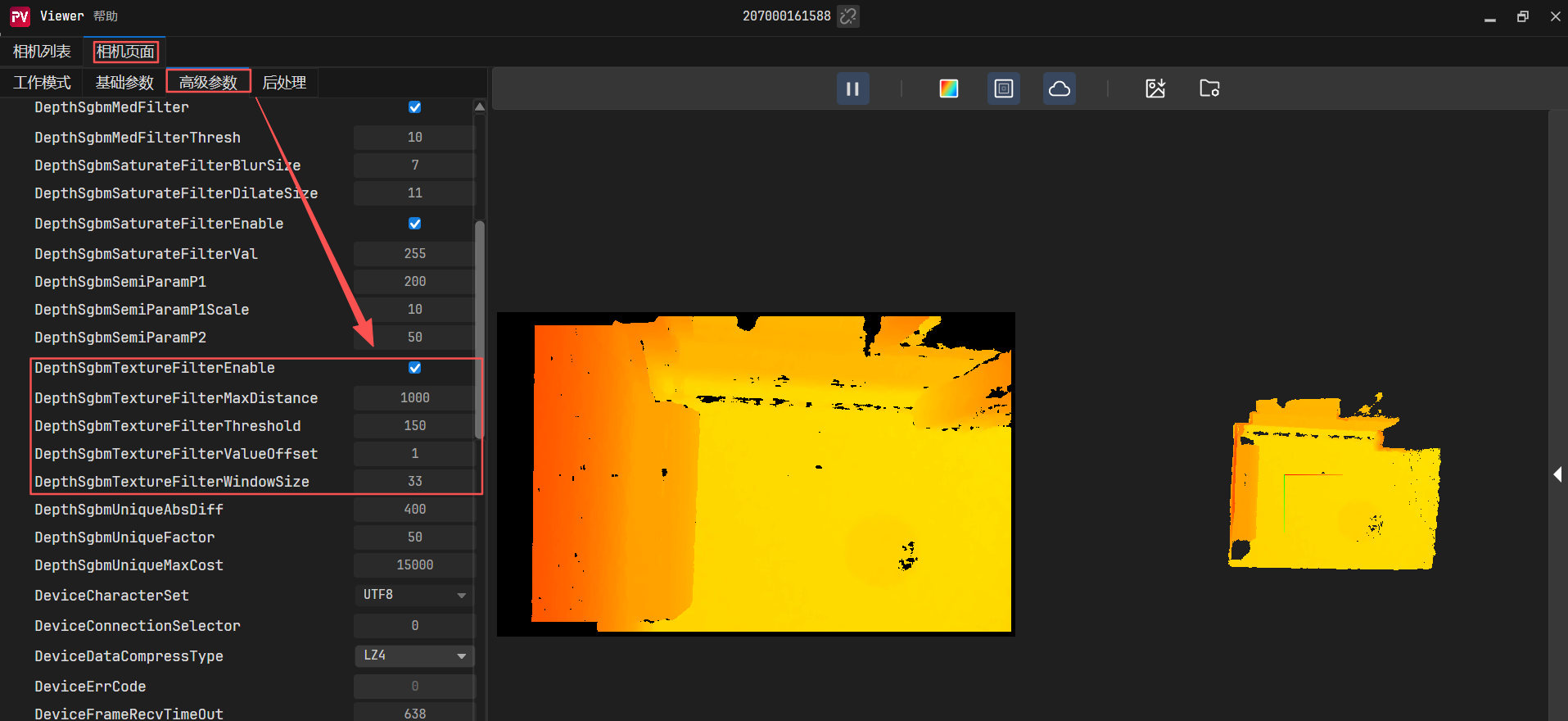
2.如果还是不行,建议关闭纹理滤波。
6.1.2 调整左右IR参数
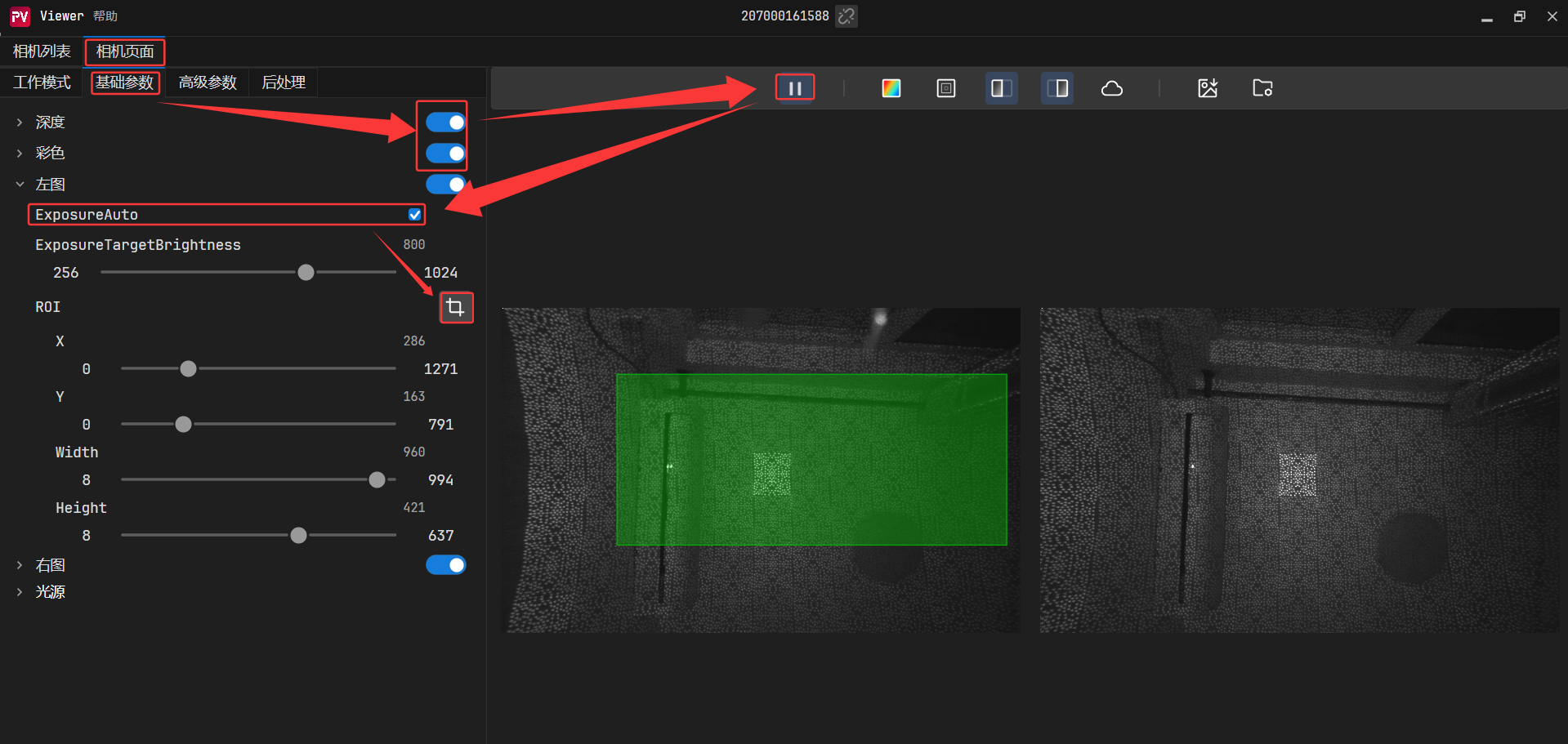
根据设置的AOI 区域的图像信息,来调整整个画面的亮度。
1. 如果检测到划定区域的亮度较低,算法“觉得”应该增强亮度,于是会调亮图像画面。
2. 如果检测到划定区域的亮度较亮,算法“觉得”应该*减弱亮度,于是会调暗`图像画面。
6.2 RGB相机成像异常
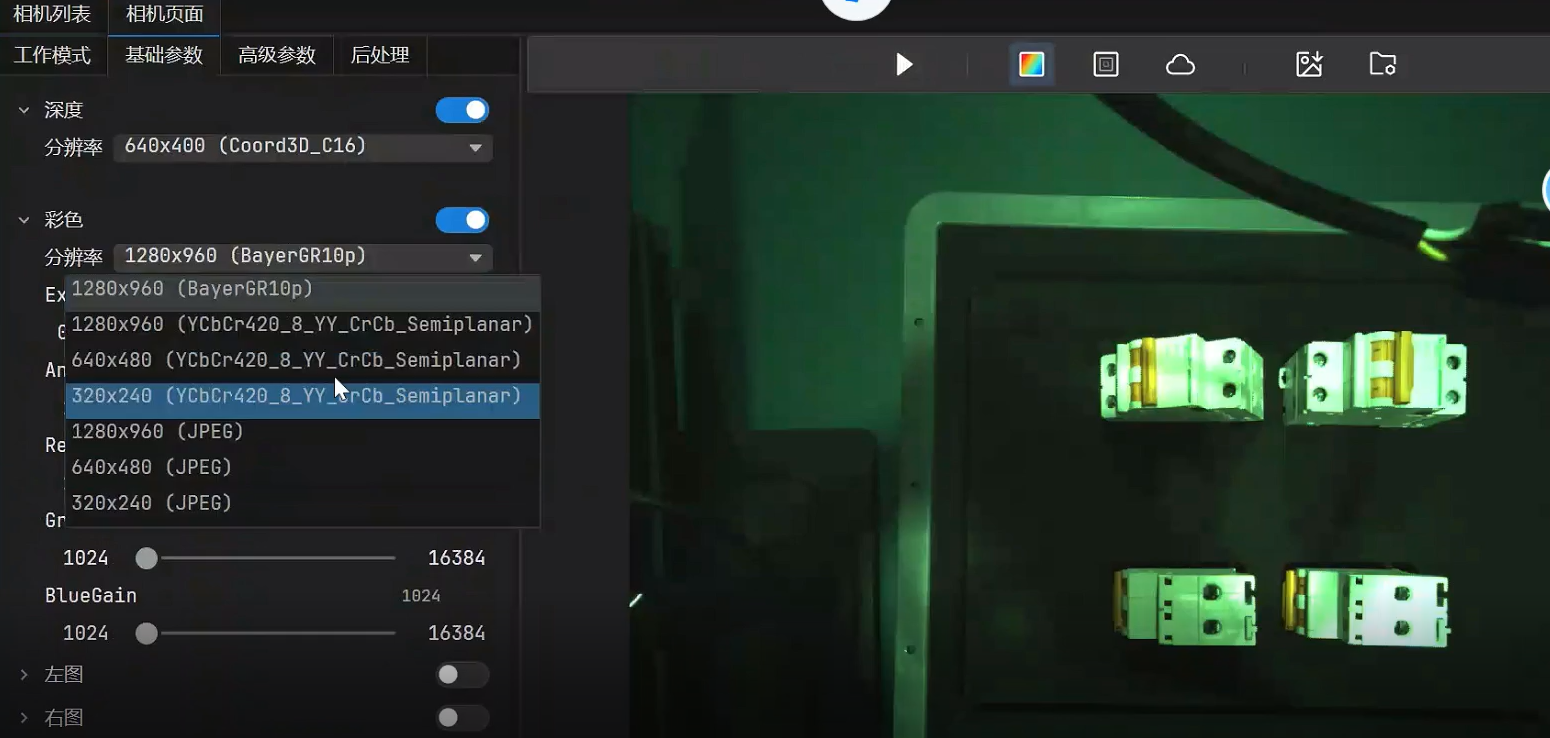
早期的GM461-E1相机,RGB格式默认是BayerGR10p格式,此时显示的RGB是异常的,建议更改为jpeg格式或者联系图漾技术,升级相机固件。
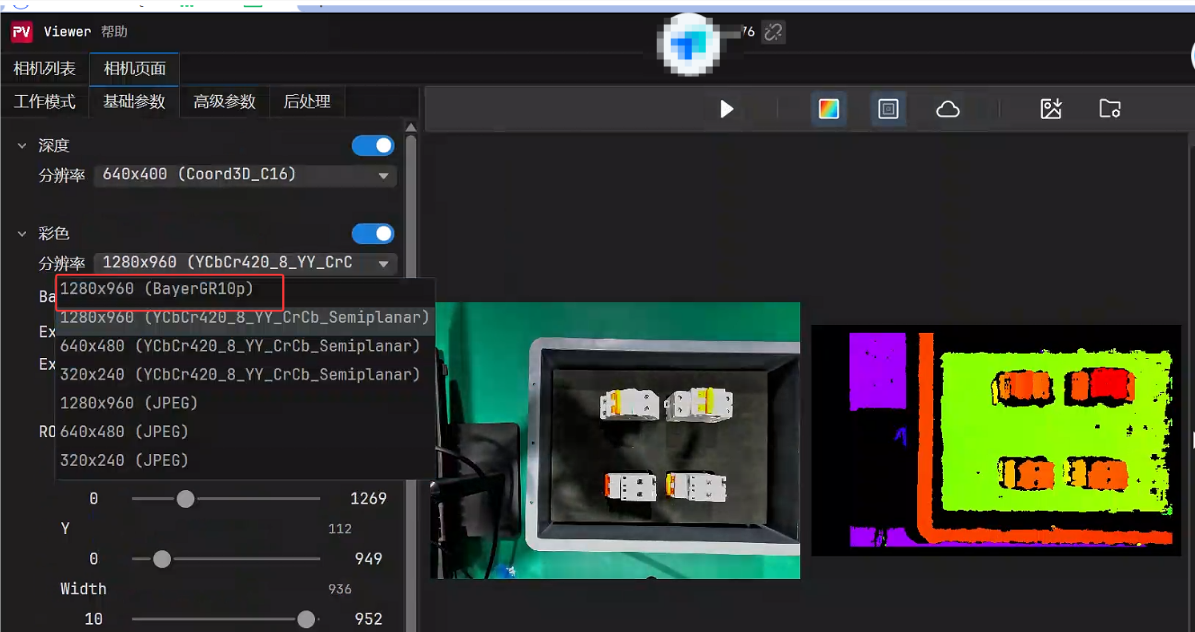
6.3 深度图切换低分辨率后,深度图效果差
比如将深度图从640x400切换成320x200后,如果此处滤波参数不修改的话,点云缺失较多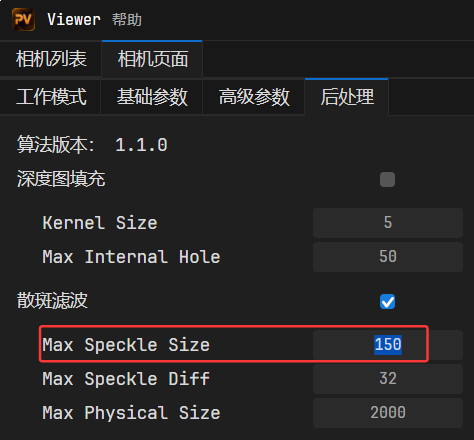
如果是从640x400降低分辨率,建议该值设置为除以4,设置为40左右,如果是升高分辨率,建议该值乘以4,为600左右。
6.4 打开深度图噪点很多
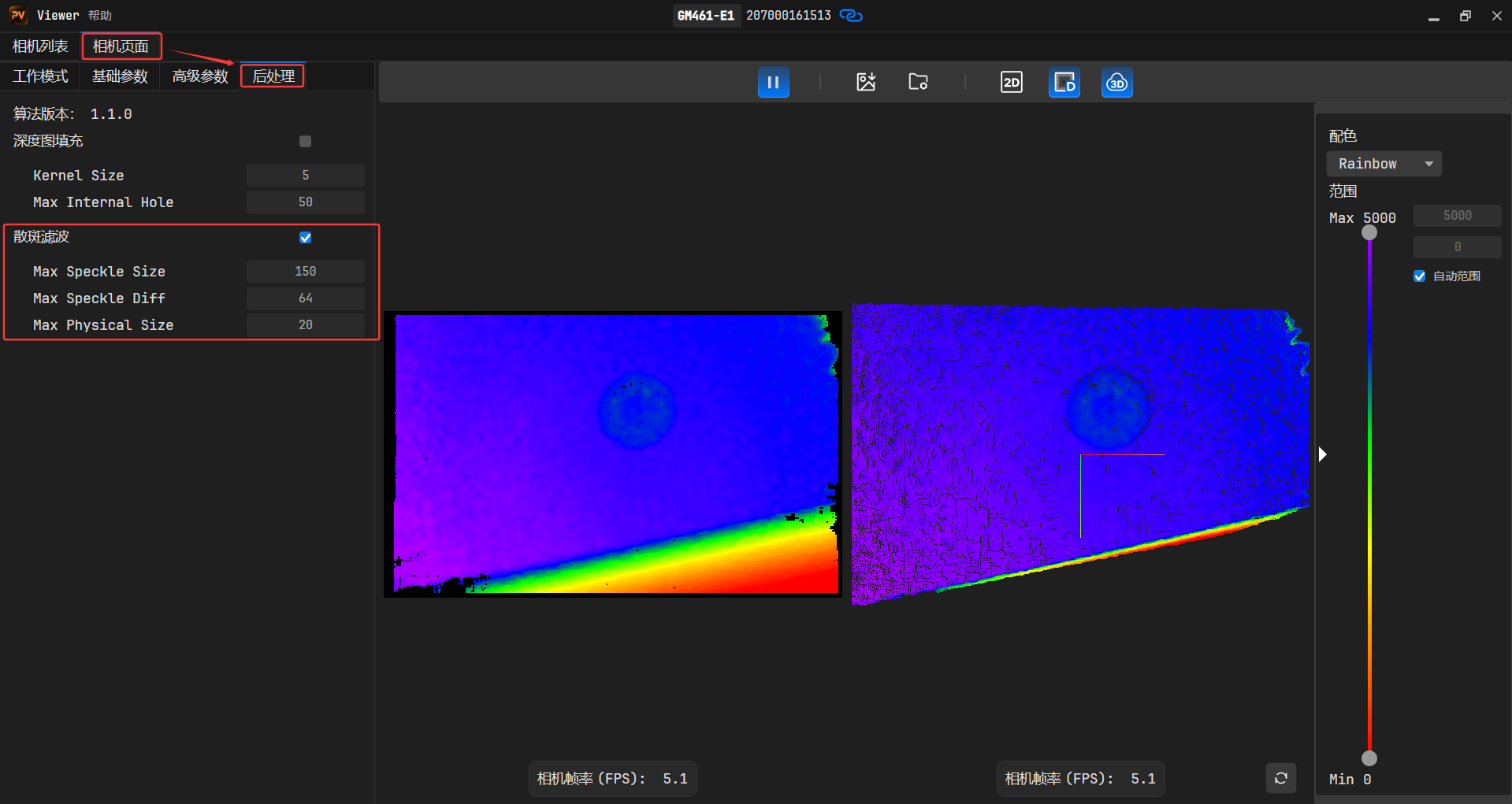
打开散斑滤波设置,过滤深度图噪点。
Max Speckle Diff:散斑滤波器聚类阈值。若相邻像素的深度差值小于该阈值,则认为该相邻像素属于同一个聚类斑点。该值越大,相邻像素属于同一聚类斑点越多。
Max Speckle Size:散斑滤波器面积阈值。面积小于该阈值的聚类斑点会被滤除。该值越大,滤除的聚类斑点越多。
Max Physical Size:物理尺寸滤波。面积小于真实物理尺寸的平方值,将被滤除。
6.5 3.5m外无深度图图像
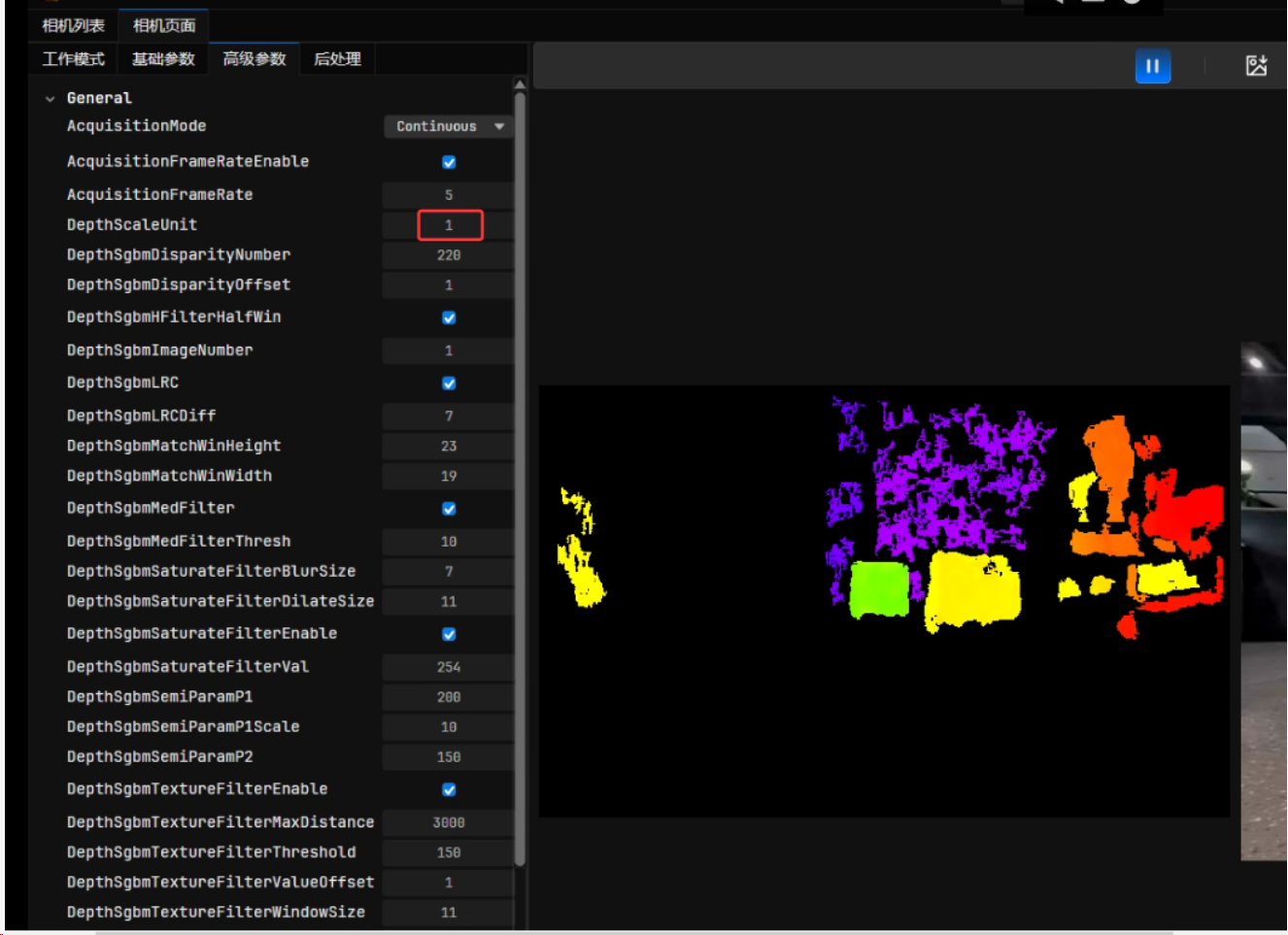
1.如果ScaleUnit默认值是0.5,在3.5m外无图像,可以将该值设置为1,即可显示3.5m的图像。
2.如果遇见低反射率材质,也需要适当增加自动曝光目标亮度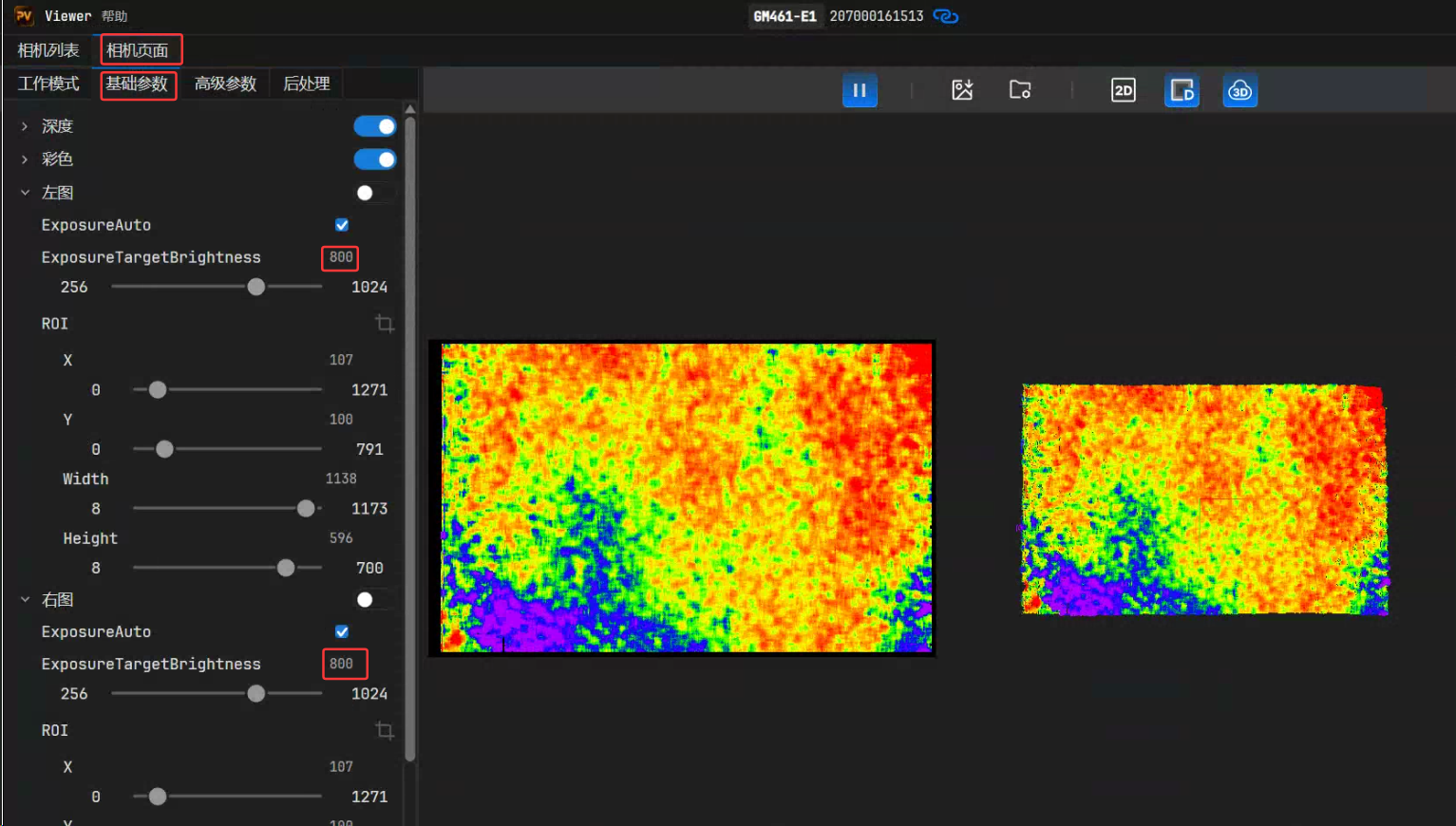
6.6 Windows连接GM461-U2/GM463-U2相机不出图?
图漾的usb相机,在windows环境下,需要安装usb驱动,打开下图链接,下载usb相关驱动:图漾官网驱动下载
下载驱动完成后,进行解压,进入到如下位置: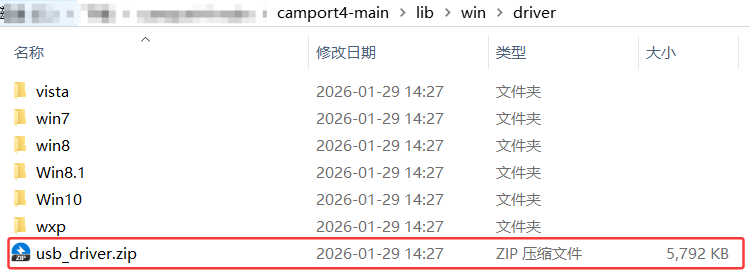
找到此位置后,双击运行下图此文件,来安装驱动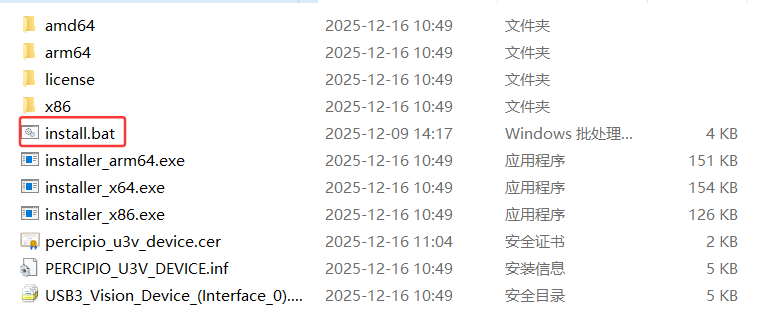
6.7 拍摄物体旁边有反光柱,反光柱成像异常
具体成像如下图: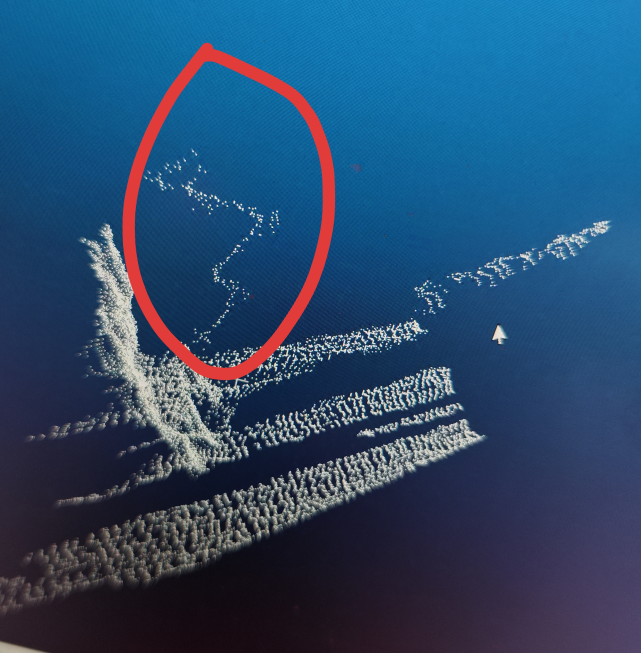
目前有两种解决措施:
6.7.1 调小ScaleUnit值
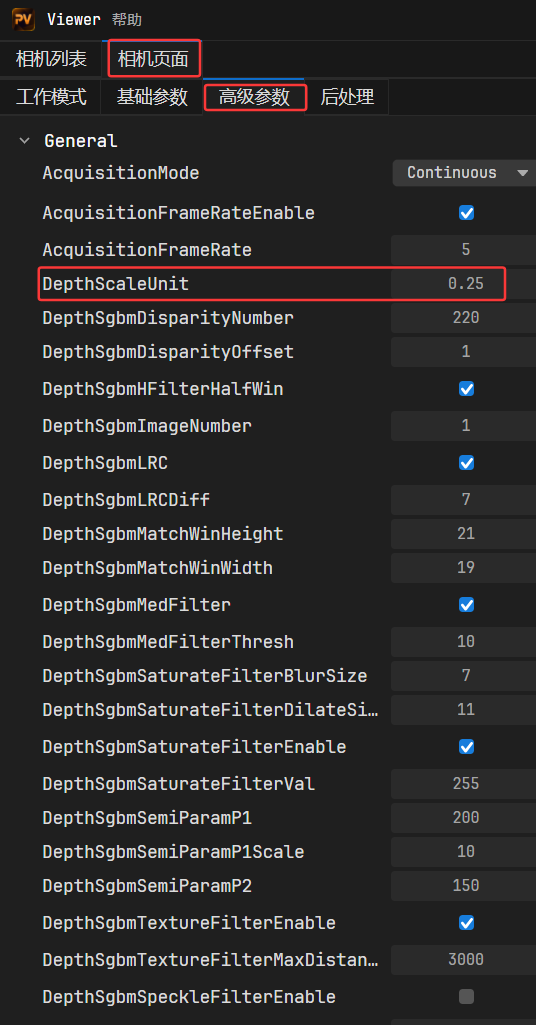
这样调整后,反光柱弯曲现象会大幅度减弱,但是3.5m外成像会看不到。
6.7.2 调整饱和度滤波,扣掉反光柱
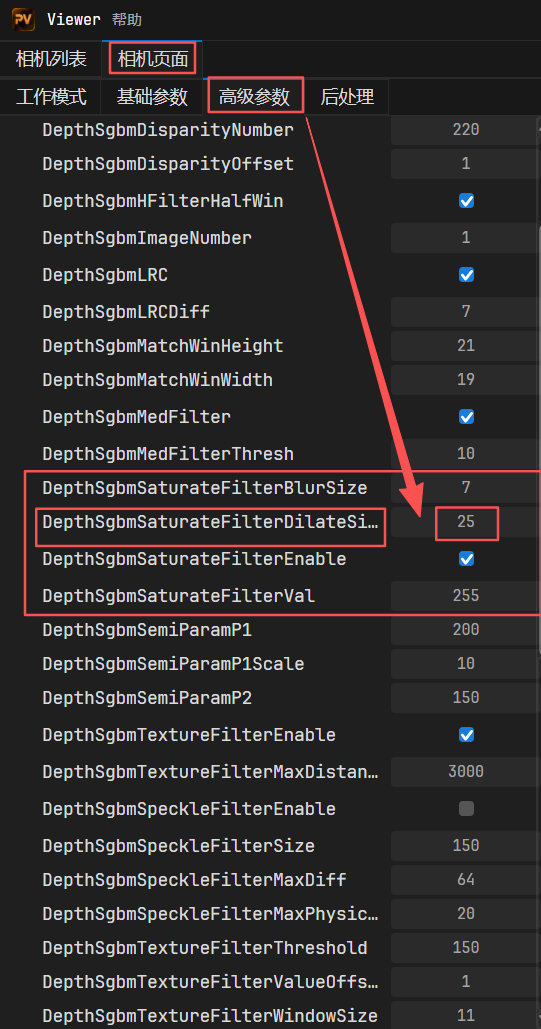
适当调大DepthSgbmSaturateFilterDilatesize数值在20往上,反光柱会被直接从成像中扣除。
| 饱和度滤波属性 | 参数及描述 | 描述 |
|---|---|---|
| DepthSgbmSaturateFilterEnable | 启⽤/禁⽤饱和度滤波 | true/false |
| DepthSgbmSaturateFilterBlurSize | 降噪的盒式滤波器⼤⼩ | [7,71] |
| DepthSgbmSaturateFilterDilatesize | 膨胀核⼤⼩ | [7,71] |
| DepthSgbmSaturateFilterVal | 饱和度阈值 | [0,255] |
6.8 切换到1280x800分辨率,图像效果较差
目前出厂的相机,只对640x400的VGA分辨率做过优化,如果需要使用最大分辨率,且远近距离兼容,且保证效果还OK,建议按照下图所示调参: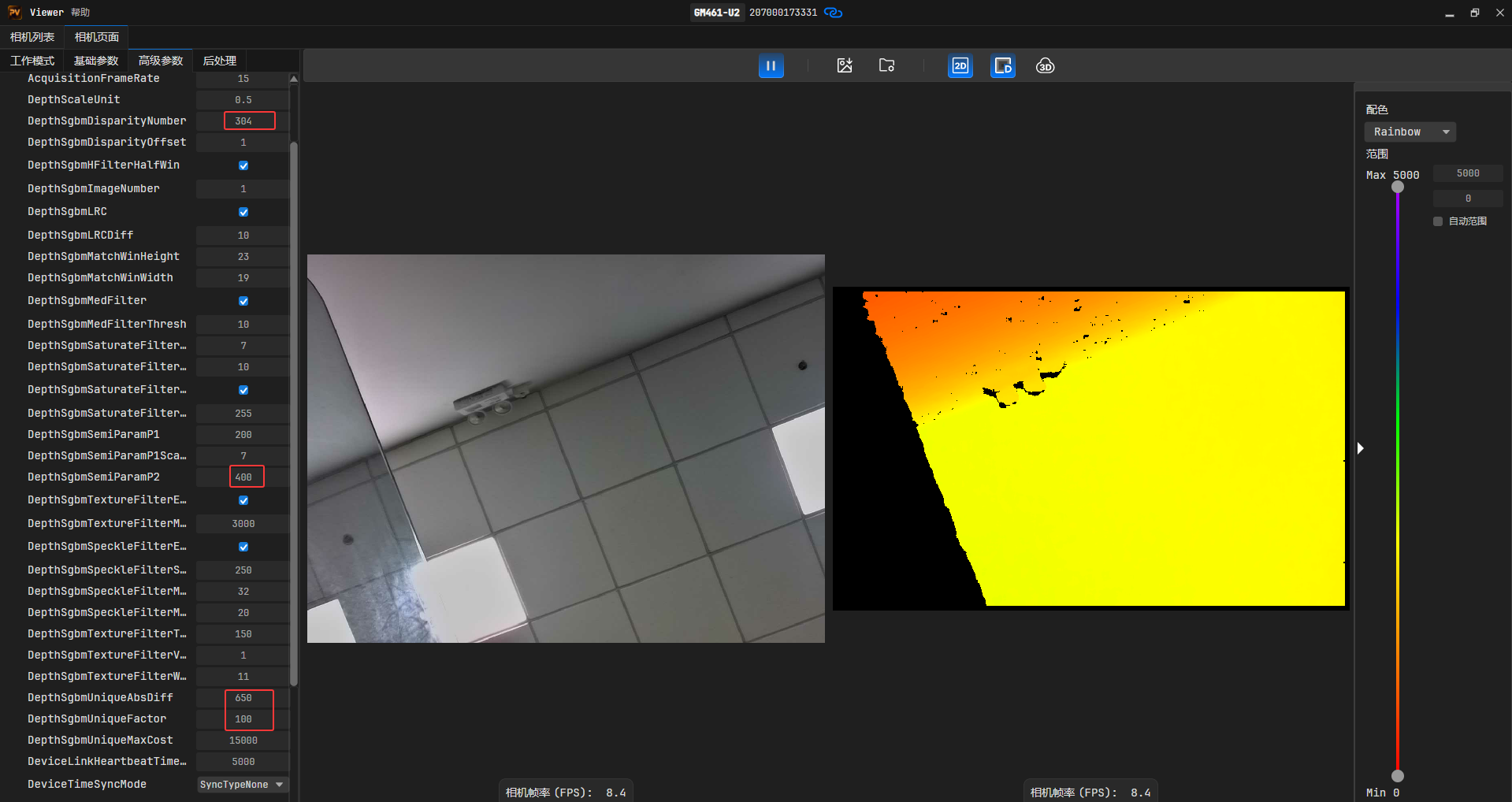
主要DepthsgbmDisparityNumber和DepthSgbmUniqueAbsDiff这两个参数,前一个跟相机时差有关,后一个和图像噪点相关。
6.9 影响成像因素汇总
6.9.1 相机散热
由于工业相机中包含感光元器件,当相机温度升高时,将对采集的图像质量造成一定影
响。基于以上情况,本节将对温度参数以及现场安装建议进行介绍,以实现更好的散热效果,提高相机的图像质量和可靠性。
6.9.1.1 如何查看GM46X相机工作温度?
工业相机关键器件的温度是影响图像质量、设备运行稳定性和长期可靠性的关键因素。
工业相机规格书中工作环境温度的上限值是指相机无任何附加散热措施的情况下能够满足的最高环境温度,在该工作温度内运行,能够满足电子元器件上的温度规格要求,保证相机可靠运行。
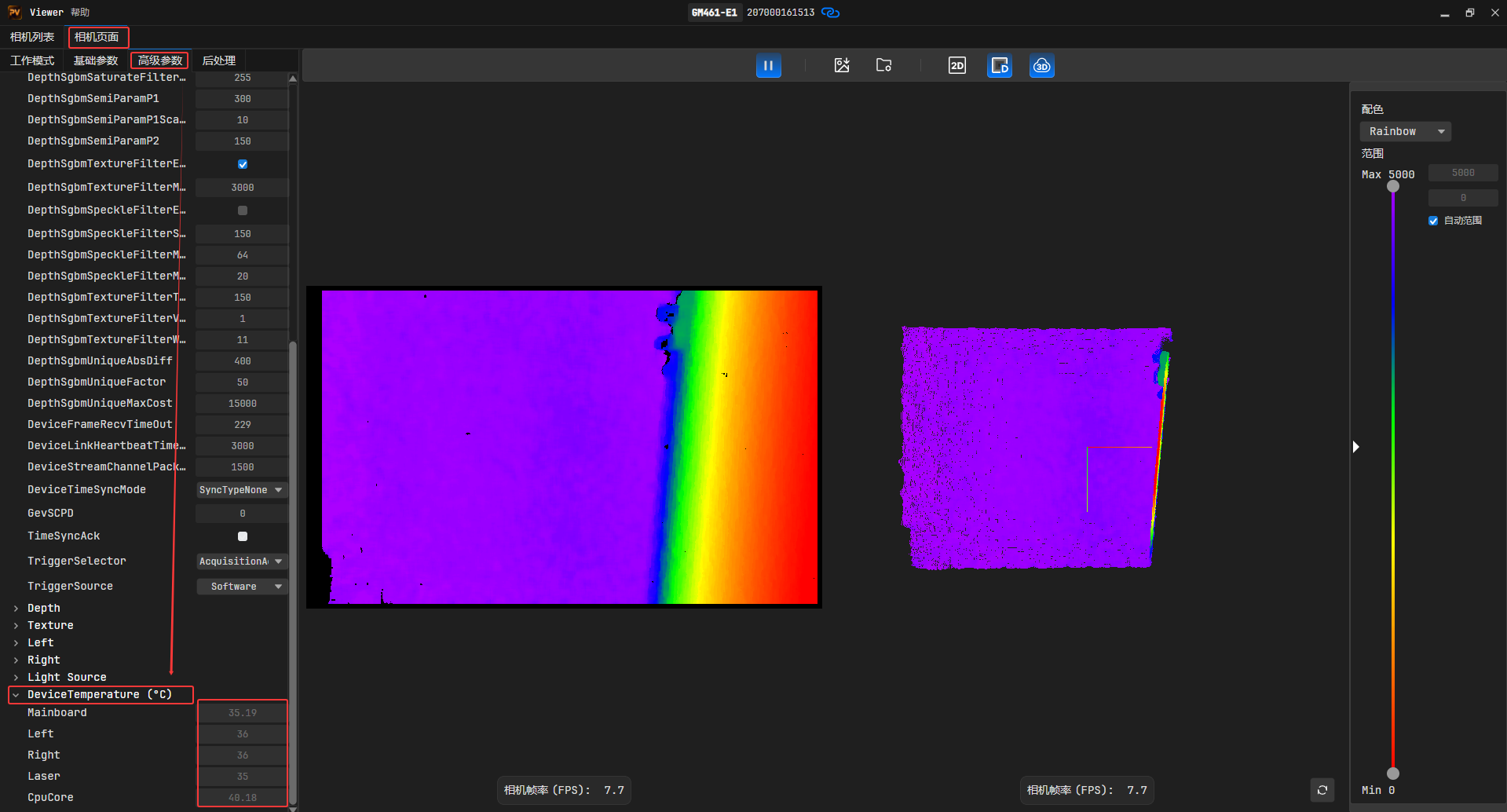
6.9.1.2 外壳温度
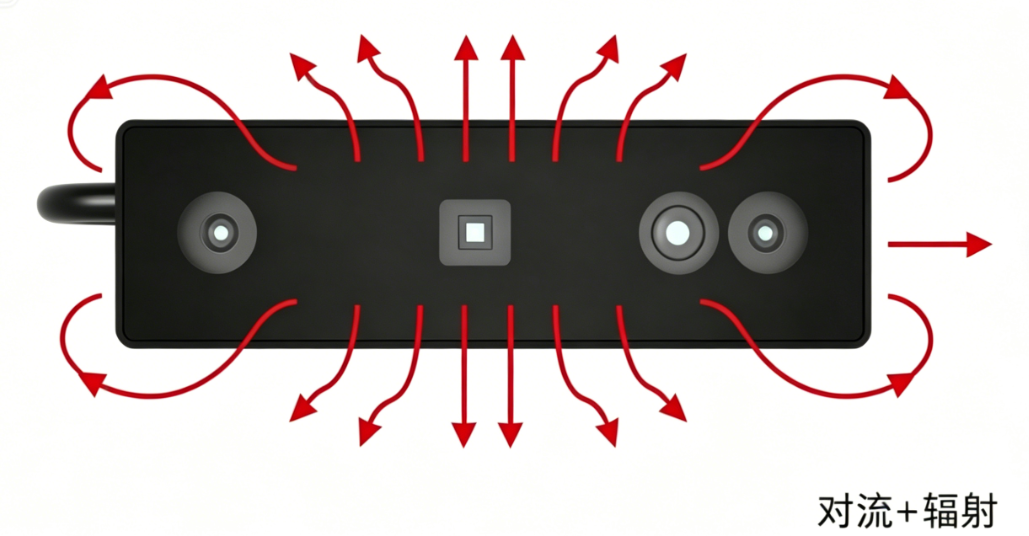
电子元器件工作产生的热量传导至相机外壳后,若相机没有附加任何散热措施,则热量通过相机外壳以对流和辐射的形式将热量散至外界环境。 相机外壳在散热的过程中温度会逐渐上升,最终达到热平衡状态时,温度趋于稳定。因此,我们常常摸到相机的外壳有一定的温度,或者感觉“烫”,这是相机散热的正常现象。
相机内部的一些元器件做了导热措施,将热量导至外壳,保证元器件的温度满足规格要求,这也导致外壳的局部温度较高。相机外壳温度受功耗、外壳尺寸、环境温度和附加散热措施的影响。在无附加散热措施下,此时外壳的温度最高,若在现场安装时增加一些附加散热措施,则热量通过相机外壳以对流和辐射的形式散至外界环境。
6.9.1.3 安装散热件
- 由于大部分工业相机通过安装件固定,因此在现场安装中,可通过安装件将大部分热量
导至金属安装平台,从而将热量散出,大幅提高相机的散热效率。 - 通过安装件导出的热量取决于安装件本身的导热能力以及安装方式等。
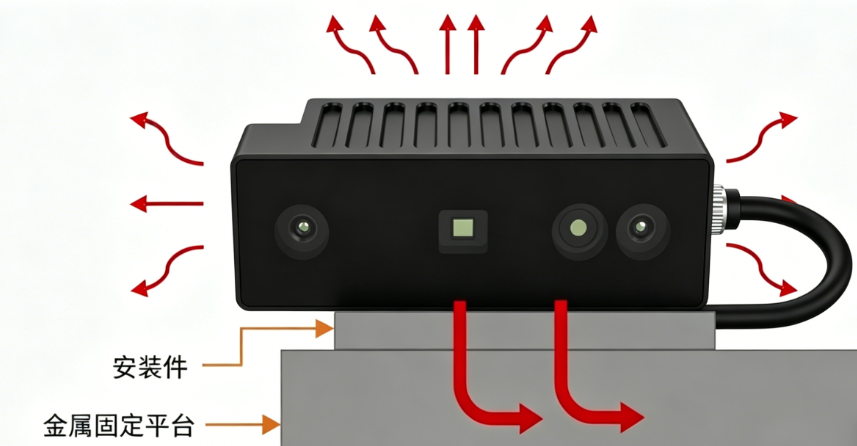
安装件材质 :
- 使用高导热性能的材料,如铝和铜等金属材质,这些高导热材料能够快速将热量导出。
- 同时,安装件最好固定在金属材质的固定平台上,这样才能把热量传导至金属件上散出。
7.其他问题FAQ
7.1 图漾相机获取的是有序点云还是无序点云?
注:看图软件和SDK获取的都是无序点云。
1.通过看图软件保存.pcd格式点云,之后通过Notepad++软件打开,打开.pcd格式点云,会发现如下: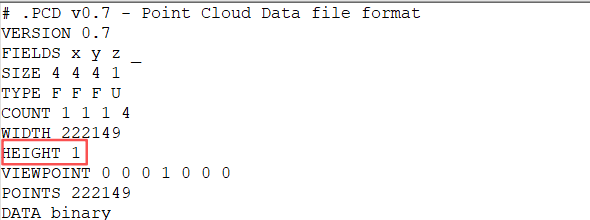
HEIGHT :用点的数目表示点云数据集的度,HEIGHT有两层解释:
- 1)它表示有序点云数据集的高度(行的总数);
- 2)对于无序数据集它被设置成1(被用来检查一个数据集是有序还是无序)。
有序点云例子:
WIDTH 640       # 像图像一样的有序结构,有640行和480列,
HEIGHT 480      # 这样该数据集中共有640*480=307200个点
无序点云例子:
WIDTH 307200
HEIGHT 1        # 有307200个点的无序点云数据集
7.1.1 PCD文件数据
# .PCD v.7 - Point Cloud Data file format
VERSION .7								# 版本号
FIELDS x y z rgb				#  指定一个点可以有的每一个维度和字段的名字
SIZE 4 4 4 4								# 用字节数指定每一个维度的大小。例如:
TYPE F FFF									# 用一个字符指定每一个维度的类型 int uint folat
COUNT 1 1 1 1						# 指定每一个维度包含的元素数目
WIDTH 640    						   # 像图像一样的有序结构,有640行和480列,
HEIGHT 480    					  # 这样该数据集中共有640*480=307200个点
VIEWPOINT 0 0 0 1 0 0 0			# 指定数据集中点云的获取视点 视点信息被指定为平移(txtytz)+四元数(qwqxqyqz)
POINTS 307200						# 指定点云中点的总数。从0.7版本开始,该字段就有点多余了
DATA ascii										# 指定存储点云数据的数据类型。支持两种数据类型:ascii和二进制
0.93773 0.33763 0 4.2108e+06
0.90805 0.35641 0 4.2108e+06
详情可参考双愚PCL
7.2 相机是否带IMU?
目前基线版本是不带的。
7.3 规格书中标称最近工作距离为150mm,如何调参?
GM461-E1官网规格书描述如下: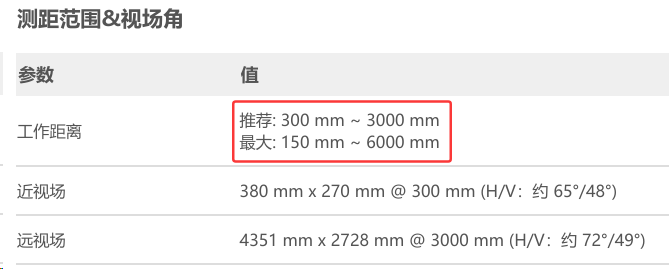
7.3.1 解决办法
适当增大DepthSgbmDisparityNumber参数,一般建议设置成16的倍数。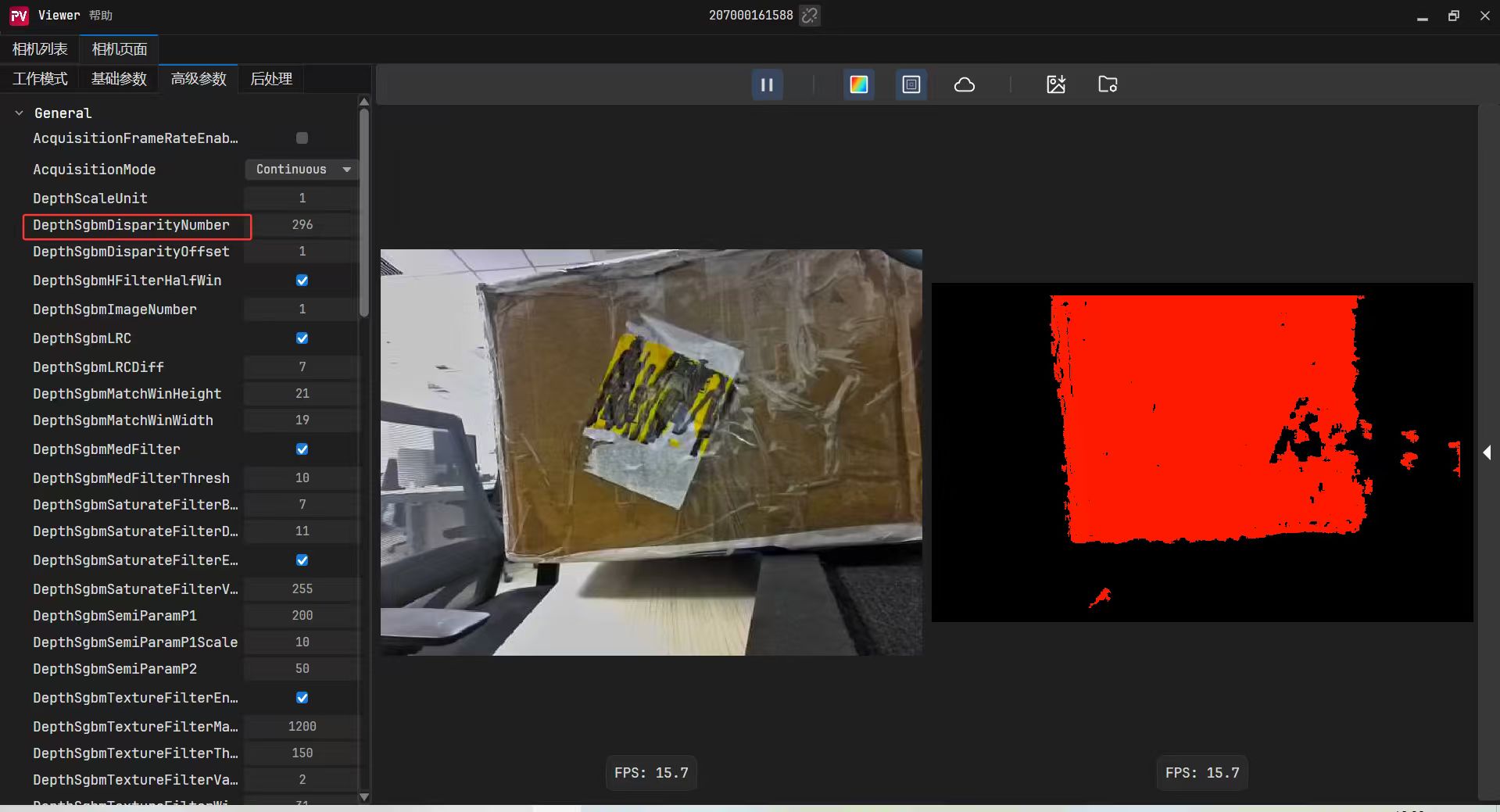
7.4 如何设置相机对时?
7.4.1 C++语言
C++语言参考示例
// For time functions
#ifdef _WIN32
#include <windows.h>
#include <time.h>
#include <stdio.h>
#else
#include <sys/time.h>
#include <time.h>
#include <stdio.h>
#endif


std::string timestampToRealTime(uint64_t timestamp_us)
{
    time_t sec = (time_t)(timestamp_us / 1000000);
    int ms = (int)((timestamp_us % 1000000) / 1000);

    struct tm local_time;

#ifdef _WIN32
    localtime_s(&local_time, &sec);
#else
    localtime_r(&sec, &local_time);
#endif

    char time_str[64];
    strftime(time_str, sizeof(time_str), "%Y-%m-%d %H:%M:%S", &local_time);

    char result[70];

#ifdef _WIN32
    sprintf_s(result, sizeof(result), "%s.%03d", time_str, ms);
#else
    sprintf(result, "%s.%03d", time_str, ms);
#endif

    return std::string(result);
}


uint64_t getCurrentTimeUs()
{
#ifdef _WIN32
    SYSTEMTIME st;
    FILETIME ft;
    ULARGE_INTEGER uli;

    GetSystemTime(&st);
    SystemTimeToFileTime(&st, &ft);

    uli.LowPart = ft.dwLowDateTime;
    uli.HighPart = ft.dwHighDateTime;

    // Convert to microseconds (100-nanosecond intervals → microseconds)
    uint64_t microseconds = uli.QuadPart / 10;

    // Subtract epoch offset (1601-01-01 to 1970-01-01)
    uint64_t epoch_offset = 134774ULL * 86400ULL * 1000000ULL;

    return microseconds - epoch_offset;
#else
    struct timeval tv;
    gettimeofday(&tv, NULL);
    return (uint64_t)tv.tv_sec * 1000000ULL + tv.tv_usec;
#endif
}
void genicam_protocol_device_init_callback(TY_DEV_HANDLE hDevice, void* userdata)
{

    TY_STATUS status;
    std::cout << "GenICam protocol device parameters init!" << std::endl;

    // Set device time sync mode to host sync
    status = TYEnumSetString(hDevice, "DeviceTimeSyncMode", "SyncTypeHost");
    if (status != TY_STATUS_OK) {
        std::cerr << "Failed to set DeviceTimeSyncMode: " << status << std::endl;
    }

    // Check time sync status without blocking (avoid deadlock in callback)
    bool sync_ready = false;
    status = TYBooleanGetValue(hDevice, "TimeSyncAck", &sync_ready);
    if (status != TY_STATUS_OK) {
        std::cerr << "Failed to get TimeSyncAck: " << status << std::endl;
    } else {
        if (sync_ready) {
            std::cout << "Time sync already established." << std::endl;
        } else {
            std::cout << "Time sync not yet established. It will continue in background." << std::endl;
            // Note: Time sync will complete in background, no need to block here
        }
    }


    uint64_t device_timestamp = 0;

    //start time
    uint64_t host_s = getCurrentTimeUs();

    // Get device timestamp
    uint64_t raw_device_timestamp = 0;
    status = TYIntegerGetValue(hDevice, "Timestamp", reinterpret_cast<int64_t*>(&raw_device_timestamp));
    if (status != TY_STATUS_OK) {
        std::cerr << "Failed to get device timestamp: " << status << std::endl;
        return;
    }

    // Check if device timestamp is valid (non-zero)
    if (raw_device_timestamp == 0) {
        std::cerr << "Warning: Device timestamp is zero. Time sync may not be complete yet." << std::endl;
        // Continue with the program, but note the issue
    }

    //end time
    uint64_t host_e = getCurrentTimeUs();
    // Convert device timestamp to microseconds (ns → us)
    device_timestamp = raw_device_timestamp / 1000;

    uint64_t host_timestamp = host_s + (host_e - host_s) / 2;

    // Print results using C++ cout for better type safety
    std::cout << "Host TimeStamp: " << host_timestamp << " us" << std::endl;
    std::cout << "Device TimeStamp: " << device_timestamp << " us" << std::endl;

    // Calculate and print time difference
    int64_t time_diff = static_cast<int64_t>(host_timestamp - device_timestamp);
    std::cout << "Time diff between host and device: " << time_diff << " us" << std::endl;


}
7.4.2 ROS1
进入到src/percipio_camera/src/percipio_driver.cpp这个文件夹中
// 添加时间同步测试代码
   TY_DEV_HANDLE hDevice = device_->getCurrentDeviceHandle();
  TYEnumSetString(hDevice, "DeviceTimeSyncMode", "SyncTypeHost");
  uint64_t device_timestamp = 0;
  struct timeval tv_s, tv_e;
  gettimeofday(&tv_s, NULL);
  TYIntegerGetValue(hDevice, "Timestamp", (int64_t *)(&device_timestamp));
  gettimeofday(&tv_e, NULL);
  device_timestamp /= 1000;
  uint64_t host_timestamp_s = (uint64_t)(tv_s.tv_sec) * 1000000 + tv_s.tv_usec;
  uint64_t host_timestamp_e = (uint64_t)(tv_e.tv_sec) * 1000000 + tv_e.tv_usec;
  uint64_t host_timestamp = host_timestamp_s + (host_timestamp_e - host_timestamp_s) / 2;
  ROS_INFO("Host TimeStamp: %lu us", (unsigned long)host_timestamp);
  ROS_INFO("Device TimeStamp: %lu us", (unsigned long)device_timestamp);
  int64_t time_diff = (int64_t)(host_timestamp - device_timestamp);
  ROS_INFO("Time diff between host and device: %ld us", (long)time_diff);
7.4.3 ROS2
进入到src/percipio_camera/src/percipio_device.cpp文件中,添加如下代码:
设置host对时:
 // Set time synchronization mode to host (only once during initialization)
    TY_STATUS sync_status = TYSetEnum(handle, TY_COMPONENT_DEVICE, TY_ENUM_TIME_SYNC_TYPE, TY_TIME_SYNC_TYPE_HOST);
    if (sync_status != TY_STATUS_OK) {
        // Try alternative method using string API
        sync_status = TYEnumSetString(handle, "DeviceTimeSyncMode", "SyncTypeHost");
        if (sync_status != TY_STATUS_OK) {
            RCLCPP_WARN_STREAM(rclcpp::get_logger(LOG_HEAD_PERCIPIO_DEVICE),
                "Failed to set time synchronization mode: " << sync_status << ". This feature may not be available on this device.");
        } else {
            RCLCPP_INFO_STREAM(rclcpp::get_logger(LOG_HEAD_PERCIPIO_DEVICE),
                "Successfully set time synchronization mode using string API.");
        }
    } else {
        RCLCPP_INFO_STREAM(rclcpp::get_logger(LOG_HEAD_PERCIPIO_DEVICE),
            "Successfully set time synchronization mode using enum API.");
    }
// Add time synchronization test method
void PercipioDevice::timeSyncTest() {
    // Time synchronization mode is already set in GigE device init(), so we don't need to set it again

    uint64_t device_timestamp = 0;
    struct timeval tv_s, tv_e;

    // Measure host time before and after getting device timestamp
    gettimeofday(&tv_s, NULL);
    TY_STATUS sync_status = TYIntegerGetValue(handle, "Timestamp", (int64_t *)&device_timestamp);
    gettimeofday(&tv_e, NULL);

    if (sync_status != TY_STATUS_OK) {
        RCLCPP_ERROR_STREAM(rclcpp::get_logger(LOG_HEAD_PERCIPIO_DEVICE),
            "Failed to get device timestamp: " << sync_status);
        return;
    }

    // Device timestamp is in nanoseconds, convert to microseconds
    device_timestamp /= 1000;

    // Calculate host timestamp start, end and average (microseconds)
    uint64_t host_timestamp_s = (uint64_t)(tv_s.tv_sec) * 1000000 + tv_s.tv_usec;
    uint64_t host_timestamp_e = (uint64_t)(tv_e.tv_sec) * 1000000 + tv_e.tv_usec;
    uint64_t host_timestamp = host_timestamp_s + (host_timestamp_e - host_timestamp_s) / 2;

    // Calculate time difference
    int64_t time_diff = (int64_t)(host_timestamp - device_timestamp);

    // Output results
    RCLCPP_INFO_STREAM(rclcpp::get_logger(LOG_HEAD_PERCIPIO_DEVICE),
        "Host Timestamp: " << host_timestamp << " us");
    RCLCPP_INFO_STREAM(rclcpp::get_logger(LOG_HEAD_PERCIPIO_DEVICE),
        "Device Timestamp: " << device_timestamp << " us");
    RCLCPP_INFO_STREAM(rclcpp::get_logger(LOG_HEAD_PERCIPIO_DEVICE),
        "Time diff between host and device: " << time_diff << " us");
}
8.GM461相机属性表
| 测试项 | 描述 |
|---|---|
| DeviceControl | 主要包含读取相机设备信息等测试 |
| AcquisitionControl | 主要包含相机采集的工作模式、曝光参数测试,曝光参数的测试在 SourceControl 模块中进行。 |
| TransportLayerControl | 主要包含相机网络方面的参数测试 |
| SourceControl | 主要包含 Depth 组件、Texture 组件、Left/Right 组件及其相关参数的测试。 |
| LightControl | 主要包含激光以及泛光的参数测试 |
| ImageFormatControl | 主要包含图像分辨率、图像格式、数据流的使能/失能测试。相关测试内容在 SourceControl 模块进行。 |
| UserSetControl | 主要包含相机参数保存到用户集的功能测试。 |
8.1 DeviceControl模块
主要包含读取相机设备信息等测试。
| 组件类型 | 属性名字 | 属性 | 数据类型 | 参数 |
|---|---|---|---|---|
| DeviceControl模块为设备信息模块,在此模块中大部分属性为只读状态。相机对时功能、心跳功能、温度也在此模块中 | GigeVision 主要版本 | DeviceTLVersionMajor | 整型 | GigeVision 主版本号。只读,值为 2 |
| GigeVision 次要版本 | DeviceTLVersionMinor | 整型 | GigeVision 小版本号。只读,值为 1 | |
| 设备类型 | DeviceType | 枚举型 | 只读,Transmitter(0) | |
| 相机制造商 | DeviceVendorName | 字符串型 | 只读,Percipio | |
| 相机型号名 | DeviceModelName | 字符串型 | 只读,GM461-E1 | |
| 相机制造商信息 | DeviceManufacturerInfo | 字符串型 | 只读 | |
| 相机版本 | DeviceVersion | 字符串型 | 只读 | |
| 相机硬件版本 | DeviceHardwareVersion | 字符串型 | 只读 | |
| 相机固件版本 | DeviceFirmwareVersion | 字符串型 | 只读 | |
| 相机序列号 | DeviceSerialNumber | 字符串型 | 只读 | |
| 相机固件所有信息 | DeviceBuildHash | 字符串型 | 只读 | |
| 相机配置版本 | DeviceConfigVersion | 字符串型 | 只读 | |
| 相机技术型号 | DeviceTechModel | 字符串型 | 只读 | |
| 相机标定时间 | DeviceCalibrationTime | 字符串型 | 只读 | |
| 心跳包模式 | DeviceLinkHeartbeatMode | 枚举型 | On:0 / Off:1 | |
| 心跳包超时时间 | DeviceLinkHeartbeatTimeout | 整型 | 范围 [2000-30000],默认值:30000,单位:ms | |
| 网络最大传输单元大小 | DeviceStreamChannelPacketSize | 整型 | 可读可写,默认值:1500 | |
| 设备字符集 | DeviceCharacterSet | 枚举型 | 只读 | |
| 设备温度选择器 | DeviceTemperatureSelector | 枚举型 | Mainboard / Left/Right / Laser / CpuCore | |
| 相机内部温度 | DeviceTemperature | 浮点型 | 支持 | |
| 对时模式 | DeviceTimeSyncMode | 枚举型 | SyncTypeNone / SyncTypeHost | |
| 设备重置 | DeviceReset | 整型 | 支持 |
8.2 AcquisitionControl模块
主要包含相机采集的工作模式、曝光参数测试曝光参数的测试在 SourceControl 模块中进行。
| 组件类型 | 属性名字 | 属性 | 数据类型 | 参数 |
|---|---|---|---|---|
| AcquisitionControl模块为相机采图控制模块。包含相机的工作模式、触发源设置、曝光参数设置等 | 相机支持的工作模式 | AcquisitionMode | 枚举型 | SingleFrame/Continuous |
| 相机支持的触发源 | TriggerSource | 枚举型 | Software | |
| 帧率输出控制 | AcquisitionFrameRateEnable | 布尔型 | True/false | |
| 设置指定帧率 | AcquisitionFrameRate | 浮点型 | Depth: [8,30]/[4,15] | |
| 自动曝光 | ExposureAuto | 布尔型 | 详见 SourceControl 模块 | |
| 自动曝光目标明亮度 | ExposureTargetBrightness | 整型 | 详见 SourceControl 模块 |
8.3 TransportLayerControl模块
主要包含相机网络方面的参数测试.
| 组件类型 | 属性名字 | 属性 | 数据类型 | 参数 |
|---|---|---|---|---|
| TransportLayerControl模块为相机网络传输参数模块 | 设置流通道的报文长度 | GevSCPSPacketSize | 整型 | [100-1500],默认值:1500 |
| 帧间延时 | GevSCPD | 整型 | [0-10000],单位:us | |
| MAC地址 | GevMACAddress | 整型 | 可读 | |
| 相机永久 IP 地址 | GevPersistentIPAddress | 整型 | 相机永久 IP 地址 | |
| 相机永久子网掩码 | GevPersistentSubnetMask | 整型 | 相机永久子网掩码 | |
| 相机永久默认网关 | GevPersistentDefaultGateway | 整型 | 相机永久默认网关 | |
| 相机当前 IP 地址 | GevCurrentIPAddress | 整型 | 相机当前 IP 地址 | |
| 相机当前子网掩码 | GevCurrentSubnetMask | 整型 | 相机当前子网掩码 |
8.4 SourceControl模块
主要包含 Depth 组件、Texture 组件、Left/Right 组件及其相关参数的测试。
8.4.1 Depth组件
| 组件类型 | 属性名字 | 属性 | 数据类型 | 参数 |
|---|---|---|---|---|
| Depth组件 | 图像格式 | PixelFormat | 枚举型 | Coord3D_C16 |
| Sensor的宽 | SensorWidth | 整型 | 1280 | |
| Sensor的高 | SensorHeight | 整型 | 800 | |
| 图像分辨率 | BinningHorizontal/BinningVertical | 枚举型 | 1,2,4 | |
| 深度比例单位 | DepthScaleUnit | 浮点型 | [0.0125-8] | |
| 视差搜索范围 | DepthSgbmDisparityNumber | 整型 | [90-640] | |
| 开始搜索的视差值 | DepthSgbmDisparityOffset | 整型 | [-1280-1280] | |
| 视差匹配窗口的高 | DepthSgbmMatchWinHeight | 整型 | [1-23]奇数 | |
| 视差匹配窗口的宽 | DepthSgbmMatchWinWidth | 整型 | [1-9]奇数 | |
| 用于深度计算的 IR 图像数量 | DepthSgbmImageNumber | 整型 | 1 | |
| 周围像素约束惩罚参数P1 | DepthSgbmSemiParamP1 | 整型 | [0-10000] | |
| 控制视差平滑度的尺度参数 | DepthSgbmSemiParamP1Scale | 整型 | [0-25] | |
| 周围像素约束惩罚参数 P2 | DepthSgbmSemiParamP2 | 整型 | [0-10000] | |
| 最优匹配点与次优匹配点的百分比 | DepthSgbmUniqueFactor | 整型 | [0-511] | |
| 最优匹配点与次优匹配点差值的绝对值 | DepthSgbmUniqueAbsDiff | 整型 | [0-10000] | |
| 唯一性代价 | DepthSgbmUniqueMaxCost | 整型 | [0-65535] | |
| 搜索滤波开关 | DepthSgbmHFilterHalfWin | 布尔型 | true/false | |
| 中值滤波开关 | DepthSgbmMedFilter | 布尔型 | true/false | |
| 中值滤波设置数值 | DepthSgbmMedFilterThresh | 整型 | [1-511] | |
| 左右一致性检查开关 | DepthSgbmLRC | 布尔型 | true/false | |
| 左右一致性设置数值 | DepthSgbmLRCDiff | 整型 | [1-4095] | |
| 启用/禁用纹理滤波 | DepthSgbmTextureFilterEnable | 布尔型 | true/false | |
| 纹理分析的滑动窗口大小 | DepthSgbmTextureFilterWindowSize | 整型 | [7,71] | |
| 纹理滤波梯度阈值 | DepthSgbmTextureFilterThreshold | 整型 | [0,512] | |
| 纹理滤波梯度阈值 | DepthSgbmTextureFilterValueOffset | 整型 | [0,512] | |
| 纹理滤波最大有效距离 | DepthSgbmTextureFilterMaxDistance | 整型 | [0,20000] | |
| 启用/禁用饱和度滤波 | DepthSgbmSaturateFilterEnable | 布尔型 | true/false | |
| 饱和度阈值 | DepthSgbmSaturateFilterVal | 整型 | [0,255] | |
| 膨胀核大小 | DepthSgbmSaturateFilterDilateSize | 整型 | [7,71] | |
| 降噪的盒式滤波器大小 | DepthSgbmSaturateFilterBlurSize | 整型 | [7,71] | |
| 自动曝光区域 | AutoFunctionAOIOffsetX | 整型 | [0-(图像宽度-2)],默认值:0 | |
| AutoFunctionAOIOffsetY | 整型 | [0-(图像高度-2)],默认值:0 | ||
| AutoFunctionAOIWidth | 整型 | [1-图像宽度],默认值:图像宽度 | ||
| AutoFunctionAOIHeight | 整型 | [1-图像高度],默认值:图像高度 | ||
| ComponentEnable | 布尔型 | true/false | ||
| 数据压缩格式 | DeviceDataCompressType | 枚举型 | None/LZ4 |
8.4.2 Left和Right组件
| 组件类型 | 属性名字 | 属性 | 数据类型 | 参数 |
|---|---|---|---|---|
| Left/Right 组件 | 图像格式 | PixelFormat | 枚举型 | 只读,Mono10p |
| Sensor的宽 | SensorWidth | 整型 | 1280 | |
| Sensor的高 | SensorHeight | 整型 | 800 | |
| 图像分辨率 | BinningHorizontal/BinningVertical | 枚举型 | 1 | |
| 模拟增益 | AnalogAll | 浮点型 | [16-268] | |
自动曝光 |
ExposureAuto | 布尔型 | true/false | |
| 自动曝光目标亮度 | ExposureTargetBrightness | 整型 | [256,1024] | |
| 自动曝光上限 | ExposureAutoUpperLimit | 浮点型 | [1200,31000] | |
| 自动曝光下限 | ExposureAutoLowerLimit | 浮点型 | [32,500] | |
曝光时间 |
ExposureTime | 浮点型 | [28-31000],单位:us | |
| 自动曝光区域 | AutoFunctionAOIOffsetX | 整型 | [0-(图像宽度-2)],默认值:0 | |
| AutoFunctionAOIOffsetY | 整型 | [0-(图像高度-2)],默认值:0 | ||
| AutoFunctionAOIWidth | 整型 | [1-图像宽度],默认值:图像宽度 | ||
| AutoFunctionAOIHeight | 整型 | [1-图像高度],默认值:图像高度 | ||
| 是否使能组件 | ComponentEnable | 布尔型 | true/false |
8.4.3 Texture组件
| 组件类型 | 属性名字 | 属性 | 数据类型 | 参数 |
|---|---|---|---|---|
| Texture组件 | 图像格式 | PixelFormat | 枚举型 | BayerGR10p/Yuyv/JPEG |
| 图像分辨率 | BinningHorizontal/BinningVertical | 枚举型 | 1,2,4 | |
| Sensor的宽 | SensorWidth | 整型 | 1280 | |
| Sensor的高 | SensorHeight | 整型 | 960 | |
| 曝光时间 | ExposureTime | 浮点型 | [13-33333],单位:us | |
| 模拟增益 | AnalogAll | 浮点型 | [1024-15872] | |
| 自动曝光 | ExposureAuto | 布尔型 | true/false | |
| 自动白平衡 | BalanceWhiteAuto | 布尔型 | true/false | |
| 自动曝光目标明亮度 | ExposureTargetBrightness | 整型 | [0-100] | |
| 绿色通道 | DigitalGreen | 浮点型 | [1024-16384] | |
| 红色通道 | DigitalRed | 浮点型 | [1024-16384] | |
| 蓝色通道 | DigitalBlue | 浮点型 | [1024-16384] | |
| 自动曝光区域 | AutoFunctionAOIOffsetX | 整型 | 起始点坐标 X | |
| AutoFunctionAOIOffsetY | 整型 | 起始点坐标 Y | ||
| AutoFunctionAOIWidth | 整型 | ROI 区域宽 | ||
| AutoFunctionAOIHeight | 整型 | ROI 区域高 | ||
| 是否使能组件 | ComponentEnable | 布尔型 | true/false |
8.4.5 LightControl模块
主要包含激光以及泛光的参数测试
| 组件类型 | 属性名字 | 属性 | 数据类型 | 参数 |
|---|---|---|---|---|
| LightControl | 选择激光器 | LightControllerSelector | 枚举型 | LightController0 |
| 激光器使能 | LightEnable | 布尔型 | true/false,默认值:true | |
| 激光器亮度 | LightBrightness | 整型 | [0,100] |
8.4.6 ImageFormatControl模块
主要包含图像分辨率、图像格式、数据流的使能/失能测试。
| 组件类型 | 属性名字 | 属性 | 数据类型 | 参数 |
|---|---|---|---|---|
| ImageFormatControl | Sensor的宽 | SensorWidth | 整型 | 只读 |
| Sensor的高 | SensorHeight | 整型 | 只读 | |
| 图像格式 | PixelFormat | 枚举型 | - | |
| 图像分辨率 | BinningHorizontal/BinningVertical | 整型 | - | |
| 是否使能组件 | ComponentEnable | 布尔型 | - | |
| 当前使用的UserSet组 | UserSetCurrent | 整型 | 只读 |
8.4.7 UserSetControl模块
主要包含相机参数保存到用户集的功能测试。
| 组件类型 | 属性名字 | 属性 | 数据类型 | 参数 |
|---|---|---|---|---|
| UserSetControl | 选择相机的UserSet 组 | UserSetSelector | 枚举型 | 选择相机的UserSet 组。 |
| 为UserSet 组添加描述 | UserSetDescription | 字符串型 | 为UserSet 组添加描述。 | |
| 加载选中的UserSet 组 | UserSetLoad | Command | 加载选中的UserSet组。 | |
| 将参数保存至指定的UserSet 组 | UserSetSave | Command | 将参数保存至指定的UserSet 组。 | |
| 相机启动默认加载的参数 | UserSetDefault | Command | 将选中的UserSet 组设置为相机启动默认加载的参数。 |
完整的保存相机参数,加载相机参数流程,可参考链接中的3.4章节Viewer看图软件操作手册
9.相机深度图后处理
本章节详细介绍
parameters.xml中各参数的含义与使用说明,包括深度图精度、测量范围、帧率、边缘平滑、误匹配过滤、纹理滤波、饱和度滤波及散斑滤波等配置项。
9.1 参数总览
下表列出了 parameters.xml 中所有可配置属性,涵盖深度图、RGB图、左/右 IR 等图像组件:
| 序号 | 组件 | 属性名称 | Parameter.xml 属性 | 类型 |
|---|---|---|---|---|
| 1 | 深度图 | 深度图中像素值的单位 | DepthScaleUnit |
浮点型 |
| 2 | 视差搜索范围 | DepthSgbmDisparityNumber |
整型 | |
| 3 | 开始搜索的视差值 | DepthSgbmDisparityOffset |
整型 | |
| 4 | 视差匹配窗口的高 | DepthSgbmMatchWinHeight | 整型 | |
| 5 | 视差匹配窗口的宽 | DepthSgbmMatchWinWidth | 整型 | |
| 6 | 用于深度计算的 IR 图像数量 | DepthSgbmImageNumber | 整型 | |
| 7 | 控制视差平滑度的第一个参数 P1 | DepthSgbmSemiParamP1 | 整型 | |
| 8 | 控制视差平滑度的尺度参数 P1scale | DepthSgbmSemiParamP1Scale | 整型 | |
| 9 | 周围像素约束惩罚参数 P2 | DepthSgbmSemiParamP2 |
整型 | |
| 10 | 最优匹配点与次优匹配点的百分比 | DepthSgbmUniqueFactor | 整型 | |
| 11 | 最优匹配点与次优匹配点差值的绝对值 | DepthSgbmUniqueAbsDiff |
整型 | |
| 12 | 唯一性最大代价阈值 | DepthSgbmUniqueMaxCost | 整型 | |
| 13 | 左右一致性检查开关 | DepthSgbmLRC | 布尔型 | |
| 14 | 左右一致性设置数值 | DepthSgbmLRCDiff | 布尔型 | |
| 15 | 搜索滤波开关 | DepthSgbmHFilterHalfWin | 整型 | |
| 16 | 中值滤波开关 | DepthSgbmMedFilter | 布尔型 | |
| 17 | 中值滤波设置数值 | DepthSgbmMedFilterThresh | 整型 | |
| 18 | 最近工作距离 | DepthRangeMin | 整型 | |
| 19 | 最远工作距离 | DepthRangeMax | 整型 | |
| 20 | 纹理滤波使能开关 | DepthSgbmTextureFilterEnable | 布尔型 | |
| 21 | 纹理滤波最大有效距离 | DepthSgbmTextureFilterMaxDistance | 整型 | |
| 22 | 纹理滤波阈值 | DepthSgbmTextureFilterThreshold | 整型 | |
| 23 | 纹理滤波偏移值 | DepthSgbmTextureFilterValueOffset | 整型 | |
| 24 | 深度图后处理 | 纹理滤波的滑动窗口大小 | DepthSgbmTextureFilterWindowSize | 整型 |
| 25 | 启用/禁用饱和度滤波 | DepthSgbmSaturateFilterEnable | 整型 | |
| 26 | 降噪的盒式滤波器大小 | DepthSgbmSaturateFilterBlurSize | 整型 | |
| 27 | 膨胀核大小 | DepthSgbmSaturateFilterDilatesize | 整型 | |
| 28 | 饱和度阈值 | DepthSgbmSaturateFilterVal | 整型 | |
| 29 | 散斑滤波器面积阈值 | DepthSgbmSpeckleFilterSize | 整型 | |
| 30 | 散斑滤波器聚类阈值 | DepthSgbmSpeckleFilterMaxDiff | 整型 | |
| 31 | 物理尺寸滤波 | DepthSgbmSpeckleFilterMaxPhysicalSize | 整型 | |
| 32 | 启用/关闭散斑滤波 | DepthSgbmSpeckleFilterEnable | 布尔型 | |
| 33 | TOF深度图 | 飞点滤波 | DepthStreamTofFilterThreshold | 整型 |
| 34 | 调制频道 | DepthStreamTofChannel | 整型 | |
| 35 | 激光调制光强 | DepthStreamTofModulationThreshold | 整型 | |
| 36 | 深度图质量 | DepthStreamTofDepthQuality | 整型 | |
| 37 | 抖动过滤 | DepthStreamTofJitterThreshold | 整型 | |
| 38 | 抗阳光指数 | DepthStreamTofAntiSunlightIndex | 整型 | |
| 39 | 抗多机干扰 | DepthStreamTofAntiInterference | 布尔型 | |
| 40 | 噪点面积小于该值将被过滤 | DepthStreamTofSpeckleSize | 整型 | |
| 41 | 高动态范围比 | DepthStreamTofHdrRatio | 整型 | |
| 42 | RGB图 | 彩色图自动曝光 | ExposureAuto | 布尔型 |
| 43 | 彩色图曝光时间 | ExposureTime | 整型 | |
| 44 | 自动曝光目标亮度 | ExposureTargetBrightness | 整型 | |
| 45 | 模拟增益 | AnalogAll | 整型 | |
| 46 | 自动白平衡 | BalanceWhiteAuto | 布尔型 | |
| 47 | R 通道增益 | DigitalRed | 整型 | |
| 48 | G 通道增益 | DigitalGreen | 整型 | |
| 49 | B 通道增益 | DigitalBlue | 整型 | |
| 50 | 左 IR | 左 IR 自动曝光 | ExposureAuto | 布尔型 |
| 51 | 左 IR 曝光时间 | ExposureTime | 整型 | |
| 52 | 左 IR 目标亮度 | ExposureTargetBrightness | 整型 | |
| 53 | 左 IR 模拟增益 | AnalogAll | 整型 | |
| 54 | 左 IR 增益 | DigitalAll | 整型 | |
| 55 | 右 IR | 右 IR 自动曝光 | ExposureAuto | 布尔型 |
| 56 | 右 IR 曝光时间 | ExposureTime | 整型 | |
| 57 | 右 IR 模拟增益 | AnalogAll | 整型 | |
| 58 | 右 IR 增益 | DigitalAll | 整型 |
9.2 精度相关 SGBM 参数
| SGBM 属性 | 参数及描述 |
|---|---|
DepthScaleUnit |
设置深度图中像素值的单位 |
说明:
- 深度数据可表示最大值 =
65536 × ScaleUnit - 设定值越小,深度计算的精度越高;但设定值过小可能导致深度计算出现误差。
- 例如:GM461 相机当
DepthScaleUnit较小时,3.5m 外的物体不可见。
- 例如:GM461 相机当
⚠️ 注意:
DepthScaleUnit需结合实际工作距离和精度需求综合调整。
9.3 测量范围相关 SGBM 参数
| SGBM 属性 | 参数及描述 |
|---|---|
DepthSgbmDisparityNumber |
设置视差搜索范围 |
DepthSgbmDisparityOffset |
设置开始搜索的视差值 |
使用场景: 客户需要更改预定义的深度范围(近远端值)。
调整方向:
- 深度范围减小,
disparityNum大概率减小 - 深度范围远端往相机端缩进,
disparityOffset变大,反之亦然
计算公式:
disparityNum = (baseline * fx) / depth_thres.first
             - (baseline * fx) / depth_thres.second + 15;

disparityOffset = ((baseline * fx) / (depth_thres.second)) - DISPARITY_TRANSLATION;
参数说明:
| 参数名 | 示例值 | 参数解释 |
|---|---|---|
baseline |
66 | 相机基线(mm),例如 66、100、300、450 等 |
fx |
840 | Depth 内参 fx,可通过相机 fetch_config.xml 读出 |
depth_thres.first |
150 | 需要成像的最近距离(单位:mm) |
depth_thres.second |
3000 | 需要成像的最远距离(单位:mm) |
DISPARITY_TRANSLATION |
0 | 常见为 0 或 64,取决于左右 IR 是否有夹角 |
disparityNum(计算结果) |
366.12 | 视差搜索范围 |
disparityOffset(计算结果) |
18.48 | 开始搜索的视差值 |
9.4 帧率相关 SGBM 参数
| SGBM 属性 | 参数及描述 |
|---|---|
DepthSgbmImageNumber |
设置用于深度计算的 IR 图像数量 |
DepthSgbmMatchWinHeight |
设置视差匹配窗口的高 |
DepthSgbmMatchWinWidth |
设置视差匹配窗口的宽 |
使用场景: 针对被测物要测量的特征(平滑面或物体细节),进行细微调整。
调整方向:
- 深度图越需要平滑,匹配块大概率从预设值向大调整,反之亦然。
⚠️ 注意事项 1:请首先按照
matchWinW = matchWinH的方式进行调整;一般匹配块大小必须是奇数且 ≥ 3。⚠️ 注意事项 2:受相机算力影响,
ImageNumber与MatchWinHeight之间存在约束:(ImageNumber + 1) / 2 × MatchWinHeight < 48
9.5 边缘像素平滑处理相关 SGBM 参数
| SGBM 属性 | 参数及描述 |
|---|---|
DepthSgbmSemiParamP1 |
控制视差平滑度的第一个参数 |
DepthSgbmSemiParamP1Scale |
控制视差平滑度的尺度参数 |
DepthSgbmSemiParamP2 |
控制视差平滑度的第二个参数 |
使用场景: 需要调整深度图平滑度的情况。
调整方向:
- P1 越大,越倾向于生成连续的视差图
- P1Scale 作用在平滑度上,范围
[0, 1],越大越平滑 - P2 越大,越倾向于消除小的视差化
9.6 与误匹配相关的 SGBM 参数
| SGBM 属性 | 参数及描述 |
|---|---|
DepthSgbmUniqueFactor |
唯一性检查阈值(最优与次优的比值约束) |
DepthSgbmUniqueAbsDiff |
唯一性检查阈值(绝对值差阈值) |
DepthSgbmUniqueMaxCost |
唯一性最大代价阈值 |
DepthSgbmLRC |
左右一致性检查开关 |
DepthSgbmLRCDiff |
左右一致性差异阈值 |
使用场景: 被测物有杂点、飞点、空洞过多等情况。
调整方向:
- 后处理约束参数调整过小 → 产生杂点或飞点
- 后处理约束参数调整过大 → 产生大片空洞
- 一般
UniqueAbsDiff比UniqueFactor约束性更强
9.7 纹理滤波
去除低纹理区域的深度值。
| 纹理滤波属性 | 参数及描述 | 取值范围 |
|---|---|---|
DepthSgbmTextureFilterEnable |
纹理滤波使能开关 | true / false |
DepthSgbmTextureFilterMaxDistance |
纹理滤波最大有效距离 | [0, 20000] |
DepthSgbmTextureFilterThreshold |
纹理滤波梯度阈值 | [0, 512] |
DepthSgbmTextureFilterValueOffset |
纹理滤波偏移值 | [0, 512] |
DepthSgbmTextureFilterWindowSize |
纹理滤波的滑动窗口大小 | [7, 71] |
图像缺失时的调整顺序(优先级从高到低):
① 调整 DepthSgbmTextureFilterMaxDistance(增大)
② 降低 DepthSgbmTextureFilterThreshold
③ 降低 DepthSgbmTextureFilterValueOffset
④ 增大 DepthSgbmTextureFilterWindowSize
现场推荐参数值:
| 参数 | 推荐值 |
|---|---|
DepthSgbmTextureFilterMaxDistance |
3000 |
DepthSgbmTextureFilterThreshold |
150 |
DepthSgbmTextureFilterValueOffset |
1 |
DepthSgbmTextureFilterWindowSize |
11 |
9.8 饱和度滤波
去除红外像素饱和区域的深度值。
| 饱和度滤波属性 | 参数及描述 | 取值范围 |
|---|---|---|
DepthSgbmSaturateFilterEnable |
启用/禁用饱和度滤波 | true / false |
DepthSgbmSaturateFilterBlurSize |
降噪的盒式滤波器大小 | [7, 71] |
DepthSgbmSaturateFilterDilatesize |
膨胀核大小 | [7, 71] |
DepthSgbmSaturateFilterVal |
饱和度阈值 | [0, 255] |
💡 提示:如果遇到反光柱等逆反射材质,可适当增加
DepthSgbmSaturateFilterDilatesize值,以扩大饱和区域掩码的覆盖范围。
9.9 散斑滤波
过滤深度图中孤立的噪声斑点(基于深度图像素)。
| 参数名 | 参数描述 |
|---|---|
DepthSgbmSpeckleFilterEnable |
启用/关闭散斑滤波 |
DepthSgbmSpeckleFilterMaxDiff(Max Speckle Diff) |
散斑滤波器聚类阈值 |
DepthSgbmSpeckleFilterSize(Max Speckle Size) |
散斑滤波器面积阈值 |
DepthSgbmSpeckleFilterMaxPhysicalSize(Max Physical Size) |
物理尺寸滤波 |
参数详解:
-
Max Speckle Diff:散斑滤波器聚类阈值。若相邻像素的深度差值小于该阈值,则认为该相邻像素属于同一聚类斑点。该值越大,相邻像素属于同一聚类斑点越多。
-
Max Speckle Size:散斑滤波器面积阈值。面积小于该阈值的聚类斑点会被滤除。该值越大,滤除的聚类斑点越多。
-
Max Physical Size:物理尺寸滤波。面积小于真实物理尺寸平方值的斑点,将被滤除。
⚠️ 注意:该功能目前存在已知问题,需要更新至最新驱动版本后方可正常生效。
10.固件和驱动更新记录
待补充
11.其他学习资料
11.1 全局快门
支持全局快门的相机,每一行同时开始曝光,同时结束曝光,曝光完成后,数据开始逐行读出。相机传感器接受曝光、数据读出的时间长度一致,但结束数据读出的时间不一致。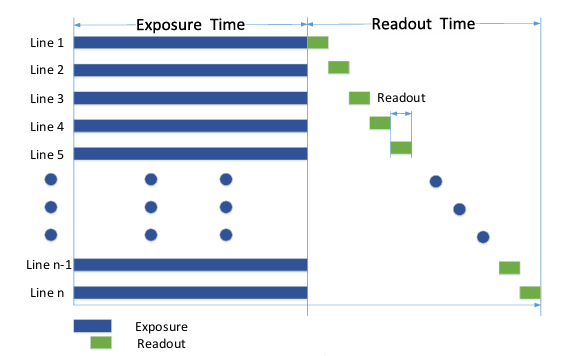
11.2 卷帘快门
支持卷帘式快门的相机,第一行曝光结束后,立即开始读出数据,数据完全读出后,下
一行开始读出数据。每一行与上一行开始曝光的时间差为数据读出时间,如此循环。相机传感器接受曝光、数据读出的时间长度一致,但开始接受曝光的时间不一致。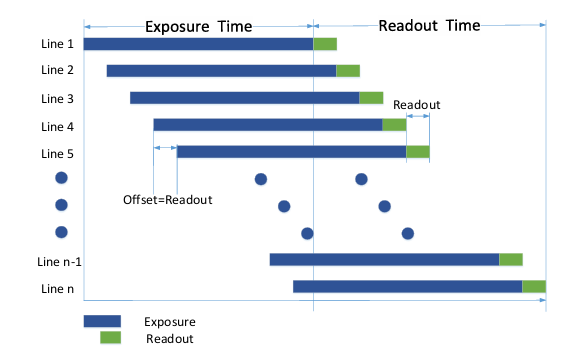

DAMO开发者矩阵,由阿里巴巴达摩院和中国互联网协会联合发起,致力于探讨最前沿的技术趋势与应用成果,搭建高质量的交流与分享平台,推动技术创新与产业应用链接,围绕“人工智能与新型计算”构建开放共享的开发者生态。
更多推荐



 14
14 0
0- 0


 已为社区贡献1条内容

所有评论(0)