C++AI大模型接入SDK—gpt-4o-mini大模型接入
ChatGPT是一个基于OPenAI的大语言模型(如GPT-3、GPT-4)构建的产品或服务,一个可以直接使用的聊天机器人应用,允许用户与语言模型进行交互,生成文本。gpt-4o-mini是一个具体的大语言模型,是OpenAI开发的GPT系列模型中的一个变种,具有特定的架构和训练数据,用于生成文本。
C++AI大模型接入SDK—gpt-4o-mini大模型接入
文章目录
项目地址: 橘子师兄/ai-model-acess-tech - Gitee.com
博客专栏:C++AI大模型接入SDK_橘子师兄的博客-CSDN博客
博主首页:橘子师兄-CSDN博客
ChatGPT是一个基于OPenAI的大语言模型(如GPT-3、GPT-4)构建的产品或服务,一个可以直接使用的聊天机器人应用,允许用户与语言模型进行交互,生成文本。gpt-4o-mini是一个具体的大语言模型,是OpenAI开发的GPT系列模型中的一个变种,具有特定的架构和训练数据,用于生成文本。
gpt-4o-mini的接入与deepseek类似,需要调用官方提供的API,以及了解接口的请求和响应格式。
1、大模型初始化
主要设置api key 以及OpenAI提供的应用编程接口的根端点(所有特定地址的起点和前缀,就像是某栋楼的地址本身,URL是根端点 + 路径 + [查询参数])。api key需要自己到OpenAI的官网申请,OpenAI提供的API根端点是:https://api.openai.com
/////////////////////////////// ChatGPTProvider.h
///////////////////////////////////////
#include "ILLMProvider.h"

namespace ai_chat_sdk {
class ChatGPTProvider : public ILLMProvider {
public:
    // 初始化模型 key: api_key, value: api_key
    virtual bool initModel(const std::map<std::string, std::string>& model_config) override;

    // 检测模型是否有效
    virtual bool isAvailable() override;

    // 获取模型名称
    virtual std::string getModelName() const override;

    // 获取模型描述信息
    virtual std::string getModelDesc() const override;
};
} // end ai_chat_sdk

/////////////////////////////// ChatGPTProvider.cpp
///////////////////////////////////////
#include "ChatGPTProvider.h"
#include "../../util/my_logger.h"
#include <cstdint>
#include <jsoncpp/json/json.h>
#include <jsoncpp/json/reader.h>
#include <jsoncpp/json/value.h>
#include <httplib.h>
#include <sstream>
#include <string>
#include <sys/types.h>

namespace ai_chat_sdk {
// 初始化模型 key: api_key, value: api_key
bool ChatGPTProvider::initModel(const std::map<std::string, std::string>& model_config) {
    // 设置 api key
    auto it = model_config.find("api_key");
    if (it != model_config.end()) {
        _api_key = it->second;
    } else {
        // API Key 未设置
        ERR("ChatGPTProvider initModel failed, api_key not found!");
        return false;
    }

    // 设置模型地址
    it = model_config.find("endpoint");
    if (it != model_config.end()) {
        _endpoint = it->second;
    } else {
        _endpoint = "https://api.openai.com";
    }

    _isAvailable = true;
    INFO("ChatGPTProvider initialized success with endpoint: {}", _endpoint);
    return true;
}

// 检测模型是否有效
bool ChatGPTProvider::isAvailable() {
    return _isAvailable;
}

// 获取模型名称
std::string ChatGPTProvider::getModelName() const {
    return "gpt-4o-mini";
}

// 获取模型描述信息
std::string ChatGPTProvider::getModelDesc() const {
    return "OpenAI 推出的轻量级、高性价比模型,核心能力接近 GPT-4 Turbo 但更经济。";
}
} // end ai_chat_sdk
2、ChatGPT提供API
Chat Completion的官方参数文档:https://platform.openai.com/docs/api-reference/chat/create官方提供的参数比较多,此处仅介绍部分重要参数,红色表示后续项目中需要使用字段,具体含义如下:
| 参数名称 | string | 必填 | 参数说明 |
|---|---|---|---|
| model | string | 模型名称,比如:gpt-4o-mini | |
| messages | array | 对话历史,每条消息包含一个role 和 content字段 | |
| temperature | number | 浮点数,采样温度,介于和2之间,较高的值(如0.8)会使输出更随机,较低的值(如0.2)会使输出更集中和确定。默认值为1 | |
| top_p | number | 核心采样替代方法,模型会考虑概率质量最高的top_p的标记记过。例如:0.1表示只考虑最高的10%的标记。与temperature二选一,避免同时设置,默认值为1 | |
| stream | boolean | 如果设置,将发送部分消息增量,以流式返回,默认值为flase,即未开启 | |
| stop | String or array | 设置停止词,遇到这些词停止生产,最多支持四个停止词,默认值none | |
| max_tokens | integer | 整数,生成内容的最大token数。该值OPenAI已经废弃,但是被大多数模型兼容 | |
| max_completion_token | integer | 完成生成的tokens数上限,包括可见输出标记和推理标记 | |
| presence_penalty | number | 浮点数,介于-2.0和2.0之间。正直减少重复,负值增加重复。默认值为0。 | |
| frequency_penalty | number | 浮点数,数字介于-2.0和2.0之间。正值会根据标记在文本中的现有频率对标记进行惩罚,减少模型重复相同内容的可能性。默认值为0。 | |
| n | integer | 生成多少回复结果。默认值为1 | |
| seed | integer | 如果指定,系统将尽力确定性地采样,使得具有相同seed和参数的重复请求应返回相同的结果 | |
| tools | array | 模型可能调用的工具列表。目前,仅支持函数作为工具。使用此参数提供模型可以为其生成JSON输入的函数列表 |
Role
- system : 给系统一个角色,比如:“你是一个具有十年C++后端开发经验的资深工程师”
- user : 用户消息,即用户向大模型的提问
- assistant : 助手消息,即大模型回复
- tool : 工具调用,如果要大模型调用外部工具时使用,即实现Function Calling
Base url:https://api.openai.com
模型名称:gpt-4o-mini
gpt-4o-mini模型的聊天补全接口设置如下:
**请求URL **POST /v1/chat/completions
请求头参数:
| 字段名称 | 字段类型 | 字段说明 |
|---|---|---|
| Content_Type | string | application/json |
| Authorization | string | “Bearer” + _api_key |
请求体参数:
| 字段名称 | 字段类型 | 字段说明 |
|---|---|---|
| model | string | 模型名称 |
| message | arry | 历史对话,内部为每个对话的object,包含role和content两个字段 |
| templerature | strign | 采样温度 |
| max_tokens | integer | 最大tokens数 |
返回响应 200 ok
{
    "id": "chatcmpl-B9MBs8CjcvOU2jLn4n570S5qMJKcT",
    "object": "chat.completion",
    "created": 1741569952,
    "model": "gpt-4.1-2025-04-14",
    "choices": [
        {
            "index": 0,
            "message": {
                "role": "assistant",
                "content": "Hello! How can I assist you today?",
                "refusal": null,
                "annotations": []
            },
            "logprobs": null,
            "finish_reason": "stop"
        }
    ],
    "usage": {
        "prompt_tokens": 19,
        "completion_tokens": 10,
        "total_tokens": 29,
        "prompt_tokens_details": {
            "cached_tokens": 0,
            "audio_tokens": 0
        },
        "completion_tokens_details": {
            "reasoning_tokens": 0,
            "audio_tokens": 0,
            "accepted_prediction_tokens": 0,
            "rejected_prediction_tokens": 0
        }
    },
    "service_tier": "default"
}
最近,记忆功能已免费向用户推出,ChatGPT会参考近期的对话内容,但免费用户只能体验到轻量级的记忆功能优化,后续享受记忆功能时可能会收费。因此为了让模型能结合之前的聊天记录进行回复,在发送聊天信息时,需要将之前的聊天记录放在messages中全部提供给模型。
3、Response API
先看官网中的一句话:
https://platform.openai.com/docs/api-reference/responses/create
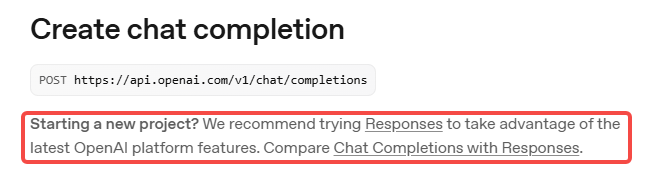
大概意思是:对于新创建的项目,官方更推荐优先使用Responses API,以使用OpenAI平台的最新功
能。
Chat Completions API,是传统的聊天接口,简单好用,但只能处理文本。
Responses API:以事件驱动,支持多模态和复杂交互,更适合做应用级AI。
以下是两种不同类型API的对比:
| 对比维度 | Chat Completions API | Resoinses API |
|---|---|---|
| 定位 | 主要用于对话生成(聊天机器人、客服问答等) | 用于多模态助手(文本、语音、图像、函数调用等多种 |
| 输入 | 聊天消息数组( messages: [{role,content}] ) | 统一的 input (可包含文本、音频、图像等),更灵活 |
| 输出 | 一段完整的文本回复(可流式,但只有文字) | 通过 事件流(semantic events) 输出:text.delta 、audio.delta 、completed 、tool_call 等 |
| 流式能力 | 只支持文本流式(逐字符/逐token返回) | 支持 多模态流式(文本、语音、工具调用、结构化消息),更细粒度 |
| 多模态支持 | 主要是文本(部分模型可输入图像) | 原生支持文本、音频、图像等,能边生成文字边输出语音 |
| 可控性 | 一次请求 = 一次完整回复,过程不可中断 | 可在生成中动态打断、分支,或让模型调用工具函数 |
| 典型场景 | 聊天机器人、FAQ、简单对话系统 | AI 助理、语音对话机器人、智能办公助手、多模态应用 |
| 生活示例 | 学生在比特答疑工具上提问: 学生:我的oj题整你通过部分用例,为什么? 老师:我先看下题目…我在看下你的代码… 你代码中比较条件写错了… 应该这么写… 你先修改下试试… |
你参加一个会议,智能助理会不断抛出“事件”: • “正在讲 PPT 第 3 页了”(output_text) • “这里有个视频片段要放”(output_audio) • “我需要查一下资料”(tool_call) • “会议结束”(completed) |
因此现在官方是比较推荐在新项目中使用Responses API。
4、发送消息-全量返回
post /v1/responses
主要请求参数:
| 字段名称 | 字段类型 | 字段说明 |
|---|---|---|
| model | string | 模型名称,即gpt-4o-mini |
| input | array | 历史对话,内部为每个对话的object,包含role和content两个字段 相当于Chat Completions API中的message数组 |
| temperature | string | 采样温度 |
| max_out_tokens | integer | 最大tokens数。相当于Chat Completions API中的max_tokens |
注意: /v1/responses 并不会自动保存上下文,需要程序员在input里维护会话历史
chatGPT 的响应格式:
{
    "id": "resp_67ccd2bed1ec8190b14f964abc0542670bb6a6b452d3795b",
    "object": "response",
    "created_at": 1741476542,
    "status": "completed",
    "error": null,
    "incomplete_details": null,
    "instructions": null,
    "max_output_tokens": null,
    "model": "gpt-4.1-2025-04-14",
    "output": [
        {
            "type": "message",
            "id": "msg_67ccd2bf17f0819081ff3bb2cf6508e60bb6a6b452d3795b",
            "status": "completed",
            "role": "assistant",
            "content": [
                {
                    "type": "output_text",
                    "text": "In a peaceful grove beneath a silver moon, a unicorn named Lumina discovered a hidden pool that reflected the stars. As she dipped her horn into the water, the pool began to shimmer, revealing a pathway to a magical realm of endless night skies. Filled with wonder, Lumina whispered a wish for all who dream to find their own hidden magic, and as she glanced back, her hoofprints sparkled like stardust.",
                    "annotations": []
                }
            ]
        }
    ],
    "parallel_tool_calls": true,
    "previous_response_id": null,
    "reasoning": {
        "effort": null,
        "summary": null
    },
    "store": true,
    "temperature": 1.0,
    "text": {
        "format": {
            "type": "text"
        }
    },
    "tool_choice": "auto",
    "tools": [],
    "top_p": 1.0,
    "truncation": "disabled",
    "usage": {
        "input_tokens": 36,
        "input_tokens_details": {
            "cached_tokens": 0
        },
        "output_tokens": 87,
        "output_tokens_details": {
            "reasoning_tokens": 0
        },
        "total_tokens": 123
    },
    "user": null,
    "metadata": {}
}
//////////////////////////// ChatGPTProvider.h
/////////////////////////////////////
// ...
class ChatGPTProvider : public ILLMProvider {
public:
    // ...

    // 发送消息给模型 - 全量返回
    virtual std::string sendMessage(const std::vector<Message>& messages,
                                    const std::map<std::string, std::string>& request_param) override;
};

//////////////////////////// ChatGPTProvider.cpp
/////////////////////////////////////

// 发送消息给模型 - 全量返回
std::string ChatGPTProvider::sendMessage(const std::vector<Message>& messages,
                                         const std::map<std::string, std::string>& request_param) {
    // 检查模型是否有效
    if (!_isAvailable) {
        ERR("ChatGPT model is not init!");
        return "";
    }

    // 获取采样温度 和 max_tokens
    double temperature = 0.7;
    int max_tokens = 2048;

    if (request_param.find("temperature") != request_param.end()) {
        temperature = std::stof(request_param.at("temperature"));
    }
    if (request_param.find("max_output_tokens") != request_param.end()) {
        max_tokens = std::stoi(request_param.at("max_output_tokens"));
    }

    // 构建历史消息
    Json::Value messages_array(Json::arrayValue);
    for (const auto& message : messages) {
        Json::Value msg;
        msg["role"] = message.role;
        msg["content"] = message.content;
        messages_array.append(msg);
    }

    // 构建请求体
    Json::Value request_body;
    request_body["model"] = "gpt-4o-mini";
    request_body["input"] = messages_array;          // /v1/reponses 下,这里是 input
    request_body["temperature"] = temperature;
    request_body["max_output_tokens"] = max_tokens;  // /v1/reponses 下,这里是 max_output_tokens

    // 序列化
    Json::StreamWriterBuilder writer;
    std::string json_string = Json::writeString(writer, request_body);
    DBG("ChatGPTProvider: request_body: {}", json_string);

    // 创建HTTP Client
    httplib::Client client(_endpoint);
    client.set_connection_timeout(30, 0);      // 30秒超时
    client.set_read_timeout(60, 0);            // 60秒读取超时
    client.set_proxy("127.0.0.1", 7890);       // 注意必须设置代理,否则无法访问

    // 设置请求头
    httplib::Headers headers = {
        {"Authorization", "Bearer " + _api_key}
        // {"Content-Type", "application/json"} chatgpt这里不需要设置,否则会报错:
    };

    // 发送POST请求
    auto response = client.Post("/v1/responses", headers, json_string, "application/json");
    if (!response) {
        ERR("Failed to connect to ChatGPT API - check network and SSL");
        std::cout << "Failed to connect to ChatGPT API - check network and SSL" << std::endl;
        return "";
    }

    DBG("ChatGPT API response status: {}", response->status);
    DBG("ChatGPT API response body: {}", response->body);

    // 检查响应是否成功
    if (response->status != 200) {
        ERR("ChatGPT API returned non-200 status: {} - {}", response->status, response->body);
        return "";
    }

    // 解析响应体
    Json::Value response_json;
    Json::CharReaderBuilder reader_builder;
    std::string parse_errors;
    std::istringstream response_stream(response->body);

    if (!Json::parseFromStream(reader_builder, response_stream, &response_json, &parse_errors)) {
        ERR("Failed to parse ChatGPT API response: {}", parse_errors);
        return "";
    }

    // 解析大模型回复内容
    // 大模型回复包含在output数组中
    if (response_json.isMember("output") &&
        response_json["output"].isArray() &&
        !response_json["output"].empty()) {
        auto& output = response_json["output"][0];

        if (output.isMember("content") &&
            output["content"].isArray() &&
            output["content"][0].isMember("text")) {
            std::string reply_content = output["content"][0]["text"].asString();
            INFO("Received ChatGPT response: {}", reply_content);
            return reply_content;
        }
    }

    // 解析失败,返回错误信息
    ERR("Invalid response format from ChatGPT API");
    return "Invalid response format from ChatGPT API";
}
5、发送消息-全量返回测试
/////////////////////////// testLLM.cpp ///////////////////////////////
// ...
TEST(ChatGPTProviderTest, sendMessageChatGPT) {
    auto chatGPTProvider = std::make_shared<ai_chat_sdk::ChatGPTProvider>();
    ASSERT_TRUE(chatGPTProvider != nullptr);

    std::map<std::string, std::string> modelParam;
    modelParam["api_key"] = std::getenv("chatgpt_apikey");
    modelParam["endpoint"] = "https://api.openai.com";

    chatGPTProvider->initModel(modelParam);
    ASSERT_TRUE(chatGPTProvider->isAvailable());

    std::map<std::string, std::string> requestParam = {
        {"temperature", "0.7"},
        {"max_output_tokens", "2048"}
    };

    std::vector<ai_chat_sdk::Message> messages;
    messages.push_back({"user", "你是谁?"});

    std::string response = chatGPTProvider->sendMessage(messages, requestParam);
    ASSERT_FALSE(response.empty());

    INFO("response : {}", response);
}
6、发送消息-流式返回
在发送/v1/responses 如果在请求参数中带上stream=true 时,表示开启流式响应。OpenAI预定义了一些事件类型,每个响应都有特定的事件类型:
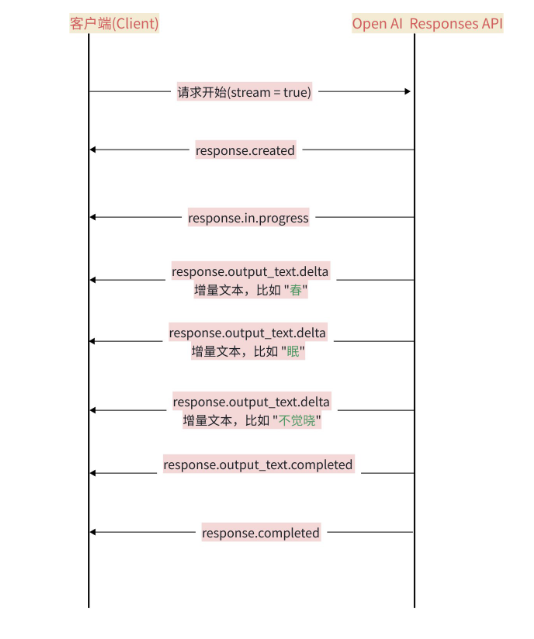
- • response.create:表示响应对象创建好了
- • response.in_progress:表示模型开始工作
- • response.output_text.delta:表示一段段文字实时流出
- • response.output_completed:表示该输出块结束
- • response.completed:表示整个响应结束。
//////////////////////////////// ChatGPTProvider.cpp
//////////////////////////////////////
// ...
std::string ChatGPTProvider::sendMessageStream(
    const std::vector<Message>& messages,
    const std::map<std::string, std::string>& request_param,
    std::function<void(const std::string&, bool)> callback)
{
    INFO("ChatGPTProvider sendMessageStream");

    if (!_isAvailable) {
        ERR("ChatGPTProvider is not available");
        return "";
    }

    // 获取采样温度 和 max_tokens
    double temperature = 0.7;
    int max_tokens = 2048;

    if (request_param.find("temperature") != request_param.end()) {
        temperature = std::stof(request_param.at("temperature"));
    }
    if (request_param.find("max_output_tokens") != request_param.end()) {
        max_tokens = std::stoi(request_param.at("max_output_tokens"));
    }

    // 构建历史消息
    Json::Value messages_array(Json::arrayValue);
    for (const auto& message : messages) {
        Json::Value msg;
        msg["role"] = message.role;
        msg["content"] = message.content;
        messages_array.append(msg);
    }

    // 构建请求体
    Json::Value request_body;
    request_body["model"] = "gpt-4o-mini";
    request_body["input"] = messages_array;           // /v1/responses 下,这里是 input
    request_body["temperature"] = temperature;
    request_body["max_output_tokens"] = max_tokens;   // /v1/responses 下,这里是 max_output_tokens
    request_body["stream"] = true;

    // 序列化
    Json::StreamWriterBuilder writer;
    std::string json_string = Json::writeString(writer, request_body);
    DBG("ChatGPTProvider: request_body: {}", json_string);

    // 创建HTTP Client
    httplib::Client client(_endpoint);
    client.set_connection_timeout(60, 0);       // 60秒连接超时
    client.set_read_timeout(300, 0);            // 300秒读取超时
    client.set_proxy("127.0.0.1", 7890);        // 注意必须设置代理,否则无法访问

    // 设置请求头
    httplib::Headers headers = {
        {"Content-Type", "application/json"},
        {"Authorization", "Bearer " + _api_key},
        {"Accept", "text/event-stream"}
    };

    // 流式处理变量
    std::string buffer;
    bool gotError = false;
    std::string errorMsg;
    int statusCode = 0;
    bool streamFinished = false;
    std::string fullResponse;  // 用于累积完整响应

    // 创建请求对象
    httplib::Request req;
    req.method = "POST";
    req.path = "/v1/responses";
    req.headers = headers;
    req.body = json_string;

    // 处理响应头
    req.response_handler = [&](const httplib::Response& response) {
        statusCode = response.status;
        DBG("Received HTTP status {}", statusCode);

        if (200 != statusCode) {
            gotError = true;
            errorMsg = "HTTP Error" + std::to_string(statusCode);
            return false; // 终止请求
        }
        return true; // 继续接收数据
    };

    // 处理流式响应
    req.content_receiver = [&](const char* data, size_t len, uint64_t offset,
                              uint64_t totalLength) {
        // 如果HTTP请求失败,不用继续接收后续数据
        if (gotError) {
            return false;
        }

        // 追加数据到缓冲区
        buffer.append(data, len);

        // 处理所有完整的事件,事件之间以\n\n分隔
        size_t pos = 0;
        while ((pos = buffer.find("\n\n")) != std::string::npos) {
            std::string event = buffer.substr(0, pos);
            buffer.erase(0, pos + 2);

            if (event.empty() || event[0] == ':') {
                continue;
            }

            DBG("buffer : {}", event);

            // 解析事件行
            std::istringstream eventStream(event);
            std::string line;
            std::string eventType;
            std::string jsonStr;

            while (std::getline(eventStream, line)) {
                if (0 == line.compare(0, 6, "event:")) {
                    eventType = line.substr(7);
                } else if (0 == line.compare(0, 5, "data:")) {
                    jsonStr = line.substr(6);
                }
            }

            // 处理事件
            Json::Value chunk;
            Json::CharReaderBuilder readerBuild;
            std::string errs;
            std::istringstream jsonStream(jsonStr);

            if (!Json::parseFromStream(readerBuild, jsonStream, &chunk, &errs)) {
                WARN("Stream ChatGPT JSON parse error {}", errs);
                continue;
            }

            // 处理文本增量事件
            if (eventType == "response.output_text.delta") {
                if (chunk.isMember("delta") && chunk["delta"].isString()) {
                    std::string content = chunk["delta"].asString();
                    // fullResponse += content;
                    callback(content, false);
                }
            } else if (eventType == "response.output_item.done") {
                // 表示该块输出结束
                if (chunk.isMember("item") && chunk["item"].isObject()) {
                    Json::Value item = chunk["item"];

                    if (item.isMember("content") &&
                        item["content"].isArray() &&
                        !item["content"].empty() &&
                        item["content"][0].isMember("text") &&
                        item["content"][0]["text"].isString()) {
                        std::string content = item["content"][0]["text"].asString();
                        fullResponse += content;
                        // callback(content, false);
                    }
                }
            } else if (eventType == "response.completed") {
                callback("", true);
                streamFinished = true;
                return true;
            }
        };
        return true;
    };

    // 给模型发送请求
    auto result = client.send(req);
    if (!result) {
        // 请求发送失败,出现网络问题,比如DNS解析失败、连接超时
        ERR("Network error {}", result.error());
        return "";
    }

    // 确保流式操作正确结束
    if (!streamFinished) {
        WARN("stream ended without [DONE] marker");
        callback("", true);
    }

    return fullResponse;
}
7、发送消息-流式返回测试
TEST(ChatGPTProviderTest, sendMessageStreamChatGPT) {
    std::map<std::string, std::string> param_map;
    param_map["api_key"] = std::getenv("chatgpt_apikey");
    param_map["temperature"] = "0.7";

    auto chatGPTProvider = std::make_shared<ai_chat_sdk::ChatGPTProvider>();
    ASSERT_TRUE(chatGPTProvider != nullptr);

    chatGPTProvider->initModel(param_map);
    ASSERT_TRUE(chatGPTProvider->isAvailable());

    std::vector<ai_chat_sdk::Message> messages;
    messages.push_back({"user", "你是谁?"});

    auto write_chunk = [&](const std::string& chunk, bool last) {
        INFO("chunk : {}", chunk);
        if (last) {
            INFO("[DONE]");
        }
    };

    std::string fulldata = chatGPTProvider->sendMessageStream(messages, param_map, write_chunk);
    ASSERT_FALSE(fulldata.empty());

    INFO("fulldata : {}", fulldata);
}
// 执行结果部分截图
// ...
data:
{"type":"response.output_text.delta","sequence_number":40,"item_id":"msg_68c250
791ad8819485e01d407933124a00f63a4cd1eb2259","output_index":0,"content_index":0,
"delta":"S","logprobs":[],"obfuscation":"6IEhjsfS2RztIJM"}
data:
{"type":"response.output_text.delta","sequence_number":41,"item_id":"msg_68c250
791ad8819485e01d407933124a00f63a4cd1eb2259","output_index":0,"content_index":0,
"delta":"SE","logprobs":[],"obfuscation":"bGKKtXYYyt7ZDq"}
data:
{"type":"response.output_text.delta","sequence_number":42,"item_id":"msg_68c250
791ad8819485e01d407933124a00f63a4cd1eb2259","output_index":0,"content_index":0,
"delta":")**","logprobs":[],"obfuscation":"4JT3MWhEDZjuG"}
data:
{"type":"response.output_text.delta","sequence_number":43,"item_id":"msg_68c250
791ad8819485e01d407933124a00f63a4cd1eb2259","output_index":0,"content_index":0,
"delta":":","logprobs":[],"obfuscation":"bpxvFdp0s6WPLLf"}
data:
{"type":"response.output_text.delta","sequence_number":44,"item_id":"msg_68c250
791ad8819485e01d407933124a00f63a4cd1eb2259","output_index":0,"content_index":0,
"delta":"这","logprobs":[],"obfuscation":"n9zTDLB8kaK6otU"}
data:
{"type":"response.output_text.delta","sequence_number":45,"item_id":"msg_68c250
791ad8819485e01d407933124a00f63a4cd1eb2259","output_index":0,"content_index":0,
"delta":"是一","logprobs":[],"obfuscation":"YQnVvT9CcE6Gm0"}
data:
{"type":"response.output_text.delta","sequence_number":46,"item_id":"msg_68c250
791ad8819485e01d407933124a00f63a4cd1eb2259","output_index":0,"content_index":0,
"delta":"种","logprobs":[],"obfuscation":"zalLiWayRff4k7J"}
data:
{"type":"response.output_text.delta","sequence_number":47,"item_id":"msg_68c250
791ad8819485e01d407933124a00f63a4cd1eb2259","output_index":0,"content_index":0,
"delta":"由","logprobs":[],"obfuscation":"sU0saBr7q88j39U"}
data:
{"type":"response.output_text.delta","sequence_number":48,"item_id":"msg_68c250
791ad8819485e01d407933124a00f63a4cd1eb2259","output_index":0,"content_index":0,
"delta":"英","logprobs":[],"obfuscation":"pRPpDYuvgP5ISI5"}
data:
{"type":"response.output_text.delta","sequence_number":49,"item_id":"msg_68c250
791ad8819485e01d407933124a00f63a4cd1eb2259","output_index":0,"content_index":0,
"delta":"特","logprobs":[],"obfuscation":"9tr7i9LfeasiKmO"}
data:
{"type":"response.output_text.delta","sequence_number":50,"item_id":"msg_68c250
791ad8819485e01d407933124a00f63a4cd1eb2259","output_index":0,"content_index":0,
"delta":"尔","logprobs":[],"obfuscation":"hMamvIo4DF4BDOG"}
data:
{"type":"response.output_text.delta","sequence_number":51,"item_id":"msg_68c250
791ad8819485e01d407933124a00f63a4cd1eb2259","output_index":0,"content_index":0,
"delta":"开发","logprobs":[],"obfuscation":"BcKMlUpLG8YhWG"}
// ...

DAMO开发者矩阵,由阿里巴巴达摩院和中国互联网协会联合发起,致力于探讨最前沿的技术趋势与应用成果,搭建高质量的交流与分享平台,推动技术创新与产业应用链接,围绕“人工智能与新型计算”构建开放共享的开发者生态。
更多推荐
 11
11 0
0- 0


 已为社区贡献1条内容

所有评论(0)