企业无线网络AC,AP搭建
配置步骤:
1)AP从AC上获取到IP地址
2)AP要在AC上注册上线
3)AC推送配置信息给AP
-
SSID模版
无线信号的名字 -
Security模版
无线信号的密码 -
VAP模版
调用SSID模版
调用Security模版
配置业务VLAN ID 10 -
创建AP组
AP组下调用VAP模版
AP加入到AP组中
4)无线终端连接AP
组网方式:
AP和AC二层旁挂组网
转发模式:
直接转发:业务流量不经过AC
隧道转发:业务流量经过AC
拓扑图
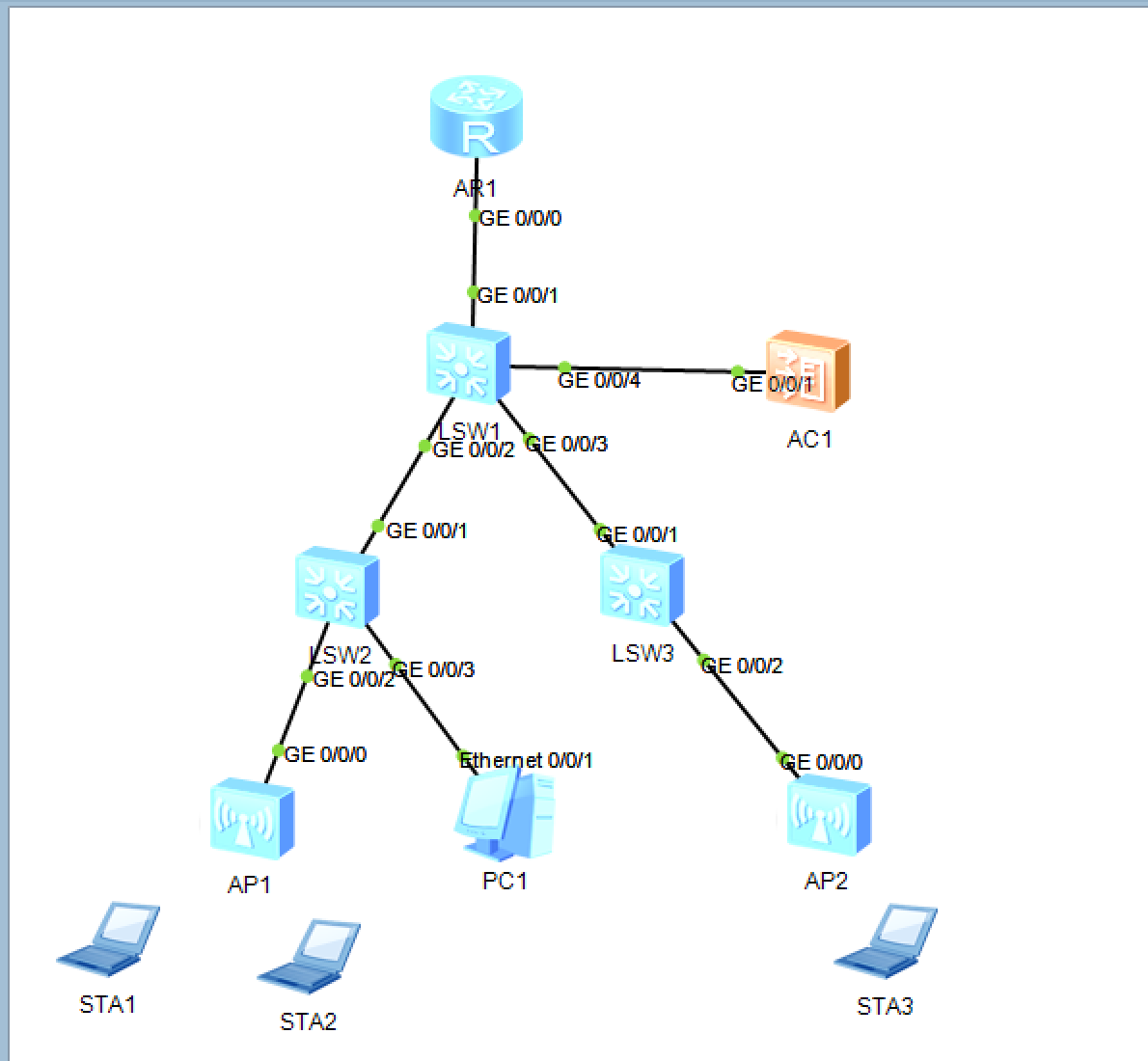
操作步骤:
sysname sw2
vlan batch 10 20 100
interface GigabitEthernet0/0/1
 port link-type trunk
 port trunk allow-pass vlan 10 20 100
interface GigabitEthernet0/0/2
 port link-type trunk
 port trunk pvid vlan 100
 port trunk allow-pass vlan 10 100
sysname sw1
vlan batch 10 20 100
interface GigabitEthernet0/0/1
 port link-type trunk
 port trunk allow-pass vlan 100
interface GigabitEthernet0/0/2
 port link-type trunk
 port trunk allow-pass vlan 10 20 100
AC:
vlan batch 100
dhcp enable
interface Vlanif100
 ip address 192.168.100.254 255.255.255.0
 dhcp select interface
interface GigabitEthernet0/0/1
 port link-type trunk
 port trunk allow-pass vlan 100
<AP1> display system-information // 查看AP的MAC信息
验证:AP获取到IP地址
<AP1> display ip interface brief
查看mac地址:dis mac-address
AC:
capwap source interface Vlanif100
wlan
 ap-id 1 ap-mac 00e0-fcb7-2ea0
 ap-name tedu619
-
capwap source interface Vlanif100
指定 AC 用 Vlanif100 的 IP 地址(192.168.100.254)作为 CAPWAP 隧道的源地址,AP 必须能到达该地址才能发现 AC。 -
wlan
进入 WLAN 配置视图,后续所有 AP、模板、射频、VAP 等无线参数都在该视图下配置。 -
ap-id 1 ap-mac 00e0-fcb7-2ea0
手动创建 AP 对象,编号 1,并绑定其出厂 MAC(00e0-fcb7-2ea0)。AP 上线时 MAC 必须匹配,否则拒绝注册。
-
ap-name tedu619
给该 AP 起个可读名称 tedu619,方便后期维护、定位故障
[ac]dis ap all 查看ap上线状态
AC:
security-profile name hcie
 security wpa-wpa2 psk pass-phrase Huawei@123 aes
ssid-profile name hcie
 ssid hcie
vap-profile name hcie
 service-vlan vlan-id 10
 ssid-profile hcie
 security-profile hcie
ap-group name hcie
 vap-profile hcie wlan 1 radio all
ap-id 1
 ap-group hcie
AC 部分(无线模板调用)
-
security-profile name hcie
创建安全模板,名字叫 hcie,后续所有加密策略都在该模板里定义。 -
security wpa-wpa2 psk pass-phrase Huawei@123 aes
配置 WPA/WPA2 混合加密,预共享密钥为 Huawei@123,加密算法使用 AES(CCMP)。 -
ssid-profile name hcie
创建 SSID 模板,名字同样叫 hcie,用于存放无线信号名称。 -
ssid hcie
无线信号名称(SSID)就是“hcie”,终端搜索到的 Wi-Fi 名称。 -
vap-profile name hcie
创建 VAP(Virtual Access Point)模板,把 SSID 和安全模板绑定在一起,并指定业务 VLAN。 -
service-vlan vlan-id 10
无线用户(STA)流量进入 VLAN 10,与 AP 管理 VLAN 100 隔离。 -
ssid-profile hcie
在 VAP 模板里引用前面定义的 SSID 模板。 -
security-profile hcie
在同一 VAP 模板里引用前面定义的安全模板。 -
ap-group name hcie
创建 AP 组,名字叫 hcie,方便批量下发配置。 -
vap-profile hcie wlan 1 radio all
在 AP 组里调用 VAP 模板,wlan-id 1,所有射频(2.4 G 和 5 G)都发射这个 SSID。 -
ap-id 1
进入已创建的 AP 1 的配置视图。 -
ap-group hcie
把 AP 1 加入到 hcie 组,AP 就能收到上面所有模板配置并发射 SSID“hcie”。2 20 100
一次性创建 4 个 VLAN,10(无线业务)、12(互联)、20(预留)、100(AP 管理)。
SW1:
ip pool wireless_yewu
 gateway-list 192.168.10.254
 network 192.168.10.0 mask 255.255.255.0
 dns-list 223.5.5.5
vlan batch 10 12 20 100
dhcp enable
ip route-static 0.0.0.0 0 10.1.12.2
interface Vlanif10
 ip address 192.168.10.254 255.255.255.0
 dhcp select global
interface Vlanif12
 ip address 10.1.12.1 255.255.255.0
-
ip pool wireless_yewu
创建全局地址池,名字叫 wireless_yewu,供 DHCP 服务器调用。 -
gateway-list 192.168.10.254
指定分配给无线用户的默认网关为 192.168.10.254(即 Vlanif10 的 IP)。 -
network 192.168.10.0 mask 255.255.255.0
地址池范围:192.168.10.0/24,可分配地址 10.1–10.253(.254 已被网关占用)。 -
dns-list 223.5.5.5
给用户下发的 DNS 服务器地址,223.5.5.5 是阿里公共 DNS。 -
vlan batch 10 12 20 100
批量创建 4 个 VLAN:10(无线业务)、12(互联)、20(预留)、100(AP 管理)。 -
dhcp enable
全局开启 DHCP 功能,否则地址池不会生效。 -
ip route-static 0.0.0.0 0 10.1.12.2
默认静态路由,所有未知目的地都扔给上游 10.1.12.2,保证回包可达外网。 -
interface Vlanif10
进入无线业务 VLAN 10 的三层接口。 -
ip address 192.168.10.254 255.255.255.0
给 VLAN 10 提供网关地址,与地址池的 gateway-list 保持一致。 -
dhcp select global
指定该接口使用“全局地址池”给客户端分配 IP(即调用刚才定义的 wireless_yewu)。 -
interface Vlanif12
进入互联 VLAN 12 的三层接口。 -
ip address 10.1.12.1 255.255.255.0
与上游设备(核心/出口路由器)互联的网段,形成 10.1.12.0/24。
AR2:
interface GigabitEthernet0/0/0
 ip address 10.1.12.2 255.255.255.0
ip route-static 192.168.10.0 255.255.255.0 10.1.12.1
当前正在运行的全部配置 的命令:display current-configuration
# 使用MAC地址而不是ID删除
[AC6005-wlan-view] undo ap ap-mac 00e0-fc96-6380

DAMO开发者矩阵,由阿里巴巴达摩院和中国互联网协会联合发起,致力于探讨最前沿的技术趋势与应用成果,搭建高质量的交流与分享平台,推动技术创新与产业应用链接,围绕“人工智能与新型计算”构建开放共享的开发者生态。
更多推荐
 15
15 0
0- 0


 已为社区贡献2条内容

所有评论(0)