Solana链上合约抢跑交易保护技术分析
什么是抢跑交易(Front-Runing)?
抢跑交易, 即在MEV机器人抢在你买入交易之前买入,然后,在你买入交易完成之后立即卖出,赚取差价。
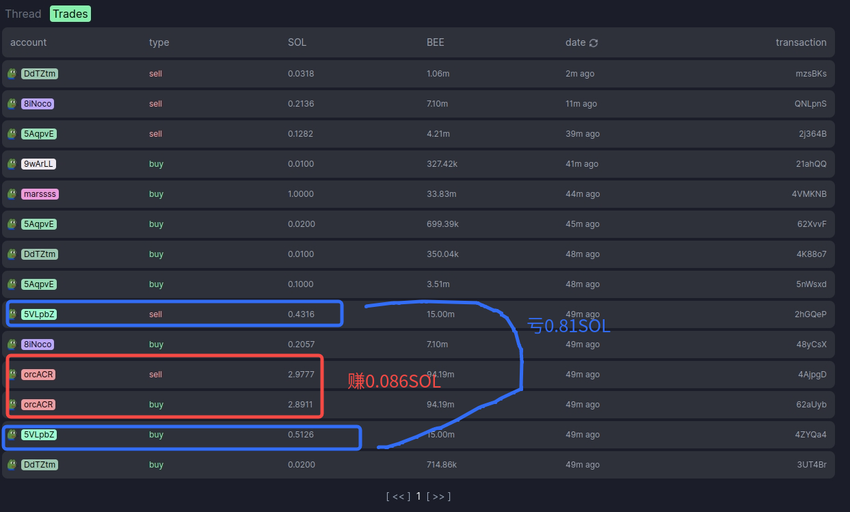
例如:
-
抢跑买入:
-
https://solscan.io/tx/62aUybT8vRCuHKs6LPXBNCD2dCzfxas6BVD3mH4CdwHQnrkxMoixE8j9ENDgopeWT2VRP6zDUdCFs2VZ8pmZa396
-
-
被抢跑的交易:
-
https://solscan.io/tx/4ZYQa47xtCgBExLt8Y4fCHCVqvM8pmEV9pSRmwt9snTCdiddieJWKuZbwW7jDiN4HUbXVbm7QgaBPYaspdsQvB1Z
-
-
抢跑卖出:
-
https://solscan.io/tx/4AjpgDcsQ435SKXvn9qCavhZvFE1hS9NfJxXcakvwK4XyNoq3ACD8bd8cX3a3ssCXjKmhjd4qYEmeV5dSZjtofMD
-


Priority Fee
-
https://docs.bloxroute.com/solana/trader-api-v2/achieve-best-performance-for-landing-a-transaction
-
官方文档:
ComputeBudgetProgram.setComputeUnitPrice({ microLamports: number }) will add a Prioritization Fee above the Base Fee (5,000 Lamports). The value provided in microLamports will be multiplied by the CU budget to determine the Prioritization Fee in Lamports. For example, if your CU budget is 1M CU, and you add 1 microLamport/CU, the Prioritization Fee will be 1 Lamport (1M * 0.000001). The total fee will then be 5001 Lamports. Transactions should request the minimum amount of CU required for execution to maximize throughput, or minimize fees.-
https://solana.com/developers/cookbook/transactions/add-priority-fees
-
1 SOL = 10^9 lamports = 10^15 microLamports
-
-
setComputeUnitPrice: 设置CU的价格 -
setComputeUnitLimit: 设置总CU的限量 -
总手续费 = 基础手续费 + CU价格 * CU限量
-
-
实际交易: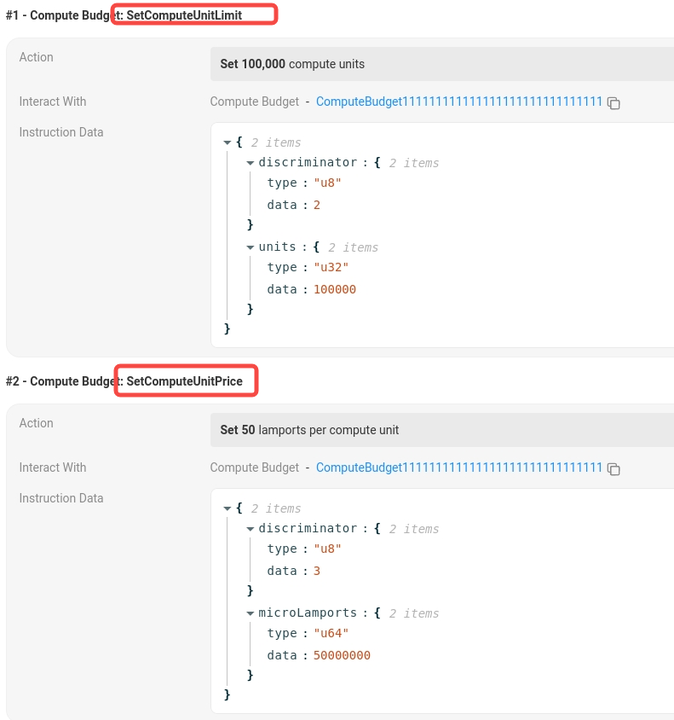
-
https://solscan.io/tx/2nGJKEZuUFW1TC7C9D4D6ABVBTJKsKbuvmYbezQ64D6QPGSTYBdebFwXVWuZpRymAM5AvYWw153fuNYAq64LUnrL
-
-
上面这笔交易 UnitLimit为
100000; UnitPrice为50000000 microLamports,即50 lamports, 因此:-
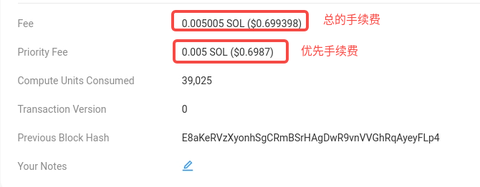
Priority Fee =
100000 * 50 lamports=5000000 lamports=0.005 SOL -
Base Fee 是固定的
5000 lamports, 即0.000005 SOL -
因此总的手续费是:
0.005 SOL + 0.000005 SOL = 0.005005 SOL
-
-
如何获取最优CU价格?
-
官方文档: https://solana.com/developers/guides/advanced/how-to-use-priority-fees
使用getRecentPrioritizationFees RPC接口获取
如何获取最优CU?
-
官方文档:
-
https://solana.com/developers/cookbook/transactions/optimize-compute
-
-
示例代码:
// request a specific compute unit budget
const modifyComputeUnits = ComputeBudgetProgram.setComputeUnitLimit({
     units: 1000000,
});

// set the desired priority fee
const addPriorityFee = ComputeBudgetProgram.setComputeUnitPrice({
  microLamports: 1,
});

// Total fee will be 5,001 Lamports for 1M CU
const transaction = new Transaction()
   .add(modifyComputeUnits)
   .add(addPriorityFee)
   .add(SystemProgram.transfer({
           fromPubkey: payer.publicKey,
           toPubkey: toAccount,
           lamports: 10000000,
           }),
);


async function buildOptimalTransaction(
    connection: Connection,
    instructions: Array<TransactionInstruction>,
    signer: Signer,
    lookupTables: Array<AddressLookupTableAccount>,) {
      const [microLamports, units, recentBlockhash] = await Promise.all([
          100 /* Get optimal priority fees - https://solana.com/developers/guides/advanced/how-to-use-priority-fees*/,
          getSimulationComputeUnits(
              connection,
              instructions,
              signer.publicKey,
              lookupTables,
          ),
          connection.getLatestBlockhash(),
      ]);

      instructions.unshift(
          ComputeBudgetProgram.setComputeUnitPrice({ microLamports }),
      );

      if (units) {
          // probably should add some margin of error to units
          instructions.unshift(ComputeBudgetProgram.setComputeUnitLimit({ units }));
      }
      return {
          transaction: new VersionedTransaction(
          new TransactionMessage({
          instructions,
          recentBlockhash: recentBlockhash.blockhash,
          payerKey: signer.publicKey,
          }).compileToV0Message(lookupTables),
          ),
          recentBlockhash,
          };
      }
使用Bloxroute实现交易保护
这个测试网没法测试,只能用主网测试
文档:
https://docs.bloxroute.com/solana/trader-api-v2/achieve-best-performance-for-landing-a-transaction
https://docs.bloxroute.com/solana/trader-api-v2/transaction-submission
-
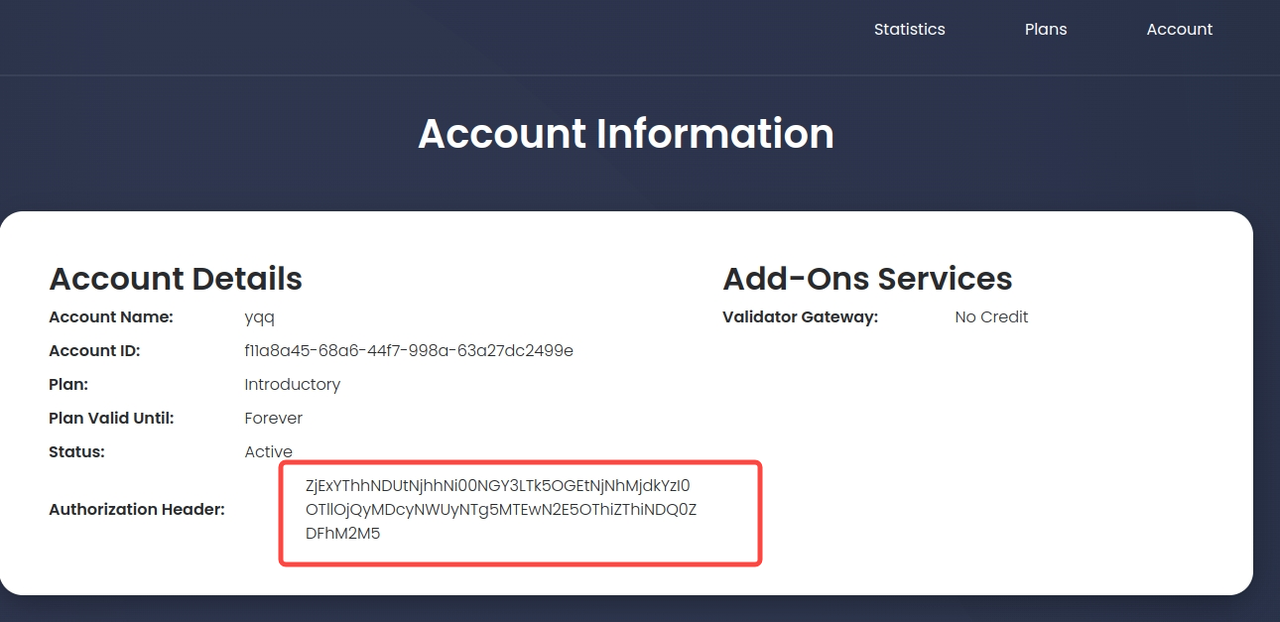
获取API KEY:
-
https://portal.bloxroute.com/
-
TODO
-
-
示例代码: https://github.com/bloXroute-Labs/solana-trader-client-ts/blob/04696fefefbaec56ecb58ee7c464a6cb24728a40/examples/index.ts#L1737-L1777
-
获取最优手续费费率:
curl --header "Authorization:TOKEN" \ 'https://ny.solana.dex.blxrbdn.com/api/v2/system/priority-fee?project=P_JUPITER'-
https://docs.bloxroute.com/solana/trader-api-v2/api-endpoints/general/stream-priority-fee
-
-
添加小费:
最小小费:0.002 SOL
-
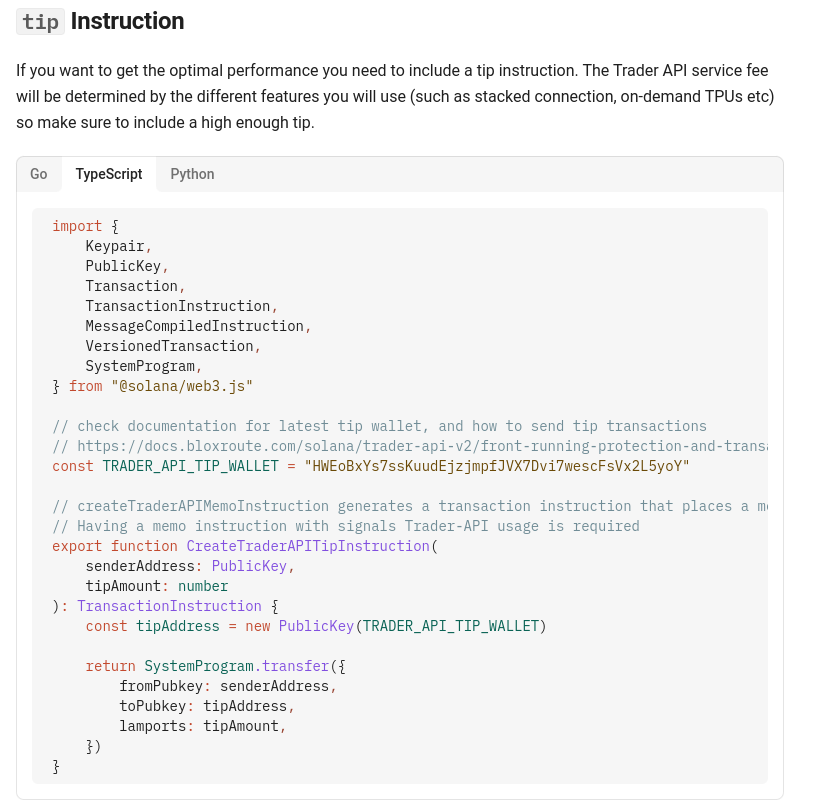
-
构造memo指令
https://docs.bloxroute.com/solana/trader-api-v2/achieve-best-performance-for-landing-a-transaction#construct-memo-program-instruction-by-yourself
-
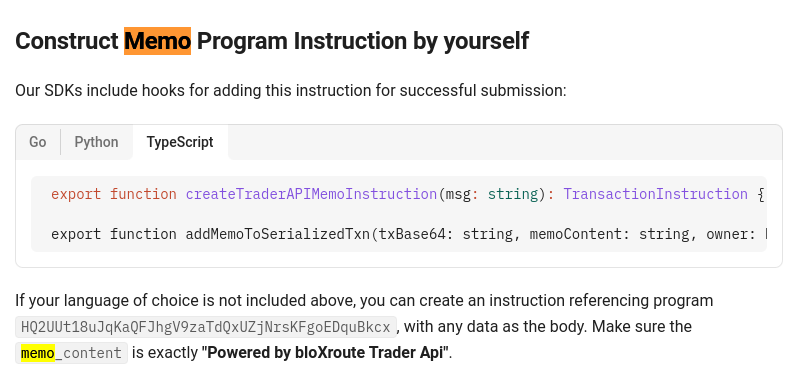
-
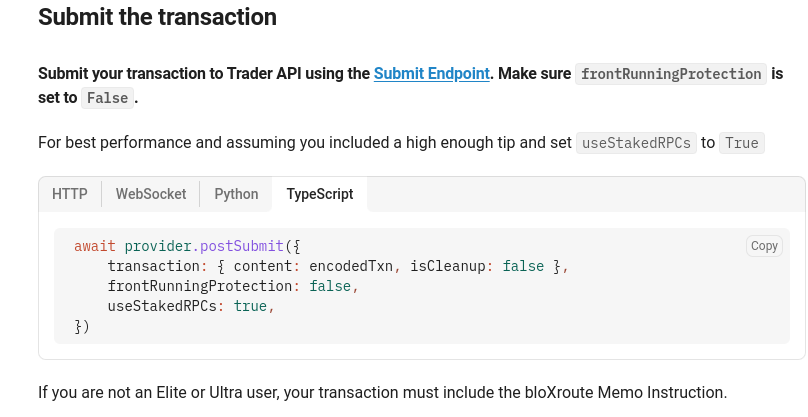
提交已签名交易:
https://docs.bloxroute.com/solana/trader-api-v2/achieve-best-performance-for-landing-a-transaction#submit-the-transaction

DAMO开发者矩阵,由阿里巴巴达摩院和中国互联网协会联合发起,致力于探讨最前沿的技术趋势与应用成果,搭建高质量的交流与分享平台,推动技术创新与产业应用链接,围绕“人工智能与新型计算”构建开放共享的开发者生态。
更多推荐


 29
29 0
0- 0


 已为社区贡献2条内容

所有评论(0)