负载均衡的园区网络综合实训
本文介绍某企业网络升级改造方案,将原有单核心架构升级为双核心冗余网络,并部署WLAN满足移动办公需求。方案采用MSTP和VRRP协议实现链路冗余与负载均衡,通过双核心交换机(S1/S2)构建高可用架构。实施内容包括:配置接入层交换机(S3-S5)划分VLAN;核心交换机部署DHCP热备、VRRP主备分流(VLAN61-62走S1,VLAN63-64走S2)和MSTP多实例负载;路由器间采用PPP
任务描述
某公司是位于工业园区内的新技术企业,原网络为单核心网络,具有“单点故障的风险”。为保障公司网络的稳定性、可用性,现对公司的原网络进行升级改造,改造后的网络要求为“双核心”的稳定结构;因公司移动办公的用户越来越多,现公司需要在网络中部署WLAN以满足员工的移动办公需求。你作为公司的网络工程师,现要求根据拓扑图对网络设备进行调试。
单核心的网络已经无法满足公司的需求,因此采用双核心的冗余网络,可以保证公司网络的稳定性。利用MSTP(多生成树协议)和VRRP(虚拟路由冗余协议)提高可靠性,实现冗余备份的同时,可实现负载均衡,MSTP协议中创建多个生成树实例,实现VLAN间负载均衡,不同VLAN的流量按照不同的路径转发。VRRP协议中创建多个备份组,各备份组指定不同的Master与Backup,实现虚拟路由的负载均衡。
移动终端已经成为人民和工作的必备工具,无线网络是移动终端最重要的网络接入路径,考虑到消费级的无线路由器的性能、扩展性、可管理型都无法满足要求,公司准备采用AC+AP的方案。
任务要求
(1)园区网综合实训网络拓扑图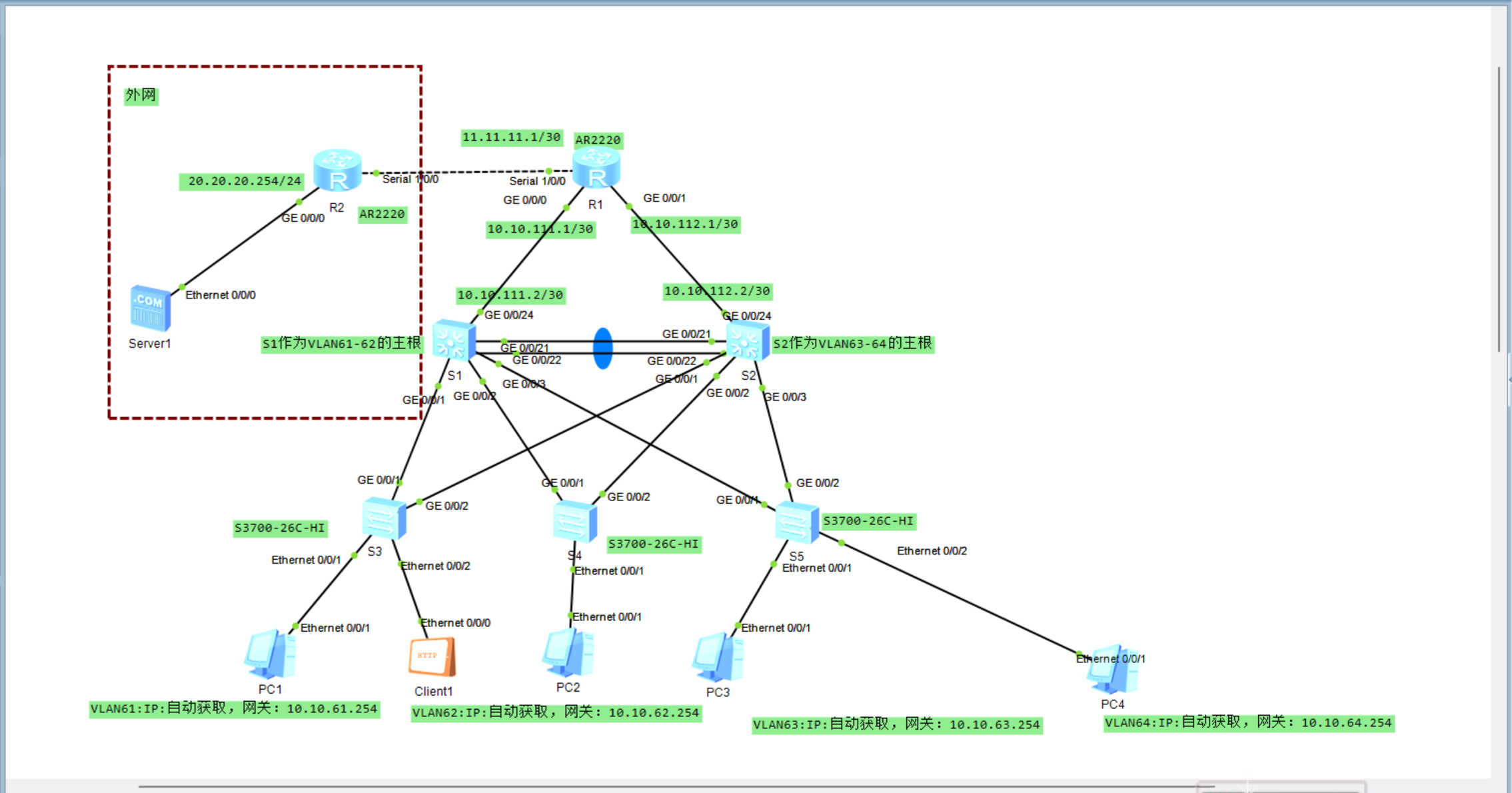
(2)该企业内网S1和S2核心交换机互为备份,实现链路聚合,设备冗余设计,核心交换机通过路由器R1与互联网连通。
(3)路由器R1与路由器R2通过PPP链路连接,启用PPP协议的CHAP认证功能,路由器R2为认证方,路由器R1被认证方,用户名使用路由器名称,认证加密类型密钥为:123456。
(4)路由器R1与路由器R2之间不配置路由协议,可通过默认路由配置实现网络通信。
(5)路由器R1上配置NAT地址转换,使内部计算机能访问互联网服务器Server1。
(6)所有VLAN的网关在核心交换机上实现,S1和S2核心交换机与路由器R1通过OSPF实现路由互通,认证模式和秘钥采用md5 1 ciper gd。
(7)在S1和S2核心交换机上分别配置DHCP服务,实现高可用的DHCP服务器双机热备,使得客户端都可以动态获取正确的IP地址。
(8)在S1和S2核心交换机启用VRRP协议,并且配置使VLAN 61、VLAN 62数据流默认通过S1转发,VLAN 63、VLAN 64数据流默认通过S2转发。
(9)整个网络启用MSTP多生成树,设置S1作为生成树实例1的根,配置VLAN 61、VLAN 62参与生成树实例1,配置S2作为生成树实例2的根,配置VLAN 63、VLAN 64参与生成树实例2。
(10)S3、S4和S5交换机作为接入层交换机,分别连接VLAN 61、VLAN 62、VLAN 63虚拟局域网。
(11)无线AC控制器连接到S2核心交换机的GE0/0/23端口上,无线控制参数自定义。VLAN 64是无线局域网业务网段,通过AP1与S5的Ethernet0/0/22端口连接。使得无线客户端可以动态获取正确的IP地址,并能访问互联网服务器Server1。
任务实施
1.交换机的基础配置
1.接入层交换机S3的基本配置。
<Huawei>system-view
[Huawei]sysname S3
[S3]undo info-center enable
[S3]vlan batch 61 to 64        //批量创建VLAN61-64
[S3]interface Ethernet 0/0/1
[S3-Ethernet0/0/1]port link-type access
[S3-Ethernet0/0/1]port default vlan 61
[S3-Ethernet0/0/1]quit
[S3]interface GigabitEthernet 0/0/1    //配置GE0/0/1为Trunk端口
[S3-GigabitEthernet0/0/1]port link-type trunk
[S3-GigabitEthernet0/0/1]port trunk allow-pass vlan 61 to 64    //允许VLAN61-64通过
[S3-GigabitEthernet0/0/1]quit
[S3]interface GigabitEthernet 0/0/2    //配置GE0/0/2为Trunk端口
[S3-GigabitEthernet0/0/2]port link-type trunk
[S3-GigabitEthernet0/0/2]port trunk allow-pass vlan 61 to 64    //允许VLAN61-64通过
[S3-GigabitEthernet0/0/2]quit
3.接入层交换机S4的基本配置。
<Huawei>system-view
[Huawei]sysname S4
[S4]undo info-center enable
[S4]vlan batch 61 to 64        //批量创建VLAN61-64
[S4]interface Ethernet 0/0/1
[S4-Ethernet0/0/1]port link-type access
[S4-Ethernet0/0/1]port default vlan 62
[S4-Ethernet0/0/1]quit
[S4]interface GigabitEthernet 0/0/1    //配置GE0/0/1为Trunk端口
[S4-GigabitEthernet0/0/1]port link-type trunk
[S4-GigabitEthernet0/0/1]port trunk allow-pass vlan 61 to 64    //允许VLAN61-64通过
[S4-GigabitEthernet0/0/1]quit
[S4]interface GigabitEthernet 0/0/2    //配置GE0/0/2为Trunk端口
[S4-GigabitEthernet0/0/2]port link-type trunk
[S4-GigabitEthernet0/0/2]port trunk allow-pass vlan 61 to 64    //允许VLAN61-64通过
[S4-GigabitEthernet0/0/2]quit
4.接入层交换机S5的基本配置。
<Huawei>system-view
[Huawei]sysname S5
[S5]undo info-center enable
[S5]vlan batch 61 to 64 102        //批量创建VLAN61-64,102
[S5]interface Ethernet 0/0/1
[S5-Ethernet0/0/1]port link-type access
[S5-Ethernet0/0/1]port default vlan 63
[S5-Ethernet0/0/1]quit
[S5]interface Ethernet 0/0/22
[S5-Ethernet0/0/22]port link-type trunk
[S5-Ethernet0/0/22]port trunk pvid vlan 102
[S5-Ethernet0/0/22]port trunk allow-pass vlan 64 102    //允许VLAN64,102通过
[S5-Ethernet0/0/22]quit
[S5]interface GigabitEthernet 0/0/1    //配置GE0/0/1为Trunk端口
[S5-GigabitEthernet0/0/1]port link-type trunk
[S5-GigabitEthernet0/0/1]port trunk allow-pass vlan 61 to 64 102    //允许VLAN61-64,102通过
[S5-GigabitEthernet0/0/1]quit
[S5]interface GigabitEthernet 0/0/2    //配置GE0/0/2为Trunk端口
[S5-GigabitEthernet0/0/2]port link-type trunk
[S5-GigabitEthernet0/0/2]port trunk allow-pass vlan 61 to 64 102    //允许VLAN61-64,102通过
[S5-GigabitEthernet0/0/2]quit
5.核心交换机S1的基本配置。
<Huawei>system-view
[Huawei]undo info-center enable
[Huawei]sysname S1
[S1]vlan batch 61 to 64 102 111        //批量创建VLAN61-64,102和111
[S1]interface GigabitEthernet 0/0/21
[S1-GigabitEthernet0/0/21]port link-type access
[S1-GigabitEthernet0/0/21]port default vlan 111
[S1-GigabitEthernet0/0/21]quit
[S1]interface GigabitEthernet 0/0/1    //配置GE0/0/1为Trunk端口
[S1-GigabitEthernet0/0/1]port link-type trunk
[S1-GigabitEthernet0/0/1]port trunk allow-pass vlan 61 to 64    //允许VLAN61-64通过
[S1-GigabitEthernet0/0/1]quit
[S1]interface GigabitEthernet 0/0/2    //配置GE0/0/2为Trunk端口
[S1-GigabitEthernet0/0/2]port link-type trunk
[S1-GigabitEthernet0/0/2]port trunk allow-pass vlan 61 to 64    //允许VLAN61-64通过
[S1-GigabitEthernet0/0/2]quit
[S1]interface GigabitEthernet 0/0/3    //配置GE0/0/3为Trunk端口
[S1-GigabitEthernet0/0/3]port link-type trunk
[S1-GigabitEthernet0/0/3]port trunk allow-pass vlan 61 to 64 102    //允许VLAN61-64和102通过
[S1-GigabitEthernet0/0/3]quit
[S1]interface Vlanif 61
[S1-Vlanif61]ip address 10.10.61.252 255.255.255.0
[S1-Vlanif61]interface Vlanif 62
[S1-Vlanif62]ip address 10.10.62.252 255.255.255.0
[S1-Vlanif62]interface Vlanif 63
[S1-Vlanif63]ip address 10.10.63.252 255.255.255.0
[S1-Vlanif63]interface Vlanif 64
[S1-Vlanif64]ip address 10.10.64.252 255.255.255.0
[S1-Vlanif64]interface Vlanif 102    //供AP使用
[S1-Vlanif102]ip address 10.10.102.252 255.255.255.0
[S1-Vlanif102]interface Vlanif 111
[S1-Vlanif111]ip address 10.10.111.2 255.255.255.252
[S1-Vlanif111]quit
6.核心交换机S2的基本配置。
<Huawei>system-view
[Huawei]undo info-center enable
[Huawei]sysname S2
[S2]vlan batch 61 to 64 102 112
[S2]interface GigabitEthernet 0/0/24
[S2-GigabitEthernet0/0/24]port link-type access
[S2-GigabitEthernet0/0/24]port default vlan 112    //设置上行链路所属VLAN
[S2-GigabitEthernet0/0/24]quit
[S2]interface GigabitEthernet 0/0/1    //配置GE0/0/1为Trunk端口
[S2-GigabitEthernet0/0/1]port link-type trunk
[S2-GigabitEthernet0/0/1]port trunk allow-pass vlan 61 to 64    //允许VLAN61-64通过
[S2-GigabitEthernet0/0/1]quit
[S2]interface GigabitEthernet 0/0/2    //配置GE0/0/2为Trunk端口
[S2-GigabitEthernet0/0/2]port link-type trunk
[S2-GigabitEthernet0/0/2]port trunk allow-pass vlan 61 to 64    //允许VLAN61-64通过
[S2-GigabitEthernet0/0/2]quit
[S2]interface GigabitEthernet 0/0/3    //配置GE0/0/3为Trunk端口
[S2-GigabitEthernet0/0/3]port link-type trunk
[S2-GigabitEthernet0/0/3]port trunk allow-pass vlan 61 to 64 102    //允许VLAN61-64和102通过
[S2-GigabitEthernet0/0/3]quit
[S2]interface Vlanif 1    //与AC通信
[S2-Vlanif1]ip address 10.10.101.254 255.255.255.0
[S2-Vlanif1]interface Vlanif 61
[S2-Vlanif61]ip address 10.10.61.253 255.255.255.0
[S2-Vlanif61]interface Vlanif 62
[S2-Vlanif62]ip address 10.10.62.253 255.255.255.0
[S2-Vlanif62]interface Vlanif 63
[S2-Vlanif63]ip address 10.10.63.253 255.255.255.0
[S2-Vlanif63]interface Vlanif 64
[S2-Vlanif64]ip address 10.10.64.253 255.255.255.0
[S2-Vlanif64]interface Vlanif 102    //供AP使用
[S2-Vlanif102]ip address 10.10.102.253 255.255.255.0
[S2-Vlanif102]interface Vlanif 112
[S2-Vlanif112]ip address 10.10.112.2 255.255.255.252
2.交换机的Eth-Trunk配置
1. 核心交换机 S1 的 Eth-Trunk 配置
[S1]interface Eth-Trunk 1
[S1-Eth-Trunk1]port link-type trunk
[S1-Eth-Trunk1]port trunk allow-pass vlan 61 to 64 102
[S1-Eth-Trunk1]quit
[S1]interface GigabitEthernet 0/0/21
[S1-GigabitEthernet0/0/21]eth-trunk 1
[S1-GigabitEthernet0/0/21]quit
[S1]interface GigabitEthernet 0/0/22
[S1-GigabitEthernet0/0/22]eth-trunk 1
[S1-GigabitEthernet0/0/22]quit
2. 核心交换机 S2 的 Eth-Trunk 配置
[S2]interface Eth-Trunk 1
[S2-Eth-Trunk1]port link-type trunk
[S2-Eth-Trunk1]port trunk allow-pass vlan 61 to 64 102
[S2-Eth-Trunk1]quit
[S2]interface GigabitEthernet 0/0/21
[S2-GigabitEthernet0/0/21]eth-trunk 1    //将此端口加入到链路组1
[S2-GigabitEthernet0/0/21]quit
[S2]interface GigabitEthernet 0/0/22
[S2-GigabitEthernet0/0/22]eth-trunk 1    //将此端口加入到链路组1
[S2-GigabitEthernet0/0/22]quit
3. 交换机的 MSTP 配置
01. 核心交换机 S1 的 MSTP 配置
[S1]stp instance 1 priority 0
[S1]stp instance 2 priority 4096
[S1]stp region-configuration
[S1-mst-region]region-name test
[S1-mst-region]revision-level 1
[S1-mst-region]instance 1 vlan 61 to 62
[S1-mst-region]instance 2 vlan 63 to 64 102
[S1-mst-region]active region-configuration
[S1-mst-region]quit
2. 核心交换机 S2 的 MSTP 配置
[S2]stp instance 1 priority 4096
[S2]stp instance 2 priority 0
[S2]stp region-configuration
[S2-mst-region]region-name test
[S2-mst-region]revision-level 1
[S2-mst-region]instance 1 vlan 61 to 62
[S2-mst-region]instance 2 vlan 63 to 64 102
[S2-mst-region]active region-configuration
[S2-mst-region]quit
3. 接入交换机 S3 的 MSTP 配置
[S3]stp region-configuration
[S3-mst-region]region-name test
[S3-mst-region]revision-level 1
[S3-mst-region]instance 1 vlan 61 to 62
[S3-mst-region]instance 2 vlan 63 to 64
[S3-mst-region]active region-configuration
[S3-mst-region]return
<S3>save
4. 接入交换机 S4 的 MSTP 配置
[S4]stp region-configuration
[S4-mst-region]region-name test
[S4-mst-region]revision-level 1
[S4-mst-region]instance 1 vlan 61 to 62
[S4-mst-region]instance 2 vlan 63 to 64
[S4-mst-region]active region-configuration
[S4-mst-region]return
<S4>save
5. 接入交换机 S5 的 MSTP 配置
[S5]stp region-configuration
[S5-mst-region]region-name test
[S5-mst-region]revision-level 1
[S5-mst-region]instance 1 vlan 61 to 62    //配置实例1对应VLAN61,62
[S5-mst-region]instance 2 vlan 63 to 64 102    //配置实例2对应VLAN63,64,102
[S5-mst-region]active region-configuration
[S5-mst-region]return
<S5>save
4. 在交换机上配置 DHCP 给有线客户端使用
1. 在核心交换机 S1 上的配置
[S1]dhcp enable
[S1]ip pool vlan61
[S1-ip-pool-vlan61]network 10.10.61.0 mask 255.255.255.0
[S1-ip-pool-vlan61]excluded-ip-address 10.10.61.252 10.10.61.253
[S1-ip-pool-vlan61]gateway-list 10.10.61.254
[S1-ip-pool-vlan61]dns-list 114.114.114.114
[S1-ip-pool-vlan61]quit
[S1]ip pool vlan62
[S1-ip-pool-vlan62]network 10.10.62.0 mask 255.255.255.0
[S1-ip-pool-vlan62]excluded-ip-address 10.10.62.252 10.10.62.253
[S1-ip-pool-vlan62]gateway-list 10.10.62.254
[S1-ip-pool-vlan62]dns-list 114.114.114.114
[S1-ip-pool-vlan62]quit
[S1]ip pool vlan63
[S1-ip-pool-vlan63]network 10.10.63.0 mask 255.255.255.0
[S1-ip-pool-vlan63]excluded-ip-address 10.10.63.252 10.10.63.253
[S1-ip-pool-vlan63]gateway-list 10.10.63.254
[S1-ip-pool-vlan63]dns-list 114.114.114.114
[S1-ip-pool-vlan63]quit
2. 在核心交换机 S2 上的配置
[S2]dhcp enable
[S2]ip pool vlan61
[S2-ip-pool-vlan61]network 10.10.61.0 mask 255.255.255.0
[S2-ip-pool-vlan61]excluded-ip-address 10.10.61.252 10.10.61.253
[S2-ip-pool-vlan61]gateway-list 10.10.61.254
[S2-ip-pool-vlan61]dns-list 114.114.114.114
[S2-ip-pool-vlan61]quit
[S2]ip pool vlan62
[S2-ip-pool-vlan62]network 10.10.62.0 mask 255.255.255.0
[S2-ip-pool-vlan62]excluded-ip-address 10.10.62.252 10.10.62.253
[S2-ip-pool-vlan62]gateway-list 10.10.62.254
[S2-ip-pool-vlan62]dns-list 114.114.114.114
[S2-ip-pool-vlan62]quit
[S2]ip pool vlan63
[S2-ip-pool-vlan63]network 10.10.63.0 mask 255.255.255.0
[S2-ip-pool-vlan63]excluded-ip-address 10.10.63.252 10.10.63.253
[S2-ip-pool-vlan63]gateway-list 10.10.63.254
[S2-ip-pool-vlan63]dns-list 114.114.114.114
[S2-ip-pool-vlan63]quit
5. 交换机的 VRRP 配置
1. 核心交换机 S1 的 VRRP 配置
[S1]dhcp enable
[S1]interface Vlanif 61
[S1-Vlanif61]vrrp vrid 61 virtual-ip 10.10.61.254    //设置VLAN61的虚拟网关
[S1-Vlanif61]vrrp vrid 61 priority 120    //配置vrrp组61的优先级为120
[S1-Vlanif61]vrrp vrid 61 track interface GigabitEthernet0/0/24 reduced 30
//配置vrrp组61的检查项track端口并设置出现端口故障时优先级减少30
[S1-Vlanif61]dhcp select global    //配置DHCP全局模式
[S1-Vlanif61]quit
[S1]interface Vlanif 62
[S1-Vlanif62]vrrp vrid 62 virtual-ip 10.10.62.254    //设置VLAN62的虚拟网关
[S1-Vlanif62]vrrp vrid 62 priority 120    //配置vrrp组62的优先级为120
[S1-Vlanif62]vrrp vrid 62 track interface GigabitEthernet0/0/24 reduced 30
//配置vrrp组62的检查项track端口并设置出现端口故障时优先级减少30
[S1-Vlanif62]dhcp select global    //配置DHCP全局模式
[S1-Vlanif62]quit
[S1]interface Vlanif 63
[S1-Vlanif63]vrrp vrid 63 virtual-ip 10.10.63.254
[S1-Vlanif63]quit
[S1]interface Vlanif 64
[S1-Vlanif64]vrrp vrid 64 virtual-ip 10.10.64.254
[S1-Vlanif64]quit
2. 核心交换机 S2 的 VRRP 配置
[S2]interface Vlanif 61
[S2-Vlanif61]vrrp vrid 61 virtual-ip 10.10.61.254
[S2-Vlanif61]dhcp select global
[S2-Vlanif61]quit
[S2]interface Vlanif 62
[S2-Vlanif62]vrrp vrid 62 virtual-ip 10.10.62.254
[S2-Vlanif62]dhcp select global
[S2-Vlanif62]quit
[S2]interface Vlanif 63
[S2-Vlanif63]vrrp vrid 63 virtual-ip 10.10.63.254
[S2-Vlanif63]vrrp vrid 63 priority 120
[S2-Vlanif63]vrrp vrid 63 track interface GigabitEthernet0/0/24 reduced 30
[S2-Vlanif63]dhcp select global
[S2-Vlanif63]quit
[S2]interface Vlanif 64
[S2-Vlanif64]vrrp vrid 64 virtual-ip 10.10.64.254
[S2-Vlanif64]vrrp vrid 64 priority 120
[S2-Vlanif64]vrrp vrid 64 track interface GigabitEthernet0/0/24 reduced 30
[S2-Vlanif64]quit
6. 交换机的路由配置
1. 核心交换机 S1 的路由配置
[S1]ospf 1
[S1-ospf-1]area 0
[S1-ospf-1-area-0.0.0.0]authentication-mode md5 1 cipher qq
//设置ospf验证算法为md5 密码为qq
[S1-ospf-1-area-0.0.0.0]network 10.10.111.0 0.0.0.3
[S1-ospf-1-area-0.0.0.0]network 10.10.61.0 0.0.0.255
[S1-ospf-1-area-0.0.0.0]network 10.10.62.0 0.0.0.255
[S1-ospf-1-area-0.0.0.0]network 10.10.63.0 0.0.0.255
[S1-ospf-1-area-0.0.0.0]network 10.10.64.0 0.0.0.255
[S1-ospf-1-area-0.0.0.0]network 10.10.102.0 0.0.0.255
[S1-ospf-1-area-0.0.0.0]quit
[S1-ospf-1]quit
2. 核心交换机 S2 的路由配置
[S2]ospf 1
[S2-ospf-1]area 0
[S2-ospf-1-area-0.0.0.0]authentication-mode md5 1 cipher qq
[S2-ospf-1-area-0.0.0.0]network 10.10.112.0 0.0.0.3
[S2-ospf-1-area-0.0.0.0]network 10.10.61.0 0.0.0.255
[S2-ospf-1-area-0.0.0.0]network 10.10.62.0 0.0.0.255
[S2-ospf-1-area-0.0.0.0]network 10.10.63.0 0.0.0.255
[S2-ospf-1-area-0.0.0.0]network 10.10.64.0 0.0.0.255
[S2-ospf-1-area-0.0.0.0]network 10.10.102.0 0.0.0.255
[S2-ospf-1-area-0.0.0.0]quit
[S2-ospf-1]quit
7. 路由器的基本配置
1. 路由器 R1 的配置
<Huawei>system-view
[Huawei]sysname R1
[R1]undo info-center enable
[R1]interface GigabitEthernet 0/0/0
[R1-GigabitEthernet0/0/0]ip address 10.10.111.1 255.255.255.252
[R1-GigabitEthernet0/0/0]quit
[R1]interface GigabitEthernet 0/0/1
[R1-GigabitEthernet0/0/1]ip address 10.10.112.1 255.255.255.252
[R1-GigabitEthernet0/0/1]quit
[R1]interface Serial1/0/0
[R1-Serial1/0/0]ip address 11.11.11.1 255.255.255.252
[R1-Serial1/0/0]quit
2. 路由器 R2 的配置
<Huawei>system-view
[Huawei]sysname R2
[R2]undo info-center enable
[R2]interface Serial 1/0/0
[R2-Serial1/0/0]ip address 11.11.11.2 255.255.255.252
[R2-Serial1/0/0]quit
[R2]interface GigabitEthernet 0/0/0
[R2-GigabitEthernet0/0/0]ip address 20.20.20.254 24
[R2-GigabitEthernet0/0/0]quit
8. 路由器的 PPP 配置
1. 路由器 R1 的 PPP 配置(PPP 被认证方)
[R1]interface Serial 1/0/0
[R1-Serial1/0/0]ppp chap user R1    //配置认证账号为R1
[R1-Serial1/0/0]ppp chap password cipher 123456    //配置认证账号密码为123456
[R1-Serial1/0/0]quit
2. 路由器 R2 的配置(PPP 认证方)
[R2]interface Serial 1/0/0
[R2-Serial1/0/0]ppp authentication-mode chap    //设置ppp的认证模式为CHAP
[R2-Serial1/0/0]quit
[R2]aaa
[R2-aaa]local-user R1 password cipher 123456    //添加PPP认证账号和密码
[R2-aaa]local-user R1 service-type ppp    //账号R1的服务类型为PPP
[R2-aaa]q
<R2>save
9. 路由器的路由和 NAT 配置
[R1]ip route-static 0.0.0.0 0.0.0.0 Serial 1/0/0    //配置默认路由指向出口
[R1]ospf 1
[R1-ospf-1]area 0
[R1-ospf-1-area-0.0.0.0]authentication-mode md5 1 cipher qq
[R1-ospf-1-area-0.0.0.0]network 10.10.111.0 0.0.0.3    //配置内网互互联网段
[R1-ospf-1-area-0.0.0.0]network 10.10.112.0 0.0.0.3    //配置内网互互联网段
[R1-ospf-1-area-0.0.0.0]quit
[R1-ospf-1]default-route-advertise always    //宣告缺省路由
[R1-ospf-1]quit
[R1]acl 2000
[R1-acl-basic-2000]rule permit source 10.10.0.0 0.0.255.255    //配置进行NAT转换的ACL
[R1-acl-basic-2000]quit
[R1]interface Serial 1/0/0
[R1-Serial1/0/0]nat outbound 2000
[R1-Serial1/0/0]return
<R1>save
任务验收
1.所有的计算机都可正确获得相应网段的 IP 地址。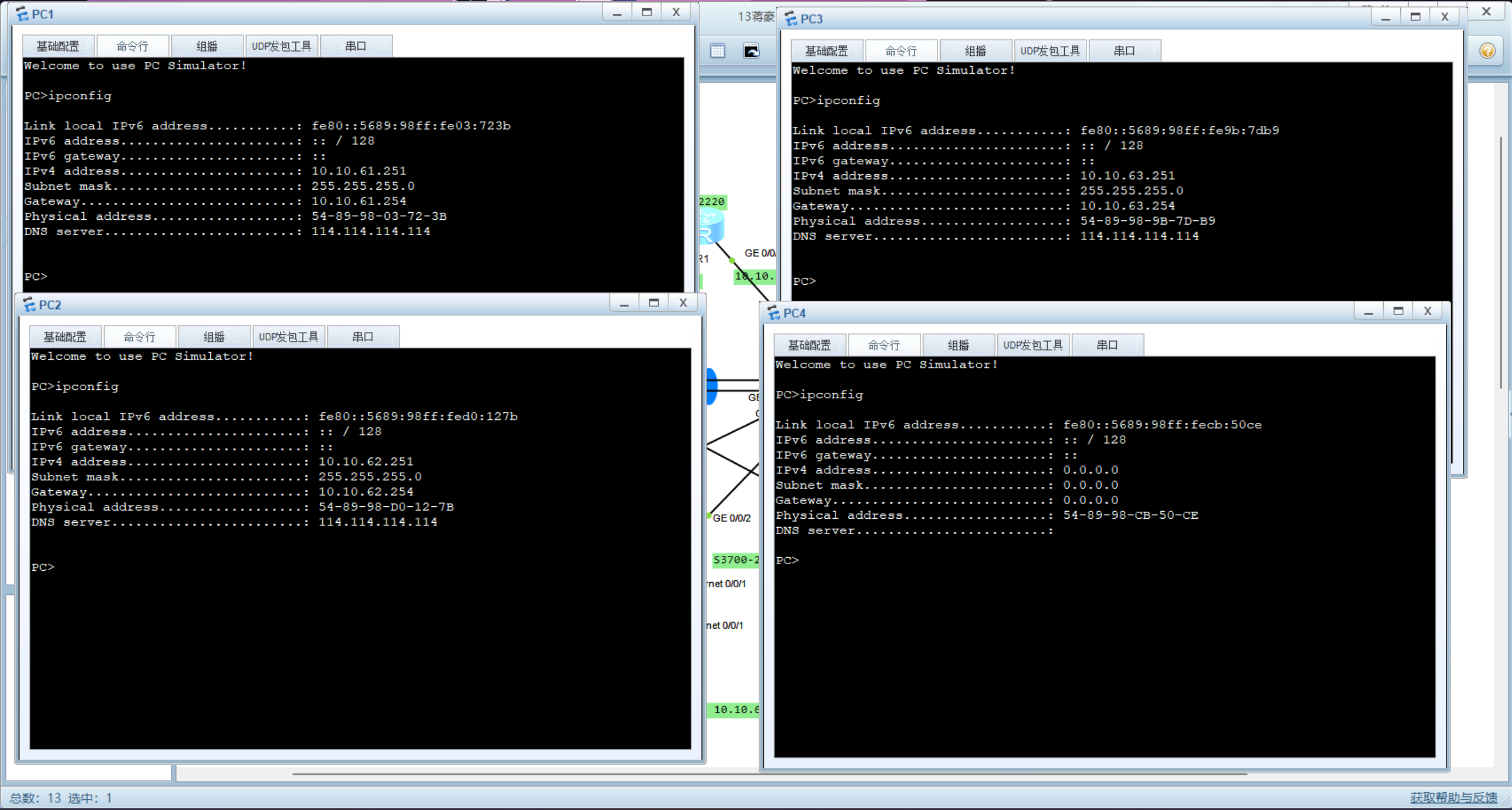
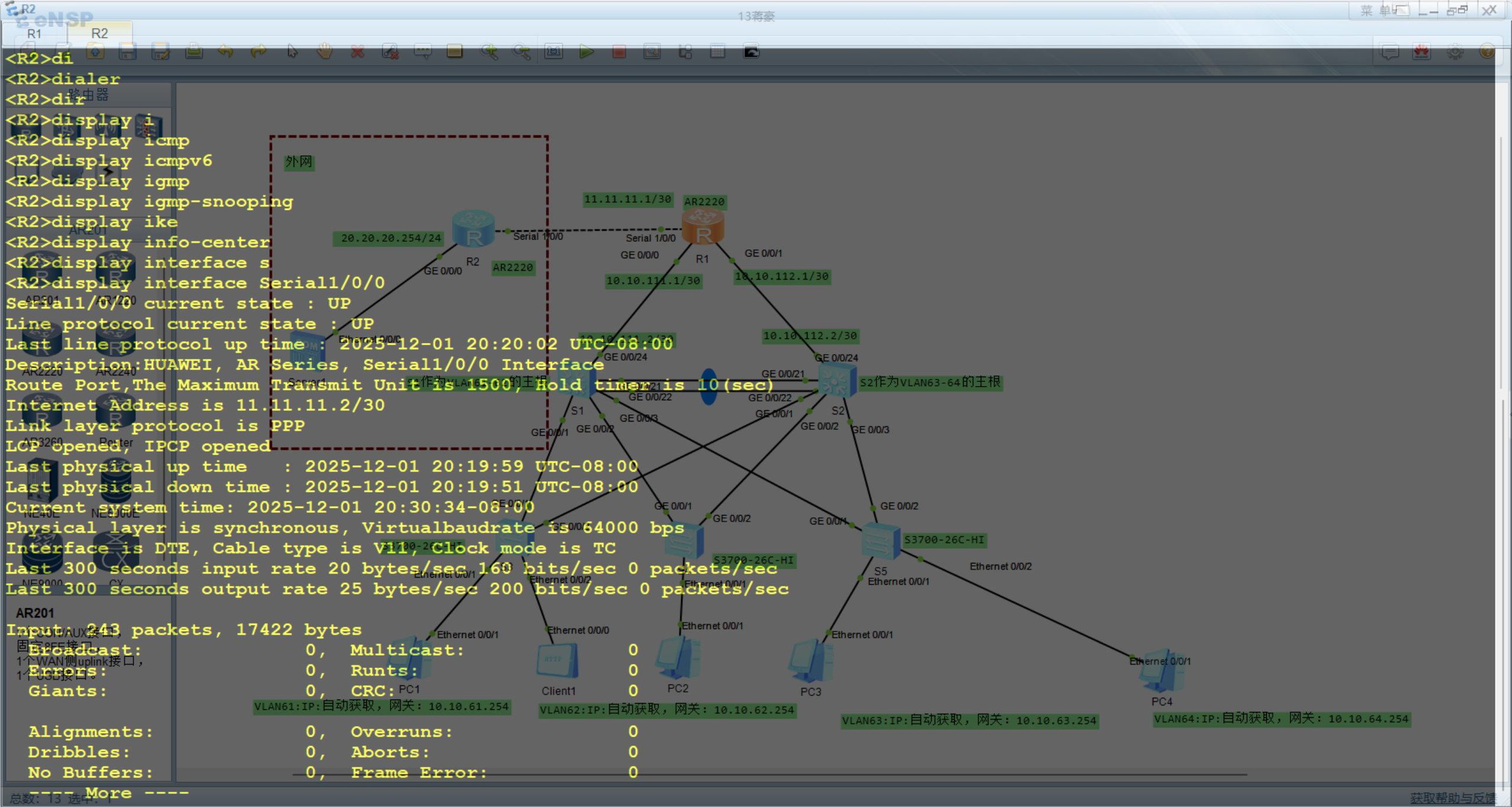
2.检查路由器 R1 和 R2 的 PPP 链路和 CHAP 单向认证情况。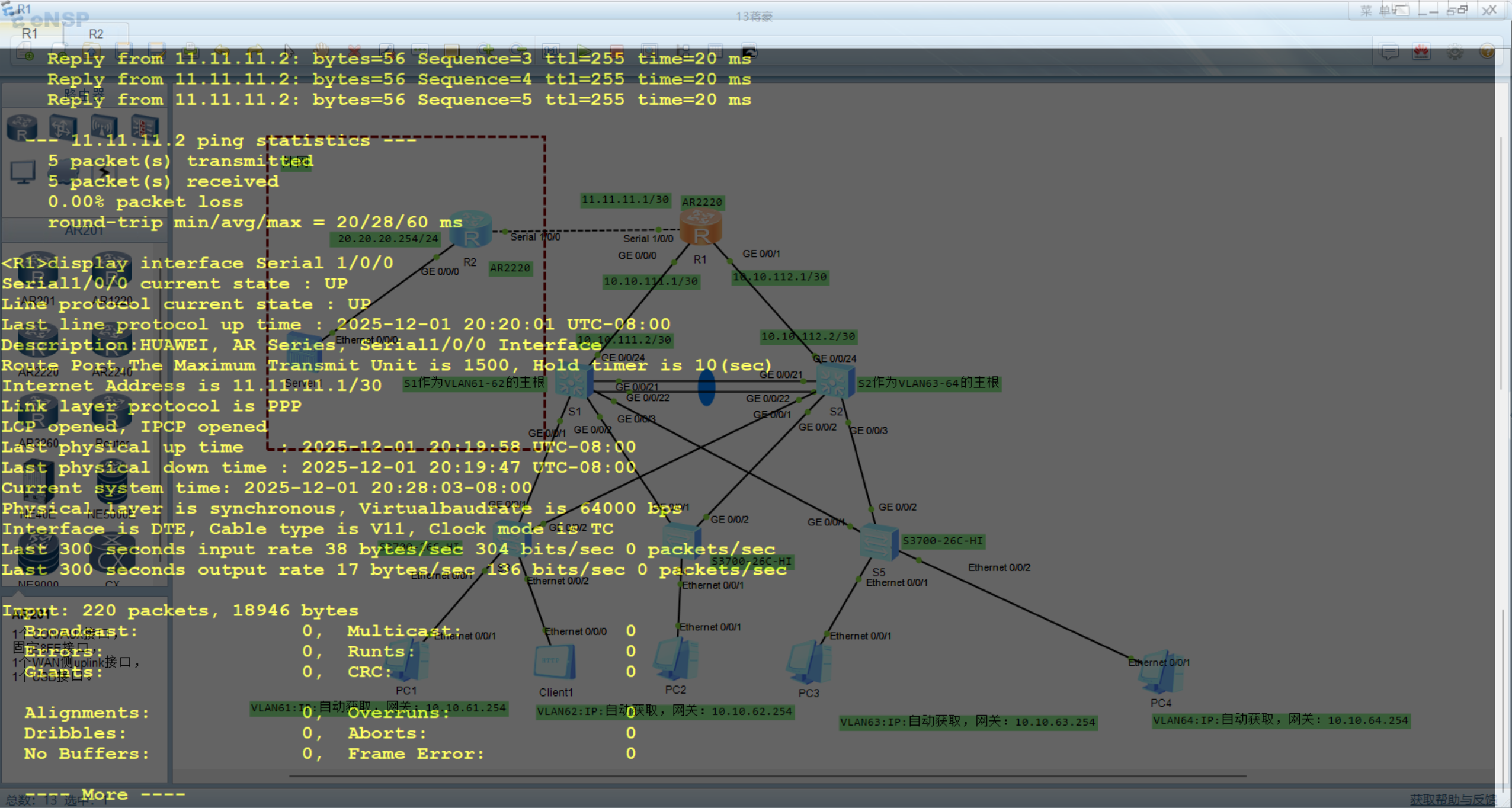
3.使用命令 display nat session all 查看 NAT 的链路情况。
R1上nat映射表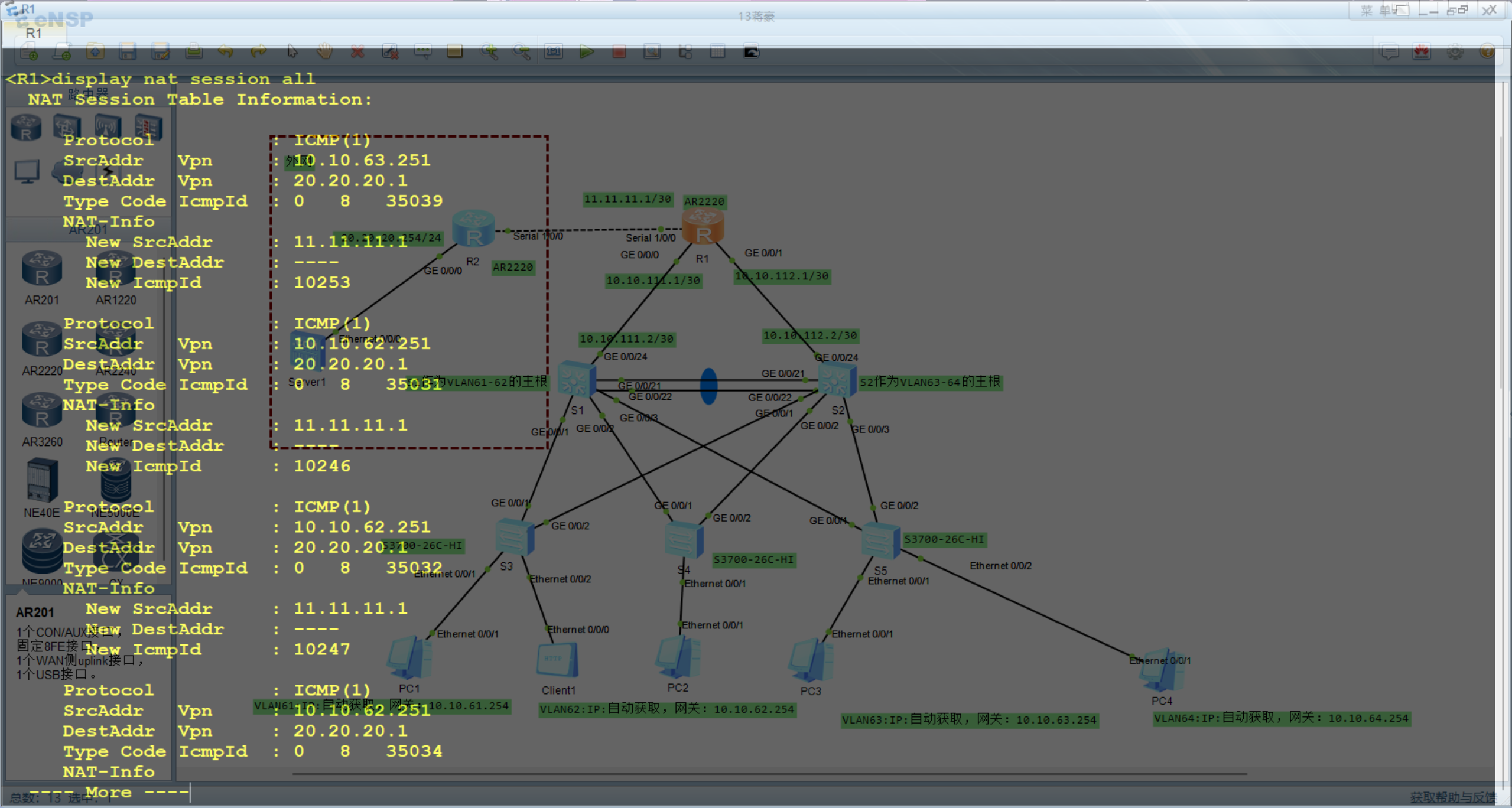
4.PC1、PC2、PC3 都可以与 Server1 正常通信。
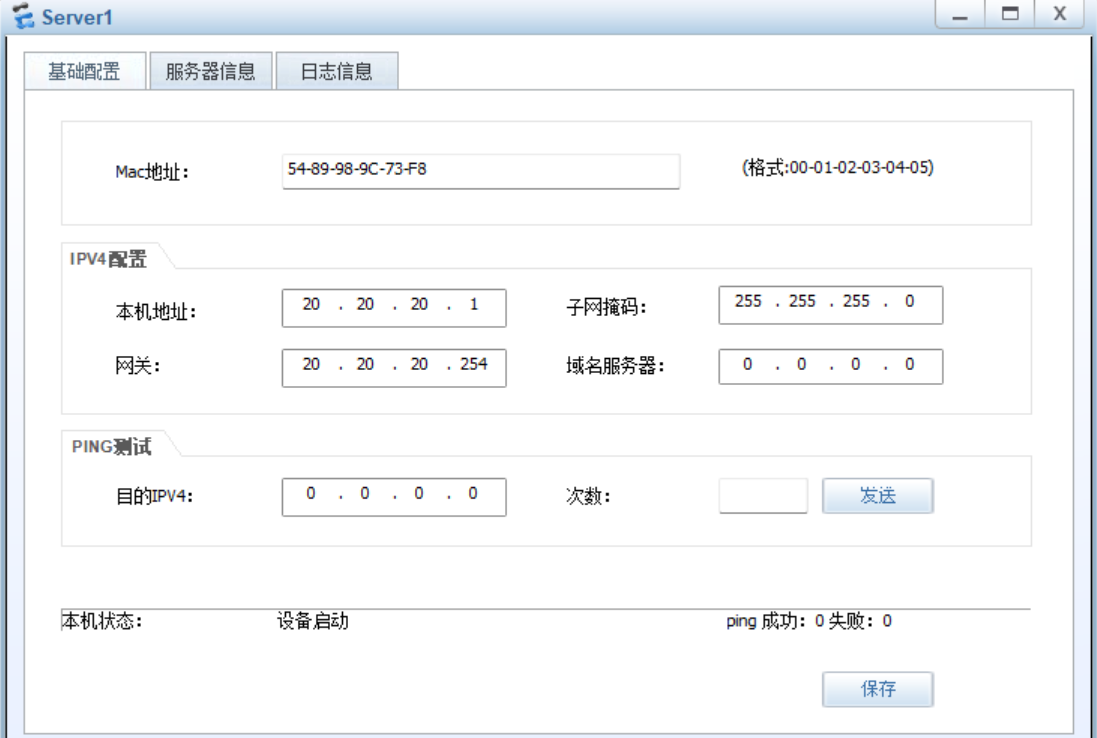
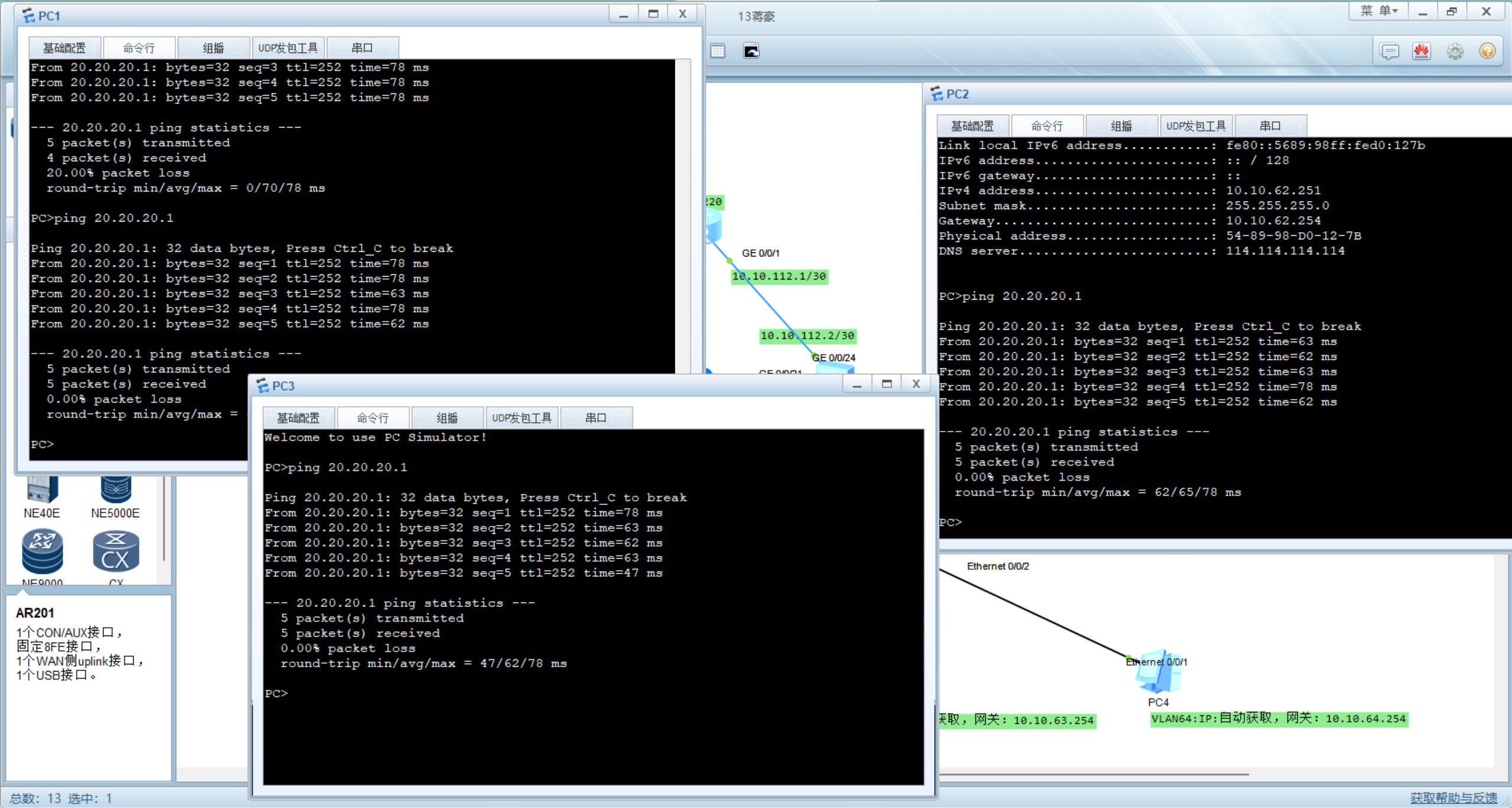
5.客户端能够访问服务器
客户端配置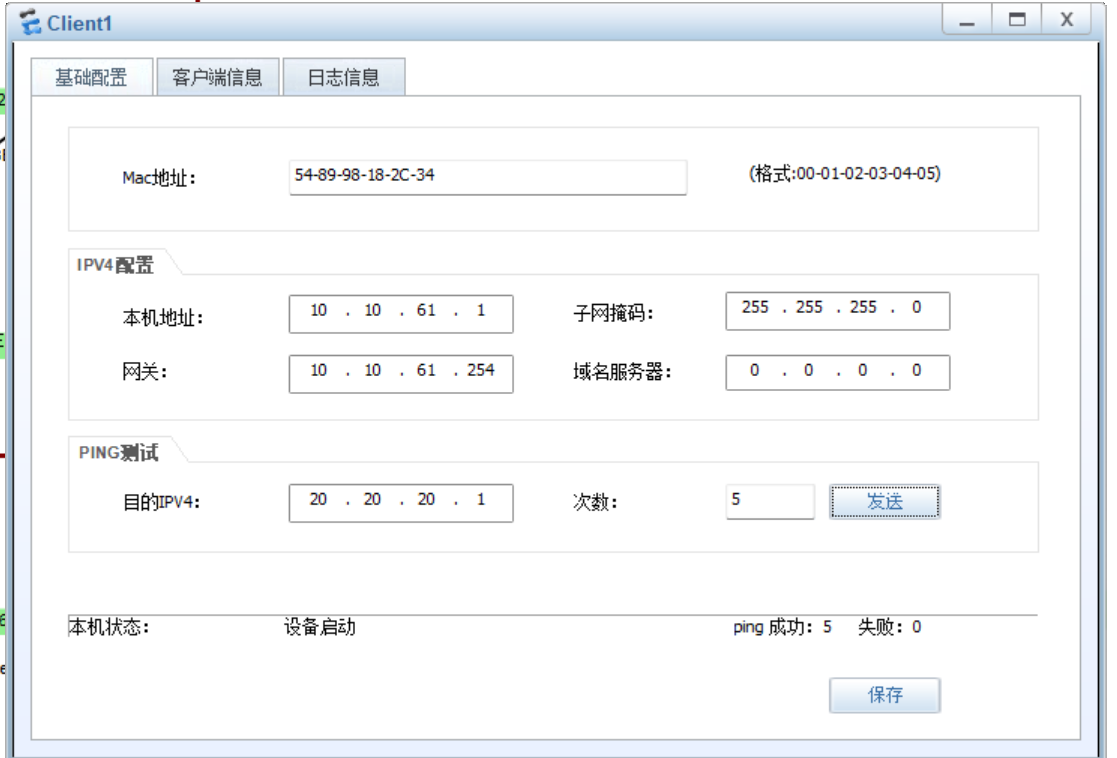
客户端访问HTTP服务器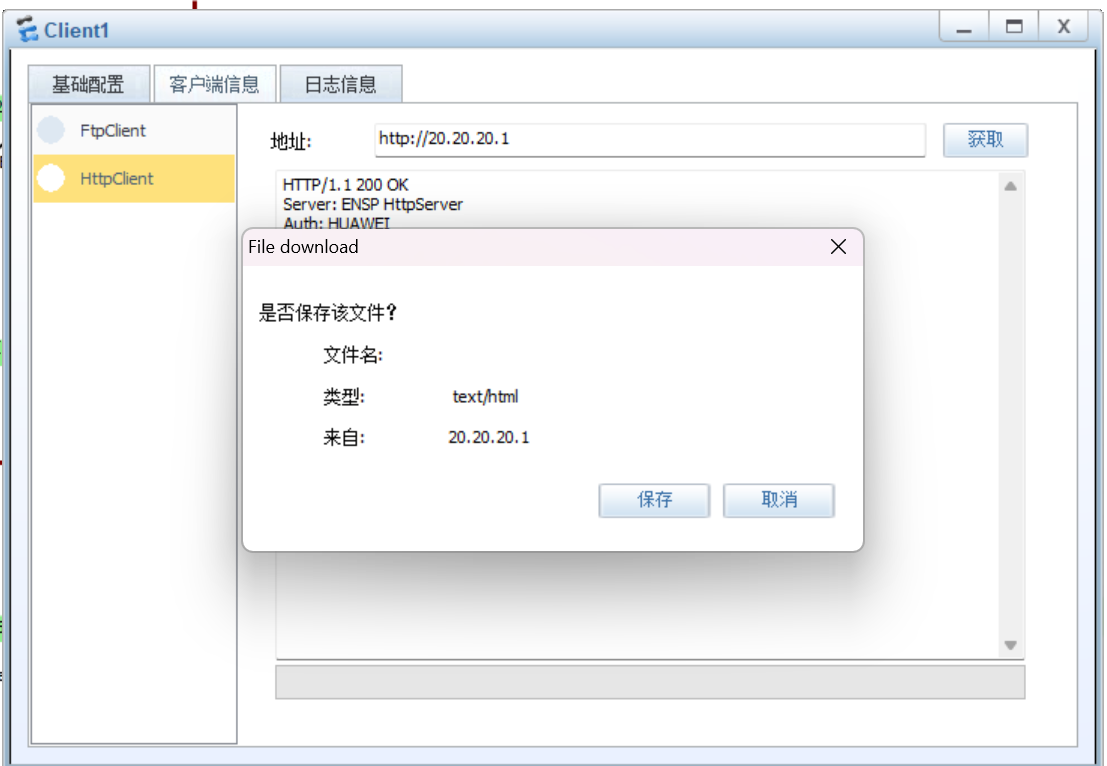

DAMO开发者矩阵,由阿里巴巴达摩院和中国互联网协会联合发起,致力于探讨最前沿的技术趋势与应用成果,搭建高质量的交流与分享平台,推动技术创新与产业应用链接,围绕“人工智能与新型计算”构建开放共享的开发者生态。
更多推荐


 29
29 0
0- 0


 已为社区贡献1条内容

所有评论(0)