WPF连接mysql数据库查询展示数据
·
效果:
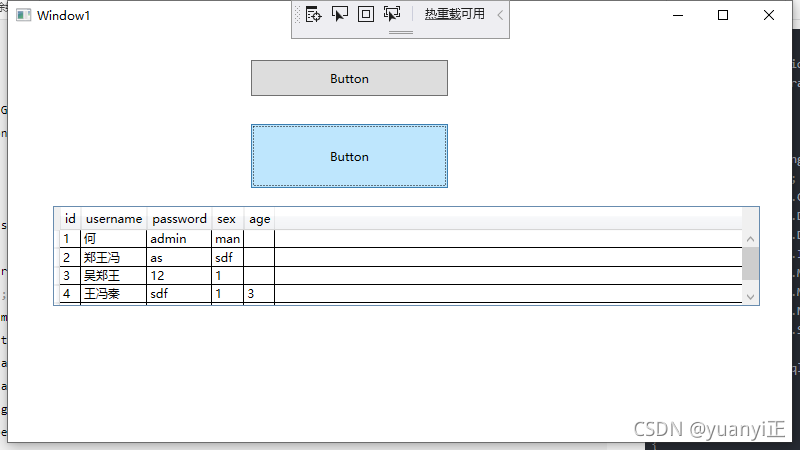
源码
using System;
using System.Collections.Generic;
using System.Configuration;
using System.Data;
using System.Linq;
using System.Text;
using System.Threading.Tasks;
using System.Windows;
using System.Windows.Controls;
using System.Windows.Data;
using System.Windows.Documents;
using System.Windows.Input;
using System.Windows.Media;
using System.Windows.Media.Imaging;
using System.Windows.Navigation;
using System.Windows.Shapes;

using MySql.Data.MySqlClient;


namespace WpfApp2
{
    public partial class Window1 : Window
    {
        public Window1()
        {
            InitializeComponent();
        }

        private void btnConnect_Click(object sender, EventArgs e)
        {
            string MyConStr = "Server=localhost;Database=aaa;uid=root;pwd=123456";

            MySqlConnection conn = new MySqlConnection(MyConStr);

            conn.Open();

            if (conn.State == ConnectionState.Open)
            {
                MessageBox.Show("Connection Opened Successfully");
                conn.Close();
            }
        }

        private void Button_Click(object sender, RoutedEventArgs e)
        {
            DBConnection conn = new DBConnection();
            // DataSet dataset = conn.Select();
            DataTable dataset = conn.Select();
            if (dataset == null)
            {
                MessageBox.Show("没有数据");
            }
            Console.WriteLine("结果:" + dataset);
            DataGrid1.ItemsSource = dataset.DefaultView;
            // 原文链接:https://blog.csdn.net/qq_43026206/article/details/86706431
        }
    }

    class DBConnection
    {
        private MySqlConnection connection;
        private string connectionStr;

        public DBConnection()
        {
            try
            {
                string MyConStr = "Server=localhost;Database=aaa;uid=root;pwd=123456";
                /*connectionStr = ConfigurationManager.ConnectionStrings[MyConStr].ConnectionString;
                connection = new MySqlConnection(connectionStr);*/

                connection = new MySqlConnection(MyConStr);
            }
            catch (Exception exception)
            {
                throw new Exception("DBConnection Constructor:" + exception.Message);
            }
        }

        public DataTable Select()
        {
            try
            {
                connection.Open();
                /*if (connection != null)
                {
                    connection.Open();
                }*/

                Console.WriteLine("---开始查询--");
                string cmdStr = "Select * from students";
                MySqlCommand sqlCmd = new MySqlCommand(cmdStr, connection);
                MySqlDataAdapter sda = new MySqlDataAdapter(sqlCmd);

                DataTable ds = new DataTable();
                sda.Fill(ds);
                return ds;
            }
            catch (Exception exception)
            {
                throw new Exception("SelectMethod:" + exception.Message);
            }
            finally
            {
                connection.Close();
            }
        }
    }
    // 原文链接:https://blog.csdn.net/qq_43026206/article/details/86706431
}
不懂的话,可以加我微信号yizheng369

DAMO开发者矩阵,由阿里巴巴达摩院和中国互联网协会联合发起,致力于探讨最前沿的技术趋势与应用成果,搭建高质量的交流与分享平台,推动技术创新与产业应用链接,围绕“人工智能与新型计算”构建开放共享的开发者生态。
更多推荐


 2
2 0
0- 0


 已为社区贡献1条内容

所有评论(0)