域用户指定计算机,如何通过命令查询域用户所登录的计算机
Hi,也许你可以尝试下这个脚本。脚本中含有三个参数分别是-computer –all –ou。-computer参数中是获取特定电脑的登陆用户,-ou是搜索此OU运行中所有计算机的所有登录用户,最后一个参数-all提供包含前两个所有的信息。function Get-UserLogon {[CmdletBinding()]param([Parameter ()][String]$Computer,[
Hi,
也许你可以尝试下这个脚本。
脚本中含有三个参数分别是-computer –all –ou。
-computer参数中是获取特定电脑的登陆用户,-ou是搜索此OU运行中所有计算机的所有登录用户,最后一个参数-all提供包含前两个所有的信息。

function Get-UserLogon {
[CmdletBinding()]
param
(
[Parameter ()]
[String]$Computer,
[Parameter ()]
[String]$OU,
[Parameter ()]
[Switch]$All
)
$ErrorActionPreference="SilentlyContinue"
$result=@()
If ($Computer) {
Invoke-Command -ComputerName $Computer -ScriptBlock {quser} | Select-Object -Skip 1 | Foreach-Object {
$b=$_.trim() -replace '\s+',' ' -replace '>','' -split '\s'
If ($b[2] -like 'Disc*') {
$array= ([ordered]@{
'User' = $b[0]
'Computer' = $Computer
'Date' = $b[4]
'Time' = $b[5..6] -join ' '
})
$result+=New-Object -TypeName PSCustomObject -Property $array
}
else {
$array= ([ordered]@{
'User' = $b[0]
'Computer' = $Computer
'Date' = $b[5]
'Time' = $b[6..7] -join ' '
})
$result+=New-Object -TypeName PSCustomObject -Property $array
}
}
}
If ($OU) {
$comp=Get-ADComputer -Filter * -SearchBase "$OU" -Properties operatingsystem
$count=$comp.count
If ($count -gt 20) {
Write-Warning "Search $count computers. This may take some time ... About 4 seconds for each computer"
}
foreach ($u in $comp) {
Invoke-Command -ComputerName $u.Name -ScriptBlock {quser} | Select-Object -Skip 1 | ForEach-Object {
$a=$_.trim() -replace '\s+',' ' -replace '>','' -split '\s'
If ($a[2] -like '*Disc*') {
$array= ([ordered]@{
'User' = $a[0]
'Computer' = $u.Name
'Date' = $a[4]
'Time' = $a[5..6] -join ' '
})
$result+=New-Object -TypeName PSCustomObject -Property $array
}
else {
$array= ([ordered]@{
'User' = $a[0]
'Computer' = $u.Name
'Date' = $a[5]
'Time' = $a[6..7] -join ' '
})
$result+=New-Object -TypeName PSCustomObject -Property $array
}
}
}
}
If ($All) {
$comp=Get-ADComputer -Filter * -Properties operatingsystem
$count=$comp.count
If ($count -gt 20) {
Write-Warning "Search $count computers. This may take some time ... About 4 seconds for each computer ..."
}
foreach ($u in $comp) {
Invoke-Command -ComputerName $u.Name -ScriptBlock {quser} | Select-Object -Skip 1 | ForEach-Object {
$a=$_.trim() -replace '\s+',' ' -replace '>','' -split '\s'
If ($a[2] -like '*Disc*') {
$array= ([ordered]@{
'User' = $a[0]
'Computer' = $u.Name
'Date' = $a[4]
'Time' = $a[5..6] -join ' '
})
$result+=New-Object -TypeName PSCustomObject -Property $array
}
else {
$array= ([ordered]@{
'User' = $a[0]
'Computer' = $u.Name
'Date' = $a[5]
'Time' = $a[6..7] -join ' '
})
$result+=New-Object -TypeName PSCustomObject -Property $array
}
}
}
}
Write-Output $result
}
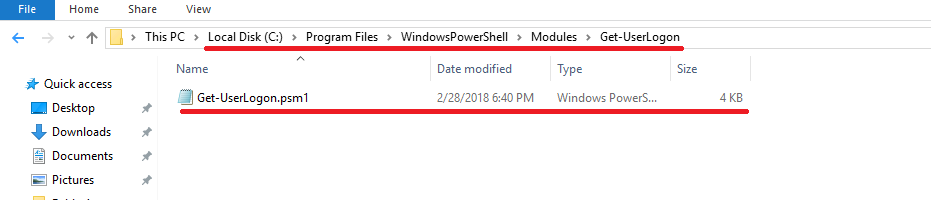
如果您希望能够预加载自定义模块,请打开PowerShell ISE。将功能复制到您的ISE会话中。在C:\ Program Files \ Windows PowerShell \ Modules中创建一个文件夹,并将代码另存为psm1文件。确保您的文件名和文件夹名匹配。
希望能够对您有所帮助。
祝好,
Young Yang

DAMO开发者矩阵,由阿里巴巴达摩院和中国互联网协会联合发起,致力于探讨最前沿的技术趋势与应用成果,搭建高质量的交流与分享平台,推动技术创新与产业应用链接,围绕“人工智能与新型计算”构建开放共享的开发者生态。
更多推荐

 0
0 0
0- 0


 已为社区贡献1条内容

所有评论(0)