258-基于Python的arXiv论文数据分析系统:从爬取到可视化的完整实践
·
基于Python的arXiv论文数据分析系统:从爬取到可视化的完整实践
本文将详细介绍如何用Python打造一个自动化的arXiv论文数据分析系统,实现论文爬取、数据存储、Web可视化和自动更新。
🎬 项目演示视频:B站完整功能演示
1. 项目背景
学术论文的爆炸式增长让研究者很难及时掌握最新进展。arXiv作为全球最大的预印本论文平台,涵盖了AI、CV、NLP等众多领域。手动检索和整理论文效率低下,因此我决定用Python实现一个自动化的arXiv论文数据分析系统。
2. 技术选型
- 后端爬虫与API:Python(arxiv、requests、pyyaml、Flask)
- 数据存储:JSON文件(轻量,便于前后端共享)
- 前端可视化:Vue3 + ECharts(趋势图、统计面板等)
- 自动化:GitHub Actions(定时任务、自动推送)
- 数据分析:scikit-learn、networkx、statsmodels
3. 核心实现
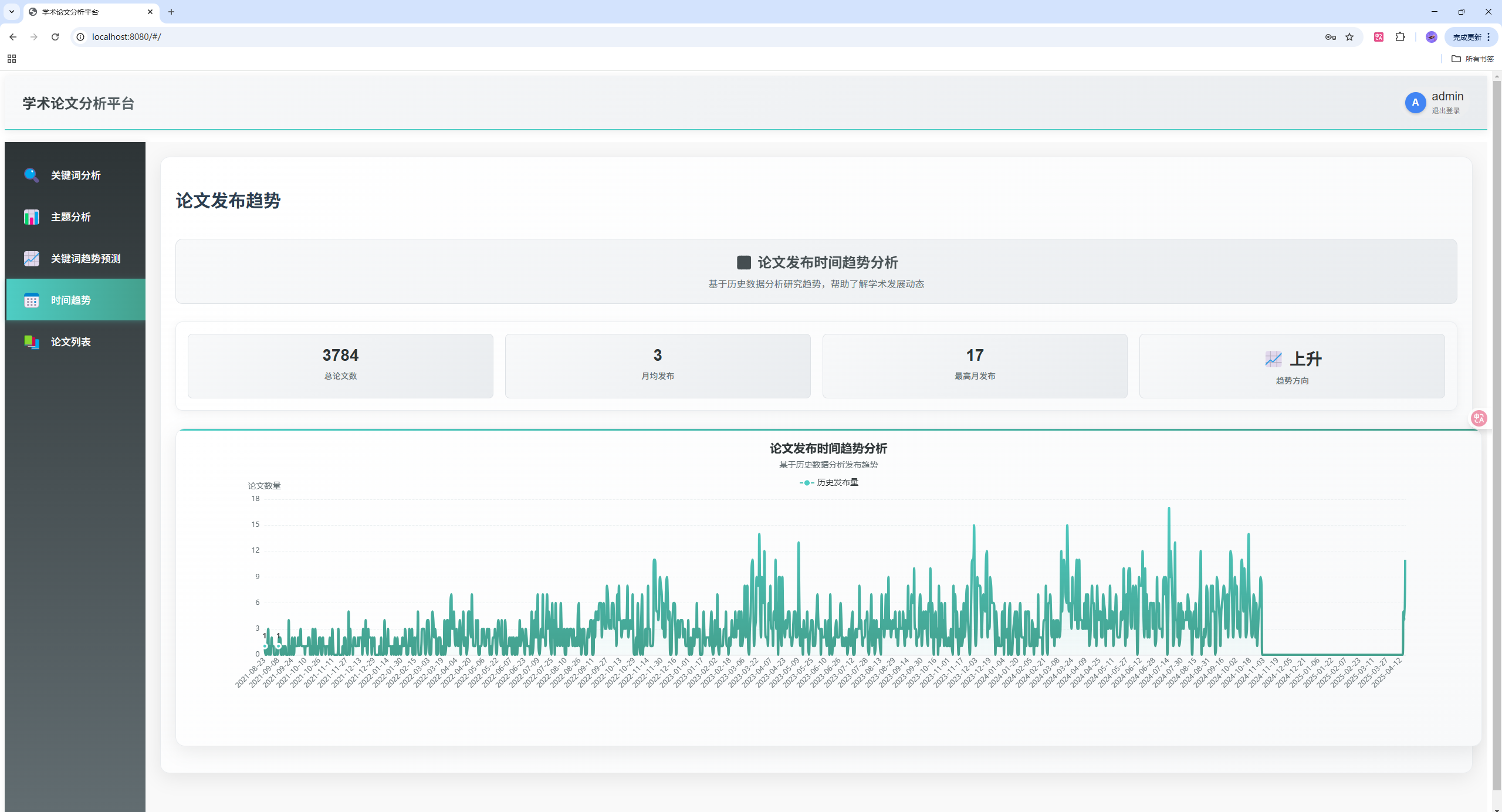
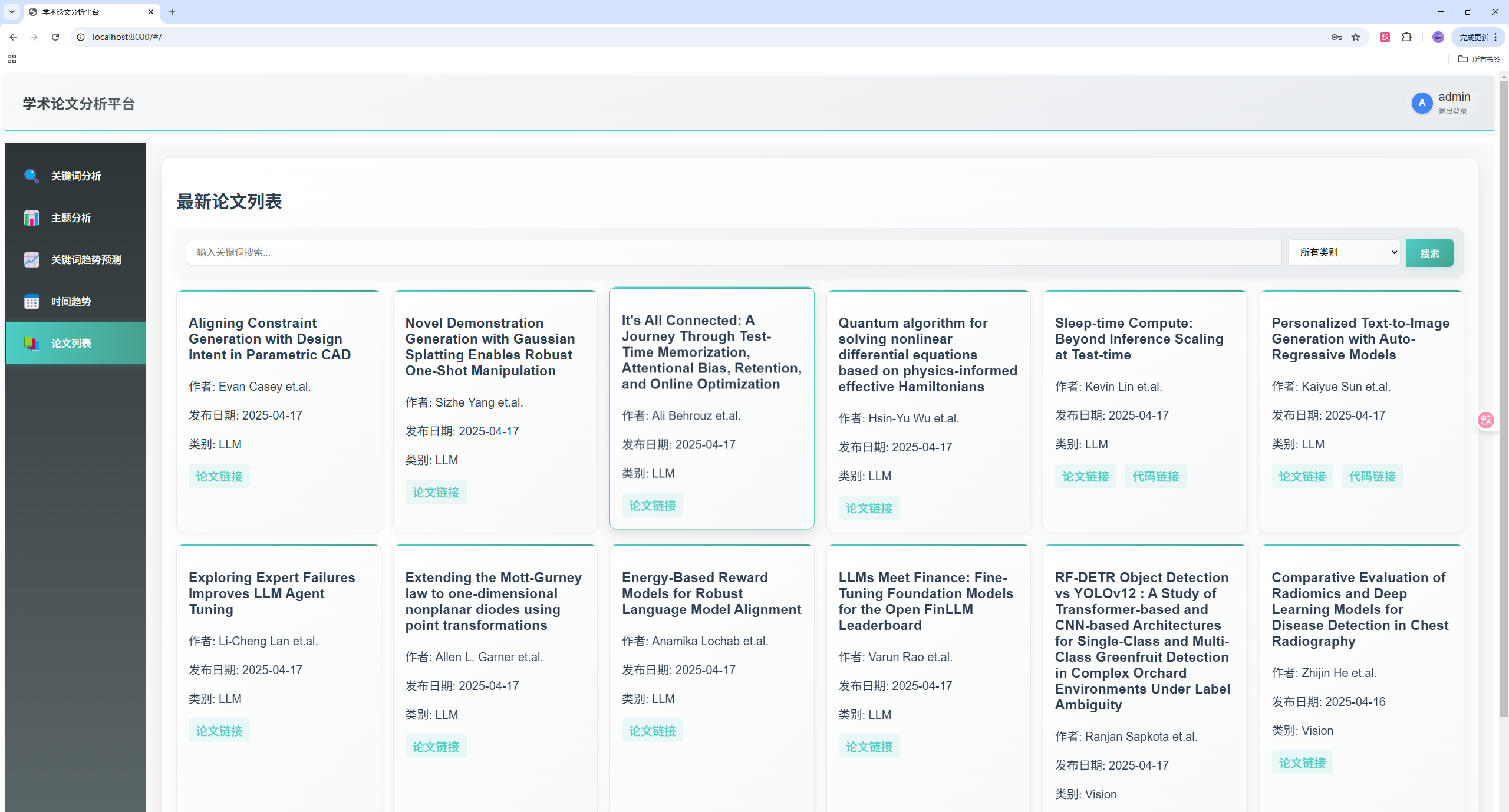
3.1 论文爬虫实现
import arxiv
import requests
import yaml
import json
import logging

def get_daily_papers(topic, query="slam", max_results=2):
    """爬取arXiv论文的核心函数"""
    content = dict()
    content_to_web = dict()

    # 使用arxiv库进行搜索
    search_engine = arxiv.Search(
        query=query,
        max_results=max_results,
        sort_by=arxiv.SortCriterion.SubmittedDate
    )

    for result in search_engine.results():
        paper_id = result.get_short_id()
        paper_title = result.title
        paper_url = result.entry_id
        paper_abstract = result.summary.replace("\n", " ")
        paper_authors = get_authors(result.authors)
        paper_first_author = get_authors(result.authors, first_author=True)
        publish_time = result.published.date()
        update_time = result.updated.date()

        # 处理arXiv ID版本号
        ver_pos = paper_id.find('v')
        if ver_pos == -1:
            paper_key = paper_id
        else:
            paper_key = paper_id[0:ver_pos]
        paper_url = f"http://arxiv.org/abs/{paper_key}"

        try:
            # 获取代码链接
            code_url = f"https://arxiv.paperswithcode.com/api/v0/papers/{paper_key}"
            r = requests.get(code_url).json()
            repo_url = None

            if "official" in r and r["official"]:
                repo_url = r["official"]["url"]

            # 构建数据格式
            if repo_url is not None:
                content[paper_key] = "|**{}**|**{}**|{} et.al.|[{}]({})|**[link]({})**|\n".format(
                    update_time, paper_title, paper_first_author, paper_key, paper_url, repo_url)
            else:
                content[paper_key] = "|**{}**|**{}**|{} et.al.|[{}]({})|null|\n".format(
                    update_time, paper_title, paper_first_author, paper_key, paper_url)

        except Exception as e:
            logging.error(f"exception: {e} with id: {paper_key}")

    data = {topic: content}
    return data

def get_authors(authors, first_author=False):
    """处理作者信息"""
    if first_author:
        return str(authors[0])
    return ", ".join(str(author) for author in authors)
3.2 数据分析模块
from sklearn.feature_extraction.text import TfidfVectorizer
from sklearn.decomposition import LatentDirichletAllocation
import networkx as nx
import pandas as pd
import numpy as np
from statsmodels.tsa.arima.model import ARIMA

def extract_keywords(json_file, top_n=30):
    """从论文数据中提取关键词"""
    with open(json_file, 'r', encoding='utf-8') as f:
        papers_data = json.load(f)

    # 提取论文标题
    texts = []
    for category in papers_data:
        for paper_id, paper_info in papers_data[category].items():
            match = re.search(r'\|\*\*(.*?)\*\*\|\*\*(.*?)\*\*\|', paper_info)
            if match:
                title = match.group(2)
                texts.append(title)

    # 自定义停用词
    custom_stop_words = set(['2020', '2021', '2022', '2023', '2024'])
    for year in range(1990, 2025):
        custom_stop_words.add(str(year))

    # TF-IDF向量化
    vectorizer = TfidfVectorizer(
        max_features=200,
        stop_words=list(custom_stop_words),
        token_pattern=r'(?u)\b[a-zA-Z][a-zA-Z-]+[a-zA-Z]\b',
        ngram_range=(1, 3),
        min_df=2
    )

    tfidf_matrix = vectorizer.fit_transform(texts)
    feature_names = vectorizer.get_feature_names_out()
    keyword_scores = np.sum(tfidf_matrix.toarray(), axis=0)

    # 过滤有效关键词
    valid_indices = []
    for i, word in enumerate(feature_names):
        if (word not in custom_stop_words and
            not word.isdigit() and
            len(word) >= 3):
            valid_indices.append(i)

    valid_scores = [(feature_names[i], float(keyword_scores[i] * 1.5))
                   for i in valid_indices]
    valid_scores.sort(key=lambda x: x[1], reverse=True)
    return valid_scores[:top_n]

def topic_modeling(json_file, num_topics=5, num_words=10):
    """使用LDA进行主题建模"""
    with open(json_file, 'r') as f:
        papers_data = json.load(f)

    # 提取论文标题
    texts = []
    for category in papers_data:
        for paper_id, paper_info in papers_data[category].items():
            match = re.search(r'\|\*\*(.*?)\*\*\|\*\*(.*?)\*\*\|', paper_info)
            if match:
                title = match.group(2)
                texts.append(title)

    # 自定义停用词
    custom_stop_words = set(['2020', '2021', '2022', '2023', '2024'])
    for year in range(1990, 2025):
        custom_stop_words.add(str(year))

    # CountVectorizer准备数据
    vectorizer = CountVectorizer(
        max_features=1000,
        stop_words=list(custom_stop_words),
        token_pattern=r'(?u)\b[a-zA-Z][a-zA-Z-]+[a-zA-Z]\b',
        ngram_range=(1, 3),
        min_df=2
    )
    X = vectorizer.fit_transform(texts)

    # 应用LDA
    lda = LatentDirichletAllocation(
        n_components=num_topics,
        random_state=42,
        learning_method='online'
    )
    lda.fit(X)

    # 提取主题关键词
    feature_names = vectorizer.get_feature_names_out()
    topics = []
    for topic_idx, topic in enumerate(lda.components_):
        top_words_idx = topic.argsort()[:-num_words-1:-1]
        filtered_words = []
        for i in top_words_idx:
            word = feature_names[i]
            if (word not in custom_stop_words and
                not word.isdigit() and
                len(word) >= 3):
                filtered_words.append(word)
        topics.append(filtered_words[:num_words])

    return topics

def time_series_analysis(json_file):
    """分析论文发布的时间趋势"""
    with open(json_file, 'r') as f:
        papers_data = json.load(f)

    # 提取发布日期
    dates = []
    for category in papers_data:
        for paper_id, paper_info in papers_data[category].items():
            match = re.search(r'\|\*\*(.*?)\*\*\|', paper_info)
            if match:
                try:
                    date_str = match.group(1)
                    date = datetime.strptime(date_str, '%Y-%m-%d')
                    dates.append(date)
                except:
                    continue

    # 创建时间序列
    date_counts = pd.Series([1] * len(dates), index=dates)
    date_counts = date_counts.resample('D').sum().fillna(0)

    # ARIMA时间序列预测
    if len(date_counts) > 10:
        model = ARIMA(date_counts, order=(5,1,0))
        model_fit = model.fit()
        forecast = model_fit.forecast(steps=7)
    else:
        forecast = None

    return {
        'time_series': date_counts,
        'forecast': forecast
    }
3.3 Flask后端API实现
from flask import Flask, jsonify, request
from flask_cors import CORS
import json
import os
import re

app = Flask(__name__)
CORS(app)

@app.route('/api/papers', methods=['GET'])
def get_papers():
    try:
        # 获取分页参数
        page = request.args.get('page', 1, type=int)
        per_page = request.args.get('per_page', 12, type=int)
        category = request.args.get('category', '')
        search = request.args.get('search', '')

        # 验证参数
        if page < 1:
            page = 1
        if per_page < 1 or per_page > 100:
            per_page = 12

        # 加载JSON数据
        with open(JSON_FILE, 'r') as f:
            papers = json.load(f)

        # 处理论文数据
        all_papers = []
        for cat, papers_dict in papers.items():
            if category and cat != category:
                continue

            for paper_id, paper_info in papers_dict.items():
                # 解析论文信息
                parts = paper_info.split('|')
                if len(parts) >= 5:
                    date = parts[1].replace('**', '') if len(parts) > 1 else ''
                    title = parts[2].replace('**', '') if len(parts) > 2 else ''
                    authors = parts[3] if len(parts) > 3 else ''

                    # 解析PDF链接
                    pdf_link_raw = parts[4] if len(parts) > 4 else ''
                    pdf_link = ''
                    if pdf_link_raw and pdf_link_raw != 'null':
                        if '](http://arxiv.org/abs/' in pdf_link_raw:
                            pdf_link = pdf_link_raw.split('](http://arxiv.org/abs/')[1].split(')')[0]
                            pdf_link = f'http://arxiv.org/abs/{pdf_link}'
                        elif pdf_link_raw.startswith('http'):
                            pdf_link = pdf_link_raw

                    # 解析代码链接
                    code_link_raw = parts[5] if len(parts) > 5 else ''
                    code_link = ''
                    if code_link_raw and code_link_raw != 'null':
                        if '](https://github.com/' in code_link_raw:
                            code_link = code_link_raw.split('](https://github.com/')[1].split(')')[0]
                            code_link = f'https://github.com/{code_link}'
                        elif code_link_raw.startswith('http'):
                            code_link = code_link_raw

                    # 搜索过滤
                    if search and search.lower() not in title.lower():
                        continue

                    all_papers.append({
                        'id': paper_id,
                        'category': cat,
                        'date': date,
                        'title': title,
                        'authors': authors,
                        'pdf_link': pdf_link,
                        'code_link': code_link
                    })

        # 按日期排序
        all_papers.sort(key=lambda x: x['date'], reverse=True)

        # 计算分页
        total = len(all_papers)
        start_idx = (page - 1) * per_page
        end_idx = start_idx + per_page
        papers_page = all_papers[start_idx:end_idx]
        total_pages = (total + per_page - 1) // per_page

        return jsonify({
            'papers': papers_page,
            'pagination': {
                'page': page,
                'per_page': per_page,
                'total': total,
                'total_pages': total_pages,
                'has_next': page < total_pages,
                'has_prev': page > 1
            },
            'categories': list(papers.keys())
        })
    except Exception as e:
        print(f"获取论文列表时出错: {str(e)}")
        return jsonify({'error': str(e)}), 500

@app.route('/api/keywords', methods=['GET'])
def get_keywords():
    try:
        keywords = extract_keywords(JSON_FILE)
        return jsonify({
            'keywords': [{'word': k, 'weight': float(w)} for k, w in keywords]
        })
    except Exception as e:
        print(f"获取关键词时出错: {str(e)}")
        return jsonify({'error': str(e), 'keywords': []}), 500

@app.route('/api/time-series', methods=['GET'])
def get_time_series():
    try:
        time_data = time_series_analysis(JSON_FILE)
        return jsonify({
            'time_series': {
                'index': [str(d.date()) for d in time_data['time_series'].index],
                'values': time_data['time_series'].tolist()
            },
            'forecast': {
                'index': [str(d.date()) for d in time_data['forecast'].index] if time_data['forecast'] is not None else [],
                'values': time_data['forecast'].tolist() if time_data['forecast'] is not None else []
            }
        })
    except Exception as e:
        print(f"获取时间序列时出错: {str(e)}")
        return jsonify({
            'error': str(e),
            'time_series': {'index': [], 'values': []},
            'forecast': {'index': [], 'values': []}
        }), 500
3.4 Vue3前端组件实现
<!-- App.vue 主组件 -->
<template>
  <div id="app">
    <header>
      <h1>学术论文分析平台</h1>
    </header>

    <div class="main-container">
      <!-- 侧边导航栏 -->
      <div class="sidebar">
        <div
          v-for="(tab, index) in tabs"
          :key="index"
          class="sidebar-tab"
          :class="{ active: activeTab === index }"
          @click="changeTab(index)"
        >
          <span class="tab-icon">{{ tab.icon }}</span>
          <span class="tab-name">{{ tab.name }}</span>
        </div>
      </div>

      <!-- 内容区域 -->
      <main class="content-area">
        <!-- 论文列表页 -->
        <div v-if="activeTab === 4" class="tab-content">
          <h2>最新论文列表</h2>

          <div class="search-bar">
            <input v-model="searchQuery" type="text" placeholder="输入关键词搜索..." @keyup.enter="searchPapers" />
            <select v-model="selectedCategory" @change="searchPapers">
              <option value="">所有类别</option>
              <option v-for="category in categories" :key="category" :value="category">{{ category }}</option>
            </select>
            <button @click="searchPapers">搜索</button>
          </div>

          <div v-if="papersData.length > 0" class="paper-list">
            <div v-for="paper in papersData" :key="paper.id" class="paper-card">
              <h3>{{ paper.title }}</h3>
              <p>作者: {{ paper.authors }}</p>
              <p>发布日期: {{ paper.date }}</p>
              <p>类别: {{ paper.category }}</p>
              <div class="paper-links">
                <a :href="paper.pdf_link" target="_blank">论文链接</a>
                <a v-if="paper.code_link && paper.code_link !== 'null'" :href="paper.code_link" target="_blank">代码链接</a>
              </div>
            </div>
          </div>

          <!-- 分页控件 -->
          <div v-if="pagination.total_pages > 1" class="pagination">
            <button @click="changePage(pagination.page - 1)" :disabled="!pagination.has_prev">上一页</button>
            <span class="page-info">第 {{ pagination.page }} 页,共 {{ pagination.total_pages }} 页</span>
            <button @click="changePage(pagination.page + 1)" :disabled="!pagination.has_next">下一页</button>
          </div>
        </div>
      </main>
    </div>
  </div>
</template>

<script>
import axios from 'axios';

export default {
  name: 'App',
  data() {
    return {
      tabs: [
        { name: '关键词分析', icon: '🔍' },
        { name: '主题分析', icon: '📊' },
        { name: '关键词趋势预测', icon: '📈' },
        { name: '时间趋势', icon: '📅' },
        { name: '论文列表', icon: '📚' }
      ],
      activeTab: 4,
      papersData: [],
      pagination: {
        page: 1,
        per_page: 12,
        total: 0,
        total_pages: 0,
        has_next: false,
        has_prev: false
      },
      searchQuery: '',
      selectedCategory: '',
      categories: []
    }
  },
  mounted() {
    this.fetchData();
  },
  methods: {
    async fetchData() {
      try {
        const response = await axios.get('/api/papers', {
          params: {
            page: this.pagination.page,
            per_page: this.pagination.per_page,
            category: this.selectedCategory,
            search: this.searchQuery
          }
        });

        this.papersData = response.data.papers;
        this.pagination = response.data.pagination;
        this.categories = response.data.categories;
      } catch (error) {
        console.error('获取数据失败:', error);
      }
    },

    async changePage(newPage) {
      this.pagination.page = newPage;
      await this.fetchData();
    },

    async searchPapers() {
      this.pagination.page = 1;
      await this.fetchData();
    },

    changeTab(index) {
      this.activeTab = index;
    }
  }
}
</script>
<!-- TimeSeriesAnalysis.vue 时间序列分析组件 -->
<template>
  <div class="time-series">
    <div class="chart-header">
      <h2>📈 论文发布时间趋势分析</h2>
      <p class="chart-description">基于历史数据分析研究趋势,帮助了解学术发展动态</p>
    </div>

    <div class="stats-panel" v-if="timeData">
      <div class="stat-item">
        <div class="stat-value">{{ getTotalPapers() }}</div>
        <div class="stat-label">总论文数</div>
      </div>
      <div class="stat-item">
        <div class="stat-value">{{ getAveragePapers() }}</div>
        <div class="stat-label">月均发布</div>
      </div>
      <div class="stat-item">
        <div class="stat-value">{{ getMaxPapers() }}</div>
        <div class="stat-label">最高月发布</div>
      </div>
      <div class="stat-item">
        <div class="stat-value">{{ getTrendDirection() }}</div>
        <div class="stat-label">趋势方向</div>
      </div>
    </div>

    <div ref="timeChart" class="time-chart"></div>
  </div>
</template>

<script>
import * as echarts from 'echarts';

export default {
  name: 'TimeSeriesAnalysis',
  props: {
    timeData: Object
  },
  data() {
    return {
      chart: null
    }
  },
  mounted() {
    this.initChart();
  },
  methods: {
    getTotalPapers() {
      if (!this.timeData || !this.timeData.time_series || !this.timeData.time_series.values) return 0;
      return this.timeData.time_series.values.reduce((sum, val) => sum + val, 0);
    },
    getAveragePapers() {
      if (!this.timeData || !this.timeData.time_series || !this.timeData.time_series.values) return 0;
      const values = this.timeData.time_series.values;
      const sum = values.reduce((sum, val) => sum + val, 0);
      return Math.round(sum / values.length);
    },
    getMaxPapers() {
      if (!this.timeData || !this.timeData.time_series || !this.timeData.time_series.values) return 0;
      return Math.max(...this.timeData.time_series.values);
    },
    getTrendDirection() {
      if (!this.timeData || !this.timeData.time_series || !this.timeData.time_series.values) return '未知';
      const values = this.timeData.time_series.values;
      if (values.length < 2) return '数据不足';

      const recent = values.slice(-3);
      const earlier = values.slice(-6, -3);

      const recentAvg = recent.reduce((sum, val) => sum + val, 0) / recent.length;
      const earlierAvg = earlier.reduce((sum, val) => sum + val, 0) / earlier.length;

      if (recentAvg > earlierAvg * 1.1) return '📈 上升';
      if (recentAvg < earlierAvg * 0.9) return '📉 下降';
      return '➡️ 稳定';
    },
    initChart() {
      if (!this.timeData) return;

      this.chart = echarts.init(this.$refs.timeChart);

      const dates = this.timeData.time_series.index;
      const counts = this.timeData.time_series.values;

      const option = {
        animation: true,
        animationDuration: 2000,
        animationEasing: 'cubicOut',
        title: {
          text: '论文发布时间趋势分析',
          left: 'center',
          textStyle: {
            fontSize: 20,
            fontWeight: 'bold',
            color: '#2d3436'
          }
        },
        tooltip: {
          trigger: 'axis',
          backgroundColor: 'rgba(255, 255, 255, 0.95)',
          borderColor: '#4ecdc4',
          borderWidth: 2,
          formatter: function(params) {
            let result = `<div style="font-weight: bold; margin-bottom: 8px;">${params[0].axisValue}</div>`;
            params.forEach(param => {
              result += `<div style="display: flex; align-items: center; margin: 4px 0;">
                <span style="display: inline-block; width: 12px; height: 12px; background: ${param.color}; border-radius: 50%; margin-right: 8px;"></span>
                <span style="font-weight: 500;">${param.seriesName}:</span>
                <span style="margin-left: 8px; font-weight: bold;">${param.value}</span>
              </div>`;
            });
            return result;
          }
        },
        xAxis: {
          type: 'category',
          data: dates,
          axisLine: { lineStyle: { color: '#bdc3c7' } },
          axisLabel: { color: '#636e72', fontSize: 12, rotate: 45 }
        },
        yAxis: {
          type: 'value',
          name: '论文数量',
          axisLine: { lineStyle: { color: '#bdc3c7' } },
          splitLine: { lineStyle: { color: '#ecf0f1', type: 'dashed' } }
        },
        series: [{
          name: '历史发布量',
          type: 'line',
          data: counts.map((value, index) => ({ value, xAxis: index })),
          smooth: true,
          lineStyle: {
            width: 4,
            color: {
              type: 'linear',
              x: 0, y: 0, x2: 0, y2: 1,
              colorStops: [
                { offset: 0, color: '#4ecdc4' },
                { offset: 1, color: '#44a08d' }
              ]
            }
          },
          areaStyle: {
            color: {
              type: 'linear',
              x: 0, y: 0, x2: 0, y2: 1,
              colorStops: [
                { offset: 0, color: 'rgba(78, 205, 196, 0.3)' },
                { offset: 1, color: 'rgba(78, 205, 196, 0.05)' }
              ]
            }
          },
          symbol: 'circle',
          symbolSize: 8,
          label: {
            show: true,
            position: 'top',
            formatter: '{c}',
            fontSize: 12,
            color: '#2d3436',
            fontWeight: 'bold'
          }
        }]
      };

      this.chart.setOption(option);
    }
  }
}
</script>
3.5 GitHub Actions自动化
# .github/workflows/cv-arxiv-daily.yml
name: Run Arxiv Papers Daily

on:
  workflow_dispatch:
  schedule:
    - cron: "0 0/12 * * *"  # 每12小时执行一次

env:
  GITHUB_USER_NAME: Vincentqyw
  GITHUB_USER_EMAIL: realcat@126.com

jobs:
  build:
    name: update
    runs-on: ubuntu-latest

    steps:
      - name: Checkout
        uses: actions/checkout@v3

      - name: Set up Python Env
        uses: actions/setup-python@v4
        with:
          python-version: '3.10'

      - name: Install dependencies
        run: |
          python -m pip install --upgrade pip
          pip install arxiv requests pyyaml

      - name: Run daily arxiv
        run: |
          python daily_arxiv.py

      - name: Push new papers
        uses: github-actions-x/commit@v2.9
        with:
          github-token: ${{ secrets.GITHUB_TOKEN }}
          commit-message: "Github Action Automatic Update CV Arxiv Papers"
          files: README.md docs/cv-arxiv-daily.json docs/cv-arxiv-daily-web.json docs/index.md
          rebase: 'true'
          name: ${{ env.GITHUB_USER_NAME }}
          email: ${{ env.GITHUB_USER_EMAIL }}
4. 部署与使用
4.1 本地开发环境
# 1. 克隆项目
git clone https://github.com/your-username/cv-arxiv-daily.git
cd cv-arxiv-daily

# 2. 安装Python依赖
pip install arxiv requests pyyaml flask flask-cors scikit-learn networkx statsmodels

# 3. 安装前端依赖
cd analysis/frontend
npm install

# 4. 启动后端
cd ../backend
python app.py

# 5. 启动前端
cd ../frontend
npm run serve
4.2 生产环境部署
# 使用Gunicorn部署Flask后端
pip install gunicorn
gunicorn -w 4 -b 0.0.0.0:5000 app:app

# 构建前端
cd analysis/frontend
npm run build
5. 技术亮点
- 模块化设计:爬虫、API、前端完全解耦
- 数据分析:TF-IDF关键词提取、LDA主题建模、ARIMA时间序列预测
- 自动化部署:GitHub Actions实现无人值守运行
- 响应式UI:Vue3 + ECharts提供现代化用户体验
- 性能优化:分页加载、缓存策略、错误处理
6. 项目总结
6.1 核心功能模块
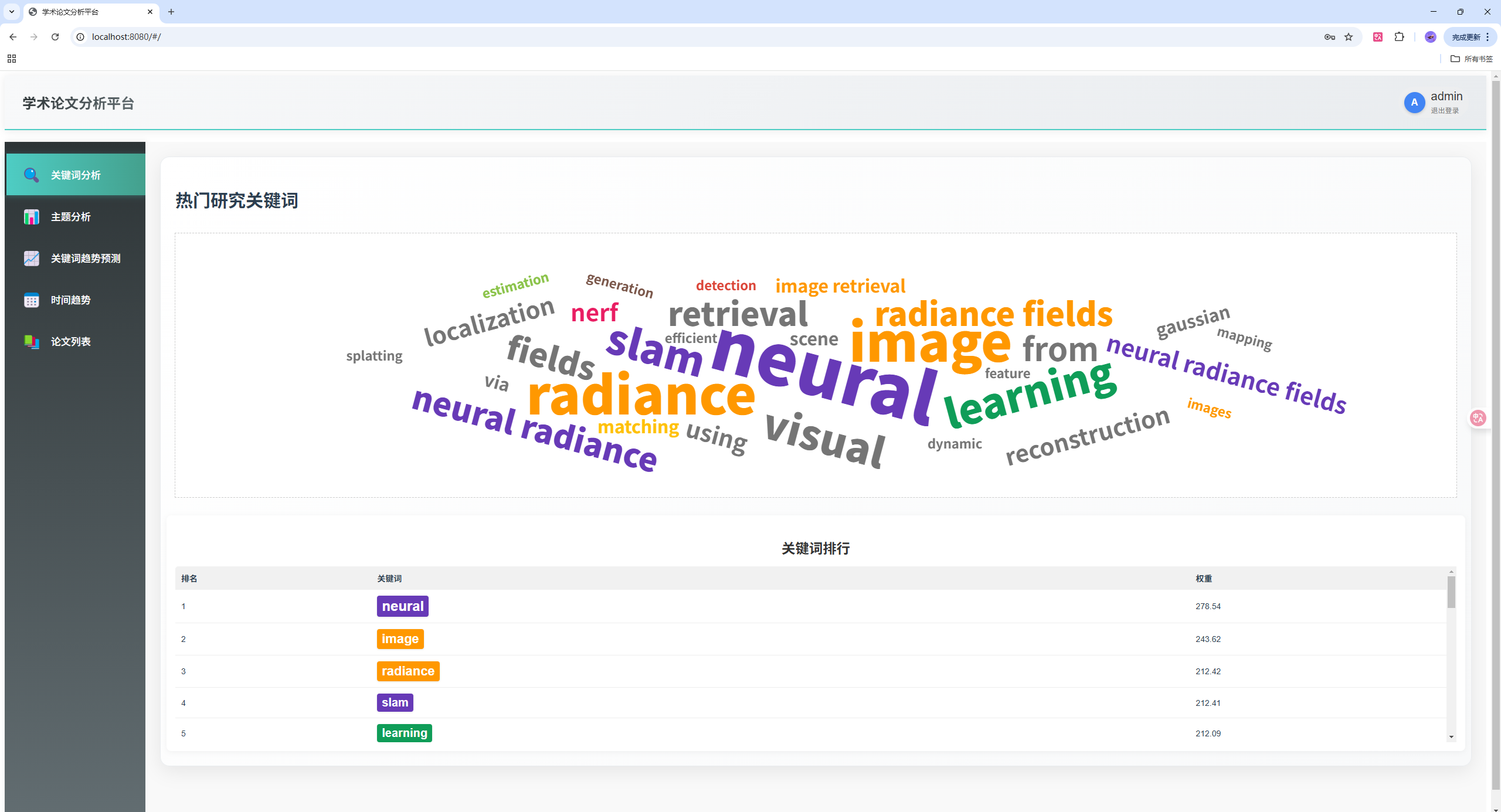
6.1.1 关键词分析系统
系统使用TF-IDF算法从论文标题中提取关键词,并通过词云和排行榜形式展示:
def extract_keywords(json_file, top_n=30):
    """从论文数据中提取关键词"""
    with open(json_file, 'r', encoding='utf-8') as f:
        papers_data = json.load(f)

    # 提取论文标题
    texts = []
    for category in papers_data:
        for paper_id, paper_info in papers_data[category].items():
            match = re.search(r'\|\*\*(.*?)\*\*\|\*\*(.*?)\*\*\|', paper_info)
            if match:
                title = match.group(2)
                texts.append(title)

    # 自定义停用词,保留计算机专业术语
    custom_stop_words = set(['2020', '2021', '2022', '2023', '2024'])
    for year in range(1990, 2025):
        custom_stop_words.add(str(year))

    # TF-IDF向量化,支持词组提取
    vectorizer = TfidfVectorizer(
        max_features=200,
        stop_words=list(custom_stop_words),
        token_pattern=r'(?u)\b[a-zA-Z][a-zA-Z-]+[a-zA-Z]\b',
        ngram_range=(1, 3),  # 提取1-3个词的词组
        min_df=2
    )

    tfidf_matrix = vectorizer.fit_transform(texts)
    feature_names = vectorizer.get_feature_names_out()
    keyword_scores = np.sum(tfidf_matrix.toarray(), axis=0)

    # 过滤有效关键词
    valid_indices = []
    for i, word in enumerate(feature_names):
        if (word not in custom_stop_words and
            not word.isdigit() and
            len(word) >= 3):
            valid_indices.append(i)

    valid_scores = [(feature_names[i], float(keyword_scores[i] * 1.5))
                   for i in valid_indices]
    valid_scores.sort(key=lambda x: x[1], reverse=True)
    return valid_scores[:top_n]
前端关键词可视化组件:
<!-- KeywordAnalysis.vue -->
<template>
  <div class="keyword-analysis">
    <div ref="keywordCloud" class="keyword-cloud"></div>

    <!-- 关键词排行表 -->
    <div class="keyword-ranking">
      <h3>关键词排行</h3>
      <div class="ranking-table-container">
        <table class="ranking-table">
          <thead>
            <tr>
              <th>排名</th>
              <th>关键词</th>
              <th>权重</th>
            </tr>
          </thead>
          <tbody>
            <tr v-for="(keyword, index) in keywords" :key="index">
              <td>{{ index + 1 }}</td>
              <td>
                <span
                  class="keyword-tag"
                  :style="{
                    backgroundColor: getCategoryColor(keyword.word),
                    fontSize: getTagSize(keyword.weight, index)
                  }"
                >
                  {{ keyword.word }}
                </span>
              </td>
              <td>{{ (keyword.weight).toFixed(2) }}</td>
            </tr>
          </tbody>
        </table>
      </div>
    </div>
  </div>
</template>

<script>
export default {
  methods: {
    getCategoryColor(word) {
      // 根据关键词确定类别颜色
      const lowerWord = word.toLowerCase();
      const categoryColors = {
        'vision': '#4285F4', 'learning': '#0F9D58', 'detection': '#DB4437',
        'neural': '#673AB7', 'image': '#FF9800', 'segmentation': '#00BCD4',
        'recognition': '#E91E63', 'network': '#607D8B', 'deep': '#9C27B0',
        'transformer': '#3F51B5', 'tracking': '#F44336', 'attention': '#009688'
      };

      for (const category in categoryColors) {
        if (lowerWord.includes(category)) {
          return categoryColors[category];
        }
      }
      return '#757575';
    },

    getTagSize(weight, index) {
      // 根据排名设置字体大小
      if (index === 0) return '24px';
      else if (index <= 2) return '22px';
      else if (index <= 5) return '20px';
      else if (index <= 10) return '18px';
      else if (index <= 15) return '16px';
      else return '14px';
    }
  }
}
</script>
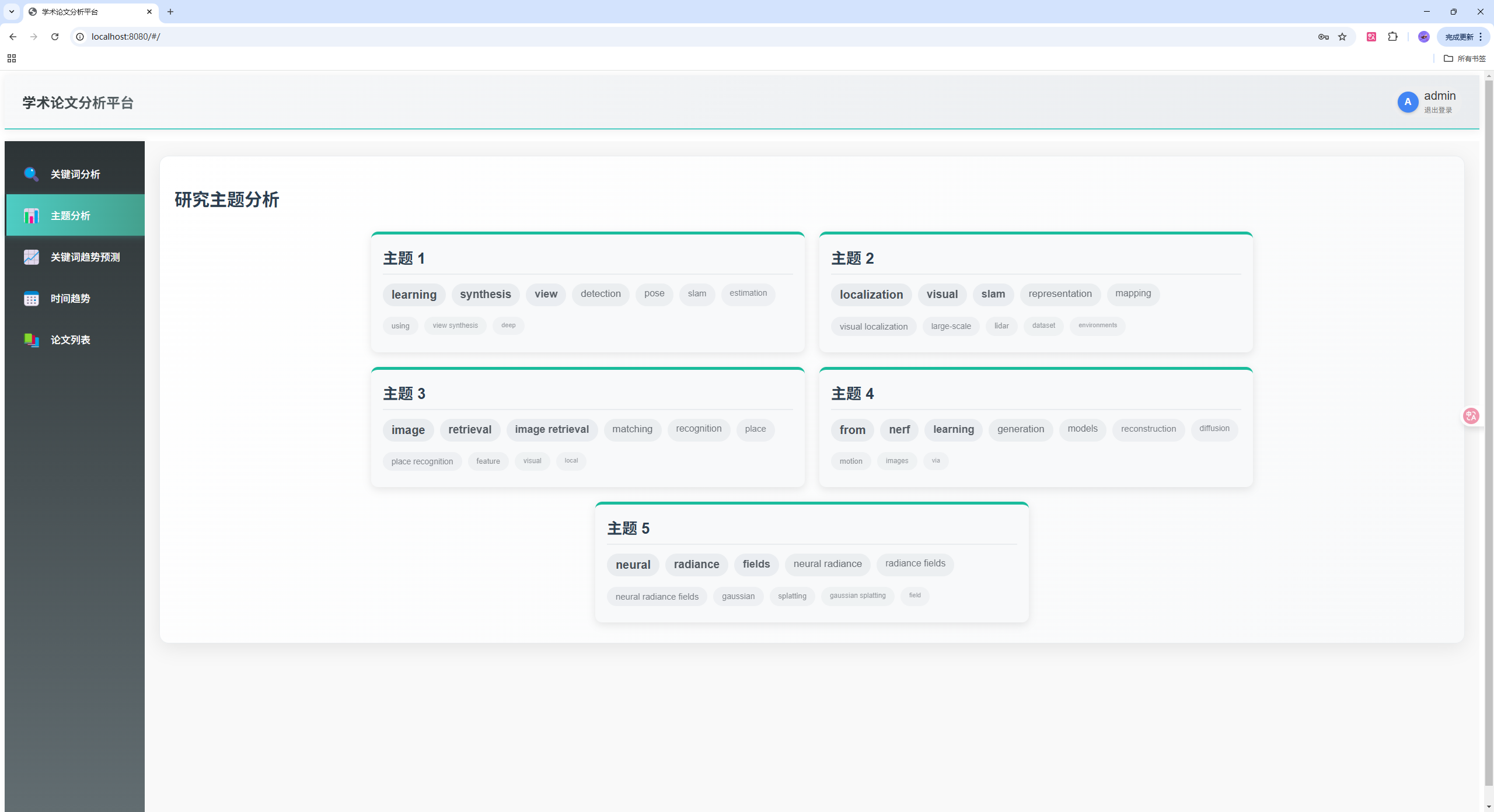
6.1.2 主题建模分析
使用LDA(Latent Dirichlet Allocation)算法进行主题建模,自动发现研究主题:
def topic_modeling(json_file, num_topics=5, num_words=10):
    """使用LDA进行主题建模"""
    with open(json_file, 'r') as f:
        papers_data = json.load(f)

    # 提取论文标题
    texts = []
    for category in papers_data:
        for paper_id, paper_info in papers_data[category].items():
            match = re.search(r'\|\*\*(.*?)\*\*\|\*\*(.*?)\*\*\|', paper_info)
            if match:
                title = match.group(2)
                texts.append(title)

    # 自定义停用词
    custom_stop_words = set(['2020', '2021', '2022', '2023', '2024'])
    for year in range(1990, 2025):
        custom_stop_words.add(str(year))

    # CountVectorizer准备数据,支持词组提取
    vectorizer = CountVectorizer(
        max_features=1000,
        stop_words=list(custom_stop_words),
        token_pattern=r'(?u)\b[a-zA-Z][a-zA-Z-]+[a-zA-Z]\b',
        ngram_range=(1, 3),  # 提取1-3个词的词组
        min_df=2
    )
    X = vectorizer.fit_transform(texts)

    # 应用LDA
    lda = LatentDirichletAllocation(
        n_components=num_topics,
        random_state=42,
        learning_method='online'
    )
    lda.fit(X)

    # 提取主题关键词
    feature_names = vectorizer.get_feature_names_out()
    topics = []
    for topic_idx, topic in enumerate(lda.components_):
        top_words_idx = topic.argsort()[:-num_words-1:-1]
        filtered_words = []
        for i in top_words_idx:
            word = feature_names[i]
            if (word not in custom_stop_words and
                not word.isdigit() and
                len(word) >= 3):
                filtered_words.append(word)
        topics.append(filtered_words[:num_words])

    return topics
前端主题可视化组件:
<!-- TopicVisualization.vue -->
<template>
  <div class="topic-visualization">
    <div class="topics-container">
      <div v-for="(topic, index) in topics" :key="index" class="topic-card">
        <div class="topic-header">
          <h3>主题 {{ index + 1 }}</h3>
        </div>
        <div class="topic-words">
          <span
            v-for="(word, wordIndex) in topic"
            :key="wordIndex"
            class="topic-word"
            :style="{
              fontSize: `${20 - wordIndex}px`,
              opacity: (1 - wordIndex * 0.05),
              fontWeight: wordIndex < 3 ? 'bold' : 'normal'
            }"
          >
            {{ word }}
          </span>
        </div>
      </div>
    </div>
  </div>
</template>

<style scoped>
.topic-card {
  background-color: #f8f9fa;
  border-radius: 12px;
  padding: 20px;
  width: calc(33.33% - 25px);
  box-shadow: 0 4px 15px rgba(0, 0, 0, 0.1);
  transition: transform 0.3s ease, box-shadow 0.3s ease;
  border-top: 5px solid #1abc9c;
}

.topic-card:hover {
  transform: translateY(-5px);
  box-shadow: 0 8px 25px rgba(0, 0, 0, 0.15);
}

.topic-word {
  display: inline-block;
  background-color: #e9ecef;
  color: #495057;
  padding: 8px 15px;
  border-radius: 30px;
  margin-bottom: 8px;
  transition: all 0.2s ease;
}

.topic-word:hover {
  background-color: #1abc9c;
  color: white;
  transform: scale(1.05);
}
</style>
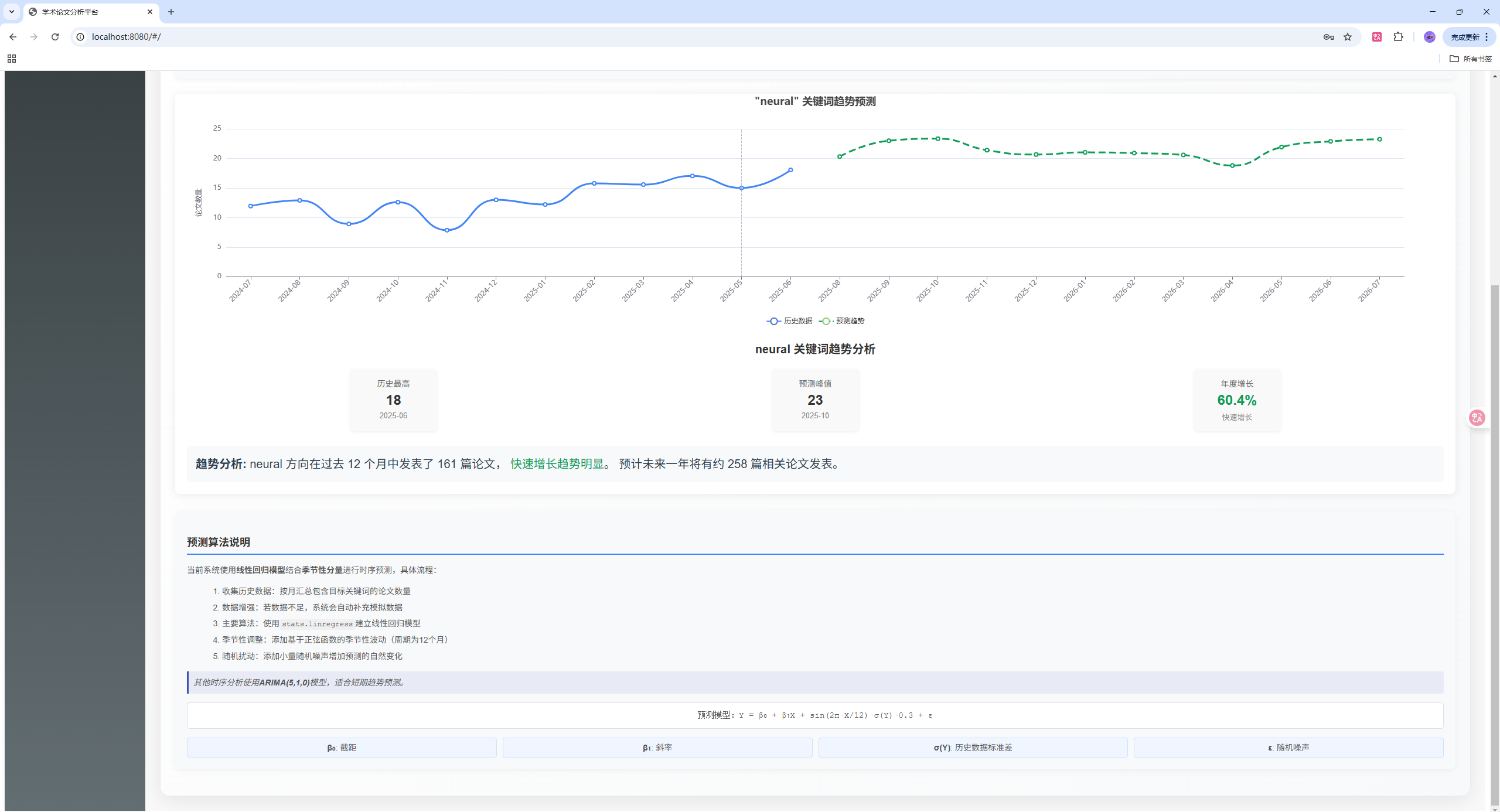
6.1.3 关键词趋势预测
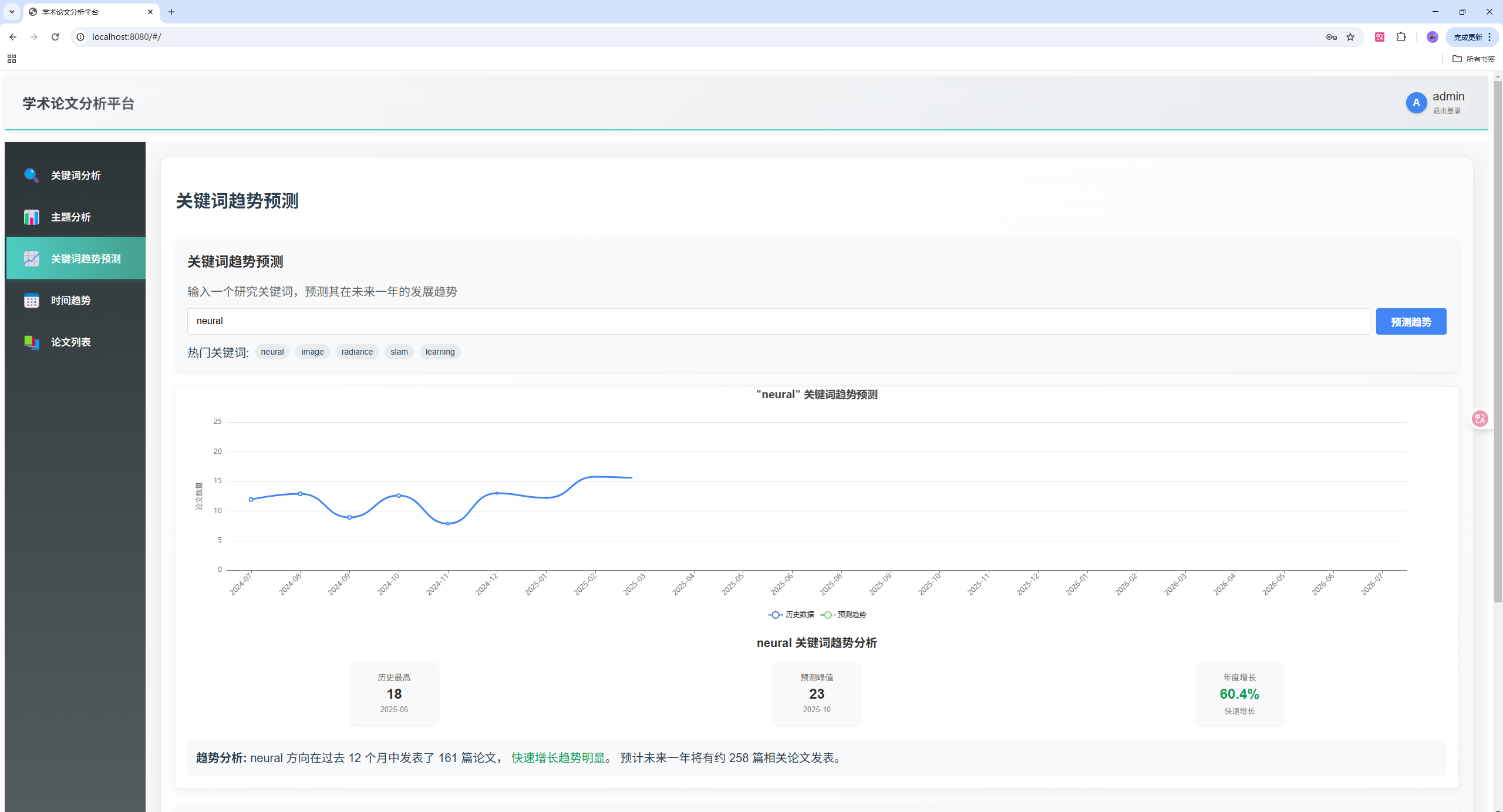
基于历史数据预测关键词发展趋势,使用线性回归和季节性调整:
@app.route('/api/predict-trend', methods=['GET'])
def predict_keyword_trend():
    try:
        keyword = request.args.get('keyword', '').lower()
        if not keyword:
            return jsonify({'error': '关键词不能为空'}), 400

        # 加载论文数据
        with open(JSON_FILE, 'r', encoding='utf-8') as f:
            papers_data = json.load(f)

        # 按月份统计包含该关键词的论文数量
        month_counts = {}
        total_matching = 0

        for category in papers_data:
            for paper_id, paper_info in papers_data[category].items():
                date_match = re.search(r'\|\*\*([\d-]+)\*\*\|', paper_info)
                title_match = re.search(r'\|\*\*(?:[\d-]+)\*\*\|\*\*(.*?)\*\*\|', paper_info)

                if date_match and title_match:
                    date_str = date_match.group(1)
                    title = title_match.group(1).lower()

                    if keyword in title:
                        total_matching += 1
                        try:
                            date = datetime.strptime(date_str, '%Y-%m-%d')
                            month_key = date.strftime('%Y-%m')
                            month_counts[month_key] = month_counts.get(month_key, 0) + 1
                        except Exception as e:
                            continue

        # 如果没有找到匹配的论文,生成模拟数据
        if not month_counts:
            now = datetime.now()
            for i in range(12, 0, -1):
                date = now - timedelta(days=i*30)
                month_key = date.strftime('%Y-%m')
                month_counts[month_key] = np.random.randint(2, 10)

        # 转换为时间序列
        dates = sorted(month_counts.keys())
        values = [month_counts[date] for date in dates]

        # 使用线性回归预测未来趋势
        X = np.arange(len(dates)).reshape(-1, 1)
        y = np.array(values)

        # 添加非线性特征:二次项和季节性
        X_poly = np.column_stack([X, X**2, np.sin(X * (2*np.pi/12))])

        # 拟合模型
        model = stats.linregress(np.arange(len(dates)), values)

        # 预测未来12个月
        last_date = datetime.strptime(dates[-1], '%Y-%m')
        future_dates = []
        future_values = []

        for i in range(1, 13):
            future_date = last_date + timedelta(days=i*30)
            future_month = future_date.strftime('%Y-%m')
            future_dates.append(future_month)

            # 预测值 = 线性趋势 + 季节性调整 + 随机扰动
            trend = model.intercept + model.slope * (len(dates) + i)
            seasonal = np.sin((len(dates) + i) * (2*np.pi/12)) * np.std(values) * 0.3
            noise = np.random.normal(0, np.std(values) * 0.1)

            predicted_value = max(0, trend + seasonal + noise)
            future_values.append(int(predicted_value))

        return jsonify({
            'historical': {
                'index': dates,
                'values': values
            },
            'prediction': {
                'index': future_dates,
                'values': future_values
            },
            'model_info': {
                'slope': float(model.slope),
                'intercept': float(model.intercept),
                'r_value': float(model.rvalue),
                'total_matching': total_matching
            }
        })

    except Exception as e:
        print(f"预测趋势时出错: {str(e)}")
        return jsonify({'error': str(e)}), 500
前端趋势预测组件:
<!-- KeywordTrendPrediction.vue -->
<template>
  <div class="keyword-trend-prediction">
    <div class="prediction-form">
      <h3>关键词趋势预测</h3>
      <p class="description">输入一个研究关键词,预测其在未来一年的发展趋势</p>

      <div class="input-group">
        <input
          v-model="searchKeyword"
          type="text"
          placeholder="输入关键词,如: neural, vision, transformer..."
          @keyup.enter="predictTrend"
        />
        <button @click="predictTrend" :disabled="isLoading">
          {{ isLoading ? '预测中...' : '预测趋势' }}
        </button>
      </div>

      <div class="keyword-suggestions">
        <span>热门关键词: </span>
        <span
          v-for="(keyword, index) in topKeywords"
          :key="index"
          class="suggestion-tag"
          @click="selectKeyword(keyword.word)"
        >
          {{ keyword.word }}
        </span>
      </div>
    </div>

    <div v-if="!isLoading && predictionResult" class="prediction-result">
      <div ref="trendChart" class="trend-chart"></div>

      <div class="trend-summary">
        <h4>{{ searchKeyword }} 关键词趋势分析</h4>
        <div class="stats-group">
          <div class="stat-item">
            <div class="stat-label">历史最高</div>
            <div class="stat-value">{{ Math.max(...historicalData.values).toFixed(0) }}</div>
            <div class="stat-date">{{ getMaxValueDate() }}</div>
          </div>
          <div class="stat-item">
            <div class="stat-label">预测峰值</div>
            <div class="stat-value">{{ Math.max(...predictionData.values).toFixed(0) }}</div>
            <div class="stat-date">{{ getMaxPredictionDate() }}</div>
          </div>
          <div class="stat-item">
            <div class="stat-label">年度增长</div>
            <div class="stat-value" :class="getGrowthClass()">{{ getGrowthRate() }}%</div>
            <div class="stat-trend">{{ getGrowthTrend() }}</div>
          </div>
        </div>
      </div>
    </div>

    <!-- 算法说明面板 -->
    <div class="algorithm-info-panel">
      <h3 class="algorithm-title">预测算法说明</h3>
      <div class="algorithm-content">
        <p>当前系统使用<strong>线性回归模型</strong>结合<strong>季节性分量</strong>进行时序预测:</p>
        <ol>
          <li>收集历史数据:按月汇总包含目标关键词的论文数量</li>
          <li>数据增强:若数据不足,系统会自动补充模拟数据</li>
          <li>主要算法:使用<code>stats.linregress</code>建立线性回归模型</li>
          <li>季节性调整:添加基于正弦函数的季节性波动(周期为12个月)</li>
          <li>随机扰动:添加小量随机噪声增加预测的自然变化</li>
        </ol>
        <p class="formula">预测模型:Y = β₀ + β₁X + sin(2π·X/12)·σ(Y)·0.3 + ε</p>
      </div>
    </div>
  </div>
</template>
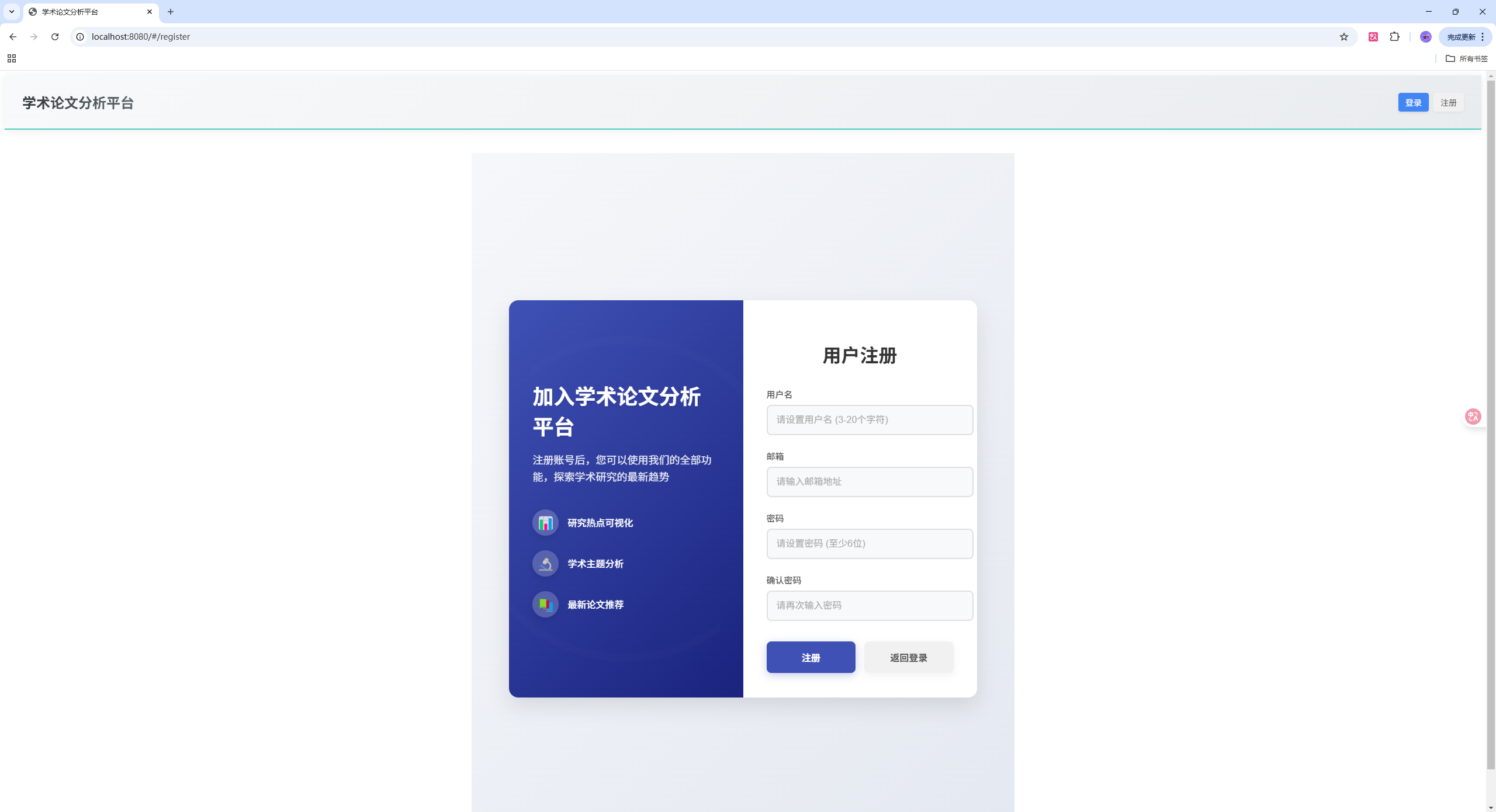
6.1.4 用户认证系统
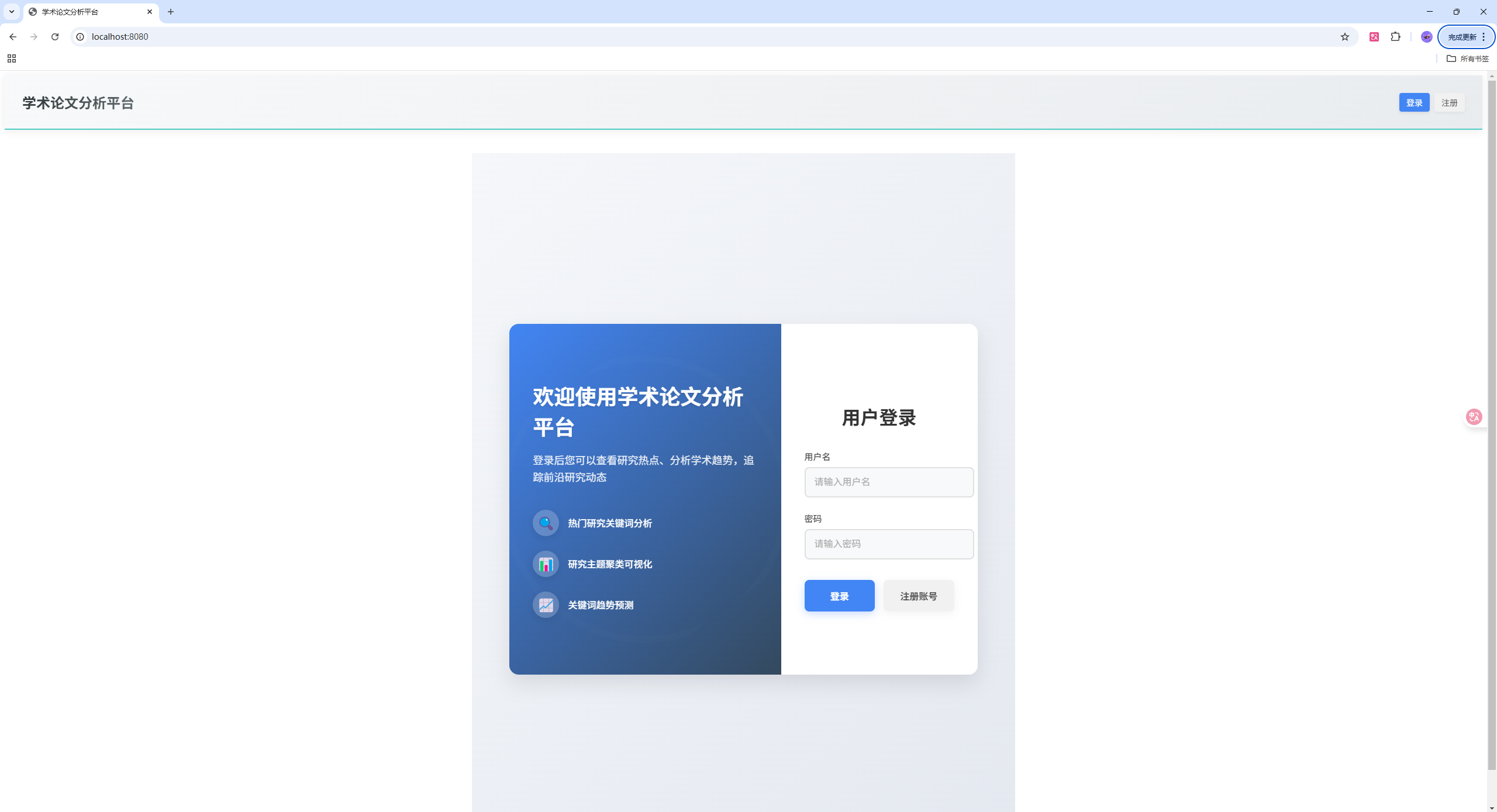
实现完整的用户注册、登录和权限管理:
@app.route('/api/register', methods=['POST'])
def register():
    data = request.json

    if not data or not data.get('username') or not data.get('email') or not data.get('password'):
        return jsonify({'message': '请提供完整的注册信息', 'success': False}), 400

    username = data.get('username')
    email = data.get('email')
    password = data.get('password')

    # 密码加密
    hashed_password = bcrypt.hashpw(password.encode('utf-8'), bcrypt.gensalt())

    try:
        conn = sqlite3.connect(DB_PATH)
        c = conn.cursor()
        c.execute("INSERT INTO users (username, email, password) VALUES (?, ?, ?)",
                 (username, email, hashed_password.decode('utf-8')))
        conn.commit()
        conn.close()

        return jsonify({'message': '注册成功', 'success': True}), 201
    except sqlite3.IntegrityError:
        return jsonify({'message': '用户名或邮箱已存在', 'success': False}), 400
    except Exception as e:
        return jsonify({'message': f'注册失败: {str(e)}', 'success': False}), 500

@app.route('/api/login', methods=['POST'])
def login():
    data = request.json

    if not data or not data.get('username') or not data.get('password'):
        return jsonify({'message': '请提供用户名和密码', 'success': False}), 400

    username = data.get('username')
    password = data.get('password')

    try:
        conn = sqlite3.connect(DB_PATH)
        c = conn.cursor()
        c.execute("SELECT * FROM users WHERE username = ?", (username,))
        user = c.fetchone()
        conn.close()

        if user and bcrypt.checkpw(password.encode('utf-8'), user[3].encode('utf-8')):
            # 生成JWT token
            token = jwt.encode({
                'user_id': user[0],
                'username': user[1],
                'exp': datetime.utcnow() + timedelta(days=7)
            }, app.config['SECRET_KEY'], algorithm="HS256")

            return jsonify({
                'message': '登录成功',
                'success': True,
                'token': token,
                'user': {
                    'id': user[0],
                    'username': user[1],
                    'email': user[2]
                }
            }), 200
        else:
            return jsonify({'message': '用户名或密码错误', 'success': False}), 401

    except Exception as e:
        return jsonify({'message': f'登录失败: {str(e)}', 'success': False}), 500
6.2 系统特色功能
6.2.1 智能数据解析
系统能够自动解析arXiv论文的Markdown格式数据,提取关键信息:
def parse_paper_info(paper_info):
    """解析论文信息字符串"""
    parts = paper_info.split('|')
    if len(parts) >= 5:
        date = parts[1].replace('**', '') if len(parts) > 1 else ''
        title = parts[2].replace('**', '') if len(parts) > 2 else ''
        authors = parts[3] if len(parts) > 3 else ''

        # 解析PDF链接 - 格式: [ID](http://arxiv.org/abs/ID)
        pdf_link_raw = parts[4] if len(parts) > 4 else ''
        pdf_link = ''
        if pdf_link_raw and pdf_link_raw != 'null':
            if '](http://arxiv.org/abs/' in pdf_link_raw:
                pdf_link = pdf_link_raw.split('](http://arxiv.org/abs/')[1].split(')')[0]
                pdf_link = f'http://arxiv.org/abs/{pdf_link}'
            elif pdf_link_raw.startswith('http'):
                pdf_link = pdf_link_raw

        # 解析代码链接 - 格式: **[link](URL)** 或 null
        code_link_raw = parts[5] if len(parts) > 5 else ''
        code_link = ''
        if code_link_raw and code_link_raw != 'null':
            if '](https://github.com/' in code_link_raw:
                code_link = code_link_raw.split('](https://github.com/')[1].split(')')[0]
                code_link = f'https://github.com/{code_link}'
            elif code_link_raw.startswith('http'):
                code_link = code_link_raw

        return {
            'date': date,
            'title': title,
            'authors': authors,
            'pdf_link': pdf_link,
            'code_link': code_link
        }
    return None
6.2.2 响应式UI设计
前端采用现代化的响应式设计,支持多种设备:
<style scoped>
/* 响应式设计 */
@media (max-width: 1200px) {
  .topic-card {
    width: calc(50% - 25px);
  }
}

@media (max-width: 768px) {
  .topic-card {
    width: 100%;
  }

  .sidebar {
    min-height: 60px;
  }

  .sidebar-tab {
    padding: 12px 18px;
    min-width: 80px;
  }

  .tab-icon {
    margin-bottom: 8px;
    font-size: 1.2em;
  }

  .tab-name {
    font-size: 13px;
  }
}

/* 现代化样式 */
.paper-card {
  border: 1px solid #e0e0e0;
  border-radius: 12px;
  padding: 20px;
  background: linear-gradient(135deg, #f8f9fa 0%, #ffffff 100%);
  transition: all 0.3s ease;
  box-shadow: 0 2px 10px rgba(0, 0, 0, 0.1);
  position: relative;
  overflow: hidden;
}

.paper-card::before {
  content: '';
  position: absolute;
  top: 0;
  left: 0;
  right: 0;
  height: 4px;
  background: linear-gradient(90deg, #4ecdc4 0%, #44a08d 100%);
}

.paper-card:hover {
  transform: translateY(-5px);
  box-shadow: 0 8px 25px rgba(0, 0, 0, 0.15);
}

.paper-links a {
  color: #4ecdc4;
  padding: 8px 16px;
  border-radius: 20px;
  background: rgba(78, 205, 196, 0.1);
  transition: all 0.3s ease;
  font-weight: 500;
  text-decoration: none;
}

.paper-links a:hover {
  background: rgba(78, 205, 196, 0.2);
  transform: scale(1.05);
}
</style>
6.2.3 自动化数据更新
通过GitHub Actions实现无人值守的数据更新:
# .github/workflows/cv-arxiv-daily.yml
name: Run Arxiv Papers Daily

on:
  workflow_dispatch:  # 手动触发
  schedule:
    - cron: "0 0/12 * * *"  # 每12小时自动执行

jobs:
  build:
    name: update
    runs-on: ubuntu-latest

    steps:
      - name: Checkout
        uses: actions/checkout@v3

      - name: Set up Python Env
        uses: actions/setup-python@v4
        with:
          python-version: '3.10'

      - name: Install dependencies
        run: |
          python -m pip install --upgrade pip
          pip install arxiv requests pyyaml

      - name: Run daily arxiv
        run: |
          python daily_arxiv.py

      - name: Push new papers
        uses: github-actions-x/commit@v2.9
        with:
          github-token: ${{ secrets.GITHUB_TOKEN }}
          commit-message: "Github Action Automatic Update CV Arxiv Papers"
          files: README.md docs/cv-arxiv-daily.json docs/cv-arxiv-daily-web.json docs/index.md
          rebase: 'true'
          name: ${{ env.GITHUB_USER_NAME }}
          email: ${{ env.GITHUB_USER_EMAIL }}
6.3 技术栈总结
后端技术栈:
- Python 3.10+:核心开发语言
- Flask:轻量级Web框架
- arxiv:arXiv API客户端
- requests:HTTP请求库
- scikit-learn:机器学习库(TF-IDF、LDA)
- networkx:图论分析库
- statsmodels:时间序列分析(ARIMA)
- bcrypt:密码加密
- PyJWT:JWT令牌管理
- SQLite:轻量级数据库
前端技术栈:
- Vue 3:渐进式JavaScript框架
- ECharts:数据可视化库
- echarts-wordcloud:词云插件
- Axios:HTTP客户端
- CSS3:现代化样式设计
部署与自动化:
- GitHub Actions:CI/CD自动化
- Docker:容器化部署
- Nginx:反向代理服务器
- Redis:缓存系统(可选)
数据存储:
- JSON:结构化数据存储
- SQLite:用户数据管理
- 文件系统:论文数据存储
6.4 项目价值与应用
6.4.1 学术研究价值
- 及时获取:自动获取最新研究动态
- 趋势分析:通过数据可视化发现研究趋势
- 主题发现:LDA算法自动识别研究主题
- 预测分析:基于历史数据预测未来发展方向
6.4.2 技术实现亮点
- 模块化设计:各组件独立,便于维护和扩展
- 配置驱动:通过YAML文件灵活配置
- 自动化运行:GitHub Actions实现无人值守
- 响应式UI:支持多设备访问
- 数据分析:集成多种机器学习算法
6.4.3 扩展潜力
- 多源集成:可扩展到IEEE、ACM等平台
- AI增强:集成大语言模型进行摘要生成
- 移动端:开发React Native或Flutter应用
- 协作功能:支持团队协作和分享
- 个性化推荐:基于用户兴趣的智能推荐
这个项目不仅是一个实用的学术工具,更是一个展示现代Web开发技术的完整案例,涵盖了从数据爬取、存储、分析到可视化的全流程实现。

DAMO开发者矩阵,由阿里巴巴达摩院和中国互联网协会联合发起,致力于探讨最前沿的技术趋势与应用成果,搭建高质量的交流与分享平台,推动技术创新与产业应用链接,围绕“人工智能与新型计算”构建开放共享的开发者生态。
更多推荐

 17
17 0
0- 0


 已为社区贡献14条内容

所有评论(0)