spring boot 事务_体验微服务分布式事务开源框架ServiceComb的Saga TCC模型
前言微服务与分步式系统架构里的事务问题一直就是痛点,在高并发与高吞吐下,伴随网络的不确定性,数据很难达到强一致性,业界一直没有完美的解决方案。基于分布式CAP理论,只能选择放弃强一致性,追求可用性,提出柔性事务、最终一致性。微服务等分布式架构中,要实现最终一致性,只能采用事务补偿方式(可能还需要手动补偿)。分布式事务在使用时应该尽量少用或不用,在不得以的情况下。最好定下分布式事务的开发规范来,对开
前言
微服务与分步式系统架构里的事务问题一直就是痛点,在高并发与高吞吐下,伴随网络的不确定性,数据很难达到强一致性,业界一直没有完美的解决方案。基于分布式CAP理论,只能选择放弃强一致性,追求可用性,提出柔性事务、最终一致性。微服务等分布式架构中,要实现最终一致性,只能采用事务补偿方式(可能还需要手动补偿)。分布式事务在使用时应该尽量少用或不用,在不得以的情况下。最好定下分布式事务的开发规范来,对开发人员使用进行约束、降低使用分布式事务开发难度。
微服务技术平台使用Spring Cloud.
前期对分布式事务研究:TCC、Saga
一开始参考很多的开源方案:只是非常简单了解。从项目活跃度、开发者和项目源码、项目文档都不太满意。
代码有点多,有点乱!可以到浏览器里看,这是下面所有的源码地址:https://github.com/zuolang/servicecomb-pack.git
基础知识
这个例子需要SpringCloud的一些基础知识。
- TC:Transaction Coordinator事务协调器
- TM: Transaction Manager事务管理
- RM:Resource Manager资源管理
RM是数据库这一端;TC指的统一管理协议各个分支事务状态;TM是在应用端:tx.begin() commit()
ServiceComb概述
Apache ServiceComb Pack 是一个微服务应用的数据最终一致性解决方案。架构ServiceComb Pack 架构是由 Alpha 和 Omega组成,其中:
- alpha充当协调者的角色要单独部署,主要负责对事务进行管理和协调。
- omega是微服务中内嵌的一个agent,负责对调用请求进行拦截并向alpha上报事务事件。
下图展示了alpha, omega以及微服务三者的关系:
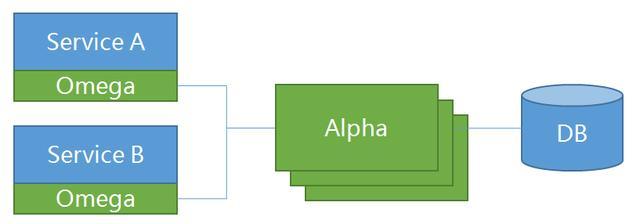
官方图片
例子:运行源码里Demo:Saga-Spring-Demo
这是所有的实验代码:https://github.com/zuolang/servicecomb-pack.git
这里是我在原来项目的基础上改的代码,后期还有继续使用。为什么要改呢?原来的例子运行都直接用命令行启动,动态传参数。这种方式不适合初学者,每次改完还编译,非常不方便。出错了也好不调试。在原来的基础上增加了服务注册中心
- 使用eureka使用服务注册中心
- Alpha启动并且注册到eureka
- 启动Demo的三服务booking car hotel,并且注册到eureka
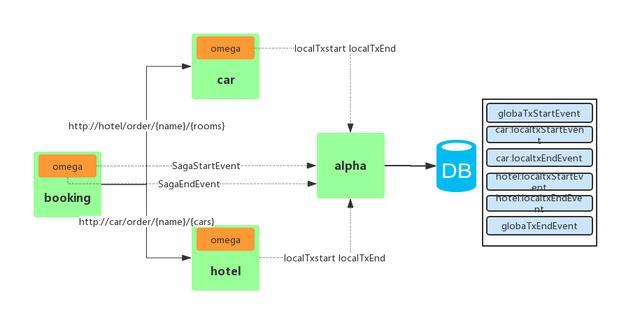
Saga流程
图中省略了注册中心
eureka注册中心:
通过:https://start.spring.io/ 建一个maven SpringBoot项目
pom.xmlorg.springframework.boot spring-boot-starter-actuatororg.springframework.boot spring-boot-starter-weborg.springframework.cloud spring-cloud-starter-netflix-eureka-clientorg.springframework.cloud spring-cloud-starter-netflix-eureka-serverorg.springframework.boot spring-boot-devtools runtimeorg.springframework.boot spring-boot-starter-test testSpring项目配置文件 application.yaml
spring: application: name: eureka_service1 #服务名称,用于在服务注册中心查找 profiles: eureka1server: port: 8761eureka: instance: hostname: eureka1 instance-id: 1 #在服务中心需要唯一性 client: register-with-eureka: true #是否把自己注册 fetch-registry: false #是否会读取注册中心:中作为服务提供者,可以配置false service-url: defaultZone: http://127.0.0.1:8761/eureka #注册的地址使用@EnableEurekaServer开启EurekaServer
@SpringBootApplication@EnableEurekaServerpublic class Application { public static void main(String[] args) { SpringApplication.run(Application.class, args); }}启动 http://127.0.0.1:8761 检查eureka服务是否启动成功
运行Alpha-0.4.x分支
- 准备数据库
docker run --name=mysql -d -e "MYSQL_ROOT_PASSWORD=1234" -e "MYSQL_DATABASE=saga" -e "MYSQL_USER=root" -e "MYSQL_PASSWORD=1234" -p 3306:3306 mysql/mysql-server:5.7- 代码编译:这里可能会出现各种不一样问题
mvn clean package -Dmaven.test.skip=true
如果docker失败,可以跳过docker -Dgpg.skip跳过包的签名校验
mvn clean install -DskipTests -Prelease -Pspring-boot-2 -Pmysql -Pspring-cloud-eureka -P -docker -Dgpg.skip
- 启动Alpha协调者
在Idea上直接启动
1.alpha-server是一个SpringBoot程序,AlphaApplication SpringBoot启动的main方法
- 默认AlphaServer pom.xml没mysql jdbc驱动
mysql mysql-connector-java 5.1.30org.springframework.cloud spring-cloud-starter-netflix-eureka-client ${spring.cloud.version}加上最好检查在项目的dependency里上是否加上
- 配置数据库url username password
- eureka客户端配置
eureka: client: enabled: true service-url: defaultZone: http://127.0.0.1:8761/eureka instance: metadataMap: servicecomb-alpha-server-port: ${alpha.server.port} servicecomb-alpha-server: ${alpha.server.host}:${alpha.server.port} prefer-ip-address: true hostname: 127.0.0.1main JVM参数:-Dspring.profiles.active=mysql
application.yaml中使用了profile通过配置参数指定数据源
- 先启动eureka服务作为服务注册中心,否则会启动会因连接不eureka出错。
- 在AlphaApplication类开启@EnableEurekaClient
- 右键run Java Application启动main方法,如果启动失败请从1.1再检查
- http://localhost:8761 eureka确认Alpha注册成功
2、命令行下启动
- Spring cloud saga booking car hotel DEMO代码:
- 增加eureka client到saga-spring-demo 的pom中
org.springframework.cloud spring-cloud-starter-netflix-eureka-client ${spring.cloud.version}给booking car hotel配置eureka注册中心
eureka: client: enabled: true service-url: defaultZone: http://192.168.0.5:8761/eureka //eureka服务注册中心alpha: cluster: address: 127.0.0.1:8081 //alpha服务的地址:omega: enable: true //ormega开关server: port: 8092 //Spring boot服务端中@SpringBootApplication@EnableEurekaClientpublic class Application { public static void main(String[] args) { SpringApplication.run(Application.class, args); }} @Bean(name = "restTemplate") @LoadBalanced RestTemplate initRestTemplate(@Qualifier("omegaRestTemplate") RestTemplate omegaRestTemplate) { return omegaRestTemplate; }//booking 调用hotel car的微服务 @Autowired @Qualifier("restTemplate") private RestTemplate template; @SagaStart @GetMapping("/booking/{name}/{rooms}/{cars}") public String order(@PathVariable String name, @PathVariable Integer rooms, @PathVariable Integer cars) { template.getForEntity("http://CAR/order/"+name+"/"+cars, null, String.class, name, cars); template.getForEntity( "http://HOTEL/order/"+name+"/"+rooms, null, String.class, name, rooms); return name + " booking " + rooms + " rooms and " + cars + " cars OK"; }//service时@Compensable(compensationMethod = "cancel") cancel是同一个类的方法与本法参数是一样的@Serviceclass CarBookingService { private Map bookings = new ConcurrentHashMap<>(); @Compensable(compensationMethod = "cancel") void order(CarBooking booking) { booking.confirm(); bookings.put(booking.getId(), booking); } void cancel(CarBooking booking) { Integer id = booking.getId(); if (bookings.containsKey(id)) { bookings.get(id).cancel(); } } }http://127.0.0.1:8761 检查eureka上的服务注册是完全
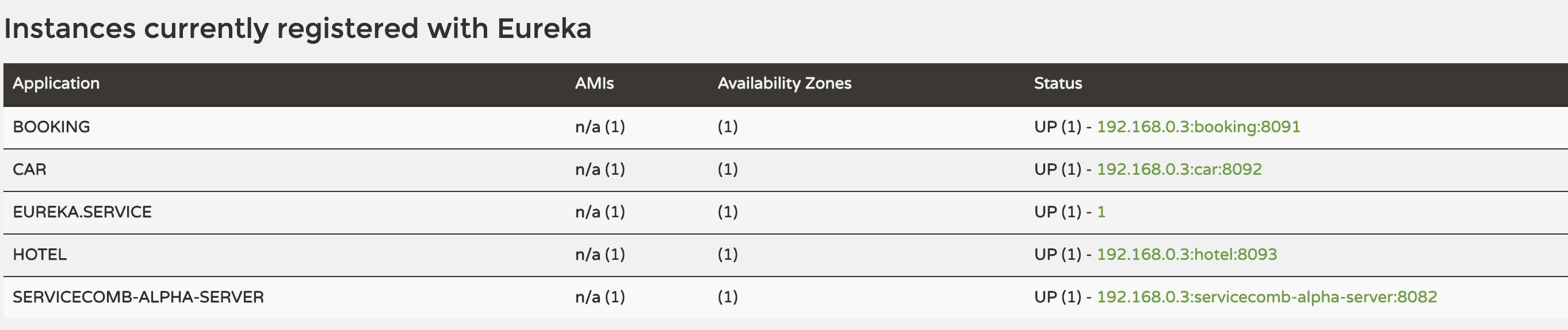
http://localhost:8091/booking/room8848/2/3
room booking 2 rooms and 3 cars OK
tcc-spring-demo
由tcc-ordering tcc-inventory tcc-payment
给三个服务都注册到服务中心上
给三个服务配置不同的端口,配置alpha.cluster.address配置Alpha的服务地址,开启Omega
eureka: client: enabled: true service-url: defaultZone: http://127.0.0.1:8761/eurekaalpha: cluster: address: 127.0.0.1:8081omega: enable: trueserver: port: 8092 @TccStart @GetMapping("/order/{userName}/{productName}/{productUnit}/{unitPrice}") @ResponseBody public String order( @PathVariable String userName, @PathVariable String productName, @PathVariable Integer productUnit, @PathVariable Integer unitPrice) { restTemplate.getForEntity("http://INVENTORY/order/"+userName+"/"+productName+"/"+productUnit,null, String.class, userName, productName, productUnit); restTemplate.getForEntity("http://PAYMENT/pay/"+userName+"/"+productUnit*unitPrice, null, String.class, userName, amount); return userName + " ordering " + productName + " with " + productUnit + " OK"; } @Participate(confirmMethod = "confirm
DAMO开发者矩阵,由阿里巴巴达摩院和中国互联网协会联合发起,致力于探讨最前沿的技术趋势与应用成果,搭建高质量的交流与分享平台,推动技术创新与产业应用链接,围绕“人工智能与新型计算”构建开放共享的开发者生态。
更多推荐

 0
0 0
0- 0


 已为社区贡献2条内容

所有评论(0)