如何将WordPress用户数据导出到CSV文件
Do you want to export WordPress users data to a CSV file? Sometimes you may need the user data to add into a new website or to use in other marketing campaigns. The default WordPress export tools do n
Do you want to export WordPress users data to a CSV file? Sometimes you may need the user data to add into a new website or to use in other marketing campaigns. The default WordPress export tools do not let you export user accounts. In this article, we will show you how to easily export WordPress users data to a CSV file.
是否要将WordPress用户数据导出到CSV文件? 有时,您可能需要用户数据将其添加到新网站或用于其他营销活动。 默认的WordPress导出工具不允许您导出用户帐户。 在本文中,我们将向您展示如何轻松地将WordPress用户数据导出到CSV文件。

何时以及为何将WordPress用户数据导出到CSV文件 (When and Why Export WordPress Users Data to a CSV File)
The default WordPress export tool does not include user accounts. It allows you to create user accounts during the import, only if those users have content. This excludes user roles with no writing privileges like subscribers or customers in an ecommerce store.
默认的WordPress导出工具不包括用户帐户。 仅当这些用户有内容时,它才允许您在导入期间创建用户帐户。 这排除了没有书面特权的用户角色 ,例如电子商务商店中的订户或客户。
If you are moving a WordPress website, then user data will already be included in your WordPress database backup. What if you just wanted to move user data and not the whole website?
如果您要移动WordPress网站 ,则用户数据将已经包含在WordPress数据库备份中 。 如果您只想移动用户数据而不是整个网站怎么办?
Many businesses and site owners may want to use the user data in their CRM platforms, email lists, or other marketing campaigns.
许多企业和网站所有者可能希望在其CRM平台 , 电子邮件列表或其他营销活动中使用用户数据。
This is when you’ll need a tool to easily export user data in a CSV file. These are plain text files where each user data field is separated by a comma. CSV files can be opened in any spreadsheet software like Google Sheets, Microsoft Excel, etc.
这是当您需要一个工具来轻松将用户数据导出到CSV文件时。 这些是纯文本文件,其中每个用户数据字段都用逗号分隔。 可以在任何电子表格软件(例如Google表格,Microsoft Excel等)中打开CSV文件。
That being said, let’s take a look at how to easily export WordPress users data to a CSV file.
话虽如此,让我们看一下如何轻松地将WordPress用户数据导出到CSV文件。
将WordPress用户数据导出到CSV文件 (Exporting WordPress User Data to a CSV File)
First thing you need to do is install and activate the Export Users to CSV plugin. For more details, see our step by step guide on how to install a WordPress plugin.
您需要做的第一件事是安装并激活“ 将用户导出到CSV”插件。 有关更多详细信息,请参阅有关如何安装WordPress插件的分步指南。
Upon activation, you need to visit Users » Export Users to CSV page to configure plugin settings.
激活后,您需要访问用户»将用户导出到CSV页面以配置插件设置。
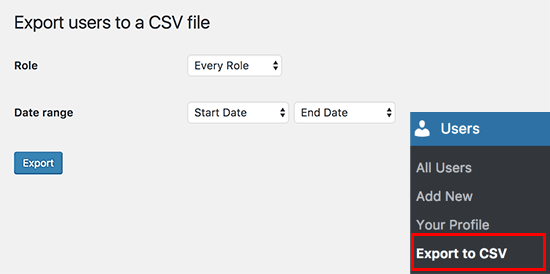
Select the user role you want to export or select ‘Every role’. The plugin also allows you to select a date range to download only users who joined between that period.
选择您要导出的用户角色,或选择“每个角色”。 该插件还允许您选择日期范围,以仅下载在此期间加入的用户。
Once you are finished, click on the export button to continue.
完成后,单击导出按钮继续。
The plugin will prepare a CSV file containing user data and send it to you as a download. Once downloaded, you can open that file in a spreadsheet program or import it into other programs.
该插件将准备一个包含用户数据的CSV文件,并将其作为下载发送给您。 下载后,您可以在电子表格程序中打开该文件或将其导入其他程序。
That’s all, we hope this article helped you export WordPress users data to a CSV file. You may also want to see our mega list of handy WordPress tips, tricks, and hacks for beginners.
仅此而已,我们希望本文能帮助您将WordPress用户数据导出到CSV文件。 您可能还想查看我们为初学者准备的大量便捷的WordPress技巧,窍门和技巧 。
If you liked this article, then please subscribe to our YouTube Channel for WordPress video tutorials. You can also find us on Twitter and Facebook.
如果您喜欢这篇文章,请订阅我们的YouTube频道 WordPress视频教程。 您也可以在Twitter和Facebook上找到我们。
翻译自: https://www.wpbeginner.com/plugins/how-to-export-wordpress-users-data-to-a-csv-file/

DAMO开发者矩阵,由阿里巴巴达摩院和中国互联网协会联合发起,致力于探讨最前沿的技术趋势与应用成果,搭建高质量的交流与分享平台,推动技术创新与产业应用链接,围绕“人工智能与新型计算”构建开放共享的开发者生态。
更多推荐

 0
0 0
0- 0


 已为社区贡献3条内容

所有评论(0)