计算机网络实验课(三)——直接使用数据构造以太网帧,打包并发送|使用SharpPcap库函数构造以太网帧,并发送出去
计算机网络实验课(三)——直接使用数据构造以太网帧,打包并发送|使用SharpPcap库函数构造以太网帧,并发送出去
文章目录
一、直接使用数据构造以太网帧,打包并发送
本实验将介绍如何直接使用数据构造一个以太网帧,并发送出去。为简化操作,本实验中以太网帧的数据将直接以代码固化在程序中,在每次点击“发送固定帧”按钮时进行一次发送。
本实验的程序基于实验二,因此,发送结果可利用实验二中的捕获功能检验是否成功发送。
1.1 添加控件
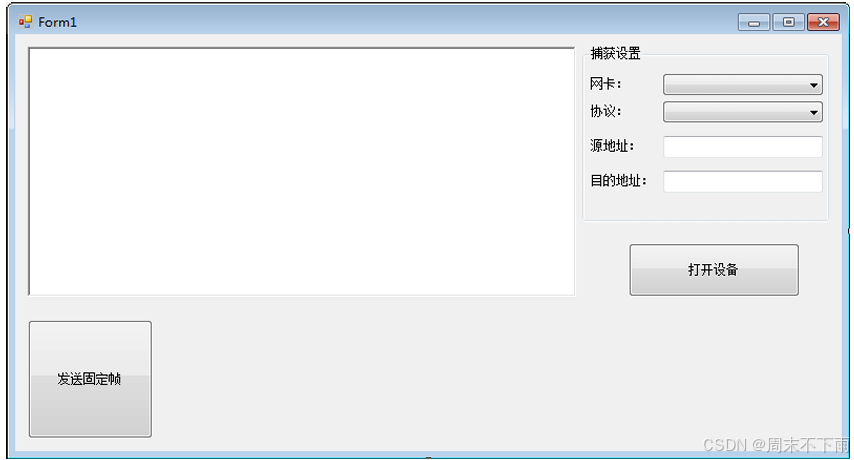
1.2 代码
using System;
using System.Collections.Generic;
using System.ComponentModel;
using System.Data;
using System.Drawing;
using System.Linq;
using System.Text;
using System.Windows.Forms;
using SharpPcap;
using PacketDotNet;
using SharpPcap.LibPcap;
using System.Net;

namespace 实验教程
{
    // 协议类型
    public enum SnapProtocol : int
    {
        udp = 0,
        tcp = 1,
        arp = 2,
        rarp = 3,
        ip = 4
    }

    public partial class Form1 : Form
    {
        /// <summary>
        /// 全局私有变量
        /// </summary>
        CaptureDeviceList   device_list;         // 设备列表
        ICaptureDevice      device;              // 当前选择设备
        DelegateMethod      disp_info;           // 委托

        public Form1()
        {
            InitializeComponent();

            // 获得设备列表
            device_list = GetDeviceList();

            // 获取支持的协议列表
            LoadProto();

            // 载入所有网卡
            LoadDevice();

            // 显示数据包委托函数
            disp_info = new DelegateMethod(Disp_PacketInfo);
        }

        #region 程序初始化

        /// <summary>
        /// 获得当前的设备列表(网卡)
        /// </summary>
        /// <returns></returns>
        private CaptureDeviceList GetDeviceList()
        {
            // Print SharpPcap version
            string ver = SharpPcap.Version.VersionString;
            this.richTextBox1.Text = string.Format("SharpPcap {0}, Device List\n", ver);
            try
            {
                // Retrieve the device list
                CaptureDeviceList devices = CaptureDeviceList.Instance;

                // If no devices were found print an error
                if (devices.Count < 1)
                {
                    this.richTextBox1.Text += "No devices were found on this machine\n";
                    return null;
                }

                this.richTextBox1.Text += "\nThe following devices are available on this machine:\n";
                this.richTextBox1.Text += "----------------------------------------------------\n";

                // Print out the available network devices
                foreach (ICaptureDevice dev in devices)
                    this.richTextBox1.Text += string.Format("{0}\n", dev.ToString());

                return devices;
            }
            catch (System.Exception ex)
            {
                MessageBox.Show(ex.ToString());
                return null;
            }
        }

        /// <summary>
        /// 获取支持的协议列表
        /// </summary>
        private void LoadProto()
        {
            comboBox2.Items.Clear();
            foreach (string e in Enum.GetNames(typeof(SnapProtocol)))
            {
                comboBox2.Items.Add(e);
            }
            comboBox2.SelectedIndex = 0;
        }

        /// <summary>
        /// 载入所有网卡信息
        /// </summary>
        private void LoadDevice()
        {
            comboBox1.Items.Clear();
            if (device_list == null)
            {
                MessageBox.Show("没有找到任何网卡设备!");
                return;
            }

            foreach (LibPcapLiveDevice dev in device_list)
            {
                try
                {
                    comboBox1.Items.Add(dev.Addresses[0].Addr);
                }
                catch
                {
                    continue;
                }
            }
            comboBox1.SelectedIndex = 0;
        }

        #endregion

        /// <summary>
        /// 打开设备
        /// </summary>
        /// <param name="sender"></param>
        /// <param name="e"></param>
        private void button1_Click(object sender, EventArgs e)
        {

            if (button1.Text == "打开设备")
            {
                button1.Text = "关闭设备";
                groupBox1.Enabled = false;


                device = device_list[comboBox1.SelectedIndex];
                device.OnPacketArrival += new SharpPcap.PacketArrivalEventHandler(device_OnPacketArrival);
                device.Open(DeviceMode.Promiscuous, 1000);
                device.Filter = RcvPacketFilter();
                device.StartCapture();
            }
            else
            {
                button1.Text = "打开设备";
                groupBox1.Enabled = true;
                try
                {
                    device.StopCapture();
                }
                catch
                {
                    device.Close();
                }
            }
        }


        #region 捕获和显示函数

        /// <summary>
        /// 根据要求构造数据包过滤字符串
        /// </summary>
        private string RcvPacketFilter()
        {
            SnapProtocol proto = (SnapProtocol)comboBox2.SelectedIndex;
            IPAddress src_host, dst_host;

            string filter = proto.ToString();
            if ((textBox1.Text.Trim().Length > 0) && (IPAddress.TryParse(textBox1.Text, out src_host)))
            {
                filter += string.Format(" and src host {0}", src_host.ToString());
            }

            if ((textBox2.Text.Trim().Length > 0) && (IPAddress.TryParse(textBox2.Text, out dst_host)))
            {
                filter += string.Format(" and dst host {0}", dst_host.ToString());
            }

            return filter;
        }

        /// <summary>
        /// 抓包事件函数,在抓到符合条件的数据包的时候该函数将被调用
        /// 功能:
        ///     1. 获得当前数据包的时间间隔、长度、协议类型、地址等参数
        ///     2. 将信息输出到RichTextBox控件显示出来
        /// </summary>
        private void device_OnPacketArrival(object sender, CaptureEventArgs packet)
        {
            // 时间和长度的获取
            DateTime time = packet.Packet.Timeval.Date;
            int len = packet.Packet.Data.Length;
            // 解析数据包成:IP包
            Packet p = Packet.ParsePacket(packet.Packet.LinkLayerType, packet.Packet.Data);
            IpPacket ip = (IpPacket)p.Extract(typeof(IpPacket));

            // 数据包信息
            string info = string.Format("\nsrc_addr={0}, des_addr={1}, type={2}\n",
                ip.SourceAddress, ip.DestinationAddress, ip.Protocol);
            info += string.Format("{0}:{1}:{2},{3} Len={4}\n",
                time.Hour, time.Minute, time.Second, time.Millisecond, len);
            info += string.Format(byteToHexStr(packet.Packet.Data));

            // 使用委托显示结果
            richTextBox1.Invoke(disp_info, info);
        }


        delegate void DelegateMethod(string info);
        /// <summary>
        /// 显示收到数据包的信息(由于捕获过程开辟了新线程,因此捕获结果需要委托来传递到RichTextBox)
        /// </summary>
        /// <param name="info"></param>
        private void Disp_PacketInfo(string info)
        {
            richTextBox1.Text += info;
        }

        #endregion


        #region 发送

        /// <summary>
        /// 固定的UDP帧
        /// </summary>
        byte[] packetConst = new byte[58]
        {
            0x01,0x02,0x03,0x04,0x05,0x06,                     // dstMac
            0xB8,0x88,0xE3,0x36,0x65,0x59,                     // srcMac
            0x08,0x00,                                         // Type          :Ip
            0x45,                                              // Version       :4
            0x00,                                              // 分隔符
            0x00,0x2C,                                         // Total Length  :16+28 = 44
            0x00,0x00,                                         // 校验位
            0x00,0x00,                                         // 片偏移
            0x80,                                              // 生存时间      :128
            0x11,                                              // Protocol      :UDP
            0xB6,0x9C,                                         // 报头校验和
            //0x0A,0x04,0x66,0x05,                                 //:10.4.102.5
            //0x0A,0x04,0x66,0x5C,                                 //: 10.4.102.92
            0xc0,0xa8,0x01,0x65,                               // srcIP         :192.168.1.101
            0xc0,0xa8,0x01,0x6F,                               // dstIP         :192.168.1.111
            0x22,0xb8,                                         // srcPort       :8888
            0x07,0xd0,                                         // destPort      :2000
            0x00,0x18,                                         // UDP数据长度   :16+8 = 24
            0xBF,0x40,                                         // UDP校验和

            0x00, 0x11, 0x22, 0x33, 0x44, 0x55, 0x66, 0x77,    // 数据
            0x88, 0x99, 0xAA, 0xBB, 0xCC, 0xDD, 0xEE, 0xFF
        };

        /// <summary>
        /// 发送固定帧按钮
        /// </summary>
        /// <param name="sender"></param>
        /// <param name="e"></param>
        private void button2_Click(object sender, EventArgs e)
        {
            try
            {
                device.SendPacket(packetConst);
            }
            catch
            {
                return;
            }
        }
        #endregion

        #region 字符串与byte数组相互转换

        /// <summary>
        /// 字节数组转16进制字符串
        /// </summary>
        /// <param name="bytes"></param>
        /// <returns></returns>
        public static string byteToHexStr(byte[] bytes)
        {
            string returnStr = "";
            if (bytes != null)
            {
                for (int i = 0; i < bytes.Length; i++)
                {
                    returnStr += bytes[i].ToString("X2") + " ";
                }
            }
            return returnStr;
        }

        /// <summary>
        /// 字符串转16进制字节数组
        /// </summary>
        /// <param name="hexString"></param>
        /// <returns></returns>
        public static byte[] strToToHexByte(string hexString)
        {
            hexString = hexString.Replace(" ", "");
            if ((hexString.Length % 2) != 0)
                hexString += " ";
            byte[] returnBytes = new byte[hexString.Length / 2];
            for (int i = 0; i < returnBytes.Length; i++)
                returnBytes[i] = Convert.ToByte(hexString.Substring(i * 2, 2), 16);
            return returnBytes;
        }

        /// <summary>
        /// 字符串IP地址转换成byte数组
        /// </summary>
        /// <param name="decString"></param>
        /// <returns></returns>
        public static byte[] strIPToByte(string decString)
        {
            string[] decStringArray = decString.Split('.');
            if (decStringArray.Length == 4)
            {
                byte[] returnBytes = new byte[4];
                for (int i = 0; i < 4; i++)
                {
                    returnBytes[i] = Convert.ToByte(decStringArray[i]);
                }
                return returnBytes;
            }
            else
            {
                MessageBox.Show("IP地址格式错误!(参考:192.168.0.1)");
                return null;
            }
        }

        #endregion


    }
}
1.3 代码分析
1.3.1 UDP 协议数据包
        byte[] packetConst = new byte[58]
        {
            0x01,0x02,0x03,0x04,0x05,0x06,                     // dstMac
            0xB8,0x88,0xE3,0x36,0x65,0x59,                     // srcMac
            0x08,0x00,                                         // Type          :Ip
            0x45,                                              // Version       :4
            0x00,                                              // 分隔符
            0x00,0x2C,                                         // Total Length  :16+28 = 44
            0x00,0x00,                                         // 校验位
            0x00,0x00,                                         // 片偏移
            0x80,                                              // 生存时间      :128
            0x11,                                              // Protocol      :UDP
            0xB6,0x9C,                                         // 报头校验和
            //0x0A,0x04,0x66,0x05,                                 //:10.4.102.5
            //0x0A,0x04,0x66,0x5C,                                 //: 10.4.102.92
            0xc0,0xa8,0x01,0x65,                               // srcIP         :192.168.1.101
            0xc0,0xa8,0x01,0x6F,                               // dstIP         :192.168.1.111
            0x22,0xb8,                                         // srcPort       :8888
            0x07,0xd0,                                         // destPort      :2000
            0x00,0x18,                                         // UDP数据长度   :16+8 = 24
            0xBF,0x40,                                         // UDP校验和

            0x00, 0x11, 0x22, 0x33, 0x44, 0x55, 0x66, 0x77,    // 数据
            0x88, 0x99, 0xAA, 0xBB, 0xCC, 0xDD, 0xEE, 0xFF
        };
1.3.2 发送函数
发送调用ICaptureDevice对象的SendPacket函数即可,该函数拥有下列四种重载:SendPacket(byte[] p); SendPacket(Packet p); SendPacket(byte[] p, int size); SendPacket(Packet p, int size); p 表示要发送的数据包,可以是byte[]类型也可以使Packet类型;size 表示要发送的字节数。
在本试验中,byte[]类型的数据包已经构造好,因此只需要调用 SendPacket 函数就可以发送,如下方Click事件中的高亮部分代码所示: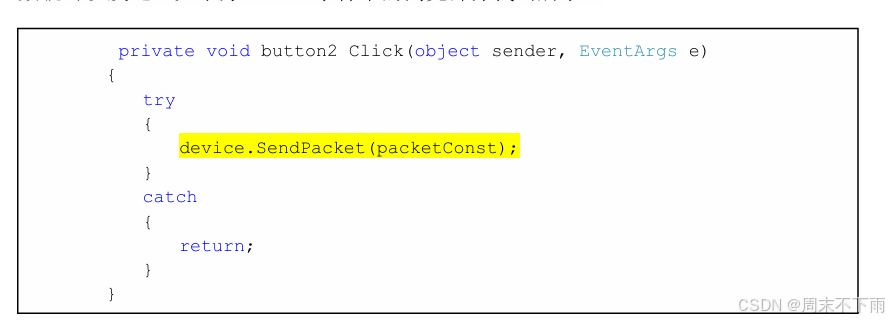
        private void button2_Click(object sender, EventArgs e)
        {
            try
            {
                device.SendPacket(packetConst);
            }
            catch
            {
                return;
            }
        }
1.4 运行程序
在运行程序后配置好“源地址”和“目的地址”并打开设备,然后点击“发送固定帧”按钮。从RichTextBox中可以看到发送的UDP数据包,如下图所示: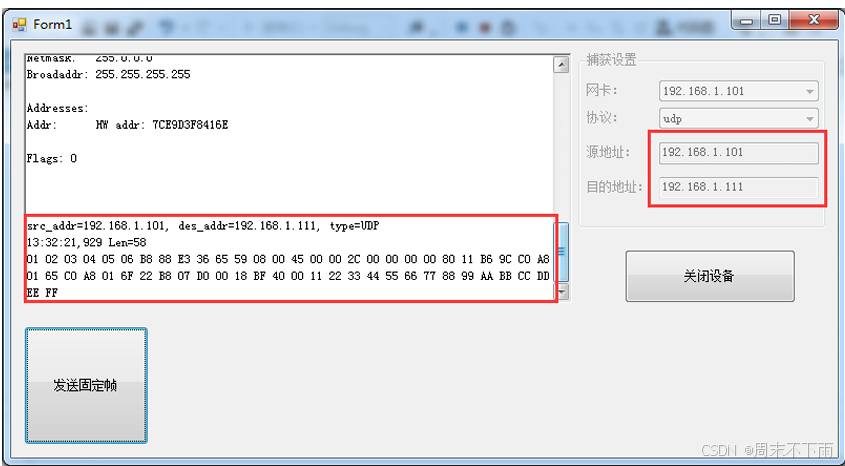
二、使用SharpPcap库函数构造以太网帧,并发送出去
实验三介绍了发送数据包的方法,但是手动去构造这样一个数据包是比较麻烦的。数据包本身不直观,并且其中若干个校验字段需要经过计算才能知道结果,因此对数据包的分析不借助工具很麻烦。因此,最合理的构造方式是借助函数来自动提取所能提取和计算的所有参数。
本实验将指导如何使用SharpPcap 中的函数去构造一个UDP数据包并发送出去。
2.1 添加控件
如下图所示,添加发送所需的控件。从图中也可以指导,除了多了一个“目的MAC”参数以外,其余需要用户填写的信息基本上与基于 Socket 发送 UDP数据包相同。由于我们构造的是一个伪数据包,并没有像 Socket 一样在两个设备间建立连接,因此目的MAC地址未知,MAC只能手动填写。
在本实验中,改动的界面如下图所示,其中数据的格式为16进制数据,填写方式同样参照下图所示: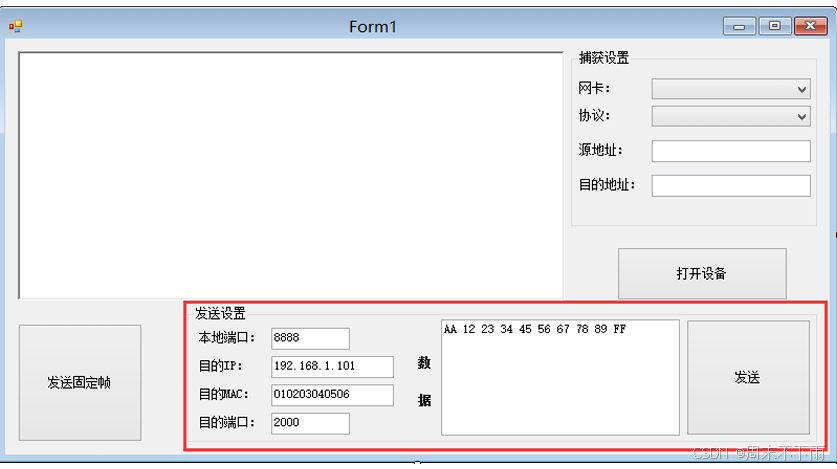
2.2 代码
using System;
using System.Collections.Generic;
using System.ComponentModel;
using System.Data;
using System.Drawing;
using System.Linq;
using System.Text;
using System.Windows.Forms;
using SharpPcap;
using PacketDotNet;
using SharpPcap.LibPcap;
using System.Net;
using System.Net.NetworkInformation;

namespace 实验教程
{
    // 协议类型
    public enum SnapProtocol : int
    {
        udp = 0,
        tcp = 1,
        arp = 2,
        rarp = 3,
        ip = 4
    }

    public partial class Form1 : Form
    {
        /// <summary>
        /// 全局私有变量
        /// </summary>
        CaptureDeviceList   device_list;         // 设备列表
        ICaptureDevice      device;              // 当前选择设备
        DelegateMethod      disp_info;           // 委托

        public Form1()
        {
            InitializeComponent();

            // 获得设备列表
            device_list = GetDeviceList();

            // 获取支持的协议列表
            LoadProto();

            // 载入所有网卡
            LoadDevice();

            // 显示数据包委托函数
            disp_info = new DelegateMethod(Disp_PacketInfo);
        }

        #region 程序初始化

        /// <summary>
        /// 获得当前的设备列表(网卡)
        /// </summary>
        /// <returns></returns>
        private CaptureDeviceList GetDeviceList()
        {
            // Print SharpPcap version
            string ver = SharpPcap.Version.VersionString;
            this.richTextBox1.Text = string.Format("SharpPcap {0}, Device List\n", ver);
            try
            {
                // Retrieve the device list
                CaptureDeviceList devices = CaptureDeviceList.Instance;

                // If no devices were found print an error
                if (devices.Count < 1)
                {
                    this.richTextBox1.Text += "No devices were found on this machine\n";
                    return null;
                }

                this.richTextBox1.Text += "\nThe following devices are available on this machine:\n";
                this.richTextBox1.Text += "----------------------------------------------------\n";

                // Print out the available network devices
                foreach (ICaptureDevice dev in devices)
                    this.richTextBox1.Text += string.Format("{0}\n", dev.ToString());

                return devices;
            }
            catch (System.Exception ex)
            {
                MessageBox.Show(ex.ToString());
                return null;
            }
        }

        /// <summary>
        /// 获取支持的协议列表
        /// </summary>
        private void LoadProto()
        {
            comboBox2.Items.Clear();
            foreach (string e in Enum.GetNames(typeof(SnapProtocol)))
            {
                comboBox2.Items.Add(e);
            }
            comboBox2.SelectedIndex = 0;
        }

        /// <summary>
        /// 载入所有网卡信息
        /// </summary>
        private void LoadDevice()
        {
            comboBox1.Items.Clear();
            if (device_list == null)
            {
                MessageBox.Show("没有找到任何网卡设备!");
                return;
            }

            foreach (LibPcapLiveDevice dev in device_list)
            {
                try
                {
                    comboBox1.Items.Add(dev.Addresses[0].Addr);
                }
                catch
                {
                    continue;
                }
            }
            comboBox1.SelectedIndex = 0;
        }

        #endregion

        /// <summary>
        /// 打开设备
        /// </summary>
        /// <param name="sender"></param>
        /// <param name="e"></param>
        private void button1_Click(object sender, EventArgs e)
        {

            if (button1.Text == "打开设备")
            {
                button1.Text = "关闭设备";
                groupBox1.Enabled = false;


                device = device_list[comboBox1.SelectedIndex];
                device.OnPacketArrival += new SharpPcap.PacketArrivalEventHandler(device_OnPacketArrival);
                device.Open(DeviceMode.Promiscuous, 1000);
                device.Filter = RcvPacketFilter();
                device.StartCapture();
            }
            else
            {
                button1.Text = "打开设备";
                groupBox1.Enabled = true;

                device.StopCapture();
                device.Close();
            }
        }


        #region 捕获和显示函数

        /// <summary>
        /// 根据要求构造数据包过滤字符串
        /// </summary>
        private string RcvPacketFilter()
        {
            SnapProtocol proto = (SnapProtocol)comboBox2.SelectedIndex;
            IPAddress src_host, dst_host;

            string filter = proto.ToString();
            if ((textBox1.Text.Trim().Length > 0) && (IPAddress.TryParse(textBox1.Text, out src_host)))
            {
                filter += string.Format(" and src host {0}", src_host.ToString());
            }

            if ((textBox2.Text.Trim().Length > 0) && (IPAddress.TryParse(textBox2.Text, out dst_host)))
            {
                filter += string.Format(" and dst host {0}", dst_host.ToString());
            }

            return filter;
        }

        /// <summary>
        /// 抓包事件函数,在抓到符合条件的数据包的时候该函数将被调用
        /// 功能:
        ///     1. 获得当前数据包的时间间隔、长度、协议类型、地址等参数
        ///     2. 将信息输出到RichTextBox控件显示出来
        /// </summary>
        private void device_OnPacketArrival(object sender, CaptureEventArgs packet)
        {
            // 时间和长度的获取
            DateTime time = packet.Packet.Timeval.Date;
            int len = packet.Packet.Data.Length;
            // 解析数据包成:IP包
            Packet p = Packet.ParsePacket(packet.Packet.LinkLayerType, packet.Packet.Data);
            IpPacket ip = (IpPacket)p.Extract(typeof(IpPacket));

            // 数据包信息
            string info = string.Format("\nsrc_addr={0}, des_addr={1}, type={2}\n",
                ip.SourceAddress, ip.DestinationAddress, ip.Protocol);
            info += string.Format("{0}:{1}:{2},{3} Len={4}\n",
                time.Hour, time.Minute, time.Second, time.Millisecond, len);

            info += string.Format(byteToHexStr(packet.Packet.Data));
            // 使用委托显示结果
            int a1 = info.IndexOf("0A 00 00", 0);
            string b1 = info.Substring(a1 + 9, 2);
            string c1 = info.Substring(a1 +12, 2);
            string a = "温度:" + b1 + " " + "湿度:" + c1+"\n";
            richTextBox1.Invoke(disp_info, info);
            richTextBox1.Invoke(disp_info, a);
        }


        delegate void DelegateMethod(string info);
        /// <summary>
        /// 显示收到数据包的信息(由于捕获过程开辟了新线程,因此捕获结果需要委托来传递到RichTextBox)
        /// </summary>
        /// <param name="info"></param>
        private void Disp_PacketInfo(string info)
        {
            richTextBox1.Text += info;
        }

        #endregion


        #region 发送

        /// <summary>
        /// 固定的UDP帧
        /// </summary>
        byte[] packetConst = new byte[58]
        {
            0x01,0x02,0x03,0x04,0x05,0x06,                     // dstMac
            0xB8,0x88,0xE3,0x36,0x65,0x59,                     // srcMac
            0x08,0x00,                                         // Type          :Ip
            0x45,                                              // Version       :4
            0x00,                                              // 分隔符
            0x00,0x2C,                                         // Total Length  :16+28 = 44
            0x00,0x00,                                         // 校验位
            0x00,0x00,                                         // 片偏移
            0x80,                                              // 生存时间      :128
            0x11,                                              // Protocol      :UDP
            0xB6,0x9C,                                         // 报头校验和
            0xc0,0xa8,0x01,0x65,                               // srcIP         :192.168.1.101
            0xc0,0xa8,0x01,0x6F,                               // dstIP         :192.168.1.111
            0x22,0xb8,                                         // srcPort       :8888
            0x07,0xd0,                                         // destPort      :2000
            0x00,0x18,                                         // UDP数据长度   :16+8 = 24
            0xBF,0x40,                                         // UDP校验和

            0x00, 0x11, 0x22, 0x33, 0x44, 0x55, 0x66, 0x77,    // 数据
            0x88, 0x99, 0xAA, 0xBB, 0xCC, 0xDD, 0xEE, 0xFF
        };

        /// <summary>
        /// 发送固定帧按钮
        /// </summary>
        /// <param name="sender"></param>
        /// <param name="e"></param>
        private void button2_Click(object sender, EventArgs e)
        {
            try
            {
                device.SendPacket(packetConst);
            }
            catch
            {
                return;
            }
        }

        /// <summary>
        /// 使用函数构造UDP数据包
        /// </summary>
        /// <param name="device"></param>
        /// <param name="dst_mac"></param>
        /// <param name="dst_ip"></param>
        /// <param name="src_port"></param>
        /// <param name="dst_port"></param>
        /// <param name="send_data"></param>
        /// <returns></returns>
        private byte[] GenUDPPacket(PcapDevice device, PhysicalAddress dst_mac, IPAddress dst_ip, int src_port,
            int dst_port, string send_data)
        {
            // 构造UDP部分数据报
            UdpPacket udp_pkg = new UdpPacket((ushort)src_port, (ushort)dst_port);
            udp_pkg.PayloadData = strToToHexByte(send_data);
            udp_pkg.UpdateCalculatedValues();
            // 构造IP部分数据报
            /// IPv4Packet ip_pkg = new IPv4Packet(device.Interface.Addresses[3].Addr.ipAddress, dst_ip);//这个地方有问题!
            IPAddress ipAddress_1 = IPAddress.Parse(textBox1.Text);
            IPv4Packet ip_pkg = new IPv4Packet(ipAddress_1, dst_ip);//这个地方有问题!
            ip_pkg.Protocol = IPProtocolType.UDP;
            ip_pkg.Version = IpVersion.IPv4;
            ip_pkg.PayloadData = udp_pkg.Bytes;
            ip_pkg.TimeToLive = 10;
            ip_pkg.UpdateCalculatedValues();
            ip_pkg.UpdateIPChecksum();
            // 构造以太网帧
            EthernetPacket net_pkg = new EthernetPacket(device.MacAddress, dst_mac, EthernetPacketType.IpV4);
            net_pkg.Type = EthernetPacketType.IpV4;
            net_pkg.PayloadData = ip_pkg.Bytes;
            net_pkg.UpdateCalculatedValues();

            return net_pkg.Bytes;
        }

        /// <summary>
        /// 发送文本框内数据
        /// </summary>
        /// <param name="sender"></param>
        /// <param name="e"></param>
        private void button3_Click(object sender, EventArgs e)
        {
            int local_port, dst_port;
            string send_data;
            IPAddress dst_ip;
            PhysicalAddress dst_mac;

            send_data = textBox7.Text + textBox8.Text;
            send_data = "11 11";
            try
            {
                if (int.TryParse(textBox3.Text, out local_port) &&
                    int.TryParse(textBox6.Text, out dst_port)&&
                    IPAddress.TryParse(textBox4.Text, out dst_ip))
                {
                    dst_mac = PhysicalAddress.Parse(textBox5.Text);
                    var a = GenUDPPacket((PcapDevice)device, dst_mac, dst_ip, local_port, dst_port, send_data);
                    device.SendPacket(a);
                }
            }
            catch
            {
                MessageBox.Show("发送出错!");
                return;
            }
        }

        #endregion

        #region 字符串与byte数组相互转换

        /// <summary>
        /// 字节数组转16进制字符串
        /// </summary>
        /// <param name="bytes"></param>
        /// <returns></returns>
        public static string byteToHexStr(byte[] bytes)
        {
            string returnStr = "";
            if (bytes != null)
            {
                for (int i = 0; i < bytes.Length; i++)
                {
                    returnStr += bytes[i].ToString("X2") + " ";
                }
            }
            return returnStr;
        }

        /// <summary>
        /// 字符串转16进制字节数组
        /// </summary>
        /// <param name="hexString"></param>
        /// <returns></returns>
        public static byte[] strToToHexByte(string hexString)
        {
            hexString = hexString.Replace(" ", "");
            if ((hexString.Length % 2) != 0)
                hexString += " ";
            byte[] returnBytes = new byte[hexString.Length / 2];
            for (int i = 0; i < returnBytes.Length; i++)
                returnBytes[i] = Convert.ToByte(hexString.Substring(i * 2, 2), 16);
            return returnBytes;
        }

        /// <summary>
        /// 字符串IP地址转换成byte数组
        /// </summary>
        /// <param name="decString"></param>
        /// <returns></returns>
        public static byte[] strIPToByte(string decString)
        {
            string[] decStringArray = decString.Split('.');
            if (decStringArray.Length == 4)
            {
                byte[] returnBytes = new byte[4];
                for (int i = 0; i < 4; i++)
                {
                    returnBytes[i] = Convert.ToByte(decStringArray[i]);
                }
                return returnBytes;
            }
            else
            {
                MessageBox.Show("IP地址格式错误!(参考:192.168.0.1)");
                return null;
            }
        }


        #endregion

        private void label5_Click(object sender, EventArgs e)
        {

        }
    }
}
2.3 代码分析
2.3.1 UDP 数据包构造函数
不同于实验三,本实验将通过下面的函数构造一帧数据。从函数的定义可知,构造一个UDP数据包需要知道以下信息: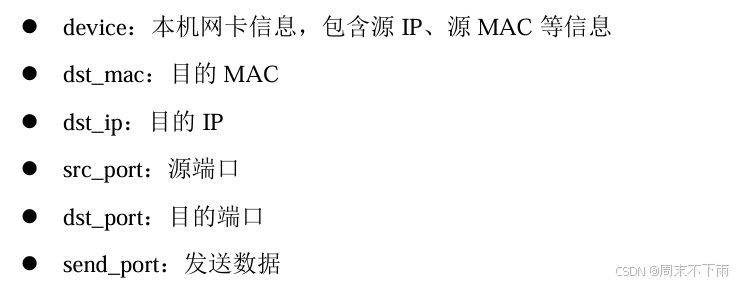
        private byte[] GenUDPPacket(PcapDevice device, PhysicalAddress dst_mac, IPAddress dst_ip, int src_port,
            int dst_port, string send_data)
        {
            // 构造UDP部分数据报
            UdpPacket udp_pkg = new UdpPacket((ushort)src_port, (ushort)dst_port);
            udp_pkg.PayloadData = strToToHexByte(send_data);
            udp_pkg.UpdateCalculatedValues();
            // 构造IP部分数据报
            /// IPv4Packet ip_pkg = new IPv4Packet(device.Interface.Addresses[3].Addr.ipAddress, dst_ip);//这个地方有问题!
            IPAddress ipAddress_1 = IPAddress.Parse(textBox1.Text);
            IPv4Packet ip_pkg = new IPv4Packet(ipAddress_1, dst_ip);//这个地方有问题!
            ip_pkg.Protocol = IPProtocolType.UDP;
            ip_pkg.Version = IpVersion.IPv4;
            ip_pkg.PayloadData = udp_pkg.Bytes;
            ip_pkg.TimeToLive = 10;
            ip_pkg.UpdateCalculatedValues();
            ip_pkg.UpdateIPChecksum();
            // 构造以太网帧
            EthernetPacket net_pkg = new EthernetPacket(device.MacAddress, dst_mac, EthernetPacketType.IpV4);
            net_pkg.Type = EthernetPacketType.IpV4;
            net_pkg.PayloadData = ip_pkg.Bytes;
            net_pkg.UpdateCalculatedValues();

            return net_pkg.Bytes;
        }
如代码中所示,与实验三类似,各层报文中所有的信息都需要配置完全。使用函数的区别在于,所有配置信息都可以通过属性的形式读取和配置,比较直观。
其中,部分参数需要计算,例如:报文头的校验以及报文的长度。这类参数可以调用相关函数来实现配置,例如“构造IP部分数据报”中的:ip_pkg.UpdateCalculatedValues(); ip_pkg.UpdateIPChecksum();
其中,UpdateCalculatedValues 和 UpdateIPChecksum 这两个函数的功能就是计算长度和校验值,并填充到相应位置。
在最后构造完以太网帧,即配置以太网帧基本参数以后,通过属性 Bytes即可得到如实验三类似的UDP协议数据包的数据。
2.3.2 发送函数
获得数据包数据以后,就可以调用SendPacket函数发送了,这与实验三相同。数据包的数据则通过上一节中所述函数获取,函数所需参数的获取如下列高亮部分代码所示: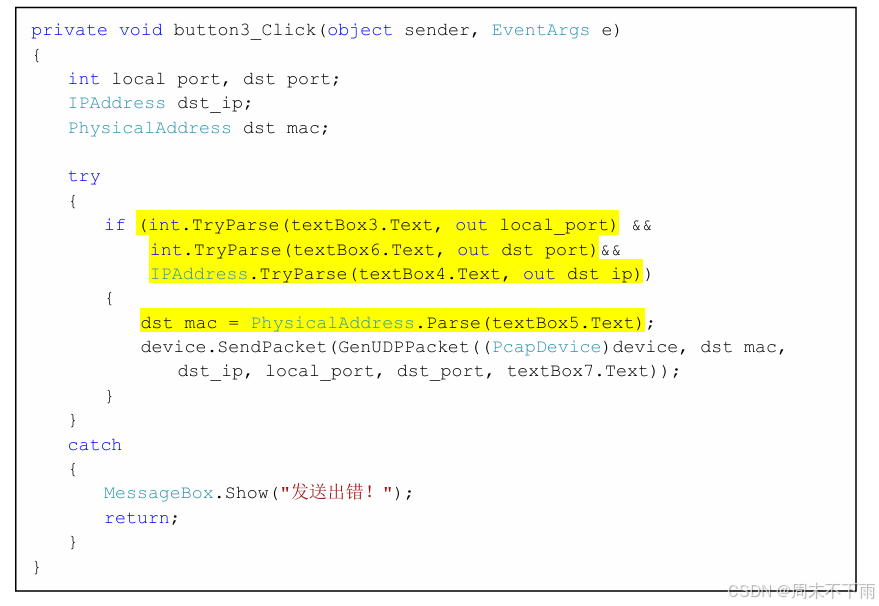
        private void button3_Click(object sender, EventArgs e)
        {
            int local_port, dst_port;
            string send_data;
            IPAddress dst_ip;
            PhysicalAddress dst_mac;

            send_data = textBox7.Text + textBox8.Text;
            send_data = "11 11";
            try
            {
                if (int.TryParse(textBox3.Text, out local_port) &&
                    int.TryParse(textBox6.Text, out dst_port)&&
                    IPAddress.TryParse(textBox4.Text, out dst_ip))
                {
                    dst_mac = PhysicalAddress.Parse(textBox5.Text);
                    var a = GenUDPPacket((PcapDevice)device, dst_mac, dst_ip, local_port, dst_port, send_data);
                    device.SendPacket(a);
                }
            }
            catch
            {
                MessageBox.Show("发送出错!");
                return;
            }
        }
2.4 运行程序
程序运行结果如下图所示,为了验证,将捕获设置中的源地址和目的地址按照发送设置设置。点击发送以后,即可看到包含发送的数据的数据包。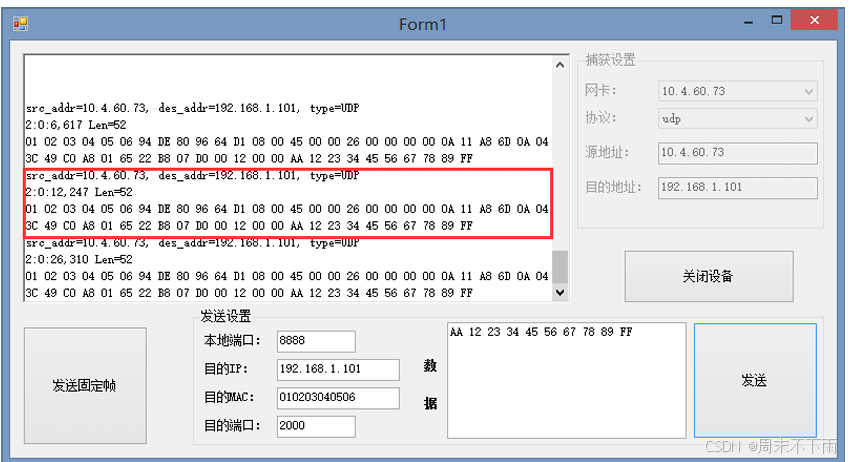

DAMO开发者矩阵,由阿里巴巴达摩院和中国互联网协会联合发起,致力于探讨最前沿的技术趋势与应用成果,搭建高质量的交流与分享平台,推动技术创新与产业应用链接,围绕“人工智能与新型计算”构建开放共享的开发者生态。
更多推荐
 9
9 0
0- 0


 已为社区贡献3条内容

所有评论(0)