代码计算sky view factor(天空可视度SVF)
参考文章https://www.cnblogs.com/pygisxss/p/12740829.html
提前声明本人很菜,全靠AI按照文章一步一步生成的代码,想着写都写了干脆发出来给大家提供一点参考。
注意!投影非常关键!我这边全部统一投影坐标系3395,大家自己可以按需设置。
原文的像元大小设置为20m,我这里是30m,大家也要对应调整自己的cell_size和缓冲区半径。
建筑数据来源:3D-GloBFP: the first global three-dimensional building footprint dataset
ESSD - 3D-GloBFP:全球首个三维建筑覆盖区数据集
下载链接:
3D-GloBFP: the first global three-dimensional building footprint dataset(3D-GloBFP 中美洲、非洲和大洋洲的建筑高度)(Che et al., 2024c)、3D-GloBFP: the first global three-dimensional building footprint dataset(3D-GloBFP 中亚洲的建筑高度)(Che et al., 2024a)3D-GloBFP: the first global three-dimensional building footprint dataset(3D-GloBFP 中欧洲的建筑高度)(Che et al., 2024b)
数据集以 shapefile 格式存储,建筑物高度位于属性表中。
下面是代码:
import arcpy
import os
from arcpy import env

# =========================
# 设置工作空间和环境参数
# =========================
env.workspace = r"D:\test\SVF.gdb"
env.outputCoordinateSystem = arcpy.SpatialReference(3395)
env.overwriteOutput = True  # 允许覆盖输出文件

# =========================
# 输入数据
# =========================
buildings = "bfp"      # 建筑面要素类
area = "region"        # 区域边界面要素类

# =========================
# 1. 投影转换
# =========================
arcpy.Project_management(buildings, 'bfp_projected', env.outputCoordinateSystem)
arcpy.Project_management(area, 'region_projected', env.outputCoordinateSystem)
buildings = 'bfp_projected'
area = 'region_projected'

# =========================
# 2. 融合建筑面
# =========================
arcpy.management.Dissolve(buildings, 'buildings_dissolved')
print("建筑要素融合完成")

# =========================
# 3. 从区域中移除建筑所占区域
# =========================
arcpy.Erase_analysis(area, 'buildings_dissolved', 'region_clip')
print("擦除操作完成")

# =========================
# 4. 合并建筑与开敞区域
# =========================
arcpy.Merge_management(['region_clip', buildings], 'merged_result')
print("合并操作完成")

# =========================
# 5. 将第一个要素的 Height 设为 0(原region对应字段)
# =========================
with arcpy.da.UpdateCursor('merged_result', ['Height']) as cursor:
    first_row = next(cursor)
    first_row[0] = 0
    cursor.updateRow(first_row)
print("字段已设为0")

# =========================
# 6. 面转栅格(字段:Height)
# =========================
arcpy.PolygonToRaster_conversion(
    'merged_result',
    'Height',
    "merged_raster",
    cellsize=30, # 像元大小自行调整
)
print("面转栅格完成")

# =========================
# 7. 栅格转点
# =========================
arcpy.RasterToPoint_conversion("merged_raster", "merged_points", "VALUE")
print("栅格转点完成")

# =========================
# 8. 创建15米圆形缓冲区
# =========================
arcpy.Buffer_analysis("merged_points", "points_buffer_15m", "15 Meters")
print("缓冲区创建完成")

# =========================
# 9. 缓冲区与之前merge的面进行相交
# =========================
arcpy.Intersect_analysis(["points_buffer_15m", "merged_result"], "intersect")
print("相交分析完成")

# =========================
# 10. 添加SinA字段(用于计算天空可见因子)
# =========================
intersect_features = "intersect"
buffer_distance = 15  # 缓冲区半径,单位为米

arcpy.AddField_management(
    in_table=intersect_features,
    field_name="SinA",
    field_type="DOUBLE",
    field_precision=10,
    field_scale=6
)
print("SinA字段添加完成")

# =========================
# 11. 计算 SinA 值
# =========================
# 公式:SinA = h / sqrt(h^2 + r^2),h 为建筑高度差,r 为缓冲半径
expression = f"""math.sqrt((!Height! - !grid_code!)**2 + {buffer_distance}**2)"""
code_block = """
def calculate_sina(height, grid_code):
    if height > grid_code:
        h = height - grid_code
        r = {0}
        return h / math.sqrt(h**2 + r**2)
    else:
        return 0
""".format(buffer_distance)

arcpy.CalculateField_management(
    in_table=intersect_features,
    field="SinA",
    expression="calculate_sina(!Height!, !grid_code!)",
    expression_type="PYTHON3",
    code_block=code_block
)
print("SinA字段计算完成")

# =========================
# 12. 汇总每个点的平均SinA
# =========================
summary_table = os.path.join(env.workspace, "SinA_Summary")

arcpy.Statistics_analysis(
    in_table=intersect_features,
    out_table=summary_table,
    statistics_fields=[["SinA", "MEAN"]],
    case_field="pointid"
)
print("SinA汇总完成")

# =========================
# 13. 导出成属性表
# =========================
arcpy.MakeFeatureLayer_management("merged_points", "points_layer")
arcpy.MakeTableView_management("SinA_Summary", "summary_view")

# =========================
# 14. 连接S属性表到点要素
# =========================
arcpy.AddJoin_management(
    in_layer_or_view="points_layer",
    in_field="pointid",
    join_table="summary_view",
    join_field="pointid",
    join_type="KEEP_ALL"
)

# 导出连接后的结果
joined_features = os.path.join(env.workspace, "points_with_avgSinA")
arcpy.CopyFeatures_management("points_layer", joined_features)

# 可选:断开连接
arcpy.RemoveJoin_management("points_layer")
print(f"连接完成,结果保存在: {joined_features}")

# =========================
# 15. 对点要素添加SVF字段
# =========================
arcpy.AddField_management(
    in_table="points_with_avgSinA",
    field_name="SVF",
    field_type="DOUBLE",
    field_precision=10,
    field_scale=6
)
print("SVF字段添加完成")

# =========================
# 16. 计算SVF值(SVF = 1 - 平均SinA)
# =========================
arcpy.CalculateField_management(
    in_table="points_with_avgSinA",
    field="SVF",
    expression="1 - !SinA_Summary_MEAN_SinA!",
    expression_type="PYTHON3"
)
print("SVF字段计算完成")

# =========================
# 17. 点转栅格(输出SVF栅格)
# =========================
arcpy.PointToRaster_conversion(
    in_features="points_with_avgSinA",
    value_field="SVF",
    out_rasterdataset="SVF_Raster_30m",
    cell_assignment="MEAN",
    priority_field="",
    cellsize=30
)
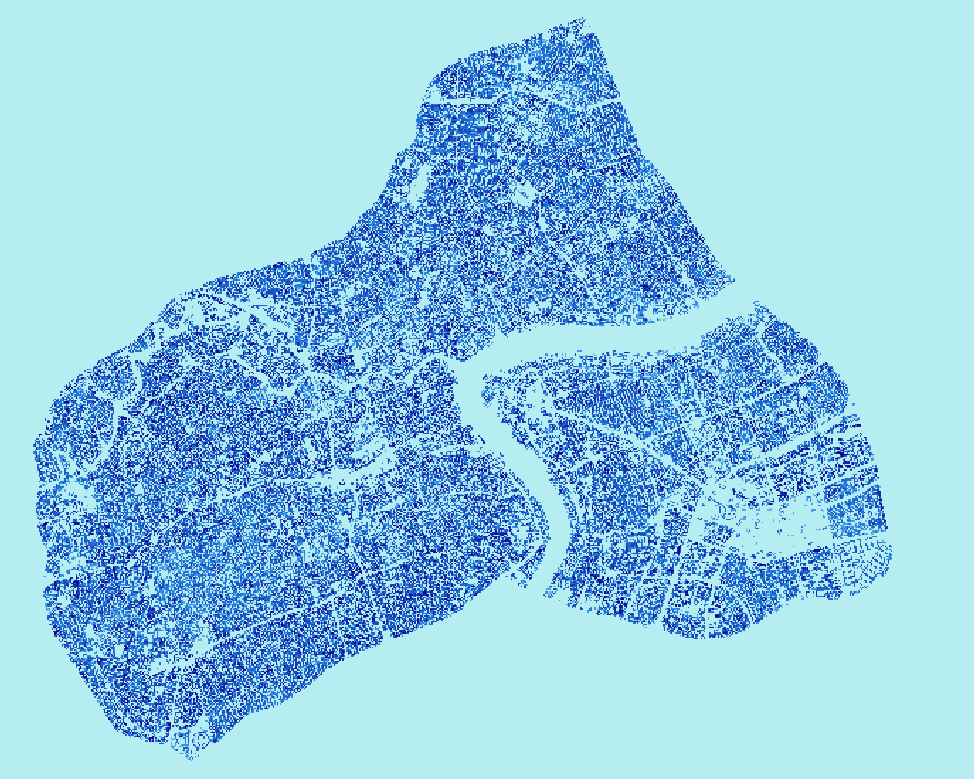
print("点转栅格完成,结果保存在: SVF_Raster_30m")
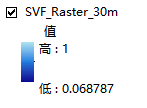
结果

DAMO开发者矩阵,由阿里巴巴达摩院和中国互联网协会联合发起,致力于探讨最前沿的技术趋势与应用成果,搭建高质量的交流与分享平台,推动技术创新与产业应用链接,围绕“人工智能与新型计算”构建开放共享的开发者生态。
更多推荐
 3
3 0
0- 0


 已为社区贡献2条内容

所有评论(0)