

夏普比率excel
In Excel, if you divide 2 by 8, the result is 0.25. If you format the cell as a fraction, the cell might show 1/4 as the result. But how can you calculate a ratio in Excel? See the steps below.
在Excel中,如果将2除以8,则结果为0.25。 如果将单元格格式化为小数,结果单元格可能会显示1/4。 但是如何在Excel中计算比率? 请参阅以下步骤。
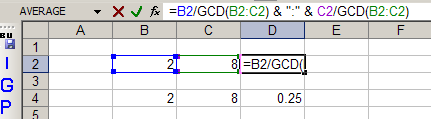
Here's a worksheet with 2 divided by 8, with the result showing as a ratio, in cell D2, and as a decimal number in cell D4.
这是一个工作表,其中2除以8,结果在D2单元格中以比率显示,在D4单元格中以十进制数显示。

视频:在Excel中显示比率 (Video: Show a Ratio in Excel)
Watch this short video to see how to show a ratio in Excel. It shows 2 different formulas that you can use. The written steps are below the video.
观看此简短视频,了解如何在Excel中显示比率。 它显示了两个可以使用的公式。 书面步骤在视频下方。
在Excel中显示比率 (Show a Ratio in Excel)
What if you want to show the result as a ratio? How can you get the cell to show 1:4 instead of 1/4? There may be other ways, but here's the formula that I used.
如果要以比率显示结果怎么办? 如何使单元格显示1:4而不是1/4? 可能还有其他方法,但这是我使用的公式。
=B2/GCD(B2,C2) & ":" & C2/GCD(B2,C2)
比率公式如何工作 (How the Ratio Formula Works)
NOTE: This formula requires that the Analysis ToolPak be installed, in Excel 2003 and earlier versions.
注意:此公式要求在Excel 2003和更早版本中安装Analysis ToolPak。
The formula:
公式:
- divides each cell by the greatest common divisor (GCD) 将每个像元除以最大公约数(GCD)
- puts a colon between the two numbers -- ":" 在两个数字之间加一个冒号-“:”
另一个比率公式 (Another Ratio Formula)
Another way to calculate ratio is with the TEXT and SUBSTITUTE functions -- these functions work in all versions of Excel, without the Analysis Tookpak installed.
另一种计算比率的方法是使用TEXT和SUBSTITUTE函数-这些函数可在所有版本的Excel中运行,而无需安装Analysis Tookpak。
In this example, there is a list of video dimensions on the worksheet.
在本示例中,工作表上有一个视频尺寸列表。
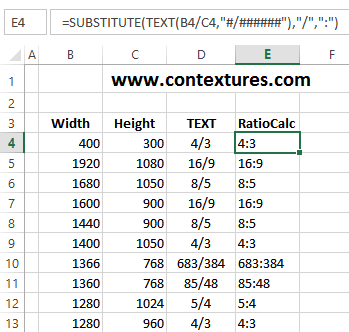
To see the ratio, enter this formula in cell E4:
要查看比率,请在单元格E4中输入以下公式:
=SUBSTITUTE(TEXT(B4/C4,"#/######"),"/",":")
= SUBSTITUTE(TEXT(B4 / C4,“#/ ######”),“ /”,“:”)
The result is 4:3 -- the ratio for those screen dimensions.
结果为4:3-这些屏幕尺寸的比例。
此比率公式如何工作 (How This Ratio Formula Works)
In this formula:
在此公式中:
- First, the width(B4) is divided by the height (C4) 首先,宽度(B4)除以高度(C4)
-
The TEXT function formats the result as a fraction -- "#/######"
TEXT函数将结果格式化为分数- “#/ ######”
-
The SUBSTITUTE function replaces the slash with a colon -- "/",":"
SUBSTITUTE函数将斜杠替换为冒号- “ /”,“:”
获取样本文件 (Get the Sample File)
To see the sample file used in the video, with both Ratio formulas, go to the Excel Ratio Formula page on my Contextures website. The zipped file is in xlsx format, and does not contain any macros.
要查看视频中使用的示例文件以及两个比率公式,请转到Contextures网站上的Excel Ratio Formula页面 。 压缩文件为xlsx格式,不包含任何宏。
翻译自: https://contexturesblog.com/archives/2009/01/16/calculate-a-ratio-in-excel/
夏普比率excel


 已为社区贡献24条内容

所有评论(0)