php数据表格控件,数据表格展示 - 扩展组件 - jQuery EasyUI中文网
数据表格展示扩展组件 » 数据表格展示数据表格展示步骤 1: 创建HTML页面步骤 2: 创建数据表格$('#tt').datagrid({title:'DataGrid - DetailView',width:500,height:250,remoteSort:false,singleSelect:true,nowrap:false,fitColumns:true,url:'datagrid_d
数据表格展示
扩展组件 » 数据表格展示
数据表格展示
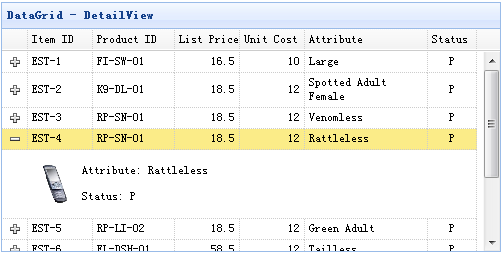
步骤 1: 创建HTML页面
步骤 2: 创建数据表格
$('#tt').datagrid({
title:'DataGrid - DetailView',
width:500,
height:250,
remoteSort:false,
singleSelect:true,
nowrap:false,
fitColumns:true,
url:'datagrid_data.json',
columns:[[
{field:'itemid',title:'Item ID',width:80},
{field:'productid',title:'Product ID',width:100,sortable:true},
{field:'listprice',title:'List Price',width:80,align:'right',sortable:true},
{field:'unitcost',title:'Unit Cost',width:80,align:'right',sortable:true},
{field:'attr1',title:'Attribute',width:150,sortable:true},
{field:'status',title:'Status',width:60,align:'center'}
]],
view: detailview,
detailFormatter: function(rowIndex, rowData){
return '' +
' ' +
' +
'' +
'
Attribute: ' + rowData.attr1 + '' +
'
Status: ' + rowData.status + '' +
'' +
'';
}
});
属性
名称
类型
描述
默认
autoUpdateDetail
boolean
定义更新行时是否更新行细节内容。
true
detailFormatter
function(index,row)
格式化程序函数以返回行详细信息内容。
事件
名称
参数
描述
onExpandRow
index,row
展开一行时触发。
onCollapseRow
index,row
当一行折叠时触发。
方法
名称
参数
描述
fixDetailRowHeight
index
固定细节行高度。
getExpander
index
获取行扩展对象。
getRowDetail
index
获取行细节容器。
expandRow
index
扩展一行。
collapseRow
index
折叠一行。
subgrid
conf
创建一个嵌套的子网格。conf参数具有“options”和“subgrid”属性。
1)选项:定义如何呈现datagrid。子网格的options对象有一个“foreignField”属性。foregin值将被发送到服务器以检索子网格的数据。
2)子网格:定义是否创建子网格。定义后,将创建嵌套的子网格。
用法实例:
var conf = {
options:{
//the master grid options
},
subgrid:{
options:{
foreignField:'orderid',// the foregin field name
//foreignField:function(prow){
//return {
//orderid: prow.id,
//ordername: prow.name
//}
//}
//other grid options
},
subgrid:{
options:{
foreignField:...,
//other grid options
}
}
}
};
$('#dg').datagrid().datagrid('subgrid', conf);
getSelfGrid
none
获取本身 datagrid对象。
getParentGrid
none
获取父类datagrid对象。
getParentRowIndex
none
获取父行索引。
数据表格展示
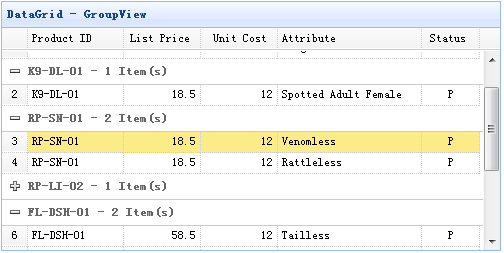
步骤 1: 创建HTML页面
步骤 2: 创建数据表格
$('#tt').datagrid({
title:'DataGrid - GroupView',
width:500,
height:250,
rownumbers:true,
remoteSort:false,
nowrap:false,
fitColumns:true,
url:'datagrid_data.json',
columns:[[
{field:'productid',title:'Product ID',width:100,sortable:true},
{field:'listprice',title:'List Price',width:80,align:'right',sortable:true},
{field:'unitcost',title:'Unit Cost',width:80,align:'right',sortable:true},
{field:'attr1',title:'Attribute',width:150,sortable:true},
{field:'status',title:'Status',width:60,align:'center'}
]],
groupField:'productid',
view: groupview,
groupFormatter:function(value, rows){
return value + ' - ' + rows.length + ' Item(s)';
}
});
属性
名称
类型
描述
默认
groupField
string
指示要分组的字段。
groupFormatter
function(value,rows)
返回组内容的格式化程序函数。值参数表示由“groupField”属性定义的组值。rows参数根据指定的组值指示数据行。
groupStyler
function(value,rows)
返回组的CSS样式的函数。值参数表示由“groupField”属性定义的组值。rows参数根据指定的组值指示数据行。
用法实例:
$('#dg').datagrid({
groupStyler: function(value,rows){
if (value == 'RP-LI-02'){
return 'background-color:#6293BB;color:#fff;'; // return inline style
// the function can return predefined css class and inline style
// return {class:'r1', style:{'color:#fff'}};
}
}
});
事件
名称
参数
描述
onExpandGroup
groupIndex
展开组时触发。
onCollapseGroup
groupIndex
当一组折叠时触发。
方法
名称
参数
描述
expandGroup
groupIndex
扩展一组。
collapseGroup
groupIndex
折叠一组。
scrollToGroup
groupIndex
滚动到一个组。
refreshGroupTitle
groupIndex
刷新组标题。
DataGrid BufferView
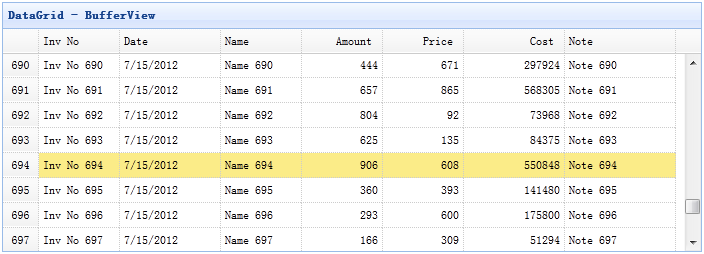
步骤 1: 包括bufferview javascript文件
步骤 2:创建数据表格
Inv No
Date
名称
Amount
Price
Cost
Note
数据表格虚拟视图
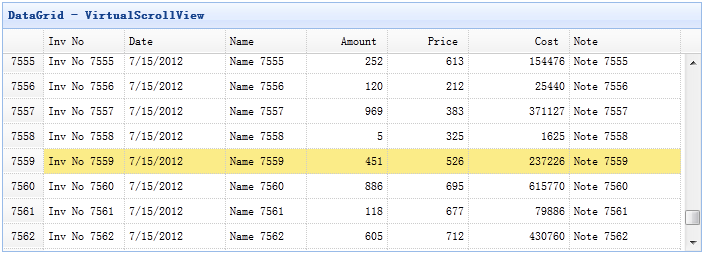
步骤 1: 包括scrollview javascript文件
使用虚拟滚动视图创建DataGrid
Inv No
Date
名称
Amount
Price
Cost
Note
方法
名称
参数
描述
getRow
index
获取指定的行数据。
gotoPage
page
转到指定的页面。
代码实例:
$('#dg').datagrid('gotoPage', 8); // go to the page 8
$('#dg').datagrid('gotoPage', {
page: 12,
callback: function(page){
console.log('go to page: ' + page);
}
});
scrollTo
index
将视图滚动到指定行.
代码实例:
$('#dg').datagrid('scrollTo', 200); // scroll to the row 200
$('#dg').datagrid('scrollTo', {
index: 120,
callback: function(index){
console.log('scroll to the row: ' + index);
}
});
fixDetailRowHeight
index
固定细节行高度。
getExpander
index
获取行扩展器对象。
getRowDetail
index
获取行细节容器。
expandRow
index
扩展一行。
collapseRow
index
折叠一行。
下载EasyUI扩展:

DAMO开发者矩阵,由阿里巴巴达摩院和中国互联网协会联合发起,致力于探讨最前沿的技术趋势与应用成果,搭建高质量的交流与分享平台,推动技术创新与产业应用链接,围绕“人工智能与新型计算”构建开放共享的开发者生态。
更多推荐

 0
0 0
0- 0


 已为社区贡献2条内容

所有评论(0)