Qt自制多功能程序设计——Qt视频播放器(结合数据库mysql、qsqlite)
·
上篇文章介绍了整个项目里的音乐播放器,这次介绍视频播放器,两者极其相似,都是打开软件自动读取数据库里的音乐或视频然后加载到播放目录,然后用户通过各种交互按钮进行操作。
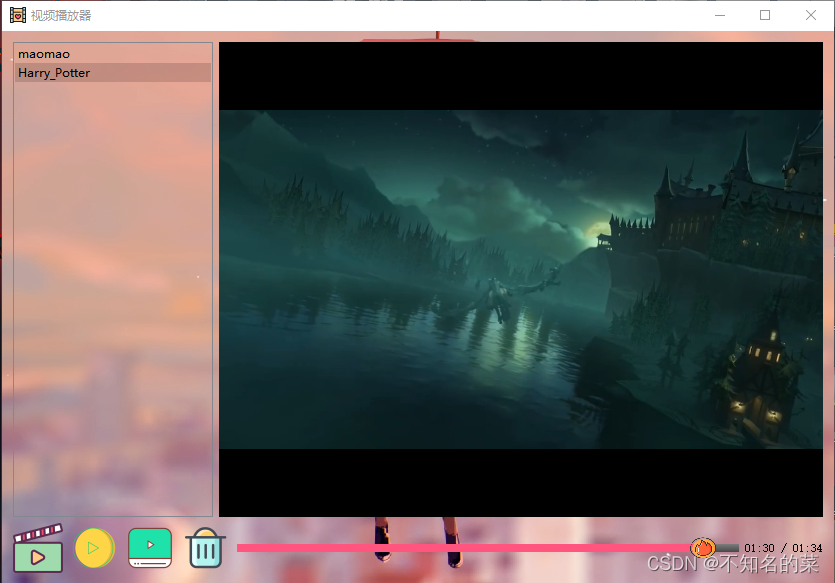
实现功能
1.利用数据库,打开视频播放器自动读取已添加的视频,并可以随时添加或删除视频;
2.利用qt样式表进行美化。
3.实现各类型音频文件的播放
ui实现
这次ui没有像之前音乐播放器直接用的.ui文件,这次全是以代码的形式实现的,先把用于布局的水平布局器和垂直布局器new出来,然后目录、滑动条也new出来,当前播放时间、视频总长所用的标签的一并创建。
//添加水平布局器和垂直布局器
QHBoxLayout *hbox_1 = new QHBoxLayout;
QHBoxLayout *hbox_2 = new QHBoxLayout;
QVBoxLayout *vbox   = new QVBoxLayout;

//添加控件
list   = new QListWidget(this);
Slider = new QSlider(Qt::Horizontal);
cur_time  = new QLabel(this);
tot_time  = new QLabel(this);
xiegang = new QLabel(this);
接着是list和slider空间的stylesheet设置,再.ui里可以直接右键改变样式表,如果要通过代码改写,就要用到 setStyleSheet()函数
list->setStyleSheet("QListWidget{background-color: transparent;}");                  \
Slider->setStyleSheet("QSlider::groove:horizontal {                            \
                       height: 8px;                                             \
                       background: qlineargradient(x1: 0, y1: 0, x2: 0, y2: 1,  \
                                                   stop: 0 rgb(124, 124, 124),  \
                                                   stop: 1.0 rgb(72, 71, 71));} \
                       QSlider::handle:horizontal {                             \
                       border-image: url(:/Image/slider2.png);                  \
                       width: 30px;                                             \
                       height:30px;                                             \
                       margin: -8px px -8px -3px;}                              \
                       QSlider::sub-page:horizontal{                            \
                       background:rgba(255, 85, 127,1);}                        \
                       ");
最后就是把几个按钮创建出来
    tianjiaBtn = new MyButton(":/Image/shipin1.png","",28);
    tianjiaBtn->setParent(this);
    tianjiaBtn->coordinateX = tianjiaBtn->x();
    tianjiaBtn->coordinateY = tianjiaBtn->y();
    tianjiaBtn->move(tianjiaBtn->coordinateX, tianjiaBtn->coordinateY);
    tianjiaBtn->setToolTip("添加文件");     //按钮标签

    zantingBtn = new MyButton(":/Image/zanting5.png","",29);
    zantingBtn->setParent(this);
    zantingBtn->coordinateX = zantingBtn->x();
    zantingBtn->coordinateY = zantingBtn->y();
    zantingBtn->move(zantingBtn->coordinateX, zantingBtn->coordinateY);
    zantingBtn->setToolTip("暂停/继续");     //按钮标签

    bofangBtn = new MyButton(":/Image/bofang6.png","",30);
    bofangBtn->setParent(this);
    bofangBtn->coordinateX = bofangBtn->x();
    bofangBtn->coordinateY = bofangBtn->y();
    bofangBtn->move(bofangBtn->coordinateX, bofangBtn->coordinateY);
    bofangBtn->setToolTip("开始播放");     //按钮标签

    shanchuBtn = new MyButton(":/Image/shanchu5.png","",31);
    shanchuBtn->setParent(this);
    shanchuBtn->coordinateX = shanchuBtn->x();
    shanchuBtn->coordinateY = shanchuBtn->y();
    shanchuBtn->move(shanchuBtn->coordinateX, shanchuBtn->coordinateY);
    shanchuBtn->setToolTip("删除文件");     //按钮标签
这样所有的控件都创建完毕了,接着就是把这些控件放到之前创建好的布局器里,然后把布局器贴到主界面上,最后对各个控件添加槽函数,用connect连接起来。
    hbox_1->addWidget(list);
    hbox_1->addWidget(video);

    hbox_2->addWidget(tianjiaBtn);     //把按钮放入布局器
    hbox_2->addWidget(zantingBtn);
    hbox_2->addWidget(bofangBtn);
    hbox_2->addWidget(shanchuBtn);
    hbox_2->addWidget(Slider);
    hbox_2->addWidget(cur_time);
    hbox_2->addWidget(xiegang);
    hbox_2->addWidget(tot_time);

    vbox->addLayout(hbox_1);
    vbox->addLayout(hbox_2);

    this->setLayout(vbox);      //把布局器贴到界面

    connect(tianjiaBtn,&MyButton::clicked,this,&Video::List_file);
    connect(zantingBtn,&MyButton::clicked,this,&Video::Pause);
    connect(bofangBtn,&MyButton::clicked,this,&Video::Play);
    connect(shanchuBtn,&MyButton::clicked,this,&Video::Del_file);
    //获取当前媒体的总时长
    connect(player, &QMediaPlayer::durationChanged, this, &Video::updateDuration);
    connect(player, &QMediaPlayer::positionChanged, this, &Video::updatePosition);
    connect(Slider, &QSlider::valueChanged, this, &Video::setPosition);
后面就是跟音乐播放器几乎一样的流程了,这里直接贴代码
void Video::List_file()
{
    QString curPash =QDir::currentPath();
    QString dlgTitle="选择视频文件";
    QString filter="mp4文件(*.mp4);;mp3文件(*.mp3);;flv文件(*.flv);;avi文件(*.avi)";
    QStringList fileList = QFileDialog::getOpenFileNames(this,dlgTitle,curPash,filter);
    if(fileList.count()<1)
       return;
    for(int i=0; i<fileList.count(); i++)
    {
        //将选择的文件显示在文本框上
        QString path = fileList.at(i);
        QString name = path.mid(path.lastIndexOf("/")+1,path.lastIndexOf(".")-1-path.lastIndexOf("/"));
        list->addItem(name);
        QString sql = QString("insert into mlist values('%1','%2');").arg(name).arg(path);
        qDebug()<<sql;
        QSqlQuery query;
        if(query.exec(sql)){
            qDebug()<<"插入数据库成功";
        }
        else{
            qDebug()<<"插入数据库失败";
        }
    }
}

void Video::Play()
{
    QString filename;
    //选择文件播放
    QListWidgetItem* item = list->currentItem();  //获取当前item
    name_file = item->text();

    QString sql = QString("select * from mlist where filename='%1';").arg(name_file);
    QSqlQuery query;
    if(query.exec(sql)){
        qDebug()<<"查询成功";
    }
    else {
        qDebug()<<"查询失败";
    }
    if( query.next()){

        qDebug()<<"登录成功";
        filename = query.value("path").toString();
    }
    else{
        qDebug()<<"登录失败";
    }
    player->setMedia(QUrl::fromLocalFile(filename));

    qDebug()<<"name:"<<filename;

    //显示视频
    player->setVideoOutput(video);
    video->show();
    player->play();
    bool ret = pix.load(zantingBtn->normalImgPath);
    if(!ret){
        qDebug() << "图片加载失败";
        return;
    }
}

void Video::Del_file()
{
    QListWidgetItem* item = list->currentItem();  //获取当前item
    name_file = item->text();

    QString sql = QString("delete from mlist where filename='%1';").arg(name_file);
    QSqlQuery query;
    if(query.exec(sql)){
        qDebug()<<"删除成功";
    }
    else {
        qDebug()<<"删除失败";
    }
    delete item;
}

void Video::Pause()
{
    //停止
    if(player->state()==QMediaPlayer::PlayingState)
    {
        zantingBtn->setIcon(QIcon(":/Image/bofang4.png"));

        zantingBtn->setToolTip("暂停");
        player->pause();
    }
    else
    {
        zantingBtn->setIcon(QIcon(":/Image/zanting5.png"));

        zantingBtn->setToolTip("开始");
        player->play();
    }
}

    //窗口关闭弹窗
void Video::closeEvent(QCloseEvent *event)
{
    emit this->VideoBack();
    this->close();
    this->deleteLater();
}

void Video::paintEvent(QPaintEvent *)
{
    //加载背景
    QPainter painter(this);

    QPixmap pix;
    pix.load(":/Image/background4.png");

    painter.setOpacity(1);//透明度设置
    painter.drawPixmap(0,0,this->width(),this->height(),pix);
}

void Video::updateDuration(qint64 duration)
{
    video_duration = duration;
    this->tot_time->setText(QString("%1:%2").arg(duration/1000/60,2,10,QChar('0')).arg(duration/1000%60));
    this->Slider->setRange(0, duration);
    this->Slider->setEnabled(duration > 0);
    this->Slider->setPageStep(duration / 10);
}

void Video::updatePosition(qint64 position)
{
    this->Slider->setValue(position);
    QTime duration(0, position / 60000, qRound((position % 60000) / 1000.0));
    this->cur_time->setText(duration.toString(tr("mm:ss")));
}

void Video::setPosition(int position)
{
    if (qAbs(player->position() - position) > 99)
        player->setPosition(position);
}
若有不懂之处,欢迎评论区留言或私信,制作不易,请点个赞和收藏吧!

DAMO开发者矩阵,由阿里巴巴达摩院和中国互联网协会联合发起,致力于探讨最前沿的技术趋势与应用成果,搭建高质量的交流与分享平台,推动技术创新与产业应用链接,围绕“人工智能与新型计算”构建开放共享的开发者生态。
更多推荐


 5
5 0
0- 0


 已为社区贡献2条内容

所有评论(0)