无法清除计算机的主dns,报错解决:将该计算机的主域DNS名称更改为""失败
Windows 7或者Sever 2008 R2 OS的计算机加入域的时候,可能会遇到过以下的错误,你有无遇到过呢?将该计算机的主域DNS名称更改为""失败。名称认为“XXX.com".错误为: 指定的服务器无法运行请求的操作。有3个可能导致这个错误的原因在IPV4属性中启用了 "Disable NetBIOS over TCP/IP"UDP 137 端口被封TCP/IPv4 协议被禁用以下是解决
Windows 7或者Sever 2008 R2 OS的计算机加入域的时候,可能会遇到过以下的错误,你有无遇到过呢?
将该计算机的主域DNS名称更改为""失败。名称认为“XXX.com".错误为: 指定的服务器无法运行请求的操作。
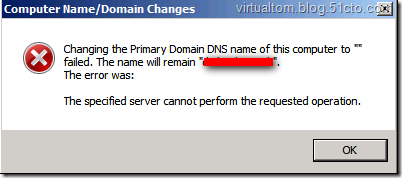
有3个可能导致这个错误的原因
在IPV4属性中启用了 "Disable NetBIOS over TCP/IP"
UDP 137 端口被封
TCP/IPv4 协议被禁用
以下是解决的方法
Despite the appearance of the on-screen error described in the symptoms section, the domain join operation completes as evidenced by the status in the NETSETUP.LOG
NetpCompleteOfflineDomainJoin SUCCESS: Requested a reboot :0x0
NetpDoDomainJoin: status: 0x0
To eliminate the error, either:
Verify that NetBIOS over TCP/IP is enabled.
a) Click Start , click Run , type ncpa.cpl , and then click OK .
b) In Network Connections , right-click Local Area Connection , and then click Properties .
c) Click Internet Protocol Version 4 (TCP/IPv4), and then click Properties .
d) In the Internet Protocol Version 4 (TCP/IPv4) Properties dialog box, click Advanced .
e) On the WINS tab, verify Enable NetBIOS Over TCP/IP is enabled, and then click OK three times.
OR
Verify end-to-end network connectivity over UDP port 137 over the network path connecting the client being and the helper DC serving the join operation.
OR
If the error occurred in an IPv6 only environment OR you require a fix to resolve the error, open a support incident with Microsoft Customer Service and Support requesting a post RTM fix for Windows 7 and / or Windows Server 2008 R2.
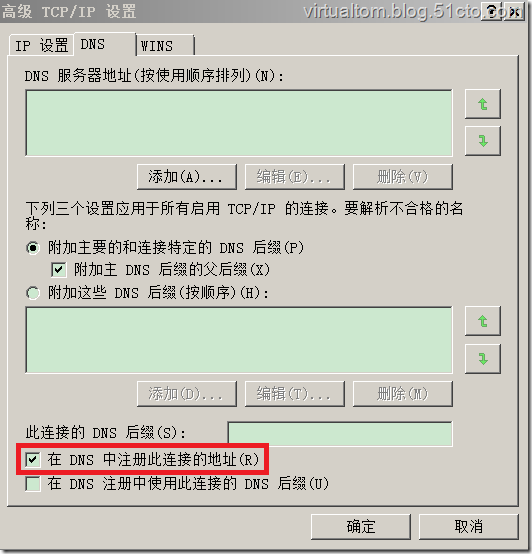
另外, "在DNS中注册此连接的地址(R)" 假如没有勾选,也要出现以上报错,而且DNS会没有此计算机的A记录。

DAMO开发者矩阵,由阿里巴巴达摩院和中国互联网协会联合发起,致力于探讨最前沿的技术趋势与应用成果,搭建高质量的交流与分享平台,推动技术创新与产业应用链接,围绕“人工智能与新型计算”构建开放共享的开发者生态。
更多推荐
 0
0 0
0- 0


 已为社区贡献2条内容

所有评论(0)