一、属性绑定

这是最简单的方式,可以在QML中直接绑定C++ 对象的属性。通过在C++ 对象中使用Q_PROPERTY宏定义属性,然后在QML中使用绑定语法将属性与QML元素关联起来。

1.person.h

1

2

3

4

5

6

7

8

9

10

11

12

13

14

15

16

17

18

19

20

21

22

23

24

25

#include <QObject>

class Person : public QObject

{

    Q_OBJECT

    /* 使用 Q_PROPERTY 定义交互的属性 */

    Q_PROPERTY(QString name READ getName WRITE setName NOTIFY nameChanged)

    Q_PROPERTY(int age READ getAge WRITE setAge NOTIFY ageChanged)

public:

    explicit Person(QObject *parent = nullptr)

        : QObject(parent), m_name(""), m_age(0)

    {

    }

    /* 为属性提供 getter 和 setter 方法 */

    QString getName() const { return m_name; }

    void setName(const QString& name) { m_name = name; emit nameChanged(); }

    int getAge() const { return m_age; }

    void setAge(int age) { m_age = age; emit ageChanged(); }

signals:

    /* 信号与属性对应,通过信号通知其他对象属性的变化 */

    void nameChanged();

    void ageChanged();

private:

    QString m_name;

    int m_age;

};

2.main.cpp

1

2

3

4

5

6

7

8

9

10

11

12

13

14

15

16

17

18

19

20

21

22

23

24

25

26

27

#include <QGuiApplication>

#include <QQmlApplicationEngine>

#include <QQmlContext>

#include "person.h"

int main(int argc, char *argv[])

{

    /* 启用Qt应用程序的高DPI缩放功能 */

    QCoreApplication::setAttribute(Qt::AA_EnableHighDpiScaling);

    /* 创建一个Qt应用程序的实例 */

    QGuiApplication app(argc, argv);

    // 创建Person对象

    Person person;

    QQmlApplicationEngine engine;

    /* 将Person对象作为QML上下文属性 */

    engine.rootContext()->setContextProperty("person", &person);

    const QUrl url(QStringLiteral("qrc:/main.qml"));

    /* 将 QQmlApplicationEngine 对象的 objectCreated 信号连接到一个 lambda 函数上 */

    /* lambda 函数用于在 QML 文件中的根对象被创建时进行处理,检查对象是否成功创建,如果创建失败则退出应用程序 */

    QObject::connect(&engine, &QQmlApplicationEngine::objectCreated,

                     &app, [url](QObject *obj, const QUrl &objUrl) {

        if (!obj && url == objUrl)

            QCoreApplication::exit(-1);

    }, Qt::QueuedConnection);

    /* 加载QML文件并显示用户界面 */

    engine.load(url);

    return app.exec();

}

3.main.qml

1

2

3

4

5

6

7

8

9

10

11

12

13

14

15

16

17

18

19

20

21

22

23

24

25

26

27

28

29

import QtQuick 2.12

import QtQuick.Window 2.12

import QtQuick.Controls 2.5

Window {

    visible: true

    width: 480

    height: 800

    title: qsTr("Hello World")

    Column {

        spacing: 10

        TextField {

            placeholderText: "请输入姓名"

            text: person.name // 与Person对象的name属性绑定

            onTextChanged: person.name = text // 当文本改变时,更新Person对象的name属性

        }

        Slider {

            from: 0

            to: 100

            value: person.age // 与Person对象的age属性绑定

            onValueChanged: person.age = value // 当滑块值改变时,更新Person对象的age属性

        }

        Text {

            text: "姓名:" + person.name

        }

        Text {

            text: "年龄:" + person.age

        }

    }

}

二、信号与槽

C++ 对象可以发出信号,而QML中的元素可以连接到这些信号上。这样,当C++ 对象的状态发生变化时,可以通过信号与槽机制将这些变化传递给QML界面。

1.myobject.h

1

2

3

4

5

6

7

8

9

10

11

12

#include <QObject>

#include <QtDebug>

class MyObject : public QObject

{

    Q_OBJECT

public:

    explicit MyObject(QObject *parent = nullptr) : QObject(parent) {}

signals:

    void mySignal(QString message);

public slots:

    void mySlot(const QString& message) { qDebug() << "Received message from QML:" << message; emit mySignal("Hello from C++");}

};

2.main.cpp

1

2

3

4

5

6

7

8

9

10

11

12

13

14

15

16

17

18

19

20

21

22

23

24

25

#include <QGuiApplication>

#include <QQmlApplicationEngine>

#include <QQmlContext>

#include "myobject.h"

int main(int argc, char *argv[])

{

    /* 启用Qt应用程序的高DPI缩放功能 */

    QCoreApplication::setAttribute(Qt::AA_EnableHighDpiScaling);

    /* 创建一个Qt应用程序的实例 */

    QGuiApplication app(argc, argv);

    /* 将自定义 C++ 类型注册到 QML 中的函数, 将自定义 C++ 类型注册到 QML 中的函数 */

    qmlRegisterType<MyObject>("com.example", 1, 0, "MyObject");

    QQmlApplicationEngine engine;

    const QUrl url(QStringLiteral("qrc:/main.qml"));

    /* 将 QQmlApplicationEngine 对象的 objectCreated 信号连接到一个 lambda 函数上 */

    /* lambda 函数用于在 QML 文件中的根对象被创建时进行处理,检查对象是否成功创建,如果创建失败则退出应用程序 */

    QObject::connect(&engine, &QQmlApplicationEngine::objectCreated,

                     &app, [url](QObject *obj, const QUrl &objUrl) {

        if (!obj && url == objUrl)

            QCoreApplication::exit(-1);

    }, Qt::QueuedConnection);

    /* 加载QML文件并显示用户界面 */

    engine.load(url);

    return app.exec();

}

3.main.qml

1

2

3

4

5

6

7

8

9

10

11

12

13

14

15

16

17

18

19

20

21

22

23

24

25

26

27

28

import QtQuick 2.12

import QtQuick.Window 2.12

import QtQuick.Controls 2.5

import com.example 1.0

Window {

    visible: true

    width: 480

    height: 800

    title: qsTr("Hello World")

    /* 定义 sendToCpp 信号 */

    signal sendToCpp(string message)

    /* Connections 组件用于连接 myObject 的 onMySignal 信号 */

    Connections {

        target: myObject

        onMySignal: console.log("Received message from C++:", message)

    }

    MyObject {

        id: myObject

        /* 将 onMySignal 信号传递到 sendToCpp信号上,便于 QML 处理 */

        onMySignal: sendToCpp(message)

    }

    Button {

        text: "Send message to C++"

        anchors.centerIn: parent

        /* 单击按钮时,会将信号传递到 C++ 的 mySlot 槽上 */

        onClicked: myObject.mySlot("Hello from QML")

    }

}

三、模型视图

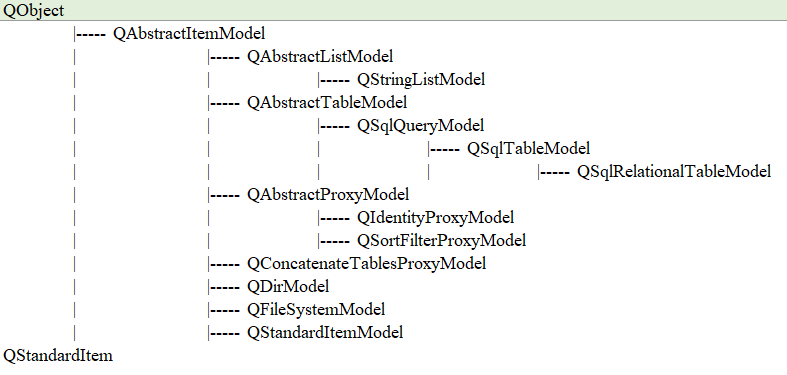
模型视图(Model-View):可以使用C++ 中的数据模型(QStandardItemModel)来提供数据给QML界面。QML中的视图元素(如ListView或GridView)可以使用这些模型来显示数据。
1.mymodel.h

1

2

3

4

5

6

7

8

9

10

11

12

13

14

15

16

17

18

19

20

21

22

23

24

25

26

27

#ifndef MYMODEL_H

#define MYMODEL_H

#include <QAbstractListModel>

#include <QList>

class MyModel : public QAbstractListModel

{

    Q_OBJECT

public:

    explicit MyModel(QObject *parent = nullptr);

    enum {

        NameRole = Qt::UserRole + 1,

        AgeRole,

        EmailRole

    };

    // 重写以下几个虚函数

    int rowCount(const QModelIndex &parent = QModelIndex()) const override;

    QVariant data(const QModelIndex &index, int role = Qt::DisplayRole) const override;

    QHash<int, QByteArray> roleNames() const override;

private:

    struct Person {

        QString name;

        int age;

        QString email;

    };

    QList<Person> m_persons;

};

#endif // MYMODEL_H

2.mymodel.cpp

1

2

3

4

5

6

7

8

9

10

11

12

13

14

15

16

17

18

19

20

21

22

23

24

25

26

27

28

29

30

31

32

33

34

35

36

37

#include "mymodel.h"

MyModel::MyModel(QObject *parent)

    : QAbstractListModel(parent)

{

    // 初始化一些数据

    m_persons.append({"Alice", 25, "alice@example.com"});

    m_persons.append({"Bob", 30, "bob@example.com"});

    m_persons.append({"Charlie", 35, "charlie@example.com"});

}

int MyModel::rowCount(const QModelIndex &parent) const

{

    Q_UNUSED(parent);

    return m_persons.count();

}

QVariant MyModel::data(const QModelIndex &index, int role) const

{

    if (!index.isValid())

        return QVariant();

    if (index.row() >= m_persons.count() || index.row() < 0)

        return QVariant();

    const Person &person = m_persons[index.row()];

    if (role == NameRole)

        return person.name;

    else if (role == AgeRole)

        return person.age;

    else if (role == EmailRole)

        return person.email;

    return QVariant();

}

QHash<int, QByteArray> MyModel::roleNames() const

{

    QHash<int, QByteArray> roles;

    roles[NameRole] = "name";

    roles[AgeRole] = "age";

    roles[EmailRole] = "email";

    return roles;

}

3.main.cpp

1

2

3

4

5

6

7

8

9

10

11

12

13

14

15

16

17

18

19

20

21

22

23

24

25

#include <QGuiApplication>

#include <QQmlApplicationEngine>

#include <QQmlContext>

#include "mymodel.h"

int main(int argc, char *argv[])

{

    /* 启用Qt应用程序的高DPI缩放功能 */

    QCoreApplication::setAttribute(Qt::AA_EnableHighDpiScaling);

    /* 创建一个Qt应用程序的实例 */

    QGuiApplication app(argc, argv);

    QQmlApplicationEngine engine;

    MyModel myModel;

    engine.rootContext()->setContextProperty("myModel", &myModel);

    const QUrl url(QStringLiteral("qrc:/main.qml"));

    /* 将 QQmlApplicationEngine 对象的 objectCreated 信号连接到一个 lambda 函数上 */

    /* lambda 函数用于在 QML 文件中的根对象被创建时进行处理,检查对象是否成功创建,如果创建失败则退出应用程序 */

    QObject::connect(&engine, &QQmlApplicationEngine::objectCreated,

                     &app, [url](QObject *obj, const QUrl &objUrl) {

        if (!obj && url == objUrl)

            QCoreApplication::exit(-1);

    }, Qt::QueuedConnection);

    /* 加载QML文件并显示用户界面 */

    engine.load(url);

    return app.exec();

}

4.main.qml

1

2

3

4

5

6

7

8

9

10

11

12

13

14

15

16

17

18

19

20

21

22

import QtQuick 2.12

import QtQuick.Window 2.12

import QtQuick.Controls 2.5

Window {

    visible: true

    width: 480

    height: 800

    title: qsTr("Hello World")

    ListView {

        anchors.fill: parent

        model: myModel

        delegate: Item {

            width: parent.width

            height: 60

            Column {

                Text { text: name }

                Text { text: age }

                Text { text: email }

            }

        }

    }

}

运行效果

四、QML类型注册

QML类型注册(QML Type Registration):可以将C++ 对象注册为自定义的QML类型,使得QML可以直接创建和使用这些对象。通过在C++ 中使用 Q_PROPERTY 宏和 Q_INVOKABLE 函数,可以将C++ 类注册为QML类型。我需要这样一个案例

1.myobject.h

1

2

3

4

5

6

7

8

9

10

11

12

13

14

15

16

17

18

19

20

21

22

23

#include <QQmlEngine>

#include "QDebug"


class MyObject : public QObject

{

    Q_OBJECT

    Q_PROPERTY(QString name READ name WRITE setName NOTIFY nameChanged)

public:

    explicit MyObject(QObject *parent = nullptr) : QObject(parent) {}

    QString name() const { return m_name; }

    void setName(const QString &name) { m_name = name; emit nameChanged(); }

    Q_INVOKABLE void printName() { qDebug() << "Name:" << m_name; }


    static void registerQmlType()

    {

        qmlRegisterType<MyObject>("com.example", 1, 0, "MyObject");

    }


signals:

    void nameChanged();

private:

    QString m_name;

};

2.main.cpp

1

2

3

4

5

6

7

8

9

10

11

12

13

14

15

16

17

18

19

20

21

22

23

24

25

26

27

28

29

30

#include <QGuiApplication>

#include <QQmlApplicationEngine>

#include <QQmlContext>

#include "myobject.h"


int main(int argc, char *argv[])

{

    /* 启用Qt应用程序的高DPI缩放功能 */

    QCoreApplication::setAttribute(Qt::AA_EnableHighDpiScaling);


    /* 创建一个Qt应用程序的实例 */

    QGuiApplication app(argc, argv);


    QQmlApplicationEngine engine;


    MyObject::registerQmlType();


    const QUrl url(QStringLiteral("qrc:/main.qml"));

    /* 将 QQmlApplicationEngine 对象的 objectCreated 信号连接到一个 lambda 函数上 */

    /* lambda 函数用于在 QML 文件中的根对象被创建时进行处理,检查对象是否成功创建,如果创建失败则退出应用程序 */

    QObject::connect(&engine, &QQmlApplicationEngine::objectCreated,

                     &app, [url](QObject *obj, const QUrl &objUrl) {

        if (!obj && url == objUrl)

            QCoreApplication::exit(-1);

    }, Qt::QueuedConnection);

    /* 加载QML文件并显示用户界面 */

    engine.load(url);


    return app.exec();

}

3.main.qml

1

2

3

4

5

6

7

8

9

10

11

12

13

14

15

16

17

18

19

20

21

22

23

24

25

26

27

28

29

30

31

32

import QtQuick 2.12

import QtQuick.Window 2.12

import QtQuick.Controls 2.5

import com.example 1.0


Window {

    visible: true

    width: 480

    height: 800

    title: qsTr("Hello World")


    MyObject {

        id: myObject

        name: "John"

    }


    /* 垂直布置组件 */

    Column {

        anchors.fill: parent        // 大小为父组件的大小

        anchors.margins: 40         // 与父组件四周的间隔

        spacing: 10                 // 子组件之间的间隔


        Text {

            text: myObject.name

        }


        Button {

            text: "Print Name"

            onClicked: myObject.printName()

        }

    }

}

到此这篇关于C++与QML进行数据交互的常见方法总结的文章就介绍到这了,更多相关C++ QML数据交互内容请搜索脚本之家以前的文章或继续浏览下面的相关文章希望大家以后多多支持脚本之家!

您可能感兴趣的文章:

Logo

DAMO开发者矩阵,由阿里巴巴达摩院和中国互联网协会联合发起,致力于探讨最前沿的技术趋势与应用成果,搭建高质量的交流与分享平台,推动技术创新与产业应用链接,围绕“人工智能与新型计算”构建开放共享的开发者生态。

更多推荐