聊天框UI 配置聊天机器人
用tkinter制作聊天框配置小爱机器人。
·
用tkinter制作聊天框
import tkinter as tk
gu=tk.Tk()
gu.geometry("500x500+400+100") # (宽度x高度)+(x轴+y轴)
gu.title(" 聊天框")
def jt(event): #回车输入
st()
def st():
result = kuang.get() # 获取文本输入框的内容
kuang.delete(0, "end")
test = tk.Text(gu,bg="skyblue",width=68,height=30,state='disabled')
test.tag_config("zi",font=('宋体',15),background='cyan') #为文字时输出设置单独的颜色
test.place(x=10,y=10)
kuang = tk.Entry(gu,bd=5,font=('楷书',15),width=42) #输入框
kuang.place(x=20,y=420) #距左边50 上边450
kuang.bind('<Key-Return>', jt)#监听输入框是否回车
an=tk.Button(gu,text="发送",command=st,bg="pink").place(x=450,y=420)
gu.mainloop()运行结果
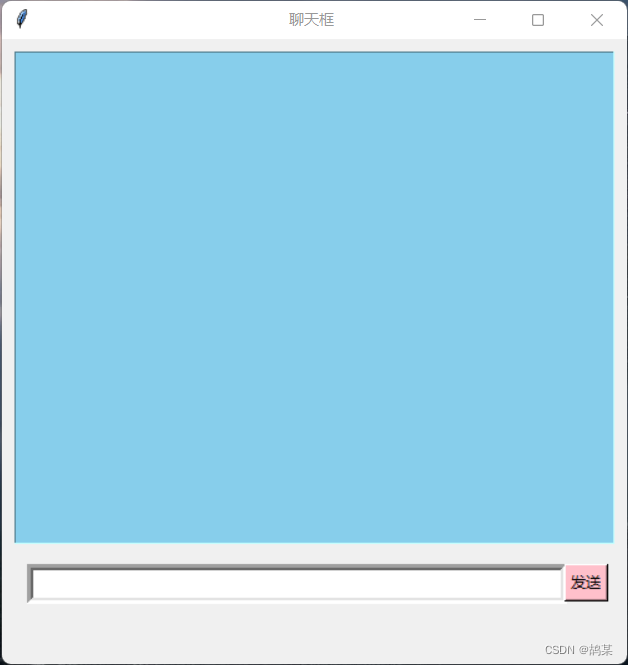
配置小爱机器人
完整代码:
import tkinter as tk
import requests
import time,pygame
urk='https://xiaoapi.cn/API/lt_xiaoai.php?type=json&msg='
gu=tk.Tk()
gu.geometry("500x500+400+100")   # (宽度x高度)+(x轴+y轴)
gu.title("                                                               聊天框")
pygame.mixer.init()
s=1                         #初始化
def jt(event):   #回车输入
    st()
def st():
    result = kuang.get()  # 获取文本输入框的内容
    global s                  #为时间做准备
    url = urk + result
    tu = requests.get(url)
    gum = tu.json().get('data').get('tts')  # 语音网址
    gus = requests.get(gum)
    guf = time.strftime("%Y%m%d%H%M%S", time.localtime())  # 用时间当文件名
    fl = 'D:/' + guf + '.mp3'
    with open(fl, 'wb') as f:
        f.write(gus.content)  # 将爬取语音保存下来w
    huif=tu.json().get('data').get('txt')
    pygame.mixer.music.load(fl)
    pygame.mixer.music.play(1)  # 播放语音
    gus.close()
    tu.close()  # 关闭

    a = time.strftime("%Y/%m/%d %H:%M:%S", time.localtime())
    test.config(state='normal')
    if s%3==1:                                                     #聊天三次在头部输出时间
        test.insert(tk.INSERT, '                     ' + a + '\n', "time")  # a1    tag
    test.insert(tk.INSERT,"旅行者:"+result+'\n',"ru")
    test.insert(tk.INSERT, "   \n", "kong")

    test.insert(tk.INSERT,"小爱:"+huif+'\n',"zi")
    test.insert(tk.INSERT,"   \n","kong")
    s += 1
    test.config(state='disabled')       #可以编辑
    kuang.delete(0, "end")

test = tk.Text(gu,bg="skyblue",width=68,height=30,state='disabled')

test.tag_config("time",font=('宋体',10))        #为时间数字输出设置单独的模式
test.tag_config("ru",font=('宋体',15),background='deepskyblue')        #为文字时输入设置单独的颜色
test.tag_config("zi",font=('宋体',15),background='cyan')        #为文字时输出设置单独的颜色
test.tag_config("kong",font=('宋体',5))        #文字之间空隙
test.place(x=10,y=10)

kuang = tk.Entry(gu,bd=5,font=('楷书',15),width=42)              #输入框
kuang.place(x=20,y=420)                   #距左边50 上边450
kuang.bind('<Key-Return>', jt)#监听输入框
an=tk.Button(gu,text="发送",command=st,bg="pink").place(x=450,y=420)
gu.mainloop()
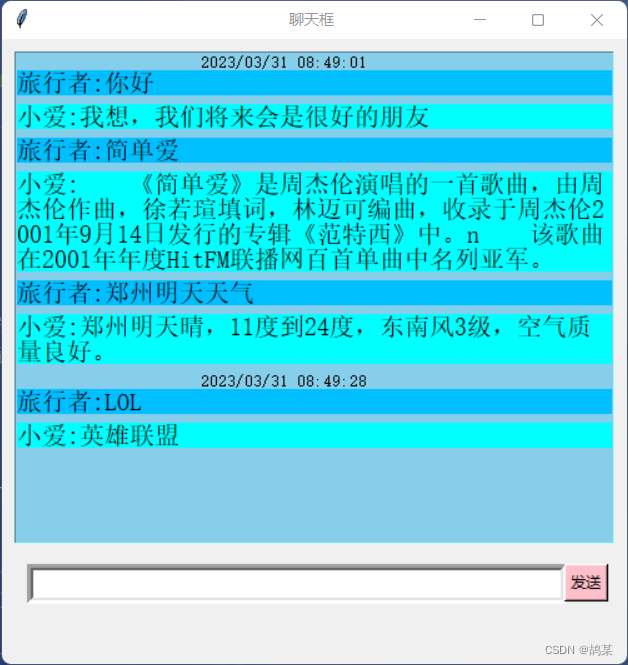
运行效果

DAMO开发者矩阵,由阿里巴巴达摩院和中国互联网协会联合发起,致力于探讨最前沿的技术趋势与应用成果,搭建高质量的交流与分享平台,推动技术创新与产业应用链接,围绕“人工智能与新型计算”构建开放共享的开发者生态。
更多推荐

 0
0 0
0- 0


 已为社区贡献2条内容

所有评论(0)