vue3+element Plus实现在table中增加一条表单数据
·
实现在table列表中,增加一行可单条数据保存的表单,使用vue3 + element Plus
1. 先上效果图
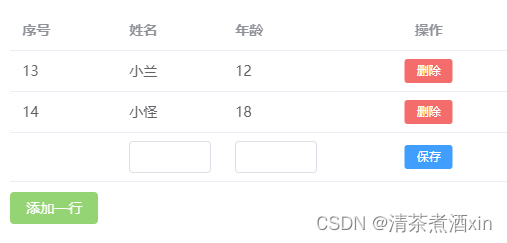
2. 代码实现
	<el-table v-loading="loading" :data="tableData" row-key="id">
      <el-table-column property="id" label="序号"></el-table-column>
      <el-table-column property="name" label="姓名">
        <template #default="scope">
          <el-input v-if="!scope.row.id" v-model="scope.row.name"></el-input>
          <span v-else>{{ scope.row.name }}</span>
        </template>
      </el-table-column>
      <el-table-column property="number" label="年龄">
        <template #default="scope">
          <el-input v-if="!scope.row.id" v-model="scope.row.number"></el-input>
          <span v-else>{{ scope.row.number }}</span>
        </template>
      </el-table-column>
      <el-table-column label="操作" fixed="right" align="center" width="200">
        <template #default="scope">
          <el-button type="primary" size="small" v-if="!scope.row.id"  @click.stop="handleSave(scope.row)">保存</el-button>
          <el-button type="danger" size="small" v-if="scope.row.id" @click.stop="handleDelete(scope.row.id)">删除</el-button>
        </template>
      </el-table-column>
    </el-table>
    <div class="bottom-btn">
      <el-button type="success" @click="addLineData()">添加一行</el-button>
    </div>
ts 实现
/**添加一行数据 */
function addLineData() {
  const newData = {
    name: '',
    number: '',
  };
  tableData.value.push(newData);
}

/** */
function handleDelete() {
  ElMessageBox.confirm("确认删除该条数据?", "警告", {
    confirmButtonText: "确定",
    cancelButtonText: "取消",
    type: "warning",
  }).then(() => {
    //调用自己的接口啦!
    // 当然啦,如果全都是自己增加的未提交的数据,可以使用splice 方法来处理哦!
  });
}
当前情况呢 是适用于单条数据新增,并且直接操作数据库的

DAMO开发者矩阵,由阿里巴巴达摩院和中国互联网协会联合发起,致力于探讨最前沿的技术趋势与应用成果,搭建高质量的交流与分享平台,推动技术创新与产业应用链接,围绕“人工智能与新型计算”构建开放共享的开发者生态。
更多推荐

 13
13 0
0- 0


 已为社区贡献1条内容

所有评论(0)