wpf 主窗口与页面数据传递(带源码)
使用 get、set的处理方法对页面间的参数进行传递
·
前言
最近在使用C#,之前习惯了From,这次使用wpf。对于wpf的消息传输。记录下,备忘。这篇博文主要记录一下编写WPF窗口程序时,实现在窗口和页面之间传递值的问题。在使用WPF的时候,我们经常会用到窗体之间传值,下面示例主窗口传值到子窗口,子窗口传值到主窗口的方法。这个也是网上大部分的教程。很少看到页面与窗口直接的传递。故记录下本文。
源码
一、遇到的问题
1、使用NavigationWindow打开页面。在页面上获取到的主窗口为null。不可取。
二、详细代码、
1、主窗口
主窗口xaml:
<Window x:Class="WpfApp1.MainWindow"
        xmlns="http://schemas.microsoft.com/winfx/2006/xaml/presentation"
        xmlns:x="http://schemas.microsoft.com/winfx/2006/xaml"
        xmlns:d="http://schemas.microsoft.com/expression/blend/2008"
        xmlns:mc="http://schemas.openxmlformats.org/markup-compatibility/2006"
        xmlns:local="clr-namespace:WpfApp1"
        mc:Ignorable="d"
        Title="MainWindow" Height="600" Width="600">
    <Grid>
        <Grid.RowDefinitions>
            <RowDefinition Height="40"></RowDefinition>
            <RowDefinition Height="80*"></RowDefinition>
        </Grid.RowDefinitions>
        <WrapPanel VerticalAlignment="Center">
            <Button Tag="PageA" Grid.Row="0" Name="btnA" Height="30" Width="60" Margin="5" Click="btnNav_Click">页面A</Button>
            <Button Tag="PageB" Name="btnB" Height="30" Width="60" Click="btnNav_Click">页面B</Button>
            <TextBox x:Name="textbox1" Height="32" TextWrapping="Wrap" Text="TextBox" Width="294"/>
        </WrapPanel>
        <Frame Name="frmMain" Grid.Row="1" NavigationUIVisibility="Hidden"></Frame>
    </Grid>
</Window>
主窗体后台:
using System;
using System.Collections.Generic;
using System.Linq;
using System.Reflection;
using System.Text;
using System.Threading.Tasks;
using System.Windows;
using System.Windows.Controls;
using System.Windows.Data;
using System.Windows.Documents;
using System.Windows.Input;
using System.Windows.Media;
using System.Windows.Media.Imaging;
using System.Windows.Navigation;
using System.Windows.Shapes;

namespace WpfApp1
{
    /// <summary>
    /// MainWindow.xaml 的交互逻辑
    /// </summary>
    public partial class MainWindow : Window
    {
        public MainWindow()
        {
            InitializeComponent();
        }


        /// <summary>
        /// 调用窗口
        /// </summary>
        /// <param name="sender"></param>
        /// <param name="e"></param>
        private void btnNav_Click(object sender, RoutedEventArgs e)
        {
            Button btn = sender as Button;
            if (btn.Tag != null)
            {
                try
                {
                    string path = "WpfApp1." + btn.Tag.ToString();
                    Type type = Type.GetType(path);
                    object obj = type.Assembly.CreateInstance(path);
                    //Type t = System.Reflection.Assembly.GetExecutingAssembly().GetType(path);
                    Page p = obj as Page;
                    this.frmMain.Content = p;
                    PropertyInfo[] infos = type.GetProperties();
                    foreach (PropertyInfo info in infos)
                    {
                        if (info.Name == "ParentWin")
                        {
                            info.SetValue(p, this, null);
                            break;
                        }
                    }
                }
                catch (Exception ex)
                {
                    MessageBox.Show(ex.Message);
                }

            }
        }

        /// <summary>
        /// 公共函数
        /// </summary>
        /// <param name="name"></param>
        public void CallFromChild(string name)
         {

            textbox1.Text = name;
         }

    }
}
2、页面A
页面A xaml
<local:BasePage x:Class="WpfApp1.PageA"
             xmlns="http://schemas.microsoft.com/winfx/2006/xaml/presentation"
             xmlns:x="http://schemas.microsoft.com/winfx/2006/xaml"
             xmlns:mc="http://schemas.openxmlformats.org/markup-compatibility/2006"
             xmlns:d="http://schemas.microsoft.com/expression/blend/2008"
             xmlns:local="clr-namespace:WpfApp1"
             d:DesignHeight="450" d:DesignWidth="800"
                Background="AntiqueWhite"
             mc:Ignorable="d" >
    <Grid>
        <Grid>
            <Button Width="120" Height="30" Click="Tick_Click">点我</Button>
        </Grid>
    </Grid>
</local:BasePage>
页面A后台
using System;
using System.Collections.Generic;
using System.Linq;
using System.Text;
using System.Threading.Tasks;
using System.Windows;
using System.Windows.Controls;
using System.Windows.Data;
using System.Windows.Documents;
using System.Windows.Input;
using System.Windows.Media;
using System.Windows.Media.Imaging;
using System.Windows.Navigation;
using System.Windows.Shapes;

namespace WpfApp1
{


    /// <summary>
    /// PageA.xaml 的交互逻辑
    /// </summary>
    public partial class PageA : BasePage
    {

        //BasePage page = new BasePage();
        public PageA()
        {
            InitializeComponent();

        }

        private void Tick_Click(object sender, RoutedEventArgs e)
        {
            ParentWin.CallFromChild("A");
        }

    }
}
3、页面B
页面B xaml
<local:BasePage x:Class="WpfApp1.PageB"
      xmlns="http://schemas.microsoft.com/winfx/2006/xaml/presentation"
      xmlns:x="http://schemas.microsoft.com/winfx/2006/xaml"
      xmlns:mc="http://schemas.openxmlformats.org/markup-compatibility/2006"
      xmlns:d="http://schemas.microsoft.com/expression/blend/2008"
      xmlns:local="clr-namespace:WpfApp1"
      mc:Ignorable="d" Background="CadetBlue"
      d:DesignHeight="450" d:DesignWidth="800"
      Title="PageB">

    <Grid>
        <Button Width="120" Height="30" Click="Tick_Click">点我</Button>
    </Grid>
</local:BasePage>
页面B后台:
using System;
using System.Collections.Generic;
using System.Linq;
using System.Text;
using System.Threading.Tasks;
using System.Windows;
using System.Windows.Controls;
using System.Windows.Data;
using System.Windows.Documents;
using System.Windows.Input;
using System.Windows.Media;
using System.Windows.Media.Imaging;
using System.Windows.Navigation;
using System.Windows.Shapes;

namespace WpfApp1
{
    /// <summary>
    /// PageB.xaml 的交互逻辑
    /// </summary>
    public partial class PageB : BasePage
    {
        public PageB()
        {
            InitializeComponent();
        }

        private void Tick_Click(object sender, RoutedEventArgs e)
        {
            ParentWin.CallFromChild("B");
        }
    }
}
3、传递类
using System;
using System.Collections.Generic;
using System.Linq;
using System.Text;
using System.Threading.Tasks;
using System.Windows.Controls;

namespace WpfApp1
{
    public class BasePage : Page
    {
        MainWindow _parentWindow;
        public MainWindow ParentWin
        {
            get { return _parentWindow; }
            set { _parentWindow = value; }
        }
    }
}
演示效果
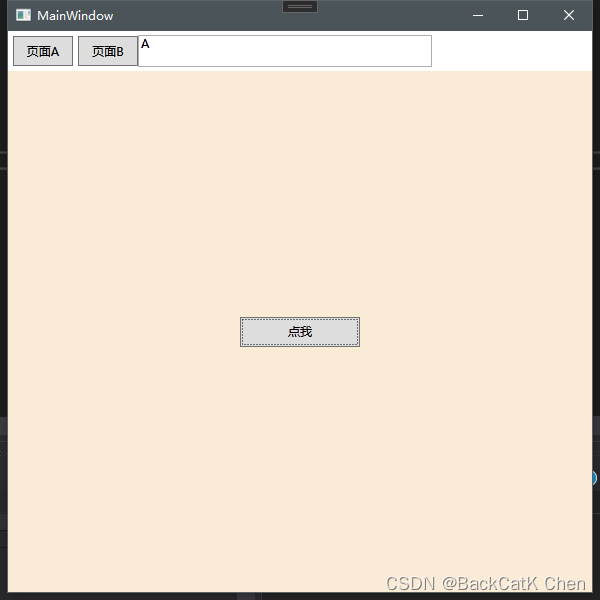
点击页面A 显示页面A, 点击页面按钮,textbox显示A,
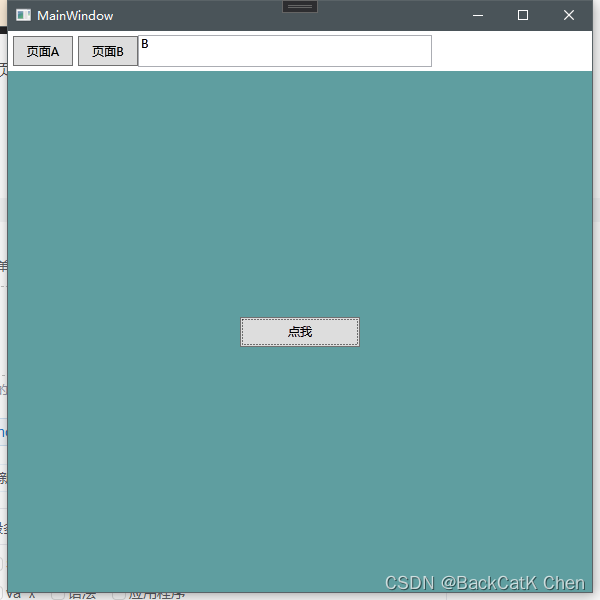
点击页面B 显示页面B, 点击页面按钮,textbox显示B,

DAMO开发者矩阵,由阿里巴巴达摩院和中国互联网协会联合发起,致力于探讨最前沿的技术趋势与应用成果,搭建高质量的交流与分享平台,推动技术创新与产业应用链接,围绕“人工智能与新型计算”构建开放共享的开发者生态。
更多推荐
 1
1 0
0- 0


 已为社区贡献4条内容

所有评论(0)