EasyExcel使用教程, 进行数据导出并解决枚举类导致的 Can not find ‘Converter‘ support class StatusEnum.问题
·
一、问题描述
在工作中,需要将查询到的数据导出到 Excel 表格中,但是在此次导出过程中报错 Can not find ‘Converter’ support class StatusEnum。经过分析发现:这个异常表明在使用 EasyExcel 进行 Excel 数据写入时,无法找到支持 StatusEnum 类型的Converter 导致的报错。
二、解决思路
EasyExcel 在处理枚举类型时,需要自定义一个 Converter 来将枚举类型转换为字符串或其他可写入 Excel 的类型。这里我要根据 StatusEnum 枚举类写一个对应的转换器来解决问题。
三、操作步骤(附带完整的EasyExcel 使用教程)
1. 引入引来
		<dependency>
            <groupId>com.alibaba</groupId>
            <artifactId>easyexcel</artifactId>
            <version>2.2.10</version>
        </dependency>
2. 对需要导出的Java实体类进行改造
@Data
@HeadRowHeight(30)
@ContentRowHeight(20)
@TableName("device_info")
public class DeviceInfo {

    @ExcelIgnore
    @TableId(value = "device_id", type = IdType.AUTO)
    private Long deviceId;

    @ExcelProperty(value = {"设备信息", "设备名称"})
    private String name;

    @ExcelProperty(value = {"设备信息", "设备的IP"})
    private String ipAddress;


    @ExcelProperty(value = {"设备信息", "设备的端口号"})
    private String port;

    @ExcelProperty(value = {"设备信息", "设备类型"})
    private Long deviceTypeId;

    @ExcelProperty(value = {"设备信息", "设备状态(在线、离线)"})
    private StatusEnum status;

    @ExcelProperty(value = {"设备信息", "所配置算法"})
    private String location;

    @ExcelProperty(value = {"设备信息", "经度"})
    private BigDecimal longitude;

    @ExcelProperty(value = {"设备信息", "纬度"})
    private BigDecimal latitude;

    @ExcelProperty(value = {"设备信息", "创建时间"})
    @JsonFormat(pattern = "yyyy-MM-dd HH:mm:ss", timezone = "GMT+8")
    private Date createTime;

    @ExcelProperty(value = {"设备信息", "更新时间"})
    @JsonFormat(pattern = "yyyy-MM-dd HH:mm:ss", timezone = "GMT+8")
    private Date updateTime;
}
对其中涉及的注解的解释
@ExcelIgnore:该注解通常用于标记某个字段,表示在导出或导入Excel文件时忽略该字段。
@ExcelProperty:该注解用于标记字段在Excel文件中的列名和分组信息。例如:value = {“设备信息”, “设备名称”}: 表示在Excel文件中,该字段对应的列名是“设备名称”,并且该列属于“设备信息”这个分组。
3. 编写枚举类转换器
我的枚举类如下:
public enum StatusEnum implements IBaseEnum<Integer>{

    ONLINE(1, "在线"),
    OFFLINE(2, "离线");

    @EnumValue
    private final Integer value;

    @JsonValue
    private final String desc;

    StatusEnum(int value, String desc) {
        this.value = value;
        this.desc = desc;
    }

    @Override
    public String getDesc() {
        return this.desc;
    }

    @Override
    public Integer getValue() {
        return this.value;
    }
}
编写的枚举类转换器如下:
public class StatusEnumConverter implements Converter<StatusEnum> {

    @Override
    public Class<StatusEnum> supportJavaTypeKey() {
        return StatusEnum.class;
    }

    @Override
    public CellDataTypeEnum supportExcelTypeKey() {
        // 支持 Excel 中的字符串类型
        return CellDataTypeEnum.STRING;
    }

    // 从 Java 枚举值转换为 Excel 数据(写)
    @Override
    public CellData<String> convertToExcelData(StatusEnum value, ExcelContentProperty contentProperty, GlobalConfiguration globalConfiguration) {
        if (value == null) {
            return new CellData<>("");
        }
        // 将枚举的描述写入 Excel
        return new CellData<>(value.getDesc());
    }

    // 从 Excel 数据转换为 Java 枚举值(读)
    @Override
    public StatusEnum convertToJavaData(CellData cellData, ExcelContentProperty contentProperty, GlobalConfiguration globalConfiguration) {
        if (cellData == null || cellData.getStringValue() == null) {
            return null;
        }
        // 根据描述查找匹配的枚举值
        for (StatusEnum status : StatusEnum.values()) {
            if (cellData.getStringValue().equals(status.getDesc())) {
                return status;
            }
        }
        throw new IllegalArgumentException("无法匹配的状态:" + cellData.getStringValue());
    }
}
4. 针对时间格式编写转换器
public class TimestampConverter implements Converter<Timestamp> {

    // 定义日期时间格式化器
    private static final DateTimeFormatter FORMATTER = DateTimeFormatter.ofPattern("yyyy-MM-dd HH:mm:ss");

    @Override
    public Class<Timestamp> supportJavaTypeKey() {
        return Timestamp.class;
    }

    @Override
    public CellDataTypeEnum supportExcelTypeKey() {
        return CellDataTypeEnum.STRING;
    }

    @Override
    public Timestamp convertToJavaData(CellData cellData, ExcelContentProperty contentProperty, GlobalConfiguration globalConfiguration) {
        // 将 Excel 中的字符串转换为时间戳
        LocalDateTime localDateTime = LocalDateTime.parse(cellData.getStringValue());
        return Timestamp.from(localDateTime.toInstant(ZoneOffset.UTC));
    }

    @Override
    public CellData<String> convertToExcelData(Timestamp value, ExcelContentProperty contentProperty, GlobalConfiguration globalConfiguration) {
        // 将时间戳转换为指定格式的字符串
        LocalDateTime localDateTime = value.toLocalDateTime();
        String formattedDateTime = localDateTime.format(FORMATTER);
        return new CellData<>(formattedDateTime);
    }

}
5. 编写数据导出接口
public void importDeviceInfoExcel(HttpServletResponse response, Long deviceTypeId, String deviceName) {
        LambdaQueryWrapper<DeviceInfo> lambdaQueryWrapper = new LambdaQueryWrapper<>();
        lambdaQueryWrapper.eq(deviceTypeId != null, DeviceInfo::getDeviceTypeId, deviceTypeId)
                .like(deviceName != null, DeviceInfo::getName, deviceName);

        // 导出到excel
        try (OutputStream outputStream = response.getOutputStream()) {
            response.setContentType("application/vnd.ms-excel;charset=utf-8");
            String fileName = URLEncoder.encode("设备信息", "UTF-8");
            response.setHeader("Access-Control-Expose-Headers", "Content-Disposition");
            response.setHeader("Content-disposition", "attachment;filename=" + fileName + ".xlsx");

            EasyExcel.write(outputStream, DeviceInfo.class)
                    // 注册设备状态枚举类转换器
                    .registerConverter(new StatusEnumConverter())
                    // 注册时间戳转换器
                    .registerConverter(new TimestampConverter())
                    .registerWriteHandler(new LongestMatchColumnWidthStyleStrategy())
                    .sheet("设备信息")
                    .doWrite(this.list(lambdaQueryWrapper));
        } catch (IOException e) {
            throw new RuntimeException("导出文件失败", e);
        }
    }
6. 调用接口测试
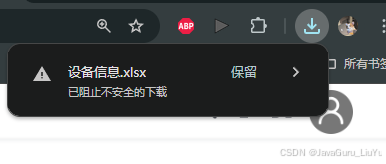
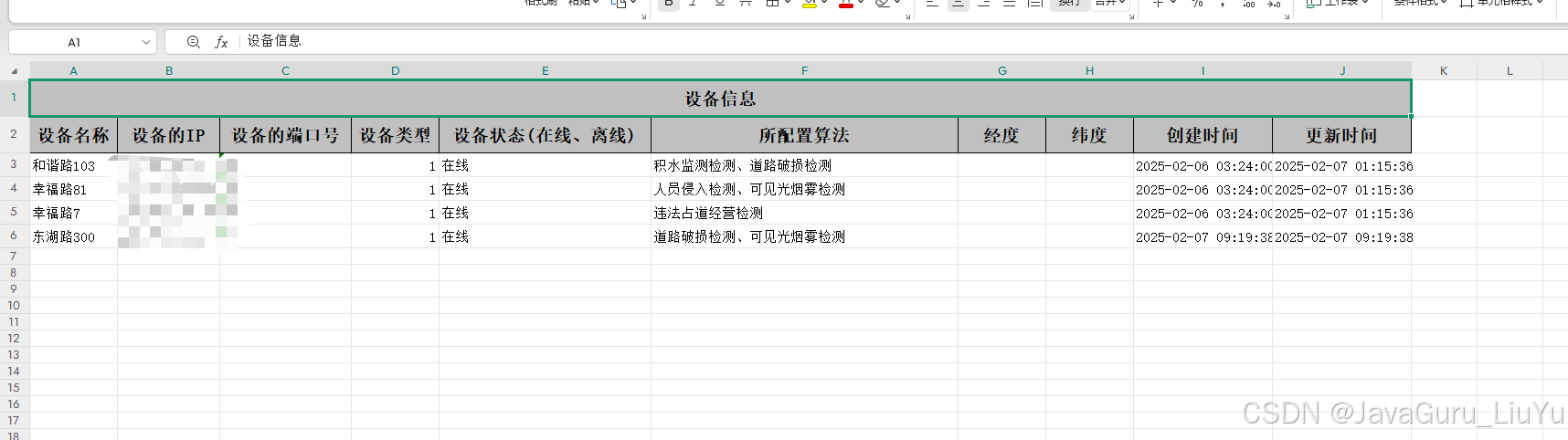
此时查看设备信息文件已经全部导出,内容和格式无任何问题。
此处是使用泛型对枚举转换器进行优化,编写了一个通用枚举类。
public class EnumConverter<T extends Enum<T>> implements Converter<T> {

    private final Class<T> enumType;

    public EnumConverter(Class<T> enumType) {
        this.enumType = enumType;
    }

    @Override
    public Class<T> supportJavaTypeKey() {
        return enumType;
    }

    @Override
    public CellDataTypeEnum supportExcelTypeKey() {
        // 支持 Excel 中的字符串类型
        return CellDataTypeEnum.STRING;
    }

    // 从 Java 枚举值转换为 Excel 数据(写)
    @Override
    public CellData<String> convertToExcelData(T value, ExcelContentProperty contentProperty, GlobalConfiguration globalConfiguration) {
        if (value == null) {
            return new CellData<>("");
        }
        // 假设枚举类型有一个 getDesc() 方法
        return new CellData<>(getEnumDescription(value));
    }

    // 从 Excel 数据转换为 Java 枚举值(读)
    @Override
    public T convertToJavaData(CellData cellData, ExcelContentProperty contentProperty, GlobalConfiguration globalConfiguration) {
        if (cellData == null || cellData.getStringValue() == null) {
            return null;
        }
        // 根据描述查找匹配的枚举值
        for (T enumValue : enumType.getEnumConstants()) {
            if (cellData.getStringValue().equals(getEnumDescription(enumValue))) {
                return enumValue;
            }
        }
        throw new IllegalArgumentException("无法匹配的枚举值:" + cellData.getStringValue());
    }

    // 假设枚举类型有一个 getDesc() 方法
    private String getEnumDescription(T enumValue) {
        try {
            return (String) enumValue.getClass().getMethod("getDesc").invoke(enumValue);
        } catch (Exception e) {
            throw new RuntimeException("枚举类型必须实现 getDesc() 方法", e);
        }
    }
}

DAMO开发者矩阵,由阿里巴巴达摩院和中国互联网协会联合发起,致力于探讨最前沿的技术趋势与应用成果,搭建高质量的交流与分享平台,推动技术创新与产业应用链接,围绕“人工智能与新型计算”构建开放共享的开发者生态。
更多推荐

 5
5 0
0- 0



 已为社区贡献1条内容

所有评论(0)