使用python爬取股票评论数据存入数据库,并基于CNN-LSTM进行情感分析
python爬取股票评论数据存入MySQL数据库,再进行分词与去停用词等预处理后,使用CNN-LSTM模型进行情感分析得出每条评论是积极还是消极,最后进行词云图可视化。
项目时间:2024.04
项目环境:python3.9 pymysql requests BeautifulSoup jieba keras WordCloud等。
项目描述:通过requests +BeautifulSoup爬取东方财富股吧的投资者评论数据存储到MySQL,经过数据预处理 Jieba 分词与去停用词处理后,结合深度学习模型(CNN-LSTM),构建情感分析系统,实现从数据采集、存储、清洗、情感分类到结果可视化的全流程开发。
目录
一、使用requests+BeautifulSoup进行股票评论的爬取
一、使用requests+BeautifulSoup进行股票评论的爬取
由于上证指数在权重股集中、影响力广泛、代表性高、历史悠久和信息全等方面的优势,在很多文献中被广泛用来作为整个中国股市行情的参考指标。研究上证指数具有典型意义,因此本文选取上证指数为研究对象。通过requests+BeautifulSoup爬取东方财富股吧上证指数吧 2023/2/1 至2024/2/29 的所有发帖评论、阅读量、评论数、作者、时间,共得到文本1045741条。并将爬取结果批量写入数据库中。
上证指数股吧评论:上证指数股吧_上证指数分析讨论社区-东方财富网
1. 先进行页面元素解析
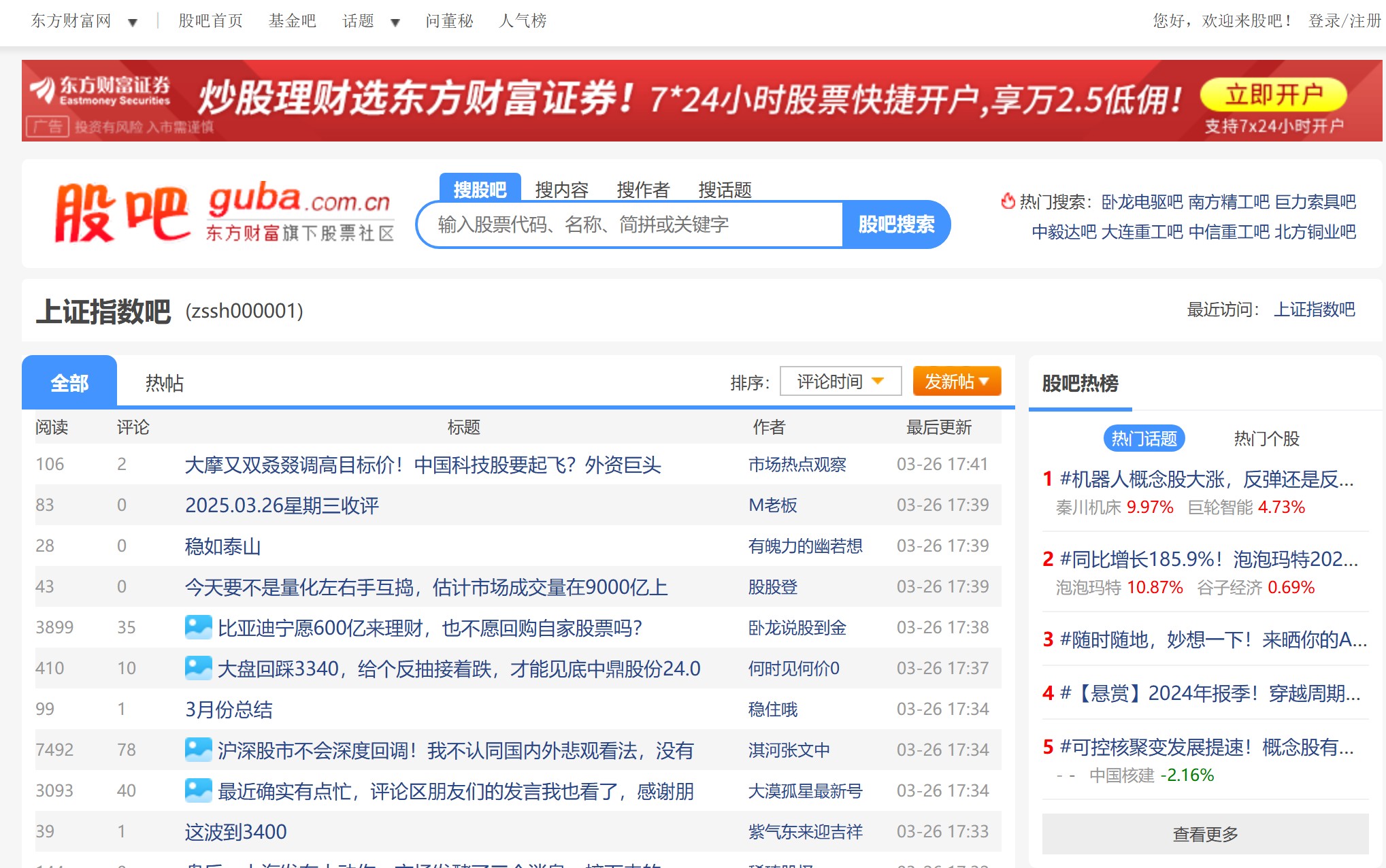

span 是 HTML 里的一个标签,而 l1 a1、l2 a2 等属于 HTML 元素的类名。可以通过这些信息来定位想要爬取的数据。
2. 编写代码
代码编写使用的面向对象的形式。
ConnMysql 类封装了数据库连接、表创建、数据插入和关闭连接等操作。数据库的连接信息(如 DB_HOST、DB_PORT 等)在 config.py 中定义,并通过 from config import * 在 ConnMysql 类中使用,这些信息对外部代码是隐藏的。外部代码只需要实例化 ConnMysql 对象并调用其方法,而不需要关心具体的数据库连接细节。更好的保证了安全性。同时模块化设计使得代码结构清晰,易于理解和维护。
config.py文件内容(自定义数据库的参数配置):
DB_HOST = IP地址
DB_PORT = 端口号
DB_USER = 用户名
DB_PASSWD = 数据库密码
DB_NAME = 数据表名称
con_mysql.py文件(数据库的连接与关闭操作等):
pymysql连接MySQL数据库,创建数据表存储原始数据,采用批量插入(executemany)优化写入效率。
import pymysql
from config import *

class ConnMysql(object):
    def __init__(self):
        # 连接数据库
        self.db = pymysql.connect(host=DB_HOST,
                                  port=DB_PORT,
                                  database=DB_NAME,
                                  user=DB_USER,
                                  password=DB_PASSWD,
                                  charset='utf8')
        self.cursor = self.db.cursor()

    def create(self):
        # 创建一个数据表
        sql = """CREATE TABLE IF NOT EXISTS stock_comment (
            id INT AUTO_INCREMENT PRIMARY KEY,
            read_nums INT,
            comment_nums INT,
            title TEXT,
            author VARCHAR(200),
            update_time VARCHAR(100)
        )"""
        self.cursor.execute(sql)

    def insert_batch(self, data_list):
        # 批量将数据添加到数据库中的stock_comment表中
        sql = "insert into stock_comment (read_nums, comment_nums, title, author, update_time) VALUES (%s, %s, %s, %s, %s)"
        values = [(item['read_nums'], item['comment_nums'], item['title'], item['author'], item['time']) for item in data_list]
        self.cursor.executemany(sql, values)
        self.db.commit()  # 提交操作

    def close(self):
        # 关闭数据库连接
        self.cursor.close()
        self.db.close()
Scraper.py文件(爬虫):
StockCommentScraper 类封装了网页爬取、数据解析和数据保存等操作。例如,get_html 方法封装了获取网页内容的逻辑,parse_page 方法封装了解析页面数据的逻辑,save_data 方法封装了将数据保存到数据库的逻辑。外部代码只需要调用 run 方法就可以完成整个爬取流程。
处理百万级数据时通过分页爬取避免单次请求负载过高。设置请求头、控制请求频率,确保数据稳定获取。
import requests
import time
from bs4 import BeautifulSoup
from con_mysql import *


class StockCommentScraper:
    def __init__(self, start_page=925, end_page=14000):
        self.start_page = start_page
        self.end_page = end_page
        self.base_url = 'https://gubaf10.eastmoney.com/list,zssh000001_{}.html'
        self.headers = {
            'User-Agent': 'Mozilla/5.0 (Windows NT 10.0; Win64; x64) AppleWebKit/537.36 (KHTML, like Gecko) Chrome/91.0.4472.124 Safari/537.36'
        }
        self.db = ConnMysql()

    def get_html(self, page_num):
        """获取网页内容"""
        try:
            url = self.base_url.format(page_num)
            response = requests.get(url, headers=self.headers, timeout=10)
            response.raise_for_status()
            response.encoding = response.apparent_encoding
            return response.text
        except requests.exceptions.RequestException as e:
            print(f"第{page_num}页请求失败: {e}")
            return None

    def parse_page(self, html):
        """解析页面数据"""
        if not html:
            return []

        parsed_data = []
        try:
            soup = BeautifulSoup(html, 'html.parser')
            post_list = soup.find_all('div', class_="articleh normal_post")

            for post in post_list:
                try:
                    data = {
                        'read_nums': int(post.find('span', class_='l1 a1').get_text(strip=True)),    # 获取帖子阅读数
                        'comment_nums': int(post.find('span', class_='l2 a2').get_text(strip=True)),    # 获取帖子评论数
                        'title': post.find('span', class_='l3 a3').get_text(strip=True), # 获取帖子标题
                        'author': post.find('span', class_='l4 a4').get_text(strip=True),  # 获取作者
                        'time': post.find('span', class_='l5 a5').get_text(strip=True)  # 获取更新时间
                    }
                    parsed_data.append(data)
                    print(f"解析数据: {data}")
                except Exception as e:
                    print(f"解析失败: {e}")
                    continue
            return parsed_data
        except Exception as e:
            print(f"页面解析失败: {e}")
            return []

    def save_data(self, data_list):
        """保存数据到数据库"""
        if not data_list:
            print("没有数据需要保存")
            return

        try:
            self.db.create()
            self.db.insert_batch(data_list)
            print(f"成功保存 {len(data_list)} 条数据")
        except Exception as e:
            print(f"数据保存失败: {e}")

    def run(self):
        """执行完整爬取流程"""
        print("开始执行GDP数据爬取...")
        print(f"开始爬取第{self.start_page}页到第{self.end_page}页...")
        all_data = []
        for page in range(self.start_page, self.end_page + 1):
            html = self.get_html(page)
            page_data = self.parse_page(html)
            all_data.extend(page_data)

            time.sleep(0.002)  # 控制请求频率
            print(f"已完成第{page}页")

        self.save_data(all_data)
        self.db.close()
        print("爬取任务完成")


if __name__ == "__main__":
    scraper = StockCommentScraper()
    scraper.run()
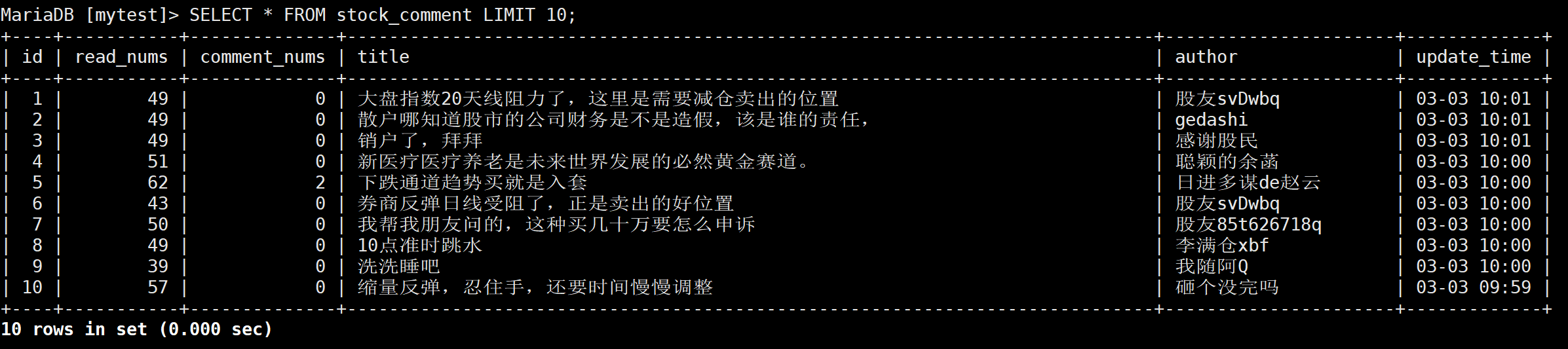
执行Scraper.py文件成功将爬取到的数据存入数据库。
二、分词与去停用词处理
获得的文本中,尽管富含投资者的情绪,然而这些情绪文本对机器来说并不直观,很难直接用于情感倾向的分析。为了解决这个问题需要将文本进行分词,将连续的句子拆分成一个个独立的词语,有助于机器更好地捕捉和理解文本中的情感信息,随后通过对这些词语的深入分析和理解,就能够推测出整句话的情感倾向。
Jieba 分词采用了基于前缀词典的分词方法,对于处理大规模文本数据速度更快,效率更高,且支持用户自定义词典,准确性更高,功能更丰富。所以本文采用 Jieba 分词工具对文本进行分词。
通过观察分词后的评论数据中存在很多意义不大、频率较高的词语和符号, 因此需要去除停用词。去除停用词有利于是模型更加准确的分析文本中所蕴涵的情感,本文在哈工大停用词表的基础上,添加词表中所没有的一些常用词,类似 “我”“今天”“的”“吗”等一些意义不大的词语。
例如:
| 处理前 | 处理后 |
|---|---|
| 今天 2900 点以下,整体反弹接近尾声。 | 2900 点 以下 整体 反弹 接近 尾声 |
| 明天可能跳空上攻年线啊! | 可能 跳空 上攻 年线 |
| A 股:放量跳水,吓蹦一片!明天走势判断,绝佳上车机。 | A 股 放量 跳水 蹦 一片 走势 判断 绝佳 上车 机 |
最后通过数据库中间表(stock_comment_processed)存储分词及去停用词结果,提升后续分析效率。
代码如下:
import jieba
from con_mysql import ConnMysql


# 加载停用词表
def load_stopwords():
    with open(r"D:\python\mathModeling\哈工大停用词表去除今天明天等.txt", 'r', encoding='UTF-8') as f:
        return {line.strip() for line in f if line.strip()}


stopwords = load_stopwords()

# 初始化数据库连接
db = ConnMysql()

# 创建新表
try:
    db.cursor.execute("""
        CREATE TABLE IF NOT EXISTS stock_comment_processed (
            id INT AUTO_INCREMENT PRIMARY KEY,
            original_id INT,         -- 原始数据ID
            read_nums INT,
            comment_nums INT,
            title TEXT,              -- 原始标题
            author VARCHAR(200),
            update_time VARCHAR(100),
            segmented_title TEXT,    -- 分词结果
            filtered_title TEXT      -- 去停用词结果
        )
    """)
    db.db.commit()
except Exception as e:
    print(f"创建表失败: {e}")

# 查询原始数据
try:
    db.cursor.execute("SELECT id, read_nums, comment_nums, title, author, update_time FROM stock_comment")
    results = db.cursor.fetchall()
except Exception as e:
    print(f"查询数据失败: {e}")
    db.close()
    exit()

# 批量插入处理后的数据
insert_sql = """
INSERT INTO stock_comment_processed
(original_id, read_nums, comment_nums, title, author, update_time, segmented_title, filtered_title)
VALUES (%s, %s, %s, %s, %s, %s, %s, %s)
"""
batch_size = 1000
batch = []

for row in results:
    original_id, read_nums, comment_nums, title, author, update_time = row

    # 分词处理
    segmented = ' '.join(jieba.cut(title))

    # 去停用词处理
    filtered = ' '.join([word for word in segmented.split() if word not in stopwords])

    batch.append((
        original_id,
        read_nums,
        comment_nums,
        title,
        author,
        update_time,
        segmented,
        filtered
    ))

    if len(batch) >= batch_size:
        try:
            db.cursor.executemany(insert_sql, batch)
            db.db.commit()
            batch = []
            print(f"已处理{original_id}条数据")
        except Exception as e:
            print(f"插入数据失败: {e}")
            db.db.rollback()
            break

# 处理剩余数据
if batch:
    try:
        db.cursor.executemany(insert_sql, batch)
        db.db.commit()
    except Exception as e:
        print(f"插入剩余数据失败: {e}")
        db.db.rollback()

db.close()
print("数据处理完成,结果已保存到 stock_comment_processed 表")
分词与停用词处理后的数据:

三、CNN-LSTM情感分析
1、语料库的选取
在训练分类模型时,训练集的质量很大程度上影响着最终分类的结果。本文参考了关于股市情感分类的开源项目,提取其已经标注好的积极、消极语料库,共16260条标注好的数据。其包含股市中常用词汇, 这与本文股市文本高度吻合,可以使模型能够对股市文本的语言结构进行充分学习,以获得好的训练结果。下表为语料库的部分内容,label中的1代表积极,-1代表消极。
| label | text |
| 1 | 买入 长期 持有 沃森 生物 19条 简短 想法 |
| 1 | 利好 出 还 涨 |
| 1 | 线 战士 持 全安 牌 伟哥 火爆 进货 深交所 9月 17日 暂停 etf 融资 买入 etf 融资 余额 已 达到 证券 上市 流通 市值 每个 男人 都 一颗 王全安 心 王 后 深 男哥 私募 火爆 大战 伟哥 股 王全安 时代 召唤 |
| 1 | 浙江 冬日 彻底 破位 |
| 1 | 达安 基因 该涨 |
| -1 | 垃圾 股市 几十年 点 动不动 就要 查 |
| -1 | 技术 再 好 沒有 订单 英雄无用武之地 |
| -1 | 现在 怕 海 王出 公告 研报麻烦 不要 出 了明天 不 知道 跌到 去 想想 害怕 |
| -1 | 前两天 买 买 跌 狗庄 |
| -1 | 肯定 跌 垃圾 医药股 |
2、模型选择与构建
CNN-LSTM 是一种结合卷积神经网络(CNN)和长短期记忆网络(LSTM)的混合模型,主要用于处理具有时空关联性的数据(如文本、时间序列)。其核心设计目标是通过 CNN 提取局部特征,再通过 LSTM 捕捉长期依赖关系,从而提升模型的表达能力。结合两者可以在处理文本时既捕捉局部语义,又考虑上下文信息,这在情感分析中尤其重要,因为情感可能由多个词组合而成,同时需要考虑句子结构。
步骤1 构建CNN模型:确定卷积层、池化层等组件的数量和参数,使用激活函数和批标准化,增强模型的表达能力和稳定性。
步骤2 序列化文本数据:将在CNN模式所提取的特征数据转化为序列化形式,将数据切分成固定长度,适应LSTM模型的输入要求。本文设置序列长度为100。
步骤3 构建LSTM模型:确定LSTM层、全连接层等的数量和参数,减少拟合风险指数。
步骤4 模型的组合:将CNN和LSTM模型进行组合,构建完整的 CNN-LSTM 模型。
步骤5 模型编译与训练:设置损失函数、优化器等参数,用准备好的训练数据对模型进行训练。
步骤6 模型的优化:使用测试数据对模型进行评估,计算模型准确率等指标。适当调整,提高模型性能并保存模型。
代码如下:
from keras.models import load_model
from sklearn.preprocessing import LabelEncoder, OneHotEncoder
from keras.models import Model
from keras.layers import Input, Dense, Embedding, Conv1D, MaxPooling1D, LSTM
from tensorflow.keras.preprocessing.text import Tokenizer
from keras.utils import pad_sequences
from sklearn.model_selection import train_test_split
import numpy as np
from sklearn.metrics import confusion_matrix, ConfusionMatrixDisplay
import matplotlib.pyplot as plt
from sklearn.metrics import precision_score, accuracy_score, f1_score, recall_score
from keras.callbacks import TensorBoard, EarlyStopping
import pandas as pd
import matplotlib
from con_mysql import ConnMysql


# 从数据库中读取数据
def read_data_from_db():
    conn = ConnMysql()
    try:
        sql = "SELECT title, filtered_title FROM stock_comment_processed"
        conn.cursor.execute(sql)
        results = conn.cursor.fetchall()
        data = pd.DataFrame(results, columns=['title', 'filtered_title'])
        return data
    except Exception as e:
        print(f"Error reading data from database: {e}")
    finally:
        conn.close()


# 读取测数据集
testData = pd.read_excel(r"D:\python\mathModeling\文本情绪.xlsx")
data, label = testData["text"], testData["label"]

X_train, X_t, train_y, v_y = train_test_split(data, label, test_size=0.2, random_state=42)
X_val, X_test, val_y, test_y = train_test_split(X_t, v_y, test_size=0.5, random_state=42)

# 对数据集的标签数据进行one-hot编码
ohe = OneHotEncoder()
train_y = ohe.fit_transform(np.array(train_y).reshape(-1, 1)).toarray()
val_y = ohe.transform(np.array(val_y).reshape(-1, 1)).toarray()
test_y = ohe.transform(np.array(test_y).reshape(-1, 1)).toarray()
print('训练集', train_y.shape)
print('验证集', val_y.shape)
print('测试集', test_y.shape)

# 使用Tokenizer对词组进行编码
# 当我们创建了一个Tokenizer对象后,使用该对象的fit_on_texts()函数,以空格去识别每个词,
# 可以将输入的文本中的每个词编号,编号是根据词频的,词频越大,编号越小。
max_words = 8000
max_len = 100
tok = Tokenizer(num_words=max_words)  # 使用的最大词语数为8000
tok.fit_on_texts(data)

# texts_to_sequences 输出的是根据对应关系输出的向量序列,是不定长的,跟句子的长度有关系
train_seq = tok.texts_to_sequences(X_train)
val_seq = tok.texts_to_sequences(X_val)
test_seq = tok.texts_to_sequences(X_test)
print(train_seq[0])

# 将每个序列调整为相同的长度.长度为100
train_seq_mat = pad_sequences(train_seq, maxlen=max_len)
val_seq_mat = pad_sequences(val_seq, maxlen=max_len)
test_seq_mat = pad_sequences(test_seq, maxlen=max_len)

num_classes = 2
# 定义CNN-LSTM模型
inputs = Input(name='inputs', shape=[max_len])
# Embedding(词汇表大小,batch大小,每个新闻的词长)
layer = Embedding(max_words + 1, 128, input_length=max_len)(inputs)
layer = Conv1D(filters=32, kernel_size=3, padding='same', activation='relu')(layer)
layer = MaxPooling1D(pool_size=2)(layer)
layer = Conv1D(filters=32, kernel_size=3, padding='same', activation='relu')(layer)
layer = MaxPooling1D(pool_size=2)(layer)
layer = LSTM(100, dropout=0.2, recurrent_dropout=0.2)(layer)
layer = Dense(num_classes, activation='softmax')(layer)
model = Model(inputs=inputs, outputs=layer)
model.summary()
model.compile(loss='categorical_crossentropy', optimizer='adam', metrics=['accuracy'])

# 模型训练
model.fit(train_seq_mat, train_y, batch_size=128, epochs=10,
          validation_data=(val_seq_mat, val_y),
          callbacks=[EarlyStopping(monitor='val_loss', min_delta=0.0001), TensorBoard(log_dir='./log')]
          # 当val-loss不再降低时停止训练
          )
# 保存模型
model.save('model_new/CNN-LSTM.h5')
del model

# 对验证集进行预测
# 导入已经训练好的模型
model = load_model('model_new/CNN-LSTM.h5')
test_pre = model.predict(test_seq_mat)
pred = np.argmax(test_pre, axis=1)
real = np.argmax(test_y, axis=1)
cv_conf = confusion_matrix(real, pred)
acc = accuracy_score(real, pred)
precision = precision_score(real, pred, average='micro')
recall = recall_score(real, pred, average='micro')
f1 = f1_score(real, pred, average='micro')
patten = 'test:  acc: %.4f   precision: %.4f   recall: %.4f   f1: %.4f'
print(patten % (acc, precision, recall, f1,))
labels11 = ['negative', 'positive']
fig, ax = plt.subplots(figsize=(10, 10))
disp = ConfusionMatrixDisplay(confusion_matrix=cv_conf, display_labels=labels11)
disp.plot(cmap="Blues", values_format='', ax=ax)
plt.savefig("ConfusionMatrix.tif", dpi=400)


def predict_(file):
    data_cut, data = file["filtered_title"].fillna(""), file["title"].fillna("")
    t_seq = tok.texts_to_sequences(data_cut)
    t_seq_mat = pad_sequences(t_seq, maxlen=max_len)
    model = load_model('model_new/CNN-LSTM.h5')
    t_pre = model.predict(t_seq_mat)
    pred = np.argmax(t_pre, axis=1)
    labels11 = ['negative', 'positive']
    pred_lable = []
    for i in pred:
        pred_lable.append(labels11[i])

    # 将结果存储到新的数据库表中
    conn = ConnMysql()
    try:
        # 创建新表
        create_table_sql = """CREATE TABLE IF NOT EXISTS stock_comment_sentiment (
            id INT AUTO_INCREMENT PRIMARY KEY,
            title TEXT,
            sentiment VARCHAR(20)
        )"""
        conn.cursor.execute(create_table_sql)

        # 插入数据
        for title, sentiment in zip(data, pred_lable):
            insert_sql = "INSERT INTO stock_comment_sentiment (title, sentiment) VALUES (%s, %s)"
            conn.cursor.execute(insert_sql, (title, sentiment))
        conn.db.commit()
    except Exception as e:
        print(f"Error inserting data into database: {e}")
    finally:
        conn.close()


data = read_data_from_db()
predict_(data)
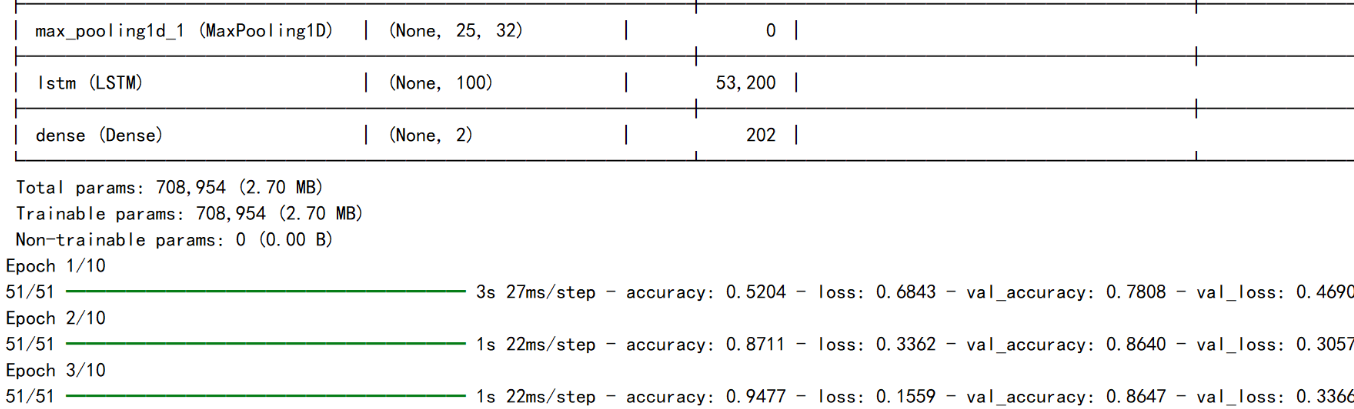
从数据库读取处理后的文本,结合标注好的情感语料库构建数据集。搭建CNN+LSTM混合网络,输出层Softmax二分类(积极/消极)。最终模型准确率达91.5%。
四、词云图可视化
通过词云分析投资者情绪分布,辅助识别市场热点话题。
从数据库读取预测结果,筛选积极/消极评论,使用WordCloud库生成词云图。
import matplotlib.pyplot as plt
from wordcloud import WordCloud, STOPWORDS, ImageColorGenerator
from con_mysql import ConnMysql  # 导入数据库连接类

# 从数据库读取积极评论
def get_positive_comments():
    conn = ConnMysql()
    try:
        # 查询积极评论
        sql = """
            SELECT title
            FROM stock_comment_sentiment
            WHERE sentiment = 'positive'
        """
        conn.cursor.execute(sql)
        results = conn.cursor.fetchall()
        comments = [row[0] for row in results]
        return comments
    except Exception as e:
        print(f"数据库查询错误: {e}")
        return []
    finally:
        conn.close()

# 获取积极评论内容
positive_comments = get_positive_comments()

# 合并所有评论内容
text = ' '.join(positive_comments)

# 生成词云
wc1 = WordCloud(
    font_path='C:\\Windows\\Fonts\\STXINWEI.ttf',
    background_color='white',
    max_words=80,
    width=1000,
    height=800,
    stopwords=STOPWORDS.add(" ")  # 添加自定义停用词
)
wc1.generate(text)

# 显示词云
plt.imshow(wc1, interpolation='bilinear')
plt.axis('off')
plt.show()

# 保存词云图
wc1.to_file('positive_wordcloud.png')

positive_wordcloud.png negative_wordclound.png
情绪为积极时“大笑”、“牛市”、“反弹”等为高频词汇,情绪为消极时“没有”、“下跌”、“跳水”为高频词汇。
处理完的数据后续可以用来分析股民情绪指数与股市价格之间的相关性。

DAMO开发者矩阵,由阿里巴巴达摩院和中国互联网协会联合发起,致力于探讨最前沿的技术趋势与应用成果,搭建高质量的交流与分享平台,推动技术创新与产业应用链接,围绕“人工智能与新型计算”构建开放共享的开发者生态。
更多推荐

 52
52 0
0- 0


 已为社区贡献1条内容

所有评论(0)