

为什么数据透视表不能分组
If you try to group pivot table items in Excel, you might get an error message that says, "Cannot group that selection." For older versions of Excel, if you had a problem grouping pivot table items, it was usually caused by blank cells, or text in number/date fields. For Excel 2013 and later, there's another thing that can prevent you from grouping.
如果您尝试在Excel中对数据透视表项进行分组,则可能会收到一条错误消息:“无法对该选择进行分组”。 对于较早版本的Excel,如果在分组数据透视表项时遇到问题,通常是由空白单元格或数字/日期字段中的文本引起的。 对于Excel 2013及更高版本,还有另一件事可以阻止您进行分组。
无法将该选择分组 (Cannot Group That Selection)
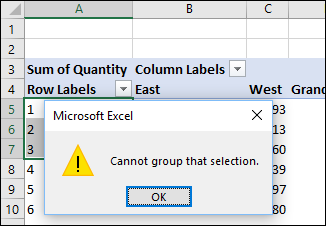
Here's a screen shot of the "Cannot group that selection." error message that appears. The message doesn't give you any clues as to why you can't group the items. It's up to you to do the detective work.
这是“无法对所选内容进行分组”的屏幕截图。 出现错误信息。 该消息没有为您提供为什么无法将项目分组的任何线索。 侦探工作由您决定。
资料模型 (Data Model)
We'll look at the traditional reasons for this grouping problem in the next section. But first, here's the newer issue, that might affect you, if you're using Excel 2013 or later.
在下一节中,我们将探讨造成这种分组问题的传统原因。 但是首先,这是较新的问题,如果您使用的是Excel 2013或更高版本,则可能会影响您。
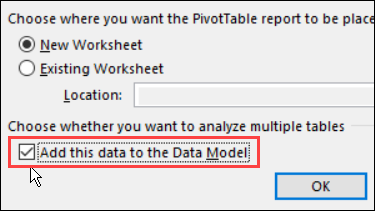
- When you create a pivot table, there's a check box to "Add this data to the Data Model". 创建数据透视表时,会有一个复选框“将数据添加到数据模型”。
- If you checked that box, you won't be able to group any items in the pivot table. 如果选中此框,则将无法对数据透视表中的所有项目进行分组。
When the source data is added to the data model, you end up with an OLAP-based Power Pivot, instead of a traditional pivot table, and the grouping feature is not available.
将源数据添加到数据模型后,最终将获得基于OLAP的Power Pivot,而不是传统的数据透视表,并且分组功能不可用。
它是基于OLAP的吗? (Is It OLAP-Based?)
A quick way to tell if your pivot table is OLAP-based is to check the Ribbon:
判断数据透视表是否基于OLAP的快速方法是检查功能区:
Select any cell in the pivot table
选择数据透视表中的任何单元格
- On the Excel Ribbon, click the Analyze tab (under PivotTable Tools) 在Excel功能区上,单击“分析”选项卡(在“数据透视表工具”下)
-
- If it's dimmed out, your pivot table is the traditional type 如果变暗,则您的数据透视表是传统类型
- If the command is active, your pivot table is OLAP-based 如果该命令处于活动状态,则您的数据透视表基于OLAP
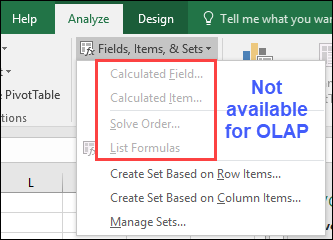
And if you check the Fields, Items, & Sets drop down, some of the features will be dimmed out, for OLAP-based pivot tables. For example, you can't create a calculated field or calculated item.
并且,如果您选中“字段,项目和集”下拉列表,则对于基于OLAP的数据透视表,某些功能将变暗。 例如,您无法创建计算字段或计算项目。
解决分组问题 (Fix the Grouping Problem)
I haven't found any way to change the pivot cache from an OLAP-based source (data model), to a data source that isn't in the data model. So, if you need grouping, create a new pivot table from the source data, and do NOT check the box to add the data to the Data Model.
我还没有找到将数据透视表缓存从基于OLAP的源(数据模型)更改为不在数据模型中的数据源的任何方法。 因此,如果需要分组,请从源数据创建一个新的数据透视表,并且不要选中将数据添加到数据模型中的框。
NOTE: You can keep the OLAP-based pivot table too, and have two pivot tables based on the same data, using different pivot caches.
注意 :您也可以保留基于OLAP的数据透视表,并使用不同的数据透视表缓存具有两个基于相同数据的数据透视表。
空白单元格或文本 (Blank Cells or Text)
If your pivot table is the traditional type (not in the data model), grouping problems are usually caused by invalid data in the field that you're trying to group.
如果数据透视表是传统类型(不在数据模型中),则分组问题通常是由您要分组的字段中的无效数据引起的。
If you're trying to group dates or numbers, the grouping problem usually occurs when the field contains records with one of these items:
如果您尝试对日期或数字进行分组,则当字段包含具有以下项目之一的记录时,通常会出现分组问题:
- a blank cell in a date/number field, or 日期/数字字段中的空白单元格,或
- a text entry in a date/number field. 日期/数字字段中的文本输入。
To fix the problem
解决问题
- For blank cells, fill in the date/number (use a dummy date/number if necessary). 对于空白单元格,请填写日期/数字(如有必要,请使用虚拟日期/数字)。
- If there is text in the date/number field, remove it. 如果日期/数字字段中有文本,请将其删除。
-
If numbers are being recognized as text, use one of the techniques to change text to real numbers.
如果将数字识别为文本,请使用其中一种技术将文本更改为实数 。
Then refresh the pivot table, and try grouping the items again.
然后刷新数据透视表,然后尝试再次对项目进行分组。
以前的分组 (Previous Grouping)
If you don't have blank cells or text in the date column, there may be a grouped field left over from a previous time that you grouped the data.
如果日期列中没有空白单元格或文本,则可能是从前一次对数据进行分组以来剩下的分组字段。
- Check the field list, to see if there's a second copy of the date field, e.g. Date2. 检查字段列表,以查看日期字段是否还有第二个副本,例如Date2。
- If there is, add it to the row area, and ungroup it. 如果有,请将其添加到行区域,然后取消分组。
- Then, you should be able to group the date field again. 然后,您应该能够再次将日期字段分组。
数据透视表分组 (Pivot Table Grouping)
Learn more about pivot table grouping, and get a workbook with sample file that you can use for testing. Go to the How to Group Pivot Table Data page on my Contextures website.
了解有关数据透视表分组的更多信息,并获得一个带有示例文件的工作簿,可用于测试。 转到我的Contextures网站上的“ 如何对数据透视表数据进行分组”页面 。
更多数据透视表链接 (More Pivot Table Links)
翻译自: https://contexturesblog.com/archives/2018/01/18/problem-grouping-pivot-table-items/
为什么数据透视表不能分组




 已为社区贡献24条内容


所有评论(0)