推送通知_Thinkphp6.0.X异常接管后通过钉钉机器人推送通知
大多团队在生产环境下都会关闭app_debug,所以相对应的错误信息就不能实时查看到。以下分享一个目前团队项目正在用的生产环境下相关技术人员能第一时间获取通知的方法:先上效果图:以上通知是在钉钉中显示!下面介绍开发步骤:1:Thinkphp版本需在6.X或以上,在app/provider.php中接管异常处理(个人案例中调用方式,具体命名依照对应项目建立)//绑定自定义异常处理handle类't.
大多团队在生产环境下都会关闭app_debug,所以相对应的错误信息就不能实时查看到。以下分享一个目前团队项目正在用的生产环境下相关技术人员能第一时间获取通知的方法:
先上效果图:

以上通知是在钉钉中显示!
下面介绍开发步骤:
1:Thinkphp版本需在6.X或以上,在app/provider.php中接管异常处理
(个人案例中调用方式,具体命名依照对应项目建立)
// 绑定自定义异常处理handle类'thinkexceptionHandle' => 'appcommonexception',然后在 app 下的 common 文件夹下新建一个 exception.php 文件
具体操作可以参考官方文档:https://www.kancloud.cn/manual/thinkphp6_0/1037615#_29
案例中我做了些许改动,如需修改请自行对应目录。
2:在异常接管方法中实现以下代码
<?phpnamespace appcommon;use thinkexceptionHandle;use thinkexceptionHttpException;use thinkexceptionValidateException;use thinkResponse;use Throwable;class Exception extends Handle {public function render($request, Throwable $e): Response {if (method_exists($e, 'getStatusCode')) {// 参数验证错误if ($e instanceof ValidateException) {return json($e->getError(), 422);}// 请求异常if ($e instanceof HttpException && request()->isAjax()) {return response($e->getMessage(), $e->getStatusCode());}if ($e->getStatusCode() == 404) {$module = app('http')->getName();!$module and $module = 'index';return view($module . '@public/404');}if ($e->getStatusCode() == 500) {return parent::render($request, $e);}} else {$file = $e->getFile();$line = $e->getLine();$code = parent::getCode($e);$message = parent::getMessage($e);$error_message = '[' . $code . '] ErrorException in ' . $file . ' line ' . $line . PHP_EOL . $message; // 此处为钉钉server $server = new appServerDingdingServer(); $data = [ 'text' => ['content' => $error_message] ]; $server->robotSend($data);}// 其他错误交给系统处理return parent::render($request, $e);}}3:钉钉Server的创建
<?php /** * 钉钉开放API * https://ding-doc.dingtalk.com/doc#/serverapi2/qf2nxq */namespace appServer;class DingdingServer { private $API_URL = "https://oapi.dingtalk.com/robot/send?access_token=xxxxx"; public function __construct() { } /** * * @param array $data * @param string $msgtype text link markdown actionCard * @return boolean */ public function robotSend($data = [], $msgtype = 'text') { if (empty($data)) { return false; } $final_data = $data + ['msgtype' => $msgtype]; $data_string = json_encode($final_data); $webhook = $this->API_URL; $result = $this->request_by_curl($webhook, $data_string); return $result; } protected function request_by_curl($remote_server, $post_string) { $ch = curl_init(); curl_setopt($ch, CURLOPT_URL, $remote_server); curl_setopt($ch, CURLOPT_POST, 1); curl_setopt($ch, CURLOPT_CONNECTTIMEOUT, 5); curl_setopt($ch, CURLOPT_HTTPHEADER, array('Content-Type: application/json; charset = utf-8')); curl_setopt($ch, CURLOPT_POSTFIELDS, $post_string); curl_setopt($ch, CURLOPT_RETURNTRANSFER, true); // 线下环境不用开启curl证书验证, 未调通情况可尝试添加该代码 // curl_setopt ($ch, CURLOPT_SSL_VERIFYHOST, 0); // curl_setopt ($ch, CURLOPT_SSL_VERIFYPEER, 0); $data = curl_exec($ch); curl_close($ch); return $data; }}此处钉钉接口需要一个access_token参数,具体操作步骤参考:
1:先下载PC版钉钉
2:发起群聊,添加至少2人创建群聊
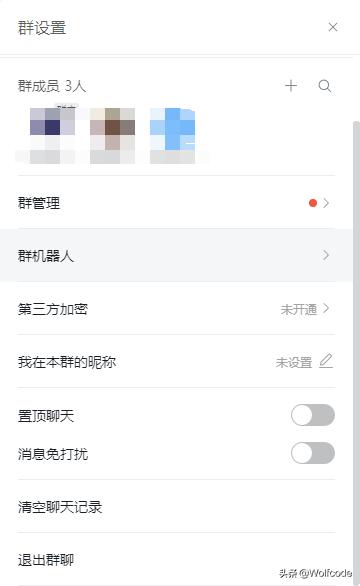
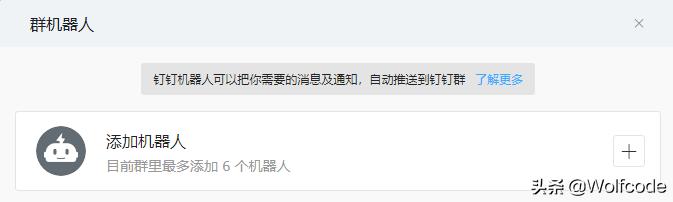
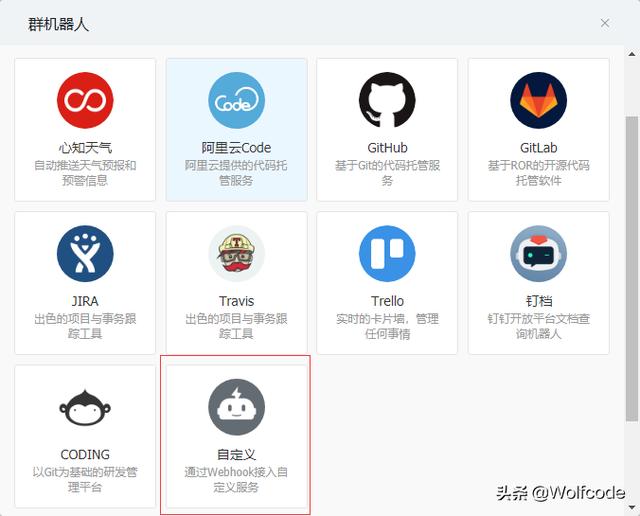
3:点击群聊界面右上角三个点中的 群机器人,选择 添加机器人,选择最后一个 自定义
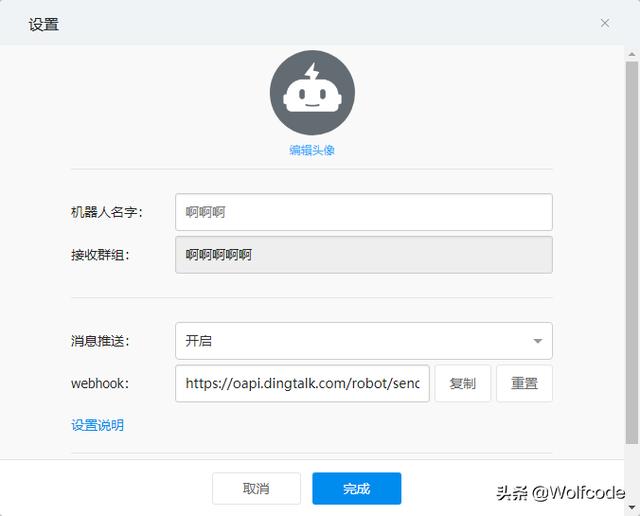
4:钉钉API地址就在webhook中
到这里,生产环境下即使关闭了app_debug,我们也能第一时间收到异常记录了!特别提醒,钉钉貌似每分钟只能发送20条推送。
关于钉钉的API,代码中默认调用text文本形式,其实还有很多,例如 link markdown actionCard 方式,小伙伴们可以自行研究~

DAMO开发者矩阵,由阿里巴巴达摩院和中国互联网协会联合发起,致力于探讨最前沿的技术趋势与应用成果,搭建高质量的交流与分享平台,推动技术创新与产业应用链接,围绕“人工智能与新型计算”构建开放共享的开发者生态。
更多推荐

 0
0 0
0- 0


 已为社区贡献1条内容

所有评论(0)