VBA 根据EXCEL的数据批量自动生成多个word文件,适合多场景使用
·
学习目标:
`实现根据Excel的内容生成word文件
例如:
- 一键打印,批量打印,打印Excel数据等
学习内容:
直接上代码
Private Sub CommandButton1_Click()
End Sub
Private Sub CommandButton2_Click()
Dim Word对象 As New Word.Application
Dim i%, x%, m%, a%, b%
Dim str
'On Error Resume Next
str = Application.GetOpenFilename("Word数据文件,*.doc*", , , , True)
f = InputBox("请问您要打印几份?")
For i = 1 To UBound(str)
Word对象.Documents.Open str(i)
a = Word对象.ActiveDocument.BuiltinDocumentProperties(wdPropertyPages)
For b = 1 To f
Word对象.PrintOut Range:=wdPrintFromTo, From:="2", To:=a
Next
Word对象.Quit
Set Word对象 = Nothing
Next
End Sub
Private Sub CommandButton3_Click()
Dim Word对象 As New Word.Application
Dim i%, x%, m%, a%, b%
Dim str
str = Application.GetOpenFilename("Word数据文件,*.doc*", , , , True)
f = InputBox("请问您要打印几份?")
For i = 1 To UBound(str)
Word对象.Documents.Open str(i)
For b = 1 To f
Word对象.PrintOut Range:=wdPrintFromTo, From:="1", To:="1"
Next
Word对象.Quit
Set Word对象 = Nothing
Next
End Sub
Private Sub CommandButton4_Click()
Dim Word对象 As New Word.Application
Dim i%, x%, m%, f%, b%, a%
Dim str
On Error Resume Next
str = Application.GetOpenFilename("Word数据文件,*.doc*", , , , True)
f = InputBox("请问您要打印几份?")
For i = 1 To UBound(str)
Word对象.Documents.Open str(i)
a = Word对象.ActiveDocument.BuiltinDocumentProperties(wdPropertyPages)
For b = 1 To f
Application.ActivePrinter = "HP LaserJet 400 M401 PCL 6 在 Ne00:"
ActiveDocument.PrintOut Range:=wdPrintFromTo, From:="1", To:="1"
Application.ActivePrinter = "HP LaserJet 400 M401 PCL 6 在 Ne00:"
ActiveDocument.PrintOut Range:=wdPrintFromTo, From:="2", To:=a
Next
Word对象.Quit
Set Word对象 = Nothing
Next
End Sub
Private Sub CommandButton5_Click()
Dim arr
Dim i As Integer
Dim wb, wb1 As Workbook
Dim sht As Worksheet
On Error Resume Next
Set wb1 = ActiveWorkbook
Set sht1 = ActiveSheet
On Error Resume Next
arr = Application.GetOpenFilename("Excel数据文件,*.xls*", , , , True)
f = InputBox("请问您要打印几份?")
Application.DisplayAlerts = False
For i = LBound(arr) To UBound(arr)
Set wb = Workbooks.Open(arr(i))
For Each sht In wb.Sheets
sht.PageSetup.PaperSize = xlPaperA4
sht.PageSetup.FitToPagesTall = 1
sht.PageSetup.FitToPagesWide = 1
sht.PrintOut copies:=f, collate:=True
Next
wb.Close
Next
Application.DisplayAlerts = True
End Sub
Private Sub 协同_Click()
Dim Word对象 As New Word.Application, 当前路径, 导出文件名, 导出路径文件名, i, j
Dim Str1, Str2
当前路径 = ThisWorkbook.Path
For i = 3 To Sheets("汇总表").Range("a65536").End(xlUp).Row
导出文件名 = Sheets("汇总表").Range("b" & i)
FileCopy 当前路径 & "\模板.doc", 当前路径 & "\" & 导出文件名 & ".doc"
导出路径文件名 = 当前路径 & "\" & 导出文件名 & ".doc"
With Word对象
.Documents.Open 导出路径文件名
.Visible = False
Set mydocument = Word对象.Documents.Open(导出路径文件名)
For j = 2 To Sheets("汇总表").Range("IV1").End(xlToLeft).Column
Str1 = "数据" & Format(j, "000")
If Sheets("汇总表").Cells(i, j + 1) <> "" Then
Str2 = Sheets("汇总表").Cells(i, j + 1).Value
.Selection.HomeKey Unit:=wdStory
.Selection.Find.Text = Str1
.Selection.Find.Replacement.Text = Str2
.Selection.Find.Replacement.Font.ColorIndex = wdBlack
.Selection.Find.Execute Replace:=wdReplaceAll
.ActiveDocument.Content.Find.Execute findtext:=".00", replacewith:="", Replace:=2
Else
.ActiveDocument.Content.Find.Execute findtext:=Str1, replacewith:="", Replace:=2
End If
Next j
End With
Word对象.Documents.Save
Word对象.Quit
Set Word对象 = Nothing
Next i
MsgBox ("Word文件中数据已更新")
End Sub
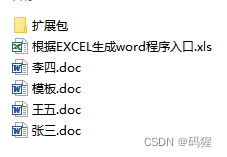
学习总结:
可以使用该功能完成各种合同和规格书之类的文件

DAMO开发者矩阵,由阿里巴巴达摩院和中国互联网协会联合发起,致力于探讨最前沿的技术趋势与应用成果,搭建高质量的交流与分享平台,推动技术创新与产业应用链接,围绕“人工智能与新型计算”构建开放共享的开发者生态。
更多推荐


 0
0 0
0- 0


 已为社区贡献3条内容

所有评论(0)