Qt操作读写Excel文件数据,【亲测有效】
利用Qt读写Excel表格,多线程编写
背景,本人遇到一个问题,就是取Excel某一行的第1、2、3、4列数据,然后进行复杂的数学运算然后输出到某一列。由于公式复杂所以Excel自带公式不能满足要求,所以用代码进行计算,那就涉及到用代码读写Excel文件。
下一节出qt如何封装成一个单独的exe文件,并在一个没有qt环境的电脑上运行,敬请期待!!
一、版本信息
Qt5.15.2
二、代码
2.1功能介绍
功能:有·n行数据(n的病人),每个病人第 a 列是参数c1,第 b 列是参数c2,第 c 列是参数t1,第 d 列是参数t2,第 e 列是参数tau。遍历第 i 个病人的数据,经过公式计算,将结果保存到第 i 行第 f 列。
程序采用【多线程 】方式实现。
主程序功能:(1)通过UI获得文件的地址 并传给子线程。(2)通过UI获得每个参数所在的列
子线程功能:(1)打开文件操作Excel表格,read_excel函数。(2)根据公式计算
注:着急看读取Excel文件代码的直接看 mythread.cpp 的 read_excel 函数 和 参考文件中的github
2.2程序架构
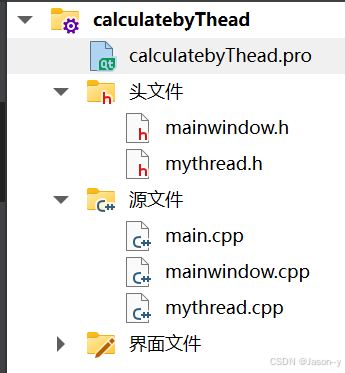
2.3代码实例
(1)calculatebyThread.pro:
QT       += core gui

greaterThan(QT_MAJOR_VERSION, 4): QT += widgets

CONFIG += c++17
QT += axcontainer
# You can make your code fail to compile if it uses deprecated APIs.
# In order to do so, uncomment the following line.
#DEFINES += QT_DISABLE_DEPRECATED_BEFORE=0x060000    # disables all the APIs deprecated before Qt 6.0.0

SOURCES += \
    main.cpp \
    mainwindow.cpp \
    mythread.cpp

HEADERS += \
    mainwindow.h \
    mythread.h

FORMS += \
    mainwindow.ui

# Default rules for deployment.
qnx: target.path = /tmp/$${TARGET}/bin
else: unix:!android: target.path = /opt/$${TARGET}/bin
!isEmpty(target.path): INSTALLS += target
RC_ICONS=1.ico      //在本程序同路径下有一个1.ico的文件。可以将生成的窗口的图标变为1.ico。可以将jpg图片转换为ico格式,来实现自定义
(2)mainwindow.h:
#ifndef MAINWINDOW_H
#define MAINWINDOW_H

#include <QMainWindow>
#include "mythread.h"


QT_BEGIN_NAMESPACE
namespace Ui { class MainWindow; }
QT_END_NAMESPACE

class MainWindow : public QMainWindow

{
    Q_OBJECT

public:
    MainWindow(QWidget *parent = nullptr);
    ~MainWindow();

private slots:
    void on_openBt_clicked();
    bool isExcelFile(const QString &fileName);


    //void on_lineEdit_cursorPositionChanged(int arg1, int arg2);

    void on_pushButton_clicked();

signals:
    void starting(QString filepath,int num,int c1,int c2,int t1,int t2,int tau,int result);

private:
    Ui::MainWindow *ui;
    MyThread *mt;
};

#endif // MAINWINDOW_H
(3)mythread.h:
#ifndef MYTHREAD_H
#define MYTHREAD_H

#include <QThread>
#if defined(Q_OS_WIN)
#include <QAxObject>  //QT += axcontainer
#include <windows.h>
#endif // Q_OS_WIN

#include <QString>
#include <QDebug>
#include <QtMath>

class MyThread : public QThread
{
    Q_OBJECT
public:
    explicit MyThread(QObject *parent = nullptr);
    void recvNum(QString filepath,int num,int c1,int c2,int t1,int t2,int tau,int result);
    bool read_excel(QString strPath);
    float calculate(float c1,float c2,float t1,float t2,float tau);

protected:
    void run() override;

signals:
    void sendover(QString str);

private:
    int m_num;//把主线程发来的  recvNum里的num传给m_num


};

#endif // MYTHREAD_H
(4)main.cpp
#include "mainwindow.h"
#include <QApplication>

int main(int argc, char *argv[])
{
    QApplication a(argc, argv);
    MainWindow w;
    w.setWindowTitle("Excel_AUC计算器 V1.1");//改主窗口名字
    w.show();
    return a.exec();
}
(5)mainwindow.cpp
#include "mainwindow.h"
#include "ui_mainwindow.h"
#include <QFile>            //�ļ�
#include <QFileDialog>      //�ļ��Ի���
#include <QDir>
#include <QVariant>

QString filepath1;


MainWindow::MainWindow(QWidget *parent)
    : QMainWindow(parent)
    , ui(new Ui::MainWindow)
{
    ui->setupUi(this);

    //创建子线程对象
    mt=new MyThread;

    connect(this,&MainWindow::starting,mt,&MyThread::recvNum);

    //接受子线程发来的数据
    connect(mt,&MyThread::sendover,this,[=](QString msg){
        ui->textBrowser_2->setText(msg);
    });

}

MainWindow::~MainWindow()
{
    delete ui;
}

void MainWindow::on_openBt_clicked() //点击选择文件按钮
{

    filepath1=QFileDialog::getOpenFileName(this);
    //设置文件路径在状态条上显示
    ui->statusbar->showMessage(filepath1);

}

void MainWindow::on_pushButton_clicked()//点击开始按钮
{
    int num=1;//第几个子表格
    int C1col,C2col,t1col,t2col,result_Col,taucol;
    bool numflag=true,C1flag=true,C2flag=true,t1flag=true,t2flag=true,resultflag=true,tauflag=true;

    if(ui->lineEdit->text()!=NULL)
    {
        qDebug()<<ui->lineEdit->text();
        num=ui->lineEdit->text().toInt(&numflag);
        qDebug()<<"num"<<num;
    }
    C1col=ui->lineEdit_2->text().toInt(&C1flag);
    C2col=ui->lineEdit_3->text().toInt(&C2flag);
    t1col=ui->lineEdit_4->text().toInt(&t1flag);
    t2col=ui->lineEdit_5->text().toInt(&t2flag);
    result_Col=ui->lineEdit_6->text().toInt(&resultflag);
    taucol=ui->lineEdit_7->text().toInt(&tauflag);
    if(filepath1==NULL)
    {
        ui->textBrowser_2->setText("请选择excel文件");
    }
    else if (
            numflag    &&
            C1flag     &&
            C2flag     &&
            t1flag     &&
            t2flag     &&
            resultflag &&
            tauflag
        )//确保都已经输入
    {
        qDebug() <<" num "<<num<<" C1col "<<C1col<< " C2col "<<C2col<<" t1col "<<t1col<<" t2col "<<t2col<<" taucol "<<taucol<<" result_Col "<<result_Col;
        if(isExcelFile(filepath1))  //判断是excel文件
        {
            QString n="选择文件是.xls/.xlsx";
            ui->textBrowser_2->setText(n);
            qDebug() <<"是excel yes";

            //在子线程里实现计算
            starting(filepath1,num,C1col,C2col,t1col,t2col,taucol,result_Col);
            mt->start();//启动
            //read_excel(filepath1);  //读文件
            //ui->textBrowser_2->setText("计算完毕!!!");
        }else
        {
            ui->textBrowser_2->setText("选择文件不是.xls/.xlsx");
            qDebug() <<"不是excel文件";
        }
    }else
    {
        ui->textBrowser_2->setText("参数没填好");
    }
}
bool MainWindow::isExcelFile(const QString &fileName) {
    QString lowerCaseFileName = fileName.toLower(); // ת��ΪСд�Ժ��Դ�Сд
    return lowerCaseFileName.endsWith(".xls") || lowerCaseFileName.endsWith(".xlsx");
}
(6)mythread.cpp
#include "mythread.h"
#include <QDebug>

QString filepath;
int num,C1col,C2col,t1col,t2col,result_Col,taucol;

MyThread::MyThread(QObject *parent)
    : QThread{parent}
{

}

void MyThread::recvNum(QString fp,int num1,int c1,int c2,int t1,int t2,int tau,int result)
{
    filepath=fp;
    num=num1;
    C1col=c1;
    C2col=c2;
    t1col=t1;
    t2col=t2;
    result_Col=result;
    taucol=tau;

}

void MyThread::run()
{
    qDebug()<<"子线程的线程地址:"<<QThread::currentThread();
    read_excel(filepath);  //读文件

    //emit sendover("over");

}
bool MyThread::read_excel(QString path)
{
    emit sendover("计算中....");
    CoInitializeEx(NULL, COINIT_MULTITHREADED);
    QAxObject *excel = NULL;    //本例中,excel设定为Excel文件的操作对象
    QAxObject *workbooks = NULL;
    QAxObject *workbook = NULL;  //Excel操作对象
    excel = new QAxObject("Excel.Application");
    excel->dynamicCall("SetVisible(bool)", false); //true 表示操作文件时可见,false表示为不可见
    workbooks = excel->querySubObject("WorkBooks");


    //————————————————按文件路径打开文件————————————————————
    workbook = workbooks->querySubObject("Open(QString&)", path);
    // 获取打开的excel文件中所有的工作sheet
    QAxObject * worksheets = workbook->querySubObject("WorkSheets");


    //—————————————————Excel文件中表的个数:——————————————————
    int iWorkSheet = worksheets->property("Count").toInt();
    qDebug() << QString("Excel文件中表的个数: %1").arg(QString::number(iWorkSheet));

    if(num>iWorkSheet)
    {
        num=1;
        emit sendover("输入的子表格数大于实际数目,请重新填写");
        workbook->dynamicCall("Save()");
        workbook->dynamicCall("Close()");
        excel->dynamicCall("Quit()");
        if (excel)
        {
            delete excel;
            excel = NULL;
        }

        CoUninitialize();
        return false;
    }


    // ————————————————获取第n个工作表 querySubObject("Item(int)", n);——————————
    QAxObject * worksheet = worksheets->querySubObject("Item(int)", num);//本例获取第一个,最后参数填1


    //—————————获取该sheet的数据范围(可以理解为有数据的矩形区域)————
    QAxObject * usedrange = worksheet->querySubObject("UsedRange");

    //———————————————————获取行数———————————————
    QAxObject * rows = usedrange->querySubObject("Rows");
    int iRows = rows->property("Count").toInt();
    qDebug() << QString("行数为: %1").arg(QString::number(iRows));

    //————————————获取列数—————————
    QAxObject * columns = usedrange->querySubObject("Columns");
    int iColumns = columns->property("Count").toInt();
    qDebug() << QString("列数为: %1").arg(QString::number(iColumns));
    if(iColumns<C1col||iColumns<C2col||iColumns<t1col||iColumns<t2col||iColumns<taucol)
    {
        workbook->dynamicCall("Save()");
        workbook->dynamicCall("Close()");
        excel->dynamicCall("Quit()");
        if (excel)
        {
            delete excel;
            excel = NULL;
        }
        CoUninitialize();

        if(iColumns<C1col)
        {
            emit sendover("输入的c1列数大于实际表格列数,请重新填写");
            return false;
        }
        else if(iColumns<C2col)
        {
            emit sendover("输入的c2列数大于实际表格列数,请重新填写");
            return false;

        }else if(iColumns<t1col)
        {
            emit sendover("输入的t1列数大于实际表格列数,请重新填写");
            return false;

        }else if(iColumns<t2col)
        {
            emit sendover("输入的t2列数大于实际表格列数,请重新填写");
            return false;

        }else if(iColumns<taucol)
        {
            emit sendover("输入的tau列数大于实际表格列数,请重新填写");
            return false;
        }
    }


    //————————数据的起始行———
    int iStartRow = rows->property("Row").toInt();
    qDebug() << QString("起始行为: %1").arg(QString::number(iStartRow));

    //————————数据的起始列————————————
    int iColumn = columns->property("Column").toInt();
    qDebug() << QString("起始列为: %1").arg(QString::number(iColumn));

    //——————————————读出数据—————————————

    //基于坐标的读法
    QAxObject *range1 = worksheet->querySubObject("Cells(int, int)", 2,1);//第二行、第一列  Excel是从第一行第一列开始的,不是数组中从0开始
    QString strRow2Col1 = range1->property("Value").toString();
    qDebug() << "第2行,第1列的数据为:" + strRow2Col1;
    //qDebug() << "第2行,第1列的数据为:" + strRow2Col1.toInt();

    //读取一列,并写
    QString temp;
    int i = 1;

    QAxObject *C1,*C2,*T1,*T2,*RESULT_COL,*Tau;
    bool c1flag,c2flag,t1flag,t2flag,tauflag;
    float c1,c2,t1,t2,tau;

    qDebug()<<" C1col "<<C1col<<" C2col "<<C2col<<" t1col "<<t1col<<" t2col "<<t2col<< " taucol "<<taucol<<" result_Col "<<result_Col;

    for (; i <= iRows ; i ++)
    {
        C1=worksheet->querySubObject("Cells(int, int)", i , C1col);
        C2=worksheet->querySubObject("Cells(int, int)", i , C2col);
        T1=worksheet->querySubObject("Cells(int, int)", i , t1col);
        T2=worksheet->querySubObject("Cells(int, int)", i , t2col);
        Tau=worksheet->querySubObject("Cells(int, int)", i , taucol);
        RESULT_COL=worksheet->querySubObject("Cells(int, int)", i , result_Col);

        c1=C1->property("Value").toString().toFloat(&c1flag);
        c2=C2->property("Value").toString().toFloat(&c2flag);
        t1=T1->property("Value").toString().toFloat(&t1flag);
        t2=T2->property("Value").toString().toFloat(&t2flag);//空的话t2会是0但是flag是false
        tau=Tau->property("Value").toString().toFloat(&tauflag);

        if(c1flag&&c2flag&&t1flag&&t2flag&&tauflag)
        {
            RESULT_COL->setProperty("Value",QString::number( calculate(c1,c2,t1,t2,tau),'f',2) );//保留两位小数
        }
        else{
            //RESULT_COL->setProperty("Value",QString::number(0) );
        }
    }

    //写
    //QAxObject *range2 = worksheet->querySubObject("Cells(int, int)", 23 , 15);//行  列
    //int a=1;
    //range2->setProperty("Value",QString::number(a) );            //存的number(a)
    //range2 = worksheet->querySubObject("Cells(int, int)", 23 , 16);//行  列
    //range2->setProperty("Value",QString::number(a+1) );


    // !!!!!!!一定要记得close,不然系统进程里会出现n个EXCEL.EXE进程
    workbook->dynamicCall("Save()");
    workbook->dynamicCall("Close()");
    excel->dynamicCall("Quit()");
    if (excel)
    {
        delete excel;
        excel = NULL;
    }

    CoUninitialize();

    emit sendover("计算完成");

    return true;

}


float MyThread::calculate(float c1,float c2,float t1,float t2,float tau)
{
    float AUC0_24;
    //公式1
    float ke=(qLn(c1)-qLn(c2))/(t2-t1);
    float t1_2=0.693/ke;
    qDebug()<<"ke"<<ke;
    qDebug()<<"t1_2"<<t1_2;
    //公式2
    float detaT=t2-t1;
    float Cmax=(c1/qExp(-ke*detaT));
    float Cmin=Cmax*qExp(-ke* ( tau-t2) );
    qDebug()<<"detaT"<<detaT;
    qDebug()<<"Cmax"<<Cmax;
    qDebug()<<"Cmin"<<Cmin;

    //公式3
    float AUCinf= t2*(Cmax+Cmin)/2;
    float AUCelim=(Cmax+Cmin)/ke;
    AUC0_24=(AUCinf+AUCelim)*24/tau;
    qDebug()<<"AUCinf"<<AUCinf;
    qDebug()<<"AUCelim"<<AUCelim;
    qDebug()<<"AUC0_24"<<AUC0_24;

    return AUC0_24;

}
//void MainWindow::on_lineEdit_cursorPositionChanged(int arg1, int arg2)
//{
//    if (ui->lineEdit->text()!=NULL)
//    {
//        qDebug()<<ui->lineEdit->text();
//    }
//}
三、效果图
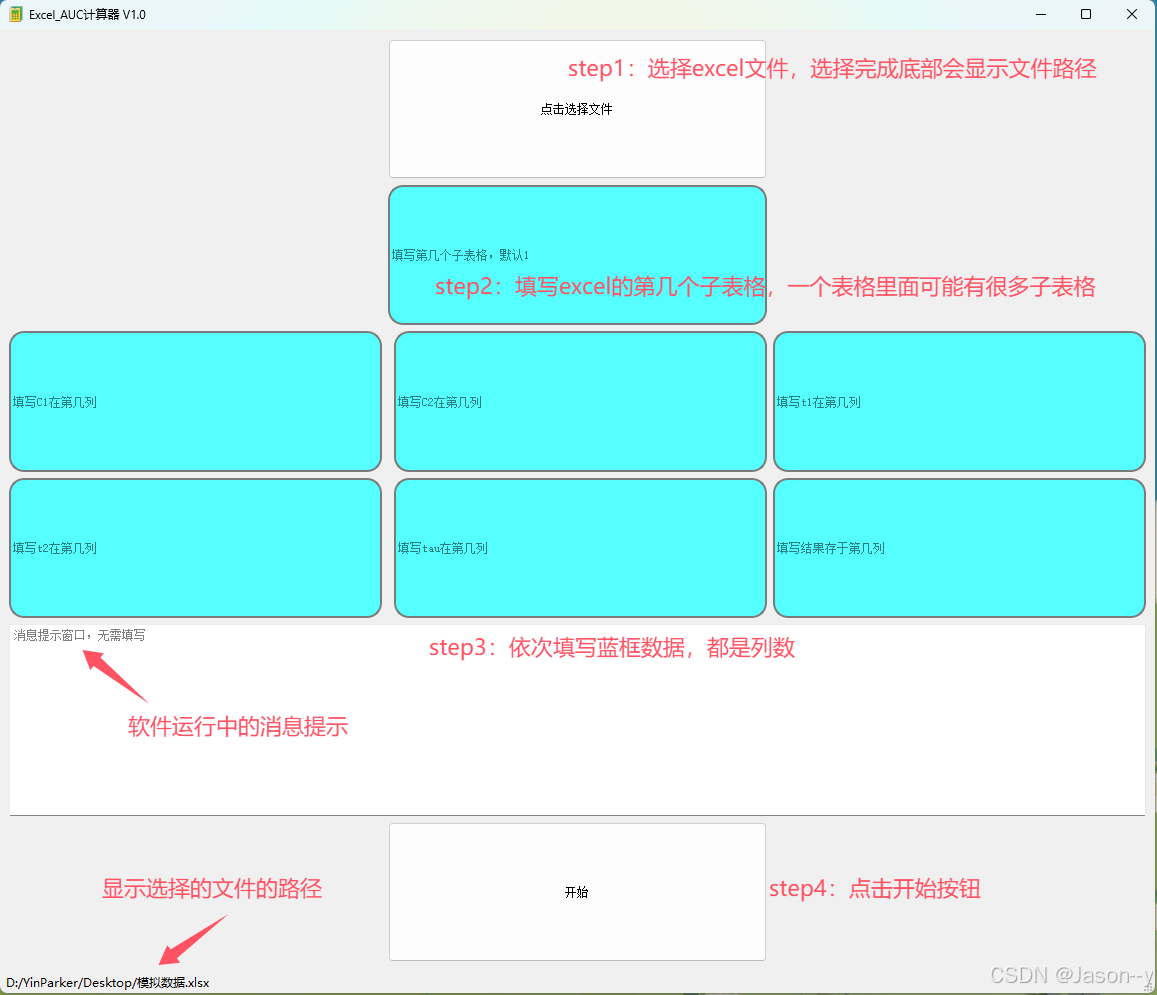
四、代码网盘
通过网盘分享的文件:calculatebyThead.zip 链接:
https://pan.baidu.com/s/1uFLGpZDXcEihxySwPzSS3Q?pwd=gfsh 提取码: gfsh
参考文献
(1)读取Excel的GitHub代码
(2)qt多线程B站视频
(3)qt的UI设计-文本选择
(4)qt的UI设计-Qt制作登陆界面
下一节出qt如何封装成一个单独的exe文件,并在一个没有qt环境的电脑上运行,敬请期待!!

DAMO开发者矩阵,由阿里巴巴达摩院和中国互联网协会联合发起,致力于探讨最前沿的技术趋势与应用成果,搭建高质量的交流与分享平台,推动技术创新与产业应用链接,围绕“人工智能与新型计算”构建开放共享的开发者生态。
更多推荐

 24
24 0
0- 0


 已为社区贡献1条内容

所有评论(0)