SpringBoot 实现自定义钉钉机器人
java 实现自定义钉钉机器人 群发消息
背景
我们在系统使用过程中,常常会有报错日志,以及商品购物等信息,那么我们如何做到信息实时通知,让使用者方便直观查看,让程序员快速定位呢?接下来介绍下钉钉机器人。
开发环境
开发语言:java 开发工具:idea
钉钉自定义机器人文档
sdk(jar包)下载:https://open-dev.dingtalk.com/sdk/download/java
创建钉钉群聊+添加自定义机器人
记住 Webhook 和 加签的key
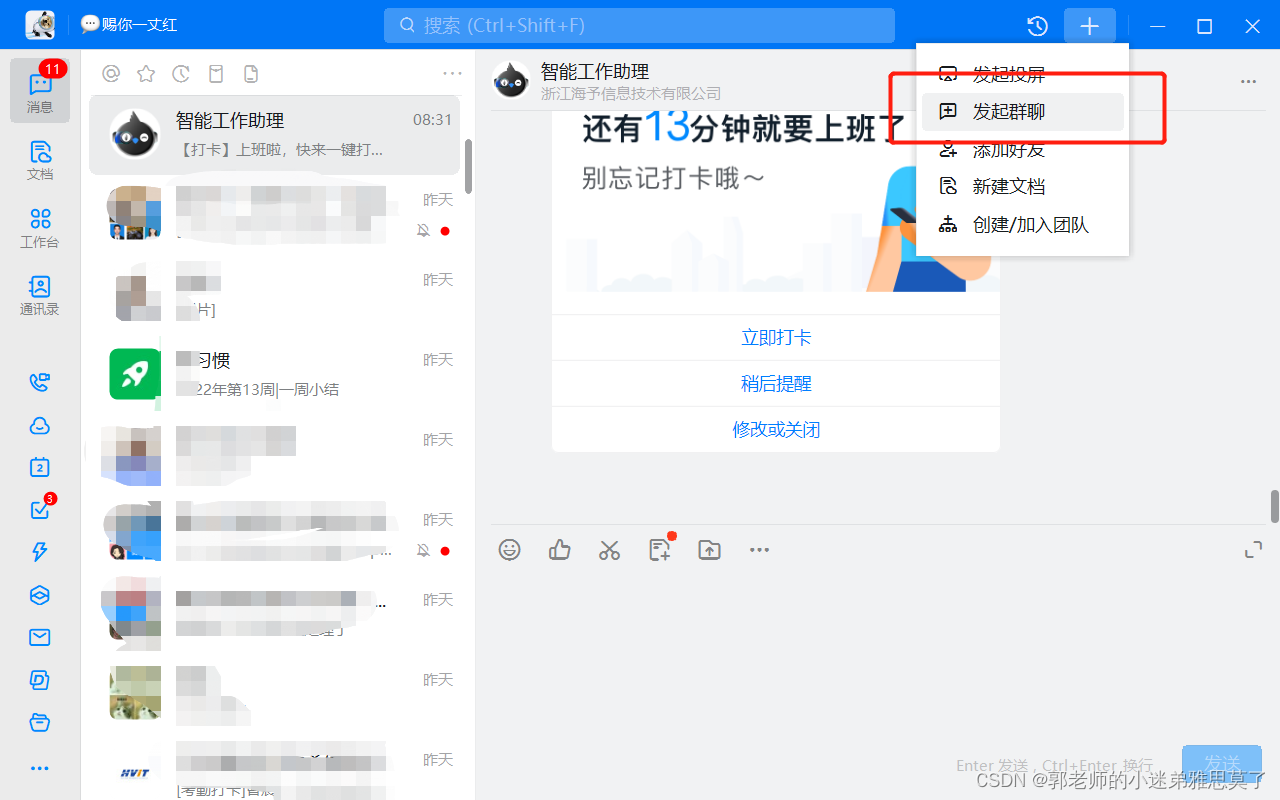
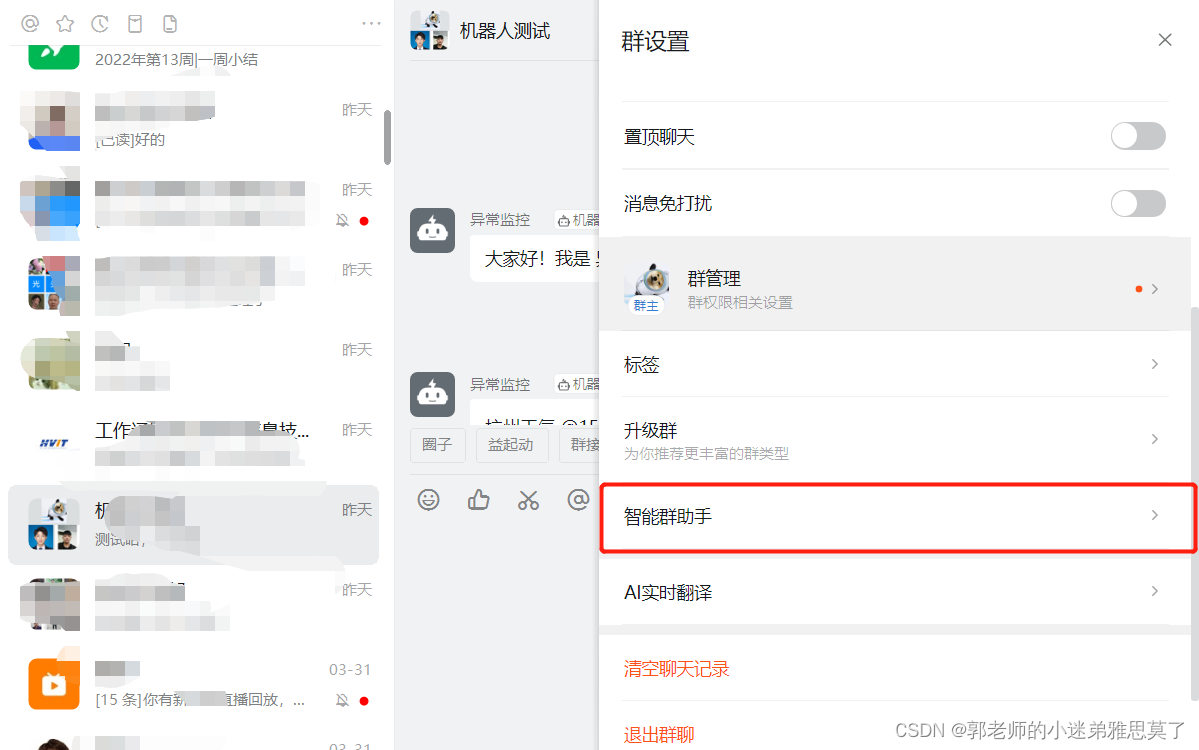
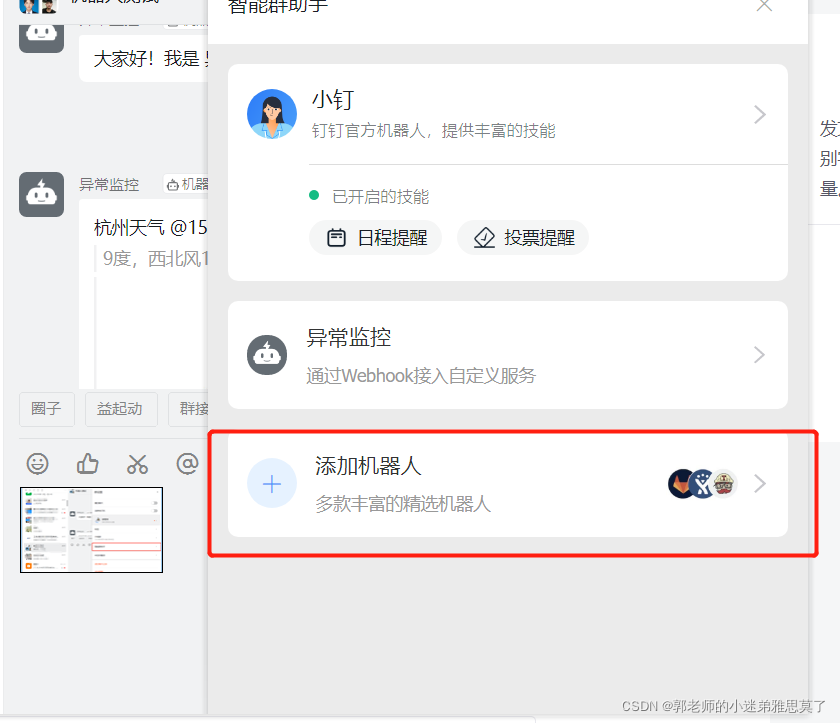
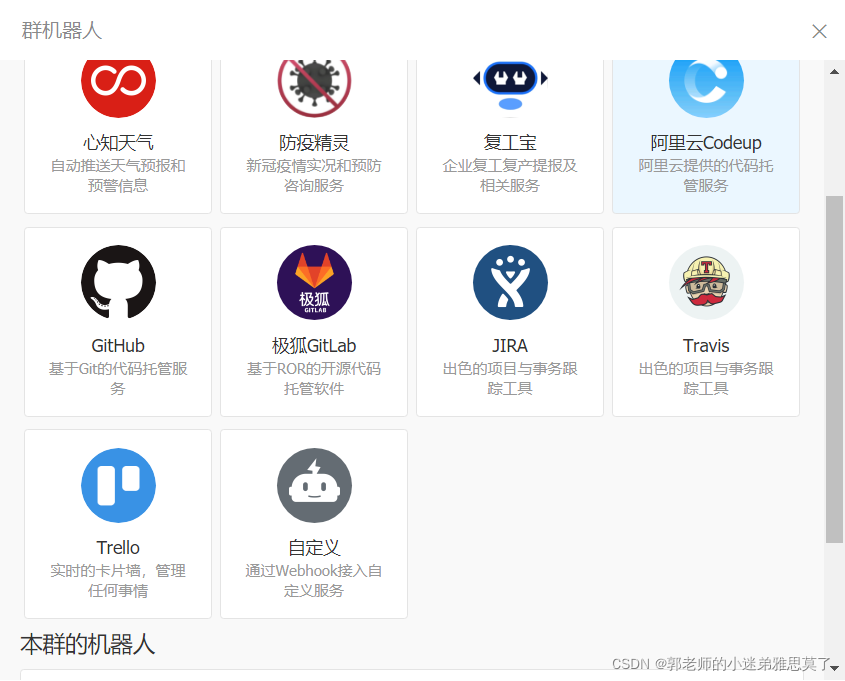
选择自定义机器人
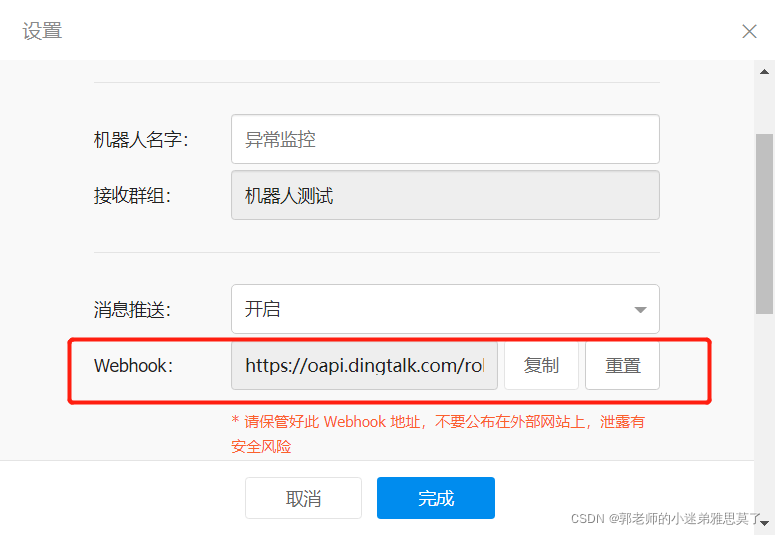
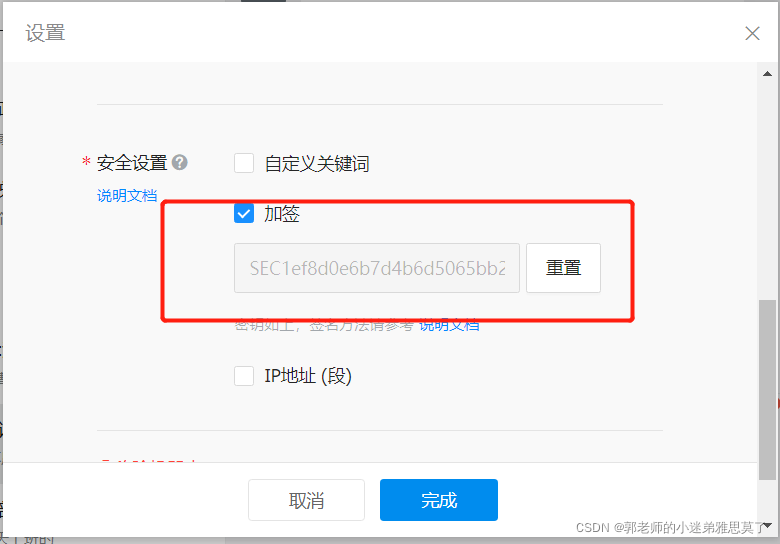
记住这两个参数
开发阶段
将下载的sdk 生成到maven中
通过idea工具执行下面命令:
mvn install:install-file -Dfile=D:\download\dingtalk-sdk-java\sdk.jar -DgroupId=com.dingtalk -DartifactId=com-dingtalk-api
-Dversion=1.0.0 -Dpackaging=jar
-Dfile=D:\download\dingtalk-sdk-java\sdk.jar 这个指你下载sdk文件的路径
pom.xml 依赖:
<dependency>
      <groupId>com.aliyun</groupId>
      <artifactId>dingtalk</artifactId>
      <version>1.3.23</version>
</dependency>
<dependency>
      <groupId>com.aliyun</groupId>
      <artifactId>alibaba-dingtalk-service-sdk</artifactId>
      <version>2.0.0</version>
</dependency>
自定义机器人安全设置
目前有3种安全设置方式,请根据需要选择一种。
自定义关键词
最多可以设置10个关键词,消息中至少包含其中1个关键词才可以发送成功。
例如添加了一个自定义关键词:监控报警,则这个机器人所发送的消息,必须包含监控报警这个词,才能发送成功。
加签
-
把
timestamp+"\n"+密钥当做签名字符串,使用HmacSHA256算法计算签名,然后进行Base64 encode,最后再把签名参数再进行urlEncode,得到最终的签名(需要使用UTF-8字符集)。参数
说明
timestamp
当前时间戳,单位是毫秒,与请求调用时间误差不能超过1小时。
secret
密钥,机器人安全设置页面,加签一栏下面显示的SEC开头的字符串。
-
签名计算示例代码(Java)
import javax.crypto.Mac;
import javax.crypto.spec.SecretKeySpec;
import org.apache.commons.codec.binary.Base64;
import java.net.URLEncoder;

public class Test{
    public static void main(String[] args) throws Exception{
        Long timestamp = System.currentTimeMillis();
        String secret = "this is secret";

        String stringToSign = timestamp + "\n" + secret;
        Mac mac = Mac.getInstance("HmacSHA256");
        mac.init(new SecretKeySpec(secret.getBytes("UTF-8"), "HmacSHA256"));
        byte[] signData = mac.doFinal(stringToSign.getBytes("UTF-8"));
        String sign = URLEncoder.encode(new String(Base64.encodeBase64(signData)),"UTF-8");
        System.out.println(sign);
    }

}
-
-
把 timestamp和第一步得到的签名值拼接到URL中。
https://oapi.dingtalk.com/robot/send?access_token=XXXXXX×tamp=XXX&sign=XXX参数
说明
timestamp
第一步使用到的时间戳。
sign
第一步得到的签名值。
实现代码:
import com.aliyun.credentials.utils.StringUtils;
import com.dingtalk.api.DefaultDingTalkClient;
import com.dingtalk.api.DingTalkClient;
import com.dingtalk.api.request.OapiRobotSendRequest;
import com.dingtalk.api.response.OapiRobotSendResponse;
import com.taobao.api.ApiException;
import lombok.extern.slf4j.Slf4j;
import org.springframework.util.CollectionUtils;
import javax.crypto.Mac;
import javax.crypto.spec.SecretKeySpec;
import org.apache.commons.codec.binary.Base64;
import java.io.UnsupportedEncodingException;
import java.net.URLEncoder;
import java.security.InvalidKeyException;
import java.security.NoSuchAlgorithmException;
import java.util.ArrayList;
import java.util.Arrays;
import java.util.List;
@Slf4j
public class DingTalkHelper {
/**
* 钉钉群设置 webhook, 支持重置
*/
private static final String ACCESS_TOKEN = "https://oapi.dingtalk.com/robot/send?access_token=d2151db0cfd7db492b83cd3c49b7b9e36xxxxxxxxxxxxxxxxx";
/**
* 消息类型
*/
private static final String MSG_TYPE_TEXT = "text";
private static final String MSG_TYPE_LINK = "link";
private static final String MSG_TYPE_MARKDOWN = "markdown";
private static final String MSG_TYPE_ACTION_CARD = "actionCard";
private static final String MSG_TYPE_FEED_CARD = "feedCard";
/**
* 客户端实例
*/
public static DingTalkClient client;
static {
try {
client = new DefaultDingTalkClient(ACCESS_TOKEN + sign());
} catch (NoSuchAlgorithmException e) {
e.printStackTrace();
} catch (UnsupportedEncodingException e) {
e.printStackTrace();
} catch (InvalidKeyException e) {
e.printStackTrace();
}
}
/**
* @description: 官方演示示例
* title 是消息列表下透出的标题
* text 是进入群后看到的消息内容
* @author: niaonao
* @date: 2019/7/6
*/
public static void sdkDemoJava() {
DingTalkClient client = DingTalkHelper.client;
OapiRobotSendRequest request = new OapiRobotSendRequest();
request.setMsgtype("text");
OapiRobotSendRequest.Text text = new OapiRobotSendRequest.Text();
text.setContent("测试文本消息");
request.setText(text);
OapiRobotSendRequest.At at = new OapiRobotSendRequest.At();
at.setAtMobiles(Arrays.asList("15556465933"));
request.setAt(at);
request.setMsgtype("link");
OapiRobotSendRequest.Link link = new OapiRobotSendRequest.Link();
link.setMessageUrl("https://www.dingtalk.com/");
link.setPicUrl("");
link.setTitle("时代的火车向前开");
link.setText("这个即将发布的新版本,创始人陈航(花名“无招”)称它为“红树林”。\n" +
"而在此之前,每当面临重大升级,产品经理们都会取一个应景的代号,这一次,为什么是“红树林");
request.setLink(link);
request.setMsgtype("markdown");
OapiRobotSendRequest.Markdown markdown = new OapiRobotSendRequest.Markdown();
markdown.setTitle("杭州天气");
markdown.setText("#### 杭州天气 @156xxxx8827\n" +
"> 9度,西北风1级,空气良89,相对温度73%\n\n" +
"> \n" +
"> ###### 10点20分发布 [天气](http://www.thinkpage.cn/) \n");
request.setMarkdown(markdown);
try {
client.execute(request);
} catch (ApiException e) {
log.error("[ApiException]: 消息发送演示示例, 异常捕获{}", e.getMessage());
}
}
/**
* @param content 文本消息
* @param mobileList 指定@ 联系人
* @param isAtAll 是否@ 全部联系人
* @description: 发送普通文本消息
* @return: com.dingtalk.api.response.OapiRobotSendResponse
* @author: niaonao
* @date: 2019/7/6
*/
public static OapiRobotSendResponse sendMessageByText(String content, List<String> mobileList, boolean isAtAll) {
if (StringUtils.isEmpty(content)) {
return null;
}
//参数 参数类型 必须 说明
//msgtype String 是 消息类型,此时固定为:text
//content String 是 消息内容
//atMobiles Array 否 被@人的手机号(在content里添加@人的手机号)
//isAtAll bool 否 @所有人时:true,否则为:false
OapiRobotSendRequest.Text text = new OapiRobotSendRequest.Text();
text.setContent(content);
OapiRobotSendRequest request = new OapiRobotSendRequest();
if (!CollectionUtils.isEmpty(mobileList)) {
// 发送消息并@ 以下手机号联系人
OapiRobotSendRequest.At at = new OapiRobotSendRequest.At();
at.setAtMobiles(mobileList);
at.setIsAtAll(isAtAll);
request.setAt(at);
}
request.setMsgtype(DingTalkHelper.MSG_TYPE_TEXT);
request.setText(text);
OapiRobotSendResponse response = new OapiRobotSendResponse();
try {
response = DingTalkHelper.client.execute(request);
} catch (ApiException e) {
log.error("[发送普通文本消息]: 发送消息失败, 异常捕获{}", e.getMessage());
}
return response;
}
/**
* @param title 消息标题
* @param text 消息内容
* @param messageUrl 点击消息后跳转的url
* @param picUrl 插入图片的url
* @description: 发送link 类型消息
* @return: com.dingtalk.api.response.OapiRobotSendResponse
* @author: niaonao
* @date: 2019/7/6
*/
public static OapiRobotSendResponse sendMessageByLink(String title, String text, String messageUrl, String picUrl) {
if (StringUtils.isEmpty(title) || StringUtils.isEmpty(text) || StringUtils.isEmpty(messageUrl)) {
return null;
}
//参数 参数类型 必须 说明
//msgtype String 是 消息类型,此时固定为:link
//title String 是 消息标题
//text String 是 消息内容。如果太长只会部分展示
//messageUrl String 是 点击消息跳转的URL
//picUrl String 否 图片URL
OapiRobotSendRequest.Link link = new OapiRobotSendRequest.Link();
link.setTitle(title);
link.setText(text);
link.setMessageUrl(messageUrl);
link.setPicUrl(picUrl);
OapiRobotSendRequest request = new OapiRobotSendRequest();
request.setMsgtype(DingTalkHelper.MSG_TYPE_LINK);
request.setLink(link);
OapiRobotSendResponse response = new OapiRobotSendResponse();
try {
response = DingTalkHelper.client.execute(request);
} catch (ApiException e) {
log.error("[发送link 类型消息]: 发送消息失败, 异常捕获{}", e.getMessage());
}
return response;
}
/**
* @param title 标题
* @param markdownText 支持markdown 编辑格式的文本信息
* @param mobileList 消息@ 联系人
* @param isAtAll 是否@ 全部
* @description: 发送Markdown 编辑格式的消息
* @return: com.dingtalk.api.response.OapiRobotSendResponse
* @author: niaonao
* @date: 2019/7/6
*/
public static OapiRobotSendResponse sendMessageByMarkdown(String title, String markdownText, List<String> mobileList, boolean isAtAll) {
if (StringUtils.isEmpty(title) || StringUtils.isEmpty(markdownText)) {
return null;
}
//参数 类型 必选 说明
//msgtype String 是 此消息类型为固定markdown
//title String 是 首屏会话透出的展示内容
//text String 是 markdown格式的消息
//atMobiles Array 否 被@人的手机号(在text内容里要有@手机号)
//isAtAll bool 否 @所有人时:true,否则为:false
OapiRobotSendRequest.Markdown markdown = new OapiRobotSendRequest.Markdown();
markdown.setTitle(title);
markdown.setText(markdownText);
OapiRobotSendRequest request = new OapiRobotSendRequest();
request.setMsgtype(DingTalkHelper.MSG_TYPE_MARKDOWN);
request.setMarkdown(markdown);
if (!CollectionUtils.isEmpty(mobileList)) {
OapiRobotSendRequest.At at = new OapiRobotSendRequest.At();
at.setIsAtAll(isAtAll);
at.setAtMobiles(mobileList);
request.setAt(at);
}
OapiRobotSendResponse response = new OapiRobotSendResponse();
try {
response = DingTalkHelper.client.execute(request);
} catch (ApiException e) {
log.error("[发送link 类型消息]: 发送消息失败, 异常捕获{}", e.getMessage());
}
return response;
}
/**
* @param title 消息标题, 会话消息会展示标题
* @param markdownText markdown格式的消息
* @param singleTitle 单个按钮的标题
* @param singleURL 单个按钮的跳转链接
* @param btnOrientation 是否横向排列(true 横向排列, false 纵向排列)
* @param hideAvatar 是否隐藏发消息者头像(true 隐藏头像, false 不隐藏)
* @description: 整体跳转ActionCard类型的消息发送
* @return: com.dingtalk.api.response.OapiRobotSendResponse
* @author: niaonao
* @date: 2019/7/6
*/
public static OapiRobotSendResponse sendMessageByActionCardSingle(String title, String markdownText, String singleTitle, String singleURL, boolean btnOrientation, boolean hideAvatar) {
if (StringUtils.isEmpty(title) || StringUtils.isEmpty(markdownText)) {
return null;
}
//参数 类型 必选 说明
// msgtype string true 此消息类型为固定actionCard
// title string true 首屏会话透出的展示内容
// text string true markdown格式的消息
// singleTitle string true 单个按钮的方案。(设置此项和singleURL后btns无效)
// singleURL string true 点击singleTitle按钮触发的URL
// btnOrientation string false 0-按钮竖直排列,1-按钮横向排列
// hideAvatar string false 0-正常发消息者头像,1-隐藏发消息者头像
OapiRobotSendRequest.Actioncard actionCard = new OapiRobotSendRequest.Actioncard();
actionCard.setTitle(title);
actionCard.setText(markdownText);
actionCard.setSingleTitle(singleTitle);
actionCard.setSingleURL(singleURL);
// 此处默认为0
actionCard.setBtnOrientation(btnOrientation ? "1" : "0");
// 此处默认为0
actionCard.setHideAvatar(hideAvatar ? "1" : "0");
OapiRobotSendRequest request = new OapiRobotSendRequest();
request.setMsgtype(DingTalkHelper.MSG_TYPE_ACTION_CARD);
request.setActionCard(actionCard);
OapiRobotSendResponse response = new OapiRobotSendResponse();
try {
response = DingTalkHelper.client.execute(request);
} catch (ApiException e) {
log.error("[发送ActionCard 类型消息]: 整体跳转ActionCard类型的发送消息失败, 异常捕获{}", e.getMessage());
}
return response;
}
/**
* @param title 标题
* @param markdownText 文本
* @param btns 按钮列表
* @param btnOrientation 是否横向排列(true 横向排列, false 纵向排列)
* @param hideAvatar 是否隐藏发消息者头像(true 隐藏头像, false 不隐藏)
* @description: 独立跳转ActionCard类型 消息发送
* @return: com.dingtalk.api.response.OapiRobotSendResponse
* @author: niaonao
* @date: 2019/7/6
*/
public static OapiRobotSendResponse sendMessageByActionCardMulti(String title, String markdownText, List<OapiRobotSendRequest.Btns> btns, boolean btnOrientation, boolean hideAvatar) {
if (StringUtils.isEmpty(title) || StringUtils.isEmpty(markdownText) || CollectionUtils.isEmpty(btns)) {
return null;
}
//参数 类型 必选 说明
//msgtype string true 此消息类型为固定actionCard
//title string true 首屏会话透出的展示内容
//text string true markdown格式的消息
//btns array true 按钮的信息:title-按钮方案,actionURL-点击按钮触发的URL
//btnOrientation string false 0-按钮竖直排列,1-按钮横向排列
//hideAvatar string false 0-正常发消息者头像,1-隐藏发消息者头像
OapiRobotSendRequest.Actioncard actionCard = new OapiRobotSendRequest.Actioncard();
actionCard.setTitle(title);
actionCard.setText(markdownText);
// 此处默认为0
actionCard.setBtnOrientation(btnOrientation ? "1" : "0");
// 此处默认为0
actionCard.setHideAvatar(hideAvatar ? "1" : "0");
actionCard.setBtns(btns);
OapiRobotSendRequest request = new OapiRobotSendRequest();
request.setMsgtype(DingTalkHelper.MSG_TYPE_ACTION_CARD);
request.setActionCard(actionCard);
OapiRobotSendResponse response = new OapiRobotSendResponse();
try {
response = DingTalkHelper.client.execute(request);
} catch (ApiException e) {
log.error("[发送ActionCard 类型消息]: 独立跳转ActionCard类型发送消息失败, 异常捕获{}", e.getMessage());
}
return response;
}
/**
* @param links
* @description: 发送FeedCard类型消息
* @return: com.dingtalk.api.response.OapiRobotSendResponse
* @author: niaonao
* @date: 2019/7/6
*/
public static OapiRobotSendResponse sendMessageByFeedCard(List<OapiRobotSendRequest.Links> links) {
if (CollectionUtils.isEmpty(links)) {
return null;
}
//msgtype string true 此消息类型为固定feedCard
//title string true 单条信息文本
//messageURL string true 点击单条信息到跳转链接
//picURL string true 单条信息后面图片的URL
OapiRobotSendRequest.Feedcard feedcard = new OapiRobotSendRequest.Feedcard();
feedcard.setLinks(links);
OapiRobotSendRequest request = new OapiRobotSendRequest();
request.setMsgtype(DingTalkHelper.MSG_TYPE_FEED_CARD);
request.setFeedCard(feedcard);
OapiRobotSendResponse response = new OapiRobotSendResponse();
try {
response = DingTalkHelper.client.execute(request);
} catch (ApiException e) {
log.error("[发送ActionCard 类型消息]: 独立跳转ActionCard类型发送消息失败, 异常捕获{}", e.getMessage());
}
return response;
}
public static void main(String args[]) {
//sdkDemoJava();
List<String> list = new ArrayList<>();
list.add("15556599999");
sendMessageByText("代码测试", list, true);
}
public static String sign() throws NoSuchAlgorithmException, UnsupportedEncodingException, InvalidKeyException {
Long timestamp = System.currentTimeMillis();
String secret = "SEC1ef8d0e6b7d4b6d5065bb25c9f40d06006xxxxxxxxxxxxxxxxx";
String stringToSign = timestamp + "\n" + secret;
Mac mac = Mac.getInstance("HmacSHA256");
mac.init(new SecretKeySpec(secret.getBytes("UTF-8"), "HmacSHA256"));
byte[] signData = mac.doFinal(stringToSign.getBytes("UTF-8"));
String sign = URLEncoder.encode(new String(Base64.encodeBase64(signData)), "UTF-8");
return "×tamp=" + timestamp + "&sign=" + sign;
}
}
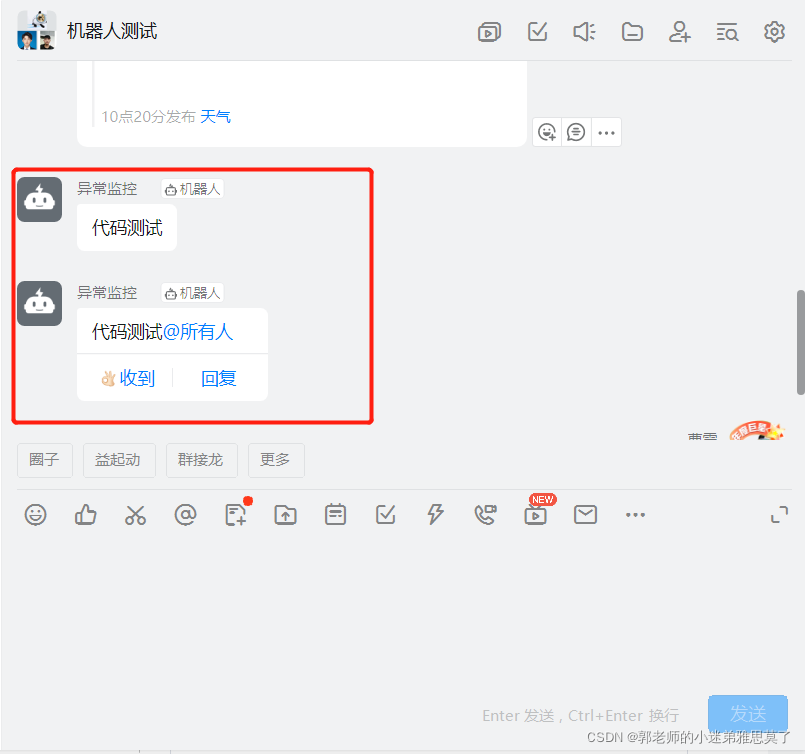
运行
 public static void main(String args[]) {
        //sdkDemoJava();
        List<String> list = new ArrayList<>();
        list.add("15556565933");
        sendMessageByText("代码测试", list, true);
    }

DAMO开发者矩阵,由阿里巴巴达摩院和中国互联网协会联合发起,致力于探讨最前沿的技术趋势与应用成果,搭建高质量的交流与分享平台,推动技术创新与产业应用链接,围绕“人工智能与新型计算”构建开放共享的开发者生态。
更多推荐


 0
0 0
0- 0


 已为社区贡献2条内容

所有评论(0)